Recommended Free Tools
The best cable management organizer is the one that fixes the real problem in the room. For a desk, that is usually an under-desk tray, reusable hook-and-loop ties, and a few clips for daily-use charging cables. For a TV wall, it is usually a listed in-wall power relocation kit or a new receptacle behind the TV, plus a low-voltage path for HDMI or data cables. For a visible wall run, paintable raceway is usually the cleanest DIY solution. For a floor crossing, a low-profile cord cover is a temporary safety measure, not a permanent wiring plan.
On our job sites, we treat cable cleanup the same way we treat trim, punch-list repairs, and storage details: the work should look clean, stay accessible, and not create a safety problem behind the finish. A $12 pack of cable ties can make a desk look better in 20 minutes, but it will not solve a room that needs another receptacle. A $50 raceway kit can make a wall look sharper, but it should not become a way to hide overloaded extension cords. The right answer depends on cable type, heat, access, mounting surface, and whether the cords are temporary, low-voltage, or part of the home’s electrical system.
As an Amazon Associate I earn from qualifying purchases.
For most homeowners in 2026, expect a small desk cleanup to cost about $8 to $25, an under-desk tray setup to cost about $15 to $50, a wall raceway kit to run about $20 to $60, and a decorative cable box to land between $20 and $110. TV cable concealment kits often fall around $20 to $70 at retail, but professional work can cost more when it involves a new outlet, drywall fishing, fireblocking, patching, painting, or permits.
What’s actually slowing this PC down?
Pick the symptom - the matching free tool is one click away.
Start By Reducing The Cable Count
Before buying organizers, unplug everything and sort the cords on the floor. This is the cheapest part of the project and often the most useful. We regularly find old printer cables, unused HDMI cords, duplicate chargers, dead power bricks, and abandoned Ethernet lines mixed into a desk or media cabinet. If a cable is not connected to a device you still use, remove it before you organize anything.
#1 Best Overall

- 【No Drill Mounted】Cable management tray can be assembled in as little as 3 minutes or less-simply. Side clips easily clampe the edge of desk, pass through the holes on the sides, and secure excess cables with baskets. Desk cable management supports inward or outward installation to meet your needs in different scenarios, and provides you with great convenience when collecting and organizing wires.
- 【Rubber Pad Protects Desk】Wire organizer under desk built-in soft rubber pads on the clamp protect your desk from scratches, so you will not damage your furniture or office.
- 【Sturdy and Beautiful】Cord management under desk is made of high-quality carbon steel and holds about 15 lbs. The wire basket has 2 holes on each side of the tray to enable your cables to pass freely. Cable baskets are suitable for desk thickness use from 0.4" to 2.4".
- 【Space Saving & Keep Organized】Desk cable management tray holds all your power cords, outlet strips, USB hubs and computer transformers hidden from your feet, and the data cables will not enter the vacuum cleaner to keep your desk clean and tidy. Desk wire organizer is also suitable for use in the kitchen and outdoors.
- 【Reduce Safety Risks】Cable tray under desk keeps all plugs away from your kids, no more worry about tripping. Using 2 holes wire tray saves extra space, helps you easily cabling and wire protection. The mesh design is not easy to accumulate dust, but avoids safety accidents caused by messy wires.
Then map the path for each remaining cable. A clean cable run has five parts: source, slack loop, bundled run, service point, and final device. The source is the outlet, dock, surge protector, router, or media box. The slack loop gives the cable room to move without pulling out. The bundled run is the hidden or controlled path. The service point is where you can unplug, reset, label, or replace a component. The final device is the monitor, lamp, speaker, charger, TV, or appliance.
That simple map prevents most bad installations. It keeps you from buying a cable sleeve when you really need an under-desk tray. It keeps you from sticking an adhesive raceway to a wall before you know where the cable exits. It also keeps you from hiding a surge protector so well that you cannot reach the switch or reset button.
The Main Types Of Cable Management Organizers
Cable organizers fall into a few practical categories. Some are for bundling. Some are for routing. Some hide power strips. Some protect cords where people walk. The mistake is trying to make one product do all of those jobs.
Free tools Windows power users keep installed
One-click scans. No signup required.
Hook-And-Loop Ties And Reusable Wraps
Reusable hook-and-loop ties are the first item we recommend for most desks, entertainment cabinets, and router shelves. They are cheap, adjustable, and forgiving. A useful pack often costs under $15, and a basic desk cleanup using ties, labels, and a few clips usually lands around $8 to $25.
Use them for monitor cables, USB-C cords, speaker wire, HDMI, Ethernet, and charger leads. They are better than zip ties for anything you may change later. Do not cinch them so tightly that the cable jacket flattens or the connector is under strain. A good bundle is controlled, not strangled.
Zip Ties
Zip ties still have a place, but use them sparingly. We reserve them for semi-permanent low-risk bundles where the cables are not delicate, not hot, and not likely to move. They are not the right choice for a standing desk, a frequently changed gaming setup, or a bundle with small data cables that can be crushed.
If you use zip ties, leave a little room and trim the tail cleanly. Sharp cut ends can scratch hands later when someone reaches behind the desk.
Crashes, No Sound, or Screen Glitches?
Random freezes, missing sound and display glitches usually trace back to one bad driver. Find and replace yours safely.Free scan · under a minuteWindows Errors? Fix Them Before They Spread
Repair common Windows errors and clear accumulated junk for a smoother, more stable PC - no reinstall needed.Free scan · no reinstallAdhesive Clips And Magnetic Cord Holders
Adhesive clips are good for keeping a phone charger, laptop lead, or headset cable from falling behind a desk. Magnetic cord holders are useful for small charging cables at the desktop edge. These are not heavy-duty routing products. They work best for one or two light cables, not a full power bundle.
Clean the surface before sticking anything down. Dust, textured paint, fresh paint, humidity, and heat all shorten adhesive life. On painted surfaces, wait for the paint to cure before adding adhesive-backed products. Where failure would create a tripping hazard or pull a device off a shelf, use screws, anchors, or a different mounting method.
Zippered Sleeves And Spiral Wraps
Sleeves and spiral wraps turn several cords into one controlled run. Budget sleeves can be found around $8 to $15, with higher-quality or longer versions costing more. They are best behind a desk, behind a TV stand, or along the back of a console.
The tradeoff is access. A sleeve looks cleaner than separate ties, but changing one cable takes more work. Use sleeves where the setup is stable. For a desk where monitors, docks, and chargers change often, hook-and-loop ties may be faster to maintain.
Quick wins for a faster PC:
Clear out junk files and repair common Windows errorsFree Scan →Fix the driver behind crashes, sound loss and screen glitchesFind Drivers →Repair Windows errors before they cause bigger problemsFix Now →Under-Desk Cable Trays
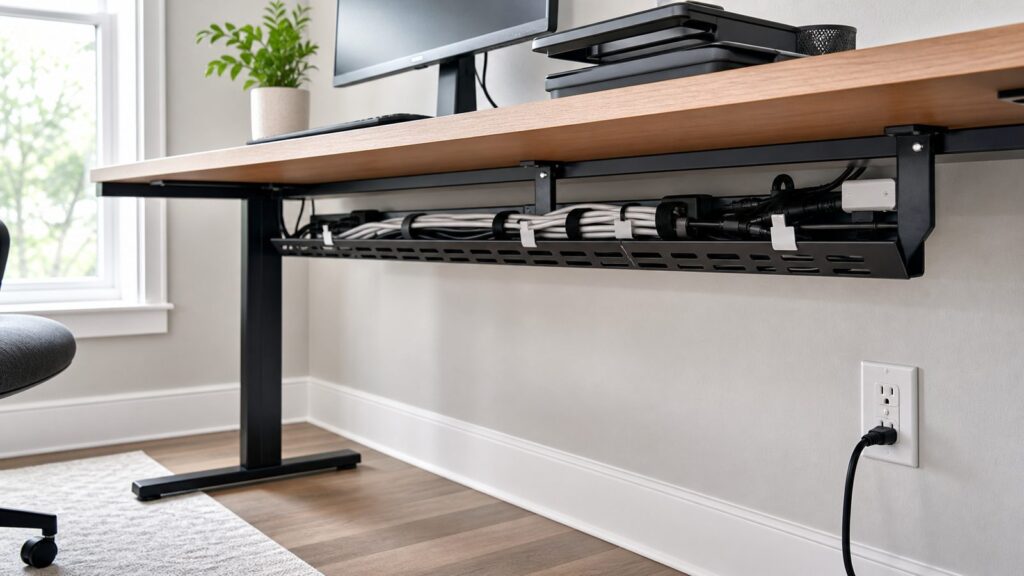
An under-desk tray is the best organizer for most home office desks. It lifts the power strip, laptop brick, dock cables, monitor cords, and excess cable length off the floor. In 2026, common under-desk trays run about $15 to $50. Premium clamp-on systems and larger powder-coated metal trays can reach $40 to $70 or more.
For a fixed desk, screw-mounted trays are solid if the desktop is thick enough. Check screw length before drilling. A 3/4-inch desktop does not give you much margin, and screws that are too long can pierce the top surface. For renters, glass desks, standing desks, or expensive furniture, clamp-on trays are often worth the extra money.
Rank #2

- 【25'' Large Size】The 25'' cable management provides enough space for all your cables. Desk cable management can withstand a weight of approximately 15 lbs. This cable tray perfect for your standing desk and home.
- 【Under Desk Cable Management Tray】Our cable management under desk are suitable for the desk within 0.4" to 2" thick. The cable management tray built-in non-slip rubber pads on the clamp to protect the desk surface from scratches. The under desk cable tray supports both inward and outward installation, you can easily change its position as needed.
- 【Sturdy Structure】The under desk cable management is made of sturdy metal. The mesh structure can maintain good ventilation to prevent the power supply from overheating and also reduce dust accumulation.
- 【No Drill Mounted】Cable tray under desk are easy to install, you only need to turn the adjustable desk clamp to install it very firmly on the edge of the desk. The side of the cord organizer adopts an open design, allowing cables to pass through freely. You can easily change its position as needed.
- 【No More Mess】Keep the cables and sockets tidily stored to maintain a clean and organized desk and floor. The desk organizer keeps all cables and sockets away from your kids, no more worry about tripping.
J-Channel Raceway And Surface Wall Raceway
J-channel raceway is useful under desks and along the back edge of furniture. Surface-mounted wall raceway is used on walls, baseboards, or trim lines to conceal visible cable runs. Retail examples in 2026 include simple 5-foot cord channels around $6, multi-piece kits around $20 to $60, and 25-foot pro raceway kits around $50.
Look for paintable material, enough capacity for the cable count, latching covers, corner fittings, and a mounting method that suits the wall. Adhesive-only raceway can work on smooth, clean surfaces. Screws or anchors are better where the raceway carries more weight, crosses near traffic, or sits on a textured wall.
Floor Cord Covers
Floor cord covers reduce trip risk when a cord must cross a walking path temporarily. They are common for holiday decor, temporary office equipment, workshops, and event setups. Choose a low-profile cover with enough internal space so the cable is not pinched.
Do not run ordinary extension cords under rugs. Do not route cords through doorways where they can be crushed. A floor cord cover is a short-term control. If the same cord crossing exists every day for months, the room probably needs a better outlet location or a revised furniture layout.
Cable Boxes
Cable boxes hide a power strip and extra cord length. They often cost about $20 to $110 depending on size, material, finish, ventilation, and whether they fit large adapters. Plastic boxes are common. Wood, rattan, and decorative finishes cost more.
Size matters. A box that is too small forces cords to bend sharply, traps heat around power bricks, and makes plugs hard to reach. Choose a box with ventilation, enough interior height for large adapters, and openings that do not pinch cords. Keep the surge protector switch and reset button accessible.
Grommets And Desk Pass-Throughs
Desk grommets give cords a clean route through a desktop or work surface. They are best during a desk build, cabinet install, or remodel, but they can be added later with a hole saw if the furniture material allows it. Common round grommets are often 2 inches to 3 inches in diameter. Measure the largest plug, not just the cable jacket, before cutting.
For built-ins, we plan grommets before countertops or desktops are installed. That lets us line up power access, monitor locations, printer bays, and wall outlets without awkward diagonal cable runs.
In-Wall TV Cable Kits
TV walls are where cable management often crosses from cosmetic work into electrical work. HDMI, Ethernet, coax, and speaker cables can run through rated low-voltage pathways. A TV power cord should not simply be dropped behind drywall unless the product and installation method are listed for that use. The clean solution is usually a receptacle behind the TV or a listed in-wall power relocation kit.
Retail kits often cost about $20 to $70, but the installed cost depends on wall type, stud layout, insulation, fireblocking, access from attic or basement, drywall repair, and local labor rates. If line-voltage wiring is involved, bring in a licensed electrician.
Do these 3 things before closing this tab:
1Scan for outdated or missing drivers - takes under a minute2Repair Windows errors before they cause bigger problems3Fix the driver behind crashes, sound loss and screen glitchesCost Comparison For 2026
Prices change by store, brand, finish, and local availability, but the table below gives practical 2026 US ranges for common cable management projects. Product cost is only part of the decision. The real cost drivers are capacity, mounting style, heat management, and whether the job touches permanent wiring.
| Organizer Type | Typical 2026 Cost | Best Use | Watchouts |
|---|---|---|---|
| Hook-and-loop ties, clips, labels | $8-$25 | Small desk cleanup, chargers, monitors, routers | Do not overtighten; adhesive clips need clean surfaces |
| Zippered sleeve or spiral wrap | $8-$20+ | Bundling stable cable runs behind desks or consoles | Harder to change one cable later |
| Under-desk cable tray | $15-$50; premium $40-$70+ | Home office desks, standing desks, gaming setups | Check clamp clearance, screw length, and full-height desk travel |
| Wall raceway or cord cover | About $6 for simple 5-ft channel; $20-$60 kits; about $50 for 25-ft pro kits | Visible wall runs, rental-friendly low-disruption routing | Adhesive can fail; verify capacity and use correct fittings |
| Decorative cable box | $20-$110 | Hiding power strips near desks, sofas, media cabinets | Needs ventilation and enough room for power bricks |
| Floor cord cover | Varies by length and duty rating | Temporary crossings in offices, workshops, event areas | Not a substitute for a permanent outlet |
| TV cable concealment kit | $20-$70 retail; more with professional labor | Wall-mounted TVs and media runs | Power wiring must be handled correctly; permits may apply |
Best Setup For A Home Office Desk
A good desk setup has three zones: desktop access cables, under-desk power distribution, and the route from the desk to the wall receptacle. When those zones are handled separately, the result looks clean and stays usable.
For the desktop, keep only the cables you touch daily: phone charger, laptop charger, headset, or card reader. Use small clips or a magnetic holder at the back edge or side edge of the desk. Do not bring every cable to the desktop just because it came with the device.
Rank #3

- Large Capacity and Durable. The cable tray size 36"L x 5.5"W x 5.5"H (The product images include detailed dimension diagrams. Please measure your table before purchasing to select the appropriate size.), it fits all size adapters and sockets, holds and hides everything under your table. It is ideal cable management under desk.
- Two Ways Installations. This under desk organizer supports both no drill clamp on and screw fixing installation, it fits all table top materials such as wood table, glass table, and metal table.
- Make Cable Management Much Easier. You can unfold the tray for much easier adding or removing items, every item can be fixed in the tray by using the build-in ties.
- Premium Quality. The screw free clamp is heavy duty for weight loading, the thick 600D oxford fabric is flame retardant, the tray has bottom support for loading heavy weight keep elegant shape. Premium quality in all details.
- Excellent Customer Service. We are the reliable brand who take customers service in top priority, strictly obey amazon customers service policy with many years reputation. Reminder: If the table has built-in drawers or back-rod, make sure there is a space of at least 5.3 inches along the edges. Otherwise, our products cannot be used. The product is fixed under the table using clips. Space needs to be left on the tabletop for the clips, and it is impossible to make it completely invisible.
Under the desk, mount a tray large enough for the power strip, laptop brick, dock wiring, and excess cable length. Many under-desk trays are roughly 15 to 24 inches wide; choose width based on the power strip length and the size of your adapters. A mesh or open metal tray helps with ventilation and lets you see labels. A plastic tray can look cleaner but may trap more heat around power bricks.
For a standing desk, test full travel before fastening bundles. Raise the desk to its maximum height and leave a slack loop that does not pull on the monitor, dock, power strip, or wall plug. Then lower the desk and make sure the slack does not sag into your knees or chair wheels. This 5-minute test prevents the most common standing-desk cable failure.
Finally, route the single main power cord to the wall. If it crosses a walking path, move the desk or use a temporary floor cord cover. If the room layout forces a permanent crossing, the better long-term fix is often adding a receptacle in the right location.
Best Setup For TV Walls And Media Centers
For a TV mounted on the wall, the cleanest finished look comes from separating power from low-voltage cabling. Power should be supplied by a properly installed receptacle behind the TV or a listed in-wall power relocation system. HDMI, coax, Ethernet, and optical cables should use rated low-voltage openings or pathways.
Do not hide a standard TV power cord loose inside a wall cavity. It may look clean from the room, but it can create code and safety problems inside the wall. If the TV location does not have an outlet, treat that as an electrical layout issue, not a cable organizer issue.
The Tool Desk
Outbyte PC Repair FREEClear out junk files and repair common Windows errorsFree Scan →Outbyte Driver Updater FREEScan for outdated or missing drivers - takes under a minuteDriver Scan →For media cabinets, use short HDMI cables where possible, label both ends, and leave service loops behind the receiver, game console, streaming box, and soundbar. A service loop is usually 6 to 12 inches of extra length, enough to pull the device forward without unplugging everything. Too much slack creates a nest. Too little slack makes service miserable.
If you are using surface raceway down from a wall-mounted TV to a console, choose a paintable channel with enough capacity for the actual plugs. HDMI ends are bulky. Measure the connector before buying a narrow channel. A 1-inch raceway may handle a simple cord run, but multiple HDMI and data cables often need a larger channel or a different route.
Best Setup For Routers, Chargers, And Smart-Home Gear
Routers, modems, smart-home hubs, mesh Wi-Fi nodes, camera bridges, and chargers create a different problem: small boxes with many power bricks. A decorative cable box can help, but ventilation matters more than appearance. Warm electronics need air space.
For a router shelf or utility cabinet, use hook-and-loop ties, labels, and a ventilated tray or open bin instead of a sealed decorative box. Keep power bricks separated enough that they are not stacked tightly together. Label both ends of Ethernet cables and power adapters. A label that says “router power” or “office switch” can save 30 minutes during an internet outage.
Avoid burying reset buttons. The most organized setup in the room is not useful if you have to dismantle it every time the modem needs to be power-cycled. Leave enough access to unplug and reset equipment without pulling the entire shelf apart.
Safety Rules We Do Not Compromise On
Cable management should never turn temporary wiring into hidden permanent wiring. Safety organizations and federal safety reports have long associated extension-cord misuse with thousands of residential fires and injuries each year. The common problems are predictable: overloading cords, running cords under rugs, daisy-chaining power strips, using damaged cords, pinching cords in doors or furniture, and treating temporary extension cords like permanent wiring.
Keep power strips visible enough to inspect. Do not cover power bricks with blankets, rugs, paper, or tight decorative boxes. Do not bundle high-load appliance cords with data cables just to make the bundle look neat. Space heaters, portable air conditioners, microwaves, refrigerators, and similar high-wattage appliances should not be solved with light-duty extension cords or decorative organizers.
Separate low-voltage and power cables when the pathway, listing, or installation requires it. Ethernet, HDMI, speaker wire, and coax are not the same as household power wiring. The 2026 National Electrical Code reorganizes limited-energy and low-voltage rules, but trade summaries indicate the practical field concerns remain familiar: separation from power wiring, proper support, firestopping, bundling limits, and using rated materials where required.
Rank #4

- 【Effortless No-Drill Installation】This under desk cable management tray requires no tools or drilling—simply clamp it securely to any desk up to 2" thick. The adjustable clamp mount with soft rubber pads protects your desktop from scratches, making it ideal for home office and standing desk cord organization.
- 【Durable Metal Construction】Made of high-quality metal, this 25.3” cable organizer offers exceptional strength, supporting up to 15 lbs. The open mesh design improves airflow to reduce dust buildup while providing easy access to power strips, adapters, and cords.
- 【Smart Cable Organization】Keep cords tidy and out of sight with this under desk cable management system. The two large access holes allow easy cord routing, helping you neatly organize power cables, USB hubs, and more—keeping your workspace clean and trip-free.
- 【Versatile & Space-Saving】Perfect as a desk accessory, this cable management tray fits various settings including home offices, gaming desks, and kitchens. It hides clutter effectively while offering quick access to plugged-in devices.
- 【Safe & Family-Friendly】Designed to protect both cables and users, this cord organizer keeps wires away from children and pets. The sturdy clamp and reinforced structure ensure a secure hold, reducing safety risks from loose or tangled cords.
Near aquariums, humidifiers, plants, kitchen counters, laundry areas, and damp basements, leave drip loops so water cannot run down a cord directly into a plug or device. Keep connections off the floor where moisture may collect.
When To DIY And When To Hire A Pro
Most cosmetic cable management is a good DIY project. Sorting cords, labeling both ends, adding hook-and-loop ties, installing an under-desk tray, attaching clips, adding a cable sleeve, or mounting a paintable low-voltage raceway can usually be handled in 30 minutes to 3 hours with basic tools.
DIY is reasonable when you are organizing existing cords, mounting lightweight accessories, using listed retail organizers as intended, and keeping plugs, switches, and reset buttons accessible. It is also reasonable for rental-friendly raceway where you are not opening walls or changing electrical wiring.
Hire a licensed electrician or qualified low-voltage professional when the solution involves adding or moving a receptacle, fishing line-voltage wiring, installing a recessed outlet, working in fire-rated assemblies, routing through complicated wall cavities, or coordinating power and low-voltage pathways behind a TV. Permit requirements vary by city and state, but adding a receptacle commonly falls under electrical work that may require a permit or licensed installation.
Free tools Windows power users keep installed
One-click scans. No signup required.
As a contractor, we look for one key sign: recurring extension-cord use. If a room depends on an extension cord every day because the outlet is in the wrong place, the durable fix is usually a new receptacle, not a better cord cover. The upfront cost is higher than a $20 organizer, but the finished result is safer, cleaner, and easier to live with.
Independent reader supportYour contribution helps us test, update, and keep practical guides available for everyone.Common Mistakes That Make Cable Management Worse
The first mistake is buying before measuring. Measure the power strip, the largest power brick, the HDMI connector, the desk thickness, and the distance from the device to the outlet. Cable organizers are often sold by length, but capacity and connector clearance matter just as much.
The second mistake is hiding everything too well. If the surge protector trips, the router needs a reset, or a monitor cable fails, you need access. Leave service points visible or reachable. Label both ends of important cords, especially monitors, docks, routers, speakers, chargers, and smart-home hubs.
The third mistake is making bundles too tight. Tight zip ties can damage cable jackets and create strain at connectors. Tight bends can also shorten cable life. As a rule of thumb, avoid sharp bends smaller than the natural curve of the cable, especially with HDMI, coax, fiber, and laptop charging leads.
PC Slower Than It Used to Be?
A free scan shows the junk files, broken settings and background clutter dragging Windows down - then fixes them in one click.Free scan · Windows 10 & 11Crashes, No Sound, or Screen Glitches?
Random freezes, missing sound and display glitches usually trace back to one bad driver. Find and replace yours safely.Free scan · under a minuteThe fourth mistake is trusting adhesive on the wrong surface. Dusty baseboards, textured walls, damp areas, and freshly painted surfaces are poor candidates. Clean the surface, follow cure times, and use screws or anchors where failure would create a hazard.
The fifth mistake is mixing cable types without thinking. A tidy bundle that combines power cords, Ethernet, HDMI, speaker wire, and charger leads may be convenient, but it can create interference, heat, access, and code issues depending on the installation. Keep power distribution organized, but do not treat every cable as interchangeable.
How To Choose The Right Organizer By Room
For a home office, start with an under-desk tray, reusable ties, adhesive or magnetic clips for daily-use cords, and labels. Budget $25 to $75 for a complete, clean setup using retail parts. Spend more only if you need a wide clamp-on tray, premium finish, or standing-desk compatibility.
For a living room TV, use short visible cable runs where possible, a media console with rear access, and a proper in-wall or behind-TV power solution if the TV is mounted. Budget $20 to $70 for retail concealment parts, plus professional labor if you need a new receptacle or wall fishing.
Recommended Free Tools
For a bedroom nightstand, keep it simple. A small cable clip, a short charging cable, and a compact power station usually work better than a large cable box. Avoid stuffing power bricks behind pillows, bedding, or upholstered furniture.
Best Value

- We used ChatGPT to analyze our reviews and determine the main benefits our customers received. Here is the summary:
- IMPROVED DESK AESTHETICS: Users reported that the cable management trays helped make their desk setup look clean and organized, reducing & hiding the visible cable clutter and providing a neater appearance.
- EASY INSTALLATION: The wire trays come with strong adhesive backing, making them easy to install without the need for drilling or additional tools. The adhesive was praised for its strength and durability.
- VERSATILE AND SPACIOUS: Users found the trays to be spacious enough to accommodate multiple cables, power strips, and even transformers. The design allows for efficient cable organization and cord hiding without occupying too much space.
- DURABLE AND STURDY: These under desk cable trays were described as robust and solid, capable of securely holding various cables and equipment without bending or losing adhesion over time.
For a kitchen command center, choose clips and raceway that can handle cleaning, heat, and occasional moisture. Keep connections away from sinks and countertop appliances. Do not overload a small outlet area with chargers, smart displays, coffee equipment, and appliance cords.
For workshops and hobby rooms, prioritize durability over appearance. Use heavier-duty cord covers for temporary crossings, mount power strips securely where appropriate, and keep cords away from blades, heat, solvents, and rolling equipment. If tools are being used regularly in the same area, plan permanent outlets.
A Simple 60-Minute Cable Cleanup Plan
For a typical desk or media cabinet, set aside one hour. Spend the first 10 minutes unplugging and removing unused cords. Spend the next 10 minutes grouping cables by device and labeling both ends of anything important. Use the next 15 minutes to mount the tray, box, clips, or raceway. Spend 15 minutes bundling and routing cables with slack loops. Use the final 10 minutes to test every device, raise and lower a standing desk if applicable, and confirm that switches, resets, and plugs are reachable.
The Tool Desk
Outbyte Driver Updater FREEScan for outdated or missing drivers - takes under a minuteDriver Scan →Outbyte PC Repair FREERepair Windows errors before they cause bigger problemsFix Now →That process produces better results than buying the most expensive organizer and forcing the cables into it. Cable management is layout work. The organizer is just the hardware that holds the layout in place.
Our Bottom-Line Recommendations
For most homes, the best first purchase is a pack of reusable hook-and-loop ties and labels. The best desk upgrade is an under-desk cable tray that can hold the power strip and excess cord length. The best wall solution is paintable raceway for visible low-voltage runs, installed with clean transitions and enough capacity. The best TV solution is not a standard cord hidden in the wall; it is a proper behind-TV receptacle or listed power relocation kit with a rated low-voltage pathway.
Use floor cord covers only for temporary crossings. Use cable boxes only when they are large and ventilated enough for the power strip and adapters inside. Treat repeated extension-cord use as a sign that the room layout needs electrical work. A clean room is good. A clean room that is still safe, serviceable, and code-conscious is the standard worth building to.
Frequently Asked Questions
What is the best cable management organizer for a home office desk?
For most home office desks, use an under-desk cable tray, reusable hook-and-loop ties, labels, and a few clips for daily charging cables. Expect to spend about $25 to $75 for a complete desk setup in 2026.
What’s actually slowing this PC down?
Pick the symptom - the matching free tool is one click away.
Are cable management boxes safe for power strips?
They can be safe if the box is large enough, ventilated, and used with a properly rated power strip. Do not cram in oversized adapters, block heat, cover the box with fabric, or hide the reset switch where you cannot reach it.
Can I run a TV power cord behind the wall?
Do not run a standard TV power cord loose behind drywall. Use a listed in-wall power relocation kit or have a receptacle installed behind the TV, then run HDMI and data cables through rated low-voltage pathways.
How much does cable management cost in 2026?
Small desk cleanups usually cost $8 to $25. Under-desk trays commonly run $15 to $50. Wall raceway kits are often $20 to $60. Decorative cable boxes are about $20 to $110. TV concealment kits often cost $20 to $70 before professional labor.
When should I install a new outlet instead of using an extension cord?
If an extension cord is used every day, crosses a walkway, runs under furniture or rugs, powers high-wattage equipment, or exists only because the outlet is in the wrong place, a new receptacle is usually the cleaner and safer fix.
Do these 3 things before closing this tab:
1Repair Windows errors before they cause bigger problems2Scan for outdated or missing drivers - takes under a minute3Clear out junk files and repair common Windows errorsShould power cables and Ethernet or HDMI cables be bundled together?
Keep them separate when practical, especially in raceways or longer runs. Power and low-voltage cables have different safety, interference, support, and code considerations. Use listed pathways and rated materials where required.
Quick Recap
Product prices and availability are accurate as of the date/time indicated and are subject to change. Any price and availability information displayed on Amazon at the time of purchase will apply.

