The best thermostat for an older adult is the one they can comfortably read and operate—and that works with the home’s heating and cooling system. Look first for a clear, backlit display and straightforward controls; then decide whether schedules, phone access, or voice control would genuinely help. There is no senior-specific comparative test establishing one model as best for everyone, so individual needs and HVAC compatibility should guide the choice.
What makes a thermostat easier to use?
Start with the everyday tasks: seeing the current temperature and system status, changing the setting, and understanding whether the heating or cooling system is running. A large, backlit screen and clear status prompts can make those tasks easier to see. These are general usability considerations, not the result of a test comparing thermostats for older adults. Consumer Reports outlines display and control features in its thermostat buying guide.

Consider the person who will use the thermostat, not age alone. Vision, dexterity, comfort with phones, and whether someone can help with setup vary from household to household. If possible, let the intended user try the controls in person before choosing.
Check the controls and display
- Can the user read the temperature and system status from their usual viewing distance?
- Are the buttons, touchscreen targets, or dial easy to reach and operate?
- Is it clear how to raise or lower the temperature and switch between heating and cooling?
- Does the thermostat provide understandable prompts rather than relying on unfamiliar symbols?
Older DOE research on programmable thermostats documented user complaints about small buttons or fonts, confusing symbols, difficult placement, and complicated operation. Those findings are historical usability evidence, not a current product ranking. Read the DOE Building America report with that distinction in mind.
Quick wins for a faster PC:
Scan for outdated or missing drivers - takes under a minuteDriver Scan →Repair Windows errors before they cause bigger problemsFix Now →#1 Best Overall

- 【Notice】Please make sure to read the installation and wiring instructions provided in the pictures carefully before buying. If you are inexperienced with installation, it is advised to be cautious when making a purchase to avoid issues like product failure or incompatibility. (Verify the existing base to ensure only 2 to 5 wires are compatible for installation and wiring).
- 【Thermostat Applications】for with Conventional Single-Stage Heating (Gas/Oil/Electric Furnace) & Ventilation & Air Conditioning, up to 1 Heat and 1 Cool. ( TIP: Does not work Multistage Heating & Air Conditioning, and HVAC Central Air Conditioner Heat Pump System )
- 【Incompatible Systems】Does not work multistage systems (1H/2C, 2H/2C), HVAC heat pump systems (2H/1C, 4H/2C), PTACs, 3-wire hydronic (hot water), dual fuel/hybrid heating. Does not work line voltage systems (120-240V electric baseboards heat); mini split heat pump air conditioner, RV air conditioners mach and roughneck series.
- Suuwer S701 Single Stage Non-Programmable Digital Thermostats for Home 1 Heating and 1 Cooling Single-Stage Systems. ( Dual powered by 24VAC power or 2 AAA batteries, No common wire (c-wire) required on most systems).
- Easy-to See and Read: Display with blue backlight, large clear backlit digital display, very suitable for middle-aged and elderly people.
Programmable or smart: which kind of control fits?
A programmable thermostat generally lets the user set a schedule on the device. A smart thermostat may add phone-app access, automation, or voice-assistant control. Those options can reduce reliance on wall controls, but can also introduce setup, account, connectivity, and app-use demands. The right choice depends on who will manage the system and which controls the household will actually use.
| Option | How it is commonly controlled | Potential benefit | Trade-off to consider |
|---|---|---|---|
| Basic manual thermostat | Adjust settings at the wall | Direct operation without a schedule or phone app | Requires the user to make changes at the device |
| Programmable thermostat | Set a schedule on the thermostat | Can change settings according to a chosen routine | Programming steps and small or unclear controls may be difficult for some users |
| Smart thermostat | Wall controls, and often an app, automation, or voice assistant | Can allow remote adjustments or additional ways to control the system | Setup and ongoing app or voice-interface use may add complexity; compatibility must be checked |
These are broad categories, not guarantees about every model. A smart thermostat may still have usable wall controls, while product interfaces differ. Consumer Reports describes features and current rated models in its thermostat ratings and reviews; the ratings are not a senior-specific ranking.
Rank #2
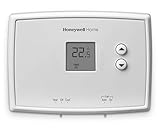
- PRECISE TEMPERATURE CONTROL: Precise temperature control of +/- 0.5 degree Celsius.
- DIGITAL DISPLAY: Easy-to-read digital display.
- SIMPLE TO USE: Simple, soft-touch buttons allow you to select the temperature quickly and easily.
- EASY-ACCESS: Easy-access battery compartment and change battery reminder.
- SET POINT RETAINED: Set point is retained in memory in the event of a power outage.
Consider who will set it up and support it
If a family member or caregiver will manage schedules or the app, confirm how access will work and who can help if the Wi-Fi, phone, or account changes. If the older adult prefers independent, hands-on control, prioritize a comprehensible wall interface rather than assuming remote features will be useful.
A 2014 U.S. DOE report on the NSTAR Smart Grid Pilot offers a narrow example of mixed interest in advanced features: among 128 thermostat recipients surveyed in that pilot, 20% liked the programmable feature and 12% liked remote web access. The report described the pilot thermostat as complex and expensive to install and operate. These responses describe that pilot, not older adults generally or thermostat users today. See the NSTAR Smart Grid Pilot final technical report.
The Tool Desk
Outbyte Driver Updater FREEScan for outdated or missing drivers - takes under a minuteDriver Scan →Outbyte PC Repair FREEClear out junk files and repair common Windows errorsFree Scan →Check HVAC compatibility and wiring before buying
Compatibility is essential: a thermostat must support the home’s heating and cooling system, and its power requirements must match the existing wiring or an approved alternative. Before selecting a model, identify the HVAC system type and check the wires at the existing thermostat against the new thermostat’s installation requirements.
What to know about a C-wire
Many newer smart thermostats need a C-wire (common wire) to provide continuous power. Some thermostats, compatible adapters or power extenders, or professional installation may offer alternatives, but support depends on the specific thermostat and HVAC system. Do not assume an adapter will work with a particular setup: check the manufacturer’s compatibility information and the system wiring. Consumer Reports’ buying guide discusses wiring and compatibility. If the wires or system type are unclear, ask an HVAC technician to assess them before purchase or installation.
Rank #4

- PRIVACY PROTECTION*: Sensi won’t sell your personal information to third parties
- EASY DIY INSTALLATION: Use the built-in level and step-by-step app instructions for a quick installation. Works with HVAC equipment found in most homes. Common wire (c-wire) is not required in most applications
- SAVE ABOUT 23% ON HVAC ENERGY*: The ENERGY STAR-certified Sensi smart thermostat can help you save energy with features like flexible scheduling, remote access and usage reports
- SIMPLE CONFIGURATION: Looks and feels like a thermostat. Has buttons and fits the same space as a traditional thermostat so you don’t have to patch and paint your walls
- SMART MAINTENANCE: Sensi can help monitor the performance and efficiency of your HVAC system by delivering valuable usage reports, alerts about your equipment, and maintenance reminders like filter replacement
Choose a schedule for comfort, not a savings promise
A schedule can be useful when it reflects the occupant’s routine and preferred temperatures. It should not force someone to tolerate an uncomfortable setting to meet a generic energy-saving target. The U.S. Department of Energy stated on August 21, 2019: “It is the position of DOE that Americans should set their thermostats to whatever temperature they choose.” See the DOE statement on the thermostat report.
For background on how programmable thermostats use schedules, the DOE Building Science Education page explains the basics of HVAC programmable thermostats.
Quick Recap
Best Value

- Heat pump thermostat for home, non programmable, 2 heating and 1 cooling, electric or gas/oil configurable. (TIP: before purchasing, check to see if this thermostat is compatible with your old thermostat)
- Compatible With: Heat pump systems and Conventional force air, central gas, oil, or electric furnaces systems, Does NOT work with electric baseboard heat (120-240V).
- Not Compatible with 110-240V HVAC systems: like 120/240v electric baseboard heat and line voltage systems. and Not compatible with RV thermostat.
- Easy to read and use: Large digital display with large characters and green backlight, separate buttons for easy setpoint temperature, very suitable for middle-aged and elderly people to use.
- It gives precise temperature control with +/- 1 degree in Fahrenheit and Celsius for ultimate consistent control to keep your room comfortable all the time.
A practical selection checklist
- Identify who will use it. Consider the person’s preferred controls, vision, dexterity, smartphone access, and available help.
- Try the interface. Check whether the display, system status, and temperature adjustment are easy for that person to understand and operate.
- Choose the control method. Decide whether simple manual adjustment, an on-device schedule, or app and voice options fit the household.
- Confirm the HVAC and wiring match. Check the system type, thermostat requirements, and whether a C-wire or approved alternative is available.
- Plan installation and ongoing support. Get professional help if compatibility or wiring is uncertain, and decide who will handle any app or schedule setup.
Product prices and availability are accurate as of the date/time indicated and are subject to change. Any price and availability information displayed on Amazon at the time of purchase will apply.