There is no single best tablet wall mount. The right choice depends on your tablet’s exact dimensions, case, wall material, viewing angle, charging plan, and theft risk. For a fixed smart-home panel, choose a slim fixed cradle or model-specific enclosure. For changing devices, choose an adjustable holder. For public or commercial use, choose a locking enclosure or commercial mount rather than a consumer adhesive or magnetic product.
The often-cited World of Tablet roundup was published on September 14, 2021, and should be treated as historical guidance, not proof that its products, prices, warranties, or compatibility remain current: World of Tablet’s original roundup.
As an Amazon Associate I earn from qualifying purchases.
Quick recommendations by use case
| Use case | Preferred design | Why it fits | Main warning |
|---|---|---|---|
| Smart-home control panel | Slim fixed cradle or purpose-built enclosure | Clean appearance and stable, permanent placement | Confirm charging access, case clearance, and service access |
| Kitchen recipe tablet | Fixed or adjustable mount with easy cleaning | Stable viewing and accessible cable routing | Keep it away from heat, steam, grease, and splashes |
| Bedroom or bedside | Swivel or articulating arm | Lets you set a comfortable viewing angle | Extended arms place more leverage on the wall |
| Office or conference scheduler | Commercial enclosure or semi-permanent mount | Better tamper resistance and serviceability | Verify power, device-management, and reboot access |
| Restaurant, retail, school, or clinic | Locking commercial enclosure | Protects the device and cable in public areas | Consumer adhesive mounts are generally unsuitable |
| Amazon Fire HD 10 panel | Exact-model enclosure or cradle | Aligns controls, camera, and power port | A Fire-specific mount is not a universal iPad or Galaxy solution |
| Several tablet models | Adjustable universal holder | Accommodates device changes | Usually bulkier and less theft-resistant |
| Rental or temporary installation | Detachable or low-damage product | Easier to remove later | Adhesive performance depends on the surface and environment |
| Accessibility-focused setup | Articulating mount with a broad angle range | Positions the screen for the user | Check reach, locking, wall strength, and cable safety |
Measure the tablet before buying
Screen size is only a rough starting point. Record the tablet’s model and generation, height, width, thickness, and weight. Measure it with the case installed if the case will stay on the mount.
Quick wins for a faster PC:
Scan for outdated or missing drivers - takes under a minuteDriver Scan →Repair Windows errors before they cause bigger problemsFix Now →- Check where the USB-C or Lightning port sits and whether a plug needs extra clearance.
- Confirm that the holder will not press the volume, power, fingerprint, or biometric controls.
- Check the front-camera and speaker openings in both portrait and landscape orientation.
- Verify that the holder’s stated size and thickness ranges are manufacturer measurements, not vague claims such as “fits almost every tablet.”
- Confirm whether the mount supports the tablet’s weight and whether its arms contact the case rather than the screen.
- Check if a folio cover can remain folded behind the device, and whether a rugged case changes the center of gravity.
Choose the mounting design
Fixed cradles and brackets
Fixed mounts sit close to the wall, look clean, and create less leverage than an extended arm. They are usually the best starting point for a permanent control panel. Their limitation is reduced angle adjustment and greater dependence on exact tablet dimensions.
#1 Best Overall

- Stronger & Sturdy: Our tablet wall mount base and arm are high-strength aluminum alloy, and the bracket clamp is made of ABS materials. It makes the tablet wall mount holder stronger and more sturdy, ensuring your tablet remains securely anchored. Note: Please use the hexagonal screws in the accessories to lock the 3 shafts, which can strengthen the stability of the product.
- Adjustable & 360° Rotating: The wall tablet holder with 360 degree metal swivel ballhead, allow you to easily adjust the tablet phone to hotizontal or vertical screen. Adjust and personalize your viewing preference with 360° rotation capability, allowing you to choose between portrait and landscape modes.
- Easy Installation: Depending on the installation method. Our wall bracket tablet holder can be adjusted at any Angle on the wall from left to right or from top to bottom 180°. The design of the steering ball allows our wall mount holder to hover according to any 360° you like. (Our product packaging includes two packs of screws and a small wrench to help you install, and you need to prepare your drilling tools.)
- Universal: The aluminum tablet wall mount is compatible with 4.7-13 inch mobile phones and tablet devices, such as iPad, iPad Pro, iPad Air, iPad Mini, iPhone 11/12/13/14/15/ProMax, Samsung Galaxy, Surface, Surface pro, Amazon Fire, Kindle Fire HD, Kindle Paper White, Switch, e-Readers, and so on.
- Mounted Places: The tablet holder wall mount installation method, choose the most ideal place to install, and use a pencil to mark the empty space at the hole of the wall mount. Take out the complimentary screws and expansion screws.Align the hole and hammer the expansion screw into the hole, and finally tighten the screw with a Phillips screwdriver to complete the installation. Don't forget to use the Allen wrench to adjust your favorite stance.
Adjustable universal holders
Adjustable holders make sense when a household or business may replace its tablet. They trade a cleaner, model-specific fit for wider compatibility. Inspect where the adjustable arms touch the case, whether they obscure buttons, and how much of the display is covered.
Articulating and swivel arms
These mounts are useful when the screen must face different users, such as at a bedside or kitchen counter. An arm extended from the wall magnifies movement and pulling force, so it needs stronger structural mounting than a flat bracket. A stud, masonry, or properly reinforced backing is preferable to a small drywall anchor.
Magnetic and detachable mounts
Magnetic systems allow quick removal for carrying or charging. Magnet strength must be evaluated with the tablet’s full weight and case installed; a thick case or uneven back can reduce retention. A magnetic mount is not automatically theft-resistant, and a magnetic plate may interfere with accessories or wireless charging.
Recommended Free Tools
Rank #2

- ✅Install on any surface: Place your tablet or mobile phone in the most convenient location you want, no need to consider whether the surface is flat to meet your location requirements.
- ✅360° Rotation: The ball head of the tablet wall holder has a 360° rotation function and can be adjusted to the best viewing angle. The anti-slip rubber pad of the iPad wall holder protects your tablet from scratches and sliding, keeping your device safe.
- ✅Universal: Tablet wall mount is compatible with 5-13 inch devices, such as iPad Pro 12.9, iPad Pro 11, iPad 10.9/iPad 10th generation, iPad Air 5/4, iPad Pro 10.5/9.7, iPad Mini 6/5, Galaxy Tab S8 /S7, Kindle, Fire HD, iPhone 17 Pro Max, 16, 15, and other smartphones and tablets. 🚗The clip sides are 0.78 in (20mm) thick, allowing use without removing the tablet case.
- ✅Sturdy Wall Mount Tablet Holder: Mounts with screws (included), can be mounted on all vertical surfaces, walls, tables, shelves, cabinets, etc. 🚗You need to prepare your own drilling tools.
- ✅Multi-functional use: This iPad wall mount can be installed in classrooms, conference rooms, recording studios, food delivery, restaurant takeout orders, medical institutions to provide user-friendly interaction, virtual offices, gyms and other places. It is very convenient for both commercial and personal use.
Adhesive mounts
Adhesive products can reduce drilling, but they are not equivalent to structural mounting. Dust, textured paint, freshly painted surfaces, heat, humidity, and long-term load can reduce bond strength. Use them only for lightweight devices in low-risk locations and follow the manufacturer’s surface-preparation and cure-time instructions.
Locking enclosures and commercial mounts
A public-facing tablet should be treated as a kiosk or enclosure project. Look for a lock or concealed release, protected cable routing, service access, and compatibility with the exact tablet. A holder that merely grips the device is not the same as an anti-theft enclosure.
VESA-compatible enclosures
VESA describes the interface between mounting hardware, such as a wall plate or arm, and an enclosure; it does not guarantee that the enclosure fits your tablet. Confirm the tablet fit separately. VESA tablet-enclosure guidance is available from Peacemounts, with additional interface context at its tablet-holder guide.
Rank #3

- Tablet Wall Mount - Transform your tablet or phone into a mini TV by securely mounting it on the wall! This iPad wall mount meets all the requirements for convenient video viewing, saving space and effortlessly securing your tablet on the wall.
- Rotational & Adjustment - The ball head of the iPad wall holder offers a 360° rotation function, with both portrait and landscape modes available, allowing you to adjust the iPad wall mount holder to the viewing angle you want to meet your different needs.
- Universal - Compatible with 4.7-12.9-inch screen devices, including iPad Pro, iPad Air, iPad Mini, iPad, Galaxy Note Pro 12.2, Galaxy Tab 4, Galaxy Tab Pro 12.2, iPhone 17 Pro Max/ Pro/ air, 16 15 14 13 12 Pro Max/ Pro, iPhone 11, Galaxy S20, e-Readers, and more.
- Mount Anywhere - Tablet stand mount is designed with a 4-hole metal drilled base and uses screws for installation. It can be used for multifunctional installation in various locations such as walls, bathrooms, kitchens, conference rooms, warehouses, offices, gyms, etc.
- Sturdy Ipad Wall Mount Holder - The robust metal base provides a reliable foundation, and the non-slip, low-friction foam pads on the tablet holder ensure that your device stays securely in place.
Charging while mounted
A simple hole for a cable is not the same as a permanent-power system. Before installation, determine whether the design provides a cable cutout, a routing channel, a recessed connector, or an enclosure intended for continuous charging.
What’s actually slowing this PC down?
Pick the symptom - the matching free tool is one click away.
- Leave a gentle cable bend and provide strain relief so the connector is not pulled sideways.
- Check that the plug is not trapped by the holder and that the tablet can be removed without damaging the cable.
- Allow heat to escape during extended charging; do not cover vents or tightly enclose a warm device.
- Plan enough cable length for the tablet’s full range of movement without loose loops that can snag.
- For in-wall routing, use wiring and installation methods permitted by local electrical rules. Do not hide a standard power adapter inside a wall unless the hardware and installation are listed and compliant.
The 2021 World of Tablet article praises cable access on several products and describes a Fire HD 10 kit with recessed routing, but those statements require current manufacturer confirmation before purchase: source article.
Install it for the actual wall
- Identify the structure. Locate a stud, masonry, or suitable backing. Check for pipes and electrical wiring before drilling.
- Match the hardware to the wall. Use appropriate screws and rated anchors for the specific wall material. Hardware suitable for a stud is not automatically suitable for hollow drywall.
- Account for leverage. A flat bracket applies less force than a swivel arm. Do not put an extended arm carrying an expensive tablet into a small, lightly rated drywall anchor.
- Test the empty mount. Tighten every fastener, operate the arm or swivel, and check for movement before installing the tablet.
- Install and inspect the tablet. Confirm that the screen, camera, controls, speakers, and charging port remain usable.
- Recheck the installation. Inspect screws after the first day and periodically thereafter, especially on an articulating mount.
A mount’s advertised load rating generally assumes an ideal installation. The wall, backing, anchor type, and extension angle determine real-world security.
Rank #4
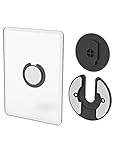
- Rotating Design: The tablet mount can rotate 90 degrees to adjust the angle according to your needs. Easily adjust the Angle of the screen to suit your vision.
- Broad Compatibility: ipad wall mount Compatible With E-reader/Kindle/iPad Air Mini Pro/WIFI Router /Cable Box/ tv box/ipad Accessories.
- Hidden Storage Mount: Backpack of iMac&laptop display hidden storage for hard drive/wi-fi router/power bank/cell phone&other device,or hidden the cable box/ wi-fi router on the back of the tv.
- Two Kinds of Installation Methods: screw and adhesive,the tablet holder that you can choose which way to install according to your requirements. Tips: If you choose to use adhesive to install the bracket, please wait for 24-48 hours after installation before using the bracket, the adhesive works best.
- Multiple Usage Scenarios: ipad accessories fits on kitchen/bathroom/bedroom/readingroom/living room and More. What do you get:Tablet wall mount*2(set), Round adhesive*3, Crescent shaped adhesive*6, Screw*4, Rubber plug*4, The bracket is made of plastic.
Home, commercial, and environmental considerations
Kitchen and bathroom
Keep the tablet away from direct steam, splashes, grease, stovetops, sinks, showers, radiators, and strong sunlight. Moisture and heat can damage both the device and adhesive. A mount that permits cleaning around the tablet is preferable in a kitchen.
Business and public areas
Plan for device management, kiosk-mode software, remote rebooting, cable protection, replacement access, and battery servicing. A commercial enclosure may cost more and take longer to remove, but it addresses risks that consumer mounts do not.
Free tools Windows power users keep installed
One-click scans. No signup required.
Long-term service
Tablets eventually need updates, troubleshooting, battery replacement, or replacement hardware. Avoid designs that make removal impossible or require destroying an adhesive bond every time the device needs service.
Best Value

- Universal Compatibility: Versatile tablet wall mount designed for devices from 4.7" to 12.9". Compatible with all iPhones, iPad Pro (12.9/11/10.5/9.7), iPad Air (5/4/3/2), iPad Mini (6/5/4), iPad (9th/10.2 generation), and Samsung tablets. This tablet wall mount holder is perfect for home, office, classroom, kitchen, or gym use.
- Fully Adjustable Viewing: This iPad wall mount features a 360° swiveling bracket and 30° horizontal/vertical tilt for optimal positioning. Ideal for video calls, recipe viewing, or as a digital display, enhancing your experience in any setting.
- Sturdy and Secure Design: This iPad wall mount holder is constructed with premium materials to ensure durability and stability. Firmly holds your device in place, providing safety for iPad Pro 12.9, iPad Air 2, iPad Mini 4, and other compatible models.
- Easy Installation: Experience a quick and hassle-free setup process. This practical wall mount for iPad allows for effortless installation, making it convenient to secure your tablet in any desired location.
- Enhance Your Space: Transform how you work, entertain, or display information with this versatile wall mount iPad holder. Suitable for various environments, it's the perfect solution to elevate your tablet usage and optimize your space.
Historical products in the 2021 World of Tablet roundup
The source article listed 11 products, including elago Home Hub, The Joy Factory Carbon Wall Mount, Bentley Mounts Universal, Monoprice, an Amazon Fire HD 10 kit, TabCare, Nite Ize Steelie, Impact Mounts, Dockem Koala, Arkon, and iKross. It described elago as a minimalist silicone-based mount; The Joy Factory as a magnetic, rotating semi-permanent system; Bentley as an adjustable swivel mount; TabCare as anti-theft-oriented; and several others as budget, adhesive, heavy-duty, or wall/desk options. Those descriptions are historical editorial claims, not current verified specifications.
The page was published September 14, 2021, contains inconsistent product-count wording, and does not document repeatable load, drop, wall, or fit testing. It also relies heavily on retailer links, so availability, pricing, warranty, and compatibility must be checked directly with the manufacturer. See the original page for its complete list and descriptions: https://www.worldoftablet.com/best-tablet-wall-mount/.
Quick Recap
When a wall mount is the wrong choice
- Choose a desk stand if the tablet moves often, is used for typing or drawing, or you rent and cannot drill.
- Choose a floor stand or kiosk when people need access from multiple positions.
- Choose a monitor arm when an existing VESA workstation already provides the required adjustment.
- Choose a commercial kiosk enclosure when security, cable protection, and serviceability matter more than a minimalist appearance.
Buying checklist
- Exact model and generation confirmed.
- Tablet dimensions, thickness with case, and weight within the holder’s published limits.
- Buttons, cameras, speakers, biometric sensors, and charging port clear in the chosen orientation.
- Wall material and structural support identified.
- Fixed, adjustable, magnetic, articulating, adhesive, or locking design selected for the actual use.
- Charging route, strain relief, heat dissipation, and removal procedure understood.
- Theft protection matched to the environment.
- Current manufacturer availability, warranty, and price checked for your region on the purchase date.
Product prices and availability are accurate as of the date/time indicated and are subject to change. Any price and availability information displayed on Amazon at the time of purchase will apply.

