Recommended Free Tools
Some links on this page are affiliate links: if you buy through them we may earn a commission, at no extra cost to you.
The best smart lock for a new Google Home installation in 2026 is the Yale Smart Lock with Matter. It is designed around Google Home, uses Matter over Thread, and can provide app control, remote access, routines and guest access when paired with compatible Google hardware. The catch is important: Matter is not hub-free. You need a compatible Matter controller and, for this Thread model, a Thread border router.
For an existing Nest household, the older Nest × Yale Lock still offers the deepest Nest-specific experience. Renters and retrofit buyers should look at the August Wi-Fi Smart Lock, while the Aqara U100 is the strongest choice for fingerprint entry and multiple backup access methods.
As an Amazon Associate I earn from qualifying purchases.
The Tool Desk
Outbyte Driver Updater FREEScan for outdated or missing drivers - takes under a minuteDriver Scan →Outbyte PC Repair FREERepair Windows errors before they cause bigger problemsFix Now →Quick comparison
| Lock | Best for | Google Home | Matter/Thread | Wi-Fi | Voice control | Entry methods | Main caveat |
|---|---|---|---|---|---|---|---|
| Yale Smart Lock with Matter | New Google Home installations | Native setup and control, subject to model and hub support | Matter over Thread | No direct Wi-Fi | Locking and status depend on current Google Home support; do not assume voice unlocking | Keypad and mechanical backup, depending on package | Requires a Matter hub and Thread border router |
| Nest × Yale Lock | Existing Nest households | Mature Nest integration, activity history and guest access | Proprietary Nest Connect system | No | Voice locking and status; voice unlocking is disabled | Keypad and physical interior control | Older platform; requires Nest Connect and availability is uncertain |
| August Wi-Fi Smart Lock | Retrofit installations and renters | Google Assistant support; advanced functions remain in August/Yale Access | No | Built in | Model- and account-dependent | Existing outside key, phone, optional keypad | Requires a compatible single-cylinder deadbolt; bulky interior |
| Aqara U100 | Fingerprint and multi-method access | Google Home and Matter support, with feature limitations possible | Matter support; verify hub and firmware requirements | Not the primary connection | Do not assume Google Home exposes biometric features | Fingerprint, keypad, mechanical key and USB-C emergency power | More complicated Aqara ecosystem |
| Yale Assure Lock 2 | Buyers choosing among ecosystems | Varies by module | Varies by module | Varies by module | Varies by module | Varies by configuration | Model suffix and communication module matter |
| Schlage Encode family | Established hardware and broad platform support | Varies by Encode, Encode Plus and Sense Pro model | Model-dependent | Relevant models use direct Wi-Fi | Model- and integration-dependent | Keypad and key on relevant models | Do not treat the product generations as interchangeable |
Prices and availability change, so this guide does not treat an unverified price as a permanent feature. Use the official product pages and confirm the exact model, module and included hub before ordering.
Best overall: Yale Smart Lock with Matter
The Yale Smart Lock with Matter is the clearest Google-first recommendation for a new installation. It has Matter built in, communicates over Thread, can be set up through Google Home and is sold through the Google Store. Google lists battery life of up to 12 months, but that is a manufacturer claim rather than a guarantee: frequent operation, cold temperatures, poor door alignment and network conditions can reduce runtime.
Popular on Amazon

- Secure smart lock for your front door; replaces the deadbolt lock you already have
- Keyless entry on the LED keypad so you can lock and unlock your front door without a key; keypad chimes play sounds to confirm responses, such as locking, unlocking, or turning Privacy Mode on or off
- Let someone in from anywhere; unlock the door with your phone for easy guest access
- Give unique passcode to family and guests and set a schedule to control when they work; when you don’t want to be disturbed, Privacy Mode disables the keypad so it can’t be unlocked with a passcode
- Get alerts when someone locks or unlocks the door or tries to tamper with your smart door lock
Its main advantage is architectural. Instead of buying an older proprietary bridge, you can build around the Matter ecosystem and use compatible Google Home hardware as the controller. It is a particularly good fit if you already own a Google device that supports Matter-controller and Thread-border-router functions.
That does not mean the lock is automatically simple. Google says Matter requires IPv6, and a network can appear to complete setup while later failing if IPv6 is not correctly enabled. You also need to confirm that your Google hardware supports the required functions. Not every Nest speaker or display is equivalent.
Outdated Drivers Are Slowing You Down
One free scan finds every outdated or missing driver and matches the right update for your exact hardware.Free scan · exact hardware matchPC Slower Than It Used to Be?
A free scan shows the junk files, broken settings and background clutter dragging Windows down - then fixes them in one click.Free scan · Windows 10 & 11Choose it if: you are starting fresh with Google Home, want a Google-oriented Matter installation and are comfortable checking hub and Thread requirements.
Look elsewhere if: your door uses a mortise, multipoint or sliding-door mechanism, you cannot provide the required Matter and Thread infrastructure, or you want a retrofit that preserves the complete exterior deadbolt.
See the Yale Smart Lock with Matter at the Google Store.
Best for existing Nest households: Nest × Yale Lock
The Nest × Yale Lock remains attractive when the household already uses Nest Connect and values the older Nest experience. It supports Nest access management, guest access, activity history, auto-lock and Google voice commands for locking and status checks.
There is a crucial security distinction: Google documents voice locking and status checks, but voice unlocking is disabled for the Nest × Yale Lock. Do not buy it expecting to say a command that unlocks the door by voice.
The lock does not connect directly to Wi-Fi. It requires a Nest Connect, so check that the package includes the required hardware or that you already own a compatible unit. Google’s former Nest × Yale product URL now redirects to the newer Yale Smart Lock with Matter page, which is a strong signal that the Nest model is a legacy choice. Availability, stock and long-term positioning should be confirmed before purchase.
Also popular on Amazon

- 𝐅𝐥𝐞𝐱𝐢𝐛𝐥𝐞 𝐖𝐚𝐲𝐬 𝐭𝐨 𝐔𝐧𝐥𝐨𝐜𝐤: Unlock the way you want: app, passcode, fingerprint, physical key, or voice via Alexa/Google Assistant. Everyone in the family can choose what works best — convenience meets flexibility. Batteries are not included.
- 𝐔𝐧𝐥𝐨𝐜𝐤 𝐅𝐫𝐨𝐦 𝐀𝐧𝐲𝐰𝐡𝐞𝐫𝐞: Built-in Wi-Fi lets you lock and unlock your door remotely anytime, anywhere from your smartphone — no extra hub needed. Stay connected and in control, even when you’re at work or on vacation. Only support 2.4Ghz network. Keep the router and lock with 65ft for better remote control.
- 𝗩𝗼𝗶𝗰𝗲 𝗖𝗼𝗻𝘁𝗿𝗼𝗹 𝗥𝗲𝗮𝗱𝘆: Pair with Alexa or Google Assistant to unlock or lock with your voice. Great for when your hands are full or you're relaxing at home and still welcome who’s at the door. Note: Please log in to your own Google or Alexa account first before use Voice Control and make sure your network connection is stable.
- 𝗬𝗼𝘂𝗿 𝗙𝗶𝗻𝗴𝗲𝗿𝘀 𝗶𝘀 𝗬𝗼𝘂𝗿 𝗞𝗲𝘆: Just one touch unlocks the door instantly. No need to search for keys — Your fingers is your keys, perfect for busy mornings. Philips wifi lock store multiple prints for easy family access.
- 𝐂𝐨𝐝𝐞 𝐀𝐜𝐜𝐞𝐬𝐬 𝐌𝐚𝐝𝐞 𝐒𝐢𝐦𝐩𝐥𝐞: Create up to 100 custom passcodes for family, friends, or renters. Easily share unlimited one-time or scheduled codes to guests, cleaners, or deliveries— no need to be home to open the door.
Google lists compatibility with wood, metal and fiberglass doors of specified thicknesses and says the backset must not exceed 2¾ inches. It is not intended for glass, sliding, mortise or multipoint locks. Follow the current Google compatibility guidance rather than assuming that any deadbolt-shaped opening will work.
Choose it if: you already have a Nest Connect installation and want its established Nest access and activity features.
Look elsewhere if: you are building a new Google Home system or want a current Matter-based platform.
Best retrofit lock: August Wi-Fi Smart Lock
The August Wi-Fi Smart Lock replaces the interior mechanism while allowing you to keep your existing exterior cylinder and key. That makes it the practical choice for renters, households that do not want to change the outside appearance, and anyone who wants a familiar mechanical key as backup.
It has built-in Wi-Fi, a DoorSense sensor and Google Assistant support. The trade-offs are a relatively bulky interior assembly and dependence on the August/Yale Access ecosystem rather than a Google-native Matter installation. A keypad is available for households that need code entry, but it is an accessory rather than a reason to assume every August package includes one.
Fit is non-negotiable. August requires an existing single-cylinder deadbolt. It will not solve a damaged strike plate, a door that sags, or a bolt that does not align smoothly. Renters should also check the lease or ask the property manager before changing the lock.
Choose it if: preserving the outside key and hardware matters more than having a Matter-based system.
Look elsewhere if: your door has a double-cylinder, mortise or multipoint lock, or if you want the smallest possible interior mechanism.
Also popular on Amazon
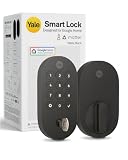
- MORE WAYS TO ENTER: Hands full of groceries? This keyless entry door lock unlocks with a tap on your phone, a code on the keypad, Google Assistant voice commands, plus a backup key if all else fails.
- COMPLETE CONTROL: This electronic door lock puts home security in your pocket. Lock up, share access, and track entries via Yale Access App or Google Home (US & Canada only). Remote access available with a Matter hub.
- DESIGNED FOR GOOGLE HOME: This smart front door lock integrates seamlessly into Google Home systems. Control access and monitor activity using the setup you already trust.
- SMART HOME FREEDOM WITH MATTER: Built with Matter technology, this lock connects to your favorite devices, including Google TV, Nest Hub, and more. Mix and match without being locked into one ecosystem.
- LONG-LASTING BATTERY: Matter over Thread technology uses an energy-efficient mesh network that minimizes power drain so your smart door lock goes longer between battery changes. Grade 2 certified by BHMA & designed to perform from -22 - 140°F.
See the August Wi-Fi Smart Lock.
Best for fingerprint access: Aqara U100
The Aqara U100 is the feature-rich alternative. It combines fingerprint entry, keypad access, a mechanical key and USB-C emergency power. Aqara says the lock can store up to 50 fingerprints. That combination is useful for families who want several ways in, particularly when carrying a phone or key is inconvenient.
The U100 supports Google Home and Matter, but “supports Matter” should not be read as “needs no Aqara equipment.” Hub requirements, firmware, region and the exact Google Home setup path can affect what works. Advanced features may remain in the Aqara app, and Google Home may expose lock status and basic controls without exposing every biometric or access-management function.
Quick wins for a faster PC:
Fix the driver behind crashes, sound loss and screen glitchesFind Drivers →Repair Windows errors before they cause bigger problemsFix Now →Scan for outdated or missing drivers - takes under a minuteDriver Scan →Fingerprint entry is not automatically superior to a keypad. Wet hands, dirt, cold weather and gloves can affect convenience, while children, visitors and service providers may still need codes or keys. Ask how biometric data is handled and keep a non-biometric backup method available.
Choose it if: fingerprint access, a keypad and emergency power are more important than the simplest Google-only setup.
Look elsewhere if: you want one minimal ecosystem with the fewest hubs and manufacturer apps.
Alternatives worth considering
Yale Assure Lock 2
The Assure Lock 2 is a broad platform family rather than one universal specification. Wi-Fi, Matter, Z-Wave and other capabilities depend on the installed module and model suffix. Confirm the exact radio, Google Home controls, included accessories and door compatibility before buying.
Do these 3 things before closing this tab:
1Scan for outdated or missing drivers - takes under a minute2Repair Windows errors before they cause bigger problems3Fix the driver behind crashes, sound loss and screen glitchesSchlage Encode, Encode Plus and Sense Pro
Schlage’s established hardware and keypad designs make these worth considering, but the names represent different generations and feature sets. Google Home, Matter, Apple Home and remote-access capabilities are model-dependent. Do not transfer a certification, feature or compatibility claim from one Schlage variant to another.
Nuki Smart Lock Plus
Nuki is a strong Matter-oriented retrofit option in markets where it is sold, especially for compatible European-style cylinders. It is not a default recommendation for a U.S. single-cylinder deadbolt: cylinder type, door geometry and regional availability must be checked first.
Also popular on Amazon

- Secure smart lock for your front door; replaces the deadbolt lock you already have.Note: Measure your door's backset, cross bore and thickness to ensure you find the right fit
- Keyless entry on the LED keypad so you can lock and unlock your front door without a key; keypad chimes play sounds to confirm responses, such as locking, unlocking, or turning Privacy Mode on or off
- Let someone in from anywhere; unlock the door with your phone for easy guest access
- Give unique passcode to family and guests and set a schedule to control when they work; when you don’t want to be disturbed, Privacy Mode disables the keypad so it can’t be unlocked with a passcode
- Get alerts when someone locks or unlocks the door or tries to tamper with your smart door lock
Independent comparison coverage also identifies Yale, August, Aqara, Nuki and Schlage as significant alternatives, but secondary rankings should not replace the manufacturer’s current model-specific specifications.
What “works with Google Home” really means
A compatibility badge can describe very different experiences. Before buying, separate these capabilities:
- Visibility: the lock appears in the Google Home app.
- App control: you can see status and, where supported, lock or unlock it.
- Voice locking: Google can issue a lock command.
- Voice unlocking: a higher-risk function that may be disabled or require authentication.
- Routines: the lock can participate in actions such as a Goodnight routine.
- Guest access: codes can be created, scheduled, shared or revoked.
- Activity history: the system records operation, sometimes with the user identified.
- Remote access: you can control the lock while away from home.
- Matter: the device can be commissioned into supported ecosystems, but required hubs and exposed features still vary.
- Manufacturer-app dependence: scheduling, biometrics, firmware and detailed access management may remain outside Google Home.
Google explicitly warns that third-party devices may appear in Google Home without supporting every available control. Treat the Google Home logo as a starting point, not a promise of full feature parity.
Read Google’s guidance on third-party devices and feature limits.
Independent reader supportYour contribution helps us test, update, and keep practical guides available for everyone.Matter, Thread and Wi-Fi: the practical difference
Matter over Thread: Usually efficient for battery devices and capable of local control, but it requires a Matter controller and a Thread border router.
Matter over Wi-Fi: Uses the home Wi-Fi network but still requires a Matter controller.
Free tools Windows power users keep installed
One-click scans. No signup required.
Direct Wi-Fi: Often reduces the need for a separate vendor bridge and can simplify remote access, but Wi-Fi radios can increase battery use.
Proprietary bridge: Older systems such as Nest × Yale use a vendor-specific bridge. That can deliver mature integration but ties the lock to an older platform.
Also popular on Amazon

- 7 in 1 Keyless Entry Door Lock: Fingerprint ID(stores up to 50 fingerprints) + Passcodes(up to 50) + Smartphone App(compatible with Android and iOS) + Web Portal + EKey / Code Sharing + Voice Control with Siri, Alexa or Google Assistant + 2 Mechanical Keys
- App Control via Built-in WiFi: Remotely lock, unlock, and manage your smart lock from anywhere. Share permanent, scheduled, or temporary eKeys and passcodes with family, guests, or service providers. Manage up to 50 fingerprints and 50 access codes, view activity history, and receive real-time notifications—all without a hub. Supports 2.4 GHz Wi-Fi only. For optimal connectivity, keep your router within 70 ft of the lock.
- Remote Access via Matter over Thread: Remotely lock, unlock, and manage your smart lock through Apple Home or other Matter-compatible apps. Enjoy simple setup, real-time notifications, event history, and secure access management—all from your smartphone. Requires a compatible Matter over Thread hub (Thread Border Router).
- Effortless Matter Smart Home Integration: Ultraloq matter smart lock seamlessly integrates with all matter-enabled ecosystems. Voice control with Siri, Alexa and Google Assistant. It can be used to automate your smart home by pairing multiple matter-enabled devices through the one app. No more compatibility headaches. Requires a compatible Matter over Thread hub (Thread Border Router).
- Reliable Connection: Enjoy fast, stable, and responsive communication with Matter over Thread. The self-healing mesh network automatically reroutes connections if a device becomes unavailable, helping keep your smart home connected with minimal interruptions. Requires a compatible Matter over Thread hub (Thread Border Router).
Matter improves interoperability; it does not guarantee that Google Home, the lock’s app and every other ecosystem will expose identical functions. A Thread lock also does not become hub-free merely because it uses Matter.
See Google’s Matter requirements, including IPv6 guidance.
Check your Google hardware before ordering
Look up your exact Google Nest or Home model in Google’s device specifications. Confirm whether it supports Matter-controller functions and, for a Thread lock, Thread-border-router functions. Software updates can change capabilities, but hardware differences remain important.
Check Google Home and Nest device specifications.
Door compatibility checklist
Do this before comparing colors, keypads or voice commands:
- Confirm that the door uses a deadbolt rather than a mortise, multipoint or sliding-door lock.
- Identify single-cylinder versus double-cylinder construction. August requires a compatible single-cylinder deadbolt.
- Measure door thickness and backset.
- Check the door edge, strike plate and bolt alignment. The bolt should extend and retract smoothly by hand.
- Measure interior clearance for the motor and battery compartment.
- Check exterior trim, glass, narrow stiles and nearby handles.
- Confirm whether the product replaces the whole deadbolt or only the interior thumb-turn mechanism.
- Verify the exact communication module and whether a bridge, hub or keypad is included.
- Keep the return policy available in case the lock fits the measurements but not the trim or alignment.
Google Home setup and control
For a compatible lock, Google’s documented control path is:
- Open the Google Home app.
- Tap Home, then All devices.
- Select the lock tile to view status or use supported lock controls.
- Touch and hold the tile and tap Settings to see available options.
- For supported passcodes, touch and hold the tile, tap Access, select the lock and create a 4- to 8-digit passcode.
Guest passcodes can be shared or scheduled where the lock and integration support those functions. Activity history may remain available for up to 60 days. The controls shown will differ by model, firmware, region and integration.
What’s actually slowing this PC down?
Pick the symptom - the matching free tool is one click away.
Read Google’s current instructions for lock controls, access and history.
If setup fails
- Confirm the exact model is supported by Google Home, not merely by Alexa or Apple Home.
- Check the model number and communication module.
- For Matter, confirm that a compatible Matter controller is present.
- For Matter over Thread, confirm that a Thread border router is present.
- Confirm IPv6 is enabled on the router.
- Update Google Home, your phone, the manufacturer app and the lock firmware.
- Complete initial setup in the manufacturer app if the vendor requires it.
- Remove duplicate or incomplete entries from Google Home.
- Restart the Google hub, router, Thread border router and lock.
- Only then consider a factory reset, after recording existing codes and reading the vendor’s reset procedure.
If local control works but remote access does not, investigate the hub, IPv6, Wi-Fi, Thread and account separately. Reinstalling the lock immediately can erase useful configuration without fixing the network problem.
Security and privacy: what a smart lock can—and cannot—do
A smart lock improves access management and convenience; it does not automatically make a door more resistant to forced entry. The deadbolt, strike plate, door frame, lighting, cameras and alarm system still matter. A badly aligned smart lock that cannot fully throw its bolt can be less dependable than a correctly installed conventional lock.
Quick Recap
- Use a unique account password and multifactor authentication where offered.
- Give each household member an individual code instead of sharing one permanent PIN.
- Use temporary or scheduled codes for cleaners, contractors and guests, then revoke them.
- Choose codes that cannot be guessed from addresses, birthdays or repeated keypad patterns.
- Disable remote unlocking if nobody needs it, or use the strongest available authorization.
- Keep batteries charged or replaced and learn the mechanical-key or external-power recovery method.
- Review activity logs and understand how long the manufacturer retains them.
- Check whether biometric information is stored locally or managed through a cloud service.
- Keep a physical backup plan for internet, power, hub and account failures.
Which smart lock should you buy?
- New Google Home installation: Yale Smart Lock with Matter, provided your door fits and you have the required Matter hub and Thread border router.
- Existing Nest installation: Nest × Yale Lock only if current stock, Nest Connect and support meet your needs.
- Retrofit or renter-friendly setup: August Wi-Fi Smart Lock, provided you have a compatible single-cylinder deadbolt and permission to install it.
- Fingerprint and multiple entry methods: Aqara U100, with its hub, firmware and app requirements verified first.
- Cross-platform shopping: Yale Assure Lock 2, Schlage or Nuki can be sensible alternatives, but only after checking the exact variant and regional compatibility.
Product prices and availability are accurate as of the date/time indicated and are subject to change. Any price and availability information displayed on Amazon at the time of purchase will apply.

