Outdated Drivers Are Slowing You Down
One free scan finds every outdated or missing driver and matches the right update for your exact hardware.Free scan · exact hardware matchPC Slower Than It Used to Be?
A free scan shows the junk files, broken settings and background clutter dragging Windows down - then fixes them in one click.Free scan · Windows 10 & 11The best plant care app for most homeowners is not one single app. It depends on what you are trying to solve. If you need watering reminders for houseplants, Planta is the strongest all-around scheduler. If you need fast plant identification and disease clues, PictureThis is hard to beat. If you are new to plant care and want a simpler reminder system, Blossom is a good fit. If you like tracking houseplants with community input, Greg is useful. If you want a free, science-backed plant ID tool, Pl@ntNet is the best budget choice.
That is the short answer. The better answer is this: a plant care app should help you make fewer guesses. On our job sites, the most expensive landscape problems usually do not start as major failures. They start as small misreads: turf and shrubs on the same watering zone, a slope being irrigated like flat ground, clay soil watered like sand, or a homeowner treating a drainage problem as a fertilizer problem. A good app can help you track symptoms, identify plants, and tighten your watering habits. It cannot redesign a poor irrigation layout, fix compacted soil, install a backflow preventer, or make an outdoor outlet code-compliant.
As an Amazon Associate I earn from qualifying purchases.
Use the app for observation and routine. Use local expertise and proper construction when the problem touches water supply, drainage, electrical work, grading, hardscape, or permanent landscape systems.
Best plant care apps at a glance
Here is the practical comparison. Prices change often by promotion, platform, and renewal term, so treat these as 2026 planning numbers and always check the App Store or Google Play subscription screen before starting a trial.
#1 Best Overall

- Trusted Since 2015: Become one of the many plant lovers who rely on the proven accuracy of XLUX. Established in 2015, our soil moisture meter has earned over 60,000+ verified ratings for its consistent performance. While many many newer brands come and go, we provide the long-term reliability and quality that American households have trusted for over a decade.
- Take the guesswork out of watering: While your eyes and fingers can only determine the moisture level of the soil surface, the XLUX meter tells you exactly what’s happening deep inside your pot or garden. Our high-sensitivity probe reaches the root zone where it matters most, requiring no batteries or charging—simply insert for an immediate, real-time reading to help your plants stay healthy and vibrant.
- Clear & Easy-to-Read Display: Perfect for beginners and expert gardeners alike. The large, color-coded dial features 10 distinct scales (Dry-Moist-Wet), making it incredibly simple to know exactly when to water. From lush Monsteras to tall Fiddle Leaf Figs, you’ll get the clarity you need at a single glance, ensuring every plant gets the precise care it deserves.
- Slim Single-Probe: Protects Delicate Roots: Protect your plants' health. Unlike bulky dual-probe testers or thick-diameter sensors that can tear and stress sensitive root systems, our sleek, slim-needle design slides smoothly into various soil types. It delivers reliable moisture data with minimal soil displacement, keeping your plants’ delicate roots safe and undisturbed while you monitor their hydration.
- Pristine Condition & Essential Care: To ensure you receive a factory-fresh instrument, each XLUX meter includes a custom anti-abrasion protective sleeve. This inner liner prevents micro-scratches during transit, maintaining the integrity of the 304 stainless steel probe. Usage Tips: 1. Soil Use Only (no liquids). 2. Temporary Test: Insert, read, and remove within 5 minutes. 3. Maintenance: Always wipe the probe clean and store it in its protective sleeve after use.
| App | Best use | 2026 price signal | Plant ID | Disease help | Reminders | Outdoor usefulness | Best homeowner fit |
|---|---|---|---|---|---|---|---|
| Planta | Care schedules and watering reminders | Common listings around $7.99-$9.99/month or $35.99-$47.99/year | Yes | Some support | Strong | Moderate | Homeowners with many indoor or patio plants |
| PictureThis | Fast identification and diagnosis clues | Premium has been reported around $29.99/year, with promotions varying | Strong | Strong | Moderate | Good | Homeowners diagnosing unknown plants, weeds, pests, or leaf issues |
| Blossom | Beginner care routines | Subscription cost depends on selected plan; review snippets reference about $2.30/month | Yes | Some support | Strong | Moderate | New plant owners who want simple instructions |
| Greg | Houseplant tracking and community advice | SUPER Greg purchase tiers appear around $3.99-$39.99 | Yes | Limited to moderate | Strong | Low to moderate | Houseplant collectors who like logging and community feedback |
| Pl@ntNet | Free plant identification and citizen science | Free | Strong | No full care workflow | Limited | Good for ID | Budget-conscious gardeners, hikers, and native-plant learners |
1. Planta: best for watering schedules and routine plant care
Planta is the app we would point to first for homeowners who want a structured plant-care routine. Its official site says it is used by more than 7 million plant lovers, and its current U.S. App Store listing shows common in-app purchase pricing around $7.99 to $9.99 monthly, $17.99 to $19.99 for 3 months, and $35.99 to $47.99 annually.
Planta is strongest when you have a lot of plants and forget which one needs what. It helps with reminders, plant profiles, care guidance, light checks, and general scheduling. That makes it useful for houseplants, porch containers, sunroom plants, and mixed patio planters.
Where Planta works well
Use Planta when your main problem is consistency. If you own 20 plants and water them whenever you remember, you are likely overwatering some and underwatering others. A scheduler gives you a baseline. After 30 to 60 days, your watering history becomes more useful than one-off advice because you can see patterns: which plants dry out every 4 days, which stay wet for 10 days, and which decline after fertilizer or relocation.
Recommended Free Tools
For construction and landscape planning, Planta is less of a full outdoor design tool and more of a care-management tool. It can help you understand plant needs before you install raised beds, planters, or a patio container layout. If a plant prefers bright indirect light and even moisture, that should affect where you put it and how you irrigate it.
Where Planta falls short
Planta should not be treated as a replacement for local horticultural knowledge. A national app may not catch county-level issues like water restrictions, invasive species concerns, regional disease pressure, freeze risk, or soil chemistry. For outdoor beds, pair the app with your county extension office, a reputable local nursery, and real site conditions.
2. PictureThis: best for plant identification and disease clues
PictureThis is the best fit when the first question is, “What is this plant, and what is wrong with it?” The app says it identifies more than 400,000 plant species with over 98% accuracy and identifies more than 1,000,000 plants daily. Its U.S. App Store listing shows a 4.8-star rating with about 1.1 million ratings.
Its strength is speed. A homeowner can take a photo of a weed in the lawn, a volunteer tree seedling near the foundation, yellowing shrub leaves, or a suspicious spot on a tomato plant and get a likely identification quickly. It also offers disease diagnosis, toxicity or allergy flags, and care guidance. Premium pricing has been reported around $29.99 per year, though app-store pricing can change with promotions and platform differences.
Free tools Windows power users keep installed
One-click scans. No signup required.
How to take better plant photos
Most bad app results start with bad photos. We use the same logic on landscape walkthroughs: do not show only the damaged leaf. Give context.
For the best diagnosis, take 4 photos in natural light: one full-plant shot from 3 to 6 feet away, one close-up of a healthy leaf, one close-up of the damaged leaf or stem, and one soil or root-zone shot. For outdoor plants, add a wider photo showing sun exposure, slope, mulch depth, nearby downspouts, and irrigation heads. Those details matter. A leaf spot can be a disease, but it can also be overspray, drought stress, poor drainage, herbicide drift, or reflected heat from concrete.
Where PictureThis works well
PictureThis is especially helpful during spring and early summer, when weeds, seedlings, pests, and fungal issues show up fast. If you are deciding whether to pull, prune, treat, or leave a plant alone, a fast identification tool can prevent wasted work.
Rank #2

- Accurate Soil Moisture Detection: The XLUX Soil Moisture Meter can tell you if the soil deep inside your pot or garden is dry, moist or wet; whereas your eyes and fingers can only determine the moisture level of the soil surface. The probe is 5.5 inches (14 cm) longer than regular styles, allowing it to measure the soil moisture at the bottom of larger and deeper flower pots.
- Easy-to-Read Large Dial: The large dial is easy to read and includes three zones with ten scales, making it very straightforward to understand.
- Immediate Moisture Reading: Insert the probe into the soil, and without waiting, the dial will immediately display the moisture level. You can then decide whether your plant needs watering based on the measurement. Do not leave this moisture meter in the soil for more than 5 minutes, as the metal tip will gradually corrode.
- Less Damage: A single probe causes less damage to plant roots compared to double or multiple probes, and when you remove the probe after testing, it won't bring out much soil.
- Usage Precautions: Do not use it to test very hard soil. Do not test water or other liquids. After testing, please wipe the probe clean.
It is also useful before construction. If you are planning a patio, walkway, fence, drainage swale, or retaining wall, identify nearby plants first. Mature roots, invasive species, and protected or desirable plants can change how a project should be staged.
Quick wins for a faster PC:
Clear out junk files and repair common Windows errorsFree Scan →Fix the driver behind crashes, sound loss and screen glitchesFind Drivers →Repair Windows errors before they cause bigger problemsFix Now →3. Blossom: best beginner-friendly plant care app
Blossom is built around watering schedules, plant care, and leaf or flower identification. It is a good choice for a homeowner who wants simpler guidance without turning plant care into a spreadsheet. App Store review snippets reference subscription pricing around $2.30 per month, but the listing states renewal cost depends on the selected subscription plan.
Blossom is not the most contractor-oriented app in this group, but it fills a real need. Many homeowners do not need advanced garden design. They need a tool that says when to water, when to fertilize, what light the plant prefers, and what the plant probably is.
Where Blossom works well
Blossom works well for new homeowners who inherited a few landscape plants and bought a few indoor plants at the same time. It can help you create a basic care rhythm. That matters because overcorrection is common. One yellow leaf turns into fertilizer, repotting, pruning, and extra water in the same weekend. A simple care app can slow that down.
Use Blossom to track what changed and when. If you moved a plant, changed pot size, added fertilizer, adjusted irrigation, or pruned heavily, log the date. Wait 2 to 4 weeks before making another major change unless the plant is clearly failing. Plants respond on plant time, not project time.
Where Blossom is limited
For outdoor work, Blossom should be treated as a plant-care assistant, not a landscape specification. It will not verify water pressure, irrigation coverage, soil compaction, drainage fall, electrical code, backflow requirements, or local watering ordinances.
4. Greg: best for houseplant tracking and community input
Greg is built for people who like plant tracking, watering amounts, reminders, identification, and community-based care input. Its App Store listing shows several SUPER Greg in-app purchase tiers, including prices around $3.99, $6.99, $19.99, $29.99, $34.99, and $39.99.
Greg is strongest for houseplant owners who want to document care more carefully. If you have a collection of tropicals, succulents, orchids, or specialty plants, logging matters. Two plants in the same room can behave differently because one is near an HVAC supply, one is in a ceramic pot without airflow, or one gets direct afternoon sun for 45 minutes.
Where Greg works well
Greg is useful when you want a care record and community perspective. For indoor plants, that is often enough. For example, if your pothos declines after moving from a north window to a west window, or your fiddle-leaf fig drops leaves after a winter HVAC cycle starts, a log helps you connect cause and effect.
The Tool Desk
Outbyte Driver Updater FREEScan for outdated or missing drivers - takes under a minuteDriver Scan →Outbyte PC Repair FREEClear out junk files and repair common Windows errorsFree Scan →Greg is also useful for homeowners staging plants during a remodel. Dust, low light, temporary heat, cold drafts, and moving plants away from windows can stress them. A tracking app helps separate construction disruption from watering mistakes.
Rank #3

- Accurate Soil Moisture Detection: The XLUX Soil Moisture Meter can tell you if the soil deep inside your pot or garden is dry, moist or wet; whereas your eyes and fingers can only determine the moisture level of the soil surface. The probe is 5.5 inches (14 cm) longer than regular styles, allowing it to measure the soil moisture at the bottom of larger and deeper flower pots.
- Easy-to-Read Large Dial: The large dial is easy to read and includes three zones with ten scales, making it very straightforward to understand.
- Immediate Moisture Reading: Insert the probe into the soil, and without waiting, the dial will immediately display the moisture level. You can then decide whether your plant needs watering based on the measurement. Do not leave this moisture meter in the soil for more than 5 minutes, as the metal tip will gradually corrode.
- Less Damage: A single probe causes less damage to plant roots compared to double or multiple probes, and when you remove the probe after testing, it won't bring out much soil.
- Usage Precautions: Do not use it to test very hard soil. Do not test water or other liquids. After testing, please wipe the probe clean.
Where Greg is limited
Greg is less useful as a yard-wide planning tool. If your goal is to redesign irrigation zones, convert turf to native beds, solve runoff, or place permanent planters, you will need site measurements, soil information, and construction planning beyond the app.
5. Pl@ntNet: best free plant identification app
Pl@ntNet is the best free option in this list. It is tied to a citizen-science biodiversity project, which makes it especially useful for identification and ecological learning. It is not trying to be the same thing as Planta or Blossom. It is better for answering, “What plant is this?” than for managing a full home-care schedule.
For homeowners, that is still valuable. Before you remove a plant, spray a weed, disturb a bed, or install hardscape near an unknown root system, identification is the first step. Pl@ntNet gives budget-conscious gardeners a strong starting point without a subscription.
What’s actually slowing this PC down?
Pick the symptom - the matching free tool is one click away.
Where Pl@ntNet works well
Use Pl@ntNet for outdoor identification, native-plant curiosity, volunteer plants, weeds, and basic biodiversity awareness. If you are converting a lawn area into a pollinator bed or native planting zone, it can help you learn what is already present.
It is also a good second opinion. If another app identifies a plant and you are unsure, compare the result in Pl@ntNet and then verify with a local nursery or extension office before acting on anything expensive or irreversible.
Where Pl@ntNet is limited
Pl@ntNet is not the right tool if you want watering reminders, fertilizer schedules, pest treatment workflows, or indoor plant routines. It is an identification tool first.
What plant care apps cost in 2026
Most mainstream plant-care apps fall between free and about $50 per year. The risk is not the one-time annual subscription. The risk is a weekly AI plant app that looks cheap during signup and effectively costs $7 to $10 per week, or $28 to $40 per month. That can put a casual plant app in the same monthly range as a utility bill add-on.
| Item | Typical 2026 cost | What drives the price |
|---|---|---|
| Basic plant app | Free to $50/year | Identification, reminders, diagnosis, plant library, platform pricing |
| Weekly AI plant app | About $7-$10/week | Trial structure, AI diagnosis features, aggressive subscription model |
| Smart sprinkler controller hardware | About $70-$300 | Zone count, outdoor enclosure, flow monitoring, brand, app features |
| Professional sprinkler controller install | About $193-$663 installed | Wiring condition, wall access, zones, controller type, electrical or irrigation repairs |
| Full in-ground sprinkler system | About $1,700-$5,000 for many homes; complex lots can exceed $8,000-$12,000 | Lot size, trenching, zones, water pressure, permits, soil, slope, hardscape |
| Per-zone irrigation installation | Common planning range of $500-$1,000 per zone; some guides show $590-$1,340 | Hydrozones, head type, pipe runs, valves, labor market |
| Low-voltage landscape lighting | Often $2,000-$6,000 total or $100-$250+ per fixture | Fixture quality, transformer size, trenching, controls, wire length, labor |
From a construction standpoint, the app subscription is the inexpensive part. The bigger money is in the physical system the app may influence: irrigation, drainage, raised beds, outdoor lighting, outlets, controllers, valves, and plantings. A $40 app can help you avoid a $400 mistake, but it can also give you false confidence before a $4,000 landscape project if you do not verify site conditions.
How plant apps connect to smart irrigation
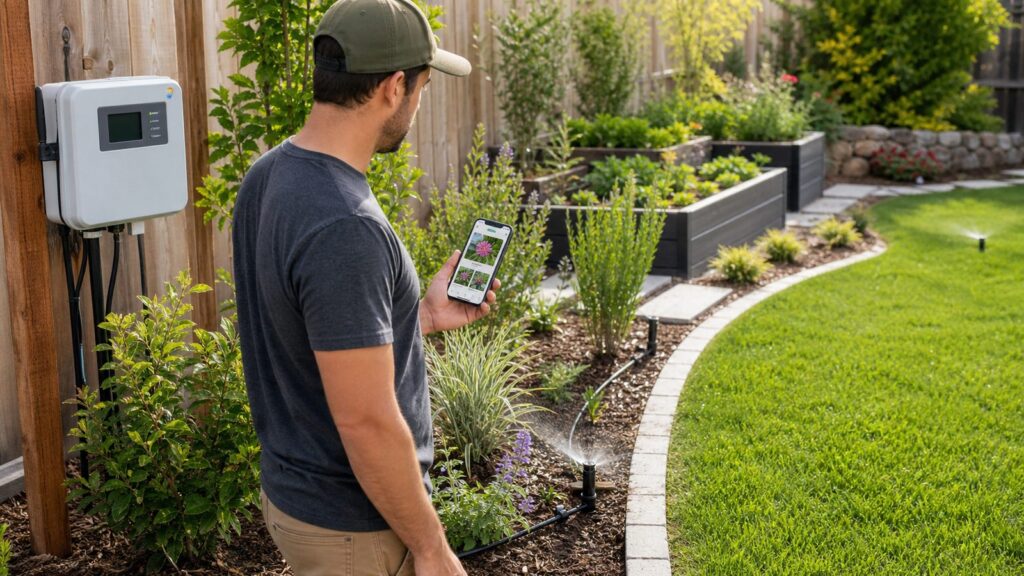
Plant-care apps and smart irrigation controllers solve related but different problems. A plant app tells you what a plant may need. A smart controller changes how water is delivered. The EPA WaterSense program says replacing a standard clock-based irrigation controller with a WaterSense-labeled controller can save an average home up to 15,000 gallons of water annually. EPA also estimates that if every U.S. home with an automatic sprinkler system used a properly operated WaterSense-labeled controller, national savings could reach 390 billion gallons of water and $4.5 billion annually.
The phrase that matters is “properly operated.” A smart controller cannot overcome bad zone design. If turf, annuals, shrubs, native beds, containers, slopes, and shade areas are all on one zone, the controller has no clean choice. It will overwater some plants to keep others alive.
Rank #4
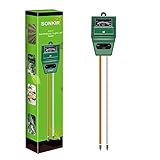
- Kindly NOTE: This soil tester can not be applied to test pH value of any other liquid. If the soil is too dry the indicator will not move, and water it before testing.
- 3 METERS IN ONE: Soil moisture level, Soil pH value and Sunlight level could be tested easily according to your need by switching the function button of this soil meter.
- NO BATTERY NEEDED: Simply insert the meter into soil, wait few minutes, accurate test results will be displayed on the readout panel. No battery is needed.
- STURDY AND SCIENTIFIC DESIGN: Reliable materials and upgraded technology used for this soil meter make it advanced and high-quality for long-term use.
- MULTIPURPOSE SOIL TEST KIT: Portable and compact design enables you to use this soil meter for house garden, farm, lawn and any other soil & plant analysis. Ideal for indoor and outdoor use.
Map hydrozones before buying a controller
Before installing a smart controller, map your yard by water need. Turf usually needs a different schedule than established shrubs. Containers dry out faster than in-ground beds. Slopes need shorter cycles to prevent runoff. Shaded areas need less water than south-facing beds. Clay soil absorbs water slower than sandy soil.
A simple 6-zone yard might break down like this: front turf, back turf, foundation shrubs, sunny annual beds, shaded native bed, and containers or drip. That is a much better setup than one front-yard zone and one back-yard zone if the plant types are mixed.
Check Wi-Fi at the controller
Before you buy a smart irrigation controller, stand at the controller location and check Wi-Fi signal. Do this with the garage door closed if the controller is in the garage. Weak connectivity can cause missed weather adjustments, failed updates, or fallback schedules. If the controller is outside, confirm that the enclosure is rated for exterior use and that wiring entries are protected.
Independent reader supportYour contribution helps us test, update, and keep practical guides available for everyone.When app advice becomes a construction project
A plant app may tell you a plant is underwatered. That is useful, but the reason matters. Is the zone not running long enough? Is a nozzle clogged? Is water pressure low? Is the plant on the wrong hydrozone? Is the bed sloped? Is the soil compacted from construction traffic? Is a downspout washing mulch away from one side and leaving another dry?
On our job sites, we look for the physical cause before recommending a physical fix. A care reminder cannot solve a drainage defect, and fertilizer will not fix root rot caused by poor grading.
Irrigation zones
If several plant types are struggling in different ways on the same sprinkler zone, the app is probably not the problem. The zone may be poorly designed. Reworking irrigation can range from a few hundred dollars for controller or valve corrections to several thousand dollars for new zones. Planning numbers around $500 to $1,000 per zone are common, with some cost guidance showing $590 to $1,340 per zone.
Backflow prevention
Automatic irrigation systems need proper backflow protection to protect the potable water supply. Requirements vary by jurisdiction and system type, but this is not an optional detail. Backflow assemblies may need permits, inspections, freeze protection, and clearance for testing or service. If your irrigation project connects to domestic water, involve a qualified irrigation contractor or plumber familiar with local code.
Drainage and grading
If plant decline appears after heavy rain, near a downspout, beside a retaining wall, or at the bottom of a slope, think drainage. Good planting beds need water, but they also need oxygen in the root zone. Standing water for 24 to 48 hours after normal rain is a warning sign for many landscape plants. Fixes may include regrading, downspout extensions, French drains, catch basins, amended soil, or raised beds.
Raised beds and soil depth
For vegetable gardens, a raised bed is often a better fix than endless app-driven watering changes. A typical raised bed is 10 to 12 inches deep for many vegetables, with deeper soil preferred for root crops and larger plants. Leave at least 24 inches between beds for walking access, and 36 inches if you want comfortable wheelbarrow access. If irrigation is included, drip lines should be planned before filling the bed.
Do these 3 things before closing this tab:
1Repair Windows errors before they cause bigger problems2Fix the driver behind crashes, sound loss and screen glitches3Clear out junk files and repair common Windows errorsOutdoor power and lighting
Some homeowners start with plant care and then add grow lights, smart plugs, patio lighting, water features, or powered irrigation controls. Exterior electrical work needs proper GFCI protection, weather-rated covers, correct burial depth, and code-compliant installation. Low-voltage landscape lighting is more approachable, but it still needs correct transformer sizing, wire layout, voltage drop planning, and protected cable runs. Professionally installed low-voltage systems often land around $2,000 to $6,000 total, or about $100 to $250+ per fixture.
Best Value
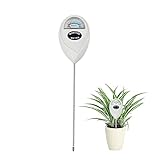
- 【SAVE YOUR PLANTS】: Over watering can cause problems with your plants or even kill them. This soil moisture meter helps you know the soil is dry, moist or wet.No more over watering!
- 【ACCURATE & FAST READING】: This plant moisture sensor can get accurate and fast reading of moisture level in the soil, just plunge the probe sensor into the soil to the plant root region and read the meter. No need to wait!
- 【NO BATTERY NEEDED】: The plant hygrometer is simple and easy to use, no battery or electricity needed. The meter probe can easily get down to the plant roots area and tell if you need to water or not.
- 【INDOOR OUTDOOR USE】: With 6.7 inch long probe sensor design, this soil moisture meter is suitable for both indoor and outdoor use. Great lifesaver for indoor outdoor plants and flowers, hanging flower baskets, potted plants,vegetable, grass watering,picky plants.
- 【GREAT SIZE & PORTABLE】: This soil meter is a great handy tool for home gardeners, plant lovers, beginners. Do not leave the soil moisture meter in the soil for long time or directly soak it into a cup of water that will ruin the device.
DIY vs. when to hire a pro
Plant care apps are excellent DIY tools when the work is observational, routine, and reversible. They are not a license to trench, tap water lines, modify wiring, or disturb grading without a plan.
| Task | DIY is reasonable when | Hire a pro when |
|---|---|---|
| Plant identification | You are deciding whether to keep, move, or monitor a plant | The plant may be invasive, toxic, protected, or near structural work |
| Watering reminders | You manage houseplants, containers, or small beds | Multiple outdoor zones fail, runoff appears, or plants decline unevenly |
| Disease diagnosis | Symptoms are minor and isolated | A tree, hedge, lawn, or expensive planting is declining quickly |
| Smart controller swap | Existing wiring is labeled, accessible, and in good condition | Wiring is damaged, zones are mislabeled, valves fail, or outdoor power is involved |
| New irrigation zones | You are using above-ground hoses or simple drip kits | Trenching, valves, backflow, permits, or water-line connections are required |
| Drainage corrections | You are redirecting a small downspout extension | Water moves toward the foundation, hardscape, basement, crawlspace, or neighbor |
Call an arborist for mature tree decline, large limb issues, trunk damage, root-zone construction, or suspected disease on valuable trees. Call an irrigation contractor when zones, valves, pressure, or controllers are involved. Call a plumber for water-supply and backflow work where required. Call an electrician for new outdoor outlets, hardwired controls, lighting transformers tied into circuits, or any unsafe existing wiring. Call your county extension office when you need regional plant, pest, disease, soil, or invasive-species guidance.
Privacy and data notes before you upload yard photos
Plant apps may collect photos, approximate or precise location, device identifiers, purchase history, diagnostics, and usage data. That does not mean every app is unsafe, but it does mean homeowners should slow down before uploading detailed yard photos.
Do these 3 things before closing this tab:
1Fix the driver behind crashes, sound loss and screen glitches2Repair Windows errors before they cause bigger problems3Scan for outdated or missing drivers - takes under a minuteCheck the Apple App Store or Google Play privacy labels before starting. If you are photographing your property, avoid including house numbers, license plates, children, security equipment, gate codes, or anything else that does not need to be in the frame. For disease diagnosis, the plant is what matters. A tight, clear photo is usually better than a wide photo that exposes half the property.
How to choose the best plant care app for your home
Choose by job, not by star rating alone. If you mainly forget watering, start with Planta or Blossom. If you need to identify plants and diagnose leaf problems, start with PictureThis. If you want a plant-care log with community input, try Greg. If you want free identification without a full subscription workflow, use Pl@ntNet.
For outdoor landscapes, do not let the app be your only source of truth. Combine it with local extension guidance, nursery advice, and real site observations. Walk the yard after rain. Watch how long water stands. Check whether sprinkler heads are blocked by shrubs. Look for overspray on siding, puddling near the foundation, and dry strips along pavement. Measure sun exposure by hours, not guesses: full sun generally means 6 or more hours of direct sun, part sun is roughly 4 to 6 hours, and shade is often less than 4 hours.
The best plant care app is the one that helps you build a reliable record. Use it for 30 to 60 days before making big changes to soil, fertilizer, or irrigation. When the record points to a physical problem, treat it like a project: measure, plan, check code, price the work, and bring in the right trade when the system goes beyond simple plant care.
Recommended Free Tools
Frequently Asked Questions
What is the best plant care app overall?
For most homeowners, Planta is the best all-around care scheduler. PictureThis is better if your main need is plant identification or disease diagnosis. Pl@ntNet is the best free identification option.
Are plant care apps worth paying for?
They can be worth it if you manage many plants or need reminders and diagnosis tools. Mainstream apps often run from free to about $50 per year, but weekly subscriptions can reach $28 to $40 per month, so check renewal pricing carefully.
Can a plant app replace a landscaper or irrigation contractor?
No. A plant app can help identify symptoms and track care, but it cannot verify water pressure, redesign irrigation zones, install backflow protection, correct drainage, or handle electrical work.
Which plant care app is best for outdoor gardens?
PictureThis and Pl@ntNet are useful outdoors for identification. For actual garden performance, pair app results with local extension resources, nursery advice, and proper irrigation zoning.
Do smart sprinkler controllers really save water?
Yes, when properly installed and programmed. EPA WaterSense says replacing a standard clock-based controller with a WaterSense-labeled controller can save an average home up to 15,000 gallons of water per year.
What photos should I take for plant diagnosis?
Take one full-plant photo, one healthy leaf close-up, one problem-area close-up, and one soil or stem photo in natural light. For outdoor plants, include a wider shot showing irrigation, mulch, slope, and sun exposure.
Quick Recap
Product prices and availability are accurate as of the date/time indicated and are subject to change. Any price and availability information displayed on Amazon at the time of purchase will apply.

