Windows Errors? Fix Them Before They Spread
Repair common Windows errors and clear accumulated junk for a smoother, more stable PC - no reinstall needed.Free scan · no reinstallCrashes, No Sound, or Screen Glitches?
Random freezes, missing sound and display glitches usually trace back to one bad driver. Find and replace yours safely.Free scan · under a minuteSome links on this page are affiliate links: if you buy through them we may earn a commission, at no extra cost to you.
Yes—you can build a motion-activated lamp with an Arduino Uno and an HC-SR501 PIR sensor. The sensor sends a digital signal when infrared radiation changes, the Arduino starts a timer, and a switching device turns the lamp on. Use a resistor for a single demonstration LED, a logic-level MOSFET for a low-voltage LED strip, or a properly enclosed and rated relay for a mains lamp.
For a construction or home-improvement project, the safest route is to prototype with a small LED and then use a separately powered low-voltage lamp. Do not put mains voltage on a breadboard or connect a household lamp directly to an Arduino pin.
As an Amazon Associate I earn from qualifying purchases.
How the motion-activated lamp works
The system follows this chain:
Motion → PIR sensor → Arduino input → software timer → switching device → lampA PIR sensor is passive infrared. It detects changes in infrared radiation from warm objects such as people and animals. It does not measure distance like an ultrasonic sensor, identify a person, or reliably detect someone who remains still. Sunlight, heaters, pets, moving curtains, and warm airflow can also trigger it.
The common HC-SR501 module normally provides three connections:
Popular on Amazon
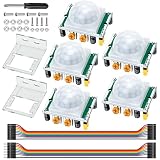
- Precise Detection: High-sensitivity PIR sensor with 100° cone angle & 3-7m adjustable range for zero false triggers
- Ultra-Low Power: DC 4.5-20V wide voltage & <50uA quiescent current, ideal for battery-powered DIY & STEM projects
- Dual Trigger Modes: L/H repeatable trigger modes with 5-18S delay time allow custom logic for smart home & security
- Wide Compatibility: Seamlessly works with Arduino, Raspberry Pi, ESP32, STM32 & breadboard for electronic prototyping
- Complete Package: Includes 5 sensors, 2 mounting brackets, jumper wires & screwdriver for a hassle-free setup
- VCC: sensor power
- GND: common ground
- OUT: digital output, normally LOW and HIGH when motion is detected
The Arduino reads OUT and controls the lamp. The Arduino should provide the control signal—not the operating current for a practical lamp or LED strip.
See the Arduino PIR troubleshooting guidance and this PIR-to-Uno wiring example for reference.
Free tools Windows power users keep installed
One-click scans. No signup required.
Parts you need
For the safe single-LED test
- Arduino Uno R3 or compatible 5 V board
- HC-SR501 PIR sensor
- 5 mm LED
- 220–1,000 Ω resistor; 220 Ω is a practical starting value
- Breadboard and jumper wires
- USB cable or suitable DC power adapter
For a low-voltage lamp or LED strip
- An LED strip or lamp rated for 5 V, 12 V, or 24 V
- A matching external power supply
- A logic-level N-channel MOSFET
- Approximately 100–220 Ω gate resistor
- Approximately 10 kΩ gate pulldown resistor
- Wire, connectors, heat-shrink tubing, and preferably a fuse and enclosure
For a mains-powered table lamp
Use a correctly rated relay module or, preferably for beginners, a certified plug-in motion switch or smart plug. A homemade mains circuit also requires an appropriate nonconductive enclosure, strain relief, insulated terminals, suitable cord and connectors, and protection appropriate to the installation.
Step 1: Wire the HC-SR501 to the Arduino
| HC-SR501 | Arduino Uno |
|---|---|
| VCC | 5 V |
| GND | GND |
| OUT | Digital pin 2 |
Pin order and connector orientation vary among inexpensive HC-SR501 clones. Read the labels on the actual board instead of relying only on a photograph. Confirm that the sensor ground and Arduino ground are connected.
After power-up, allow the sensor to calibrate. Arduino recommends allowing approximately 10–60 seconds before judging its behavior. The sensor may remain HIGH or respond unpredictably during this warm-up period.
Also popular on Amazon

- Build a 37-Module Sensor Lab: Add motion, distance, light, sound, temperature, touch, display and control functions to compatible UNO, MEGA, Nano, ESP-32 or STM32 projects for prototyping, classroom experiments and maker builds
- Explore Input Sensors and Motion: Experiment with GY-521 motion sensing, PIR detection, ultrasonic ranging, temperature and humidity, DS18B20, flame, Hall, touch, light, sound, tilt, tracking and obstacle-avoidance modules
- Add Displays, Timing and Control: Use the LCD1602, DS1307 real-time clock, joystick, rotary encoder, relay, buzzers, RGB LEDs and infrared modules to build clocks, alarms, counters, status displays and automated projects
- Follow Guided Projects Materials: Use digital tutorial materials, datasheets, wiring diagrams and example code for compatible UNO R3, MEGA 2560 and Nano boards, then adjust thresholds, timing and logic to create custom experiments
- Module-Only Expansion Kit: Controller board, USB cable, breadboard and jumper wires are not included; use 6.5–9 V DC only with the included power module, verify pin requirements before wiring and keep the laser emitter away from eyes
Step 2: Add a test LED
| Component | Connection |
|---|---|
| Arduino pin 9 | 220 Ω resistor |
| Resistor | LED anode, normally the longer leg |
| LED cathode | Arduino GND |
Never connect an LED directly to an Arduino output without a current-limiting resistor. The resistor protects the LED and limits pin current. If the LED is reversed, it will normally remain off rather than light.
Step 3: Upload a non-blocking timer sketch
Open the Arduino IDE, select the correct board and port, and upload:
const byte PIR_PIN = 2;
const byte LAMP_PIN = 9;

const unsigned long HOLD_TIME = 30000UL; // 30 seconds

unsigned long lastMotionTime = 0;

void setup() {
  pinMode(PIR_PIN, INPUT);
  pinMode(LAMP_PIN, OUTPUT);

  digitalWrite(LAMP_PIN, LOW);

  Serial.begin(9600);
  Serial.println("PIR warming up...");
}

void loop() {
  bool motionDetected = digitalRead(PIR_PIN) == HIGH;

  if (motionDetected) {
    lastMotionTime = millis();
    digitalWrite(LAMP_PIN, HIGH);
    Serial.println("Motion detected");
  }

  if (millis() - lastMotionTime >= HOLD_TIME) {
    digitalWrite(LAMP_PIN, LOW);
  }
}
Open Tools → Serial Monitor and set the baud rate to 9600. After calibration, move across the sensor’s field of view. The LED should turn on, remain on for 30 seconds after the latest detected motion, and then turn off.
This sketch uses millis() rather than a 30-second delay(). A blocking delay prevents the Arduino from conveniently reading other sensors, responding to buttons, updating a display, or managing several lights during the timeout.
Adjusting the PIR sensor
Most HC-SR501 boards have two adjustment potentiometers and a trigger-mode jumper:
Also popular on Amazon

- 3PCS MINI Motion Sensor Detector Module SR602 Pyroelectric Infrared PIR kit sensory switch Bracket for Arduino Diy With lens
- This module has high sensitivity, fast response, small static power consumption, small size, easy to install and install.
- Response distance: up to 5 m; 0-3.5 m recommended
- Output: high level, H=3.3V, L=0V
- DC power supply: 3.3 V-15 V Quiescent current: 20uA
- Sensitivity: changes the detection range or sensitivity.
- Time delay: controls how long the module’s output remains active.
- Trigger mode: commonly selects repeatable triggering or non-repeatable triggering.
Labels and exact behavior vary between clones. For a project controlled by the Arduino timer, use a moderate sensor delay and let the software determine the final lamp timeout. Remember that the hardware and software timers can add together: if the module holds OUT HIGH for 10 seconds and the software timer is 30 seconds, the lamp may stay on longer than expected.
Mount the sensor where people cross its detection zones rather than walk directly toward it. A person moving across the field of view usually creates a clearer infrared change than someone approaching head-on. Test the actual mounting position; advertised range and angle are not guaranteed for every module.
Using a low-voltage LED strip or lamp
Do not power a long LED strip from an Arduino GPIO pin or the Uno’s 5 V pin. Use the Arduino only to control a switching device and power the lamp from a separate supply.
A typical low-side MOSFET arrangement is:
External supply +  ───── LED strip +
LED strip -        ───── MOSFET drain
MOSFET source      ───── External supply GND
Arduino GND        ───── External supply GND
Arduino pin 9      ───── MOSFET gate through 100–220 Ω
MOSFET gate       ───── GND through 10 kΩ pulldown
Choose a logic-level N-channel MOSFET that turns on adequately at the Arduino’s output voltage. Check its voltage and current ratings, heat dissipation, wiring, connectors, and the maximum current of the strip. A MOSFET is usually preferable for DC lighting because it is silent, has no mechanical contacts, and can support PWM dimming when the lamp and circuit are suitable.
Do these 3 things before closing this tab:
1Fix the driver behind crashes, sound loss and screen glitches2Repair Windows errors before they cause bigger problems3Scan for outdated or missing drivers - takes under a minuteCalculate the supply requirement from the lamp’s full-brightness current. The supply voltage must match the strip, and its current rating should meet or exceed the calculated load. A supply with a higher current rating is acceptable; the load draws only what it needs. Arduino’s power-supply guidance explains why higher-power loads need separate supplies and why total project current matters.
Also popular on Amazon

- WWZMDiB 5 Pcs PIR Sensor: When a human body enters the sensing range, the temperature difference between the body and the background causes a voltage change in the pyroelectric device. After amplification and comparison, the voltage signal is output.
- Voltage:DC 4.5-20V
- Detection Angle: <110 ° cone angle Lens size
- Detection range: 3-7 meters (10-23 feet)(adjustable)
- Two triggering modes: H: The output signal is maintained as long as a person is present. L: Triggered once with each change.
Using a relay
A relay module can switch a low-voltage lamp, DC strip, or AC table lamp if its contacts are correctly rated for the voltage, current, and load inrush. Typical control connections are:
| Relay module | Arduino |
|---|---|
| VCC | Appropriate module supply |
| GND | Arduino GND |
| IN | A digital output pin |
Many relay modules are active LOW: writing LOW energizes the relay. Others are active HIGH. Test or read the module documentation and define your software logic accordingly; do not assume that HIGH means “on.”
Mains safety
For a 120 V AC or other household-mains lamp, unplug the lamp before any modification. Never put mains voltage on a breadboard, expose screw terminals or live conductors, or mix mains and low-voltage wiring in an unprotected enclosure. Keep the circuits physically separated and use a relay, enclosure, insulation, connectors, and strain relief appropriate to the installation.
If you are not qualified to work on mains wiring, use a certified plug-in relay, motion switch, or smart plug instead. A relay module alone does not make a mains installation safe.
Independent reader supportYour contribution helps us test, update, and keep practical guides available for everyone.Powering the project
For an Uno with a barrel jack, Arduino’s current guidance recommends 7–12 V DC through the center-positive 5.5 mm × 2.1 mm connector and warns never to connect AC mains directly to the board. USB is convenient for testing.
Also popular on Amazon

- 38 sensor modules and 1 leaflet in a plastic box.
- A complete set of the most commonly used electronic components for Arduino projects.
- A 0.96 OLED included.
- 100% compatible with Arduino UNO R3 MEGA 2560, Raspberry Pi and STM32.
- The use of DEYUE sensor kits requires basic electronics knowledge. Tutorial information is easy to find online. If you have a problem with this, please send us an e-mail. We will provide specific information for you.
A rectangular 9 V battery may run a small demonstration briefly, but it is generally a poor choice for a bright lamp or LED strip because its energy and current capability are limited. Give a practical lamp its own correctly sized power supply.
Optional: turn the lamp on only when it is dark
A PIR responds to motion in daylight and darkness. For a hallway, closet, or under-bed light, add an LDR or digital light sensor and require both conditions:
The Tool Desk
Outbyte Driver Updater FREEFix the driver behind crashes, sound loss and screen glitchesFind Drivers →Outbyte PC Repair FREERepair Windows errors before they cause bigger problemsFix Now →if (motionDetected && isDark) {
lastMotionTime = millis();
digitalWrite(LAMP_PIN, HIGH);
}This prevents unnecessary activation during the day, but an LDR needs calibration and can be affected by the lamp itself. A PIR-and-LDR lighting design is demonstrated in this Arduino Project Hub example.
Troubleshooting
| Symptom | Likely cause | Fix |
|---|---|---|
| Sensor is HIGH at startup | Calibration | Wait approximately 10–60 seconds. |
| No motion detected | Wiring, sensitivity, or wrong input pin | Check VCC, GND, OUT, lens coverage, calibration, and sensitivity. |
| Lamp never turns off | Repeated triggers, high sensor delay, heat, sunlight, or timer reset | Watch Serial Monitor, reduce sensitivity, reposition the sensor, and check both timers. |
| Relay works backward | Active-LOW module | Invert the output logic in the sketch. |
| False triggers | Sunlight, heaters, pets, HVAC airflow, vibration, or electrical noise | Reposition the sensor, reduce sensitivity, improve wiring, or add a cooldown and light sensor. |
| Arduino resets when lamp turns on | Load current, voltage sag, relay supply, or poor grounding | Use a separate lamp supply, a correctly rated switch, sound connectors, and a common low-voltage ground where required. |
| LED is dim or damaged | Missing resistor, wrong voltage, excessive current, or direct GPIO connection | Use the correct resistor, external supply, and switching device. |
When a PIR is the wrong sensor
A PIR is well suited to a person entering a hallway or closet, but it is not a reliable occupancy sensor. A stationary person may stop retriggering it. For continuous presence, consider an mmWave presence sensor, multiple PIRs, a door/contact sensor, or another privacy-appropriate sensing method. A longer minimum-on timer can reduce nuisance shutoff, but it cannot make a basic PIR identify occupancy.
Arduino versus a standalone motion light
Choose the Arduino version when you want adjustable timeout logic, multiple sensors, an ambient-light rule, dimming, color control, serial debugging, or a platform for future automation. It costs more space, wiring, standby power, and maintenance than a finished motion light.
If the requirement is simply “turn on a light when someone passes,” a commercial battery-powered or plug-in motion light is usually smaller and more practical. An Arduino Nano-class board is useful after prototyping when the final enclosure must be compact. An Uno R4 is a newer Uno-family option, but Uno R3 and Uno R4 should not be assumed electrically identical; specify the board and verify pin, power, and library requirements. An ESP32 is a better starting point only when Wi-Fi or Bluetooth is genuinely needed.
The HC-SR501 is adjustable and widely documented but physically large and variable between suppliers. An AM312-style mini PIR can suit a compact enclosure, although it generally offers fewer adjustments and its specifications also vary. This comparison-oriented Arduino tutorial shows both types in motion-light projects.
Final build sequence
- Test the HC-SR501 by printing its output in Serial Monitor.
- Add a resistor-protected LED and confirm the timer behavior.
- Choose the lamp’s voltage and calculate its current.
- Use a separate supply and a logic-level MOSFET for a low-voltage strip or lamp.
- Use only a properly rated, enclosed relay—or a certified plug-in device—for mains.
- Adjust sensitivity, delay, trigger mode, and mounting position after installation.
That sequence separates software debugging from power and installation problems, producing a more dependable motion-activated lamp than connecting a large load directly to the Arduino.
Quick Recap
Product prices and availability are accurate as of the date/time indicated and are subject to change. Any price and availability information displayed on Amazon at the time of purchase will apply.

