Free tools Windows power users keep installed
One-click scans. No signup required.
If an Apollo gate opener will not close, reverses, or ignores its remote, start by identifying the operator and control-board model. Apollo systems use different boards and troubleshooting procedures, so check the Apollo manuals directory before changing settings or ordering parts. Begin with visible, non-invasive checks; a symptom alone does not identify a failed component.
Before troubleshooting: identify the operator and controller
Find the model information on the operator, control box, or existing paperwork, then match it to the correct manual. Apollo publishes distinct resources for operator and controller families; a procedure for one board may not apply to another. The Apollo support page also provides a route to technical help.
- Observe the gate from a safe position. Note whether it fails to start, stops partway, reverses, or responds only to certain controls.
- Look for an obvious obstruction or visible binding without reaching into the gate’s travel path.
- Do not bypass a safety input or change force and sensitivity settings as a first fix. Those settings affect safe operation.
- Stop and contact a qualified gate technician if diagnosis requires opening energized equipment, structural repair, or work on safety devices.
Apollo’s troubleshooting guidance cites 12–14 volts under load as a battery-voltage check. Treat that as the publisher’s guidance, not a universal specification: confirm the requirement for your exact system in its manual. Apollo’s older Model 1550/1650 manual says, “Some troubleshooting will require a hand held multimeter.” A meter can help with diagnosis, but the statement is not an instruction to open a control box or test live equipment without appropriate training.
Why won’t my automatic gate stay closed?
Apollo lists excessive closing pressure, reverse sensitivity set too sensitively, mechanical binding, low battery voltage, and a possible circuit-board fault as possible causes. These are diagnostic possibilities, not a confirmed diagnosis.
#1 Best Overall

- 100 FOOT RANGE: Stay nice and cozy in your car and open your gate from 100 ft. away with this convenient CO-Z remote control
- EASY TO PROGRAM: Quickly pair this remote with your existing gate opener system using the ANT button on your opener’s circuit board
- LIGHT YET DURABLE: Constructed from high quality aluminum alloy, our remote has an incredibly low weight and resists wear & tear for years of corrosion-proof use
- WIDE COMPATIBILITY: Open any CO-Z 433.92 MHz sliding gate from a distance with this handy remote control
- GREATER CONVENIENCE: Set the system to automatically close your gate 12, 24 or 36 seconds after opening it with this remote gate opener's auto close feature
- Check from a safe position for an obstruction or a point where the gate appears to bind during closing.
- Note whether the gate reaches the same point before reopening; share that observation with the technician or use it to consult the model-specific manual.
- Have battery voltage and board settings checked against the exact manual if the visible travel appears clear.
Do not reduce reverse sensitivity simply to make the gate stay shut. Apollo warns that sensitivity must remain sufficient to help avoid injury. A circuit-board fault should be considered only after the model’s basic checks and safety inputs have been assessed.
Why does my automatic gate stop and reverse?
Power, mechanical travel, sensitivity settings, an edge or other safety input, and the control board can all be involved. The likely checks differ by model.
Apollo 1500
Apollo’s 1500 troubleshooting page lists low battery voltage, mechanical binding, a bent actuator extension tube, current sensitivity set too sensitively, or a possible board fault when the gate travels only a short distance and then stops or reverses. Check for visible obstruction or binding; leave actuator inspection, electrical measurement, and setting changes to someone qualified to follow the 1500 procedure.
Rank #2

- CHECK COMPATIBILITY BEFORE ORDERING — Replacement gate opener remote for Linear Multi-Code 3089, 308911 and MCS308911 systems operating at 300MHz with 10 physical dip switches. This remote is not universal. Confirm the model, frequency and number of switches on your existing remote or receiver.
- SIMPLE 10 DIP SWITCH SETUP — Open your existing working remote and copy its exact 10-position dip-switch pattern into the replacement remote. The transmitter will operate when the switch code matches the compatible receiver. This remote does not program using a learn button.
- SINGLE-BUTTON 300MHz CLICKER — Controls one compatible automatic gate or garage door receiver. The compact design and included visor clip keep the gate remote conveniently accessible inside your vehicle.
- COMPLETE 2-PACK — Includes two Multi-Code gate opener remotes, two CR2032 batteries, visor clips and programming instructions. Keep one clicker in each vehicle or use the second as a replacement or spare.
- CLEAR SETUP GUIDANCE — Follow the included step-by-step instructions or Garage Stop programming video to copy the correct dip-switch code. Each remote must use the same 10-switch pattern as the compatible gate or garage receiver.
Apollo 1050
The 1050 guide points to the UL/edge input and force settings for short travel followed by a stop and reversal. Check the relevant input indicators and external safety equipment using the exact board manual. Do not defeat an edge or other safety device to test whether the gate will move.
635/636 boards and safety inputs
The 635/636 guide describes input functions including edge, stop, close, open, free-exit, shadow, and safety inputs. It advises checking that accessories are secured in the correct port and inspecting input LEDs; the LED enable button may need to be depressed for the LEDs to be visible. An active input can affect gate movement, so identify what is connected before changing wiring.
The 635/636 guide also describes an emergency bypass connector that powers the motor without limit, closing, or other setting functions, and warns that leaving the actuator powered too long can blow the blue 15 amp fuse. This is a model-specific emergency measure—not a routine troubleshooting step or a way to operate the gate normally. Follow the board manual and seek qualified service rather than improvising a bypass.
Rank #3
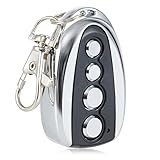
- 100 FOOT RANGE: Stay nice and cozy in your car and open your gate from 100 ft. away with this convenient CO-Z remote control
- EASY TO PROGRAM: Quickly pair this remote with your existing gate opener system using the ANT button on your opener’s circuit board
- LIGHT YET DURABLE: Constructed from high quality aluminum alloy, our remote has an incredibly low weight and resists wear & tear for years of corrosion-proof use
- WIDE COMPATIBILITY: Open any CO-Z sliding gate or any other 433.92 MHz non-encrypted gate from up to 100 feet away with this handy remote control
- GREATER CONVENIENCE: Set the system to automatically close your gate 12, 24 or 36 seconds after opening it with this remote gate opener's auto close feature
Why is the gate surging or moving unevenly?
For the Apollo 1500, the troubleshooting guidance points to a non-rigid pivot arm, loose bolts, or a gate that is too flexible. From a safe position, look for visibly loose mounting hardware or excessive movement in the gate structure. Do not tighten, weld, reinforce, or disassemble structural parts unless you are qualified to do that work; a gate technician can determine whether the mounting or actuator needs repair.
Why doesn’t the remote operate the gate?
For the cited Apollo 1500 system, possible checks include the transmitter and receiver code switches, transmitter battery, control-board fuses, operator battery voltage, and receiver. These checks are specific to the system described; first confirm the installed transmitter and controller model in the manuals directory.
What’s actually slowing this PC down?
Pick the symptom - the matching free tool is one click away.
- Replace or check the transmitter battery according to its instructions.
- If the system uses code switches, confirm that transmitter and receiver settings match the 1500 procedure.
- Observe whether the control-board pushbutton operates the gate while the remote does not. This narrows the symptom to the remote/control path but does not prove the receiver is defective.
- Have fuses, operator battery voltage, and the receiver checked against the correct manual before buying replacement parts.
Do not assume that a receiver, remote, or fuse is interchangeable across Apollo models. Match any replacement to the operator and control board.
Rank #4

- 【Wide Compatibility】Upgraded 3089 Multicode Gate Opener Remote, strictly compatible with Multi-Code 300MHz 10-DIP switch garage door openers ONLY, such as Multicode/Linear 1090, 1092-07, 1096, 1099, 1099-30, 1099-40, 1099-50, 3028; Digi-Code 5100, 5110, 5120, 5150 10 Digit Pin Code Gate Remote.
- 【Replace OEM Part Numbers】Multicode/Linear: 3089, 308911, MCS308911, 1089, 3060, 306010, MCS306010, MCS306001, 3070, 307010, MCS307010, MCS307001, 302101, MCS302101, 308301, MCS308301, 4120, 412001, MCS412001, 4140, 414001, MCS414001; Digi-Code: 5010, 5040, 5060, 5070, 5030.
- 【120FT Long Range & Secure Signal】 Powerful 3089 Multicode Remote triggers your garage/gate smoothly up to 120ft. Advanced anti-interference smart chip provides a highly stable, encryptive signal to prevent neighbor WiFi cross-talk, while the 10 DIP Switch design offers 1024 secure codes to keep your property safe from intruders.
- 【Easy Setup & Highly Portable】 Match 10 DIP Switches to your existing receiver for quick 2-minute programming. Its ultra-compact 3.4×1.8in sleek profile fits perfectly in pockets, clips tightly onto car sun visors, or attaches to your keychain for hassle-free daily carry.
- 【Heavy-Duty & Premium Quality】 Engineered with a reinforced casing and an upgraded metal visor clip that won't snap or bend. The heavy-duty buttons are tested for over 50,000+ crisp, responsive clicks, while advanced PCB soldering technology prevents component detachment, ensuring years of vibration-proof vehicle use.
Why does the remote work only near the gate?
Apollo says remote range varies with terrain, obstructions, and electrical interference. Its general guidance estimates 50–100 feet from inside a vehicle and 100–150 feet outside one; these are publisher estimates, not guaranteed range for a particular installation.
- Check the transmitter battery and whether the remote operates consistently at close range.
- Look for an obstructed receiver location or a loose antenna connection, without opening equipment that may be energized.
- If the problem persists, have the receiver and antenna checked. Apollo mentions an antenna extension kit, but compatibility should be confirmed for the installed system.
Why is the gate opening, closing, or stopping unexpectedly?
A stuck transmitter, keypad, pushbutton, or another control can send an unintended command. Apollo also identifies a potentially defective control-box pushbutton and, for the cited older system, problematic transmitter/receiver code-switch settings. The 1050 troubleshooting guide advises checking accessory inputs.
- Check whether a remote button, keypad key, or pushbutton is physically stuck or being pressed unintentionally.
- On a 1050, inspect accessory input indicators and connected devices using the board manual.
- For a system with code switches, verify settings only according to that model’s instructions.
- If the gate continues to move unexpectedly, stop using it and arrange qualified service; do not leave an unpredictable gate operating unattended.
Apollo 1050 power, closing, backup, or shutdown problems
Apollo’s 1050 guide separates several symptoms that can look like a general opener failure:
Do these 3 things before closing this tab:
1Clear out junk files and repair common Windows errors2Scan for outdated or missing drivers - takes under a minute3Repair Windows errors before they cause bigger problemsBest Value

- Operate solar gate opener or garage that have a US Automatic / Sentry 433 MHz receiver. Up to 100 ft typically.
- Operating frequency: 433.92MHz
- The transmitter security code is created by 9 ways three-position dipswitches. This allows up to 19,683 code combinations
- Power LED off: Check board power, loose or broken terminal wiring, voltage, and fuses using the installed configuration’s manual.
- Gate opens but will not close: Check input LEDs, external safety devices, and loop detectors. An active input may hold the gate open.
- Battery backup fails: Check battery voltage and controller connections against the board instructions.
- Hard shutdown: Clear obstructions and use the controller’s STOP/CLEAR button as described in the 1050 guide.
Do not replace a fuse or battery with a different rating or type based on appearance. Use the manual’s specified part and procedure; seek service if wiring, board power, or safety inputs are unclear.
When to repair, replace a part, or call a technician
Choose the next step based on what the symptom actually establishes—not on a guess that a particular component has failed.
| What you know | Practical next step |
|---|---|
| Operator or controller model is unknown | Identify the installed model and consult its manual before adjusting settings or sourcing parts. |
| Visible obstruction or binding is present | Keep people clear of the gate path; arrange correction of the obstruction or qualified mechanical inspection. |
| Remote fails but a board button operates the gate | Check the model-specific transmitter, battery, code settings if applicable, and receiver path; the observation alone does not establish receiver failure. |
| An input indicator or external safety device appears active | Identify the connected accessory and use the board manual to diagnose it; do not bypass the safety input. |
| Electrical, structural, board, or safety-device work is needed | Use a qualified gate technician or Apollo technical support rather than trial-and-error replacement. |
Apollo’s parts resources cover categories such as boards, actuators, receivers, transmitters, keypads, pushbuttons, and power accessories, but compatibility depends on the model. Confirm the part number and manual before ordering. Apollo’s troubleshooting pages are useful diagnostic guidance from a specialist seller/resource site; for procedures and part fit, prioritize the manual for the installed controller.
Quick Recap
Product prices and availability are accurate as of the date/time indicated and are subject to change. Any price and availability information displayed on Amazon at the time of purchase will apply.




