Quick wins for a faster PC:
Clear out junk files and repair common Windows errorsFree Scan →Scan for outdated or missing drivers - takes under a minuteDriver Scan →The best general-purpose solution for keeping room automation reliable is a local mmWave presence sensor connected to Home Assistant. Unlike a conventional PIR motion sensor, mmWave can continue reporting a person who is sitting still at a desk, on a sofa, or in a bathroom. A typical build uses an LD2410-family radar module, an ESP32 running ESPHome, and a Home Assistant automation with a deliberate vacancy delay.
That does not make the sensor a perfect human detector. Basic radar reports targets and reflections; it does not necessarily identify a human, distinguish every pet from every person, or know who is in the room. Choosing the right technology starts with defining what “presence” actually means.
As an Amazon Associate I earn from qualifying purchases.
Motion, occupancy, person detection, and identity are different
Home-automation products often use these terms interchangeably, but they describe different outcomes:
What’s actually slowing this PC down?
Pick the symptom - the matching free tool is one click away.
| Goal | Suitable technology | Main limitation |
|---|---|---|
| Detect movement | PIR, radar, or camera | Movement does not prove that a room is occupied. |
| Detect someone remaining in a room | mmWave presence sensing | Placement, reflections, and calibration matter. |
| Detect a person rather than an animal or vehicle | Camera AI, or more advanced radar and sensor fusion | No inexpensive sensor is perfectly reliable in every environment. |
| Identify a specific person | Facial recognition, phone, or Bluetooth tracking | Accuracy, privacy, and security concerns increase substantially. |
| Determine whether somebody is home | Phone, Wi-Fi, Bluetooth, or geofencing | These methods usually cannot reliably identify which room someone occupies. |
For room lighting, “occupied” is usually the useful state. You do not need to know a person’s identity; you need to know whether someone is still there.
#1 Best Overall

- WWZMDiB 5 Pcs PIR Sensor: When a human body enters the sensing range, the temperature difference between the body and the background causes a voltage change in the pyroelectric device. After amplification and comparison, the voltage signal is output.
- Voltage:DC 4.5-20V
- Detection Angle: <110 ° cone angle Lens size
- Detection range: 3-7 meters (10-23 feet)(adjustable)
- Two triggering modes: H: The output signal is maintained as long as a person is present. L: Triggered once with each change.
Why PIR lighting automations turn off while you are still there
A PIR sensor reacts to changes in infrared heat. It is excellent at detecting a person walking into a room, but it may stop reporting motion after that person sits quietly. The familiar failure sequence is:
- The PIR detects entry and turns on the light.
- The occupant sits at a desk, on a sofa, or on the toilet.
- No significant movement crosses the sensor’s detection zones.
- The PIR clears and the automation turns the light off.
mmWave radar is designed to detect moving and stationary targets. ESPHome’s LD2410 integration exposes separate has_moving_target, has_still_target, and combined has_target states. See the official LD2410 ESPHome documentation.
Choosing the sensing method
PIR
PIR remains the best choice for inexpensive, low-power motion detection, especially in hallways, stairs, and quick-response triggers. It is also common in battery-operated sensors. Its weakness is stationary occupancy: a still person may eventually disappear from the sensor’s perspective.
mmWave radar
mmWave is the strongest default for room lighting, desks, sofas, bedrooms, and bathrooms where somebody may remain still. It can report target presence as well as moving and still targets.
Its disadvantages are practical rather than theoretical. Radar can respond to pets, airflow, moving curtains, plants, reflections, or activity in an adjacent room. It may also behave unexpectedly around walls, doors, screens, and enclosures. Limit the detection distance and test the final mounting position.
The LD2410 documentation recommends a hardware UART and documents a factory-default baud rate of 256000. Exact power requirements depend on the module or carrier board, so check the documentation for the particular hardware rather than assuming every breakout is wired identically.
Rank #2
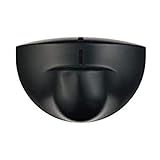
- Support NO(Normal Open) and COM, not support NC( Normal Close). it normally work together with another master device( control device or a professional power unit) to trigger relay
- Max mounting height:3-4M;Detection Area:4m(W)x2m(D)
- Technology:24G Microwave abd microprocessor
- Detection mode: Movement
- When walk close to door, it will detect person and trigger to open lock automatically. High-sensitivity, quick and accurate response. Specially apply in commercial, industrial and demanding of automatic access area.
Camera plus AI
Camera-based detection is useful when visual classification matters—for example, distinguishing people from vehicles at a gate or driveway. A local platform such as Frigate can provide AI object detection and camera automation workflows.
Cameras introduce different failure modes: darkness, glare, weather, poor angles, blocked views, image quality, processing load, and latency. They also expose substantially more private information, including faces, visitors, routines, and interior activity. For simply keeping a light on while someone sits still, a camera is usually disproportionate.
Phone, Bluetooth, Wi-Fi, and geofencing
These methods are useful for home/away status, HVAC setback, and security context. A phone can be left behind, lose connectivity, or be restricted by battery-saving settings. It should not normally be the only trigger for room-level lighting.
A practical beginner build
A flexible DIY architecture is:
LD2410-family presence sensor
        ↓
ESP32 running ESPHome
        ↓
Home Assistant native API
        ↓
binary_sensor state
        ↓
light, switch, HVAC, media, or notification automation
You need an LD2410, LD2410B, or LD2410C module; an ESP32 board with suitable hardware UART pins; wiring or a small PCB; an appropriate power supply; a non-metallic enclosure with a clear RF path; Home Assistant; ESPHome; and dependable Wi-Fi.
Preassembled sensors, such as the Athom Human Presence Sensor, reduce wiring and enclosure work. A bare module plus ESP32 offers more control over mounting, firmware, repair, and calibration. Confirm firmware and power-adapter options before buying any preassembled product; prices and availability change.
Wiring and mounting cautions
Connect the radar’s transmit and receive lines to the ESP32’s corresponding UART pins, observing the board’s voltage and pinout documentation. The GPIO17 and GPIO16 values shown below are examples, not universal assignments. Some boards label UART pins differently, and some pins may be unavailable or reserved.
Rank #3
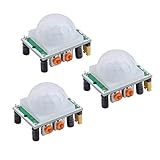
- Operating voltage range: DC 4.5-20V
- Quiescent Current: <50uA Trigger: L can not be repeated trigger/H can be repeated trigger(Default repeated trigger)
- Delay time: 5-200S(adjustable) the range is (0.xx second to tens of second)
- Board Dimensions: 32mm*24mm
- Angle Sensor: <100 ° cone angle Lens size sensor:Diameter:23mm(Default)
Do not hide the antenna behind metal, a conductive display, or an enclosure material that blocks or significantly alters the RF path. In the original Hackaday project, the LD2410B did not work properly behind an e-ink display and required a thin, unobstructive area in the enclosure. Read the project report for that physical limitation.
Aim across the area where people sit or work rather than directly at a reflective wall. Keep the field of view away from adjacent rooms, fans, vibrating equipment, and moving curtains. Test the sensor bare, then test it again in the finished enclosure.
Flash ESPHome firmware
The following is an example configuration, not a drop-in file for every ESP32 board or ESPHome release:
Recommended Free Tools
esphome:
  name: living-room-presence

esp32:
  board: esp32dev

logger:

api:
  encryption:
    key: !secret living_room_api_key

ota:
  - platform: esphome

wifi:
  ssid: !secret wifi_ssid
  password: !secret wifi_password

uart:
  tx_pin: GPIO17
  rx_pin: GPIO16
  baud_rate: 256000
  parity: NONE
  stop_bits: 1

ld2410:

binary_sensor:
  - platform: ld2410
    has_target:
      name: "Living Room Presence"
      device_class: occupancy
    has_moving_target:
      name: "Living Room Moving Target"
      device_class: motion
    has_still_target:
      name: "Living Room Still Target"
      device_class: occupancy
Replace the Wi-Fi secrets, API key, device name, board type, and UART pins. Use the current syntax supported by the ESPHome version installed on your system. The Home Assistant ESPHome integration uses ESPHome’s native API, supports encryption, and maintains a persistent connection rather than polling values. The documented default API port is 6053.
Add the device to Home Assistant
After compiling and installing the firmware, check the ESPHome logs and wait for Home Assistant to discover the device. If discovery does not occur, use Settings → Devices & services → Add Integration → ESPHome, then enter the device’s hostname or IP address and API credentials as required.
Confirm that the presence, moving-target, and still-target entities change state. Rename the entities to clear room-specific names, then use the combined has_target sensor for a simple occupancy automation unless testing shows that separate signals are more useful.
Rank #4

- Motion sensor audio player detection range is up to 13ft(4m), 120° view angle. It will trigger the sound remind you when someone or animals enter and move in the monitored area.
- Music files can be customized, Download MP3 or WAV music files by computer. (Recommend the Windows 7 ) MP3 audio files playback, single track or multiply play.This product only supports USB data cable to replace voice, not TF card.The card slot is for decoration only.(Part of the audio has been downloaded for the initial product, if you need to change it, please connect to the computer to replace the audio)
- Indoor festival music decorations ,halloween and christmas party fun music,entrance door greeting, driving animals soundbox or alert. Install front doors, window frames, driveways, and anywhere you want to be playing music to motion.
- Customize your chimes, your MP3 sound file will playback automatically after the PIR sensor detects movement. sounds as you wish! Included mounting screws, ball mounting accessories, USB cable
- Operates with 3 AAA batteries (Not Included) and optional to be plugged in DC5V (USB Cable Included) for external power supply. (If you have any questions about the product, please contact us immediately and we will reply you within 24 hours.)
Calibrate before relying on it
- Flash the firmware and verify the entities in Home Assistant.
- Temporarily mount the sensor in its intended location.
- Observe it with the room empty.
- Walk through the room and confirm fast detection.
- Sit still at the desk, sofa, or other important occupancy location.
- Test with pets, fans, curtains, HVAC airflow, and nearby-room activity active.
- Set a maximum detection distance so the sensor cannot see unintended areas.
- Adjust thresholds only after observing real readings.
- Test the finished enclosure and mounting surface again.
ESPHome can expose engineering data including moving energy, still energy, detection distance, moving distance, still distance, and per-range-gate thresholds. Its documented calibration approach is to enable engineering mode, monitor moving and still energy, adjust thresholds, and then disable engineering mode.
The Tool Desk
Outbyte PC Repair FREEClear out junk files and repair common Windows errorsFree Scan →Outbyte Driver Updater FREEFix the driver behind crashes, sound loss and screen glitchesFind Drivers →The radar’s timeout and Home Assistant’s vacancy delay are separate controls. The LD2410 timeout is how long the radar continues reporting presence after losing a target. ESPHome documents a default of 5 seconds, but that is generally too short to use as the room-lighting vacancy delay. The automation should usually wait longer before turning off a light.
Create a reliable Home Assistant light automation
This example turns on the light when presence begins, checks illuminance, and turns it off only after five minutes of continuous vacancy:
alias: Living room light from human presence
description: Turn on for presence and turn off after the room is vacant
triggers:
  - trigger: state
    entity_id: binary_sensor.living_room_presence
    to: "on"
    id: occupied

  - trigger: state
    entity_id: binary_sensor.living_room_presence
    to: "off"
    for: "00:05:00"
    id: vacant

conditions: []
actions:
  - choose:
      - conditions:
          - condition: trigger
            id: occupied
          - condition: numeric_state
            entity_id: sensor.living_room_illuminance
            below: 80
        sequence:
          - action: light.turn_on
            target:
              entity_id: light.living_room

      - conditions:
          - condition: trigger
            id: vacant
        sequence:
          - action: light.turn_off
            target:
              entity_id: light.living_room
mode: restart
Entity IDs will differ on your installation. Home Assistant supports state triggers with a for duration, as described in its automation trigger documentation.
Choose the vacancy delay based on the room. A bathroom may need a shorter delay; a study or living room may need considerably longer. Use a manual override—such as an input_boolean.living_room_light_manual—for dinner, cleaning, entertaining, or any situation where automatic shutoff is undesirable. Add a lux condition only when daylight-based behavior is wanted.
Free tools Windows power users keep installed
One-click scans. No signup required.
Do not treat unknown or unavailable as “empty.” An unavailable sensor may indicate a Wi-Fi, power, ESPHome, or UART problem. Add availability conditions or a separate device-health automation so a communications failure does not unexpectedly switch off lights, disarm security, or trigger another unsafe action.
Best Value

- IS335 WIRED PIR Motion Detector, 40' x 56' by Honeywell
Improve reliability with sensor fusion
One sensor does not need to make every decision. A practical combination is:
PIR       = fast movement
mmWave   = stationary occupancy
Door     = entry and exit context
Lux      = whether lighting is needed
PIR can provide an immediate entry signal, while mmWave keeps the room occupied. A door contact can help distinguish someone entering from activity on the other side of a wall. For more complex rooms, retain a “recently occupied” timestamp or helper rather than depending on one instantaneous state.
Common problems and fixes
| Symptom | Likely cause | Fix |
|---|---|---|
| Device is not discovered | Wi-Fi, mDNS, API, or power problem | Check the ESPHome logs, device IP address, network connection, and API settings. |
| No radar entities appear | Missing ld2410 or binary-sensor configuration |
Validate the YAML and reflash the device. |
| UART data is garbled or absent | Wrong pins, baud rate, wiring, or serial settings | Use a suitable hardware UART with 256000 baud, no parity, and one stop bit, unless your hardware documentation specifies otherwise. |
| It detects the next room | Detection range is too large or placement is poor | Reduce distance gates, change orientation, or move the sensor. |
| The light turns off while someone is seated | The automation uses motion rather than presence, or thresholds are too high | Use has_target or has_still_target and calibrate at the actual seating position. |
| Occupancy stays on constantly | Fan, curtain, pet, HVAC airflow, reflection, or nearby activity | Reposition the sensor, reduce range, and retune thresholds. |
| It works bare but fails in the enclosure | The enclosure blocks or alters the RF path | Use a thin, non-conductive, RF-transparent section and retest. |
| The light turns off after a disconnect | Unavailable data is being interpreted as vacancy | Handle unknown and unavailable states explicitly and choose a fail-safe fallback. |
Pets, walls, doors, and false detections
Do not promise reliable human-versus-pet classification from a basic LD2410. Cats and dogs can generate valid radar targets. Test the actual animal, room, mounting height, and furniture arrangement. If pet rejection is essential, consider a more advanced radar, camera AI, door-position context, or multiple sensors.
mmWave behavior through walls and doors is unintuitive. Construction materials, target size, angle, reflections, and range settings all affect the result. A sensor may detect activity outside the intended room, creating both an automation problem and a privacy problem. Maximum-distance limits and careful placement are essential.
Privacy and security
mmWave generally provides presence information rather than an image, which can be a better fit for bedrooms, bathrooms, and private rooms. It is not automatically private, however: the ESP32, Home Assistant server, network, logs, and remote-access configuration still need sensible security.
Cameras reveal much more. Facial recognition adds biometric and access-control concerns. Prefer local processing and local-only automations where practical, and avoid sending camera images to a cloud service merely to turn on a light. Local processing reduces cloud exposure; it does not eliminate privacy or network-security risks.
When a camera or multiple sensors make sense
- Use mmWave for room occupancy and stationary people.
- Use camera AI when person-versus-vehicle or other visual classification justifies the additional hardware, processing, latency, and privacy exposure.
- Use phone or geofence presence for home/away context, not precise room occupancy.
- Use multiple sensors when rooms are large, divided, reflective, or have pets.
For safety-critical functions—door locks, garage doors, gas appliances, medical alerts, fall detection, security disarming, or emergency lighting—do not rely on an inexpensive presence sensor as the sole input. Use appropriate certified equipment and redundant safeguards.
Final recommendation
For most Home Assistant room-lighting projects, build or buy a local mmWave presence sensor and expose its occupancy state through ESPHome. Use a state-based automation with a longer vacancy delay than the radar’s own timeout, restrict the detection range, calibrate it in the finished installation, and handle unavailable states explicitly.
Keep the terminology honest: PIR detects motion, mmWave detects targets suited to occupancy sensing, cameras can classify visible objects, and phones can suggest who is home. No single inexpensive sensor reliably solves motion, room occupancy, visual classification, and personal identity at once.
Quick Recap
Product prices and availability are accurate as of the date/time indicated and are subject to change. Any price and availability information displayed on Amazon at the time of purchase will apply.




