Free tools Windows power users keep installed
One-click scans. No signup required.
The best VDSL modem router for your home is the one your internet provider will actually provision, that matches your line type, and that sits on clean wiring. For many U.S. homeowners still using CenturyLink, Brightspeed, Frontier, Windstream, or a rural telephone-company DSL service, that usually means starting with an approved C3000Z or C4000-series DSL gateway, considering a retail VDSL2 unit only where the provider allows it, and investing part of the budget in better inside wiring instead of spending everything on a flashy router.
On our job sites, we see the same pattern over and over: a homeowner buys a stronger modem-router combo, plugs it into a 25-year-old daisy-chained phone jack behind a desk, and gets almost no improvement. Then a clean DSL home-run from the network interface device to the modem location stabilizes the line, raises the sync rate, or cuts random dropouts. VDSL is copper-based. The modem matters, but the copper path matters just as much.
For 2026, treat VDSL as a legacy-but-still-useful access technology. It can be perfectly serviceable for email, remote work, streaming, and general household use, especially on bonded VDSL2 service. But it is not cable internet, and it is not fiber. A DOCSIS cable modem will not work on a VDSL line. A fiber ONT is a different category entirely. Before you buy hardware, confirm your exact service type: ADSL2+, VDSL2, bonded VDSL2, G.fast, cable, or fiber.


Quick Picks: Best VDSL Modem Routers in 2026
If you want the short answer, these are the practical choices we would shortlist first for most homeowners.
| Best for | Model or type | Typical 2026 cost | Why it makes sense | Main caution |
|---|---|---|---|---|
| CenturyLink or Brightspeed DSL | CenturyLink-compatible C3000Z or C4000 DSL model | $100-$180 renewed for many C3000Z/C4000-class units | ISP support and provisioning usually matter more than raw feature claims | Make sure it is the correct DSL variant; C4000XG is not for DSL |
| Bonded CenturyLink-style VDSL | C4000BG bonded DSL gateway | Commonly $100-$180 renewed | Designed for bonded DSL lines and Wi-Fi 6-class service | Marketplace units are often renewed or ISP-branded |
| Single-line VDSL2 where retail equipment is allowed | TP-Link Archer VR400 | Often around $60-$100 equivalent, availability varies | VDSL2/ADSL2+/ADSL2/ADSL support with AC1200 Wi-Fi | U.S. ISP compatibility must be verified before purchase |
| Advanced users, small offices, larger homes with separate Wi-Fi | DrayTek Vigor xDSL router or modem | $180-$400+ depending on features | Business-grade routing, VPN, xDSL, and modem options | Not plug-and-play for every residential ISP |
| Cheap used replacement | NETGEAR Nighthawk D7000 | Used units may appear around $30-$50 | Older AC1900 VDSL/ADSL modem router | End of Service status makes it a risky primary router in 2026 |
For most homeowners, we would not rank these by Wi-Fi speed alone. VDSL line rate may be 20, 40, 60, 80, or roughly 100 Mbps depending on distance from the DSLAM or cabinet, copper condition, and whether the service uses one or two pairs. A modem advertising AC1200 or AX3000 Wi-Fi cannot create more internet speed than the DSL line delivers.
#1 Best Overall
How VDSL Changes the Buying Decision
VDSL and VDSL2 run over copper telephone pairs. That copper may pass through a network interface device on the outside wall, old inside wiring, splitters, alarm panels, punch-down blocks, and wall jacks before reaching the modem. Every connection point is a possible source of noise, corrosion, or signal loss.
That is why the best modem router in a VDSL home is often part of a system, not a magic box. The system includes the provider line, the demarc or NID, a clean dedicated cable path, the modem, the router, Ethernet wiring, switches, and Wi-Fi access points. If any one of those pieces is weak, the homeowner feels it as buffering, lag, stalled video calls, or speed tests that change room by room.
Bonded VDSL adds another requirement. Bonded service uses two copper pairs instead of one to increase speed or stability. If your account is provisioned for bonded VDSL, you need a modem gateway that supports bonded DSL and that your ISP will activate. Buying a generic VDSL2 router without bonded support is a common and expensive mistake.
Best Overall for CenturyLink and Brightspeed DSL: C3000Z or C4000 DSL Gateways
For CenturyLink and Brightspeed DSL customers, our first move is to check the current provider-compatible modem list, then look at the C3000Z and C4000 DSL variants. CenturyLink guidance names C4000 models, except the C4000XG, and C3000Z as preferred DSL models. That point matters because the C4000XG is a fiber gateway, not the right choice for VDSL.
The C3000Z has been common in CenturyLink DSL installations for years. It is not glamorous, but it is often easier to support, provision, and troubleshoot than an unsupported third-party router. For a homeowner who wants the internet working with minimum drama, that has real value.
The C4000BG and C4000LG models are newer-looking gateways commonly seen in CenturyLink-style deployments. The C4000BG is the one to watch for bonded DSL service. Listings often emphasize bonded DSL compatibility and Wi-Fi 6 or 802.11ax-class wireless, though many units sold online are renewed or ISP-branded. That means the question is not just, “What does the spec sheet say?” The question is, “Will my provider activate and support this serial-numbered unit on my account?”
Best fit
Choose a C3000Z or correct C4000 DSL model if you have CenturyLink or Brightspeed DSL, want provider support, and do not want to turn setup into a networking project. Expect many renewed units to land around $100-$180 in 2026, with older or basic gateways sometimes closer to $45-$100.
What to verify before buying
Confirm the exact model suffix, line type, bonded or single-pair service, return policy, and whether your ISP will provision customer-owned or renewed hardware. Also check whether you need PPPoE credentials, VLAN tagging, or ISP firmware.
Best Retail VDSL2 Option Where Supported: TP-Link Archer VR400
The TP-Link Archer VR400 is a sensible retail VDSL2/ADSL modem router where the provider allows customer-owned equipment. TP-Link lists it as supporting VDSL2, ADSL2+, ADSL2, and ADSL, with up to 100 Mbps VDSL broadband. Its Wi-Fi is AC1200 class: 300 Mbps on 2.4 GHz and 867 Mbps on 5 GHz.
Those wireless numbers are local network radio ratings, not a promise that your DSL line will hit those speeds. If your VDSL service syncs at 40 Mbps, the Archer VR400 cannot turn it into 100 Mbps. What it can do, in the right installation, is provide a clean all-in-one modem-router for a modest price.
The catch is U.S. availability and ISP support. The Archer VR400 is easier to find in some international markets than in the U.S., and not every American DSL provider will provision it. We would only buy it after confirming the provider supports retail VDSL2 equipment for that exact service.
Windows Errors? Fix Them Before They Spread
Repair common Windows errors and clear accumulated junk for a smoother, more stable PC - no reinstall needed.Free scan · no reinstallCrashes, No Sound, or Screen Glitches?
Random freezes, missing sound and display glitches usually trace back to one bad driver. Find and replace yours safely.Free scan · under a minuteRank #2
Best fit
Choose the Archer VR400 for single-line VDSL2 or ADSL service where your ISP explicitly allows it, especially if you need a modest all-in-one device for a smaller home or apartment. Typical pricing is often around $60-$100 equivalent, depending on marketplace and availability.
Best for Advanced Setups: DrayTek Vigor xDSL Routers and Modems
DrayTek is worth considering when the home network is closer to a small office: VPN needs, multiple access points, more detailed routing, failover, or a structured wiring panel with separate switching. DrayTek’s 2026 catalog still includes xDSL routers and modems, including Vigor2867, Vigor2763/2766, Vigor166, and Vigor167 families with VDSL2 or G.fast options depending on the model.
In a larger home, we often prefer separating jobs: use the DSL modem or gateway for the WAN connection, then run Ethernet to a real router, switch, and wired access points. That gives better Wi-Fi placement, easier upgrades, and less dependence on one plastic box sitting near a phone jack.
DrayTek hardware is not the cheapest route. Plan on roughly $180-$400+ depending on Wi-Fi, VPN, LTE backup, or G.fast capability. It is also not something we would buy blind for a residential DSL account. Verify ISP compatibility first, especially for bonded lines, VLAN requirements, PPPoE, and provisioning rules.
The Tool Desk
Outbyte PC Repair FREERepair Windows errors before they cause bigger problemsFix Now →Outbyte Driver Updater FREEScan for outdated or missing drivers - takes under a minuteDriver Scan →Used NETGEAR D7000: Cheap, but Not Our Primary Recommendation
The NETGEAR Nighthawk D7000 AC1900 VDSL/ADSL modem router still appears on the used market, sometimes around $30-$50. Years ago, it was an attractive all-in-one option for certain DSL homes because it combined VDSL/ADSL modem capability with stronger Wi-Fi than many basic ISP gateways.
In 2026, the problem is support. NETGEAR lists the D7000 as End of Service, meaning no additional firmware updates are planned. For a primary internet gateway that faces the outside world, that is a serious caveat. Cheap hardware is not cheap if it becomes the weak point in the household network.
We would consider a D7000 only as a temporary replacement, lab device, or last-resort compatibility fix where the homeowner understands the security tradeoff. For a permanent installation, we would steer toward supported ISP equipment, a current business-grade xDSL device, or a bridge-mode design with a modern router behind the DSL gateway.
The Wiring Upgrade That Often Beats a New Router
If your VDSL drops connection, has poor margins, or tests far below the service plan, look at the wiring before chasing another router. A dedicated DSL home-run from the NID or demarc to the modem location is one of the highest-value fixes in older homes.
What’s actually slowing this PC down?
Pick the symptom - the matching free tool is one click away.
A clean home-run means the DSL signal is not traveling through every old phone jack in the house. It avoids unnecessary splitters, bridge taps, alarm-panel loops, damaged staples, corroded terminals, and mystery splices from previous remodels. In many homes, the best modem location is near the demarc or structured media panel, then Ethernet carries the network to the rooms that need it.
For a simple jack relocation or dedicated DSL home-run, homeowners commonly spend in the low hundreds of dollars. Whole-home structured cabling can range from several hundred dollars to several thousand dollars depending on home size, wall access, number of drops, attic or crawlspace conditions, patch panel, enclosure, rack, labeling, and testing.
When walls are open during a remodel or new build, cable is inexpensive compared with finished-wall labor. We typically recommend at least two CAT6 cables to offices, media centers, and other high-use locations. For ceiling access points, run CAT6 to high, central locations rather than expecting one modem-router in a utility corner to cover the whole floor plan.
Rank #3

- Four-port 10/100/1000Base-T Ethernet switch, RJ-45, Two-port USB 2.0
- Single-port voice FXS, RJ-14
- Concurrent Wi-Fi support for 400 mW 802.11b/g/n and 802.11ac
- ONT IS REQUIRED FOR THIS MODEM TO WORK WITH YOUR SERVICE
- Includes; Gateway, Power Adapter and Ethernet Cord
Construction-Grade Network Layout for a VDSL Home
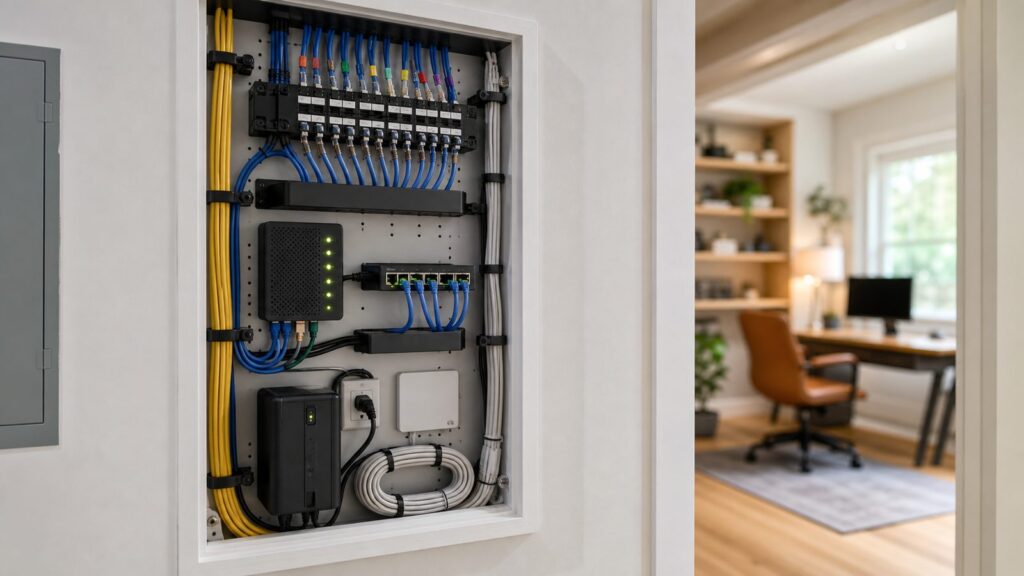
A better VDSL home network usually follows this path: provider line to NID, dedicated DSL home-run to the modem or gateway, Ethernet from the gateway area to a structured media panel, then wired backhaul to offices, TVs, gaming areas, and ceiling access points.
Do these 3 things before closing this tab:
1Repair Windows errors before they cause bigger problems2Fix the driver behind crashes, sound loss and screen glitches3Clear out junk files and repair common Windows errorsThe structured media panel should be large enough to work in. Small 14-inch enclosures fill up fast once you add a modem, router, switch, patch panel, coax splitter, power supply, and slack cable. In many homes, a 28-inch or larger enclosure is more practical, and a small wall-mounted rack is better still if the space allows it.
Do not bury the Wi-Fi radio inside a metal cabinet and expect good coverage. If the DSL gateway must live in the panel, turn off or de-emphasize its Wi-Fi where appropriate and use ceiling or wall-mounted access points in better locations. High and central beats low and hidden. A basement utility room, garage, laundry room, or cabinet behind a television is rarely the best wireless location.
For remote work, gaming, and streaming, wire what does not move. A desktop computer, smart TV, game console, network printer, security recorder, or office dock should be on Ethernet whenever practical. Save Wi-Fi capacity for phones, tablets, laptops, and smart-home devices.
Cost Planning: Hardware, Wiring, and Labor
A homeowner budgeting for VDSL equipment should separate the modem cost from the network cost. The modem-router may be $100-$180, but the larger performance gain may come from a $250-$600 wiring cleanup or a $1,500 structured cabling package during a remodel.
Quick wins for a faster PC:
Clear out junk files and repair common Windows errorsFree Scan →Scan for outdated or missing drivers - takes under a minuteDriver Scan →Repair Windows errors before they cause bigger problemsFix Now →| Item | Typical 2026 cost | Notes from the field |
|---|---|---|
| Older or refurbished basic DSL gateway | $45-$100 | Useful only if compatible and still secure enough for the job |
| C3000Z/C4000-class renewed gateway | $100-$180 | Often the practical choice for CenturyLink or Brightspeed DSL |
| Business-grade xDSL router | $180-$400+ | Best for advanced networks, VPN, routing, or separate AP designs |
| Simple DSL jack relocation or home-run | Low hundreds | Price depends heavily on wall access and demarc location |
| Whole-home CAT6 cabling | Several hundred to several thousand | Number of drops, finished walls, attic/crawlspace access, and labeling drive cost |
| UPS for modem, router, switch, and gateway | $75-$250 | Keeps short outages from interrupting work calls or VoIP |
Material choices also matter. CAT6 is a strong default for most homes. CAT6A may be worth considering for longer runs, higher-spec installations, or future 10-gigabit planning, but it costs more and is stiffer to terminate. Plenum-rated cable may be required in certain air-handling spaces. Patch panels, keystone jacks, wall plates, surge protection, labels, firestopping materials, and testing all add cost but also make the system serviceable.
Independent reader supportYour contribution helps us test, update, and keep practical guides available for everyone.When to DIY vs. When to Hire a Pro
DIY can make sense if you are replacing an approved modem with the same provider, changing Wi-Fi settings, labeling cables, adding a UPS, or plugging Ethernet patch cords into an existing panel. A careful homeowner can also run surface-mounted Ethernet in a basement or utility room if local rules allow it and the routing is simple.
Hire a pro when the work involves finished-wall fishing, multi-story cable routing, attic or crawlspace work, exterior penetrations, the NID area, alarm-panel bypasses, structured cabling during a remodel, or uncertainty about low-voltage code. A qualified low-voltage contractor or electrician can test cable runs, preserve firestopping, avoid electrical hazards, and leave the system labeled.
Low-voltage work is not automatically permit-free. Rules vary by city, county, and state. Some jurisdictions allow homeowners to run communications cable in their own single-family home. Others require permits, licensed contractors, specific cable ratings, firestopping, or inspection, especially in multifamily buildings, commercial spaces, plenum areas, or larger remodels. Before walls close, ask the inspector or local authority having jurisdiction what they expect.
Keep communications cable away from line-voltage wiring except where properly separated or crossing at a clean angle. Do not run network cable through the same holes as electrical cable. Do not staple cable so tightly that the jacket deforms. Do not leave penetrations unsealed where fireblocking is required.
Rank #4

- Compatible with CenturyLink DSL Service Only
- Brand New, Sealed in Bulk Packaging
- ADSL2+ & VDSL2 Modem Compatible with CenturyLink Internet
- All-In-One Device -Includes Built-In 4-Port Simultaneous Dual-Band WiFi Router
Setup Checklist Before You Judge the Router
Before declaring a modem router good or bad, measure the system. First, record the DSL sync rate and signal-to-noise margin if the gateway exposes those numbers. Then run a wired speed test from a computer connected by Ethernet. After that, test Wi-Fi in the office, living room, primary bedroom, and any room where video calls or streaming matter.
Also test latency under load. A connection that looks fine at idle can fall apart when someone uploads photos, syncs cloud backups, or starts a large game download. If the router supports quality of service settings, configure them conservatively based on the actual DSL upload speed, not the advertised plan speed.
Check firmware during setup. Unsupported hardware should not be the permanent edge device for a household network. Change default admin passwords, document PPPoE or VLAN settings if your ISP provides them, label the NID home-run, and keep a simple network diagram inside the media panel.
Recommended Free Tools
Final Recommendation
For most U.S. VDSL households in 2026, the best choice is not the fanciest all-in-one router. It is an ISP-approved DSL gateway, installed on clean wiring, feeding a sensible Ethernet and Wi-Fi layout. CenturyLink and Brightspeed customers should start with the C3000Z or the correct C4000 DSL variant, especially the C4000BG for bonded DSL. Retail options like the TP-Link Archer VR400 can work where the ISP permits them. DrayTek is the stronger choice for advanced networks, but it requires more homework.
If the home is larger than about 1,800-2,500 square feet, has thick plaster, masonry, multiple floors, or a modem location in a corner utility room, plan on separate Wi-Fi access points. The modem gets you onto the DSL line. The home network design determines whether that connection feels solid in the rooms where people actually live and work.
Frequently Asked Questions
What is the best VDSL modem router for CenturyLink or Brightspeed in 2026?
Start with the ISP-approved list. For CenturyLink and Brightspeed DSL, C3000Z and the correct C4000 DSL models are usually the practical shortlist. Use C4000BG for bonded DSL where supported, and avoid confusing DSL models with fiber-only gateways such as C4000XG.
Can I use any VDSL2 modem router with my DSL provider?
No. The modem must match your service type and the provider must be willing to provision it. Bonded VDSL, PPPoE, VLAN tagging, and ISP firmware requirements can make an otherwise capable retail router unusable.
Is a VDSL modem router different from a cable modem router?
Yes. VDSL uses copper telephone pairs. Cable internet uses DOCSIS over coax. Fiber uses an ONT or fiber gateway. A DOCSIS cable modem-router combo will not work on a VDSL line.
Will a Wi-Fi 6 VDSL router make my DSL internet faster?
It can improve local Wi-Fi performance, but it cannot exceed the DSL line speed. If your VDSL line syncs at 40 Mbps, a Wi-Fi 6 router will not turn it into 100 Mbps internet.
Should I use a modem-router combo or separate Wi-Fi access points?
A modem-router combo is fine for many small homes. Larger homes, remodels, and remote-work households usually perform better with the DSL gateway connected to a modern router, Ethernet switch, and wired access points.
Do I need a permit to run Ethernet or telephone cable?
It depends on your local jurisdiction and building type. Some single-family homeowner work is allowed without a permit, while multifamily, commercial, plenum, or remodel work may require permits, rated cable, firestopping, or a licensed low-voltage contractor.
Quick wins for a faster PC:
Repair Windows errors before they cause bigger problemsFix Now →Fix the driver behind crashes, sound loss and screen glitchesFind Drivers →Clear out junk files and repair common Windows errorsFree Scan →Quick Recap
Product prices and availability are accurate as of the date/time indicated and are subject to change. Any price and availability information displayed on Amazon at the time of purchase will apply.