For tighter, more repeatable miter and bevel cuts, first make sure the blade is sharp and secure, the fence and table are flat, and the blade is aligned to the fence. Then set the angle with the saw’s controls, hold the work firmly against both surfaces, and check a test cut in scrap before cutting finished stock. Unplug the saw before inspecting or adjusting it, and use the procedure in the manual for your exact model.
Know which angle you need
A miter changes the blade’s horizontal angle relative to the fence while the blade stays perpendicular to the table. A bevel tilts the blade. A compound cut combines both settings. Bosch’s GCM18V10SD manual describes the miter scale as showing the blade angle relative to the fence; consult the manual for your saw’s controls and terminology.
Troubleshoot in a reliable order
1. Unplug the saw
Disconnect power before inspecting the blade, checking alignment, or making adjustments. DEWALT begins its calibration procedure by unplugging the saw. Follow the safety and service instructions for your model.
2. Inspect the blade and its mounting
Check that the blade is correctly secured and in good condition. DEWALT notes that an old or dull blade can cause inaccurate cuts. If replacement is needed, use a blade compatible with the saw’s specified diameter, arbor, and other requirements; check the saw manual rather than choosing by appearance alone. See DEWALT’s adjustment guidance.
Do these 3 things before closing this tab:
1Fix the driver behind crashes, sound loss and screen glitches2Repair Windows errors before they cause bigger problems3Scan for outdated or missing drivers - takes under a minute#1 Best Overall

- VERSATILE 3-IN-1 DIGITAL ANGLE FINDER: Measure inside and outside angles, lengths, and calculate miter saw cut angles with precision
- EFFICIENT MITER SAW PROTRACTOR: Easily calculate the perfect saw blade angle for precise miter joints every time
- MACHINED RULER EDGES: Accurate measurements with +/- 0.2-Degree precision for reliable results
- BRIGHT LED DISPLAY: White LED display ensures easy visibility in any lighting conditions
- DURABLE AND RUST RESISTANT: Long-lasting metallic ruler with deeply etched markings for clear readings
3. Check the table and fence for flatness
Place a straightedge along the fence and table and use feeler gauges to check for gaps, as DEWALT recommends. A flat, stable reference matters: the angle scale cannot compensate for a fence or table surface that is not flat. Keep the saw unplugged while checking.
4. Check blade alignment against the fence
Use a suitable square against the fence to check whether the blade is aligned at a right angle to it. Follow the manufacturer’s method; DEWALT’s procedure checks at the near and far sides of the blade and describes adjustment at the detent assembly if alignment is off. Do not push against or bend the blade to make the square appear to fit. Adjustment hardware and steps vary by model, so use the manual for your saw.
Rank #2

- SIMPLE INTERFACE: This digital angle finder features a straightforward 4-button interface for easy operation: ZERO to recalibrate at any position, HOLD/FLIP to secure your reading, REV. to display the outside angle measurement, and ON/OFF.
- COMPREHENSIVE RANGE: Our digital protractor features a 360° range and an ergonomic Angle Lock knob, allowing precise inside, outside, and reverse angle measurements—perfect for detailed projects.
- HIGH-RESOLUTION DISPLAY: This angle finder features an extra-large LCD screen with 0.05° resolution and a durable 7-inch anodized aluminum rule with laser-etched millimeter and inch markings for precise measurements.
- ROBUST PROTECTION: Each digital angle gauge comes with a heavy-duty zippered pouch that protects the tool during demanding tasks such as woodworking, flooring, and tiling.
- UNMATCHED ACCURACY: Each digital protractor is assigned a unique serial number and undergoes rigorous testing. Our quality control process ensures an accuracy standard of +/- 0.3°, guaranteeing reliability and precision with every use.
5. Set the miter or bevel with the saw’s controls
Use the detents for common angles when they match the cut you need. For an angle near a detent but requiring greater precision, some Bosch saws provide a detent override; the control and scale markings are model-specific. Check the manual for the correct setting method instead of assuming that another saw’s adjustment sequence applies.
6. Secure the stock and make a test cut
Keep the workpiece flat against the table and fence, and clamp it so the clamp clears the guard and saw head throughout the cut. Make a test cut in scrap and check the result before cutting finished stock. This lets you catch an alignment or setup problem without sacrificing the final piece. Follow the manual’s instructions for your saw, especially when using a sliding cut.
Rank #3
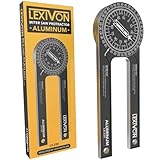
- ACCURATE - Crafted from CNC-machined Anodized Aluminum Alloy Steel. Features easy-to-read precision laser engraved scales.
- DESIGN - Internal Teflon O-ring mechanism swivels during operation and ensures smooth & precise read on inside/outside corners.
- FORGET ABOUT THE GUESSWORK - Two scales transfer your work angle directly to the miter saw for an accurate Miter cut, and Single cut.
- DO IT RIGHT THE FIRST TIME! - Perfect for crown molding, trim work, plumbing, and a variety of other carpentry applications.
- QUALITY - The 1/4-Inch thick aluminum alloy is stronger and won't bend like the plastic ones | Backed by our Lifetime Limited Warranty for your complete peace of mind!
Check the cut before changing the saw
If a cut does not close tightly or repeated parts differ, work through the setup checks rather than immediately changing the angle scale. A dull blade, loose mounting, uneven reference surfaces, misalignment, or stock that is not seated consistently can each undermine the result. Change one setting at a time and recheck with scrap so you can identify what corrected the cut.
Safety during cutting and adjustment
- Keep hands well clear of the blade and maintain firm control of the stock; OSHA identifies hand contact and slipping stock as serious hazards.
- Use the blade guard and keep the blade sharp. OSHA advises that the upper guard adjust automatically to the material thickness.
- Wear eye and face protection. OSHA’s miter-saw guidance says, “Always wear eye and face protection.” See OSHA’s miter-saw safety guidance.
- Wait for the blade to stop before raising the saw head or removing the workpiece, as directed in the Bosch manual.
When the saw’s specifications matter
Different saws have different bevel ranges, detents, and adjustment controls. For example, DEWALT lists the DWS715 with a bevel range of 0°–48° left and 0°–3° right, plus 14 positive miter stops; those are specifications for that model, not general miter-saw capabilities. Check the exact model’s manual and product specifications if your planned cut approaches the limits of your saw.
Rank #4
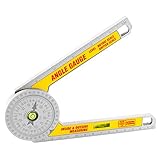
- Easy to carry-made of lightweight plastic, the protractor has excellent corrosion and wear resistance for extended service life. In addition, it is small in size, light in weight and easy to carry.
- The protractor is equipped with two measurement modes and two horizontal bubbles to ensure accuracy.
- Perfect forming angle gauge with two horizontal bubbles, used for crown forming, bevel cutting, woodworking, etc.
- Protractor saves time and reduces waste
- Wide application- whether you are a professional or a non professional, our products are very suitable for you. It is suitable for crown forming, oblique cutting, woodworking, plumbing, metal processing.
Sources: DEWALT support, updated March 13, 2026; OSHA miter-saw guidance; and the model-specific Bosch manual.
Quick Recap
Best Value

- PATENTED MEASURING TECHNOLOGY -- Ruler and protractor combination for easy measuring inside and outside angles.
- DURABLE RULERS -- Well-made stainless steel rulers and laser etched measurements offer clear reading and years' usage.
- HIGH ACCURACY -- Accuracy of this protractor is ±0.3 degree. It is a good choice for most projects like woodworking, crown molding and daily use. Folded length: about 7.5 inch/220mm.Total length 400mm.
- LOCKING FUNCTION -- For read it easily, GemRed angle finder could be locked at any angle. *NO REVERSE ANGLE/DISPLAY FUNCTION.
- BATTERY -- CR2032 battery. Package contains battery.
Product prices and availability are accurate as of the date/time indicated and are subject to change. Any price and availability information displayed on Amazon at the time of purchase will apply.
Quick wins for a faster PC:
Clear out junk files and repair common Windows errorsFree Scan →Fix the driver behind crashes, sound loss and screen glitchesFind Drivers →Repair Windows errors before they cause bigger problemsFix Now →



