Do these 3 things before closing this tab:
1Fix the driver behind crashes, sound loss and screen glitches2Repair Windows errors before they cause bigger problems3Scan for outdated or missing drivers - takes under a minuteThe battery is inside the wireless keypad—not the garage-door opener motor unit. Find the keypad’s model number first, then open its cover using the method for that model. Chamberlain’s current support guide recommends a 9V alkaline battery for the keypad families it covers; check your model before replacing the battery.
Before you start: identify the keypad
Look for the model number on the back of the wireless keypad or inside its battery compartment. Chamberlain uses different cover designs across keypad models, so the model determines how to open the cover and replace the battery. The instructions below cover the model groups listed in Chamberlain’s battery-change guide.
For those models, prepare a new 9V alkaline battery. Chamberlain says most of its keypads use a 9V battery and recommends alkaline; do not assume an unidentified keypad takes the same battery. Have a small screwdriver ready only if your model’s cover requires one.
Open the cover and replace the battery
CH148, L979S, CH348/CH348C, L979M, R979M, CMX348, Q348LA, CHU48/CHU48C and L979U
- Slide the cover down and remove it.
- Take out the old battery and disconnect it from the power leads.
- Connect the new 9V battery to the leads and place it in the housing.
- Slide the cover back into place until it clicks.
940D, 940EV, 977LM, 377LM, 877LM, 877MAX and 878MAX
- Insert a flat-head screwdriver into the oval cutout at the top of the battery cover.
- Press and slide the cover down. Once it clears the tabs, remove the cover.
- Replace the battery, then slide the cover up until it locks.
740CB/66LM older style
- Use a Phillips screwdriver to remove the screw at the bottom of the keypad.
- Slide the cover down and replace the battery.
- Slide the cover up and tighten the screw.
940CB, 976LM and 376LM pin-hole style
- Insert a small Phillips screwdriver into the pin hole.
- Gently pull outward while sliding the cover down, then remove it.
- Replace the battery and slide the cover up to secure it.
Test the keypad
- Check that the battery cover is seated securely.
- Press a keypad button and confirm that the keypad lights.
- Enter your PIN to check that the keypad communicates with the opener.
If it remains unresponsive, consult the instructions for the exact keypad model before attempting programming or other troubleshooting. Chamberlain’s battery-change guidance does not establish that replacing the battery always erases the PIN or requires reprogramming.
What’s actually slowing this PC down?
Pick the symptom - the matching free tool is one click away.
#1 Best Overall

- 🔋【7000mAh High Capacity】– Long-lasting rechargeable battery for MyQ Smart Garage Video Keypad, MyQ Garage Door Opener, and MyQ Smart Garage Camera . Provides extended power with 3.7V output for reliable performance.
- ⚡【Type-C Fast Charging】– Supports 5V/2A USB-C charging for quick and convenient power-ups. No need for disposable batteries—just recharge and reuse!
- ❄️🔥【Extreme Temperature Resistance】– Works from -4°F to 122°F (-20°C ~ 50°C)Reliable performance in freezing winters and scorching summers, perfect for outdoor garage use.
- 💡【Intuitive LED Indicators】– Easy Charging Status Monitoring,Red light (charging) & green light (fully charged)—no guessing when your battery is ready.
- 🔒【60-Second Quick Swap】+ 6 Smart Protection Systems,Tool-free installation; safeguards against overcharge, short-circuit, overheating, and more.
Check the model-specific instructions if yours is not listed
Do not use a procedure for a similar-looking keypad as a substitute for identifying your model. Chamberlain’s battery-change support page provides the covered model groups. Chamberlain’s 940EV programming guide is specific to that model; it is not a universal battery or keypad guide.
Quick Recap
Best Value

- WIDE COMPATIBILITY: This wireless garage door keypad is compatible with Liftmaster, Chamberlain, Wayne Dalton, and Sears Craftsman garage door openers with purple yellow red orange green learn buttons from 1993 to present. Does not work with Craftsman 200.57933 57943 57953 Series 100 CR1150 139.57943 139.57953, Models whose connection protocol is Wi-Fi are not currently supported!Incompatible with Chamberlain 3.0 opener!
- KEYLESS GARAGE ENTRY: This garage door opener key pad is a secure keyless entry system that opens or closes your garage door without the use of a remote or key. The wireless keyless entry system opens your garage door using a 4-digit private code that you program directly into the device. Replacement 877MAX G940EV-P2 878MAX 377LM 977LM 877LM 66LM CMXZDCG440
- EASY TO INSTALL AND USE: The keyless entry system offers wireless installation and wireless programming. A rain cover is included. Large backlit buttons on the keypad provide quick and easy access. Offers a one-touch closing feature that makes closing the garage door easier than ever.
- SECURE AND RELIABLE: This garage door keypad features the latest rolling code technology that easily synchronizes with existing door opener frequencies to eliminate radio wave interference. Rigorously tested using specialized test equipment. This keypad has 3 channels for 3 door openers, so you can control up to 3 motor units with just one keypad.Temporary Password: Can be provided to maintenance personnel, meter readers, house sitters, etc. while you are away without revealing your family's private entrance code
- After-Sales Service Promise: Inside the box, you’ll get: 1 universal garage door keypad, 1 easy-to-follow installation guide, 1 9V battery, 2 mounting screws, and 2 wall anchors. Not sure if it’s the right fit? Just hit the “Ask a Question” button on our store page or drop us a quick email—we’re here to help. And if you’re not happy with your purchase for any reason, no worries! Let us know and we’ll fix it right away. We can even send you a brand-new one—no questions asked.
Rank #4
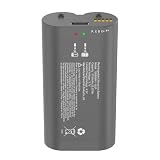
- Compatible with the myQ smart garage video keypad
- Rechargeable lithium-ion battery pack
- Nominal voltage: 3.7V / Capacity: 6100mAh
- Charge cable for the battery is included in the package
- Please charge the battery before first use for the best experience. If you have any issues, feel free to contact our customer support team
Rank #3

- High Capacity Smart Garage Video Rechargeable Battery : Voltage: 3.7V; Capacity: 6100mAh. Using imported Japan chips to replace ordinary Cheap battery chips, provides better battery stability performance for Long-lasting power.
- Compatible with the myQ smart garage video keypad for myQ garage door openers and MyQ Smart Garage Camera.
- Linergy myq replacement battery with Led Charge Indicator design, easy to check the battery charging status. ( The red is charging, Green is full )
- The myQ battery replacement builts in lithium-ion rechargeable battery with a Type-c Charge cable, the charging current: 5V/1A.
- Multiple Safety : Built-in safety protection including over-current protection, over-voltage protection, short circuit protection and temperature protection, Worry-free for using,18 Months Warranty.
Rank #2

- Quickly swap in a fully charged battery when your current one is depleted.
- Simply unscrew your Video Keypad from the mount, remove the back cover, and press up on the battery tab to release it.
- Use the included cable to charge your spare battery so your video keypad is never without power.
- Compatible with the myQ Smart Garage Video Keypad
Product prices and availability are accurate as of the date/time indicated and are subject to change. Any price and availability information displayed on Amazon at the time of purchase will apply.




