Samsung does not describe a separate reset or calibration procedure for its dryer moisture-sensor bars. If a Sensor Dry cycle stops too soon, the first step is to clean the bars inside the drum. A general power reset is different: it may clear an electronic glitch, but it will not clean the bars or clear a blocked vent.
Clean the moisture-sensor bars when a cycle ends too quickly
Dryer-sheet residue can coat the bars and interfere with sensing. Samsung’s recommended fix is to clean them—not to recalibrate or reset them. The bars are two curved metal strips inside the front of the drum, usually around the lint-filter housing or beside it. Their exact position can vary by model.
- Turn off and unplug the dryer. If it has been running, let the drum cool.
- Locate the two curved metal bars inside the front of the drum.
- Gently wipe the bars with a soft cloth dampened with warm water and a little mild dish soap.
- Wipe the bars dry with a clean cloth before using the dryer.
Avoid abrasive cleaners, metal tools, and excessive water. Samsung’s US troubleshooting instruction is to “Clean them with a soft cloth and a drop of dish soap.” See Samsung’s dryer troubleshooting guidance. For model-specific cleaning directions or sensor placement, check the owner’s manual.
When to use a general dryer power reset
A power reset is intended to address a possible electronic glitch, such as one that follows a power outage. It is separate from sensor-bar cleaning and will not fix residue or restricted airflow.
Quick wins for a faster PC:
Clear out junk files and repair common Windows errorsFree Scan →Fix the driver behind crashes, sound loss and screen glitchesFind Drivers →#1 Best Overall

- DC61-02627A Moisture Plate Sensor Fits for Samsung Kenmore Dryer.
- DC61-02627A Dryer moisture sensor Replace for part numbers:2069516, AP4578789, PS4206812, EAP4206812, PD00023015.
- Moisture sensor DC61-02627A detects the amount of moisture in the laundry load.This sensor is an essential part of any modern dryer, and it is important to choose a sensor that is durable and accurate.
- Disconnect the power before installing this part. Wear work gloves to protect your hands.
- Any questions not completely satisfied, please contact us, you can have or exchange within 30 days.
- Turn off the dryer and unplug it, or switch off its circuit breaker.
- Wait one to five minutes.
- Restore power and restart the dryer.
Samsung cautions that a reset can erase error-code history. Troubleshoot the displayed code first; if it returns after the reset, avoid repeatedly clearing it because the history may help a technician diagnose the problem. Samsung’s dryer reset instructions and dryer FAQ describe the general power-reset steps.
If laundry is still damp or Sensor Dry stops early
Check the load size
A very small load may not tumble across the bars enough for the dryer to detect it. Samsung estimates that the minimum load for sensor detection is about four regular bath towels. For a very small load, its troubleshooting guidance suggests adding a few soaked towels.
Rank #2
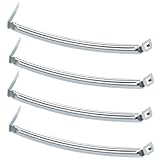
- COMPATIBILITY: The DC61-02627A Samsung Dryer Moisture Sensor is compatible with DV Series Sam-sung Dryers, 402 Series Kenmore Dryers. Size is about 4 4/5in*1 1/8in(4.80in*1.13in). (Note: Please confirm the model number before purchasing.)
- PRODUCT FUNCTION: If your dryer's humidity sensor isn't working or dryer won't shut off while clothes are dry, the sensor may be damaged. Simply replacing the humidity sensor with a new one can resolve these issues: Broken Parts, Potential Damage, Failed Sensing, Non-Functioning, Leaking, Defective.
- PREMIUM MATERIAL: The DC61-02627A dryer moisture sensor parts are made of high-quality stainless steel, making them durable, resistant to wear and chemical corrosion, and rust-resistant, ensuring a long service life.Excellent quality of moisture sensor for samsung dryer parts ensures reliable and accurate maintenance, making it a cost-effective solution.
- HIGH-PRECISION MEASUREMENT OF CLOTHING HUMIDITY: The DC61-02627A sensor is highly accurate and reliably detects moisture levels in laundry,sends a signal to the control board when the clothes are dry. This sensor is a vital component of any modern dryer, so choosing a durable and accurate one is crucial.
- HOW TO USE THE DC61-02627A DRYER MOISTURE SENSOR PLATE BAR: You can search for the installation video on YouTube by entering "#DC61-02627A". The video will guide you through the installation process. Therefore, even if you're unfamiliar with how to install the DC61-02627A dryer humidity sensor plate, you can complete the task in 30 minutes or less.(NOTE:Before installing this part, disconnect the power cord. Wear work gloves to protect your hands. )
Adjust the dryness setting
If Sensor Dry ends with clothes too damp, select a higher Dry Level. This adjusts the target dryness; it does not clean or recalibrate the sensor.
Manage mixed loads
Lighter items may touch the bars and trigger an early stop while heavier pieces remain damp. On models with Damp Alert—or Mixed Load Bell on some older models—the signal indicates that a mixed load is about 80 percent dry. Remove items that are already dry and let the rest continue. A Manual Dry cycle runs for the selected time rather than ending when the sensor detects dryness.
Rank #3

- The Samsung DC61-02627A Moisture Sensor is a genuine OEM (Original Equipment Manufacturer) part designed and engineered to exact specifications
- Replacement Samsung Dryer Moisture Sensor monitors the clothing’s moisture level and sends a signal to the control board when the clothes are dry
- Samsung DC61-02627A Dryer Moisture Sensor is also called a Plate Sensor
- High quality Samsung OEM DC61-02627A Dryer Moisture Sensor is manufactured with premium materials for durability and exact fit, be sure to follow instructions in owners manual when installing this part
- Repair your appliance with confidence when you choose Genuine Samsung Appliances Parts & Accessories
Inspect airflow if drying is poor or takes too long
Check that the lint filter is clean and inspect the exhaust vent if drying performance is poor or cycles take too long. Restricted exhaust can prevent heat and moisture from escaping. A power reset will not remove a vent blockage; use Samsung’s vent and dryer troubleshooting guidance for the applicable checks and model-specific requirements.
Independent reader supportYour contribution helps us test, update, and keep practical guides available for everyone.When to stop troubleshooting and get model-specific help
If cleaning the bars and checking the load and airflow do not resolve the symptom—or an error code returns—consult the owner’s manual for your model or request service. Preserve recurring error information rather than repeatedly resetting the dryer; it may help a technician identify the fault.
Quick Recap
Rank #4

- This is an O.E.M. Authorized part
- Fits with various Samsung brand models
- Oem part # DC97-08894A
- Product Dimension: 2.0"L x 7.0"W x 1.0"H
Product prices and availability are accurate as of the date/time indicated and are subject to change. Any price and availability information displayed on Amazon at the time of purchase will apply.