What’s actually slowing this PC down?
Pick the symptom - the matching free tool is one click away.
For most indoor brightness surveys, the Extech LT300 is the best all-purpose choice: it has a remote sensor, cosine- and color-corrected response, and a published basic accuracy of ±5% of reading. Choose a spectrometer instead if you need to assess LED color, spectrum, or flicker—not just illuminance. The right instrument depends on what you need to establish and where you take the measurement.
Quick picks
| Need | Pick | Why it fits |
|---|---|---|
| General indoor surveys and maintenance | Extech LT300 | Remote sensor, broad range, and a published ±5% basic accuracy specification. |
| LED-oriented facility checks | Extech LT40 | Designed for environmental lighting checks with LED and conventional sources. |
| Professional spectral analysis | UPRtek MK350N Premium | Measures illuminance along with spectrum, chromaticity, CCT, and related metrics. |
| Compact spectral diagnostics | UPRtek MK350D | A small instrument that adds color, spectral, and flicker-related readings. |
| Film, photography, and color-critical production | Sekonic C-800-U | Production-focused color analysis plus ambient and flash measurement. |
| Occasional informal checks | A basic digital lux meter | Can help compare locations, but documented accuracy, response, and calibration matter for defensible results. |
What a lux meter measures—and what it cannot tell you
Illuminance is the amount of light arriving on a surface. It is measured in lux or foot-candles; one foot-candle is about 10.76 lux. A lux meter measures illuminance at its sensor, so the reading changes with the sensor’s position and orientation.
Illuminance is not the same as luminance, which describes light emitted or reflected toward an observer. A lux reading also does not, by itself, show whether a room has glare, comfortable contrast, even coverage, accurate color, or distracting flicker.
A basic photometer is suitable when the question is how much light reaches a work surface. A spectrometer measures the light’s spectral distribution and can provide additional results such as correlated color temperature (CCT), chromaticity, color-rendering metrics, and sometimes flicker. Those measurements answer different questions: a room can have adequate lux while its LEDs differ noticeably in color or cause camera banding.
#1 Best Overall
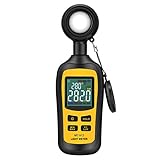
- Measures luminosity from 0 to 200,000 Lux and ambient temperature
- High accuracy of ±3% rdg ± 8 dgts (10,000 Lux)
- 4 digital color LCD screen, MIN/Max readings, data hold, auto power off, and low battery indication
- Wide range of application, use lux light meter for set design, factory, office or home use
- lightweight and compact, 2 years long period warranty
Specifications that matter more than a big maximum number
- Accuracy: Look for a stated accuracy, not just the number of decimal places on the display. Extech gives the LT300 a basic accuracy of ±5% of reading for lux and foot-candles. That is a manufacturer specification, not a claim of laboratory-grade uncertainty.
- Cosine response: Light arrives from many directions. A sensor with suitable cosine correction better represents illuminance from oblique angles. NIST discusses cosine response in illuminance measurements in its photometric measurement guidance.
- Spectral response: Meters can disagree under narrow-band or unusual LEDs if their spectral response differs. NIST calibration procedures account for spectral mismatch correction factors; see NIST Special Publication 250-95.
- Probe placement: A remote sensor helps place the sensing surface exactly on a desk or other work plane without the meter body or operator blocking the light.
- Calibration records: For safety, contractual, or compliance documentation, confirm the exact instrument’s calibration certificate, date, serial number, and stated uncertainty. NIST describes its photometric calibration services here.
- Repeatability and logging: Stable readings and data export help with room maps and comparisons over time, but display resolution alone does not establish repeatability. Do not infer it where a manufacturer has not published data.
Recommended lux meters by use
Extech LT300: best general-purpose indoor meter
The Extech LT300 is the strongest default for facility managers, contractors, electricians, schools, offices, warehouses, and routine workplace surveys. It measures up to 400,000 lux (40,000 foot-candles), has resolution as fine as 0.01 lux or 0.01 foot-candle, and specifies basic accuracy of ±5% of reading. The manufacturer lists cosine- and color-corrected response, relative and peak modes, and a remote sensor on a 12-inch coiled cable that extends to 24 inches. It uses a 9V battery and has a two-year warranty.
The remote probe and broad range make it practical for mapping work surfaces and bright areas. It remains an illuminance meter: it does not provide a full spectral analysis, CCT, CRI, TM-30, or flicker diagnosis. The manufacturer also lists an LT300-NIST version; the designation alone does not prove a particular meter’s readings are traceable. Check the calibration paperwork supplied with the specific unit.
Extech LT40: straightforward facility and LED checks
The Extech LT40 is positioned for commercial, institutional, and industrial environments, including offices, schools, hospitals, and warehouses. It measures LED and conventional light sources up to 400,000 lux (40,000 foot-candles). It is a reasonable alternative for routine facility readings, but the available manufacturer information is less detailed than the LT300’s on accuracy and other specifications. Check the current datasheet for the exact accuracy, calibration options, included accessories, and warranty before purchase.
Rank #2

- High Precision & Fast Response: This high-precision illuminance meter delivers lightning-fast readings 2 times per second, ensuring you get accurate light intensity data—perfect for creating the ideal growing environment for your plants.
- FC/LUX Conversion: FC or LUX? The Power is in Your Hands! Effortlessly toggle between FC and LUX to measure light intensity in the unit that suits your gardening needs—precision made simple.
- PEAK Data Recording: Instantly lock in and display the highest light pulse value with a single press of the PEAK button—perfect for measuring lightning, laser beams, and other brief high-intensity sources.
- Low Battery Alert: Stay powered, stay prepared! A handy + - symbol appears when the battery runs low, so you’ll always know when it’s time to swap out the 9V battery and keep your light measurements going strong.
- Versatile Usage: Ready for any setting! Whether indoors or outdoors, this meter is perfect for homes, offices, factories, or measuring sunlight intensity to create the perfect environment for your plants to thrive.
UPRtek MK350N Premium: best for professional lighting-quality analysis
The UPRtek MK350N Premium is for lighting designers, commissioning specialists, researchers, and LED manufacturers who need more than brightness. Its listed illuminance range is 5–100,000 lux and its spectral range is 380–780 nm, with wavelength data in 1 nm increments. It measures lux and foot-candles, CCT, CIE 1931 x/y, CIE 1976 u′/v′, XYZ, Duv, and dominant wavelength. It has a 3.5-inch resistive touch display, approximately five hours of battery operation, and Excel/JPG-compatible data export.
Its spectral data can help identify color-temperature shifts and differences between fixtures that produce similar lux readings. That capability adds complexity and is unnecessary for a simple desk-brightness check. Its 100,000-lux upper limit is also lower than the LT300’s. CCT or a color-rendering score alone should not be treated as a complete verdict on lighting quality.
UPRtek MK350D: compact spectral work
The UPRtek MK350D is a portable option for LED technicians and mobile lighting professionals. It covers 70–70,000 lux and a spectral range of 380–780 nm, with 1 nm wavelength data increments. Listed measurements include lux and foot-candles, CCT, CIE coordinates, CRI/R9, percent flicker, and spectral power distribution. It supports microSD export and mobile or PC connectivity; its approximate dimensions are 90 × 30 × 32.2 mm and its weight is about 70 g.
Rank #3
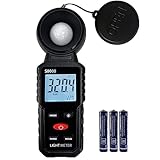
- 【Widely used】S8608 is a digital illuminometer, used for measuring visible brightness, large screen display, wide measuring range, up to 200000LUX, automatic conversion range. Can be widely used in such as schools, hospitals, factories, airports, families and other occasions of brightness measurement.
- Measurement visible brightness, measurement range is wide
- lluminance unit switch,Unit of illuminance:LUX、FC
- Measurement time: S
- MAX/ MIN,Data HOLD,Backlight function
Its small form is useful when portability matters, but a compact display and connected workflow may be less convenient for quick room mapping. A percent-flicker result is a particular measurement, not a complete assessment of every temporal-light-modulation effect or risk.
Sekonic C-800-U: best for film, photography, and color-critical lighting
The Sekonic C-800-U is aimed at cinematographers, photographers, broadcast crews, and studio lighting technicians matching sources such as LED, HMI, fluorescent, tungsten, daylight, and flash. Its listed ambient range is 1–200,000 lux and its flash range is 20–20,500 lux-seconds. It covers 380–780 nm and a CCT range of 1,600–40,000 K. The manufacturer lists CRI, TM-30-18, SSI, TLCI/TLMF, chromaticity, a 270-degree swiveling head, a 4.3-inch color touchscreen, storage for up to 99 readings, and computer utility software.
The manufacturer states that it conforms to Class A of JIS C 1609-1:2006 as an illuminance meter. That classification is specific to the cited Japanese standard and should not be treated as interchangeable with every national or laboratory classification. The official U.S. product page showed a price of $1,899 on August 16, 2026; price and availability can change. This instrument is excessive for routine office brightness checks and does not replace every exposure, spot-metering, or lighting-control tool used in production.
Rank #4
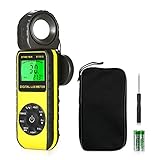
- ☀【HIGH ACCURACY】+/- 4% of readings for 10000 Lux, 1000 FC; +/- 5% of readings +/- 10 digits for 400000 Lux, 40000FC
- ☀【0.4 SECOND RESPONSE】2~3 times sampling per second, Instantly to measure out how much luminosity intensity you’re getting, No more guessing
- ☀【WIDE MEASURE RANGE】 This light meter can measure luminance at 0.01~400,000 Lumens, (0.01~40,000 Foot Candles), Which is much wider than the others. Resolution 0.01
- ☀【EASY TO USE】The light sensor can be rotated 270º, so you don’t need to turn around the light meter to measure luminosity intensity from different angles. Just rotate the sensor, and you can still read the illuminance at front
- ☀【MEMORIZE THE LIGHT READINGS】This Lux Meter can help you record 33 sets of readings,Temp Testing, The RELATIVE measuring mode will show you the difference between current / recorded data. Ideal lux meter to measure light intensity for LED grow lights,garden, plants, school, office, state, LED lights, indoor and outdoor
Basic meters and smartphone apps
An inexpensive digital meter or phone app can be useful for finding a dark corner or making a rough before-and-after comparison at home. Phone results depend on the device’s sensor, app calibration, diffuser, spectral response, and placement; these factors are rarely controlled as they are with a dedicated instrument. Neither an unspecified low-cost meter nor an app is a sound basis for compliance or a safety dispute unless the measurement method and instrument are documented and fit for purpose.
Choose the instrument for the job
- Homeowner or occasional user: For informal comparisons, a basic meter may suffice. If readings will guide a formal decision, choose a model with documented accuracy and calibration.
- Office, school, warehouse, or facility manager: Start with an illuminance meter such as the LT300; consider the LT40 if its facility-oriented workflow suits your needs.
- Contractor or commissioning professional: Prioritize a defined measurement method, work-plane placement, calibration documentation, and a record of conditions—not the largest range alone.
- LED designer or manufacturer: Choose a spectrometer if color coordinates, CCT, spectrum, or rendering metrics are part of acceptance or product comparison.
- Photographer or cinematographer: A production-oriented instrument such as the C-800-U is more relevant when matching sources, evaluating camera-oriented color metrics, or measuring flash.
- Horticulture user: Confirm that the instrument and metric suit the intended plant-lighting question. Lux describes human-perceived illuminance and is not a direct measure of photosynthetic photon flux.
For low-cost, dimmed, PWM-controlled, RGB, or tunable-white LEDs, or where occupants report visual discomfort, a lux reading cannot settle a flicker or color question. Use an instrument and metric designed for that specific assessment.
How to measure a room reliably
- Define the question and criterion. Decide whether you are checking a minimum, average, uniformity, fixture output, or color quality. Identify the applicable standard, contract, or target before taking readings.
- Set the measurement plane. Put the sensor at the actual desk or task surface for desk work; use the floor or specified height for circulation areas. Match the height in the relevant criterion—do not compare a chest-height reading with a desk-plane target.
- Record normal operating conditions. Note whether daylight, blinds, dimming, occupancy controls, or emergency lighting are active. Let lamps and controls stabilize where applicable.
- Orient and place the sensor consistently. For horizontal illuminance, keep it level and follow the meter’s instructions. Do not cover the sensor with a hand, cast a body shadow, or let the meter placement alter the light field.
- Take a grid of readings. Sample representative workstations, edges, corners, and circulation paths. A center-only reading misses dark zones and window-side gradients.
- Calculate and report the distribution. Record each reading, then the minimum, maximum, and average. State the grid and calculation method if reporting uniformity; a high average does not establish even illumination.
- Repeat when conditions matter. In daylight-heavy rooms, take separate readings with daylight present and with artificial lighting alone if that distinction is relevant. Check dimming systems at normal operating settings.
- Document the survey. Record meter model and serial number, calibration date and certificate, date and time, weather or daylight conditions, lighting mode and dimmer setting, measurement plane, grid, individual readings, summary values, and the applicable criterion.
What lux level should you aim for?
There is no universal indoor lux target. The task, age and visual needs of occupants, measurement plane, glare, reflections, uniformity, daylight, and applicable jurisdiction all matter. The figures below are context-specific references, not interchangeable legal requirements.
Free tools Windows power users keep installed
One-click scans. No signup required.
Best Value

- UNI-T professional digital illuminance meter UT383. Effectively measures light intensity and display results in units of Lux or FC. Range: 0 to 199,900 Lux / 0 to 18,500 Fc. High accuracy of +/-(4 %+8)
- Compact & easy to use. Large 4 digital LCD screen with backlight. 0.5 s sampling time. Overload indication. Max/Min. Data hold. Low battery indicator. Auto shutdown for power saving
- Portable value pack. What you get: 1 x UT383 mini light meter, 1 x packaging box, 1 x paper manual, 1 x e Manual (free download)
- Effective & Versatile. Widely used in lightening enterprise, agriculture and animal husbandry, mining enterprise, laboratory, office, household, street lights construction, camera & studios, photography, etc
- Easy access to UNI-T 7/24 1 to 1 user support. If you encounter any problems during use, please contact us first (via e-mail) and our customer service team will deal with your problem as soon as it is received
| Context | Reference | How to interpret it |
|---|---|---|
| Office paper tasks and CRT displays | 20–50 foot-candles | OSHA’s computer-workstation guidance gives this range. The same guidance notes a 30-foot-candle minimum for construction-industry employers under the applicable rule. See OSHA workstation environment guidance. |
| Federal facilities | 50 foot-candles at work-station surfaces; 30 foot-candles in work areas; 10 foot-candles in non-work areas | These figures come from federal facility rules, with lower corridor and stairwell minimums under specified conditions. Check the applicable provision at 41 CFR 102-74.180. |
| WELL visual-acuity pathway examples | 320 lux at office/classroom task surfaces; 110 lux at listed transition, circulation, storage, dining, lounge, and restroom locations | These are example thresholds under a selected certification pathway and space type, not general building-code limits. See the WELL Building Standard v2 reference. |
| Office lighting design | Use the applicable office-lighting recommendations | ANSI/IES RP-1-24 addresses illuminance along with luminance, uniformity, glare, color, flicker, controls, and space types. See the RP-1-24 product and scope page. |
For many everyday spaces, rough planning references often place corridors around 50–110 lux, general office areas around 200–500 lux, reading or detailed desk tasks around 300–500 lux or higher, classrooms around 300–500 lux, and precision inspection at 750 lux or above. These are illustrative ranges only, not universal requirements. Film and video set levels depend on the camera, fixtures, exposure, and creative intent. For a specific project, check the standard, code, contract, or workplace rule that governs its location and task. The IES maintains application-specific recommended practices for many environments in its Lighting Library.
Common measurement mistakes
- Choosing by maximum lux alone: Range does not establish accuracy, suitable spectral response, calibration, or ease of placement.
- Confusing resolution with accuracy: A display that increments by 0.01 lux does not mean the reading is accurate to 0.01 lux.
- Measuring at the wrong height or plane: The reading must match the work surface or location specified by the criterion.
- Taking one reading: A single point cannot show dark corners, bright window zones, or uneven coverage.
- Blocking or tilting the sensor: A hand, body, or inconsistent angle can change the light reaching the detector.
- Ignoring daylight and controls: Sunlight, blinds, occupancy sensors, and dimming can make otherwise comparable readings differ.
- Treating lux as visual comfort: Glare, reflections, contrast, flicker, and uniformity can make a bright space uncomfortable. IES office guidance treats these as distinct lighting considerations.
- Assuming a spectrometer is automatically the better lux meter: Extra color data do not remove the need to choose the right range, calibration, and measurement method.
- Treating CRI as a complete quality score: CCT, Duv, TM-30, spectral distribution, flicker, glare, and uniformity may also matter.
If a reading seems wrong
- Verify the selected lux or foot-candle unit and the measurement range.
- Check that the sensor is clean, uncovered, and positioned as intended.
- Move away from direct shadows or nearby reflective surfaces that are not representative of the space.
- Check whether daylight, auto-dimming, or occupancy controls changed during the measurement.
- Compare with a known reference meter rather than relying on a phone app alone.
- Under colored or narrow-band LEDs, consider spectral mismatch; two meters can disagree because their spectral responses differ.
- If the result supports a compliance decision, safety finding, or dispute, use a current calibration record and a documented measurement procedure.
Buying verdict
Choose the Extech LT300 for most indoor illuminance surveys. The LT40 is a credible facility-oriented alternative, while the UPRtek models and Sekonic C-800-U make sense when spectrum, color, flicker-related metrics, or production workflows are part of the job. For records others will rely on, buy to the measurement requirement and calibration path—not to a product label or the highest number on the box.
Quick Recap
Product prices and availability are accurate as of the date/time indicated and are subject to change. Any price and availability information displayed on Amazon at the time of purchase will apply.