Do these 3 things before closing this tab:
1Repair Windows errors before they cause bigger problems2Scan for outdated or missing drivers - takes under a minute3Clear out junk files and repair common Windows errorsMost household cords can be made far less noticeable without opening a wall. Use a surface raceway or wall cord hider for a neat wall run, adhesive clips for a lightweight temporary cable, a sleeve for several cords behind furniture, and a purpose-built floor protector when a cord must cross a walkway.
Do not run ordinary extension cords inside walls or hide cords beneath rugs. Permanent electrical changes, including adding a receptacle, require separate planning and may require a qualified electrician.
Most household cords can be made far less noticeable without opening a wall. The best method depends on what the cable is doing: use a surface raceway or wall cord hider for a neat wall run, adhesive clips for a lightweight temporary cable, a sleeve for several cords behind furniture, and a purpose-built floor protector when a cord must cross a walkway.
Do not treat every cord as suitable for the same concealment method. In particular, do not run an ordinary extension cord inside a wall or hide a cord beneath a rug. Permanent electrical changes, such as adding a receptacle or modifying branch-circuit wiring, are a separate project that may require a qualified electrician and compliance with local requirements.
Free tools Windows power users keep installed
One-click scans. No signup required.
Quick guide: choose the right cord-hiding method
| Your situation | Best starting point | Important limitation |
|---|---|---|
| A TV, desk, or lamp cord runs along a wall | Paintable surface raceway or wall cord hider | It conceals a surface run; it does not turn an extension cord into approved in-wall wiring. |
| You rent or need a temporary solution | Compatible adhesive cord clips or a removable sleeve | Adhesive products have surface exclusions and can still damage uncertain finishes. |
| Several cables collect behind a desk or media console | Cable sleeve, split wrap, or cable box | Keep power strips ventilated and accessible. |
| A cable must cross a walkway | Floor cord protector or cable cover | Never substitute a rug or carpet for a cord protector. |
| You are mounting a television | Low-voltage TV cable-management kit for signal cables | Electrical power and a new receptacle require separate consideration. |
14 smart ways to hide cords and wires
1. Install a paintable surface raceway along the wall
A surface raceway is usually the cleanest solution when a power, HDMI, Ethernet, speaker, or other cable needs to travel horizontally or vertically across an exposed wall. The channel mounts on the wall, contains the cable, and creates a straight, finished-looking route. Many wall cord covers are designed to blend into the wall or be painted when the manufacturer permits it.
#1 Best Overall

- Cable clip supports conduit to threaded rod, ceiling wire or flange.
- Can also be used for flexible metallic tubing, armored cable, portable cables, control tubes and communications cable management.
- No installation tools required - squeeze tabs to apply wire clips.
- Heavy duty clip spring steel construction.
- Comes in packages of 50 or 100 units.
Measure the complete route before buying. Account for corners, end caps, the cable’s connector size, and the number of cables. A narrow single-cord channel is not automatically large enough for several thick HDMI or power cables. A wall cord hider or surface raceway is the right category to compare when you want a finished route without opening the wall.
2. Run a narrow cord channel along the baseboard
If a cable must travel from an outlet to a nearby desk, lamp, or media console, keep it low by following the baseboard. A narrow cord channel can make the run less conspicuous than a cable crossing the middle of the wall, and it is easier to inspect and remove than concealed wiring.
Plan the route so the cable does not get pinched at a doorway or crushed by furniture. If the baseboard is textured, dusty, or uneven, do not assume an adhesive-backed channel will hold reliably. A mechanically fastened or otherwise compatible surface product may be more appropriate, subject to the wall and trim material.
3. Guide one lightweight cable with compatible adhesive clips
Adhesive cord clips work well for a single USB, charging, lamp, speaker, or similar lightweight cable that needs to follow the edge of a desk, nightstand, wall, or cabinet. They are useful for renters and for setups that change frequently because installation does not require drilling.
Surface compatibility matters. 3M’s Command cord organizers, for example, identify compatible smooth surfaces such as some painted walls, wood, tile, glass, and metal, while excluding surfaces including wallpaper, fabric, textured walls, brick, and rough finishes. Follow the product’s preparation, weight, installation, and removal instructions; test an inconspicuous area when the finish is uncertain. “Removable” is not a guarantee that every paint or wall covering will be undamaged.
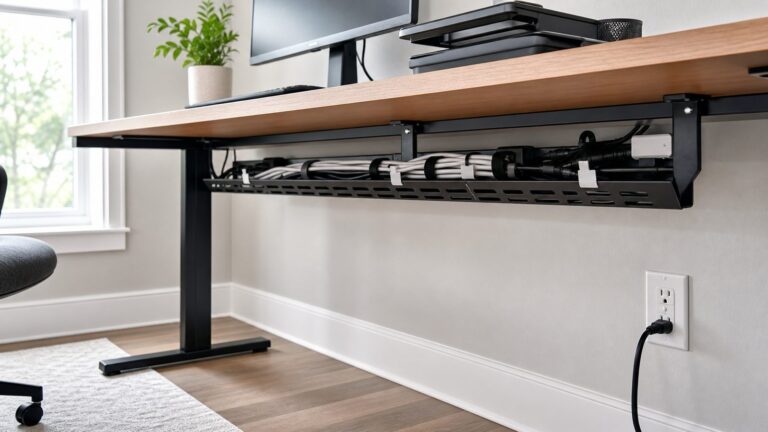
4. Bundle desk cables inside a sleeve or split wrap
Behind a computer desk, entertainment center, or charging station, the main problem is often not the visible length of one cord but the tangle of several. A cable sleeve or split wrap groups HDMI, USB, Ethernet, speaker, and power cables into a more orderly bundle.
Use the sleeve to simplify a visible bundle, not to bury a questionable or damaged cord. Leave enough room for cables to move independently where they connect to devices, and avoid compressing the bundle tightly. Labeling both ends of important cables makes future troubleshooting much easier.
PC Slower Than It Used to Be?
A free scan shows the junk files, broken settings and background clutter dragging Windows down - then fixes them in one click.Free scan · Windows 10 & 11Crashes, No Sound, or Screen Glitches?
Random freezes, missing sound and display glitches usually trace back to one bad driver. Find and replace yours safely.Free scan · under a minuteRank #2
- Cable clip supports conduit to threaded rod, ceiling wire or flange.
- Can also be used for flexible metallic tubing, armored cable, portable cables, control tubes and communications cable management.
- No installation tools required - squeeze tabs to apply wire clips.
- Heavy duty clip spring steel construction.
- Comes in packages of 50 or 100 units.
5. Attach the power strip to the rear or underside of furniture
A power strip sitting in the middle of the floor creates visual clutter and is more likely to be kicked or pulled. Where the furniture and power strip instructions allow it, attach the strip to the underside of a desk, the back of a media console, or the inside of an accessible cabinet.
Keep the strip away from moisture and heat, do not block its ventilation openings, and do not place it where it can be crushed. It should remain reachable so you can disconnect equipment and inspect the cord. This method organizes the slack; it does not justify overloading the strip or hiding it permanently behind an immovable fixture.
6. Protect unavoidable walkway crossings with a floor cord cover
If a cord genuinely must cross a walkway, use a purpose-built floor cord cover or floor cable protector. These products are made to route and protect cables across floor areas. Select one according to the number and diameter of cables, the floor surface, foot traffic, and whether rolling furniture or carts will pass over it.
Low-profile flexible covers may suit light residential foot traffic, while a more substantial protector may be appropriate in a busier area. Follow the product’s instructions for carpet, hardwood, tile, and other surfaces. A floor protector should reduce the chance of catching a foot; it does not make a damaged, unsuitable, or overloaded cord safe.
The Tool Desk
Outbyte Driver Updater FREEScan for outdated or missing drivers - takes under a minuteDriver Scan →Outbyte PC Repair FREEClear out junk files and repair common Windows errorsFree Scan →7. Use a low-voltage cable-management kit for a wall-mounted TV
A mounted television typically has two different cable questions. HDMI, Ethernet, USB, coaxial, and other signal cables are low-voltage cables. A recessed TV cable-management kit with low-voltage wall plates can provide a cleaner route for those cables when its installation requirements fit the wall and project.
Electrical power is different. A low-voltage kit does not authorize routing an ordinary extension cord inside the wall, and it does not replace a properly installed electrical receptacle. If the project involves adding an outlet, changing branch-circuit wiring, or putting permanent electrical wiring in the wall, stop and check local requirements or hire a qualified electrician.
8. Move the furniture to shorten the visible run
Sometimes the most effective cord-hiding improvement is changing the layout. Place a desk, console, or lamp closer to the outlet, rotate a media console so its rear faces the wall, or position equipment so cables exit toward the nearest connection point.
Do not push furniture so tightly against a plug that the plug or cord is bent. Leave access to outlets, avoid crushing cables against the wall, and make sure ventilation openings on electronics remain clear. A shorter route is easier to manage, easier to inspect, and less likely to need an extension cord.
Quick wins for a faster PC:
Clear out junk files and repair common Windows errorsFree Scan →Scan for outdated or missing drivers - takes under a minuteDriver Scan →Rank #3

- HIGH QUALITY- Made from 304 Premium Stainless steel material with quality rubber cushioned. Salt resistant, anti rust, anti-corrosion, waterproof, oil-proof. Clamps are sturdy, strong and reliable. The quality rubber insulation on the clamps holds up flawlessly. It is pliable which protect the tube well and keeps the clamp securely in place.
- WIDELY USED- Clamps are marine grade. Perfect to apply in automotive, industrial, boat/marine, windshield, household etc. for wiring, cables, pipe, rack, line management and restoration. No matter in salt water/air environment.
- STYLISH DESIGN- The P-Style design makes the clamps stylish, flexible and innovative.Strong and reliable. Easy to twist, bend, manipulate when install.
- SIZE- Cable clamp screw hole diameter: 6.5mm, fit for 6M( 1/4 inch) screw bolt to through them. Cable clamp inside diameter 1/2 inch. Fit for 1/2 inch (outside diameter) wiring, lines,hoses or cables to a panel or frame application.
- ENVIRONMENTAL FRIENDLY- It can be reused and recycle if you do not want them to stay on the original place thanks to the high quality material which makes them worked last for years.
9. Use reusable hook-and-loop wraps behind furniture
Reusable hook-and-loop wraps are useful for gathering slack behind a desk or media unit. Unlike a permanent knot or a tightly cinched disposable tie, they can be opened when you replace a monitor, game console, router, or charger.
Bundle cables by destination rather than forcing every cord into one large mass. Keep power cords and low-voltage signal cables identifiable, maintain gentle bends, and leave service loops near devices. Do not use a wrap to conceal fraying, crushed insulation, hot plugs, or other damage.
10. Match a raceway to the wall—or paint it when allowed
A cord cover is less noticeable when its color matches the wall, trim, or furniture behind it. For a stronger visual result, select a raceway that the manufacturer identifies as paintable and use a compatible preparation and paint system.
Do not paint a product merely because it appears plastic. Paint can interfere with covers, adhesive surfaces, joints, or removal, and some products have specific preparation instructions. A clean, straight installation with properly fitted corners usually looks better than a poorly painted channel.
11. Use furniture cable openings and rear channels
Many desks, entertainment units, and nightstands include cable grommets, rear cutouts, or channels. Feed cables through the nearest opening, route them along the rear face, and keep the visible portion as short as possible.
Check that an opening has smooth edges. If a cable passes through a sharp-edged hole, use an appropriate grommet or another protective solution so the insulation is not cut by the furniture. Do not close a cabinet around a power strip or charger if heat cannot escape.
12. Route lamp and charging cables along the back edge of a desk or nightstand
Small cords are easiest to hide when they leave the device at the back rather than the front. Place a compatible clip near the charging point, guide the cable along the rear edge, and let only the length needed to reach the user remain visible.
Rank #4

- High quality material:XHF Adhesive Cable Clips are manufactured from Strong Adhesive and PA66 nylon
- Widely used: USB Cable, Ethernet Cable, Outdoor String Lights, LED Strip Lights, Tachograph Cable, TV Cable, Desk and under Desk cables, etc
- Size: Base 5/8" x 5/8", inner diameter of buckle 1/4" x 2/5",120pcs
- Suitable for a variety of object surface: whether glass, wall, ceramic, wood, metal, plastic, they can stay firmly on the surface
- No residue: even if you want to remove them, it can easily tear the whole piece of glue, without any stain
Keep charging connectors accessible and avoid sharp bends where the cable meets the device. A cable that is repeatedly pulled from the front of a nightstand can be damaged even if the route looks tidy.
13. Put excess slack and power-strip clutter in a cable box
A cable-management box can contain excess low-voltage slack and make a charging area look orderly. It is particularly useful below a desk or beside a media console where multiple chargers would otherwise be visible.
Use a box designed with suitable openings and ventilation. Do not seal a hot adapter, transformer, or power strip in an unventilated container, and do not use the box to hide damaged cords or an inaccessible connection. You should still be able to identify, unplug, and inspect the equipment.
14. Hire a qualified professional for permanent in-wall electrical changes
If your preferred solution requires a new receptacle, a recessed electrical outlet, branch-circuit work, or permanent electrical cable inside a wall, it is no longer just a cord-organizing project. Local electrical rules, wall construction, existing wiring, and the type of cable all matter.
A qualified electrician can determine what work is permitted and install the electrical portion appropriately. For a mounted TV, a professional installer may also help coordinate the low-voltage route and the electrical supply without confusing the two systems. Do not improvise by feeding an extension cord through a wall cavity.
What’s actually slowing this PC down?
Pick the symptom - the matching free tool is one click away.
What not to do when hiding cords
- Do not put cords under rugs or carpeting. Consumer Product Safety Commission safety material warns that cords can be damaged under rugs or furniture. Concealment also makes wear, crushing, heat, and other problems harder to notice.
- Do not run an ordinary extension cord inside a wall. An extension cord is not a substitute for permanent building wiring or a new receptacle.
- Do not hide a damaged cord. Replace cords with cuts, exposed conductors, crushed insulation, loose plugs, or signs of overheating.
- Do not rely on adhesive clips on every finish. Wallpaper, fabric, brick, textured walls, and rough surfaces may be excluded by the manufacturer, and even compatible painted surfaces require correct preparation and removal.
- Do not bury power strips or adapters in an unventilated box. Keep connections inspectable and allow heat to dissipate.
- Do not make a walkway crossing disappear under decoration. If relocation is impossible, use a purpose-built floor protector selected for the cable and traffic.
How to select a cord-hiding product
- Identify the cable type. Separate power cords from HDMI, Ethernet, USB, speaker, coaxial, and other low-voltage cables. The safe installation options are not interchangeable.
- Count the cables and measure their diameter. A single-cord channel has different capacity from a multi-cable raceway. Include connectors and bends in your measurements.
- Inspect the surface. Painted drywall, tile, wood, wallpaper, brick, textured plaster, and fabric-covered walls need different attachment methods.
- Choose the intended permanence. Clips and sleeves suit temporary or changing arrangements; a surface raceway provides a more continuous finished route.
- Assess traffic and furniture. Any floor run needs a protector matched to foot traffic, rolling loads, cable count, and floor material.
- Plan serviceability. Leave enough slack to unplug, replace, or troubleshoot a device without dismantling the entire route.
- Check heat and access. Do not cover vents, trap hot adapters, or place power connections where they cannot be inspected.
A practical installation sequence
- Unplug the equipment and inspect every cable before routing it.
- Sketch the shortest safe path, keeping cables away from doors, sharp edges, heat, moisture, and crushing points.
- Measure the route and cable bundle, including corners and connector clearance.
- Choose the product category: raceway, clips, sleeve, floor protector, furniture organizer, or low-voltage TV kit.
- Clean and prepare the surface only as the product instructions specify. Allow adhesive products the required time to bond before loading them.
- Install the route with gentle bends and accessible connection points. Do not close a cover over a damaged cord.
- Test the equipment, then check that plugs are not strained, cables are not pinched, and the route does not create a trip hazard.
- Reinspect after rearranging furniture or adding equipment. Cable management should remain serviceable, not merely invisible.
When a surface solution is better than opening the wall
Opening a wall can produce a very clean result, but it adds uncertainty: the wall may contain plumbing, electrical wiring, insulation, structural members, or finishes that are expensive to repair. A surface raceway is often the better choice when the route is short, the arrangement may change, or you need immediate access for troubleshooting.
For a TV, use a low-voltage cable kit only for the cables and installation conditions it is designed to support. If the desired result includes a new electrical receptacle or permanent wiring, treat that as electrical work rather than a cosmetic cable-hiding shortcut.
Best Value

- Exceptional Industrial Strength: Crafted from 16-gauge galvanized steel, these J-hooks offer an impressive 50lbs load capacity. They are perfect for heavy-duty cable installations in data centers, telecom rooms, and industrial settings. Their corrosion-resistant build ensures over 10 years of reliable service, even in humid or outdoor environments, making them a top choice for cable tray and conduit management
- Broad Compatibility: Designed to securely organize a wide range of cables, including CAT5e/6/6A, coaxial, and fiber optic cables with diameters from 0.5" to 2", as well as conduits. The slotted design allows for easy use with cable ties (not included), making it suitable for various mounting surfaces such as ceiling beams, ladder racks, and wall-mounted cable trays in network and industrial applications
- Enhanced Safety and Tangle-Free Operation: The reinforced retainer clips are a crucial safety feature, preventing cables from accidentally slipping, thus reducing trip hazards and potential cable damage. They also help maintain the NEC-compliant bend radius, especially important for protecting fiber optic integrity. This makes them ideal for use in areas where safety and cable organization are paramount, like server rooms
- Swift Tool-Free Installation: Install these J-hooks effortlessly on beams, walls, or conduit racks in just 5 seconds, without the need for drilling. The built-in retainer clip firmly holds cables while allowing for smooth adjustments. In high-vibration areas such as workshops or server rooms, they can be used with standard cable ties (sold separately) for added security
- Versatile Application: Whether you're setting up an office network, a home theater, or need support for conduits in a warehouse, these J-hooks are up to the task. The bundle includes 100 hooks + clips, sufficient for 400ft cable runs. Offering high quality at a low cost, they are a cost-effective solution for cable management across multiple scenarios
Disclosure: Product categories mentioned here are recommendations to help compare solutions. If this page later includes retailer links, the commercial relationship should be disclosed clearly and close to those recommendations. No product should be described as tested or damage-free on every surface unless that has been independently verified.
Frequently Asked Questions
What is the easiest way to hide cords along a wall?
A surface raceway or wall cord hider is usually the best choice. Measure the cable route and choose a channel with enough capacity for the number and diameter of cables. It conceals a surface run but does not make an ordinary extension cord suitable for in-wall use.
Recommended Free Tools
Can I hide an extension cord inside the wall?
No. Do not run an ordinary extension cord inside a wall. If you need a new receptacle or permanent in-wall electrical wiring, check local requirements and use a qualified electrician.
How can I hide a cord that crosses a walkway?
Use a purpose-built floor cord protector selected for the cable count, floor type, and foot traffic. Never hide the cord beneath a rug or carpet, where it can be damaged and become harder to inspect.
Can a recessed TV cable kit carry the TV’s power cord?
Use a recessed low-voltage TV cable-management kit only for compatible signal cables such as HDMI or Ethernet. Electrical power is a separate issue; a new outlet or permanent electrical wiring should be handled according to local requirements by qualified electrical help.
The Bottom Line
The safest attractive solution is usually the simplest one: shorten the route, organize cables behind furniture, or cover a visible wall run with a correctly sized surface raceway. Use a purpose-built floor protector for walkway crossings, keep low-voltage TV cable management separate from electrical wiring, and call a qualified electrician for permanent in-wall changes.
Quick Recap
Product prices and availability are accurate as of the date/time indicated and are subject to change. Any price and availability information displayed on Amazon at the time of purchase will apply.