First, check what “won’t rotate” means: do the blades spin while the fan head stays pointed in one direction, or do the blades themselves stay still? A fan that blows air but no longer sweeps side to side has an oscillation problem; a fan whose blades will not turn needs a different troubleshooting path.
Why won’t my fan rotate on its own?
“Rotate” can describe two separate movements. The blades turn to move air; an oscillating fan also pivots its head from side to side. Identify which movement has stopped before checking anything, because an oscillation control or obstruction is different from a possible motor or electrical fault.
The blades spin, but the fan does not oscillate
If airflow continues and the fan head stays in one position, the main fan motor is working, but the oscillation function may be switched off, obstructed, or affected by an internal mechanical problem. Honeywell’s troubleshooting guidance recommends checking the oscillation control and clearing anything in the fan’s sweep area. See Honeywell’s fan troubleshooting guidance.
The blades do not spin
If the blades remain still even though the fan appears to have power, the cause could be an internal mechanical or electrical fault. For a ceiling fan, Hunter lists possibilities including wiring, a capacitor, a receiver, or internal controls; those are possibilities, not a diagnosis. The correct checks and parts depend on the specific fan. Consult its manual or contact the manufacturer rather than opening the motor housing or guessing at a replacement part. See Hunter’s ceiling fan troubleshooting guidance.
What’s actually slowing this PC down?
Pick the symptom - the matching free tool is one click away.
#1 Best Overall

- 3 Quiet Speeds
- Tilt-Back Feature
- Fully-Adjustable Height
- Wide-Area Oscillation
- Simple "No Tool" Assembly
How to check a fan that has stopped oscillating
- Turn it off and unplug it. Do this before inspecting or cleaning accessible parts.
- Check the oscillation control. Use the fan’s manual to confirm how oscillation is enabled on that model; the control may differ by design.
- Clear the fan’s sweep area. Move furniture, curtains, cords, and other objects that could block the head as it pivots.
- Test it again. Plug the fan back in and switch oscillation on. If the blades spin but the head still will not move after these external checks, an issue inside the oscillation assembly is possible.
Do not open the gearbox or motor housing as a routine fix. If the oscillation mechanism still fails, check the model’s instructions or ask the manufacturer about service or repair. Honeywell’s setup and assembly guide is one example of model-specific guidance; use the guide for your own make and model where available.
What if the fan hums but the blades do not spin?
A hum without blade movement is not enough to identify a failed part. Manufacturer troubleshooting for ceiling fans lists several possible internal causes, so replacing a capacitor or attempting wiring or motor repairs based on the symptom alone can lead to the wrong repair. Stop using the fan and consult its model-specific manual or manufacturer support for the next step.
Rank #2
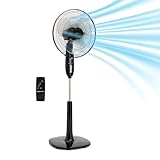
- OPTIMIZED DESIGN FOR MEDIUM TO LARGE ROOMS: This 16-inch pedestal fan with remote effectively circulates air in spaces like living rooms, kitchens, and offices
- ENERGY-EFFICIENT QUIET OPERATION: Featuring an advanced AC motor, this electric fan delivers airflow using only 60 Watts
- CUSTOMIZED COMFORT WITH 3 SPEEDS: Enjoy personalized comfort with 3 speed settings and 3 breeze modes on this cooling fan(nature, sleep, or normal mode).
- ADJUSTABLE AIRFLOW AND HEIGHT: This stand up fan allows easy adjustment of height and tilt to direct airflow where needed
- REMOTE CONTROL CONVENIENCE: Manage your fan with ease using the included remote control. Adjust speed, mode, and timer settings without moving, helping your standing fan circulate air throughout the room
The same caution applies if the fan stalls, grinds, or jerks. Turn it off and unplug it; do not keep running it to see whether it frees itself. Internal motor, gearbox, and electrical checks are not universal DIY procedures, and a manual for another fan may not apply.
What if the fan runs slowly or blows weakly?
Weak airflow is different from a fan that will not oscillate or whose blades are stopped. Dust or an obstruction at the intake or on the blades may affect airflow. Turn off and unplug the fan before cleaning, follow the cleaning instructions for the specific model, and keep liquids out of the motor housing. If cleaning does not help, an internal motor problem is possible; seek model-specific guidance rather than opening the housing.
Free tools Windows power users keep installed
One-click scans. No signup required.
Rank #3

- POWERFUL COOLING: Three quiet speeds deliver personalized comfort without disruptive noise, making this tall fan ideal for light sleepers. Widespread oscillation sends a refreshing breeze across your skin and throughout every corner of your bedroom or living room.
- ADJUSTABLE HEIGHT: Keep your cool where you need it most. Features a fully adjustable stand that extends up to 54" and a tilt-back head that directs airflow during the hottest summer days.
- CUSTOMIZE YOUR COMFORT: The remote control handles power, speeds, and timer—no need to leave the couch or bed. A 4-hour timer shuts off automatically, perfect for fitness enthusiasts wanting a cooler home gym.
- BUILT IN SAFETY: ETL listed, this office fan features Blue Plug technology, stopping the electrical current if a fault is detected, providing a safer, more reliable cooling solution.
- LOVE YOUR AIR: Since 1906, Lasko has pioneered the way forward in delivering superior air comfort through our range of fans, heaters and other products. We remain dedicated to providing supreme comfort to you and your entire family.
When should you contact the manufacturer?
- The blades remain still, or the fan stalls while in use.
- The fan hums without blade movement, grinds, or jerks.
- The blades spin, but oscillation remains stuck after checking the control and clearing the sweep area.
- Basic cleaning does not resolve slow operation or weak airflow.
Have the fan’s make and model available when you contact support. If repair is not practical, compare replacements by fan type and size, control method, whether oscillation is needed, available model-specific parts, and warranty or support options. A replacement may make sense after model-specific troubleshooting points to internal failure, but it is not the first step for every fan that stops moving as expected.
Quick Recap
Best Value

- ETL listed, patented, fused safety plug
- 16-inch black oscillating pedestal fan perfect for homes or offices
- 3 quiet speeds; easy-grip rotary control
- Height adjusts up to 47" tall with wide-range 90-degree oscillation
- Easy no-tools assembly
Rank #4
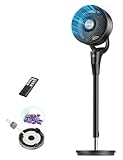
- 𝙐𝙡𝙩𝙧𝙖 𝙋𝙤𝙬𝙚𝙧𝙛𝙪𝙡 𝘼𝙞𝙧 𝘾𝙞𝙧𝙘𝙪𝙡𝙖𝙩𝙤𝙧 𝘽𝙮 𝙐𝙥𝙜𝙧𝙖𝙙𝙚𝙙: Compared with previous DREO fan for bedroom, the 2026 upgraded air circulator fan for whole room powered by DREO's advanced airflow tech circulates air up to 90 ft away and 1000 CFM to circulate all the air in your bedroom, living or kitchen in under 2 min. (DR-HPF013, TurboPoly Fan 353)
- 𝙐𝙡𝙩𝙧𝙖 𝙌𝙪𝙞𝙚𝙩 𝘾𝙤𝙢𝙛𝙤𝙧𝙩: Powered by a DC motor, DREO's unique blade design delivers smooth airflow with quiet operation. You can also mute beep sounds with a single touch on the remote and set an 8-hour timer.
- 𝘿𝙞𝙧𝙚𝙘𝙩 𝘼𝙞𝙧 𝙒𝙝𝙚𝙧𝙚 𝙔𝙤𝙪 𝙉𝙚𝙚𝙙 𝙄𝙩: This oscillating fan offers 90˚ horizontal oscillation, a 105˚ pivoting head, and an adjustable height range (38"–42"). You can set it low for kids or pets, mid-height for relaxing in the living room, or high to stay cool in bed.
- 𝘼𝙪𝙩𝙤 𝙈𝙤𝙙𝙚 𝙃𝙖𝙣𝙙𝙡𝙚𝙨 𝙒𝙞𝙣𝙙 𝙛𝙤𝙧 𝙔𝙤𝙪: The standing fan for bedroom has 8 speeds and an auto mode that automatically adjust fan speed for a seamless comfort experience, increasing 1 wind speed whenever room temp goes up 2˚F.
- 𝙈𝙤𝙧𝙚 𝙩𝙝𝙖𝙣 𝘼𝙞𝙧 𝘾𝙞𝙧𝙘𝙪𝙡𝙖𝙩𝙞𝙤𝙣: This pedestal fan has detachable design, letting you take the blade, front, and rear grill separately for an easy clean, while its built-in aroma pad lets you add fragances for a fresher air.
Product prices and availability are accurate as of the date/time indicated and are subject to change. Any price and availability information displayed on Amazon at the time of purchase will apply.




