A blinking red light on a Blink camera does not have one universal meaning. It may indicate startup, setup mode, a lost Wi-Fi connection, changing systems, or failing batteries, depending on the model and the exact pattern. A solid red light can mean something different from a quick red flash every few seconds.
A blinking red light on a Blink camera does not have one universal meaning. It may indicate startup, setup mode, a lost Wi-Fi connection, changing systems, or failing batteries, depending on the model and the exact pattern. A solid red light can mean something different from a quick red flash every few seconds.
As an Amazon Associate I earn from qualifying purchases.
Before resetting anything, identify the camera: Mini, Mini 2, Mini 2K+, Outdoor 4, Outdoor or Indoor (3rd Gen), XT, XT2, Video Doorbell, or Wired Floodlight Camera. Then note whether the red light is blinking continuously, flashing at intervals, staying solid, appearing after a blue recording light, or occurring only during motion.
Outdated Drivers Are Slowing You Down
One free scan finds every outdated or missing driver and matches the right update for your exact hardware.Free scan · exact hardware matchPC Slower Than It Used to Be?
A free scan shows the junk files, broken settings and background clutter dragging Windows down - then fixes them in one click.Free scan · Windows 10 & 11What the red light means by Blink model
| Model | Likely meaning | Best first action |
|---|---|---|
| Mini, Mini 2, Mini 2K+ | Blinking red generally means the camera is starting up. Solid red usually means it cannot connect to the network or the Wi-Fi password may be incorrect. | Unplug the USB power connection and reconnect it. If the red light remains solid, follow the model-specific reset procedure. |
| Outdoor 4 | A flashing red light can appear during setup or while the camera is changing systems or Wi-Fi. | Remove the batteries for five seconds, reinstall them, and use the app’s Add Device process if setup is incomplete. |
| Outdoor or Indoor (3rd Gen), XT, XT2 | A quick red flash about every three seconds generally indicates that the camera is disconnected from the internet. Five or six red flashes after the blue recording light goes out can indicate failing batteries. | Check the network first. If the battery pattern is present, install fresh AA 1.5-volt lithium non-rechargeable batteries. |
| Video Doorbell | The red LED around the button can indicate that the doorbell is seeking a connection or is ready to connect during setup, depending on its generation and setup state. | Remove the batteries for five seconds and reinstall them. Try fresh lithium AA batteries if the expected setup flash does not appear. |
| Wired Floodlight Camera | A solid or flashing red LED can be related to setup, reset, power, or wiring. | Use the manufacturer’s reset guidance. Turn off the breaker before inspecting wiring, and use a licensed electrician if you are not qualified to work on the circuit. |
These interpretations come from Blink’s LED status guide and its red-light troubleshooting guidance. Blink can change LED behavior by model and firmware, so use the entry for your exact device rather than treating the table as a universal fault-code list.
#1 Best Overall
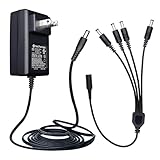
- Input: AC 100~240V 50/60Hz, Output: DC 12V 2A 24W, Connector Size : 5.5 mm x 2.1 mm. DC Polarity: Inner Positive (+), Outer Negative (-). Cord Length: 6 Feet/1.8M. UL Listed, EMC Approval, FCC, RoHS, Level VI energy efficiency
- Adapter comes with 4-way DC power splitter cable which enables you to easily power up to 4 security cameras or devices with one plug
- Good for 12V CCTV security cameras/DVR/NVR/HVR(analog,AHD,IP), BNC cables, LED strip lights, routers, and more
- Applicable to any 12V 2A(max) electronics, such as monitor, LED mirror, LED lamp, fish tank light, IR Illuminator, projector, BT speaker, mini fan, humidifier, water pump, 12V neck/back/foot massager, digital photo frame, mobile DVD system, CD player, piano keyboard, etc
- Package includes 1 x 12V 2amp power Adapter, 1 x 4-way power splitter. Lifetime Technical Support. Please kindly double check the plug size before buy. Please contact ANLINK team for bulk order
Quick checks before troubleshooting
- Is it red or blue? Blink commonly uses blue to show recording or Live View. A red flash that appears only during motion may not mean the same thing as a continuous red light.
- Is it blinking or solid? A blinking red Mini may simply be starting; a solid red Mini points more toward a connection problem.
- Is the camera battery-powered? Mini cameras use USB power, so changing AA batteries cannot fix a Mini’s red light.
- Is a Sync Module involved? Some Blink systems depend on a Sync Module. If the Sync Module is offline, troubleshoot it before repeatedly resetting the camera.
- Did the light begin after a router, Wi-Fi-password, or system change? That makes a network or setup issue more likely than a failed camera.
On several models, LED behavior can also be changed in the Blink app. Therefore, an absent or intermittent LED is not automatically proof that the camera is malfunctioning.
How to fix a Blink camera blinking red
1. Power-cycle the correct way
For a battery-powered camera or doorbell, remove the batteries, wait at least five seconds, and reinstall them. For a Mini-family camera, unplug the USB power connection, wait briefly, and reconnect it.
Watch the LED after power is restored. A temporary red startup or setup pattern can be normal. Give the camera time to complete its startup before pressing reset or deleting it from the app.
2. Replace batteries only in battery-powered models
For Outdoor, Indoor (3rd Gen), XT, XT2, and compatible doorbell models, use fresh AA 1.5-volt lithium non-rechargeable batteries. Blink specifically recommends Energizer Ultimate Lithium AA batteries or an equivalent lithium battery type. Rechargeable, alkaline, and lithium-ion batteries are not Blink’s recommended battery types for these cameras.
If the red flashes occur after the blue recording light turns off, batteries are a particularly plausible cause on the Outdoor, Indoor (3rd Gen), XT, and XT2 families. You can use Energizer Ultimate Lithium AA batteries for compatible battery-powered Blink devices, but confirm the model first. They are not a solution for a Mini, which is USB-powered, and they do not fix a Wi-Fi problem.
Blink advertises battery life of up to two years under default conditions, but actual life varies with motion activity, Live View use, temperature, signal strength, internet speed, and camera settings. A camera at a busy construction entrance or exposed to extreme temperatures may use batteries faster than a lightly used indoor camera.
Rank #2

- This 12V 5A security camera power supply and 9-way power splitter cable can power up to 9 standard analog and HD CCTV security cameras that function under 60 watts (60w).
- Uses a standard 2.1mm DC power plug, making it a perfect replacement security camera power supply. Compatible with TIGERSECU, Lorex, Reolink, Night Owl, Swann, Defender, ZOSI cameras and more. Contact TIGERSECU's Help Desk to check compatibility with your cameras.
- Suitable for lower wattage devices of up to 60w, including standard analog and CCTV cameras. This adapter is not suitable for devices requiring higher wattage to run and operate (such as PTZ cameras, DVRs, and NVRs). Do not attempt to power multiple high-wattage devices to this single power supply as this can result in damage.
- Input voltage: AC 100V-240V 50/60HZ. Output voltage: DC 12V. Max current: 5A.
- This set includes one 12V 5A 100V-240V power adapter and one 9-way power splitter cable.
The battery count also varies by Video Doorbell generation. Blink’s current FAQ lists two batteries for the first-generation doorbell and three for the newer Battery Doorbell 2K+ and Video Doorbell 2nd Gen. Follow the count in the setup instructions for the exact doorbell rather than applying one count to every generation.
Do these 3 things before closing this tab:
1Repair Windows errors before they cause bigger problems2Fix the driver behind crashes, sound loss and screen glitches3Clear out junk files and repair common Windows errors3. Check the Sync Module and Wi-Fi
If the camera previously worked, open the Blink app and check whether the Sync Module is online when your system requires one. Blink’s offline guidance recommends resolving a disconnected Sync Module first, then power-cycling the camera and continuing with network troubleshooting.
- Confirm that the router has power and that other devices can access the internet.
- Check that the Wi-Fi password has not changed. A solid red Mini can result from an incorrect Wi-Fi password.
- Make sure the camera is within a practical wireless range of the router or Sync Module.
- Restart the router if the internet connection is unstable, then wait for it to come fully back online.
- Return to the Blink app and check the camera’s connection status.
For a jobsite, also check whether the router, cellular hotspot, temporary internet service, or power supply was moved, unplugged, or switched off after working hours. A camera that loses power at the site can show a startup pattern when it comes back, while a camera that has power but cannot reach the network may remain in an offline state.
Blink’s offline-device guidance provides the relevant Sync Module and network sequence.
4. Complete setup again if the camera is new or was moved
For a new camera, a camera that never completed setup, or an Outdoor 4 that is changing systems or Wi-Fi, use the Blink app’s Add Device flow. A flashing red light during this process may be expected.
Quick wins for a faster PC:
Fix the driver behind crashes, sound loss and screen glitchesFind Drivers →Clear out junk files and repair common Windows errorsFree Scan →Rank #3
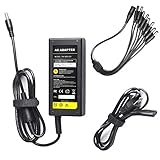
- 12 Volt 5 Amp DC Power Supply Adapter (60 Watts) - Standard High quality power adapter
- Input:100-240V-1.5A Volts AC 50-60 Hz. Output: 12V DC 5 Amp (12V, 5A)
- It will run most CCTV cameras etc that require up to 5000mA 12V power
- This power adapter (transformer) is good for 12V CCTV security camera/DVR/NVR/HVR(analog,AHD,IP), RGB LED strip lights
- 1 x 8-Way Power Splitter enables you to easily power up to 8 security cameras or 1 DVR with just one plug, no matter it is Analog or AHD
If the camera was already configured but remains offline after power, battery, Sync Module, and Wi-Fi checks, deleting and re-adding the camera is a later troubleshooting option. Do not start with this step if a simple power cycle or incorrect password explains the problem, because re-adding can require you to repeat setup and settings.
5. Reset only when the model’s instructions call for it
For a Mini, Mini 2, or Mini 2K+, Blink’s red-light guidance says to press the reset control with a thin object if a steady red light remains after unplugging and reconnecting the camera. Use the reset method described for your exact model; do not force a sharp object into the camera or use a tool that could damage the button or housing.
Blink says to contact support if the Mini’s LED pattern does not change within 120 seconds after the reset procedure. Resetting is not a substitute for checking the Wi-Fi password or Sync Module.
6. Protect outdoor power connections
If you power a compatible Outdoor 4, Mini 2, Mini 2K+, or another listed model continuously, a Blink Weather-Resistant Power Adapter may help avoid battery replacement—but only when the accessory is compatible with the exact camera and installation. It is not a universal fix for a red LED caused by startup, setup, or lost Wi-Fi.
Free tools Windows power users keep installed
One-click scans. No signup required.
For an outdoor installation, protect the camera’s USB port with its silicone cover or a compatible weather-resistant power cable. Simply plugging in a USB cable does not preserve the camera’s intended weather resistance. Follow Blink’s USB power and weather-sealing instructions.
Wired Floodlight Camera: take electrical precautions
Do not treat a wired floodlight camera like a battery-powered Outdoor model. If the red light is accompanied by a power failure, unusual behavior, or suspected wiring trouble, turn off the circuit at the breaker before inspecting any wiring. Blink specifically advises disconnecting power at the breaker and consulting a licensed electrician when appropriate.
Rank #4

- 【Power Specification】Input:100-240V, 50-60Hz; Output: 12V 5A Max. Output adaptor Self-Adapting Barrel jack size: 5.5mm x 2.1mm , inner Positive (+)outer Negative ( - ). 8-Way Power Splitter enables you to easily power up to 8 security cameras or 1 DVR with just one plug, no matter it is Analog or AHD
- 【Product Compatibility】This LED Power Transformers fit for 12V CCTV Camera/DVR/NVR/HVR(analog,AHD,IP), RGB LED strip lights. Compatible with TIGERSECU, Lorex, Reolink, Night Owl, Swann, Defender, ZOSI, and samsung security camera
- 【Friendly Reminder】Uses a standard 2.1mm DC power plug, a universal standard for almost all security camera on the market, making it a perfect replacement security camera power supply
- 【Certified Safe】12v power supply With the latest generation of smart chips; no fire hazard, low-temperature operation, stable output. Automatic overload cut-off, over-voltage cut-off, over-temperature cut-off, short circuit protection
- 【High Quality】 Updated Intelligent Chip for stronger compatibility and better performance. Premium thick pure wire.Germany imported compact material, wear-resistant and not easy to break
Do not open or alter fixed wiring while the circuit is energized, and do not guess which breaker controls an exterior camera. If you cannot verify that the power is off, stop and have the work handled by a qualified electrician. Use Blink’s Wired Floodlight Camera troubleshooting instructions for the reset and power sequence.
When the red light means something else
Red light only during motion or Live View
A brief flash is not necessarily a fault. Determine whether it appears during motion detection, recording, or Live View and whether a blue light appears first or afterward. Check the LED setting in the Blink app if the behavior seems inconsistent with the expected model pattern.
Red light after changing Wi-Fi
On a Mini, a solid red LED after a network change is consistent with a connection failure or incorrect password. Check the credentials and network status before resetting. On other models, complete the relevant setup or system-change flow in the app.
Red light after installing new batteries
Confirm that the batteries are the correct AA 1.5-volt lithium non-rechargeable type, installed in the correct orientation, and fresh. If the light pattern persists, the issue may be network, setup, or hardware-related rather than battery-related.
Independent reader supportYour contribution helps us test, update, and keep practical guides available for everyone.When to contact Blink support
Escalate the problem when the documented steps do not change the LED pattern. Blink directs users to contact support when:
Best Value

- AC Input: 100~240V 50/60Hz can be used worldwide, DC Output: 12V 2A.
- This power adapter (transformer) is good for 12V CCTV 2A security camera (analog, AHD, IP).
- 1 to 4-Way Power Splitter enables you to easily power up to 4 security cameras.
- Simplifying the Installation Process. Simple installation, more safety.
- Quality warranty, Lifetime Tech Support.
- a Mini’s red light does not change within 120 seconds after the prescribed reset;
- a Video Doorbell still does not show the expected red setup flash after fresh batteries and a power cycle;
- an Outdoor-family camera’s red LED remains on after battery and connection troubleshooting; or
- the camera repeatedly fails after confirmed power, correct batteries or USB supply, working Wi-Fi, and a functioning Sync Module.
Before contacting support, record the exact model, LED color and timing, whether the light is solid or intermittent, the battery or power arrangement, the Sync Module status, and what changed immediately before the fault. A short video of the LED pattern can also make the diagnosis clearer.
Practical decision guide
- Mini blinking red during startup: wait for startup to finish. If it becomes solid red, check Wi-Fi and the password.
- Outdoor 4 flashing red during setup or a system change: power-cycle for five seconds and continue setup in the app.
- Outdoor, Indoor 3rd Gen, XT, or XT2 flashing red every few seconds: check the internet and Sync Module.
- Five or six flashes after blue recording on an older battery model: install fresh recommended lithium AA batteries.
- Doorbell red light during setup: power-cycle it, verify the generation-specific battery count, and retry setup.
- Floodlight red light with suspected wiring trouble: switch off the breaker and use qualified electrical help.
The safest general rule is to diagnose the model and pattern first, then power-cycle, check the network, replace batteries only where applicable, and reset or re-add the camera only as a later step.
Frequently Asked Questions
Is a blinking red light on a Blink camera always a problem?
Not necessarily. On the Blink Mini, Mini 2, and Mini 2K+, blinking red generally indicates startup. On other models it can indicate setup, a system or Wi-Fi change, or a lost connection. The exact model and timing matter.
Should I replace the batteries if my Blink Mini is blinking red?
No. Blink Mini cameras are USB-powered. AA battery replacement applies to battery-powered models such as Outdoor, Indoor (3rd Gen), XT, XT2, and compatible Video Doorbells.
How do I fix a Blink Video Doorbell that is blinking red?
Remove the batteries for five seconds and reinstall them. If the expected pattern does not return, try fresh lithium AA batteries and repeat the model-specific setup or troubleshooting steps in the Blink app.
What does a solid red light mean on a Blink Mini?
A solid red Mini generally indicates that it cannot connect to the network or that the Wi-Fi password may be incorrect. Check the password and network, power-cycle the camera, and follow Blink’s reset instructions if the solid light remains.
What should I do if my Wired Floodlight Camera has a red light?
Turn off the relevant circuit at the breaker before inspecting wiring. If you cannot safely verify that power is off or the problem involves fixed wiring, use a licensed electrician.
The Bottom Line
Bottom line: A blinking red Blink camera may be starting, entering setup, losing its network connection, or reporting failing batteries. Identify the model and timing first. Power-cycle it, check the Sync Module and Wi-Fi, use fresh lithium AA batteries only in battery-powered models, and reserve reset or re-adding for the appropriate case. For a wired Floodlight Camera, disconnect power at the breaker before inspecting anything electrical.
Quick Recap
Product prices and availability are accurate as of the date/time indicated and are subject to change. Any price and availability information displayed on Amazon at the time of purchase will apply.
What’s actually slowing this PC down?
Pick the symptom - the matching free tool is one click away.

