Most cable-box noise comes from a cooling fan, an internal hard drive in DVR models, or vibration against a shelf or another device. A quiet, steady hum may be normal, but grinding, repeated clicking, worsening noise, overheating, failed recordings, or unexpected shutdowns usually justify asking your provider for a replacement.
Is it normal for a cable box to make noise?
Sometimes. DVR cable boxes commonly contain both an internal hard drive and a cooling fan, so they may continue humming or softly whirring even when the television is off. The ARRIS/Motorola DCX3600-M guide identifies the integrated hard drive and cooling fan as sources of humming and notes that fan noise can change with temperature.
As an Amazon Associate I earn from qualifying purchases.
A low, stable sound audible only near the box is generally less concerning than a harsh, new, or progressively louder noise. Model design also matters: basic receivers and streaming boxes may have fewer mechanical parts than DVRs, but some still contain fans or produce electrical coil noise. “Normal” does not mean every noise is acceptable.
Identify the sound first
| Sound | Likely causes | Urgency |
|---|---|---|
| Low, steady hum or soft whir | Normal fan or hard-drive operation; vibration against a shelf | Usually low |
| Fan-like whoosh that rises and falls | Temperature-controlled cooling fan | Low to moderate; inspect ventilation |
| Buzz that changes when the box or cables move | Loose panel, cable contact, shelf resonance, or vibration | Usually low |
| Rattle or ticking | Loose casing, fan obstruction, worn fan bearing, or hard-drive activity | Moderate |
| High-pitched squeal | Fan bearing, electrical/coil noise, or defective hardware | Moderate; replacement may be appropriate |
| Grinding or repeated sharp clicking | Possible mechanical fan or hard-drive failure | High; contact the provider |
| Crackling, popping, burning smell, or smoke | Possible electrical fault | Unplug safely and seek assistance |
The description alone cannot prove the cause. People often use “hum” to describe fan noise, hard-drive activity, furniture vibration, or an electrical buzz.
#1 Best Overall

- Effective Cooling: USB fans designed to cool various electronics and components, like TV box, AV receiver, DVR, router, modem, for xbox series x cooling , playstation, microcomputer, survelllance recorder, mini PCs, T-Mobile home internet gateway and other audio aideo electronics
- Mini Box Fan: Versatile fans cool a wide range of devices. From routers and modems to computer components and entertainment centers, Xbox consoles and other equipment, enclosed spaces
- Easy Installation: Simple USB connection for quick setup. Fits easily in tight spaces.Keeps your devices cool & functioning. Say goodbye to overheating! Effective cooling performance, with no heat build-up and efficient router cooling
- USB Fan: Dimension: 120mm x 120mm x 25mm / 4.7x4.7x1 in. per fan; Rated Voltage:5V 0.2A; Speed: 1500RPM; Air flow: 56.7CFM; Noise:23dBA; Cable Length: 55cm Or 21 inches; Bearing: Sleeve ; Life: 35000 hours
- High Performance: Good for use in home theaters and other electronics.1 Piece fan include fan Protective net, 4X Foot columnsand 4Xmounting screws & nuts
Common causes of cable-box noise
Cooling fan
A fan is more likely when the sound resembles airflow, becomes louder after the box has been running for a while, or rises and falls with room temperature. A restricted cabinet or nearby hot equipment can make the fan work harder. DIRECTV says its receiver may increase the fan to maximum speed when it detects excessive internal temperature.
Internal DVR hard drive
A hard drive produces a steady spinning or whirring sound and may make brief, quiet seek sounds during recording or playback. Occasional activity is not automatically a failure. Repeated loud clicking, grinding, freezing, sluggish menus, failed recordings, or playback errors are more concerning because they suggest a possible mechanical problem.
Blocked ventilation, dust, or heat
Closed entertainment centers, covered vents, direct sunlight, dust, soft surfaces, and equipment stacked directly above or below the receiver can raise its temperature and increase fan noise. DIRECTV’s ventilation guidance recommends unobstructed vents, a well-ventilated location, and avoiding soft surfaces and stacked electronics. Clearance requirements vary, so follow the instructions for your specific model rather than using a universal measurement.
Free tools Windows power users keep installed
One-click scans. No signup required.
Rank #2

- 【Variety used】This EMC and ROHS certified 120mm Usb fan is Used for receiver, cabinet, DVR, playstation, TV box, fridge, incubator, aquarium,ham radios and more that requires cooling or ventilation; or as a replacement fan.
- 【Silent】 Each computer case fan equipped with 4 silicone rubberfeets, which can help absorbing the air flow shock and absorb the noise,reduce to 9.3-16.8dBA.
- 【L/M/H 3-Degree Speed Controller】 The variable speed is great for turning the speed up or down to your noise comfort level. It is cycles from high-Medium-low and off speed mods.
- 【Convenient 】The fan is suitable for devices with a USB interface, No matter where you are, just plug it in and use it.
- 【Dual ball bearings】 Durable dual ball bearings have a lifespan of 50,000 hours, and allow the fan to be flat or upright and easy to use.
Furniture and cable resonance
The chassis may vibrate against a wooden shelf, metal stand, wall, or another device. A hollow cabinet can amplify a small vibration. Cables under tension can also transmit vibration into the furniture, while missing or uneven rubber feet can leave the case resting directly on a hard surface.
Electrical or external-device noise
The apparent source may be elsewhere. Listen near the television, soundbar, AV receiver, cable modem, router, power strip, UPS, wall outlet, and coaxial connection. A buzz from speakers or a soundbar may result from cable interference or an audio-ground issue rather than a mechanical problem inside the box.
What to do when your cable box is noisy
- Locate the source. Listen close to the box and each nearby device. Note whether the sound comes from the chassis, speakers, power equipment, or furniture.
- Check the operating conditions. Make sure vents are uncovered, the box is not tightly enclosed or stacked, and it is not sitting on a blanket, rug, cushion, or other soft material.
- Move it safely. If appropriate, turn the box off according to your provider’s instructions. Place it on a firm, level surface with ventilation space around it. Keep cables from pressing against the case. Thin, heat-safe vibration-damping feet may help if they do not cover vents or lift the unit into an unstable position.
- Observe when the noise occurs. Does it begin at startup, appear only after warming up, change during recording or playback, stop briefly after restarting, or get louder over days or weeks? A short audio or video clip can help provider support; a phone decibel reading is not a formal failure test.
- Restart the receiver. Stop recording or playback if possible. Unplug the power cord, wait at least 15 seconds, reconnect it, and allow the box to complete startup. For example, Xfinity’s published troubleshooting guidance instructs customers to unplug the TV Box for 15 seconds and then reconnect it. Other providers may use different procedures.
- Check whether the noise returns. A restart can clear a temporary fan-control or software condition, but it cannot repair a worn bearing or failing hard drive.
- Contact your provider if it persists. Describe the sound, when it occurs, the box model, ventilation conditions, and any recording or picture problems. Ask about equipment exchange eligibility.
What if the box is overheating?
Warmth alone does not prove a dangerous fault. More meaningful warning signs include a suddenly louder fan, an unusually hot enclosure, an on-screen temperature warning, repeated reboots, shutdowns, or picture and recording problems after extended use.
Rank #3
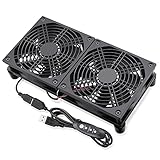
- 240 mm USB Fan: Cools routers, modems, receivers, DVRs, AVR, amplifier, gaming consoles, computers, and other av electronics – lowers internal temps to prevent overheating
- L/M/H 3-speeds Wind Adjustment: Features a multi-speed controller to set the fan’s speed to optimal noise and airflow levels; Low setting runs near-silent (inaudible from 2ft away); high setting delivers max airflow meets high-load equipment
- 5V USB Powered Fan: USB plug can power the fan through any type-A USB ports found behind electronics, wall charger and on portable power banks; No extra adapter needed; No assembly required, plug and play
- Dual 120mm fans move ample air to cool multiple devices simultaneously – place under or on top of heat-generating gear; Durable hydraulic bearing motor ensures long-lasting quiet cooling fan for 24/7 operation
- Compact, slim USB fan – fits in crowded shelves, network racks, and AV cabinets. Includes USB extension cable with inline switch for speed control
According to DIRECTV’s overheating guidance, an overheated receiver may display a temperature warning, illuminate the red Record light, run its fan at maximum speed, reboot, and eventually shut down if the temperature remains too high.
- Turn the receiver off if possible.
- Remove blocked objects and move it into open, well-ventilated space.
- Let it cool naturally.
- Restart it only after it has cooled.
- Contact the provider if overheating or loud fan operation returns.
Do not put the box in a refrigerator or freezer, place ice packs on it, or improvise a powerful fan directly against its vents. Condensation, dust, and blocked airflow can create additional problems.
Independent reader supportYour contribution helps us test, update, and keep practical guides available for everyone.When should you request a replacement?
Ask your provider about a replacement when the noise is loud enough to interfere with normal viewing, is new or getting worse, or appears with any of these symptoms:
Rank #4

- Widely Used: This usb cooling fan works great for router, Mac Mini, PlayStation, cabinet, Modem, DVR, Receiver, Streaming ,boxes, x-box, SSD, Security Camera NVR, andriod box, stereo, T-Mobile gateway and other electronic equipment.
- Dimensions: 120x120x25mm / 4.7 x 4.7 x 1 in per fan. Totally 240x120x50mm / 9.4x4.7x1.97 inch
- Rated voltage: 5v usb; Rated current: 0.25A; Speed:1100rpm per fan(total 2200rpm) ; Airflow 38cfm per fan(total 76cfm); Noise:28dBA; Bearing: sleeve; Lifespan:35,000 hours
- 20MM Rubber Feet: 120mm x 4 usb large router fan are equipped with 2cm 0.79inch non-slip and shockproof rubber feet, allowed fan can be placed flat with no slip and leave more space for airflow intake to cool down the device soon.
- Plug and Play,no assembly needed! No power supply included!
- Grinding, scraping, severe rattling, or repeated loud clicking
- Failed recordings or playback errors
- Freezing, unusually slow menus, repeated reboots, or unexpected shutdowns
- Excessive heat or recurring fan surges
- Crackling, popping, a burning odor, smoke, or a damaged power cord
Provider policies, equipment charges, shipping, technician fees, lease terms, and unreturned-equipment fees vary by account and location. Check the provider’s current support terms rather than assuming an exchange is free. Relevant support portals include Xfinity, DIRECTV, and Verizon Fios.
Will unplugging it damage recordings?
Unplugging can interrupt an active recording, which may leave that program incomplete or lost. Scheduled recordings will usually remain programmed, but behavior varies by provider and model. Use the provider’s normal restart procedure when possible. If the box is severely overheating, making electrical noises, or producing smoke, prioritize safety and support over preserving one recording.
Do these 3 things before closing this tab:
1Clear out junk files and repair common Windows errors2Fix the driver behind crashes, sound loss and screen glitches3Repair Windows errors before they cause bigger problemsDo not assume recordings can be backed up or transferred. Many provider DVRs use encrypted storage or do not provide a customer-accessible backup process.
Should you open or repair the cable box?
Generally, no. Provider equipment is often leased or provider-owned. Opening it can create electrical and thermal hazards, affect warranty or service eligibility, and make DVR recordings inaccessible. Internal fan or hard-drive repair is rarely a practical subscriber repair; external diagnosis, ventilation, cable management, and a normal restart are the sensible DIY boundary.
A replacement may use the same fan or hard-drive design and therefore may not be silent. If the provider offers a newer streaming-oriented box, ask whether it changes DVR storage, cloud-recording access, channel features, internet dependence, or monthly equipment charges before accepting it.
Quick Recap
Product prices and availability are accurate as of the date/time indicated and are subject to change. Any price and availability information displayed on Amazon at the time of purchase will apply.

