Outdated Drivers Are Slowing You Down
One free scan finds every outdated or missing driver and matches the right update for your exact hardware.Free scan · exact hardware matchPC Slower Than It Used to Be?
A free scan shows the junk files, broken settings and background clutter dragging Windows down - then fixes them in one click.Free scan · Windows 10 & 11The best way to cut plastic depends on the resin, sheet thickness, cut shape and edge finish you need. For a straight cut in thin PLEXIGLAS® acrylic, scoring and snapping can work up to 4 mm thick. For thicker acrylic, use a supported saw with a sharp blade made for plastic; use a jigsaw for curves. Polycarbonate has different fabrication guidance, and laser cutting is safe only when the material and machine are confirmed compatible.
Choose the method for the material and cut
First identify the sheet’s resin, grade and thickness, then consider whether the cut is straight or curved, how precise it must be and how clean the edge needs to look. Acrylic instructions are not automatically suitable for polycarbonate or other plastics. Check the sheet supplier’s processing guidance before cutting.
| Situation | Practical starting point | Limits and checks |
|---|---|---|
| Thin PLEXIGLAS® acrylic, straight cut | Score with a suitable knife and snap along the score. | Röhm recommends this only for sheets up to 4 mm thick; the method makes straight cuts and can leave sharp edges or splinters. Röhm’s PLEXIGLAS® cutting guide. |
| Thicker acrylic, straight cut | Use a circular saw or hand saw with a sharp blade designed for plastic. | Support and clamp the sheet; use a guide for a straight cut. Blade, feed and speed depend on the saw and sheet thickness. ACRYLITE® cutting guidance. |
| Acrylic curves or recesses | Use a jigsaw with a suitable blade. | Support the sheet to limit vibration, control the speed and switch off pendulum action as Röhm advises. Röhm’s PLEXIGLAS® cutting guide. |
| Polycarbonate sheet | Consult the guide for the exact grade; possible saws include circular, band, jig or hacksaw. | Polycarbonate recommendations differ from acrylic. Scoring and snapping is suitable only for appropriate thicknesses and straight cuts. LEXAN™ 2025 processing guide. |
| Laser cutting | Use only when the material is known to be compatible with the specific laser system. | Confirm the approved-material list, ventilation and fire-safety procedures. Acrylic cutting creates fumes; PVC/vinyl can emit chlorine gas, and thick polycarbonate may cut poorly, discolor or ignite. University of Illinois laser-cutter safety guidance. |
How to make a straight saw cut in acrylic
- Identify the sheet. Confirm that it is acrylic and note its grade and thickness. Follow the supplier’s instructions for that product.
- Protect the surface. Leave the masking film in place while cutting. If the sheet is unmasked, use compatible protective tape only as the material maker directs.
- Set up firm support. Put the sheet on a clean, level base, clamp it securely and support the offcut so it cannot vibrate or bind.
- Choose the blade and guide. Use a sharp blade designed for plastic and appropriate to the saw and sheet thickness. For a straight cut, guide the saw with a track or straightedge.
- Test the setup. Set feed and speed according to the tool and material instructions. If possible, cut a scrap piece and check for melting, chipping or a poor edge before proceeding.
- Make the cut without forcing it. Keep the saw running as it enters and leaves the cut. Remove swarf safely.
- Finish the edge. Deburr with a scraper, file or suitable abrasive; cut edges may be sharp.
Wear safety glasses and hearing protection as appropriate, and follow the tool’s safety manual and local requirements. Use care when handling sharp edges and splinters.
Which blade should you use?
Jigsaws, saber saws and band saws
Blade tooth spacing needs to suit both sheet thickness and the finish you want. ACRYLITE® says blades with 7–14 teeth per inch (TPI) are generally acceptable for saber, jig and band saws, but recommends matching the spacing to the material so at least two teeth engage the sheet. Its examples are 16 TPI as a starting point for 3 mm sheet and 8 TPI for 6 mm sheet. These are starting points, not a universal blade specification; use the blade maker’s guidance for your saw and material. ACRYLITE® guidance on saber, band and jigsaw blades.
#1 Best Overall

- [ Product Included ]- 8-in-1 Adjustable blade hand saw, The TPR non-slip handle with ergonomic designed reduces hand fatigue.
- [ Clever Design ]- Lockback mechanism secures teeth blades in place firmly, Through the ingenious clamping design, large and small blades can be supported, so we provide 8 different saw blades for use to meet different use needs.
- [ High quality Blades ]- Include 8 different saw blades witch are made of high speed steel (HSS steel), be very resistant, sharpened tip and hardened blade for durability.
- [ Replacement Blades ]- The replacement reciprocating blades are available anywhere tools are sold. The hand saw has a professional clamping mechanism,which can be fixed well for both large and small blades that can be meet your different needs and easy to get spares.
- [ Compact Design ]- Compact design, Save space in the go toolbox.
Circular saws
ACRYLITE® recommends sharp carbide-tipped blades and describes dedicated acrylic blades. Keep the sheet supported and clamped, and feed consistently: a dull blade or unsuitable feed and settings can contribute to melting or chipping. Match the blade to the saw and sheet thickness rather than treating one blade choice as suitable for every plastic. ACRYLITE® cutting guidance.
When scoring and snapping is appropriate
Röhm says PLEXIGLAS® sheets up to 4 mm thick can be cut in a straight line by scoring and breaking. Its example is one scoring pass per millimeter of sheet thickness. This is a limited option for thin acrylic and straight cuts, not a general method for thick sheets, curves or unidentified plastics. Support the sheet while snapping, and protect your eyes and hands from splinters and sharp edges. Röhm’s PLEXIGLAS® cutting guide.
Rank #2

- Designed for cutting Plexiglas 5/64 In. to 3/4 In. thick
- Ideal for straight, clean cuts
- Ground and taper back tooth design
- Superior bi-metal longevity
Why polycarbonate needs its own instructions
Polycarbonate can be cut with several saw types, but the appropriate setup depends on the product and thickness. The LEXAN™ processing guide covers material-specific fabrication, while AmeriLux also provides polycarbonate scoring and sawing instructions. Do not transfer acrylic blade or scoring recommendations to polycarbonate without checking the applicable sheet guidance.
Sources: LEXAN™ Sheet: Processing, Forming and Fabricating Guide (2025); AmeriLux Polycarbonate Installation Guide.
Do these 3 things before closing this tab:
1Scan for outdated or missing drivers - takes under a minute2Clear out junk files and repair common Windows errors3Fix the driver behind crashes, sound loss and screen glitchesRank #3

- PRECISE SCORING: Quickly create a clean scoring line and snap acrylic sheets along the groove for straight, accurate cuts. This scoring tool is built for controlled scoring, and the plexiglass cutter knife design helps achieve precise plexiglass cut to size results with smooth, clean edges.
- SK5 STEEL BLADE: Made with durable SK5 high-carbon steel, this plastic cutter knife stays sharp through repeated use. The hard SK5 blade helps this acrylic cutter deliver long-lasting durability and dependable performance for cut to size plexiglass projects.
- EASY BLADE CHANGE: The plexiglass cutter tool uses a push-and-release design, making this scoring knife easier for quick, hassle-free blade replacement without any tools.
- COMFORT GRIP HANDLE: Built with a strong ABS body and non-slip TPR grip, this plastic cutter tool provides better control and comfort during use. The ergonomic handle helps this acrylic cutter tool reduce hand fatigue and maintain steadier scoring on straight lines.
- VERSATILE MATERIAL USE: Perfect for cutting plexiglass, acrylic sheets, ABS, PVC panels, and other plastic materials, this plastic cutting tools is ideal for DIY, home improvement, and craft projects. As a hard plastic cutter tool, it is better suited for thin to medium materials and not intended for especially thick material.
Laser cutting: check material and safety first
A laser is not a safe default for an unknown plastic. ACRYLITE® says laser-cutting acrylic creates substantial fumes that require proper collection and handling; laser power, feed rate and pulse rate affect cut quality and residual stress. Heating acrylic or polycarbonate can also create heat stress. Follow the laser manufacturer’s approved-material list and ventilation instructions rather than relying on a generic plastics list. ACRYLITE® laser-machining guidance; ACRYLITE® safety guidance on acrylic fumes and dust.
The University of Illinois Division of Research Safety, in guidance last updated October 1, 2026, warns that PVC or vinyl can emit chlorine gas in a laser cutter. It also notes that thick polycarbonate cuts poorly, may discolor and may ignite. Do not laser cut PVC/vinyl; verify that any other plastic is approved for the exact machine and use its required ventilation and fire controls. University of Illinois laser-cutter safety guidance.
Quick Recap
Best Value

- This acrylic hook knife tool is specially used to cut acrylic sheets or other plastic sheets. Acrylic sheets or other plastic sheets are hard and brittle, so it is difficult to divide. This hook knife can help you carve a thin groove on the acrylic sheet, and then you can break the acrylic sheet along the groove.
- 1.Please mark the board with a pen,then use a ruler to place it according to the mark.2.Use the hook knife to draw a groove on the acrylic plate along the ruler,and the ruler must be pressed with your left hand. Hold the hook knife with right hand and repeat the operation to make the groove deep enough.
- 1.There is a ridge-like protrusion on the back of the hook knife. Place the hook knife under the acrylic board, align the protrusion of the hook knife with the groove just hooked out,and press down on both sides of the groove with both hands,Let a small part of the acrylic board split along the groove.2.Completely break the acrylic board along the groove.
- When using the hook knife,pay attention to protect the tip of the knife and do not touch the ground. If the tip of the knife is not sharp, you can change the blade.Contains a hook knife with 1 blades and a box of blades. There are 11 blades in total.
- If you are not familiar with the usage of this tool, it is recommended that you carefully read the above instructions on how to use it, as well as the cutting demonstration video.
Rank #4
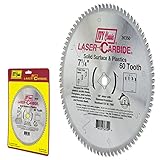
- Designed for cutting plastics, acrylic sheets, Plexiglas and solid surface materials such as: Corian and Fountain Head.
- Triple chip ground large C4 modified tungsten carbide teeth, Laser Carbide (Registered Trademark)
- Industrial duty blade with fully hardened body - Rockwell Hardness 40 - 43 HRC
- Expansion slots reduce heat build-up and eliminate warping
- Arbor: 5/8-inch diamond knockout, Kerf: 0.110-inch, Hook: -6 degree
Product prices and availability are accurate as of the date/time indicated and are subject to change. Any price and availability information displayed on Amazon at the time of purchase will apply.




