Do these 3 things before closing this tab:
1Scan for outdated or missing drivers - takes under a minute2Repair Windows errors before they cause bigger problems3Fix the driver behind crashes, sound loss and screen glitchesShort answer: Vivint is a strong choice for homeowners who want professionally designed and installed security, professional monitoring, cameras, and smart-home controls in one ecosystem. Its hardware-and-installation proposition is compelling, but the service can become expensive, its contracts and financing require close attention, and customer experiences are mixed.
Vivint is less suitable for renters, frequent movers, bargain shoppers, committed DIY users, or households that already own a large collection of cameras, locks, and sensors from brands Vivint may not support. The most important question is not simply whether Vivint equipment looks good; it is what you will pay over the full agreement term and what functionality remains if you cancel monitoring.
As an Amazon Associate I earn from qualifying purchases.
Vivint review at a glance
| Category | Assessment |
|---|---|
| Best for | Homeowners who want professional installation, monitoring, integrated cameras, and one central smart-home system. |
| Main strengths | Professional setup, a polished centralized experience, cellular communication and backup battery in the Smart Hub, and a broad range of integrated devices. |
| Main weaknesses | Potentially high total cost, multi-year commitments, financing complexity, limited third-party compatibility, and service dependence after cancellation. |
| Customer sentiment | Mixed. Many customers praise technicians and equipment, while others report sales pressure, setup mistakes, connectivity problems, repair delays, and cancellation difficulty. |
| Overall verdict | Worth considering if convenience and professional service matter more than the lowest price or maximum flexibility. Read the complete contract before signing. |
This review is based on Vivint’s public product and pricing information, its Terms of Service updated January 29, 2025, customer-review patterns, and published reporting. Customer reviews are useful as a sentiment signal, not as an independent reliability test; the available research does not establish a laboratory failure rate for Vivint equipment.
Quick wins for a faster PC:
Repair Windows errors before they cause bigger problemsFix Now →Scan for outdated or missing drivers - takes under a minuteDriver Scan →Clear out junk files and repair common Windows errorsFree Scan →What Vivint sells
Vivint combines professionally installed security equipment with monitoring and smart-home automation. A system can include a central control panel or hub, door and window sensors, motion sensors, keypads, key fobs, security and doorbell cameras, smart locks, thermostats, smoke and carbon-monoxide detectors, water sensors, lighting controls, smart plugs, garage controls, and related services.
#1 Best Overall
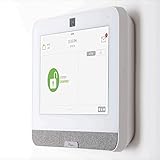
- The IQ Panel 4 is a security system control panel that is designed for residential and small commercial use. It is a modern and intuitive control panel that offers a range of features. (Optional) 3 months of 24/7 professional monitoring included with purchase!
- Supports well over 100 wireless sensors and devices, including door and window sensors, motion detectors, glass break detectors, thermostats, lights, security cameras and more!
- Seamlessly integrate with the Alarm.com mobile app. View video cameras and answer video doorbells, remotely lock/unlock doors, adjust thermostat and lights, and receive doorbell call and motion notifications all on your smart device.
- The IQ Panel 4 has a built-in 8MP front camera with a 120° wide angle lens and FlexTilt capability that captures photos and videos when the panel is disarmed or when the alarm is triggered, it also records up to a 4-minute video clip when the alarm is triggered, all of which is stored locally on the panel.
- Featuring a cutting-edge processing unit, you can experience best-in-class wireless range capabilities This coupled with the ability to use Z-wave devices, gives you almost limitless control over your home security and automation. Using the integration from Alarm.com's LTE cellular services, you can create rules that allow you to make your entire home play well together, such as turning on an outside light when your driveway sensor is tripped, or unlocking your door when you disarm the system.
Depending on the package, the recurring service may cover alarm monitoring, mobile-app access, camera features, video storage or DVR functions, troubleshooting, maintenance, and repair. Equipment, installation, monitoring, cameras, storage, protection plans, taxes, and financing can all affect the final price. Vivint’s own cost guidance says a fully connected smart-home system can reach $2,500 or more in equipment, before the complete effect of service and financing is considered.
The advertised HomeProtect pricing example
The public HomeProtect offer reviewed for this article was presented in two materially different ways:
- 36-month option: $199.99 upfront, professional installation included, and monitoring advertised at a reduced $24.99 per month when the customer signs a 36-month agreement.
- No-long-term-contract option: $349.99 upfront, $29.99 per month for monitoring, plus a separate $199 professional-installation charge.
Vivint describes the entry-level bundle as including a Vivint Security Hub, three door/window sensors, one motion sensor, and one keypad. Promotional pricing can change by location and date, and add-on equipment or services can substantially increase the quote.
Using only the figures shown above, the 36-month offer would total approximately $1,099.63 before taxes and additions: $199.99 upfront plus 36 payments of $24.99. The no-long-term-contract option would total approximately $908.87 during the first 12 months: $349.99 upfront, $199 installation, and 12 payments of $29.99. If the same monthly price continued for 36 months, its total would be approximately $1,628.63. These calculations are comparisons of the advertised figures, not a guarantee of the price you will be offered.
The cheaper-looking monthly payment is therefore not the same thing as the cheaper system. Ask for a written quote that separates equipment, installation, monitoring, cameras, video storage, protection plans, taxes, financing, and every other recurring or one-time charge.
Contracts, financing, cancellation, and equipment ownership
The contract is the area where a buyer should be most careful. Vivint’s public Terms of Service say subscriptions may be month-to-month or multi-month. Cancellation is initiated by calling customer service, and Vivint says the subscription will be canceled within 30 days after it receives the request. That does not necessarily mean a multi-year agreement can be ended without cost.
The terms warn that a multi-month subscription may involve an early-termination fee. Promotional discounts may also be lost. The exact obligation depends on the customer’s agreement, state, promotion, and any separate financing documents, so the public marketing page is not a substitute for the paperwork you sign.
Free tools Windows power users keep installed
One-click scans. No signup required.
What happens if you cancel?
Vivint’s terms state that simply unpairing a device does not cancel a subscription. They also warn that, without an active Vivint service subscription, customers may lose access to the Vivint app or account and that devices may have limited functionality or may not work at all.
This creates an important distinction between owning or paying for equipment and having a fully functional, independently operated security system. Before signing, ask in writing:
- Which features continue if professional monitoring is canceled?
- Will the app, remote access, camera recordings, notifications, automation, and local controls still work?
- Will any device be locked to Vivint or lose cloud-dependent features?
- What is the exact early-termination formula?
- What happens if you move, sell the home, or transfer service?
- Is there a remaining equipment balance separate from the monitoring obligation?
Do not treat a salesperson’s summary as the financing agreement
If equipment is financed, request the name of the financing company, annual percentage rate, repayment term, total repayment amount, monthly payment, credit-inquiry details, and whether the arrangement creates a separate line of credit. Keep the signed equipment list, promotional offer, financing documents, and cancellation instructions.
Rank #2

- Home Security Systems
There is also historical context worth knowing. A U.S. Department of Justice settlement concerning Vivint sales practices from April 2017 through December 31, 2020 alleged that certain sales representatives used personal funds to cover initial financing payments, creating a misleading appearance about borrowers’ ability to make those payments. The settlement expressly stated that it was not an admission of liability by Vivint. This does not establish that current representatives behave the same way, but it is a good reason to verify every financing detail independently and never rely solely on a verbal promise.
Crashes, No Sound, or Screen Glitches?
Random freezes, missing sound and display glitches usually trace back to one bad driver. Find and replace yours safely.Free scan · under a minuteWindows Errors? Fix Them Before They Spread
Repair common Windows errors and clear accumulated junk for a smoother, more stable PC - no reinstall needed.Free scan · no reinstallVivint’s terms also include individual arbitration provisions and restrictions on jury trials or class actions, subject to applicable law. Read the state-specific customer agreement and any financing agreement before committing.
Professional installation is Vivint’s clearest advantage
Vivint says its technicians handle device placement, wiring, integration, syncing, testing, and customer training. That is valuable for a homeowner who does not want to measure sensor locations, mount cameras, configure a hub, troubleshoot wireless coverage, or connect locks and thermostats manually.
Professional installation can be particularly useful in a large house, a property with detached access points, or a home where door and window layouts make sensor placement less obvious. It also gives the buyer an opportunity to have the complete system demonstrated before the installer leaves.
Customer feedback supports installation as a frequent strength, but not a universal one. Positive reviews commonly mention prompt, courteous technicians, clean or professional work, and a system that was easy to operate after setup. Negative reviews describe rushed or lengthy installations, communication problems, installation mistakes, unresolved sensor issues, and pressure during the sales process. These are individual customer reports and should not be treated as a controlled measure of technician quality.
The Tool Desk
Outbyte PC Repair FREERepair Windows errors before they cause bigger problemsFix Now →Outbyte Driver Updater FREEScan for outdated or missing drivers - takes under a minuteDriver Scan →Installation-day checklist
Do not consider the job complete merely because the devices are mounted. Before the technician leaves, test:
- Every door and window sensor, including any difficult or rarely used entry.
- Every motion sensor, while checking for unwanted detection from pets, heating systems, or high-traffic areas.
- Each camera in daytime and low-light conditions.
- Doorbell activity, two-way audio, and notification delivery.
- Every alarm mode, including away, stay, and disarm behavior.
- Smart-lock locking, unlocking, codes, and the physical key override.
- Smoke, carbon-monoxide, water, garage, thermostat, lighting, and other add-on devices included in the order.
- Mobile notifications and authorized-user access.
- Cellular-backup behavior if it is part of the system.
- How to replace batteries, contact support, and request cancellation.
Save screenshots of the installed device list and photograph the equipment, serial numbers, and final paperwork. Those records can help if the delivered system differs from the sales presentation.
Equipment, Smart Hub, and smart-home compatibility
The Vivint Smart Hub is designed to centralize security and automation. Vivint lists support for Vivint sensors and devices, Z-Wave home-automation devices, and select Honeywell and Resolution Products devices. The hub also provides remote management, cellular communication, Wi-Fi, a rechargeable backup battery, and capacity for multiple security and automation devices.
That does not make Vivint a universal smart-home controller. Compatibility depends on the exact product, model, firmware, hub, and configuration. Vivint’s terms warn that third-party devices not designated as compatible may not work properly. Its support documentation also identifies some branded switches as incompatible, while Philips Hue and most Zigbee 3.0 bulbs may work for lighting.
Households that already own Ring, Arlo, Eufy, Wyze, Ecobee, or another mixed-brand collection should verify each exact model before buying. A device’s use of a general standard such as Z-Wave or Zigbee does not, by itself, prove that it will integrate with a particular Vivint installation.
Rank #3

- Comprehensive Protection: This Home Security System offers 24/7 Professional Monitoring and an easy-to-use DIY setup with a plug-in Keypad and wire-free Sensors
- 6-in-1 Keypad Sensor Hub with Integrated Sensors: Control, pair devices, and set your security system to arm away, arm home, or standby and use rapid One Tap Emergency Response buttons to send fire, police, or medical responders to your home; Also features Integrated Siren, Motion Detection, and Smoke and CO Alarm Listening
- 8 Sensing Functions in 1 Device: Place the sensor anywhere you need coverage in your home and use it as a motion sensor, door alarm, and more; manage your security alarm system effortlessly with the Arlo Secure App
- Reliable Connectivity: With Arlo's SecureLink technology, enjoy extended range, a more secure connection, and longer battery life for devices paired with the Arlo home alarm system
- Arlo Secure Plan Trial: Premium features like 30-Day Video Cloud Storage; Object Detection; Professional Monitoring; 24/7 Emergency Response; Arlo Safe, and more require a paid subscription after trial
Alexa and Google Home
Vivint officially documents integrations with Amazon Alexa and Google Home or Nest. Depending on the compatible device and setup, voice control can include arming the system, locking doors, changing thermostats, controlling lights, and operating compatible garage controls.
There are deliberate security limits. Through the documented Complete skill, Alexa cannot disarm the system or unlock doors. Those restrictions are sensible from a security standpoint, but buyers expecting unrestricted voice control should understand the difference between supported commands and unsupported commands.
Is a third-party Z-Wave lock a safe purchase?
Not without checking the exact model first. Vivint’s Z-Wave support makes an exact-model replacement or additional lock a possible avenue, but it does not mean every Amazon Z-Wave lock will work with every Vivint panel. Panel generation, firmware, device model, installer access, and the existing configuration can all matter.
Ask Vivint to confirm the exact lock model in writing before ordering. If the company cannot confirm compatibility, buying a generic Z-Wave lock creates a preventable return and installation problem.
Cameras, reliability, and privacy
Vivint’s camera offering can include doorbell, indoor, and outdoor cameras, remote viewing, recording, and storage. The appeal is having cameras, alarms, locks, and sensors managed through one service rather than stitching several independent apps together.
The trade-off is service and network dependence. Vivint’s terms say reliable Wi-Fi, sufficient internet bandwidth, compatible mobile devices, and functioning third-party networks are required for proper operation. An internet or network interruption can make notifications and alerts unreliable or unavailable. The terms also do not promise that devices or services will be error-free or continuously available, or that they will detect or prevent every burglary, fire, or other event.
For privacy, the customer is responsible for camera and microphone placement, recording notices, and obtaining required consent. That matters when a camera covers a shared room, a neighbor’s property, a public-facing area, a tenant, a visitor, or a worker. Check applicable state and local recording laws before enabling audio or recording areas beyond your private property.
What’s actually slowing this PC down?
Pick the symptom - the matching free tool is one click away.
SafeWise reported that Vivint told its reviewers video footage is encrypted between the Smart Hub and the cloud and that customers control who can access their system and video feeds. That is a report of Vivint’s explanation, not an independent security audit. Vivint’s terms also acknowledge that no company can guarantee unauthorized access will never occur. Use strong account credentials, limit authorized users, and review access permissions periodically.
What customer reviews say
The available Trustpilot page showed a 3.8 out of 5 TrustScore from approximately 65,563 reviews, with 60% five-star reviews and 19% one-star reviews at the time of the research check. Trustpilot notes that the company invites customers to review and that reviews represent individual opinions, so the distribution should be read as a directional sentiment signal rather than a controlled customer-satisfaction survey.
The positive pattern is consistent with Vivint’s intended value proposition: customers often praise professional technicians, courteous support, easy-to-use equipment, clear video, and the reassurance of professional monitoring.
Rank #4

- A great fit for condos and apartments, this Alarm Kit includes one Base Station, one Keypad, one Contact Sensor, one Motion Detector, and one Range Extender.
- Includes an intuitive Keypad that can arm and disarm your Alarm and Contact Sensors that detect when doors or windows open.
- Choose the Ring Alarm Kit that fits your needs and detect even more with additional Alarm Sensors and accessories (sold separately) at any time.
- Receive mobile notifications when your system is triggered and monitor all your Ring devices all through the Ring app.
- More peace of mind. Subscribe to a compatible Ring Protect Plan (sold separately) to Arm your Alarm from anywhere, keep your system online if the Wi-Fi goes down, and more. Plus, get 24/7 Professional Monitoring for emergency police, fire and medical response, and more.
The negative pattern is equally important. Recurring complaints involve aggressive or rushed sales interactions, unclear financing, installation mistakes, camera connectivity or image problems, false alarms or sensor issues, delayed repairs, and difficulty canceling service. A mixed review profile does not prove that every customer will have a poor experience, but it does identify the parts of the purchase that deserve documentation and testing.
How Vivint compares with the alternatives
Vivint’s real competition is not one specific product. It is the choice between a professionally installed, professionally monitored ecosystem and a more flexible DIY or mixed-brand setup.
| If you prioritize… | Vivint’s position |
|---|---|
| Professional design and installation | Strong fit. This is the service’s central differentiator. |
| One app for alarms, cameras, locks, and automation | Potentially strong, provided you are comfortable with Vivint’s ecosystem and supported devices. |
| The lowest total cost | Weak fit. Equipment, installation, monitoring, storage, protection plans, and financing can add up. |
| Self-monitoring with no monthly service | Weak fit. Cancellation can reduce app access and device functionality. |
| Maximum third-party compatibility | Weak to moderate fit. Verify every existing device by exact model. |
| Easy cancellation or frequent moves | Potentially weak fit, especially with a multi-month agreement or financed equipment. |
For a homeowner finishing a renovation or building out a new property, Vivint may be attractive when a single installer can coordinate entry sensors, cameras, locks, garage access, and automation. However, plan the system around the finished layout and ask how wiring, internet service, equipment ownership, and a future sale or move will be handled. A system that works well in a permanent residence may be less practical for a short-term occupant.
Vivint buying checklist
Use this checklist before authorizing installation:
- Request the complete written equipment list, including model numbers and quantities.
- Separate the equipment balance, installation charge, monitoring fee, camera-storage fee, protection-plan charge, taxes, and other fees.
- Confirm whether the promotion requires a 36-month agreement or is genuinely month-to-month.
- Ask for the early-termination formula in dollars or a clearly defined calculation.
- Ask what happens if you move, sell the home, or transfer service.
- Get a written explanation of which features remain after monitoring is canceled.
- Confirm the financing company, APR, term, total repayment, monthly payment, and whether there is a credit inquiry or separate credit line.
- Verify compatibility for every existing smart-home product by exact model number.
- Save the signed agreement, promotional promises, equipment list, financing documents, and cancellation instructions.
- Test all sensors, cameras, locks, alarm modes, notifications, and backup communications before the installer leaves.
Small maintenance costs can still matter
Battery requirements vary by device, so check the label, manual, or Vivint support instructions before ordering. Vivint identifies CR2032 batteries for its smart-lighting switches; owners of those switches may want to keep replacement CR2032 batteries on hand. Do not assume that every Vivint sensor uses the same battery.
Vivint documents four AA batteries for its Smart Lock. If your exact lock model calls for them, searching for AA batteries for a Vivint smart lock can be more useful than buying a general-purpose battery pack without checking the device. Confirm the model and battery type before purchase.
Who should buy Vivint?
Vivint is a good fit for:
- Homeowners who want professional installation rather than a weekend DIY project.
- Households that value professional monitoring and a single control app.
- People who want integrated cameras, locks, sensors, thermostats, and automation.
- Customers willing to pay more for installation, support, and a cohesive ecosystem.
- Buyers prepared to review a service agreement and financing documents carefully.
Consider another approach if you:
- Are a renter or expect to move frequently.
- Want the lowest possible equipment and monthly cost.
- Prefer fully self-monitored service with no long-term commitment.
- Already own many third-party cameras, locks, sensors, or thermostats.
- Expect the equipment to remain fully functional after canceling monitoring.
- Dislike financing, sales negotiations, arbitration provisions, or difficult cancellation procedures.
Frequently Asked Questions
Can Vivint work without professional monitoring?
Vivint’s Terms of Service warn that canceling the active service subscription can remove access to the Vivint app or account and can leave devices with limited functionality or no functionality. Ask for the exact post-cancellation feature list for your equipment before signing; do not assume that owning or paying for the hardware creates a fully self-monitored system.
Is Vivint month-to-month?
Vivint says subscriptions may be month-to-month or multi-month, but the specific promotion matters. The reviewed HomeProtect offer advertised a 36-month option at a reduced monitoring price and a separate no-long-term-contract option with different upfront, installation, and monthly charges. Read the customer agreement rather than relying on the headline offer.
How do I cancel Vivint?
Vivint says cancellation starts by calling customer service and that the subscription will be canceled within 30 days after the request is received. A multi-month agreement may include an early-termination fee and loss of promotional discounts. Unpairing equipment does not cancel the subscription.
Recommended Free Tools
Does Vivint work with Alexa and Google Home?
Vivint officially documents integrations with Amazon Alexa and Google Home or Nest. Supported commands can include arming the system, locking doors, adjusting thermostats, controlling lights, and operating compatible garage controls. The documented Alexa Complete skill cannot disarm the system or unlock doors.
Does Vivint support third-party smart-home devices?
Vivint supports its own devices, Z-Wave devices, and select Honeywell and Resolution Products devices, with additional documented lighting compatibility. Compatibility is not universal. Verify each existing camera, lock, sensor, thermostat, switch, or bulb by exact model, panel, and firmware before purchasing.
The Bottom Line
Bottom line: Vivint is compelling when you want a professionally installed and monitored smart-home security system and are willing to pay for convenience. It is not the obvious choice for low-cost DIY security, broad mixed-brand compatibility, or a system that must remain fully useful after cancellation. Get the complete equipment and financing documents, calculate the full term cost, confirm compatibility, and test every device before the installer leaves.
Quick Recap
Product prices and availability are accurate as of the date/time indicated and are subject to change. Any price and availability information displayed on Amazon at the time of purchase will apply.

