The best ceiling projector mount depends on four checks: your projector’s weight, mounting-hole pattern, ceiling height, and required adjustment precision. For expensive or heavier projectors, the Chief RPAU/RPMAU is the strongest professional choice; the Peerless-AV PRG-UNV offers excellent precision adjustment at a lower published price. For lighter projectors, VIVO’s MOUNT-VP01B, MOUNT-VP02B, and MOUNT-VP03W cover low-profile, moderate-drop, and tall-ceiling installations.
A mount is not safe simply because it fits the projector. The ceiling structure, fasteners, ventilation clearance, projector orientation, and complete hardware package must also be suitable.
As an Amazon Associate I earn from qualifying purchases.
Quick comparison
| Mount | Best for | Manufacturer-stated capacity | Profile or drop | Adjustment | Price snapshot* |
|---|---|---|---|---|---|
| Chief RPAU/RPMAU | Professional installations and valuable projectors | 50 lb | Modular 1.5-inch NPT column system | RPAU: 25° pitch, 4° roll, 360° yaw with threaded column | Not verified on catalog page |
| Peerless-AV PRG-UNV | Precision alignment and professional value | 50 lb / 22 kg | 8.50–17.63 in. adjustable depth | ±20° tilt, ±10° roll; 360° swivel with column | $302 |
| VIVO MOUNT-VP01B | Budget, low-profile installations | 30 lb | About 6 in. from a flat ceiling | ±15° tilt, ±15° swivel, 360° rotation | $19.99 sale / $29.99 regular |
| VIVO MOUNT-VP02B | Affordable moderate ceiling drops | 30 lb | 15–23 in. extension | ±15° tilt, ±15° swivel, 360° rotation | $25.99 sale / $29.99 regular |
| VIVO MOUNT-VP03W | Tall ceilings and long drops | 29.7 lb | 33.5–58 in. extension | ±15° tilt, ±15° swivel, 360° rotation | $59.99 |
*US manufacturer-direct prices checked August 18, 2026. Prices, stock, warranties, and included hardware can change.
Recommended Free Tools
1. Chief RPAU/RPMAU: best overall for professional installations
The Chief RPA Elite platform is the best fit when long-term alignment, service access, and installation quality matter more than the lowest purchase price. The RPAU supports a manufacturer-stated maximum load of 50 pounds and provides 25° pitch, 4° roll, and 360° yaw when used with a threaded column. It connects through a 1.5-inch NPT column, so it is a modular ceiling system rather than necessarily a complete one-piece kit.
#1 Best Overall

- Projector Holder Compatible with QKK,DR.J,DBPOWER,Anker,VANKYO,AAXA,Jinhoo,PVO,TMY,AuKing and Most Other Mini Projector
The RPMAU is the keyed-locking variant. That makes it particularly useful in schools, offices, public rooms, and other locations where tamper resistance or controlled servicing is important.
Why choose it
- Professional construction and a broad universal mounting interface.
- Modular ceiling plates and extension columns can be selected for the room.
- Suitable for expensive projectors that may need periodic removal.
- Keyed locking is available through the RPMAU version.
Important limitation
Do not assume the mount body includes the ceiling plate, extension column, sloped-ceiling adapter, or suspended-ceiling hardware. Confirm the exact package and calculate the total installed cost before comparing it with a complete consumer kit. Also verify the projector’s hole pattern and ventilation clearance; “universal” does not mean every projector is compatible.
2. Peerless-AV PRG-UNV: best precision/value choice
The Peerless-AV PRG-UNV Precision Gear Projector Mount is the strongest alternative for buyers who want professional alignment control without choosing the Chief ecosystem. Peerless lists a 50-pound (22-kilogram) maximum load, ±20° tilt, ±10° roll, quick release, lockable adjustment, cable management, and a universal spider adaptor plate.
Its defining feature is the precision-gear mechanism. Instead of relying only on a friction joint that must be loosened and retightened, the installer can make controlled pitch and roll adjustments with adjustment knobs. That is valuable with large screens, limited lens shift, long extension columns, or projectors that must occasionally be removed for service.
Verified features
- 8.50–17.63 inches of adjustable depth.
- 360° swivel when used with an extension column; ±15° when flush-mounted.
- Quick-release servicing and lockable adjustment.
- UL listed, RoHS compliant, and TAA compliant.
- Five-year limited warranty listed by Peerless-AV.
The manufacturer-listed price was $302 when checked. That price is for the mount itself, so check whether a ceiling plate and extension hardware are included in the package you are buying. Peerless is not automatically better than Chief: Peerless’s distinction is its precision-gear adjustment and clearly published specifications, while Chief offers a mature modular professional platform and keyed-locking options.
Rank #2

- Universal Compatibility: Fits most projectors (Note: Length <13.7'', Width <8.6'') with standard mounting interfaces. Projector Wall Mount supports a maximum load of 10kg/22LBS, suitable for home, office, cinema and other scenarios, and is compatible with mainstream device sizes, no compatibility concerns
- Flexible Adjustment: Enables multi-dimensional adjustment of height and angle based on usage scenarios. Projector Ceiling Mount adapts to different room layouts, projector models and screen configurations for both ceiling and wall installation, no need to purchase additional mounts, reducing costs
- Easy Installation: Includes a detailed step-by-step manual and full set of installation hardware for beginners to finish assembly and installation quickly. After assembly, only fixing operations are needed to place the device stably, saving much installation time
- Tidy Cable Management: Ceiling Projector Mount Features a built-in cable storage structure to organize device connecting cables effectively, avoiding tangles. It keeps the installation space neat, reduces cable damage risks and improves device usage safety and environmental coordination
- Adjustable Length: This projector mount delivers flexible length settings to adapt to different room layouts. It features 14.17''–22.44'' adjustable range for ceiling installation and 22.05''–31.5'' adjustable range with tray for wall mounting. The adjustable bracket matches various projectors and screens without extra purchases
3. VIVO MOUNT-VP01B: best budget low-profile mount
The VIVO MOUNT-VP01B is appropriate for a lightweight projector on a conventional flat ceiling when a short, inexpensive installation is the priority. VIVO lists a 30-pound weight-tested capacity, approximately six inches of ceiling clearance, and a mounting-hole range of 5.25 to 12.5 inches with the arms installed.
The arms can be removed for some mini projectors with a 1.5-by-1.5-inch hole pattern. The mount provides ±15° tilt, ±15° swivel, and 360° rotation. VIVO listed a three-year warranty and 30-day return policy when checked.
The manufacturer-listed price was $19.99 on sale, compared with a $29.99 regular price. That low price does not make it a substitute for a professional mount. Friction-joint adjustment is less controlled than the Peerless gear system, and a 30-pound maximum leaves less capacity for a large projector, lens, cables, or accessories.
Check the exclusion list
VIVO specifically lists several projectors that do not fit, including the Epson LS1100, 3010, 3200, 3700, 3800, 8350, 8500UB, and 4010, as well as the Mitsubishi XL25U and LG HU915QE. Check the current product page rather than assuming a similar model will fit.
4. VIVO MOUNT-VP02B: best affordable extended-drop mount
The VIVO MOUNT-VP02B is the budget choice when the projector needs to hang lower than a low-profile bracket allows. It supports a manufacturer-stated 30 pounds and extends 15 to 23 inches from a flat ceiling. Its mounting-hole range is 2 to 12.5 inches, and its 4-by-5-inch mounting base is designed for common installations.
Rank #3
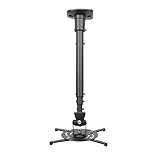
- Universally Compatible: This projector ceiling mount supports most projector brands with distance between the mounting holes on back 12.1 inches or less. This mount can be used on flat ceiling.
- High Grade Material: Crafted from premium quality and heavy duty steel to provide a reliable projector mount with maximum strength and support. Max Load: 30 lbs (13.6kg).
- Full Motion Adjustable Mount: Our projector ceiling mount can tilt 25 degrees up and down, swivels 90 degree from left to right and 360 degrees rotation, hitting all possible viewing angles. The mount provides a 43.6-inch extension and collapses to 23-inch from the ceiling using the extendable arm and 8.9-inch without the arm.
- Easy to Install: Pre-assembled, this projection mount can be set up in a few steps with quick release hooks that attach and detach by tightening and loosening mounting bolts. Warm Tip: To prevent the mount from shaking,please tighten the screws marked in the picture above.
- Package includes: A pre-assembled projector ceiling mount and all necessary hardware and instructions booklet. Compatible with BenQ, Epson, Acer, Optoma, Sony, Video, Dell and other popular brands. If our product is not suitable for your projector, or if you have any questions about the product and package, please do not hesitate to contact us.
It offers ±15° tilt, ±15° swivel, and 360° rotation. VIVO listed a three-year warranty and 30-day return policy. The manufacturer-direct price was $25.99 on sale, with a $29.99 regular price, when checked.
Quick wins for a faster PC:
Scan for outdated or missing drivers - takes under a minuteDriver Scan →Repair Windows errors before they cause bigger problemsFix Now →This mount can help clear a beam or place the projector at a more suitable vertical height, but the extra length increases leverage and sensitivity to vibration. Attach it to a structural joist, suitable blocking, or an appropriately rated concrete system—not drywall alone. It is best for lightweight or midweight projectors, not large home-cinema units near the mount’s limit.
5. VIVO MOUNT-VP03W: best for tall ceilings and long drops
The VIVO MOUNT-VP03W addresses a different problem: the projector must hang 33.5 to 58 inches below the ceiling. It supports a manufacturer-stated 29.7 pounds and accepts mounting-hole spacing from 5.25 to 12.5 inches with its arms installed. Removable arms support some mini projectors with a 1.5-by-1.5-inch pattern.
VIVO lists installation on flat and pitched ceilings, including wood-joist and concrete/brick options. It provides ±15° tilt, ±15° swivel, and 360° rotation. The listed price was $59.99 when checked, with a three-year warranty and 30-day return policy shown by VIVO.
Use this mount only when the long drop is genuinely necessary. A 58-inch vertical assembly can magnify vibration and visible image movement, and its 29.7-pound capacity is the lowest in this group. The structure must be securely attached and the long assembly must be mechanically locked. For a heavy projector or a public installation, a modular professional column system may be the more appropriate solution.
What’s actually slowing this PC down?
Pick the symptom - the matching free tool is one click away.
Rank #4
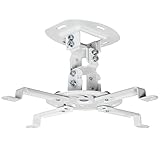
- Universal Projector Mount: Fits most projectors on the market, including mini projectors. Sturdy steel design supports up to 30 lbs (Please Note: Extension arms need to be removed for mini projectors)
- Compatibility: Distance between mounting holes on back of projector must be 5.25" to 12.5” with arms and 1.5" x 1.5" without arms. Not compatible with these models: Epson LS1100, 3010, 3200, 3700, 3800, 8350, 8500UB, 4010, Mitsubishi XL25U, or LG HU915QE
- Fully Adjustable: Features +15° to -15° tilt, +15° to -15° swivel, and 360° rotation. Hits all the right viewing angles so you and your guests can watch in comfort
- Low Profile: This mounting system holds your projector just 6” from the ceiling surface. The sleek powder-coated finish blends well with the majority of home and office environments
- Easy Installation: Quick release hooks attach and detach by tightening and loosening the mounting bolts. All hardware and instructions are provided for assembly
How to choose the right category
Flush or low-profile mounts
Choose a low-profile mount when the projector can sit close to the ceiling without interfering with the projection path, ventilation, or access panels. The shorter structure generally presents less leverage and is visually cleaner, but it may not provide enough vertical adjustment.
Short and moderate extension mounts
A short extension is useful when the room has a moderately high ceiling, a beam must be cleared, or the projector needs to sit at a particular height. Measure from the finished ceiling to the projector lens and compare that measurement with the mount’s actual range.
Long-drop mounts
Long drops are necessary in tall rooms, halls, studios, and spaces with deep beams or obstructions. They also demand more careful structural attachment because leverage and vibration increase with length. Do not select a long-drop bracket merely because it offers more adjustment range.
Suspended ceilings
An acoustic ceiling tile is not a structural anchor. A drop-ceiling installation requires a rated suspended-ceiling mounting system that transfers the load to the building structure, such as a compatible T-grid or scissor-clamp assembly. A standard drywall bracket is not automatically suitable.
Free tools Windows power users keep installed
One-click scans. No signup required.
Sloped ceilings
Do not assume a universal projector plate will level the projector on a pitched ceiling. Confirm that the ceiling plate or mount is designed for the slope. VIVO specifically lists flat and pitched-ceiling installation for the VP03W, but the current installation instructions should still be checked.
Best Value

- Compatibility Note: Not compatible with Aurzen D1 MAX projector model
- Wide Projector Compatibility: Compatible with projectors from Aurzen, TMY, HAPPRUN, Yaber, Epson, and most other brands. Only for projectors featuring a centered 1/4-inch thread (off-center holes, M6/M8, or non- threads not supported) and weighing 5.5 lbs (2.5KG)
- Full Motion Adjustability 360 Rotation & 90 Tilt: Upgraded adjustable projector mount supports 360 rotation and 90 vertical tilt for optimal viewing angles in home theater or office setups
- Telescopic Pole Adjustable from 9" to 15": This telescoping projector mount extends from 9 to 15 inches, providing height flexibility for various ceiling projector mount installations
- Safe Weight Support Ceiling 2.5KG / Wall 1KG: Securely supports up to 2.5KG (5.5 lbs) when used as a ceiling bracket for projectors, and 1KG for wall installations. For safety, mount only on solid wood, brick, or concrete surfaces
Ultra-short-throw projectors
A conventional ceiling mount is usually not the first choice for an ultra-short-throw projector. UST models are normally positioned close to the screen on a cabinet, shelf, or specialized wall bracket. Their optical geometry differs from that of a conventional long-throw projector, so do not use this list as a substitute for a UST mounting solution.
Independent reader supportYour contribution helps us test, update, and keep practical guides available for everyone.Compatibility checklist
Before buying, verify all of the following against the projector manual and the mount manufacturer’s current specifications:
- Weight: Include the projector, lens, cables, and attached accessories. Select a mount whose stated maximum load is above the complete installed load; do not treat the maximum rating as the recommended operating weight.
- Hole pattern: Measure the number and spacing of threaded mounting holes. A mount that supports the projector’s weight may still be physically incompatible.
- Projector-specific plate: Some models require a manufacturer-specific interface rather than universal arms.
- Ventilation: Ensure the arms and plate do not cover intake or exhaust vents.
- Orientation: Confirm that inverted ceiling operation is permitted. The projector’s manual controls over generic mount claims, especially for cooling, lamp, laser, portrait, or stacked operation.
- Projection geometry: Check throw distance, lens shift, zoom, screen height, and ceiling clearance. A mount cannot correct an unsuitable optical position.
VIVO’s published exclusions for the VP01B and VP03W are a useful reminder that “universal” means adjustable—not universally compatible.
Do these 3 things before closing this tab:
1Repair Windows errors before they cause bigger problems2Fix the driver behind crashes, sound loss and screen glitches3Clear out junk files and repair common Windows errorsHow much load capacity is enough?
Do not choose a 30-pound mount for a projector and accessories that weigh 30 pounds or more. Even below the stated limit, a heavy or expensive projector is usually better served by the 50-pound Chief or Peerless options because their intended use and adjustment systems provide more installation margin and service control.
Capacity is only one part of the safety calculation. The ceiling, fasteners, ceiling plate, column, mount body, and projector interface must all be suitable as a complete system. Epson installation guidance for the referenced mounting system instructs installers to verify that the supporting surface can safely support four times the combined weight of attached equipment and hardware. That is a manufacturer requirement for that installation system, not a universal rule that overrides the instructions for every mount.
What the package may not include
Compare complete systems, not just mount-body prices. Depending on the product, you may need to purchase separately:
- Ceiling plate.
- Extension column or long-drop hardware.
- Sloped-ceiling adapter.
- Suspended-ceiling hardware.
- Concrete anchors or wood-lag screws.
- Security hardware.
- Cable-management accessories.
- Structural blocking or professional installation.
For comparison, Epson’s CHF1000 is listed as a complete projector ceiling-mount kit at $399.99 when checked, while modular Chief and Peerless systems require more careful component matching. A complete kit can cost more but may simplify procurement.
The Tool Desk
Outbyte PC Repair FREERepair Windows errors before they cause bigger problemsFix Now →Outbyte Driver Updater FREEFix the driver behind crashes, sound loss and screen glitchesFind Drivers →Installation and safety checklist
- Locate structure. Attach the ceiling plate to a suitable joist, structural blocking, steel support, or appropriately rated concrete system. Drywall alone is not adequate for a projector mount.
- Confirm the substrate and fasteners. Wood, concrete, steel framing, and suspended ceilings require different attachment methods. Use the mount manufacturer’s specified fasteners and anchors.
- Plan the position. Confirm throw distance, lens height, screen centerline, access panels, beams, lights, and cable routes before drilling.
- Verify the complete load path. The ceiling plate, column, mount, fasteners, and projector interface must all be mechanically compatible and rated for the installed load.
- Lock the assembly. Fully thread and secure extension columns and lock the mount to the ceiling plate as directed. Epson’s installation guidance specifically warns about properly threading and locking extension columns.
- Protect ventilation. Keep projector intakes and exhausts clear and follow the projector’s required clearances.
- Route cables without strain. Leave appropriate service slack and prevent cable weight from pulling on the projector connectors.
- Align mechanically first. Position the projector square to the screen. Use lens shift and physical adjustment before relying on digital keystone correction.
- Tighten adjustment hardware. After alignment, secure every locking screw or mechanism. Recheck after servicing or accidental contact.
- Plan service access. Make sure filters, lamps, lenses, cables, and access panels can be reached without dismantling an unsafe assembly.
For heavy projectors, long drops, concrete ceilings, public rooms, suspended ceilings, or difficult cable routing, a qualified AV or construction professional should confirm the structural attachment.
Quick Recap
Common buying mistakes
- Buying by weight alone: The mounting-hole pattern may not fit.
- Taking “universal” literally: Manufacturer exclusion lists prove that compatibility still requires checking.
- Anchoring into drywall: The mount can pull out, sag, or transmit excessive vibration.
- Ignoring the required drop: The projector may be too high, obstructed by a beam, or incorrectly positioned relative to the screen.
- Forgetting lens shift and throw distance: Tilt and swivel cannot replace correct projector geometry.
- Using a long drop for a heavy projector: Leverage and vibration may be inappropriate even when the static weight is within the stated limit.
- Comparing incomplete and complete kits: A professional mount body may still need a ceiling plate and column.
- Leaving adjustment hardware loose: The image can move after servicing or contact.
- Blocking vents: A correct hole pattern does not guarantee adequate cooling.
- Using a conventional mount for a UST projector: The optical design calls for a near-screen solution.
Decision guide
- Projector over 30 pounds: Start with Chief RPAU/RPMAU or Peerless PRG-UNV, then verify the complete system and hole pattern.
- Need controlled fine alignment: Choose the Peerless PRG-UNV or a Chief RPA-family system.
- Light projector on a flat ceiling: Consider the VIVO VP01B if its hole pattern and ventilation clearance match.
- Need a 15-to-23-inch drop: Consider the VIVO VP02B.
- Need more than 30 inches of drop: Consider the VIVO VP03W for a suitably light projector, or use a modular professional column system.
- Have a pitched ceiling: Use hardware explicitly designed for the slope and verify the installation manual.
- Have a suspended ceiling: Use a rated suspended-ceiling mounting system that transfers load to the structure.
- Have a UST projector: Investigate a specialized wall bracket, shelf, or cabinet installation.
- Hole pattern falls outside the stated range: Use a projector-specific plate or choose another mount; do not improvise with generic hardware.
Product prices and availability are accurate as of the date/time indicated and are subject to change. Any price and availability information displayed on Amazon at the time of purchase will apply.

