Recommended Free Tools
In practical terms, this project is an ESP32 Bluetooth Classic speaker with fixed offline voice commands. A phone or computer streams music to the ESP32 over A2DP. The ESP32 sends digital audio over I2S to a MAX98357A amplifier and passive speaker, while a DFRobot DF2301Q module listens for predefined commands and returns command IDs over UART.
That makes it useful for a workshop, garage or construction site where hands-free play, stop, track and volume controls are convenient. It is not an Alexa- or Google Home-style assistant: the documented design does not understand arbitrary speech, search cloud music services or provide conversational responses.
As an Amazon Associate I earn from qualifying purchases.
What you are building
The project has two separate paths: an audio path and a control path.
Phone or computer
    │ Bluetooth Classic A2DP
    ▼
ESP32 Bluetooth audio sink
    │ I2S
    ▼
MAX98357A Class-D amplifier
    │
    ▼
8-ohm passive speaker
Your voice
▼
DF2301Q offline voice-recognition module
│ UART command ID
▼
ESP32 firmware
├── AVRCP play, stop, next and previous commands
└── Amplifier volume adjustmentThe voice module does not manipulate the music waveform. It recognizes a supported phrase, sends an ID to the ESP32, and the firmware responds either by sending a Bluetooth media-control command to the phone or by changing amplifier gain.
#1 Best Overall

- POWERFUL PROCESSOR: Integrated ESP32-S3-PICO-1-N8R8 dual-core Xtensa LX7 processor running up to 240MHz with 8MB Flash and 8MB PSRAM for robust IoT voice interaction applications
- HIGH-QUALITY AUDIO: ES8311 24-bit mono audio codec with NS4150B Class D amplifier and 8 1W speaker delivers clear voice pickup through MEMS microphone (65dB SNR) and high-fidelity audio output
- WIRELESS CONNECTIVITY: Built-in 2.4GHz Wi-Fi enables seamless wireless communication for smart home control, AI voice assistants, and human-computer interaction scenarios
- COMPACT DESIGN: Ultra-compact dimensions of 0.94 x 0.94 x 0.66 inches and lightweight at 0.33 ounces, with integrated infrared transmitter for enhanced control capabilities
- EXPANDABLE INTERFACE: Programmable IoT controller with expandable pins and interfaces, operating at DC 5V power input and temperature range of 32F to 104F for versatile development needs
The reference project is documented by DFRobot. Espressif documents the underlying A2DP, AVRCP and I2S services.
A2DP, AVRCP, UART and I2S explained
- A2DP: Bluetooth Classic profile used to stream music from a phone, computer or media player to the ESP32.
- AVRCP: Bluetooth media-control profile used for play, stop, next, previous and related commands.
- UART: The serial link carrying command IDs from the DF2301Q to the ESP32.
- I2S: Digital audio bus carrying bit clock, word-select and audio data from the ESP32 to the amplifier.
Bluetooth Classic is important. BLE is widely used for sensors, configuration and control, but it is not the normal phone-to-speaker music profile for this design. Use a conventional ESP32 with Bluetooth Classic support. Do not assume that an ESP32-C3, ESP32-S3 or ESP32-C6 is a drop-in replacement; verify A2DP support for the exact chip and software stack.
Features and limitations
The documented build can provide:
- Bluetooth music playback from a paired source device
- Offline fixed-command voice control
- Play, stop, next and previous track commands
- Volume increase, decrease and preset levels
- Mono output through a single MAX98357A channel
It does not establish:
- General speech-to-text or conversational intelligence
- Cloud music search or streaming without a phone or computer
- Universal compatibility with every phone, app or Bluetooth board
- Measured high-fidelity performance, battery runtime or response latency
“Offline” applies to command recognition. The music still originates from a Bluetooth source, and initial pairing normally requires a phone, computer or similar device.
Do these 3 things before closing this tab:
1Fix the driver behind crashes, sound loss and screen glitches2Clear out junk files and repair common Windows errors3Scan for outdated or missing drivers - takes under a minuteBill of materials
| Part | Purpose | Notes |
|---|---|---|
| Original ESP32 development board | Bluetooth sink and controller | Must support Bluetooth Classic; the exact board determines available GPIOs. |
| DFRobot DF2301Q | Offline command recognition | Uses predefined commands and supports UART or I2C. |
| MAX98357A I2S amplifier | Digital audio amplification | Approximately 1.8 W into 8 ohms or 2.5 W into 4 ohms under stated conditions; mono output. |
| Passive 8-ohm speaker | Audio output | A safe beginner choice for this amplifier arrangement. |
| 5-V supply | Power | Allow current margin and use short, sound wiring. |
| USB cable, jumper wires and enclosure | Programming and construction | Physical isolation and ventilation improve reliability. |
The MAX98357A is specified for a 3.3–5 V supply. Its electrical output rating is not a guarantee of acoustic loudness or distortion-free operation in every cabinet. A 4-ohm speaker may produce more output but demands more current and creates greater thermal stress. An 8-ohm speaker is the conservative default.
The amplifier uses a bridge-tied-load output. Connect the speaker across the amplifier’s two speaker terminals. Do not connect either speaker terminal to ground or to a conventional grounded stereo input.
Rank #2
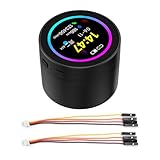
- High-Performance Processor: Dual-core Xtensa LX7, up to 240MHz.
- Wireless Connectivity: Supports 2.4GHz Wi-Fi (802.11 b/g/n) and Bluetooth 5 (LE) with onboard antenna.
- Memory & Storage: 512KB SRAM, 384KB ROM, 16MB Flash, and 8MB PSRAM.
- Display & Touch: 1.85-inch LCD (360x360), capacitive touch control via I2C.
- Rich Peripherals: Includes audio decoder, microphone, RTC sensor, TF card slot, and battery management.
Wiring
DF2301Q to ESP32
| DF2301Q | ESP32 |
|---|---|
| RX | GPIO16 |
| TX | GPIO17 |
| VCC | 5 V |
| GND | GND |
Cross serial connections: the module’s TX goes to the ESP32’s RX, and the module’s RX goes to the ESP32’s TX. The published Arduino example uses Serial2.
MAX98357A to ESP32
| MAX98357A | ESP32 |
|---|---|
| BCLK | GPIO25 |
| LRCLK or WS | GPIO26 |
| DIN, DATA or SDIN | GPIO14 |
| VCC | 5 V |
| GND | GND |
Board labels vary: LRCLK is commonly marked WS, and DIN may be marked DATA or SDIN. Confirm the selected board before wiring. Tie all grounds together, add supply decoupling close to the amplifier and voice module, and keep speaker and amplifier power wiring short. Keep the microphone away from the speaker and noisy power wiring where possible.
The Tool Desk
Outbyte Driver Updater FREEScan for outdated or missing drivers - takes under a minuteDriver Scan →Outbyte PC Repair FREERepair Windows errors before they cause bigger problemsFix Now →Software setup
The reference project selects ESP32 Dev Module, 115200 upload speed, 80 MHz flash frequency and 240 MHz CPU frequency. Treat these as the author’s documented Arduino settings rather than universal requirements. Record the exact Arduino IDE version, Arduino-ESP32 board-package version, library releases, board variant and tested phone before calling the build reproducible.
The example names these libraries:
#include <DFRobot_MAX98357A.h>
#include <DFRobot_DF2301Q.h>
Its UART object is:
DFRobot_DF2301Q_UART DF2301Q(&Serial2, 16, 17);The published page shows the voice-module and amplifier integration, but not a complete standalone A2DP sink initialization, Bluetooth event sequence, AVRCP setup and audio-callback-to-I2S implementation. For a reliable build, use an existing A2DP sink library with documented compatibility or implement the complete pipeline with ESP-IDF/ESP-ADF. Espressif’s ADF Bluetooth service documentation is the stronger reference for a complete audio architecture.
Voice command IDs
| Function | ID |
|---|---|
| Play | 92 |
| Stop | 93 |
| Previous | 94 |
| Next | 95 |
| Repeat | 96 |
| Volume up | 97 |
| Volume down | 98 |
| Maximum volume | 99 |
| Minimum volume | 100 |
| Medium volume | 101 |
The documented sample polls for a nonzero command:
uint8_t commandID = DF2301Q.getCMDID();

if (commandID != 0) {
  // Dispatch the command here
}
Use the module’s supported phrases, such as “Play Music,” “Stop,” “Next track,” “Previous Track,” “Volume Up” and “Volume Down.” These are predefined commands, not unrestricted natural-language requests.
Rank #3

- Please note!!! This product requires a 3.7V MX1.25 lithium battery for operation, which is not included. Please purchase it separately.
- High-Performance MCU: The board is equipped with the ESP32-S3R8 module, featuring a powerful Xtensa 32-bit LX7 dual-core processor that operates at up to 240MHz, ensuring efficient processing for various smart applications.
- Wireless Connectivity: With built-in support for 2.4GHz Wi-Fi (802.11 b/g/n) and Bluetooth 5 (LE), the ESP32-S3-AUDIO-Board offers robust wireless capabilities, facilitated by the onboard antenna for seamless communication and connectivity.
- Advanced Voice Interaction: The dual microphone array is designed with noise reduction and echo cancellation features, enabling accurate speech recognition and responsive near/far-field wake-up functionality, perfect for voice-activated applications.
- Dynamic Lighting Effects: Equipped with 7x programmable surround RGB LEDs, the board allows the creation of vibrant and colorful lighting effects, enhancing user interaction and visual appeal for projects.
The sample also configures mute, volume and wake time:
DF2301Q.settingCMD(DF2301Q_UART_MSG_CMD_SET_MUTE, 0);
DF2301Q.settingCMD(DF2301Q_UART_MSG_CMD_SET_VOLUME, 10);
DF2301Q.settingCMD(DF2301Q_UART_MSG_CMD_SET_WAKE_TIME, 10);
The final value is described as a 10-second wake period. It is a module setting, not a guaranteed recognition latency or listening range.
Firmware responsibilities
Organize the firmware into explicit stages:
- Start UART and initialize the DF2301Q.
- Initialize Bluetooth Classic in A2DP sink mode.
- Configure the I2S peripheral and audio callback.
- Initialize AVRCP as a controller.
- Track Bluetooth connection state.
- Poll and log voice command IDs.
- Dispatch commands only after a media connection is ready.
- Apply volume changes through the amplifier or audio pipeline.
- Use timeouts and readable error messages instead of blocking forever.
An AVRCP call resembles:
esp_avrc_ct_send_passthrough_cmd(
  0,
  ESP_AVRC_PT_CMD_PLAY,
  ESP_AVRC_PT_CMD_STATE_PRESSED
);
That call does not create an AVRCP connection. It works only after the Bluetooth stack has been initialized as an AVRCP controller and the relevant connection is active. The controller handle, connection state and phone behavior must be handled by the selected library or ESP-IDF implementation.
Pairing and first test
- Power the speaker and open the serial monitor.
- Confirm that the DF2301Q and amplifier initialize.
- Search for the ESP32 Bluetooth device from a phone or computer.
- Pair and confirm that media audio is enabled.
- Start music.
- Test play, stop, next and previous.
- Test volume commands and watch the reported command IDs.
The example uses “Nick Smart Speaker” as a Bluetooth name. Replace it with your own name; it is not a required identity.
Independent reader supportYour contribution helps us test, update, and keep practical guides available for everyone.Troubleshooting
No voice recognition
- Check 5-V power and common ground.
- Confirm TX/RX are crossed.
- Check GPIO16 and GPIO17 on the exact board.
- Confirm
Serial2setup and inspect serial output. - Use the module’s expected phrase and speak clearly. The project author recommends approximately 1 metre or less, but that is operating guidance rather than a universal specification.
Bluetooth pairs but there is no sound
- Verify that the ESP32 is an A2DP sink, not merely a BLE device.
- Confirm the phone connection is enabled for media audio.
- Check BCLK, WS/LRCLK, DIN, power and ground.
- Verify that the audio callback is writing correctly formatted samples to I2S.
- Check speaker impedance and the bridge output wiring.
Media commands do nothing
Check AVRCP initialization, connection state, controller handles and the behavior of the active phone app. Send commands only after the media connection is established; phones and apps do not necessarily respond identically.
Quick wins for a faster PC:
Fix the driver behind crashes, sound loss and screen glitchesFind Drivers →Clear out junk files and repair common Windows errorsFree Scan →Scan for outdated or missing drivers - takes under a minuteDriver Scan →Rank #4

- ESP32-S3-AUDIO-Board adopts ESP32-S3R8 module with 32-bit LX7 dual-core processor, up to 240MHz main frequency. Supports 2.4GHz Wi-Fi (802.11 b/g/n) and Bluetooth 5 (LE), with onboard antenna
- Integrated 512KB Static RAM, 384KB ROM, 8MB PSRAM, and external 16MB Flash memory. Onboard TF card slot for storing audio files, etc.
- Onboard Dual microphone array with noise reduction and echo cancellation, suitable for accurate speech recognition and near/far-field wake-up. Onboard audio decoding chip, dual microphones and speaker header. Onboard 7x surround RGB LEDs, programmable for a variety of dynamic effects
- Onboard SPI LCD display interface (FPC connector / pin header), DVP camera interface (24pin connector), USB, I2C, and some I/O pins (compatible with display interface I/O pins). Onboard multiple reserved buttons and battery switch for customized function development
- Integrated PCF85063 RTC chip, supports power-off time retention for alarm, scheduled task, and wake-up functions. Built-in battery recharge management module, supports multiple power modes and low-power applications
Distortion, resets or amplifier shutdown
Investigate supply sag, thin jumper wires, excessive gain, a 4-ohm load, inadequate cooling and clipping. A 5-V USB source that works for the ESP32 alone may still be unsuitable when the amplifier draws current peaks. Blocking loops such as while (!DF2301Q.begin()) can also leave a failed peripheral hanging indefinitely; production firmware should use retry limits and recovery states.
Feedback and false triggers
Place the microphone away from the speaker, provide a dedicated microphone opening and add physical separation or damping inside the enclosure. Reduce speaker gain during recognition, add physical buttons as a fallback, and consider push-to-talk operation. Espressif notes that enclosure and cavity design strongly affect voice performance; see the ESP-SR user guide.
Construction and power improvements
For a workshop or jobsite enclosure, protect the boards from dust, provide ventilation around the amplifier, strain-relieve the speaker and power cables, and avoid sealing the microphone behind thick material. A bench supply is simpler than a battery. Portable operation requires a suitable 5-V regulator or boost converter, battery protection and charging hardware, enough peak-current capacity and a safe shutdown plan. Runtime cannot be estimated responsibly without measured current draw.
Useful upgrades include:
- Physical play and volume buttons as a backup
- Status LEDs or a small display for pairing and error states
- Persistent volume settings
- Bluetooth reconnection handling
- A better speaker cabinet and microphone isolation
- Two-channel hardware if stereo output is required
- SD-card or local-file playback for operation without a phone
When to choose a different architecture
| Goal | Better choice | Trade-off |
|---|---|---|
| Simple fixed voice commands | DF2301Q plus original ESP32 | Fastest route, but limited vocabulary. |
| Integrated local speech processing | ESP32-S3 with ESP-SR | More flexible, but requires a suitable microphone front end and more complex software. |
| Audio and microphone prototyping | Espressif audio development board | Better integrated hardware, higher cost and complexity. |
| Playback only | Commercial Bluetooth audio module or finished speaker | Less firmware work, little programmable voice control. |
| General speech and media assistant | Raspberry Pi-class computer | More capable, but uses more power and needs a larger software stack. |
Espressif’s ESP-SR framework provides an alternative with an audio front end, WakeNet wake-word detection and MultiNet speech-command recognition on supported hardware. It is a migration path for builders who need a more integrated local voice pipeline, not a reason to assume every ESP32-family chip supports the same Bluetooth audio profiles.
Free tools Windows power users keep installed
One-click scans. No signup required.
Quick Recap
Product prices and availability are accurate as of the date/time indicated and are subject to change. Any price and availability information displayed on Amazon at the time of purchase will apply.




