Free tools Windows power users keep installed
One-click scans. No signup required.
A smart irrigation system using Arduino measures soil moisture and switches a low-voltage pump or valve when plants need water. For a pot, greenhouse bench, planter, or small garden zone, the most dependable design combines a calibrated capacitive sensor, a separate pump power supply, a properly rated relay or MOSFET driver, hysteresis, and a maximum runtime.
This is a sensor-driven automation prototype—not automatically a precision-agriculture or commercial irrigation controller. Its performance depends more on sensor placement, hydraulic design, electrical protection, and calibration than on adding an app.
As an Amazon Associate I earn from qualifying purchases.
How an Arduino irrigation system works
The system is a closed-loop controller:
- A soil-moisture sensor measures the root-zone condition.
- The Arduino reads the sensor’s analog output.
- Software compares the reading with calibrated dry and wet limits.
- A relay, MOSFET, or motor driver switches a pump or solenoid valve.
- Water travels through tubing and an emitter to the soil.
- The controller stops watering when the wet limit or a safety limit is reached.
A timer waters at predetermined times. A sensor-triggered controller waters when a measured condition crosses a threshold. “Smart” irrigation generally adds feedback plus safeguards, scheduling, rain information, flow monitoring, tank protection, or remote status.
What’s actually slowing this PC down?
Pick the symptom - the matching free tool is one click away.
An Arduino Uno Rev3 provides an ATmega328P, 14 digital I/O pins, six analog inputs, 5 V operation, a 16 MHz clock, and 10-bit analog readings. Its I/O pins are intended for approximately 20 mA; they must not power a pump directly. The Arduino controls the switching device, while a separate supply powers the motor or valve. Arduino Uno Rev3 specifications
#1 Best Overall
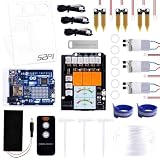
- The Plant Watering Kit for Arduino UNO R4 WiFi, an all-in-one solution for enthusiasts and makers looking to delve into the world of smart gardening and IoT projects.
- This kit is designed to provide a hands-on experience with a range of electronic components and sensors, enabling you to create a fully automated plant watering system.
- With UNO R4 WiFi Board, it features WiFi capabilities for IoT integration.
- Sensors and Modules equip your project with the ability to monitor and react to environmental conditions with soil moisture sensors, a temperature sensor, and water pumps.
- 1.3-inch TFT Color Display visualizes data and controls interfaces with a vibrant color screen.
Parts for a practical small-zone build
- Arduino Uno Rev3 or compatible board.
- Capacitive analog soil-moisture sensor.
- 5 V relay module or logic-level MOSFET driver.
- Low-voltage DC pump for a reservoir, or a normally closed solenoid valve for a pressurized supply.
- Separate, correctly rated pump or valve power supply.
- Tubing, filter, and preferably a drip emitter.
- Jumper wires, terminal connectors, enclosure, and strain relief.
- Fuse or current protection appropriate to the pump circuit.
A capacitive sensor is generally preferable to a cheap exposed-metal resistive probe for repeated use because resistive electrodes can corrode and their readings can change as the electrodes degrade. Capacitive sensors still drift with soil type, salinity, fertilizer, temperature, compaction, supply voltage, and placement, so “capacitive” does not mean “pre-calibrated.”
Choosing the switching device
| Option | Best suited to | Trade-off |
|---|---|---|
| Relay module | Simple low-voltage demonstrations | Mechanical wear, clicking, coil consumption, and possible active-low logic |
| MOSFET driver | Frequent switching of compatible DC pumps | Requires correct polarity, gate compatibility, current rating, heat management, and flyback protection |
| Solenoid valve | Existing pressurized water supply | Needs suitable pressure and valve power |
| DC pump | Reservoir-based watering | Needs protection from dry running, clogging, and excessive head height |
Do not treat a mains-voltage pump as a casual breadboard load. Mains installations require appropriately rated switching hardware, enclosure, fuse protection, grounding, strain relief, and compliance with local electrical requirements. A beginner build should use low-voltage equipment or have mains work completed by a qualified person.
Wiring plan
| Component | Arduino connection | Important note |
|---|---|---|
| Capacitive sensor VCC | 5 V or its specified supply | Confirm the sensor’s voltage range |
| Sensor GND | GND | Provides the common reference |
| Sensor analog output | A0 | Never exceed the Uno analog-input voltage |
| Relay input | D7 | Test whether the module is active-low or active-high |
| Relay VCC and GND | Appropriate supply and GND | Check the module’s coil-current requirement |
| Pump | Separate supply through relay contacts or driver | Never connect it to an Arduino GPIO pin |
For a typical relay installation, use the common and normally open contacts so the pump is off by default. Keep pump wiring separate from sensor and USB wiring where possible. A relay does not regulate pump speed, prevent dry running, or guarantee safe motor switching: its contact rating must account for the pump’s voltage and startup current, not just a nominal resistive-load rating.
With a transistor or MOSFET circuit, provide flyback protection for an inductive pump or valve unless the module already includes it. Use a common ground where the driver circuit requires one. A separate pump supply helps prevent motor noise and startup voltage drops from resetting the Arduino.
Calibrate the sensor before choosing thresholds
A reading such as 500 or “30% moisture” is not universal. Sensor polarity varies: some sensors produce larger values in dry soil, while others produce larger values in wet soil. The raw number also depends on the substrate, depth, supply voltage, and sensor design.
Rank #2

- Automatic Watering System:Combine Pump, Tubing, Soil Moisture Sensor and 1 Channel 5V Relay Module in one plant watering system, it automatically waters your plants and flowers according to monitor the soil moisture in a very efficient way.
- 4Pcs Capacitive Sensor:Operating voltage: 3.3 ~ 5.5 VDC; Output voltage: 0 ~ 3.0 VDC; Interface: PH2.54-3P; Pin: Analog signal output, GND, VCC.
- 4Pcs 1 Channel 5V Relay Module:Maximum load: AC 250V/10A, DC 30V/10A;Operating voltage 12V;the power indicator (green), the relay status indicator (red).
- 4Pcs Mini Water Pump: Rated voltage: DC3V or 4.5V; No load of water discharge capacity: 100L / H ; Load rated current: 0.18A, Use: diving type
- 4Pcs 1M Vinyl Tubing: Material: PVC ; ID Size: 0.22"/5.54mm; ODSize: 0.32"/8.20mm ; Length:1M
- Connect the sensor output to
A0. - Upload the raw-reading sketch below.
- Record the value in air, dry soil, adequately watered soil, and saturated soil if that condition matters.
- Install the sensor at the intended root depth and repeat the measurements.
- Allow watered soil to drain for several minutes before treating it as a reference.
- Choose a pump-start value and a wetter pump-stop value based on the plant’s actual root-zone condition.
- Recheck the readings after several days in the final soil or substrate.
const byte SENSOR_PIN = A0;

void setup() {
  Serial.begin(115200);
}

void loop() {
  Serial.println(analogRead(SENSOR_PIN));
  delay(1000);
}
Open the Serial Monitor at 115200 baud. A value mapped to 0–100 is only a relative moisture index unless the sensor has been calibrated against a defined measurement method. Do not call it a laboratory moisture percentage.
Place the probe in the root zone, not directly beside the emitter and not against the pot wall unless that is intentional. In a large bed, one sensor may not represent the whole irrigation zone. A surface-mounted sensor can report dry conditions while deeper roots remain adequately wet.
Reference Arduino code with filtering and safeguards
This version averages readings, uses hysteresis, starts with the pump off, and stops the pump after a maximum runtime. The threshold direction assumes that larger readings mean drier soil. Reverse the comparisons if your sensor behaves differently.
const byte SENSOR_PIN = A0;
const byte RELAY_PIN  = 7;

// Change these after calibration.
const int DRY_THRESHOLD = 650;
const int WET_THRESHOLD = 500;

// Common inexpensive relay modules are active-low.
const bool RELAY_ACTIVE_LOW = true;

const unsigned long SAMPLE_INTERVAL_MS = 2000;
const unsigned long MAX_PUMP_RUNTIME_MS = 30000;

bool pumpOn = false;
unsigned long pumpStartedAt = 0;
unsigned long lastSampleAt = 0;

void setPump(bool on) {
  pumpOn = on;

  bool relayLevel = RELAY_ACTIVE_LOW ? !on : on;
  digitalWrite(RELAY_PIN, relayLevel ? HIGH : LOW);

  if (on) {
    pumpStartedAt = millis();
    Serial.println("PUMP ON");
  } else {
    Serial.println("PUMP OFF");
  }
}

int readAverage(byte pin, byte samples = 10) {
  long total = 0;

  for (byte i = 0; i < samples; i++) {
    total += analogRead(pin);
    delay(10);
  }

  return total / samples;
}

void setup() {
  Serial.begin(115200);
  pinMode(RELAY_PIN, OUTPUT);
  setPump(false);
}

void loop() {
  unsigned long now = millis();

  if (now - lastSampleAt < SAMPLE_INTERVAL_MS) {
    return;
  }

  lastSampleAt = now;
  int moisture = readAverage(SENSOR_PIN);

  Serial.print("Moisture raw reading: ");
  Serial.println(moisture);

  // Larger readings mean drier soil in this example.
  if (!pumpOn && moisture >= DRY_THRESHOLD) {
    setPump(true);
  }

  if (pumpOn && moisture <= WET_THRESHOLD) {
    setPump(false);
  }

  if (pumpOn && now - pumpStartedAt >= MAX_PUMP_RUNTIME_MS) {
    Serial.println("SAFETY TIMEOUT");
    setPump(false);
  }
}
The serial monitor should show a reading every two seconds. The pump starts at the dry threshold and remains on until the wetter stop threshold is reached or the safety timeout expires. The gap between the two thresholds is hysteresis. It prevents relay chatter when the reading fluctuates around one boundary.
Build and test in stages
1. Test the sensor alone
Confirm that readings change consistently in the actual soil. If they do not, check supply voltage, ground, loose connections, and sensor placement before adding a pump.
Rank #3
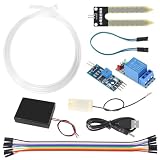
- Through adjusting the potentiometer to control the soil humidity threshold,can automatic watering the vegetable garden, garden, control the flower pot soil moisture.
- Include Relay module, Mini water pump, Plastic Battery Storage Case Holder, USB power cable, Jumper wires, 0.5m Vinyl Tubing and Soil Moisture Detector Module.
- Note:Do not pour water directly on the sensor. The humidity of the water will rust the sensor.
- Easy assemble, make your life more automated, particularly suitable for people who travel frequently!
- Soil Moisture Sensor Kit Automatic Watering System Manager with Mini Water Pump for Arduino DIY Kit
2. Test the relay without the pump
Use the onboard indicator or another safe indicator. Determine whether LOW or HIGH activates the relay. Never assume the logic polarity from a code example.
3. Test the pump independently
Verify that the pump starts reliably from its own supply, that the supply can provide startup current, and that the tubing, emitter, and reservoir are suitable. Confirm the pump is not being run dry.
4. Connect the pump through the switch
Use normally open relay contacts for an off-after-reset arrangement. Add a filter to reduce emitter or pump blockage, secure the tubing, and keep electronics above the maximum water level.
5. Test the complete control loop
Test dry soil, adequately moist soil, a disconnected sensor, a blocked tube, an empty reservoir, a power reset, and a deliberately exceeded runtime. Do not leave the prototype unattended until it passes these tests.
Troubleshooting
The pump never starts
- Print the raw sensor value and verify that the threshold direction is correct.
- Check whether the relay is active-low.
- Test the relay with the pump disconnected.
- Check the pump supply and wiring to common and normally open contacts.
- Measure the pump-supply voltage under load and inspect for a jammed pump or dry reservoir.
The pump runs continuously
- Check for reversed sensor polarity or an unreachable wet threshold.
- Look for a disconnected sensor producing a floating reading.
- Move the sensor into the actual wetted root zone.
- Keep the timeout enabled while diagnosing the problem.
- Test the relay manually and inspect its active-low setting.
The Arduino resets when the pump starts
Startup current can pull down a shared supply, while motor noise can enter the logic wiring. Use a separate pump supply, suitable driver, short motor wiring, appropriate bulk capacitance near the driver, and flyback protection where required. Never power the pump from the Uno’s 5 V pin.
Recommended Free Tools
Rank #4
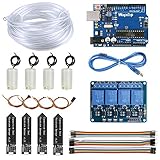
- 【Upgraded Automatic Watering System】Combine development board with USB download cable, water pump, tubing, soil moisture sensor, 4 channel 5V relay module and jumper wires in one plant watering system, including all component for a whole for Arduino DIY drip irrigating system.
- 【Take Care of Your 4 Plants Anytime】You can have the system to water your 4 plant automatically. Whenever your soil becomes too dry, the pump is set into motion and water flows up the tube and into the pot. You don’t have to worry about your plants while going for vacations.
- 【Development Board】The board comes preprogrammed with a bootloader that allows you to upload new code to it without the use of an external hardware programmer.
- 【Capacitive Sensor】Insert it in to the soil around your plants and With a screen and a motherboard, you can talk to your plants. To see if your plants is thirsty, do they need more water to moisten it?
- 【Reliable Support】We have prepared detailed automatic self watering tutorial, includes: guidance manual, demo code, burning tools, necessary class libraries.(All of these are in E-format. You can contact us on Amazon, we will send PDF Document to you at any time.)
Readings fluctuate
Loose wiring, pump noise, resistive-probe corrosion, unstable power, and variable sensor placement can all cause fluctuations. Prefer a capacitive probe, average samples, wait after watering before making a decision, and use hysteresis.
Water leaks or overflows
Use a drip emitter instead of unrestricted tubing, secure every connection, add a catch tray indoors, keep electronics in a sealed enclosure above the water line, and use a tank-level cutoff. A maximum runtime is essential protection against a failed sensor, leaking tube, or empty tank.
Safeguards worth adding
- Tank-level switch: A float switch is usually the simplest low-water cutoff and helps prevent dry running.
- Flow sensor: Detects a running pump with no flow, blocked tubing, broken lines, and approximate water use. It needs installation-specific calibration.
- Rain delay: A low-cost rain board detects water on its exposed surface; it does not necessarily measure useful rainfall depth. Combine it with soil response, a tipping-bucket gauge, or weather data when appropriate.
- Real-time clock: Adds watering windows, quiet hours, time-stamped logs, and daily runtime limits. It should be a constraint, not an excuse to ignore soil feedback.
- Manual override: Include an automatic timeout so a remote or local command cannot leave the pump on indefinitely.
- Multi-zone control: Use a sensor and valve or pump channel for each meaningful zone. One sensor should not be assumed to represent different plants, soils, or sun exposures.
Expanded Arduino projects combine soil, rain, flow, real-time-clock, and temperature inputs; these features can improve fault detection and scheduling, but each adds calibration and failure modes. Example of an expanded Arduino irrigation controller
Independent reader supportYour contribution helps us test, update, and keep practical guides available for everyone.Uno, wireless boards, and component trade-offs
| Decision | Suitable choice | What to consider |
|---|---|---|
| Offline learning build | Arduino Uno Rev3 | Well documented and sufficient for a simple wired controller, but no built-in wireless |
| Remote monitoring | Uno R4 WiFi or another Wi-Fi-capable board | Less added hardware, but more software, network, and fail-safe complexity |
| Repeated soil installation | Capacitive sensor | Usually more durable than exposed resistive electrodes, but still requires calibration |
| Frequent DC switching | Logic-level MOSFET driver | Quiet and efficient when electrically compatible |
| Simple demonstration | Relay module | Easy to understand, but verify active-low behavior and motor-load rating |
| Reservoir watering | Low-voltage DC pump | Check head height, startup current, duty cycle, clogging, and dry-run limits |
| Pressurized irrigation | Normally closed solenoid valve | Requires suitable pressure and valve power |
The Uno R4 WiFi is the more natural choice when wireless status or control is genuinely required; the Uno Rev3 is simpler for an offline prototype. Wireless control also introduces network dependency and security concerns, so every remote pump-on command should expire automatically.
Do these 3 things before closing this tab:
1Repair Windows errors before they cause bigger problems2Fix the driver behind crashes, sound loss and screen glitches3Clear out junk files and repair common Windows errorsCan this system really save water?
It can reduce unnecessary watering when calibrated correctly, because it can avoid watering soil that is already sufficiently moist. It cannot support a fixed water-saving percentage without a controlled comparison. Results depend on plant type, substrate, weather, emitter flow, leaks, sensor placement, thresholds, runtime, rainfall, and drainage.
Best Value

- Complete Project-Based Learning Path – Build 13 progressive projects (LED blink → button control → PIR motion sensor → music playback → motorized doors/windows → SK6812 RGB lighting → fan control → LCD display → gas alarm → temperature/humidity monitor → RFID door unlock → Morse code access → WiFi control → mobile APP remote control). Each project builds on the previous one, ensuring you understand both the electronics and the programming logic behind every smart home feature.
- Master Two Industry-Standard Languages – Learn to code in both Arduino C++ and MicroPython with 13 detailed tutorials for each language. Compare how the same hardware behaves under different programming approaches – a valuable skill for any aspiring engineer. Perfect for classrooms teaching multiple coding languages or self-learners who want flexibility.
- Build a Real WiFi-Controlled Smart Home – Assemble the wooden house structure and integrate sensors to create a functioning smart home system. Control lights, fans, door servos, and RGB lighting directly from your mobile APP (iOS/Android) . Experience how IoT works in real life – from manual control to automated responses based on temperature, humidity, motion, and gas detection.
- Comprehensive Online Wiki with No Guesswork – Our detailed online tutorials (also accessible via the packaging) include wiring diagrams, full code explanations, and step-by-step assembly guides for every project. Whether you're a complete beginner or a teacher preparing lessons, the structured content eliminates confusion and helps you succeed from project 1.
- Everything You Need to Get Started – (TIPS: Batteries are NOT Included)This kit includes the ESP32 development board, expansion board, wooden house parts, all sensors and modules (DHT11, PIR motion, gas sensor, RFID, SK6812 RGB, servo motors, fan, LCD1602, etc.), and connection cables. NOTE: 6x AA batteries are required (NOT Included). The kit is unassembled – you'll build it yourself following our online tutorials, making the learning experience truly hands-on.
To measure savings, compare a timer-controlled setup with a sensor-controlled setup using equivalent plants or beds, the same emitter flow, the same observation period, measured water volume, and plant-health outcomes. A flow meter or graduated reservoir is more credible than estimating usage from pump time alone.
A 2026 paper describes an Arduino-based system with soil-moisture, temperature, and flow sensing, a display, Bluetooth, and a mobile app. Its reported flow-sensor accuracy of ±1.2% applies to that experimental setup and should not be generalized to another sensor, plumbing arrangement, or installation. 2026 Arduino irrigation system paper
What this prototype cannot claim
- A raw analog value is not automatically a true moisture percentage.
- A threshold copied from another tutorial is not universal.
- A pump connected through a relay is not protected from dry running.
- One sensor does not represent an entire garden or field.
- Sensor-triggered automation is not the same as precision irrigation based on evapotranspiration, crop coefficients, rainfall totals, soil-water tension, and hydraulic uniformity.
- A hobby prototype is not a certified commercial agricultural controller.
For a small construction or landscaping project, treat the Arduino unit as a low-cost control layer and validate the water delivery separately: check pressure, emitter uniformity, drainage, access for maintenance, cable protection, and enclosure weather resistance.
Useful reference projects and documentation
Arduino’s official analogRead() reference explains the function used to collect sensor values. Example Arduino Project Hub builds demonstrate a sensor on A0, a relay on D7, serial diagnostics, and threshold-based control, but their values—including a threshold of 500 or a mapped 30% start point—are examples rather than universal settings: Uno irrigation example and mapped moisture example.
Quick Recap
Product prices and availability are accurate as of the date/time indicated and are subject to change. Any price and availability information displayed on Amazon at the time of purchase will apply.

