A smart home can turn a few everyday tasks into dependable routines: lights come on when someone enters, the thermostat adjusts to occupancy, and a leak sensor sends an alert before a small problem becomes expensive. The best systems do this without making the home harder to use. They balance convenience and comfort against setup, cost, privacy, and reliability.
What smart-home technology actually means
Smart-home technology combines connected devices with sensors, communication networks, apps, controllers, and rules that automate household actions. A motion sensor is one kind of device; a light switch or thermostat that acts on its signal is another. The system coordinating them may run on a hub, in a mobile app, on a vendor’s cloud service, or across all three.
As an Amazon Associate I earn from qualifying purchases.
- Connected device: A bulb, lock, camera, thermostat, plug, sensor, or appliance that can communicate with other equipment or an app.
- Controller: The app, voice assistant, display, or hub through which a person or automation issues commands.
- Hub: Hardware that coordinates devices, often including devices that use radio protocols such as Thread, Zigbee, or Z-Wave.
- Protocol: The communication method devices use, such as Wi-Fi, Thread, Zigbee, Z-Wave, Bluetooth, or Matter.
- Ecosystem: A platform that organizes devices, automations, permissions, and related services, such as Apple Home, Google Home, Alexa, or SmartThings.
- Automation: A rule connecting a condition to an action—for example, “if motion is detected after sunset, turn on the hallway light.”
“Smart” does not have to mean artificial intelligence. A reliable schedule, motion sensor, or smart plug can solve a real problem without learning, predicting, or generating anything.
Do these 3 things before closing this tab:
1Clear out junk files and repair common Windows errors2Scan for outdated or missing drivers - takes under a minute3Repair Windows errors before they cause bigger problemsHow a smart home works
A typical automation follows a simple chain: a sensor notices a condition, sends an event to the system, the automation engine checks its rule, and a device carries out an action. The system may also send a notification or update the status shown in an app.
#1 Best Overall

- Getting started with smart home has never been easier - An all-in-one kit with a quick guided setup makes starting your smart home easy.
- A setup so easy, it feels like magic - Just unbox, plug it in, and tap to get started.
- One hub with endless possibilities - the Echo Hub works with thousands of connected cameras, lights, locks, plugs, thermostats, speakers, and more—bringing your smart devices together in one convenient hub.
- Peace of mind, anytime - The included four lights can be easily set to make it look like you’re home when you’re away.
- Works with thousands of Alexa-compatible devices like Ring security cameras to build a smarter, safer home.
- A door sensor detects that a door opened.
- The system checks whether the time is after 10 p.m.
- If the rule’s conditions are met, a hallway light turns on at 30% brightness.
- The homeowner receives an alert if the door remains open.
Local, cloud, and hybrid control
Local processing means commands or automations run on the home network or a local hub. This can reduce delay and let some functions continue during an internet outage. Google says Matter commands can travel over the existing home network rather than always going over the internet, and Amazon documents local Matter connections to Alexa. Those capabilities do not guarantee that every device or feature works offline.
Cloud processing means a vendor’s servers and account handle some commands, video, voice data, automation logic, or remote access. Hybrid systems use both: basic local control may continue while remote viewing, video history, advanced recognition, or notifications depend on the internet or a subscription. Check which functions matter to you and what happens when your connection fails.
Which devices can make a practical difference?
Lighting
Smart bulbs are quick to install and can provide schedules, dimming, scenes, tunable white light, color, or presence-based control. Their main drawback is that they need power: if someone switches off the wall switch, the bulb may become unreachable. Smart switches and dimmers preserve familiar wall control, but may require a neutral wire, a compatible electrical box, or professional installation. Motion lighting is useful in halls and entryways; poor placement, sensitivity, or timeout settings can make it frustrating.
Thermostats and HVAC
Smart thermostats can support schedules, remote adjustments, occupancy sensing, geofencing, room sensors, and participation in utility demand-response programs. Before choosing one, verify compatibility with the home’s heating and cooling equipment, including heat pumps and two-wire systems, and check whether installation requires wiring changes. ENERGY STAR provides information about certified smart thermostats and smart-home energy-management systems.
A thermostat does not guarantee a particular saving. Results depend on climate, insulation, HVAC equipment, occupancy, settings, installation, and whether occupants override its schedule. Comfort and remote control may be the more immediate benefits for some households.
Smart plugs and energy monitoring
A smart plug can schedule a lamp or fan, switch seasonal decorations remotely, or measure electricity use for a connected load. It may also make an ordinary device easier to include in a routine. Check the plug’s electrical rating and the appliance maker’s guidance before using one with a heater, pump, compressor, or other high-power device. A smart plug is not a universal or automatically safe controller for every appliance.
Security, access, and hazard sensors
Door and window sensors, motion detectors, video doorbells, cameras, smart locks, and garage-door controllers can provide alerts or remote status. Water-leak, freeze, smoke, and carbon-monoxide sensors may help surface a problem early; some systems can also work with a water shutoff valve. These devices have different jobs: a notification is not the same as a professionally monitored alarm response, and a camera can record an event without preventing it.
PC Slower Than It Used to Be?
A free scan shows the junk files, broken settings and background clutter dragging Windows down - then fixes them in one click.Free scan · Windows 10 & 11Outdated Drivers Are Slowing You Down
One free scan finds every outdated or missing driver and matches the right update for your exact hardware.Free scan · exact hardware matchSmart locks add remote access and can make it easier to manage entry, but their convenience depends on batteries, connectivity, mechanical condition, account access, and a recovery method. Keep a documented physical or emergency fallback. Cameras deserve particular care because they may capture people, voices, visitors, and household routines.
Rank #2

- Home Fragrances: This starter set includes Fragrance Aroma Diffuser Plus with the diffuser refill scents Apple Orchards and Lavender Fields
- Personalized Scent Experience: Utilizing Puralast technology, our diffuser adapts to your preferences, providing long-lasting and customized fragrance intensity from each smart fragrance vial
- Consistent Aroma Delivery: With Adaptive Diffusion Technology, the diffuser adjusts scent dispersion based on room temperature, ensuring a reliable and even scenting experience
- Captivating Atmosphere: Immerse yourself in a refreshing aroma encounter as the Pura 4 transforms your surroundings, creating an inviting aura that resonates with sophistication
- About Pura: We are reimagining the future of fragrance through smart home technology, because life is better when it smells good
Appliances and household systems
Connected washers, dryers, refrigerators, ovens, robot vacuums, air purifiers, water heaters, irrigation systems, and robotic lawn equipment can report status or accept remote commands. Ask what connectivity actually adds: a cycle-complete alert may be useful, while requiring an account for a basic appliance function may not be. Favor equipment that remains usable when its app or cloud service is unavailable.
Voice assistants and displays
Speakers and displays offer hands-free control, timers, reminders, music, calls, and a visible dashboard. They can help people who have difficulty reaching switches or navigating a phone, but voice recognition can fail, wake-word systems can activate unexpectedly, and many features depend on an account or cloud service. Review microphone controls and data settings. Google lists the Nest Hub (2nd gen) at $99.99 on its U.S. Google Store page; the page describes a microphone switch and controls for clearing Assistant history.
Energy management and environmental monitoring
Smart-home systems can bring together thermostat schedules, load monitoring, solar generation, battery storage, electric-vehicle charging, and time-of-use electricity rates. Utility demand-response programs may offer another way to shift loads, with terms that households should review before enrolling. Apple’s developer documentation describes EnergyKit as providing grid-forecast information for apps managing EV charging or smart thermostats, including periods with relatively cleaner electricity: Developing apps and accessories for the home.
Temperature, humidity, air-quality, soil-moisture, radon, and water sensors can monitor conditions that are otherwise easy to miss. Leak and freeze alerts are especially practical when a household is away or when a vulnerable pipe, basement, or appliance needs watching.
Matter, Thread, Wi-Fi, Zigbee, and Z-Wave
These terms describe different parts of the system, not interchangeable promises of compatibility. Matter is an interoperability standard for supported, certified device types and platforms—not a radio network. Matter devices can use Wi-Fi, Ethernet, or Thread; Bluetooth Low Energy is commonly used during setup. The Connectivity Standards Alliance explains the standard and its scope in its Matter FAQ.
| Technology | What it does | Practical considerations |
|---|---|---|
| Matter | An application-layer interoperability standard that can let certified devices work across compatible platforms. | It does not guarantee identical features in every ecosystem, local operation for every function, or freedom from hubs, accounts, and vendor services. |
| Thread | A low-power IPv6 mesh network; Thread border routers connect its network to the wider home network. | Useful for low-power devices. Apple describes Thread as a mesh in which devices can forward packets, helping coverage and redundancy; compatible border-router hardware is needed. |
| Wi-Fi | A common network connection for cameras, displays, speakers, appliances, and other devices. | Performance depends on router quality and coverage; many Wi-Fi devices can add network load, and Wi-Fi can be less suitable for battery-powered sensors. |
| Zigbee and Z-Wave | Established smart-home protocols used in many existing hubs and device installations. | They are distinct from Matter and do not natively interoperate with it without a bridge or compatible hub. |
Matter can reduce ecosystem lock-in, including through multi-admin support that lets a compatible device be shared across platforms. It is not a universal compatibility guarantee. A device may expose different features in different apps; a bridge, hub, firmware update, or cloud connection may still be required; and older equipment may remain tied to a legacy platform. Check the device’s certified status, supported device type, required controller, and advertised functions before buying.
For details on platform requirements, consult the Google Home Matter support page, Apple’s Matter support documentation, and Amazon’s Alexa Matter documentation.
Free tools Windows power users keep installed
One-click scans. No signup required.
Choosing a smart-home platform
Start with the phones, services, and devices your household already uses, then compare the functions you need. No platform is the best choice for every home.
Rank #3

- 𝐀𝐝𝐝𝐞𝐝 𝐒𝐞𝐜𝐮𝐫𝐢𝐭𝐲 𝐟𝐨𝐫 𝐲𝐨𝐮𝐫 𝐓𝐚𝐩𝐨 𝐒𝐦𝐚𝐫𝐭 𝐇𝐨𝐦𝐞 - This purchase includes 3x Tapo T110 Contact Sensors and 1x Tapo H100 Smart Hub with Chime. The sensors require the Tapo Hub to operate and use Sub-G protocol for extended range and longer battery life.
- 𝐇𝐨𝐦𝐞 𝐄𝐧𝐭𝐫𝐲 𝐏𝐫𝐨𝐭𝐞𝐜𝐭𝐢𝐨𝐧 - Receive real-time notifications when doors or windows open or close, and check their status from anywhere with the Tapo App. Also great for monitoring cabinets, refrigerators, mailboxes, and other items that open and close.
- 𝐈𝐧𝐬𝐭𝐚𝐧𝐭 𝐀𝐥𝐚𝐫𝐦𝐬 𝐟𝐨𝐫 𝐇𝐨𝐦𝐞 𝐒𝐞𝐜𝐮𝐫𝐢𝐭𝐲 - Activate a 90dB customizable alarm to deter intruders and review full activity history in the Tapo App.
- 𝐓𝐚𝐩𝐨 𝐇𝐮𝐛 - 𝐂𝐞𝐧𝐭𝐫𝐚𝐥𝐢𝐳𝐞𝐝 𝐒𝐦𝐚𝐫𝐭 𝐇𝐨𝐦𝐞 𝐂𝐨𝐧𝐭𝐫𝐨𝐥 - Connect up to 64 sensors, switches, and buttons using a low-power wireless protocol that extends connected device battery life by up to 10x compared to Wi-Fi based devices. 2.4 GHz Wi-Fi required.
- 𝐈𝐧𝐭𝐞𝐠𝐫𝐚𝐭𝐞𝐝 𝐒𝐞𝐜𝐮𝐫𝐢𝐭𝐲 𝐰𝐢𝐭𝐡 𝐓𝐚𝐩𝐨 𝐂𝐚𝐦𝐞𝐫𝐚𝐬 - Sync the contact sensors with Tapo pan/tilt cameras to detect intruders early, sound alarms, and capture footage when doors or windows are opened.
| Platform | Often a fit for | Trade-offs to check |
|---|---|---|
| Apple Home | Households using iPhone, iPad, Apple Watch, Apple TV, or HomePod that want integrated control and Home app automations. | A fuller experience may depend on Apple hardware; device and feature selection can differ from other platforms. Apple says iOS 16.1 and later support Matter: Matter support in iOS. |
| Google Home | Android and Google-account households interested in voice control, displays, cameras, and Google services. | Some advanced camera or AI features can involve a subscription; availability varies by device, country, language, and account. Review data and privacy settings rather than assuming one policy covers every feature. |
| Amazon Alexa | Households that value a broad device catalog, Echo voice control, and third-party integrations. | A large catalog can make quality and compatibility harder to assess; skills and cloud integrations can change. Review voice-data settings and account access. |
| Samsung SmartThings | Samsung-device households and users seeking mixed-device integrations and deeper automation. | Support varies by hub, device, region, and integration. More configuration can mean more setup and troubleshooting. |
| Home Assistant and other local-control platforms | Technically confident users who want customization, mixed-brand integrations, and greater local control. | Users take on more setup and ongoing responsibility for updates, backups, networking, and troubleshooting; local control is not automatically simpler. |
What a smart home can improve—and what it cannot promise
Comfort and convenience
Schedules and scenes can reduce repetitive adjustments: one routine might dim selected lights and lower the thermostat at bedtime. Remote status checks are useful when someone forgets whether a door is closed or a device is running. The benefit is greatest when routines match the household’s habits and remain easy to override.
Safety and household awareness
Leak, freeze, smoke, and carbon-monoxide alerts can help people respond sooner to a developing hazard. Door sensors and cameras can improve visibility, while smart locks can simplify access management. These tools do not replace required alarms, a monitored security service, emergency response, or sound maintenance of the home.
Accessibility and caregiving
Voice or app control can reduce the need to reach switches; automated night lighting can make a route easier to navigate; reminders and alerts can help caregivers check selected household conditions. These functions may support people with limited mobility, visual or hearing impairments, chronic illness, memory challenges, temporary injuries, or caregiving responsibilities. They should supplement, not silently replace, human support, emergency services, or medical monitoring.
Recommended Free Tools
Energy use
Automation can reduce avoidable heating, cooling, or lighting, and connected systems can help coordinate loads with solar, batteries, or utility rates. Whether this saves money depends on the equipment, home, settings, behavior, and program terms. Comfort, accessibility, safety, and convenience may be the more meaningful reasons to adopt a device.
Privacy, security, and reliability
Connected devices can reveal routines, occupancy, voices, and images. Risk depends not only on a protocol but also on each maker’s accounts, apps, cloud storage, permissions, update practices, physical installation, and data-retention rules. Matter’s design includes security goals such as authentication and encrypted network traffic, but that does not secure every manufacturer’s service or account.
- Change default passwords; use unique passwords and multifactor authentication where available.
- Keep router, hub, and device firmware updated, and favor vendors that explain their security-update policies.
- Consider a separate network for less-trusted or inexpensive IoT devices if your router supports it.
- Disable unused microphones, cameras, integrations, and remote access; review what each service stores and shares.
- Review household members, shared access, former residents, and third-party app permissions.
- Avoid cameras in bedrooms and other intimate spaces; set privacy zones and recording rules where available.
- Check what works without the vendor’s cloud, and plan to erase devices securely before resale or disposal.
What happens during an outage?
During an internet outage, some local lights, switches, or automations may continue to work, while cloud cameras may lose remote viewing or recording, voice assistants may be limited, and remote notifications may stop. A power outage is different: battery-powered sensors may remain active, but routers, hubs, and mains-powered devices generally need backup power to operate. Test outage behavior before relying on a device for safety, and retain a mechanical fallback for a smart lock.
Common failure modes
- Router replacement: A new Wi-Fi name or password may require reconnecting many devices. Keep an inventory of device names, rooms, rules, hub location, account ownership, recovery codes, and network credentials.
- Pairing trouble: A device may already be commissioned to another platform, need a compatible Thread border router, have weak coverage, require app permissions or a firmware update, or expose a device type the platform does not support.
- False triggers: Pets, sunlight, reflections, HVAC movement, curtains, visitors, camera placement, seasonal changes, or network delays can affect motion and presence detection. For important events, combine independent signals rather than relying on one sensor.
- Vendor changes: Discontinued support or a service shutdown can remove cloud control, video history, or integrations. Local controls, widely adopted protocols, documented reset or export procedures, and clear update commitments can reduce dependence on one vendor.
Recovering from Matter pairing problems
- Confirm the device is Matter-certified and that the target platform supports its device type and the features you want.
- Update the device firmware through the manufacturer’s app and confirm that required controller and Thread border-router hardware is available.
- Check network coverage, app permissions, setup code, and whether the device is still paired to another ecosystem.
- Record the setup code before removing stale pairings. Use the manufacturer’s documented factory-reset procedure; reset steps differ by device.
- Pair near the controller or router, then test the basic function before building automations.
Build a useful system without overbuying
Choose one recurring problem, solve it with a small setup, and live with it before adding more. A staged approach makes it easier to find bad sensors, inconvenient routines, or subscription requirements before they spread across the home.
What’s actually slowing this PC down?
Pick the symptom - the matching free tool is one click away.
Simple convenience starter
Use one controller or speaker, two smart bulbs or one smart switch, a smart plug, and one motion or temperature sensor. Begin with a bedtime routine and an away routine. A renter can favor plug-in devices, removable sensors, bulbs, and non-permanent mounts; get permission before changing a lock, thermostat, wiring, or door hardware.
Rank #4
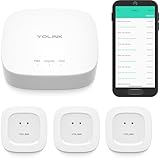
- "SMART WATER STARTER KIT" YoLink Hub Leak Detection Starter Kit, including one hub and quantity three Water Leak Sensor 1. Hub supports ethernet and/or WiFi (2.4GHz, only). Connect to your router's ethernet port for our "Plug, Plug & Play" easiest set-up - be up and running in just minutes!
- SET IT & FORGET IT! Installs in seconds! The YoLink wireless Water Sensor could not be easier to install; just place near or under the equipment you wish to monitor. Suggested uses are near or under, toilets, water heaters, laundry machines, dishwashers, sinks, fish tanks, in or near sump pumps, and by any other location subject to water leaks and flooding.
- EXTREME LONG RANGE! Powered by LoRa technology, the long-range yet low-power system offers the industry’s longest receiving range in the market (2034 feet). Our long-range coverage enables its use in areas challenging for most residential Wi-Fi systems, such as basements, outdoor porch/patio areas, sheds, free-standing garages, even remote outbuildings on your property.
- NO WIFI, NO INTERNET, NO POWER? NO PROBLEM! Our patented Control-D2D device-to-device pairing, over our LoRa-based wireless network, allows for devices to be paired to each other, in such a way they will continue to operate, even if WiFi is flaky, the internet goes down, or the AC power goes out!
- UNLOCK YOUR SMART HOME! The YoLink Hub can support more than 300 devices and is compatible with the entire line of YoLink smart products, including security, environmental, power & lighting, smart locks, and cameras (coming soon!).
Comfort and energy starter
Start with a controller that supports the devices you need, then verify HVAC compatibility before installing a thermostat. Add room or occupancy sensors only if they address an actual comfort issue. Consider energy monitoring or demand-response participation where useful, after reviewing the program terms.
Safety starter
Begin with a water-leak sensor in a high-risk location, then consider freeze alerts or supported smoke and carbon-monoxide integration. Add door sensors or an exterior camera only if they serve a defined purpose. Keep manual operation available for locks and lights, and consider backup power for the router or critical hub.
Privacy-first starter
Choose a local-control platform and devices whose local functions are documented. Use cameras only where justified, consider local storage, avoid cameras in private rooms, and configure a separate IoT network if practical. Expect greater responsibility for setup, backups, updates, and troubleshooting.
Before adding a device
- Define the use case: Name the recurring problem or task it will address.
- Check compatibility: Confirm phone, platform, device type, hub, and feature support—not just a general compatibility badge.
- Test local operation: Find out which core functions remain available without the internet.
- Assess reliability and security: Look for recovery procedures, update commitments, access controls, and behavior after reboots or outages.
- Account for installation and household use: Check wiring, permissions, accessibility, and whether everyone can operate the device.
- Calculate ownership cost and exit options: Include subscriptions, batteries, accessories, service dependence, and the effort to move or reset the device.
What does a smart home really cost?
The purchase price is only one part of ownership. Upfront expenses can include devices, a controller or hub, professional installation, electrical work, better Wi-Fi equipment, batteries, mounts, and wiring accessories. Ongoing costs may include cloud video storage, professional monitoring, AI features, cellular backup, premium automation, replacement batteries, and eventual hardware replacement.
For a five-year estimate, add the controller, chosen devices, installation, expected batteries, any recurring plan for all 60 months, and a realistic allowance for replacement or discontinued support. Compare that total with the value you expect from convenience, comfort, accessibility, safety, or energy management; do not assume the system will pay for itself.
Google Home Premium’s U.S. Google Store page lists Standard at $10 per month or $100 per year and Advanced at $20 per month or $200 per year, with differences in video history and AI features: Google Home Premium plans. These are the prices shown on that page, not a guarantee of future pricing; check current terms before subscribing.
Is smart-home technology worth it?
- For convenience-focused households: Usually start with lighting, a plug, or a routine that removes a repeated task.
- For energy-focused households: Check thermostat and HVAC compatibility, then consider monitoring, time-of-use rates, and utility programs. Measure results rather than assuming savings.
- For security-focused households: Match sensors, locks, and cameras to specific risks. Decide whether self-monitoring is sufficient or professional monitoring is required.
- For privacy-focused households: Favor documented local operation, minimize cameras and microphones, and accept that more control can require more maintenance.
- For renters and older homes: Prioritize removable devices and check permissions, wiring, electrical boxes, HVAC systems, and wireless coverage before buying.
- For accessibility or caregiving: Choose controls that the people in the home can use reliably, and keep appropriate human and emergency support in place.
A smart home earns its place when it solves a clearly defined problem and remains dependable enough that people can use it without thinking about the technology. A few interoperable, well-configured devices are often more useful than a large collection of gadgets with overlapping apps, alerts, subscriptions, and failure points.
The Tool Desk
Outbyte PC Repair FREEClear out junk files and repair common Windows errorsFree Scan →Outbyte Driver Updater FREEScan for outdated or missing drivers - takes under a minuteDriver Scan →Quick Recap
Product prices and availability are accurate as of the date/time indicated and are subject to change. Any price and availability information displayed on Amazon at the time of purchase will apply.




