PC Slower Than It Used to Be?
A free scan shows the junk files, broken settings and background clutter dragging Windows down - then fixes them in one click.Free scan · Windows 10 & 11Crashes, No Sound, or Screen Glitches?
Random freezes, missing sound and display glitches usually trace back to one bad driver. Find and replace yours safely.Free scan · under a minuteDrawer slides are straightforward to install when you get four things right: choose the correct mounting style, measure the drawer and cabinet accurately, leave the required clearance, and keep both slides level and parallel. The most reliable workflow is to remove and inspect the drawer, identify the existing hardware, verify the manufacturer’s dimensions, install the cabinet members first, attach the drawer members at matching heights, and test the movement before fully tightening every screw.
This guide focuses mainly on conventional side-mount slides. Undermount, bottom-mount, and center-mount systems use different clearances, drilling locations, clips, brackets, and adjustment procedures, so the instructions supplied with your exact slide always take priority over generic advice.
As an Amazon Associate I earn from qualifying purchases.
Before you buy: identify the drawer-slide system
Do not choose replacement slides solely because they look similar to the old ones. First determine how the existing hardware mounts to the drawer and cabinet.
The Tool Desk
Outbyte PC Repair FREEClear out junk files and repair common Windows errorsFree Scan →Outbyte Driver Updater FREEFix the driver behind crashes, sound loss and screen glitchesFind Drivers →| Slide type | How to recognize it | Important replacement consideration |
|---|---|---|
| Side-mount | A slide is attached vertically to each side of the drawer and the corresponding cabinet sides. | Usually requires a specified gap—often about 1/2 inch on each side, but verify the product specification. |
| Undermount | The runners are concealed beneath the drawer, often with front locking clips and rear brackets. | The drawer may need bottom recesses, rear notches, specific side thickness, and precisely drilled holes. |
| Bottom-mount | The hardware is visible beneath or around the lower drawer joints. | The slide’s mounting geometry and clearance differ from side-mount hardware. |
| Center-mount | A single rail or track runs beneath the center of the drawer. | The drawer and cabinet must accommodate the central rail and its rear mounting arrangement. |
For a replacement, matching the original mounting style is usually the least disruptive approach. Converting a side-mount drawer to undermount slides—or the reverse—may require rebuilding the drawer box, changing its width, cutting notches, or adding brackets. It is not automatically a drop-in conversion.
#1 Best Overall

- Premium Home Improvement Tool: Take the guesswork out of drawers with the Drawer Slide Jig; easily create level drawers that slide smoothly
- Eliminate Measuring: Kreg jig has built-in indexing tabs to precisely align drawer slides and drawers without measuring
- Works with Many Drawer Slides: Drawer jig aligns undermount, ball-bearing, and epoxy-coating slides
- Multipurpose Carpenter Tools: Works for cabinets, cases, drawers, desks, and more
- Premium Kreg Tools: We offer products that help woodworkers close the gap between idea and outcome
Check the cabinet construction
Look at the front of the cabinet opening. A face-frame cabinet has a frame around the front edges of the cabinet; a frameless cabinet has the cabinet sides extending to the front without a separate face frame.
Face-frame cabinets can require rear brackets, spacers, or a jig that references the face frame. Frameless cabinets generally allow the cabinet-side member to reference the cabinet side directly. A drawer-slide jig designed for both cabinet styles can make positioning more repeatable, but it cannot correct an out-of-square cabinet or an incorrectly sized drawer.
Measure before purchasing
Measure the cabinet and drawer before ordering hardware. Record these dimensions:
Quick wins for a faster PC:
Clear out junk files and repair common Windows errorsFree Scan →Fix the driver behind crashes, sound loss and screen glitchesFind Drivers →Repair Windows errors before they cause bigger problemsFix Now →- Width of the cabinet opening at the front, middle, and rear.
- Interior cabinet depth from the front reference point to the inside back.
- Drawer-box width at the front, middle, and rear.
- Drawer-box length or depth.
- Drawer-side thickness.
- Vertical space available for the selected slide.
- Any rear obstruction, face-frame lip, hinge, shelf, or cabinet divider.
Measure both sides of the cabinet. Older cabinets may not be square, and a single front-to-back measurement can conceal a taper or obstruction.
Side-mount slide length
For many side-mount replacements, measure from the front edge of the cabinet to the inside back and subtract approximately 1 inch to estimate the slide length. For example, an interior depth of 22 inches may point to a 21-inch slide. This is an estimating method, not a universal rule: the slide’s installation sheet may specify a different setback or usable depth.
Common drawer slides are available in lengths of roughly 10 to 28 inches, with specialty sizes outside that range. If possible, match the old slide’s length and mounting style, then confirm that the new model’s screw pattern, required setback, drawer-side thickness, and rear mounting method will work with the cabinet.
Side clearance
Many standard side-mount slides require approximately 1/2 inch of clearance between each slide and the adjacent cabinet side. That commonly means the finished drawer box is about 1 inch narrower than the cabinet opening:
Rank #2
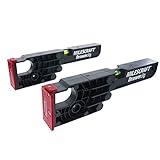
- Alignment fences and tabs make sure your jig is accurately aligned on both framed and frameless cabinets
- Large clamping area allows for tight and secure clamping to cabinet
- CABINET MUST BE AT LEAST 15" DEEP TO SUPPORT SLIDE INSTALLATION
- Reverse the DrawerJig and face outwards to support and align drawer while attaching slides
- Built-in level helps indicate if your cabinets have been installed accurate and true
Approximate drawer-box width = cabinet-opening width − 1 inch
Do not cut or modify a drawer based on that formula alone. Some slides require a different clearance, and the measurement may apply to the drawer box rather than the finished drawer front. Verify the exact clearance printed in the manufacturer’s documentation. Measure the drawer at the front, center, and rear because swelling, bowed sides, or loose joints can make the width vary.
Extension and load rating
Select the movement you need:
- Partial or three-quarter extension: part of the drawer remains inside the cabinet.
- Full extension: the drawer comes out far enough to provide access to most or all of its interior, including the back.
- Over-travel: the drawer extends farther beyond the cabinet front than a conventional full-extension design.
The load rating must cover the empty drawer and everything stored in it. Ratings are product-specific; common slides may be listed in the 75-to-150-pound range, but that does not mean every slide in that range can carry the same load in every mounting orientation. Follow the manufacturer’s rating and mounting conditions.
If you are replacing worn hardware, start by comparing side-mount drawer slides or other replacement hardware by mounting style, length, extension, clearance, and load rating—not by appearance alone.
Tools and materials
A basic installation generally needs:
- The correct left- and right-hand slide pair, if the model is handed.
- A tape measure and pencil or other marking tool.
- A drill/driver and the correct drill bit.
- Manufacturer-specified screws or the supplied fasteners.
- A small level for cabinet installation.
- A square or straightedge.
- Optional cabinet installation clamps to hold a slide or jig.
- Optional drawer-slide installation jig for repeatable positioning.
Use drawer slide mounting screws only when they are compatible with the slide and cabinet material. Screws supplied with one model should not automatically be used with another. A screw that is too long can interfere with the mechanism or pierce the cabinet exterior; one that is too short may pull out of particleboard. Use all required mounting holes when the instructions call for them. Proper fastening is part of achieving the slide’s rated capacity.
Simple side-mount drawer-slide installation
1. Remove and inspect the drawer
Empty the drawer and remove it from the cabinet. Look for release levers, rear sockets, clips, tracks, or a center rail. Photograph the old installation before disassembly if the configuration is unfamiliar.
Inspect the drawer box before installing new hardware. Repair or replace loose joints, a swollen bottom, a bowed side, or a twisted box first. A defective drawer can bind even when both slides are accurately installed.
2. Confirm the replacement dimensions
Before drilling, compare the new hardware with the old installation and the manufacturer’s instruction sheet. Confirm:
Free tools Windows power users keep installed
One-click scans. No signup required.
- Mounting style.
- Slide length.
- Required side or bottom clearance.
- Front setback.
- Drawer-side thickness.
- Required screw locations.
- Rear bracket or socket requirements.
- Extension type and load rating.
Do not assume that all slides use the same screw pattern. Slotted holes may allow adjustment, but they do not eliminate the need to establish the correct height and setback.
Rank #3

- 【Drawer Slide Jig】: Works with all standard drawer slide types (side-mount, undermount) and cabinet materials (wood, MDF, plywood). The magnetic arm securely holds slides during installation without damaging surfaces
- 【Cabinet Installation Clamps】: The adjustable clamp (0-4 cm range) locks slides in place with a single press, eliminating measurement errors. Achieve perfect alignment every time for multiple drawers without recalibration, saving hours on cabinet projects
- 【Hardware Jig for Cabinets and Drawers】: Features a reversible guide rail (1-5 cm adjustable) with embedded magnets for tool-free operation.Its user-friendly design speeds up installation, making it a must-have tool for achieving professional-grade results in less time
- 【Drawer Kit】: Made from durable plastic and stainless steel, the cabinet drawer jig is lightweight yet sturdy, perfect for both DIY enthusiasts and professionals. Its user-friendly design speeds up installation, making it a must-have tool for achieving professional-grade results in less time.
- 【Drawer Slide Installation Jig Kit】: Achieve drawer slide alignment every time with our jig kit. The adjustable guides ensure accurate positioning, whether you’re working on face-frame or frameless cabinets.
3. Separate the slide members when required
Many ball-bearing slides have a removable drawer member. Extend the slide and operate the release lever according to the markings—some left and right members release in opposite directions. Separate the narrower drawer member from the larger cabinet member only if the product is designed for it.
Keep the left and right parts paired. Installing a handed member on the wrong side can prevent engagement or produce a crooked drawer.
4. Establish a level reference
Decide where the slide should sit on each cabinet side. Mark that height on both sides, then transfer the mark with a level, straightedge, or repeatable jig reference. The cabinet members must be at matching heights.
Check the cabinet in two directions:
- The left and right slides should be at the same vertical height.
- Each slide should run straight from front to back.
- The pair should be parallel horizontally and vertically.
Do not use the cabinet bottom as your only reference if the cabinet is uneven. Establish a measured line instead.
5. Position and mount the cabinet members
Place each cabinet member at the specified front setback. Some products are flush with the cabinet front; others require a setback. For example, one Accuride instruction sheet specifies a 2 mm offset from the cabinet’s external face for that particular model. That example demonstrates why “always mount it flush” is not a safe general rule.
- Hold the first cabinet member on the reference line.
- Set its front position according to the product instructions.
- Drive one screw through an adjustment slot or the recommended initial hole.
- Check the member for level and correct setback.
- Repeat the process on the opposite side.
- Compare the two members before installing the remaining required screws.
Leave enough adjustment available to correct a small error until both sides have been checked. Once alignment is confirmed, install and tighten the remaining specified fasteners without stripping the cabinet material.
6. Mount the drawer members
Mark the same vertical reference on both sides of the drawer box. Attach the drawer members at equal heights and with the specified front setback. On a conventional side-mount system, each member should sit flat and straight against its drawer side.
Recommended Free Tools
Rank #4

- 【DRAWER SLIDE JIG】Works with most of standard drawer slide types (side-mount, undermount) and cabinet materials (wood, MDF, plywood). The magnetic arm securely holds slides during installation without damaging surfaces
- 【DRAWER TRACK MOUNTING JIG】The adjustable clamp (0 - 4cm/1.5inch range) locks slides in place with one press, eliminating measurement errors. Achieve perfect alignment every time for multiple drawers without recalibration, saving times on cabinet projects
- 【TIME-SAVING & EFFICIENT DESIGN】Constructed of durable plastic and stainless steel, lightweight and sturdy. Durable fade-resistant laser markings, simply align, mark the drill points and install the drawer slides in seconds without any measuring tools.
- 【WIDE APPLICATIONS】Suitable for any project - cabinets, drawers, nightstands, DIY furniture or professional woodworking, making it easy to achieve professional results in all your woodworking projects.
- 【NOTE】This drawer jig DO NOT fit for face-frame cabinets, only apply for frameless cabinets
Do not intentionally mount one side higher to compensate for a twisted or uneven drawer. That can create binding and may change the load path intended by the manufacturer. Correct the drawer or cabinet condition instead.
7. Insert and test the drawer
Engage the drawer members with the cabinet members using the manufacturer’s procedure. Support the drawer so its weight does not damage a partially engaged slide. Open and close it slowly several times.
Check for:
- Rubbing or scraping.
- Uneven gaps at the sides.
- Side-to-side looseness.
- A drawer front that sits too high, low, or proud of the cabinet.
- Incomplete closing.
- Resistance at a particular point in the travel.
Some ball-bearing systems engage fully only after the drawer is closed. Do not force a drawer that stops abruptly; remove it and inspect the slide alignment and rear clearance.
8. Make adjustments and tighten fully
Use slotted holes or built-in adjustment features for small positional corrections. Once the drawer moves smoothly and sits correctly, tighten the screws firmly but do not strip the wood or particleboard.
Do these 3 things before closing this tab:
1Clear out junk files and repair common Windows errors2Fix the driver behind crashes, sound loss and screen glitches3Repair Windows errors before they cause bigger problemsLoad the drawer gradually and test it again. A drawer that works empty may bind or sag when loaded. Never exceed the slide’s stated rating.
Undermount and concealed slides require a different workflow
Undermount slides are not simply side-mount slides turned underneath the drawer. They often require:
- A specific drawer-side thickness.
- A recessed drawer bottom.
- Rear notches or sockets.
- Locking clips at the front.
- Precisely located holes or dowels.
- Rear brackets and model-specific setbacks.
- Adjustment mechanisms for height, side-to-side position, or front alignment.
For example, Blum TANDEM documentation describes wood drawers with side thicknesses in the 1/2- to 3/4-inch range, but the exact slide family and product code still determine the required drawer preparation. Identify the product code on the package and use the corresponding instruction sheet. A drawer that is the correct width can still fail if its bottom recess or locking-clip holes are wrong.
A dedicated undermount drilling guide may be useful for compatible Blum-style systems. Do not treat a universal side-mount jig as a substitute for a model-specific drilling guide, and verify compatibility with the exact TANDEM, TANDEM Plus, TANDEM Edge, MOVENTO, or other slide family before drilling.
When an installation jig is worth using
A jig is optional for one simple replacement, but it can be worthwhile when:
Best Value

- For Blum Undermount Drawer Slides Jig: Designed for use with Blum undermount drawer slides it works with Blum tandem drawer slides and 21 Inch Blum undermount drawer slides to make installing undermount drawers quick and easy
- Designed for Blum drawer slides jig: Made with aluminum alloy craftsmanship for solid durable performance built-in bubble level helps maintain horizontal balance during installation and improves drilling accuracy
- Stable Non-Suspended Design: Features a non-suspended stable base design that fits firmly against the drawer panel and eliminates wobble during drilling for one-step installation more reliable than suspended models
- Complete Accessory Kit: The VASTHOME undermount drawer slides drill guide jig includes 2pcs 3/32 Inch 2.5mm bits 1pc 15/64 Inch 6mm bit depth gauge collars and a hex wrench to meet all installation needs
- Effortless Installation Experience: With this drill guide you can easily drill 6 precise holes in each drawer box for installing Blum undermount drawer slides greatly boosting woodworking installation efficiency
- You are working inside a deep or confined cabinet.
- You need to install several drawers at consistent heights.
- You are working with a face-frame cabinet.
- You find it difficult to hold a slide level while drilling.
- You want repeatable front setbacks and hole locations.
The Kreg drawer slide jig is designed to hold a slide while cabinet mounting holes are drilled and to support the drawer box while the drawer members are attached. Its positioning tabs can help reference both the cabinet and drawer, and it is intended for face-frame and frameless cabinet work as well as several common slide styles.
The Rockler Universal Drawer Slide Jig uses a locking wedge, adjustable indexing foot, and clamping surfaces for repeatable positioning. Rockler identifies compatibility with many ball-bearing, epoxy-coated, side-mount, and center-mount slides, but also specifically excludes Blum TANDEM slides. That limitation matters: use a guide designed for the concealed system rather than assuming “universal” means every slide.
A jig improves repeatability; it does not guarantee a perfect installation. It cannot fix a warped drawer, an out-of-square cabinet, incorrect slide length, or a wrong clearance dimension.
Troubleshooting drawer-slide problems
| Problem | Likely causes | What to check |
|---|---|---|
| Drawer is too tight or will not enter | Insufficient side clearance, slides mounted too close together, or cabinet out of square. | Measure the drawer width at the front, center, and rear. Recheck the slide’s required clearance and compare both cabinet members. |
| Drawer binds halfway in | Nonparallel slides, a bowed drawer box, incorrect slide length, or a rear obstruction. | Confirm that both members are level and parallel in the vertical and horizontal axes. Inspect the drawer and cabinet back. |
| Drawer sits crooked | Drawer members at different heights, uneven cabinet opening, or handed components on the wrong sides. | Remove the drawer, compare both height marks, and verify left/right pairing. |
| Drawer does not close fully | Wrong extension type, rear contact, a self-close or soft-close mechanism that is not engaging, or excessive load. | Check the rear of the drawer, the slide mechanism, and the load. Confirm that the drawer is fully engaged. |
| Slide feels loose | Wrong fasteners, stripped particleboard, or insufficient mounting points. | Use specified screws, inspect the mounting material, and use all required holes. Add reinforcement only when compatible with the slide design. |
| Undermount installation fails despite correct width | Wrong drawer-side thickness, missing bottom recess, incorrect rear notch, locking-clip holes, or drilling locations. | Match the exact product code to its instruction sheet and verify every drawer-preparation dimension. |
Safety and quality checks
- Wear eye protection when drilling.
- Support the drawer securely while attaching or engaging the slides.
- Keep fingers, drill bits, and screws clear of moving slide members.
- Use the supplied or specified fasteners.
- Do not exceed the rated load.
- Do not mount slides flat beneath a drawer unless the model is designed for that orientation.
Some slides designed for vertical side mounting can have their applicable load rating reduced by at least 50 percent when mounted flat beneath a drawer, and some models are not suitable for flat mounting at all. The manufacturer’s mounting orientation and load instructions control.
Replacement-buying checklist
Before ordering, confirm each item:
- Same mounting style as the existing hardware, unless you are intentionally modifying the drawer and cabinet.
- Correct slide length for the available cabinet depth.
- Correct drawer width and side clearance.
- Compatible drawer-side thickness.
- Correct front setback and rear mounting method.
- Required left- and right-hand components.
- Desired partial, full-extension, or over-travel movement.
- Load rating suitable for the drawer and its contents.
- Compatible screws, brackets, clips, or rear sockets.
- Exact product instruction sheet available before drilling.
The safest rule is simple: identify, measure, align, and test. Generic dimensions can help you narrow the choices, but the exact slide documentation supersedes any rule of thumb.
Frequently Asked Questions
How much space should be left for side-mount drawer slides?
Many standard side-mount slides require approximately 1/2 inch of clearance on each side, making the drawer box about 1 inch narrower than the cabinet opening. This is not universal. Verify the clearance for the exact slide before cutting or modifying the drawer.
Should drawer slides be mounted flush with the cabinet front?
Not always. Some slides are flush with the cabinet front, while others require a setback. Follow the product instruction sheet; applying a generic flush rule can prevent the drawer from closing or engaging correctly.
What’s actually slowing this PC down?
Pick the symptom - the matching free tool is one click away.
Can I install undermount slides on any drawer?
No. Undermount systems often require specific drawer-side thickness, bottom recesses, rear notches, locking clips, and precisely drilled holes. A drawer may need modification or rebuilding, and the exact slide family determines the preparation dimensions.
Do I need a drawer-slide jig?
No, not for every installation. A jig is especially useful for face-frame cabinets, deep or confined cabinets, multiple drawers, or repeatable positioning. It improves consistency but cannot correct a warped drawer, incorrect measurements, or an out-of-square cabinet.
Why does my drawer bind after installing new slides?
The most common causes are insufficient clearance, cabinet members that are not parallel, drawer members mounted at different heights, a bowed drawer box, incorrect slide length, or a rear obstruction. Remove the drawer and check these conditions before forcing it.
The Bottom Line
A clean drawer-slide installation depends less on force or specialized skill than on accurate selection and layout. Match the mounting style, verify the slide-specific clearance and setback, mount both sides level and parallel, use the correct fasteners, and test the drawer before final tightening. When the hardware is concealed or model-specific, use its exact preparation guide rather than a generic side-mount method.
Free tools Windows power users keep installed
One-click scans. No signup required.
Quick Recap
Product prices and availability are accurate as of the date/time indicated and are subject to change. Any price and availability information displayed on Amazon at the time of purchase will apply.

