The right office accessories solve a specific workstation problem: unsupported feet, awkward document viewing, or a keyboard and mouse that are hard to reach. Adjust your chair, desk, monitor, and work area first; add an accessory only if a fit or placement problem remains. The best setup depends on your furniture, tasks, and body—not on buying every item in a checklist.
Start with your workstation, not a shopping list
Accessories work best as part of a coordinated setup. Adjust the chair and arrange the monitor, keyboard, mouse, and frequently used items before deciding what to buy. OSHA recommends positioning the monitor directly in front of you and at least 20 inches (50 cm) away; treat that as guidance to adapt to your needs, not a universal product specification. Keep frequently used devices within your primary work zone so you do not have to lean or reach repeatedly. See OSHA’s workstation components guidance and its desk recommendations.
Then identify the remaining issue: Do your feet dangle when the chair is adjusted for the desk? Do you look down repeatedly at pages? Is the keyboard position forcing your wrists out of neutral, or is the mouse too far away? Each answer points to a different solution.
Which office accessories address common fit problems?
| Accessory | Consider it when | What to check |
|---|---|---|
| Footrest | Your feet cannot rest flat on the floor after you adjust the chair to suit the desk. | Adjustable height or angle, stable support for both feet, and enough floor space. |
| Document holder | You refer to paper or other documents while working at the computer. | Stability and adjustment for height, position, distance, and viewing angle. |
| Keyboard tray | A fixed-height desk prevents a workable keyboard position. | Enough room for both keyboard and mouse without pushing the mouse out of easy reach. |
| Wrist rest | You want a place to rest your hands during pauses in typing. | Height, depth, width, slope, softness, and rounded edges that suit the keyboard. |
| Mouse platform or repositioning | Your current mouse location makes you lean or reach. | Whether it brings the mouse into a comfortable work area without creating a new reach. |
Footrest: when your feet need support
A footrest may help when a chair is adjusted to fit a fixed-height desk but your feet still do not reach the floor comfortably. OSHA advises providing one when the workstation cannot be adjusted enough for the feet to rest flat. CCOHS recommends an adjustable footrest that supports both feet. Check that it stays stable and fits under the desk without interfering with your legs or normal movement. Guidance is available from OSHA and CCOHS chair-adjustment guidance.
Windows Errors? Fix Them Before They Spread
Repair common Windows errors and clear accumulated junk for a smoother, more stable PC - no reinstall needed.Free scan · no reinstallCrashes, No Sound, or Screen Glitches?
Random freezes, missing sound and display glitches usually trace back to one bad driver. Find and replace yours safely.Free scan · under a minute#1 Best Overall

- Desk Organizers and Accessories Set: Office Supplies set includes a variety of essential office items,1 x 360-degree rotating pen holders, 1 x staplers, 1 x staple removers, 1000 x staples, 1 x scissors,1 x tape dispenser, binder clips & paper clips & push pins kit, 2 x tapes.This rich content make your workspace convenient and efficient.
- Premium Materials: Our office supplies are made from high-quality materials including metal, plastic, and acrylic. These materials ensure durability, wear-resistance, and a smooth, shiny finish that is easy to clean and maintain.
- Aesthetic and Practical Design: The office supplies sets are designed to be both elegant and functional. They enhance the aesthetics of the workspace with their stylish designs and colors, Unique designs 360-degree rotating pen holders keeping the desk tidy and organize
- Multi-functional Use: The desk organizers and accessories can be used not only in office settings but also at home, in classrooms, and other environments. They can store and organize various items such as, pens, remote control and even cosmetics or kitchen supplies.
- Gift-Worthy: Office desktop organizer sets make great gifts for various occasions such as birthdays, holidays, Christmas, and back-to-school. They are suitable for students, teachers, office workers, and anyone who appreciates organized and aesthetically pleasing desk setups.
Document holder: match placement to the task
Choose a holder that is stable and easy to adjust for height, position, distance, and viewing angle. Place it according to what you look at most and whether you write on the page:
- If the monitor is your main focus: OSHA says the document holder can sit beside the monitor at a similar height and distance.
- If you frequently write on the document: A position between the monitor and keyboard may be appropriate.
These are arrangement options, not rules for every desk. The aim is to make the material you use easy to see without repeated awkward head or body movements. Consult the OSHA purchasing guide for its document-holder criteria.
Rank #2

- ALL-IN-ONE OFFICE ESSENTIALS SET: This set includes 13 must-have office tools: 1 Desk Organizer, 1 Pen Holder, 1 Ruler, 1 Stapler, 1 Box of Staples, 1 Staple Remover, 1 Hole Punch, 1 Pair of Scissors, 1 Set of File Folders, 1 Tape Dispenser with 1 Roll of Tape, and 2 Ballpoint Pens. Everything you need to stay organized and productive is right at your fingertips.
- SPACE-SAVING DESK ORGANIZER: The included Desk Organizer features a sleek, modern design with multiple compartments to store pens, scissors, staplers, and other small items. It helps declutter your workspace, saving you time and improving efficiency. The organizer is both practical and aesthetically pleasing, making it a perfect addition to any desk.
- DURABLE & HIGH-QUALITY MATERIALS: Crafted from premium materials, the desk organizer and accessories are built to last. The organizer features a sturdy construction with a smooth finish, while tools like the stapler, hole punch, and scissors are designed for daily use. The set is both functional and durable, ensuring long-lasting performance.
- ERGONOMIC & USER-FRIENDLY DESIGN: Every item in this set is designed with user comfort in mind. The stapler offers smooth operation, the hole punch features a soft silicone grip, and the scissors have comfortable handles for easy use. The desk organizer has rounded edges to prevent scratches, making it safe and convenient for everyday use.
- PERFECT FOR BACK TO SCHOOL GIFTS: Whether you're working from home, managing tasks in the office, or studying at school, this set is versatile enough for any environment. It also makes an excellent gift for colleagues, students, or anyone who values an organized workspace. Packaged neatly, it’s ready to gift for birthdays, holidays, or special occasions.
Keyboard tray: make sure there is room for the mouse, too
A tray can help when a fixed-height desk makes it difficult to place the keyboard comfortably. Before choosing one, check that its usable surface can hold both keyboard and mouse in positions that do not require reaching. OSHA warns that an undersized tray may force the mouse into a poor position. A tray is not automatically an improvement if it solves keyboard height but makes mouse use harder. OSHA’s purchasing guide and desk guidance cover these placement considerations.
Keyboard and mouse: prioritize fit and reach
Choose a keyboard for a neutral wrist position
Keyboard designs vary, and CCOHS says there is no universally agreed best design. Instead of assuming that a particular shape suits everyone, consider whether you can use the keyboard with your wrists in a neutral position. Keyboard, chair, and desk height work together, so assess them as one setup. CCOHS provides guidance on keyboard selection and use; the page was published and last revised on February 28, 2022.
Rank #3

- 【Ergonomic Design】:OPNICE newly releases the monitor stand for desk organizer! This computer stand elevates your monitor or laptop to a comfortable viewing height, relieving pressure on your neck, shoulders. Ideal for strengthening office organization and increasing comfort levels
- 【Save Space】:This 2-Tier monitor stand with drawer and 2 hanging pen holders provides ample storage space to keep your office supplies and office desk accessories neatly organized and easily accessible, keeping your workspace tidy and improving your sense of well-being
- 【Durable and Stable】:The metal computer stand is made of high quality material with sturdy construction, it can easily carry the weight of the display and computer accessories, to ensure stable and non-shaking for a long time, ideal for use in the office, dorm room or home
- 【Sleek and Aesthetic】:This desktop organizer features a modern minimalist design that blends seamlessly with any office decor. It not only enhances functionality but also adds a touch of style and aesthetic to your workspace, making it an essential piece for your office organization efforts
- 【Hassle-free Shopping】:OPNICE is committed to providing excellent after-sales service and offers a 100-day unconditional return policy for desk organizers and accessories. Comes with four non-slip pads that are height-adjustable to protect your table from scratches(U.S. Patent Pending)
Put the mouse where you can reach it comfortably
There is no single mouse location that fits every workstation. Evaluate the work area and position the mouse to avoid excessive leaning or reaching. A mouse platform is one possible arrangement, but simply moving the mouse beside the keyboard may be enough. See CCOHS guidance on mouse placement, revised October 8, 2024.
Independent reader supportYour contribution helps us test, update, and keep practical guides available for everyone.Wrist rest: support during pauses, not pressure while typing
A wrist rest is for resting between typing, not for pinning the wrists down while you type. During active typing, keep your hands free to move above the support; when resting, use the heel or palm of the hand for support. Match the rest’s height and shape to the keyboard edge so it does not force the hands into an awkward position. OSHA’s purchasing guide specifies at least 1.5 inches of depth and advises minimizing use while actively keying. CCOHS gives wrist-support depth guidance of 1.5 inches (3.8 cm) in its page revised April 30, 2026. These are source recommendations, not proof that a wrist rest will prevent or treat an injury. Read the respective guidance from OSHA and CCOHS.
Quick Recap
Best Value
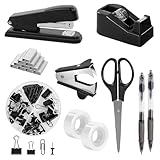
- Office Supplies set:Black desk accessories include a variety of essential office supplies, such as staplers, tape dispensers, scissors, stapler removers, clips, paper clips, offering your needed for an organized workspace.
- Durable & High-Quality:Black stapler and tape dispenser set are made from durable, high-quality plastic and metal materials, ensuring long-lasting use.
- Practical and Stylish Design: Black desk supplies set have user-friendly features, easy-to-use stapler and tape dispenser, suitable for anyone who enjoys practical and stylish desk accessories
- Compact and Space Saving: The office desk supplies are designed to save space, the stapler and tape dispenser size is within 4.8 inches, easy to store or carry
- Versatile Gift Option: These office supplies work well as gifts for occasions like birthdays, holidays, and back-to-school season, appealing to students, professionals, and color enthusiasts
Rank #4

- All-in-One Purple Organization & Style: Elevate your workspace with this complete set of essential Purple desk accessories! Features a 1 mesh desk organizer,1 360° rotating pen holder, 1 clip Set(includespaper clips, large binders, small binders, pins), 1 stapler, 1,000 staples, 1 staple remover, 1 tape dispenser, 1 adhesive tape, 1 Pocket Book, 1 Pocket Pen, 1 pu leather organizer , 1 ruler, 1 scissors, 1 book of sticky notes,6 pens,1 scoaster
- Enchanting Purple, Inspires Focus & Creativity:Charming purple design infuses your workspace with a serene and inspiring atmosphere, showcasing unique taste. Favored by users seeking personality and quality
- Exceptional Value, Meets Essential Needs:Thoughtfully curated essential supplies offer one-stop convenience and savings. Efficiently handles daily writing, organization, binding needs. Outstanding value proposition
- Exquisite Gift Box, A Refined Gifting Choice:Presented in an exquisite gift box, enhancing the gifting experience. A practical and thoughtful present for students, professionals, or loved ones with refined taste
- Smart Zoned Storage, For a Clearer Mind:Features smart zoned storage design for quick categorization of supplies. Maintains a clean, organized desk, minimizes search time, and boosts focus for work or study
A practical way to decide what to buy
- Adjust what you already have. Set up the chair and arrange the monitor, keyboard, mouse, and frequently used items before shopping.
- Name the problem precisely. For example: feet unsupported, pages difficult to view, keyboard position constrained by desk height, or mouse too far away.
- Choose the accessory that addresses that problem. Use the fit checks above rather than buying a full set by default.
- Check the whole arrangement after adding it. A tray or platform should not create a new reach or crowd out another device. OSHA offers a workstation evaluation checklist to help review the setup.
Product prices and availability are accurate as of the date/time indicated and are subject to change. Any price and availability information displayed on Amazon at the time of purchase will apply.




