Free tools Windows power users keep installed
One-click scans. No signup required.
Yes—myQ can still be a sensible choice if you want simple phone-based garage-door control and your opener is confirmed compatible. It is a weaker choice for homeowners who require broad Alexa, Google Home, HomeKit, Home Assistant, or local-first automation. The frequently cited “71,000 five-star reviews” figure is also historical: BGR reported it on July 4, 2024, and it should not be treated as a verified current review count.
What the “71K reviews” claim actually means
The review figure comes from a July 4, 2024 BGR article, which described a myQ product as having “nearly 71,000” five-star Amazon ratings. That is a dated marketplace snapshot—not a confirmed August 2026 total.
As an Amazon Associate I earn from qualifying purchases.
Amazon listings can change, reviews can be merged or separated, and the generic phrase “myQ Smart Garage Opener” may refer to different products. Do not assume that all of those ratings belong to one identical hardware model, or that a large review count proves current reliability, compatibility, or integration support.
Recommended Free Tools
Popularity is useful evidence that many shoppers found the basic concept appealing. It is not a substitute for checking your opener model and deciding whether myQ’s cloud-based ecosystem fits your smart-home plans.
#1 Best Overall

- “Did I shut the garage” No more worrying.
- Open or close your garage from anywhere. Simply download the free myQ app for iPhone or Android and get connected with your very own Smart Garage
- Works with Amazon Key In-Garage Delivery—an exclusive Prime member benefit that protects your Amazon packages.
- Give access to family or friends while on the go
- Never worry if the garage is closed at night by setting a close schedule
Which myQ product are you considering?
“myQ Smart Garage Opener” can describe several different things:
- A Chamberlain or LiftMaster opener with myQ connectivity built in.
- The retrofit Chamberlain Smart Garage Control or myQ Smart Garage Hub.
- A broader myQ setup involving cameras, locks, lights, vehicle integrations, or delivery features.
- A retailer listing using a generic product title.
A built-in smart opener is not the same product as a retrofit hub. Before comparing price, installation, or reviews, identify the exact model and use the manufacturer’s official compatibility checker.
What myQ does
A compatible myQ system connects your garage door to the myQ app through a controller with Wi-Fi—or through an opener with myQ built in. Depending on the product and account setup, it can let you:
Outdated Drivers Are Slowing You Down
One free scan finds every outdated or missing driver and matches the right update for your exact hardware.Free scan · exact hardware matchPC Slower Than It Used to Be?
A free scan shows the junk files, broken settings and background clutter dragging Windows down - then fixes them in one click.Free scan · Windows 10 & 11- Open or close the garage door remotely.
- See whether the door is open or closed.
- Receive activity and door-state notifications.
- Share access with family members, guests, or service providers.
- Use selected vehicle, smart-home, delivery, or partner features.
Chamberlain’s setup guidance says the system requires an internet connection and a strong Wi-Fi signal near the garage controller. The app is convenient, but it is not the same as a purely local garage-door control system.
Why homeowners like myQ
The strongest case for myQ is simplicity. If you only want to check whether you left the garage open, receive an alert, or let someone in while you are away, the app addresses that problem directly.
- Useful remote access: You can check or operate the door without being near a physical remote.
- Status awareness: Notifications can reduce the uncertainty of wondering whether the door was left open.
- Shared access: App-based permissions can be more convenient than handing out extra remotes.
- Retrofit potential: A compatible hub may add smart functions without replacing a mechanically sound opener.
- Familiar ecosystem: Chamberlain and LiftMaster owners may prefer staying with the opener manufacturer’s platform.
These benefits explain why a product can receive strong marketplace ratings even when enthusiasts criticize its integration policy. Many buyers simply need dependable app access, not elaborate automation routines.
What caused the myQ controversy?
The central controversy was not that every myQ opener stopped working. It was Chamberlain Group’s decision in 2023 to restrict unauthorized third-party access to the myQ ecosystem.
Rank #2
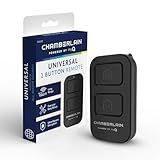
- Compatible with Leading Brands – Works seamlessly with Chamberlain, LiftMaster, Craftsman and most other garage door openers made after 1997.
- Long-Range Performance – Up to 1300 ft range for your garage door opener (conditions permitting) for smooth, reliable operation.
- Fast, Improved Programming – New setup process makes pairing with your garage door opener quick and frustration-free.
- Control Up to 2 Garage Doors or Gates – Each programmable button controls a different garage door openers or gate.
- myQ Smart Garage Control – Connect to the my Q app to manage access, receive notifications, and view garage door opener access history and more!
In its October 25, 2023 announcement and November 7 update, Chamberlain said unauthorized integrations were creating excessive traffic and consuming system resources. The company stated that these integrations represented 0.2% of users but could account for more than half of myQ traffic at times. Chamberlain said the change was intended to protect performance and reliability, while approved partnerships and IFTTT support remained available according to that announcement.
The consumer concern is different: a buyer may purchase a connected garage controller expecting broad compatibility with Alexa, Google Home, Home Assistant, HomeKit, or another platform, only to discover that access depends on the manufacturer’s approval and policies. A garage door can remain mechanically functional while a preferred automation pathway disappears.
That distinction matters. It is inaccurate to say Chamberlain banned every integration. It is accurate to say that myQ is a controlled ecosystem, and its third-party access rules can affect the product’s long-term value to smart-home users.
Does myQ require a subscription?
Do not reduce this question to a universal “no subscription” promise.
The basic myQ app experience and ordinary remote-control functions are presented by Chamberlain as part of the core product setup. However, vehicle integrations, delivery services, video features, partner services, and premium offerings may have separate requirements or commercial terms. A buyer should distinguish among:
- The one-time hardware purchase.
- A myQ account and cloud service.
- Third-party partner services.
- Vehicle-maker or delivery subscriptions.
- Camera or video-related features.
Check the terms for the exact hardware and feature you plan to use. “The basic app has no recurring fee” does not mean every myQ-connected service is permanently free.
Compatibility: check the opener, not just the brand
Chamberlain says many openers manufactured after 1993 may be compatible, but that is a screening guideline rather than a guarantee. Compatibility depends on the exact opener, accessory, production period, control protocol, and safety-sensor arrangement.
Rank #3

- Power Outage Protection: Ensure uninterrupted access during power failures. Chamberlain Garage Door Battery Backup keeps you in control when it matters most, for safety and peace of mind.
- Ultra-Quiet Operation: Garage door opener with a reinforced belt drive and ultra-quiet DC motor ideal for garages near living spaces or bedrooms.
- Smart Access for Smart Homes: Wi-Fi connected myQ garage door opener and myQ app let you control your garage opener from your phone - anytime, anywhere. Built-in video monitoring helps you keep eyes on what matters, bringing modern convenience to your fingertips
- Advanced Power for Bigger Demands: Choose the right garage door opener horsepower for the job-from everyday reliability to higher-cycle performance. Our 3/4 HP garage door motor is designed for frequent use, delivering smooth, consistent operation and long-term durability
- Bright When You Need It Most: Illuminate your entire garage with 2 LED Bulb lighting - providing front and rear coverage for safer, more complete visibility whenever you need it. Bulbs sold separately.
Before buying, record:
- The opener brand.
- The complete model number.
- The learn-button color, where applicable.
- The approximate manufacture date.
- Whether standard photoelectric safety sensors are installed and working.
- Whether reliable Wi-Fi reaches the garage.
Chamberlain’s support documentation lists exceptions and model-specific limitations. Genie and Overhead Door compatibility, for example, can vary by accessory and production year; some Smart Garage Hub compatibility may be limited to units manufactured through 2019. Certain Chamberlain and LiftMaster models are also excluded. Use the official compatibility tool rather than relying on a brand name or age alone.
Do these 3 things before closing this tab:
1Clear out junk files and repair common Windows errors2Scan for outdated or missing drivers - takes under a minute3Repair Windows errors before they cause bigger problemsAlso distinguish an opener that is compatible with a retrofit hub from one that includes myQ connectivity. Those are different installation paths.
What installation generally requires
The exact instructions depend on the controller or opener, but a typical retrofit setup involves:
- Identify the opener model and verify compatibility.
- Confirm that the garage has usable Wi-Fi near the controller.
- Install and power the hub or controller according to its manual.
- Mount and align the door-position sensor securely.
- Download the myQ app and create or sign in to an account.
- Add the device and connect it to Wi-Fi.
- Pair the controller with the opener.
- Open and close the door several times while checking the app status.
- Test operation over cellular data, not only while connected to home Wi-Fi.
- Configure notifications and shared access.
App labels can change, so follow the current in-app prompts and product manual rather than an old menu path. Garage doors are safety-critical equipment. Do not bypass safety sensors or change force settings casually; follow the opener manufacturer’s instructions and use a qualified garage-door professional for work outside the manual’s intended installation steps.
Cloud dependence and reliability
myQ has several separate layers, and troubleshooting is easier when they are not confused:
- Mechanical layer: springs, tracks, rollers, motor, and the door itself.
- Local control layer: wall button, physical remote, opener radio, and safety sensors.
- Network layer: household internet and Wi-Fi coverage in the garage.
- Account layer: login, permissions, notifications, and device pairing.
- Cloud layer: the service that connects app commands and status updates.
A wall button or physical remote may continue to work during an internet or cloud outage while app control does not. Conversely, the cloud can be operating normally while a misaligned sensor prevents correct status reporting. This is why “smart” performance should not be treated as a single measure of opener reliability.
If the app says the door is open when it is closed
- Check sensor alignment and mounting rigidity.
- Check the sensor’s battery or power condition, if applicable.
- Confirm the door did not move during setup or pairing.
- Recalibrate or re-pair the device using the current instructions.
- Refresh the app and consider whether the displayed status is stale.
Do not rely on an incorrect status indication for a security-sensitive decision until the physical door and sensor have been checked.
Rank #4

- Secure Keyless Garage Entry – Open your garage door with a personalized PIN using this myQ garage door keypad—no remote or keys needed.
- Compatible withh Chamberlain, LiftMaster, and most Craftsman garage door openers manufactured after 1997 with safety sensors.
- Temporary & Guest PIN Access – Create unique, temporary access codes for guests, deliveries, dog walkers, or service providers to access your garage.
- Easy Wireless Setup – Battery-powered garage opener keypad installs quickly with improved programming—no wiring required.
- Built for Durability – New, modern garage keypad design eliminates the need for a protective cover while maintaining the same durability in tough weather conditions.
If a remote command fails
- Check opener power and household internet service.
- Check Wi-Fi signal strength at the controller, not just inside the house.
- Check the sensor and local wall control.
- Confirm the account is signed in and the device is still paired.
- Try a power cycle or re-pairing step only when allowed by the manual.
- Keep a physical remote or wall control available as a fallback.
HomeKit, Alexa, Google Home, and Home Assistant
Do not infer platform support from the myQ name alone. The 2023 policy change makes integration availability a central buying question, and approved-partner arrangements can change.
Apple HomeKit deserves particular caution. Chamberlain’s materials describe the myQ Home Bridge as an Apple HomeKit/Siri pathway, but Chamberlain also said the Home Bridge was discontinued in 2022, while stating in its 2023 message that it remained supported at that time. Do not assume that a newly purchased myQ setup includes a generally available HomeKit bridge. Check current product documentation before buying.
What’s actually slowing this PC down?
Pick the symptom - the matching free tool is one click away.
Similarly, do not promise Alexa, Google Home, Home Assistant, or IFTTT support without checking the exact current integration and product combination. Chamberlain said approved partnerships remained and that IFTTT continued as an option in its 2023 statement; that should not be treated as a guarantee for every future feature or device.
Privacy and account security
A connected garage controller creates an account and an activity record associated with a security-sensitive access point. That does not by itself establish misuse, but it is a legitimate consideration when comparing cloud platforms.
- Use a unique password for the myQ account.
- Enable multifactor authentication if it is offered for your account.
- Share access only with people who need it.
- Remove former household members, contractors, or guests promptly.
- Review notifications and connected services periodically.
- Keep a physical control available in case the app or cloud service is unavailable.
myQ compared with alternatives
| Option | Best for | Main strength | Main weakness |
|---|---|---|---|
| myQ | Simple phone control and existing Chamberlain/LiftMaster owners | Familiar ecosystem and broad hardware footprint | Cloud dependence and controlled third-party integration |
| Meross | Buyers prioritizing broader platform support | Commonly marketed across multiple smart-home ecosystems | Exact model compatibility and current support must be verified |
| Nexx | Users seeking more integration-oriented features | Broader automation positioning on some models | Current availability, pricing, and vendor longevity require checking |
| Tailwind | Buyers seeking a different third-party ecosystem | Alternative approach to myQ | Product, plan, and opener compatibility details require verification |
| ratgdo and other local-first controllers | Technically capable local-automation users | Reduced dependence on a manufacturer cloud | More installation, protocol, and support complexity |
Meross, Nexx, Tailwind, and ratgdo should each be evaluated using the exact current model and your opener’s compatibility list. Features, prices, subscriptions, and supported platforms can differ between models.
Who should buy myQ?
Buy myQ when your opener is confirmed compatible, your main goal is remote control and status notifications, you are comfortable with cloud dependence, and unrestricted third-party automation is not essential.
It is particularly reasonable for an existing Chamberlain or LiftMaster owner who wants a retrofit rather than a full opener replacement.
Think twice when your opener model cannot be verified, garage Wi-Fi is weak, local operation during internet outages is important, or your purchase depends on HomeKit, Home Assistant, Alexa, Google Home, a vehicle integration, or a delivery feature that may change.
Replacing a mechanically reliable opener solely to gain app control may also be poor value. First determine whether a compatible retrofit controller solves the actual problem.
Quick Recap
Final buying checklist
- Identify the exact product, not just “myQ.”
- Verify the opener’s complete model number with the official compatibility tool.
- Confirm Wi-Fi coverage at the opener.
- Check whether your required platform integration is supported now.
- Separate basic app functionality from partner, vehicle, video, and delivery terms.
- Understand that cloud policies and integrations can change after purchase.
- Keep a physical remote or wall control available.
- Do not use the historical “71K reviews” figure as your primary buying reason.
Product prices and availability are accurate as of the date/time indicated and are subject to change. Any price and availability information displayed on Amazon at the time of purchase will apply.
The Tool Desk
Outbyte Driver Updater FREEScan for outdated or missing drivers - takes under a minuteDriver Scan →Outbyte PC Repair FREERepair Windows errors before they cause bigger problemsFix Now →
