After roughly three months with a Bambu Lab A1, I had moved beyond downloading simple models and pressing print. The next obvious project was to print accessories for the printer itself. That was when the easy part of 3D printing ended—and the useful learning began.
Printing upgrades exposed a distinction I had missed: a printer that produces excellent PLA models is not automatically suitable for every filament, part geometry, temperature, or application. The most valuable upgrade to my workflow was not immediately a new piece of hardware. It was learning to choose the right material, orient parts properly, inspect the first layer, and treat every failed print as diagnostic information.
As an Amazon Associate I earn from qualifying purchases.
From effortless novelty to functional parts
My first phase of 3D printing was satisfyingly simple. I downloaded models, selected a printer and material profile in the slicer, and watched the A1 turn filament into finished objects. Successful decorative prints create confidence quickly because they often hide the questions that matter for functional work.
Free tools Windows power users keep installed
One-click scans. No signup required.
A functional part has to do more than look right. It may need to fit another component, survive repeated force, tolerate heat, remain flexible, stay attached to a surface, or print with the correct orientation of its layers. A printer upgrade adds another level of responsibility: it must improve the machine without blocking ventilation, interfering with moving parts, obstructing sensors, or making maintenance harder.
#1 Best Overall
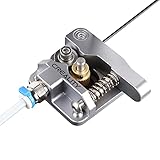
- 【Quality Assurance】100% official all-metal 3D printer extruder. High quality aluminum alloy material and sandblast to surface oxidization, ensuring this gray extruder is last for long term use. Works better than original plastic stock extruder. Original Creality 3D printers accessories for Ender-3/Ender-3 Pro/Ender-3S/Ender-3 V2/Ender-3 Max/CR-10/CR-10S
- 【Work Better】Our 3d printer extruder kits have an adjustable bolt so that you can adjust the pressure of the extruder gear as needed. The extruder drive has better stronger pressure pushing the filament into the printer nozzle and so will improve the printer's performance. 40 Teeth drive gear feeds the 1.75mm filament, compatible with PLA/ABS/Wood/TPU/PTEG
- 【Improved Performance】The optimized extruder with metal extrusion and original hotend kit pushes the filament into the printer nozzle, greatly making the metal extruder retain power in filament feed-in. And the beveled filament intake can prevent scraping the filament as it is pulled into the feeder
- 【Easy To Install】DIY kit and you need to assemble by yourself. The full necessary screws & parts kit for the extruder is included. Referring to instructions or our 5th picture to install, it is very easy and straightforward to switch to this upgraded part on your machine
That progression—from simple models to useful parts, then from useful parts to printer-specific upgrades—is where 3D printing became less like a vending machine and more like a small manufacturing process.
My experience with the A1 followed that pattern. The printer made the beginning unusually approachable, but the machine could not remove the underlying constraints of FDM printing: material behavior, bed adhesion, geometry, temperature, moisture, and mechanical setup.
That is also the central lesson of the project. A fast, automated printer reduces setup friction. It does not make every material interchangeable or every downloaded model reliable.
Quick wins for a faster PC:
Fix the driver behind crashes, sound loss and screen glitchesFind Drivers →Repair Windows errors before they cause bigger problemsFix Now →Why print upgrades for the printer?
There is an appealing kind of recursive making in printing parts for the machine that makes the parts. A spool holder, filament guide, tool organizer, cable-management part, camera mount, protective cover, or small bracket has an obvious purpose. Unlike a decorative model, it gives me a straightforward question: did the part solve the problem?
Printer-specific accessories are also practical tests of dimensional accuracy. A model can look perfect while still being slightly too large, too small, or poorly aligned. An upgrade may reveal:
- poor fit or incorrect tolerances;
- weakness caused by layer orientation;
- warping on a large or flat surface;
- excessive support material;
- stringing or poor surface finish;
- material incompatibility; or
- interference with the printer’s movement, airflow, sensors, or maintenance access.
That does not mean every popular upgrade is worth printing. Before slicing a downloaded model, I check its dimensions, intended printer, recommended material, suggested orientation, required supports, user comments, photographs, and revision history. I also ask what could go wrong if the part is slightly inaccurate.
A part that holds tools is low-risk. A part that touches a hot component, adds weight to a moving axis, guides filament near a moving assembly, or covers electronics deserves much more caution. A printed accessory should solve a recurring problem—not merely add another object to the machine.
Do these 3 things before closing this tab:
1Scan for outdated or missing drivers - takes under a minute2Clear out junk files and repair common Windows errors3Fix the driver behind crashes, sound loss and screen glitchesUpgrades worth considering
The most useful way to categorize upgrades is by the problem they solve.
Low-risk quality-of-life parts
- Spool holders and filament guides;
- tool holders and parts bins;
- storage for a scraper or nozzle tools;
- cable-management parts;
- filament labels and organizers; and
- lighting or camera mounts that do not obstruct movement.
These parts can make a workspace easier to use without changing the printer’s fundamental capabilities. Even here, I check that a mount does not add unnecessary moving mass or become a snag point.
Rank #2
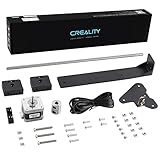
- 【Increased Accuracy】Compared with original structure, dual Z-axis kit reduces the layer ripple caused by Z-axis vibration, avoiding backlog of filament thoroughly, which improves stability of 3D printing and increases the printing performance of 3D printer.
- 【Stable Performance】 Compared with Closed Timing Belt, this 3D printer parts set still retains the design of stepper motor to ensure screw rod smooth operation.
- 【Smooth Running】 Upgrade Single Z-axis structure to a dual Z-axis structure, will make the printer more easy to Leveling, both ends of the X axis are raised and lowered synchronously, which reduces difficulty and frequency of bed leveling obviously.
- 【High Comparable】The dual z axis upgrade kit is compatible with Ender 3/ Ender 3 Pro/ Ender 3 V2/Ender 3 Neo/Ender 3 V2 Neo 3D printer. Easily improve 3D printers with low cost efficiency to Dual Z axis mode.
- 【After Sales Service】Creality 3D pay great attention to the buyer’s user experience. If you have unsolvable problems during installation and use, please feel free to contact us, our after-sales technical team will provide you with detailed solutions within 24 hours.
Workflow improvements
Some of the best “upgrades” are not attached to the printer at all. A repeatable setup benefits from:
- a spare, compatible build plate;
- a reliable method for cleaning the print surface;
- digital calipers for checking dimensions;
- flush cutters, a deburring tool, and small files;
- appropriate nozzle-cleaning tools;
- filament storage; and
- a way to observe the first layer and the beginning of a long print.
These tools address common causes of failure before they become hardware problems. A dryer or dry-storage system becomes more valuable when printing moisture-sensitive materials such as PETG, TPU, nylon, or some composite filaments. Someone printing occasional PLA may need no dedicated dryer; airtight storage with desiccant may be sufficient, depending on storage time and local humidity.
Capability upgrades
Hardware changes require a clearer reason. A hardened nozzle may be appropriate for abrasive composite filament, but it is not a necessary upgrade for ordinary PLA or PETG. An enclosure may improve the thermal environment for some warp-prone materials, but it is not a universal cure and must not compromise cooling, electronics, motion, or ventilation.
Alternative build plates, different nozzle sizes, automatic material systems, filtration, and other modifications can all be useful in the right setup. The question is whether the recurring limitation justifies the added complexity. If the real problem is a dirty plate or a poor profile, more hardware will not fix it.
Filament is not interchangeable plastic
The material choice determines what a part can do and what the printer must provide. A filament may extrude successfully yet still be wrong for a particular part because it softens in heat, absorbs moisture, warps, remains too flexible, or wears the nozzle.
| Material | Good beginner uses | Main advantages | Main risks or limitations |
|---|---|---|---|
| PLA | Toys, organizers, prototypes, and indoor accessories | Generally easy for beginners, visually attractive, and widely supported by profiles | Softens at relatively low temperatures and is a poor default for hot cars or high-heat parts |
| PETG | Brackets, holders, and tougher household parts | Tougher and generally more heat-resistant than PLA | Can string, may adhere too strongly to some surfaces, and needs appropriate plate preparation |
| TPU | Flexible feet, bumpers, grips, and gaskets | Rubber-like flexibility | Slower and more demanding; the filament path must suit flexible material |
| ASA or ABS | Outdoor or higher-temperature parts | Better heat and weather resistance than PLA | More prone to warping; enclosure and ventilation are often advisable |
| Nylon, polycarbonate, and carbon-fiber-filled materials | Engineering parts in suitable designs | Can provide high strength or stiffness | May be moisture-sensitive or abrasive and may require an enclosure, hardened nozzle, or more advanced temperature control |
These are useful starting points, not universal rules. Results depend on the printer, nozzle, bed, enclosure, ambient temperature, filament brand and blend, moisture content, geometry, cooling, layer height, and speed. Prusa’s current guidance similarly separates everyday PLA and PETG work from advanced materials that can require an enclosure, hardened nozzle, or, in demanding cases, an actively heated chamber. Its material and printer guide is a useful reference, but the manufacturer’s instructions for the exact filament and printer should take priority.
For a Bambu Lab A1, I would verify the current official material and hardware specifications for the exact model and revision before making a definitive compatibility decision. An open, bed-slinging printer can be an excellent fit for PLA and many everyday PETG jobs while remaining a poor default platform for materials that need a stable heated environment, higher nozzle temperatures, or greater resistance to heat and weather.
The mistake that changed the project
My mistake was treating a successful PLA print as evidence that the printer could handle anything I put into it. It was not. The printer, the filament, the build surface, the environment, the model, and the slicer profile all form one system.
A filament marketed as “carbon fiber,” “high temperature,” or “engineering” is not simply a stronger version of ordinary plastic. It may be abrasive, moisture-sensitive, difficult to bond between layers, or prone to warping. It may require a hardened nozzle, a suitable build surface, an enclosure, drying, or a different printer entirely.
Rank #3

- 【Uograde Extruder kit】1*Upgraded Extruder Filament Feeder 1.75mm Filament for most Creality 3d printers in the market. It makes loading the filament easier and smoother, no worries about filament scraping or breaking.
- 【Upgraded Aluminum Hand Twist Level Nut】These red aluminum nuts are original upgraded replacement part for Ender 3/3 Pro/3 X, Ender 5/5 Plus/ 5 Pro, CR-10, CR-10 V2, CR-10 Max, CR 10, CR-10 Mini, CR-10S, CR 10S Pro,CR-10 Plus, CR-X, CR 20
- 【4* bed-level springs】 The length of springs are about 25mm, which is slightly longer than the ender 3 series printers(Including ender 3/ender 3 pro/ender 3 v2). The springs need to cut them shorter than the original ones in order to adapt them to the printer or adjust the hot bed to be higher to fit the springs
- 【Package List】This kit include: 1* 3d printer extruder, 4* Aluminum Hand Twist Level Nuts,4*25mm Premium Metal Bed Springs. This upgrades kit includes all the necessary screws & parts needed, it can directly replace your old original fragile plastic extruder.
- 【After Sales Service】We pay great attention to the buyer’s user experience. If you have unsolvable problems during installation and use, please feel free to contact us, our after-sales technical team will provide you with detailed solutions within 24 hours.
The same distinction applies to the part itself. A material that works for an indoor organizer may be a poor choice for a part exposed to sunlight, heat, repeated flexing, moisture, or mechanical load. “Works with the printer” is not the same as “works for this application.”
I also learned that a printed upgrade can create new problems. Before installing one, I now check whether it blocks airflow, covers electronics, interferes with calibration or movement, touches a hot component, adds weight to a moving assembly, traps debris, snags filament, or makes routine maintenance more difficult.
The first layer is the early warning system
The first layer is not a formality to skip before leaving a print unattended. It is the best early indication that the job has a chance of succeeding. A dirty or contaminated surface, incorrect plate selection, unsuitable profile, poor calibration, or material-specific adhesion problem can waste hours if it is not caught immediately.
Before a long print, I:
- Clean the build surface according to the build-plate manufacturer’s instructions.
- Confirm that the selected plate and material profile match what is actually installed and loaded.
- Check for grease, dust, scraps, or damage.
- Watch the first layer and the first several minutes of the print.
- Stop if lines are detached, excessively squashed, or failing to merge.
Prusa identifies first-layer problems among the most common print-quality issues and recommends watching a new print for roughly the first 5–10 minutes. Its print-quality troubleshooting guide provides a useful symptom-based reference.
Cleaning advice is not universal. Prusa’s general guidance discusses 90% or higher isopropyl alcohol for certain surfaces, while warning that PETG can adhere too strongly to some plates and damage them. The correct treatment depends on the plate material and its manufacturer’s instructions; I do not apply one cleaning rule to every filament and surface.
Outdated Drivers Are Slowing You Down
One free scan finds every outdated or missing driver and matches the right update for your exact hardware.Free scan · exact hardware matchPC Slower Than It Used to Be?
A free scan shows the junk files, broken settings and background clutter dragging Windows down - then fixes them in one click.Free scan · Windows 10 & 11Orientation is part of the design
When a print fails, the problem is not always the printer or the filament. Sometimes the model is simply facing the wrong way.
Orientation affects support requirements, surface quality, layer strength, print time, warping, and final fit. FDM parts are generally stronger along the layers than across them, so a bracket loaded in one direction may need to be rotated even if another orientation looks cleaner.
If a shape has severe overhangs, a better solution may be to rotate it, split it into two pieces, or redesign the joint rather than adding a forest of supports. Prusa’s support-failure guidance discusses orientation and splitting as ways to reduce support problems.
Before printing a downloaded model, I inspect the dimensions, holes, wall thicknesses, clearances, overhangs, and expected load direction. I also preview the sliced toolpath for unsupported islands, surprising travel moves, excessive support, and unexpectedly high filament use.
The Tool Desk
Outbyte PC Repair FREEClear out junk files and repair common Windows errorsFree Scan →Outbyte Driver Updater FREEScan for outdated or missing drivers - takes under a minuteDriver Scan →Rank #4

- 【Upgraded 68-in-1 3D Printer Tools Kit, 1-Year Warranty】Designed by a Team of 15-Year 3D Printing Enthusiasts, the kit includes all essential tools. From wire cutters to needle-nose pliers, it cuts and trims PLA and other filaments precisely and fast. From high-quality hand drill with 10 drill bits to 5 types of metal files, your 3D printing range expands to a wide variety of materials. Upgraded durable 900D Oxford fabric with orange tags for quick and easy organization.
- 【Scrapers for Flawless Removal 3D Printed Models】One Stainless Steel removal scraper features a 15-degree angled (0.5mm thickness, 1.57-inch length), providing optimal leverage and precision, perfect for models like 3D printed dragon eggs and ideal for PETG, ABS, PLA+. The smaller orange scraper, with 10 extra-thin flat blades, offers pinpoint accuracy, making it ideal for removing small models with precision, such as 3D printed toys.
- 【1 Deburring Tool & 10 HSS BS1010 Swivel Blades】Our model polishing tools include 3 engraving knives with 9 types of blades, 5 different metal files and a 360° swivel-head deburring tool. This deburring tool conforms to uneven shapes, surfaces, edges, and ideal for PETG, ABS, PLA+ 3D printed models. Additionally, we add 10 EXTRA razor-sharp BS1010 blades made of tempered high-speed steel. HSS is known for being stronger and lasting 80% longer than regular steel.
- 【Nozzle Cleaning Needles, Brushes & Tweezers】To avoid inconsistent filament extrusion caused by a clogged nozzle, we provide 5 types of cleaning needles, (0.2mm, 0.25mm, 0.3mm, 0.35mm, 0.4mm), suitable for most 1.75mm PLA/ABS filament 3D printers. 3 Different cleaning brushes — made of Brass, Stainless Steel and Nylon for different cleaning conditions. Bent, Straight, Flat-Tip tweezers are added for precision cleaning.
- 【3D Printer Accessories Gifts Must-Have】4 cut-resistant finger cots to protect your fingers while working. A black sleeve case makes it easy to find, organize, store, and transport your tools. It keeps all 3D printer tools in excellent condition by protecting them from dust, debris, and moisture —ensuring all tools stay sharp and ready for your next 3D printed task. Your Satisfaction, Our Promise: All products come with 1-YEAR warranty and all questions will be answered within 12 hours.
What the slicer actually does
A slicer is the translation layer between a three-dimensional model and the instructions the printer follows. It determines how the model is divided into layers and how the nozzle moves through each one.
For a beginner, the most important settings are usually:
- printer and material profile;
- layer height;
- wall count;
- infill percentage and pattern;
- supports;
- brim or raft;
- nozzle and bed temperature;
- cooling;
- print speed;
- retraction;
- seam placement; and
- model orientation.
There is no universal best temperature, speed, infill percentage, or retraction value. Start with the printer and filament manufacturer’s profile. Change one variable at a time and keep notes. Changing five settings together may produce a better print, but it leaves no reliable explanation for why it improved.
PrusaSlicer is free and includes built-in profiles for supported printers and materials. Other slicers may also be suitable, but compatibility and current profile support matter more than claims that one slicer is universally best.
A symptom-first failure checklist
The print never sticks or the corners lift
Likely causes include a contaminated plate, incorrect bed temperature, a first-layer or calibration problem, drafts, excessive cooling, material-specific adhesion, or a large footprint with sharp corners.
- Stop the print if adhesion is clearly failing.
- Clean the plate using its documented method.
- Recheck the selected plate and material profile.
- Use a brim if the geometry permits it.
- Adjust first-layer cooling or temperature only within documented limits.
Corner lift is a common form of warping, particularly on large objects and with higher-temperature materials. Do not immediately assume that a different build plate is the answer.
The print has strings or fine hairs
Stringing can result from incorrect retraction, excessive nozzle temperature, wet filament, excessive travel, or the natural behavior of materials such as some PETG and flexible filaments.
- Start with the standard material profile.
- Dry the filament if moisture is plausible.
- Reduce nozzle temperature incrementally.
- Tune retraction only after confirming the material and temperature.
- Trim remaining hairs carefully rather than scorching the part.
The layers shift sideways
A layer shift may indicate a loose pulley or belt, an obstruction, a warped part striking the nozzle, aggressive motion settings, or difficult geometry.
What’s actually slowing this PC down?
Pick the symptom - the matching free tool is one click away.
- Identify whether the shift is on the X or Y axis.
- Inspect belts, pulleys, and the movement path.
- Remove scraps or obstructions.
- Check whether the part warped into the nozzle.
- Use a more conservative profile and reconsider the orientation.
The part is weak or under-extruded
Missing material can result from a partial clog, wet or poorly feeding filament, the wrong profile, low nozzle temperature, excessive speed, or resistance in the feed path.
Best Value

- 【Widely Compatible 】Upgraded aluminum hand twist level. Suitable for Ender 3/3 Pro/3 V2/3 Max, Ender 5/5 Plus/ 5 Pro, CR-10, CR-10 V2, CR-10 V3,CR-10 Max, CR 10, CR-10 Mini, CR-10S, CR 10S Pro,CR 10S Pro V2, CR-10 Plus, CR-X, CR 20.
- 【High Quality】This Ender 3 bed leveling kit is made of high quality aluminum. It is stronger, and it will twist more tightly than plastic nuts.
- 【Easy to use】Just take off the old one and put on nuts and springs. Also the torque of these nuts is large, making it easier to fine tune the hot bed.
- 【Package List】The 3d printer bed leveling kit contains 4 Pcs aluminum level nuts (60mm) , 4 Pcs yellow die spring (8*20mm)
- 【100% Satisfaction Service】We provide lifetime professional technical support. If you have any problems during installation and use, please feel free to contact us, we will reply you within 24 hours.
- Check that filament feeds freely.
- Confirm the material profile.
- Inspect the nozzle and follow the printer’s documented cleaning procedure.
- Dry the filament when appropriate.
- Slow the print before changing several other settings.
The print becomes spaghetti or detaches
Stop the printer. This usually means the first layer failed, the object detached, the model contains defective geometry, supports were insufficient, or a collision caused a layer shift.
Inspect the first layer and the slicer preview. Look for gaps or broken geometry, then reorient the model, add supports, or print a small test section before committing to the full job. Prusa lists detachment and malformed STL geometry among common causes of this kind of failure.
A blob forms around the nozzle
A nozzle blob can start when a failed first layer sticks to the nozzle and plastic continues to accumulate. It can obscure or damage the hotend, so it is not merely a cosmetic nuisance. Watch unfamiliar prints during the first minutes and stop immediately if plastic begins building around the nozzle. Follow the printer manufacturer’s procedure for safely removing the obstruction rather than pulling at a hot component without guidance.
Recommended Free Tools
When a hardware upgrade—or another printer—is justified
A workflow upgrade is usually the right first step when failures come from dirty plates, incorrect profiles, poor orientation, insufficient inspection, or wet filament. Hardware becomes more defensible when the same limitation recurs across several projects and the desired material is genuinely outside the printer’s safe operating envelope.
An enclosed printer can provide a more stable thermal environment and may be better suited to warp-prone or higher-temperature materials. An open-frame printer is easier to observe and access and can be an excellent choice for PLA and many everyday projects. An enclosure is not a universal cure: it does not replace dry filament, correct profiles, suitable hardware, or ventilation.
A second printer may make more sense than an invasive modification when the current machine already handles everyday work reliably and the new requirement is fundamentally different. For example, a permanently enclosed machine may be preferable for advanced materials while the open printer remains available for ordinary parts. The decision should be based on material support, hotend and nozzle limits, build volume, spare parts, software, repairability, workspace, and safety—not on one failed print.
What I would do differently
- Start every unfamiliar material with a small test print.
- Use the recommended printer and material profile before experimenting.
- Confirm the part’s operating environment, load, heat exposure, and required flexibility.
- Inspect the downloaded model and sliced preview before printing.
- Watch the first layer and the first several minutes.
- Change one setting at a time and record the result.
- Buy or print an upgrade only when it solves a recurring problem.
- Stop treating a successful PLA print as proof that every material will work.
Printed parts also have limits. I would not assume a consumer FDM print is suitable for a safety-critical structural load, high-temperature application, food contact, electrical insulation, automotive safety component, medical use, or child-safety application without appropriate design, testing, and professional validation.
The printer is a tool, not a vending machine
The first months of 3D printing can feel magical because modern machines remove so many barriers. That is valuable, but it can also create the wrong expectation. The printer is not dispensing finished products independently of the choices around it.
Printing upgrades for the printer itself turned a smooth beginner experience into a practical lesson in materials, geometry, adhesion, and maintenance. The failures were not wasted effort. They showed me which assumption had been wrong and which part of the process needed attention.
The hobby became more rewarding once I stopped asking only whether the printer could print something and started asking whether the material, design, orientation, environment, and intended use were appropriate together.
Quick Recap
Product prices and availability are accurate as of the date/time indicated and are subject to change. Any price and availability information displayed on Amazon at the time of purchase will apply.

