Yes—you can make a basic USB 2.0 Micro-USB OTG cable. Wire VBUS, D−, D+, and ground straight through, then connect the Micro-USB ID pin to ground. Use a Micro-USB OTG plug and a USB-A female socket so a phone, tablet, Raspberry Pi Zero, or similar host-capable device can connect to a keyboard, mouse, flash drive, or other USB peripheral.
The cable only signals the intended USB role. It cannot add USB host hardware, operating-system support, or extra power. The target device must already support USB host mode.
As an Amazon Associate I earn from qualifying purchases.
Choose the right project first
This guide covers a Micro-USB OTG host cable for USB 2.0. It is not a guide to building a full-featured USB-C, USB 3.x, or USB Power Delivery cable.
Do these 3 things before closing this tab:
1Fix the driver behind crashes, sound loss and screen glitches2Repair Windows errors before they cause bigger problems3Scan for outdated or missing drivers - takes under a minute| Design | Best use | Main caution |
|---|---|---|
| Micro-B OTG to USB-A female | Connecting ordinary USB peripherals | The host device supplies bus power |
| Micro-B OTG to Micro-B | Specific compact board-to-device setups | Power-role behavior can vary by device |
| USB-C breakout project | Experienced electronics work | Requires CC and role-management design |
Before soldering, verify that the phone, tablet, board, or camera supports USB OTG or USB host mode. Android host support is a hardware and software feature identified by the android.hardware.usb.host capability and USB host API; it is not guaranteed on every Android device. See the Android 17 Compatibility Definition.
#1 Best Overall
![JSAUX USB C to USB 3.0 Adapter [2 Pack], USB C Male to USB Female OTG Cable Adapter Compatible with MacBook Pro/Air, iPhone 18 Pro Max/iPhone Duo/Air/17/16/15 Series, Samsung Galaxy S26/S25/S24/S23](https://m.media-amazon.com/images/I/41Q9tgu65+L._SL160_.jpg)
- USB OTG(On The Go): Plug in and use computer peripherals, such as flash drive, keyboard, hub, mouse and more, makes your USB C devices compatible with USB drives and any other USB devices that support OTG. Not compatible with video output.
- USB 3.0 Super Speed Transfer: Full USB 3.0 super speed data transfer up to 5Gbps, 10x faster than USB 2.0; Transfer files, HD movies and songs to your USB C devices in seconds
- Nylon Tangle-free Design: Tangle-free nylon braided design, premium nylon braided cable adds additional durability and tangle free
- Aluminum Body: Made out of sturdy aluminum alloy, innovative engineering ensures durability and a long life span
- What you get: We provide this 2 USB C adapters. If you have any questions,we will resolve your issue within 24 hours; Compatible with all USB C devices, Compatible with iPhone 18 Pro, iPhone 18 Pro Max, iPhone Duo, Samsung Galaxy S26/S25/S24/S23, MacBook Pro/Air, LG G6 G5 V20 and more.
Micro-USB OTG wiring
Use a Micro-USB OTG male plug or breakout and a USB-A female receptacle or breakout. The connections are:
Micro-USB OTG plug              USB-A female socket

Pin 1 VBUS  -------------------- Pin 1 VBUS
Pin 2 D−    -------------------- Pin 2 D−
Pin 3 D+    -------------------- Pin 3 D+
Pin 5 GND   -------------------- Pin 4 GND

Pin 4 ID    ----+
               +---------------- GND
The defining OTG connection is ID to GND. Commercial Micro-B OTG host cables use the same basic arrangement: a Micro-B OTG plug and USB-A female socket. See Adafruit’s MicroB OTG Host Cable.
Micro-USB pin assignments
| Pin | Signal | Typical cable color |
|---|---|---|
| 1 | VBUS, +5 V | Red |
| 2 | D− | White |
| 3 | D+ | Green |
| 4 | ID | Usually absent from ordinary Micro-B cables |
| 5 | GND | Black |
These colors are conventions, not guarantees. Identify the pins from the connector documentation and verify each conductor with a multimeter. Adafruit specifically warns that internal wire colors can differ from expected diagrams.
Recommended Free Tools
Rank #2
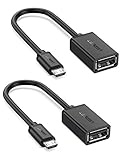
- The most practical & necessary on the go micro usb cable: Enabled android or windows micro usb phones or tablets work as PC host by connect female usb connector devices such as keyboard, game controller(PS3, PS4 etc.), usb headphones,flash drives, SD/TF card reader, wireless mice and more. Note: Please make sure your cell phone/tablet can support OTG function before your purchase
- Portable and Versatile: Only 4-inch portable Ugreen OTG cable provides a convenient and simple smartphones or tablets host replacement of PC to view picture, listen to music, data transform from flash drivers, edit files with keyboard or mice
- Compatible with DJI Spark/ Mavic Remote Controller, most OTG Micro USB connector phones and tablets such as Samsung Galaxy S7/S7 Edge/S6/S6 Edge/S5/S4/S3/Note 4/Note 5/Note 3/Note 2 /Avant, Samsung Tab S2/Tab A 2018 and before/Galaxy Tab E Lite, Google Nexus 6, ASUS Zen 8/VIvotab Note 8, HTC One M9 M8, LG K8/Q6/G4, Moto G6 Play/G5/G4 Plus/E5 Plus/E4, Sony Xperia XA/Z5/Z3, Xiaomi Redmi 6A/Mi A2 Lite/Redmi Note 4, BlackBerry Z30, Nokia 6/3 and more
- Plug and Play: A must-have for transferring pics, music, video files when you can't transfer data via the cloud or a WiFi connection. It also can unlock your phone and get access to your phone through your mice when your phone screen is broken
- Charging Phone for Emergency: The phone on the OTG end is able to output the power to another phone on the other side through additional USB charging cable. NOTE: Do not support OTG and charging simultaneously. Note: It will NOT transmit HDMI, VGA, DP,or any other types of video signal
Parts and tools
Parts
- Micro-USB OTG male plug, Micro-USB breakout, or salvaged OTG plug
- USB-A female receptacle or breakout
- Short four-conductor USB cable
- Heat-shrink tubing
- Optional cable sleeve, epoxy, strain relief, or small enclosure
Tools
- Fine-tip soldering iron, flux, and thin solder
- Multimeter with continuity mode
- Tweezers, small vise, and magnification
- Heat gun or carefully controlled heat source
- Optional USB voltage/current meter
A breakout cable makes the work easier. A plain USB-A breakout exposes USB power and data conductors; it does not contain a USB-serial converter, host controller, or protocol-conversion electronics. See Adafruit’s USB Type-A Plug Breakout Cable.
How to build the cable
- Confirm the host device. Check its documentation for OTG support, connector type, host-mode current, software requirements, and any required adapter arrangement.
- Identify the connector orientation. A pinout may show the mating face, solder side, cable-entry side, plug, or receptacle. A reversed view can swap D+ and D− or miswire power.
- Wire the USB 2.0 conductors. Connect VBUS to VBUS, D− to D−, D+ to D+, and ground to ground. Keep D+ and D− together and reasonably short.
- Ground the ID pin. Connect the Micro-USB ID pin to ground. Do not confuse ID with D− or D+.
- Insulate every joint. Check for solder bridges, loose strands, bare VBUS touching the shield, and accidental shield-to-signal contact.
- Add strain relief. Heat-shrink, adhesive support, a flexible jacket, or an enclosure prevents bending forces from reaching the tiny connector joints.
- Test before connecting hardware. Use the checklist below, then begin with a low-power mouse or keyboard.
Electrical safety and multimeter checks
With the cable disconnected from every device:
- Verify continuity from each Micro-USB signal to the correct USB-A pin.
- Verify that ID is connected to ground.
- Verify that VBUS is not shorted to ground.
- Verify that D+ and D− are not shorted together.
- Verify that neither data line is shorted to VBUS.
- Check the connector shield for unintended shorts.
Only after these checks should you connect the cable to a valuable phone, board, or storage device.
Testing the finished OTG cable
Start with a low-power USB mouse or keyboard. A compatible host may show a USB notification, illuminate the peripheral, enumerate it, or request permission. A flash drive may appear in a file manager if the operating system supports its filesystem.
Rank #3

- 2-in-1 Functionality: Specially designed for adding USB peripherals like keyboards, flash drives, external hard drives or USB Ethernet adapters to your host devices while continue to charge it. (not for smart phones or tablets).
- Effortless Plug-and-Play: Connect the micro USB male port to your host device and the micro USB female port to a power cable—no additional setup or configuration needed. Get started within minutes!
- Portable and Durable: Compact 6-inch design is easy to carry and store, making it the perfect companion for your on-the-go needs.
- Wide Compatibility: Works seamlessly with FireStick, PlayStation Classic, Raspberry Pi Zero, SNES/NES Classic Mini, Sega Genesis Mini, and more. (Note: Ensure your device supports OTG functionality before purchasing.)
- Reliable Support: Backed by 24/7 customer service—add the AuviPal 2-in-1 Micro USB OTG Cable to your cart today and enjoy effortless connectivity!
Failure to enumerate does not automatically prove the cable is incorrectly wired. Host support, current limits, USB class support, filesystem support, connector damage, and signal quality can all affect the result.
Power limitations
In traditional OTG host mode, the phone or board generally supplies power to the peripheral. A mouse or keyboard is a sensible first test; hard drives, webcams, audio interfaces, and some development boards may exceed the host’s available current. Flash drives can also have startup-current spikes.
Android compatibility requirements describe host-capable implementations that support charging connected peripherals and advertise at least a 1.5 A source capability under applicable conditions, but that is not a guarantee that every individual phone supplies 1.5 A in every mode. Check the device’s specifications.
Rank #4
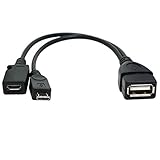
- Purpose-Built Connectivity: Designed for seamless integration of USB peripherals with host devices, offering exceptional versatility.
- OTG Functionality: Note that it does not charge phones or tablets but exclusively supports OTG when used for these devices, ensuring efficient performance.
- Enhanced Expansion: With a compact 6-inch length, this cable allows easy addition of various USB peripherals like keyboards, flash drives, external hard drives, card readers, and more to host devices.
- Hassle-Free Setup: The plug-and-play design simplifies installation. Connect the micro USB male port to your host device and the micro USB female port to your USB power cable for instant usability.
- Ideal for Fire Stick lite/4K and 4K Max/cube, Android, or Windows devices supporting OTG.
A phone acting as host may drain its battery or stop charging normally. Simultaneous charging and OTG is device-specific.
Do not splice in power casually
Do not simply tie a phone’s VBUS, an external 5 V supply, and peripheral VBUS together. That can backfeed one supply into another or cause excessive current. For high-power peripherals, use a properly designed powered USB hub or a purpose-built OTG power-injection arrangement with managed or isolated power paths.
Micro-B-to-Micro-B cables need extra caution
A Micro-B-to-Micro-B OTG cable can be useful for compact board-to-device connections. Some commercial designs ground the ID pin on both ends for particular hardware arrangements; see Adafruit’s Micro-USB-to-Micro-USB OTG Cable.
Best Value
![USB C to USB Adapter [2 Pack],Type-C OTG Cable Type C Male to USB A Female Usb to Usbc-c Adapter Compatible with Macbook Pro/Air iPad Pro 2022 2021 2020, Galaxy S23 S22 Ultra Note 10 S9 S8 (Black)](https://m.media-amazon.com/images/I/31xINmpcvYL._SL160_.jpg)
- 【Durable and Reliable】Type-C Adapter shell is made of high-quality material, which is used to dissipate the heat generated during charging and data transmission. It can be used daily and can withstand strong tension.
- 【Super Speed Transfer】Full USB 2.0 ultra high speed data transfer up to 480MB / s, transfer files, HD movies and songs to usb-c devices in seconds. Every detail is guaranteed to ensure the fast transfer of high-definition digital audio and high-definition video signals.
- 【Plug & play 】Plug in and use computer peripherals, such as flash drive, keyboard, hub, mouse and more, makes your USB-C devices compatible with USB drives.
- 【Wide Compatibility】This is a flexible and durable usb-c to usb adapter. Compatible with all USB C devices, Compatible with Samsung Galaxy Note8 S9/S9 Plus S8/S8 Plus, Compatible with New Macbook Pro,LG G6 G5 V20 and other USB Type-C devices.
- 【Customer Service】If anything is wrong or you are not satisfied, please contact us and we will resolve the issue.
Do not assume that this arrangement works universally. Two connected devices may both attempt to control the power role, and the hardware must tolerate the resulting behavior. Use a Micro-B-to-Micro-B cable only when the documentation for both devices supports that setup.
Independent reader supportYour contribution helps us test, update, and keep practical guides available for everyone.Why USB-C is different
USB-C does not use the traditional Micro-USB ID-pin method. Role and connection detection use the CC1 and CC2 configuration-channel pins. USB-C source, sink, and dual-role-port designs use different signaling and circuitry; a commonly cited 5.1 kΩ Rd resistor is only part of specified USB-C configurations, not a universal “OTG resistor.” See the USB Type-C Specification.
A USB-C dual-role port may require:
- DRP role detection and correct CC handling
- Power-role switching, protection, and current limiting
- USB 2.0 D+ and D− wiring
- SuperSpeed pairs if USB 3.x is required
- USB Power Delivery support where applicable
Do not connect USB-C CC pins arbitrarily or treat USB-C as a reversible Micro-USB plug. A simple USB 2.0 breakout may be suitable for a narrowly defined experiment, but it should not be presented as a standards-compliant full-featured USB-C cable. USB-IF’s cable and connector documentation covers connector, cable, signal-integrity, and compliance requirements.
Windows Errors? Fix Them Before They Spread
Repair common Windows errors and clear accumulated junk for a smoother, more stable PC - no reinstall needed.Free scan · no reinstallCrashes, No Sound, or Screen Glitches?
Random freezes, missing sound and display glitches usually trace back to one bad driver. Find and replace yours safely.Free scan · under a minuteTroubleshooting
| Symptom | Likely causes | Next check |
|---|---|---|
| Nothing happens | No host support; floating or miswired ID; power fault; damaged connector | Confirm host support and check ID, VBUS, and ground continuity |
| Peripheral powers on but is not recognized | D+ and D− error; unsupported USB class; signal or filesystem issue | Test with a basic keyboard or mouse |
| Keyboard works but storage does not | Storage filesystem, driver, or current limitation | Try another low-power drive or a powered hub |
| Flash drive works but hard drive fails | Startup current exceeds the host’s supply | Use externally powered storage or a powered hub |
| Phone charges instead of hosting | Incorrect ID wiring or device-specific power behavior | Recheck the OTG plug and device documentation |
| Disconnects under load | Voltage drop, weak joints, inadequate power, or poor strain relief | Check VBUS under load and improve power management |
| Wire colors do not match | Nonstandard cable construction | Ignore color assumptions and trace each conductor |
Build or buy?
Buy a ready-made Micro-USB OTG adapter when you need a dependable one-off connection, are working with critical data, need frequent use, or do not have suitable soldering and test equipment. A commercial adapter is also the better choice for USB-C, USB 3.x, Power Delivery, or high-current applications.
Build one when the goal is learning, repair, a custom length, a compact enclosure, or repeated prototyping. A Micro-USB OTG cable is electrically simple, but the tiny connector joints make mechanical durability harder than the wiring.
For comparison, a ready-made Adafruit MicroB OTG Host Cable is a direct substitute for the Micro-B-to-USB-A design, while a SparkFun USB OTG cable is another commercial option. Compatibility still depends on the connected device.
Quick Recap
Final checklist
- ☐ The device supports USB host or OTG mode.
- ☐ The connector is the correct Micro-USB type and orientation.
- ☐ VBUS, D−, D+, and ground are correctly mapped.
- ☐ Micro-USB ID is connected to ground.
- ☐ Wire colors were verified rather than assumed.
- ☐ There is no VBUS-to-ground or data-line short.
- ☐ The joints are insulated and strain-relieved.
- ☐ A low-power peripheral was used for the first test.
- ☐ No external 5 V supply is tied in without proper power management.
Product prices and availability are accurate as of the date/time indicated and are subject to change. Any price and availability information displayed on Amazon at the time of purchase will apply.
The Tool Desk
Outbyte Driver Updater FREEScan for outdated or missing drivers - takes under a minuteDriver Scan →Outbyte PC Repair FREEClear out junk files and repair common Windows errorsFree Scan →
