For a LiftMaster LJ8900W that stops, reverses, or will not close, start by counting the UP and DOWN arrow flashes on the operator and matching both counts to the LJ8900W diagnostic chart. Then check only the visible, low-risk issues the code points to, such as an obstructed or misaligned safety sensor. If the door binds or sticks when moved manually, stop and call a trained door-systems technician.
Identify the operator’s diagnostic code
- Watch the operator’s UP and DOWN arrows and count the flashes for each.
- Record the two counts as a pair, then find that pair in the LJ8900W diagnostic chart in the correct owner’s manual. A symptom such as “will not close” can have more than one cause, so do not diagnose from the symptom alone.
- Follow the chart’s check for that code. If the code points to sensors, inspect for an obstruction, misalignment, or visibly disconnected or damaged wiring. When properly wired and aligned, both sensor LEDs should glow steadily.
Use LiftMaster’s support page to select the manual for the operator’s manufacturing generation. The page distinguishes units made before 2022 from those made in 2022 or later; newer units have a Step Saver Setup sticker below the learn button. This distinction also matters if a travel module is being sourced: the listed part number is 041B8861 for 2022-and-later units and 041D8861 for earlier units.


If the door will not close
Sensor-related codes identify different checks. Use the paired arrow counts rather than treating every failure to close as the same fault.
| Diagnostic code | What the manual identifies | What to check |
|---|---|---|
| 1-1 | Safety reversing sensors are not installed or connected, or a wire may be cut. | Look for a disconnected or visibly cut sensor wire. |
| 1-2 | A sensor wire may be shorted or reversed. | Inspect visible wire and connection points, including where staples may have damaged wiring. |
| 1-4 or 4-6 | Sensors may be misaligned or momentarily obstructed. | Clear anything interrupting the beam and realign the sensors until both LEDs glow steadily. Check for objects hanging from or mounted on the door that cross the beam. |
The manual says the door will not close when the safety sensors are not correctly installed and aligned; an obstructed or misaligned beam during closing causes reversal. Never bypass, disconnect, or defeat the sensors to make the door close. If visible checks do not resolve the fault, use the diagnostic chart and arrange qualified service for damaged wiring or a persistent sensor problem. The LJ8900W product page lists the 041A5034 safety sensor kit, but a sensor code by itself does not establish that the sensors need replacement.
Quick wins for a faster PC:
Repair Windows errors before they cause bigger problemsFix Now →Scan for outdated or missing drivers - takes under a minuteDriver Scan →Clear out junk files and repair common Windows errorsFree Scan →#1 Best Overall
If the door moves briefly, stops, or reverses
Codes 4-1 through 4-4
The manual directs owners to open and close the door manually to check for binding or an obstruction, including a broken spring or door lock. If it binds or sticks, stop and contact a trained door-systems technician. If it moves freely, the chart says to attempt to reprogram travel.
Code 1-5
The chart separates several behaviors: the door moves about 6–8 inches (15–20 cm) and stops or reverses; there is no movement and a single click; or the motor hums for one to two seconds without movement. Check manual door movement and look for binding or obstructions as directed by the manual. The chart lists the travel module, logic board, or motor as possible service-level remedies depending on the symptom; the code alone is not enough to determine which component has failed. Leave component replacement to qualified service.
Rank #2
If the door coasts after stopping
For code 1-6, the diagnostic chart describes a door that coasts after it has come to a complete stop. It lists programming travel to a coasting position or having a trained technician balance the door. Do not treat a door-balance issue as a casual adjustment.
Read the battery-backup indicator
| Indicator | Meaning in the manual | Action |
|---|---|---|
| Solid green | Normal system status; battery fully charged. | No battery replacement is indicated by this status. |
| Flashing green | Battery is charging. | Allow it to charge and interpret the indicator again. |
| Solid orange with a beep about every two seconds | Operator has lost power and is running on battery backup. | Restore or check the operator’s power supply if appropriate. |
| Flashing orange with a beep every 30 seconds | Battery is low while the operator is on backup. | Check the power situation and battery status. |
| Solid red with a beep every 30 seconds | The 12V battery will no longer hold a charge. | Replace only with LiftMaster 485LM, after confirming compatibility. |
LiftMaster names the 485LM as the replacement battery in the owner’s manual and lists it as an optional LJ8900W accessory. myQ smartphone control and wireless myQ devices are disabled while the operator is in battery-backup mode. Wear protective gloves and eye protection when changing the battery or working around its compartment.
Rank #3

- This sleek, space-saving design mounts on the wall beside your garage door, freeing up ceiling space
- This elite series model comes fully equipped with security 2.0, myq
- Get reliable, durable and powerful performance with our p3 motors
- Runs ultra-quiet by eliminating sound and vibrations through the ceiling
- Not compatible with roll up doors, low headroom track, wayne dalton torquemaster Must have a front mount torsion bar system
Manual release, power, and when to stop
For emergency manual operation, follow the release procedure in the owner’s manual for the correct LJ8900W generation; do not force the door. Do not adjust torsion springs, cables, or the torsion bar yourself. The manual’s safety instruction is: “Disconnect ALL electric and battery power BEFORE performing ANY service or maintenance.”
- Call a trained door-systems technician: the door binds or sticks, or a check points to a broken spring, door lock, balance issue, or mechanical repair.
- Seek qualified service: sensor wiring is damaged, a sensor fault persists after obstruction and alignment checks, or the chart points to electrical or operator component repair.
- Do not guess at parts: verify model compatibility and, for a travel module, the operator’s manufacturing generation before sourcing anything.
Know the LJ8900W’s operating scope
LiftMaster describes the LJ8900W as a wall-mounted, light-duty commercial operator for smaller, lighter sectional doors. Its stated duty-cycle limit is a maximum of 10 cycles per hour and fewer than 25 cycles per day. Those are product specifications, not a troubleshooting test, and this guidance is specific to the LJ8900W rather than every LiftMaster residential opener. See the LJ8900W product page.
Quick Recap
Best Value
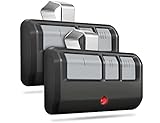
- Broad Compatibility: Works on LiftMaster, Chamberlain and Craftsman garage door openers manufactured from 1993 to current; Compatible for 3 different frequencies of security rolling code, it’s the easy option for adding an extra remote to multi-car families or for replacing lost or broken remotes
- Safe & Reliable: It features latest Security+2.0 rolling code technology that significantly reduces radio wave interference and rolling code protects against intruders by generating a new security code every time the remote control is used on your garage door opener
- Long Distance Remote: CreaCity garage door opener remote works within 120 feet from the garage door opener for “no waiting” roll-in access
- Multichannel: 3 button design allows control of up to 3 garage door openers or gate operators at once, which eliminating the trouble of carrying multiple remote
- Comes in a pack of two: We prepared two garage door opener remotes for you so that you can still get "no waiting" roll-in access even if you lose one; You can also give one of the remotes to your family, when you take away the remote from home and your family is going to enter the garage, another remote will give them a hand
Rank #4

- Power Outage Protection: Ensure uninterrupted access during power failures. Chamberlain Garage Door Battery Backup keeps you in control when it matters most, for safety and peace of mind.
- Ultra-Quiet Operation: Garage door opener with a reinforced belt drive and ultra-quiet DC motor ideal for garages near living spaces or bedrooms.
- Smart Access for Smart Homes: Wi-Fi connected myQ garage door opener and myQ app let you control your garage opener from your phone - anytime, anywhere. Built-in video monitoring helps you keep eyes on what matters, bringing modern convenience to your fingertips
- Advanced Power for Bigger Demands: Choose the right garage door opener horsepower for the job-from everyday reliability to higher-cycle performance. Our 3/4 HP garage door motor is designed for frequent use, delivering smooth, consistent operation and long-term durability
- Bright When You Need It Most: Illuminate your entire garage with 2 LED Bulb lighting - providing front and rear coverage for safer, more complete visibility whenever you need it. Bulbs sold separately.
Product prices and availability are accurate as of the date/time indicated and are subject to change. Any price and availability information displayed on Amazon at the time of purchase will apply.




