What’s actually slowing this PC down?
Pick the symptom - the matching free tool is one click away.
They are not synonyms. A hackerspace usually describes a community and its culture; a makerspace is the broadest term for a shared place to make things; a FabLab describes a digital-fabrication model associated with an international network; and TechShop was the name of a former commercial workshop chain.
The labels overlap, so the name on the door cannot tell you whether you can use a CNC router, bring your own materials, store a project, or work independently. For that, you must check the space’s equipment, training, hours, safety rules, governance, and pricing.
As an Amazon Associate I earn from qualifying purchases.
The short version
| Term | What it usually means | Main emphasis | Current status |
|---|---|---|---|
| Hackerspace | A community-organized place for exploring, modifying, repairing, and building systems | Peer learning, technical experimentation, electronics, computers, software, and DIY culture | Current generic term |
| Makerspace | A shared workshop or studio with tools, workspace, materials, and sometimes instruction | Broad making, education, prototyping, crafts, woodworking, electronics, and fabrication | Current umbrella term |
| FabLab | A digital-fabrication lab associated with the Fab Lab program and its operating principles | Digital fabrication, public access, education, shared processes, and network collaboration | Current network model; verify individual participation |
| TechShop | A former commercial chain of large membership-based workshops | Professional equipment, classes, certifications, and paid access | Historical brand; U.S. operations closed in 2017 |
A useful way to remember the difference is that the terms describe different dimensions:
Do these 3 things before closing this tab:
1Scan for outdated or missing drivers - takes under a minute2Repair Windows errors before they cause bigger problems3Fix the driver behind crashes, sound loss and screen glitches- Hackerspace: What is the community culture?
- Makerspace: What kind of shared making facility is it?
- FabLab: Does it follow a digital-fabrication and network model?
- TechShop: Is the discussion about a large commercial workshop—or the former brand?
What is a hackerspace?
A hackerspace is a community of people who gather to explore, modify, build, repair, and understand technology or other systems. In this context, “hack” generally means creative modification, experimentation, reverse engineering, or unconventional problem-solving—not illegal computer intrusion.
#1 Best Overall

- 【3D Printer Tools Expedite Your Workflow, 1-Year Warranty】Designed and Selected by a 15-Year 3D print enthusiasts team, this kit includes all essential tools. We have MK8 Brass Nozzles x 2, Nozzles Cleaning Needles × 5, Brushes × 2, Small Multifunctional Wrench x 1, 45# Steel Removal Scraper x 1, Razor Spatula x 1 plus Blades x 11, Files x 5, Engraving Knife x 1 plus Blades x 6, Tweezers x 2, Wire Cutter x 1, ensuring a successful 3D model-building experience. Pro tools, better price.
- 【Nozzle Cleaning & Replacing One-Station Solution】To avoid filament inconsistent extrusion caused by a clogged nozzle, we prepare 5 different types of cleaning needles, (0.2mm, 0.25mm, 0.3mm, 0.35mm, 0.4mm). Moreover, 2 EXTRA Premium 3D Printer MK8 Brass Nozzles (0.2mm, 0.4mm) suitable for most 1.75mm PLA/ABS filament 3D printers. In addition, 2 types Metal and Nylon cleaning brushes, tweezers are added for precision cleaning.
- 【2 Types of Removal Scrapers for Flawless Prints】To remove different-sized prints without damaging the print bed, the kit includes 2 types of removal scrapers. One scraper features a Heavy Duty Stainless Steel Blade for maximum leverage and fast removal, perfect for medium to large models like 3D printed dragons, ideal for PETG, ABS, PLA+. The smaller scraper with 10 extra-thin flat blades offers pinpoint accuracy, making it perfect for removing small models with precision like 3D printed toys.
- 【5 Shapes of Metal Files Catered to A Wide Range of Tasks】They are flat steel file, flat warding steel file, square steel file, triangular steel file, round steel file, and half-round steel file, for 3D objects Polishing and Processing such as filing, deburring, shaping, and smoothing etc. Worth mentioning, our metal files are made from high-hardness carbon steel and feature ergonomic handles for extended use.
- 【3D Printer Accessories Gift Must-Have】Black canvas storage bag with tool holder for easy finding, organizing, storing and transporting. The storage box provides ultimate protection to keep all 3D printer tools in good condition from dust, debris and moisture, ensuring all tools stay sharp and in good condition, ready for your next 3D printing task. Your Satisfaction, Our Commitment: All products are covered by a 1-year warranty, and all questions will be answered within 12 hours.
Hackerspaces commonly feature:
- Member-led, volunteer-led, or nonprofit governance
- Project nights, talks, open houses, and informal meetups
- Peer-to-peer teaching rather than a fixed curriculum
- Electronics, programming, robotics, radio, hardware, repair, digital art, or fabrication
- Tools acquired through dues, donations, grants, or member contributions
- Members who help maintain the space, teach others, or staff open hours
These are tendencies, not requirements. A hackerspace may be highly organized and well equipped, or it may focus almost entirely on software, electronics, and computers with little conventional workshop equipment. The label does not guarantee that the space is free, nonprofit, volunteer-run, or small.
What is a makerspace?
Makerspace is the broadest and most flexible label. It usually means a shared place where people can access tools, materials, workspace, and instruction to make physical or digital projects.
Makerspaces can operate inside libraries, schools, universities, museums, science centers, nonprofit workshops, commercial facilities, incubators, corporations, or government programs. Their equipment may include:
The Tool Desk
Outbyte PC Repair FREERepair Windows errors before they cause bigger problemsFix Now →Outbyte Driver Updater FREEScan for outdated or missing drivers - takes under a minuteDriver Scan →- 3D printers and scanners
- Laser cutters
- CNC routers and mills
- Electronics benches and computers
- Woodworking, metalworking, and welding equipment
- Sewing, textile, jewelry, ceramics, and printmaking tools
- Photography, recording, and other digital-media equipment
One makerspace may be a library room with a few desktop printers; another may be a large industrial workshop. “Makerspace” therefore does not promise a particular machine, skill level, price, access schedule, or membership model.
What is a FabLab?
FabLab is short for fabrication laboratory. The program emerged from work associated with MIT’s Center for Bits and Atoms, and the Fab Foundation was formed in 2009 to support the international Fab Lab network.
Rank #2

- 【Complete 3D Printing Tool Kit for Daily Maker Projects】Carefully selected by makers with over 15 years of 3D printing experience, this 56PCS 3D printer tools kit includes the essential 3D printing accessories makers actually use every day — wire cutters, needle-nose pliers, deburring tool, hand drill, files, tweezers, scrapers, nozzle cleaning needles, and brushes. Designed specifically for support removal, nozzle cleaning, filament trimming, print cleanup, and model finishing on PLA, PETG, ABS, TPU, and resin prints, this kit focuses on the tools truly needed for smoother and more efficient daily printing projects.
- 【Easier Support Removal & Safer Print Detachment】Remove stubborn prints and supports without damaging your build plate or PEI sheet. The stainless steel scraper provides strong leverage for larger models, while the plastic scraper is ideal for delicate prints like articulated dragons, miniatures, and print-in-place toys. Great for daily post-processing and smoother print removal.
- 【Smooth Rough Edges & Improve Print Finishing】The 360° swivel-head deburring tool easily follows curved edges, holes, and uneven surfaces to clean up stringing, rough corners, and leftover supports. Includes durable HSS blades that stay sharp longer for repeated PLA and PETG model cleanup, helping your prints look cleaner and more professional.
- 【Nozzle Cleaning Tools for Better Extrusion】Clogged nozzles and filament residue can ruin long prints. This kit includes flexible nozzle cleaning needles, brass and stainless steel brushes, plus 3 ESD precision tweezers (Bent, Straight, Flat-Tip) to help maintain cleaner hotends and more consistent extrusion. Compatible with most 1.75mm FDM printers including Bambu Lab, Ender 3, Anycubic Kobra, Neptune, and more.
- 【Exclusive a .3MF Organized Storage Case File , 1-Year Warranty & Maker-Friendly Support】To keep your 3D printer accessories organized and easy to carry with a included storage case. We also designed a custom 3D-printable storage box specifically for this tool set, allowing makers to print and build their own organizer using their 3D printer. Backed by a 1-year warranty and responsive customer support for added peace of mind.
The Fab Foundation’s guidance describes a FabLab as a technical prototyping and learning platform providing access to tools, skills, materials, and advanced technology for making “almost anything.” Its model involves more than owning a 3D printer or laser cutter. Published criteria include:
- Public access for at least part of each week
- Support for the Fab Charter
- A common set of tools and processes
- Participation in a wider network of labs and knowledge-sharing practices
That gives FabLab two meanings: a physical facility emphasizing digital fabrication, and a program or network model involving public access, education, documentation, and shared practices.
Free tools Windows power users keep installed
One-click scans. No signup required.
Not every room with digital-fabrication equipment is a network-affiliated FabLab. Check whether the facility identifies its network participation, follows the relevant criteria, and supports the Fab Charter. Individual labs are self-governing organizations; the Fab Foundation UK, for example, says it does not govern individual labs.
Public access also does not necessarily mean free, unlimited access. It may mean scheduled public hours, classes, supervised sessions, or access subject to training and material fees.
What was TechShop?
TechShop was a commercial chain of large-scale membership-based workshops. It combined features associated with a makerspace, prototyping studio, training center, and community workshop, including professional-grade machinery, classes, safety training, and paid memberships.
Rank #3

- 【Master Level 59-Piece Master Tool kit | 1-Year Warranty】Designed for the serious 3D maker, this set covers every stage of the 3D printing workflow—from bed preparation (glue stick, PTFE tube cutter, larger screen hygrometer), filament management (needle-nose pilers, flush cutter, 2mm thickened precision tweezers) to intricate model finishing (caliper, files, deburring tool, precision knife & A5 cutting mat) and machine maintenance (Φ1.5mm Nozzle Clog Poke Kit). All tools are placed in a premium Hard-Shell Case with a custom-molded insert to keep your 3D pritner accessories well organized.
- 【Printing Environment Monitoring & Bed Prep】Achieve perfect first layers with our Solid Glue Stick (36g), designed to prevent warping on all build plate types. To safeguard your filament from moisture-related brittleness, we chose an 2-in-1 Temperature & Humidity Monitor featuring a larger digital screen than competitors for instant, easy-to-read environmental data. Coupled with our 420 stainless steel blade PTFE tube cutter, these tools ensure your printing environment and materials are ready for professional results.
- 【Professional Measuring & Model Handling】While competitors offer limited 4-inch scales, Our kit includes a professional 0-6" (150mm) Digital Caliper to accurately verify dimensions and material shrinkage on larger functional parts. For model removal, we have a 15° angled Stainless Steel Scraper for sturdy parts and a 10-blade Plastic Scraper for scratch-free removal could use for any printer beds. This set is fully compatible with all major 3D printers, including Bambu Lab A1/P1S/P1P, Ender 3 V3, K1/K2, and more, 59pcs tools all organized in a custom-fit hardshell black storage case.
- 【Newly Designed Precision Knife & Model Detail Tools】Feel superior control with our newly redesigned 23g Precision Craft Knife. At more than double the weight of standard 10g aluminum craft knives, the added heft provides a stabilized, ergonomic grip for delicate support removal. The handle features an integrated magnetic tail for the safe and effortless pickup of the 10 included interchangeable blades. Handle delicate components with 2 types of extra thick 2.0mm precision tweezers (Curved, Straight) Complemented by a 5-piece finishing file set and a deburring tool with 5 extra BS1010 blades, you can achieve smooth, injection-mold quality edges on every print.
- 【Advanced Nozzle Clog Removal & Printer Maintenance】 Keep your hotend in great condition with our newly added Clog Poke Tool (Φ1.5mm), designed to clear stubborn blockages in any 1.75mm nozzle system. The kit also includes 10 stainless steel cleaning needles and a specialized 3-Brush System: Soft Brass for heated nozzles, Stainless Steel for hardened steel components, and a Plastic Head brush for delicate fans and electronics. This maintenance kit part prevents under-extrusion and extends the life of your 3D printer.
TechShop filed for bankruptcy and shut down its U.S. operations in 2017. It is best treated today as a historical brand and business model, not as a current generic category or active nationwide chain. Former locations and communities may have continued under different organizations, but a successor should not automatically be called TechShop.
TechShop did not invent makerspaces, and its closure does not establish a single cause of failure. It is simply a useful example of the cost and complexity involved in operating large, equipment-heavy membership workshops. Historical closure context is documented by Design Justice.
How the labels differ in practice
Culture and community
Hackerspaces usually make community identity and peer collaboration central. Makerspaces range from informal community workshops to structured educational services. FabLabs also encourage collaboration and knowledge sharing, but add network and digital-fabrication expectations. A commercial workshop may have an active community while making paid access, equipment use, training, and financial sustainability its operating priorities.
Governance and ownership
A hackerspace may be member-led, volunteer-run, nonprofit, or another type of organization. A makerspace may be operated by a school, library, museum, nonprofit, company, or public agency. FabLabs are locally self-governing while participating in a broader program or network. TechShop was a centrally branded commercial operation.
Equipment
There is no universal hackerspace or makerspace equipment list. A hackerspace may prioritize soldering stations, computers, radio, robotics, or software. A makerspace may offer anything from crafts to heavy machinery. FabLabs generally emphasize digital-fabrication capabilities and shared processes. A large commercial workshop may offer more heavy equipment than either.
Recommended Free Tools
Rank #4

- 40-PIECE COMPLETE 3D PRINTER TOOLS KIT:Designed for FDM 3D printing enthusiasts, this all-in-one 3D printer tool kit is essential 3D printer accessories and hobby tools. It covers tools for post-processing, cleaning and maintenance, ideal 3D printer tools. Flush cutters and pliers trim PLA filaments quickly; metal files and sanding sticks work with various materials, all organized for easy access.
- TWO SCRAPERS FOR CLEAN, PRECISE PRINT REMOVAL:This kit includes two 3D printer scraper tools for print removal and support removal. The main stainless steel scraper has a 15° blade (0.01" thick, 4.5" long, 0.9" wide), lifting prints cleanly without scratches. A small plastic scraper tool with 5 extra-thin blades is included for delicate operation, suitable for PETG, ABS and PLA+.
- METAL FILES FOR SMOOTH MODEL POLISHING:This polishing accessory set comes with 5 different metal files to smooth uneven surfaces, edges and complex model contours. Perfect for finishing 3D printed models, model building and hobby projects, compatible with PETG, ABS and PLA+ printed works.
- COMPLETE NOZZLE CLEANING KIT FOR SMOOTH EXTRUSION:Prevent clogs and keep filament flowing with this 3D printer nozzle cleaning kit. It features 10 cleaning needles in 4 sizes: 0.1mm, 0.2mm, 0.3mm, extra-long 0.3mm, compatible with 1.75mm PLA/ABS filaments. Includes a brass brush, precision tweezer and nozzle cleaner for daily maintenance, a reliable tool for 3D printers.
- PRACTICAL ACRYLIC STORAGE FOR 3D PRINTER TOOLS:This durable acrylic case (8.58"×6.30"×0.71", 0.80 lbs) holds all your 3D printer accessories and tools. It protects against dust and moisture, keeping tools in great condition. Lightweight and portable, it keeps your 3D printer tools kit ready for all 3D printing and hobby projects.
Access, training, and cost
Spaces may offer free public hours, day passes, memberships, classes, supervised use, tool-specific certification, volunteer exchanges, institutional enrollment, or paid rentals. Membership may not include orientation, advanced-machine certification, consumables, storage, machine time, or private workspace.
Do not assume that hackerspaces are free while makerspaces charge. Both labels cover multiple funding models, including dues, donations, grants, classes, institutional funding, sponsorships, and commercial membership.
Can one place have more than one label?
Yes. A nonprofit hackerspace may have a FabLab-style digital toolset. A library makerspace may contain a small digital-fabrication lab. A university FabLab may have a strong academic makerspace culture. A commercial makerspace may operate in a way that resembles the former TechShop model.
For example, Maker Works describes itself using several overlapping terms, including nonprofit makerspace, hackerspace, tech shop, and DIY workspace. That illustrates why the label is only a starting point: the same organization can fit several descriptions depending on whether you are discussing its community, facility, or business model.
PC Slower Than It Used to Be?
A free scan shows the junk files, broken settings and background clutter dragging Windows down - then fixes them in one click.Free scan · Windows 10 & 11Crashes, No Sound, or Screen Glitches?
Random freezes, missing sound and display glitches usually trace back to one bad driver. Find and replace yours safely.Free scan · under a minuteHow to choose the right space
Start with your actual project rather than the most attractive label. Ask these questions before joining.
Best Value
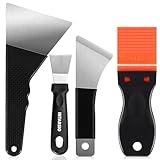
- 【3D Printer Removal Tools 4-IN-ONE Kit,2-Year Warranty】Selected by a 15-Year 3D print enthusiasts team.We believe that pairing each model with the right scraper leads to expert results. This removal kit includes ④x differnet types of tools to prevent 3D printer bed damage such as scratches, residue buildup, 3D prints deformation, while enhancing 3D printing efficiency and improving models removal quality.Offers pro-level tools at outstanding value — no premium price needed.
- 【Large Removal Scraper, Edge Precision-Sharpened to 0.4mm】This Large Removal Spatula features a thinner, larger, and sharper edge design (ONLY 0.4mm in blade thickness, 3.94 inches in blade length) compared to standard removal tools. The scraper bends up to 60° and quickly returns to shape. Made of stainless steel, it performs exceptionally well on larger 3D prints such as 3D printed dragon egg, 3d printed castle etc.
- 【Medium Removal Scraper, Edge Sharpen to 0.55mm】The medium spatula whole tool is made from C45 steel, making it strong and durable (0.55mm in blade thickness, 2.36 inches in blade length). The scraper features an anti-slip grip for comfortable use. Great for 3D printed projects for example 3D printed toys etc.
- 【Small Removal Scrapers, Edege Sharpen to 0.5mm】The removal scraper features a 15-degree angle (0.5mm in blade thickness, 1.57 inches in blade length), providing optimal leverage and precision, removing parts from the print bed without disturbing other prints, and even scraping off excess filament from your 3D printer. Perfect for scraping 3D printed small animals, decorations, miniatures etc.
- 【Specially Included Plastic Razor Blade (0.2mm) Scraper x Extra 10pcs Blades】3D enthusiasts know these hot-molded plastic scrapers work fantastically ZERO scratches, ZERO damage to printed bed. Sharpened to 0.2mm, 1.54 inches blade length, strength,rigidity, lightweight, and perfect for a variety of 3D printing projects. Your Satisfaction, INTARSIO Promise: all products come with 2-Year warranty and all questions would be answered by our friendly customer service team within 12 hours.
1. Is the required tool present and usable?
- Is the machine you need actually available and operational?
- What are its size, power, material, and project restrictions?
- Are consumables included or charged separately?
- Can you bring outside materials?
- Is personal storage available?
2. What training is required?
- Is orientation mandatory?
- Is certification free or separately priced?
- Does certification cover one machine or an entire shop?
- Are staff present whenever members work?
- Can experienced users skip or shorten introductory training?
Equipment existing on the premises does not mean a new member can use it immediately. Maker Works, for example, requires training or checkout for tools that could harm users or equipment; see its tool-use FAQ.
3. When can you work?
- What are public, member, and staff-supported hours?
- Are evenings, weekends, or 24/7 access available?
- Do machines require reservations?
- Are there capacity limits?
- Do classes displace independent work?
4. What safety and liability rules apply?
- What personal protective equipment is required?
- How are dust, fumes, ventilation, and fire risks managed?
- Are waivers or insurance required?
- What rules apply to children and guests?
- Are welding, solvents, chemicals, or high-voltage work permitted?
5. Is the community a good fit?
Look for open houses, project nights, mentoring, an active chat or forum, and clear expectations about cleaning, maintenance, volunteering, and helping beginners. A technically equipped space may still be a poor fit if you need regular staff support or a welcoming introduction to a new discipline.
6. What is the complete first-project cost?
Compare membership dues with orientation, certifications, classes, materials, machine-use fees, storage, transport, and private-space charges. A day pass may be cheaper for a one-off project; a membership may make sense for repeated visits. A monthly fee alone is not a useful comparison.
Quick wins for a faster PC:
Repair Windows errors before they cause bigger problemsFix Now →Scan for outdated or missing drivers - takes under a minuteDriver Scan →Clear out junk files and repair common Windows errorsFree Scan →As dated examples, Maker Works currently lists day, punch-card, monthly, quarterly, annual, student/teacher, veteran, family, professional, and all-hours options on its membership page. Artisans Asylum lists full-time, part-time, group, day-pass, and private-space options, with shop access dependent on orientation and tool testing; see its official membership page. Prices and policies can change, so confirm current terms directly.
Which term should you search for?
| Your priority | Best starting search |
|---|---|
| Peer-led technical community, electronics, coding, robotics, or radio | Hackerspace |
| The widest range of shared workshops and public programs | Makerspace |
| Digital fabrication, prototyping, education, and network practices | FabLab |
| Woodworking, metalworking, or a specific production capability | Community workshop, fabrication shop, or a discipline-specific makerspace |
| Classes and structured beginner access | Makerspace, FabLab, or community workshop |
| Dedicated business production or guaranteed capacity | Professional makerspace, fabrication shop, or contract manufacturer |
| The former large commercial membership model | TechShop, mainly for historical research; verify any claimed successor independently |
Common mistakes to avoid
- Treating names as guarantees: Inspect the inventory, operating hours, policies, and current activity calendar.
- Assuming independent machine use: Ask about orientation, checkout, supervision, and reservations.
- Assuming membership includes everything: Confirm charges for consumables, machine time, storage, specialty tooling, and classes.
- Confusing public with free: Public access may be scheduled, supervised, subsidized, or fee-based.
- Using TechShop as a living category: Treat it as a former brand unless a current organization explicitly owns or licenses the name.
- Overstating the FabLab network: Verify whether a facility participates in the network rather than inferring it from the equipment.
- Ignoring member labor: Some spaces expect cleaning, maintenance, volunteer shifts, or open-hour staffing.
- Comparing prices without scope: Compare what each fee buys, including hours, tools, training, storage, and staff support.
Bottom line
Use makerspace as the broadest search term. Choose hackerspace when peer-led technical community matters most. Look for a FabLab when digital fabrication, public access, education, and network affiliation are important. Treat TechShop as a historical commercial model and former brand, not a current generic category.
Whatever the label, evaluate the specific facility. The right space is the one that has the tools your project needs, allows the kind of work you intend to do, provides appropriate training and safety support, and makes the total cost and member obligations clear.
Quick Recap
Product prices and availability are accurate as of the date/time indicated and are subject to change. Any price and availability information displayed on Amazon at the time of purchase will apply.




