Research each candidate home by its full street address, then verify three things with the responsible authorities: the student’s current attendance assignment, the real trip to every recurring destination, and the services that can legally and practically serve the address. Maps and listing descriptions are useful for discovery, but they cannot promise enrollment, a tolerable commute, or service availability.
Build a dated comparison for every address. Record the source, the date checked, the exact answer, any caveat, and the office or person who confirmed high-impact details. Recheck those items before signing a contract or enrolling a student because boundaries, policies, routes, and service areas change.


As an Amazon Associate I earn from qualifying purchases.
Start with an address-specific comparison sheet
A neighborhood name or postal city is too broad for this decision. Use the complete street address, including unit number where relevant, for every candidate home. Create one row per address and keep the same fields for each row so that an attractive listing does not receive less scrutiny than another option.
| Field | What to record |
|---|---|
| Address and date | Full address, date and time checked, and the enrollment or moving year under consideration |
| School assignment | District, assigned school for each relevant grade, assignment method, and the official lookup or office used |
| School caveats | Application, transfer, capacity, program, transportation, or boundary uncertainty |
| Commute | Destination, departure and return periods, mode, estimated time, transfers, parking or drop-off needs, and reliability concerns |
| Services | Water, sewer, electricity, gas, broadband, waste, transit, childcare, healthcare, parks, libraries, groceries, and emergency-service contacts as applicable |
| Confirmation | Name or office of the person or provider that confirmed the answer, plus the confirmation date |
Keep copies or screenshots of address lookups and write down the question you asked. A listing statement that a house is “near” a school establishes proximity only; it does not establish enrollment eligibility, transportation, or a seat in a particular program.
#1 Best Overall
Verify the school district and attendance zone separately
A school district boundary and a school attendance zone are different geographic facts. A district may contain many schools and may assign students through attendance zones, choice programs, transfers, or other policies. The district that appears on a statewide map is not necessarily the school a child at a particular address may attend.
Use state and federal tools for discovery
Begin with the relevant state education agency and federal mapping resources to identify possible districts, schools, and boundary information. The U.S. Department of Education’s mapED tools provide school and district exploration resources. The National Center for Education Statistics (NCES) School Attendance Boundary Survey (SABS) can help visualize attendance geography.
These tools are discovery aids, not current enrollment decisions. SABS pages display historical data vintages, so an older boundary file can be useful for orientation while being wrong for the coming school year. Treat a map as a prompt to contact the district.
The Tool Desk
Outbyte Driver Updater FREEScan for outdated or missing drivers - takes under a minuteDriver Scan →Outbyte PC Repair FREEClear out junk files and repair common Windows errorsFree Scan →Confirm the current assignment with the district
- Open the responsible district’s current address or boundary lookup and enter the complete address, not just a subdivision or ZIP code.
- Check the result for every grade level the household may need. A feeder pattern can change between elementary, middle, and high school.
- Read the district’s current enrollment and assignment policies. Look for attendance zones, open-enrollment or choice rules, transfer requirements, capacity limits, application deadlines, and waitlists.
- Ask the enrollment office to confirm the result for the intended enrollment year. Record the staff member, office, date, and any conditions attached to the answer.
- Ask whether the listed school is the guaranteed attendance school, an application-based option, or merely a nearby campus.
For a transaction-sensitive question or boundary dispute, contact the district and the appropriate county authority rather than relying on a general map. The Texas Education Agency’s School District Locator FAQ illustrates the issue: it distinguishes district boundaries from attendance zones, notes that districts can use different assignment or transfer methods, and warns that its locator boundaries are approximate and not suitable for legal or commercial purposes. That guidance is Texas-specific; it is not a nationwide statement of school-assignment law.
Check programs, enrollment, and transportation—not just distance
Once the assignment is confirmed, use current state and district records to evaluate whether the school actually fits the student. Verify grade span, specialized or language programs, calendar, enrollment procedures, and available performance or administrative information.
Rank #2

- Effective Budget Plan Book – Take control of your finances with the SUNEE budget account book. This all-in-one budget planner allows you to plan and track your income, expenses, savings, and financial goals. Its intuitive layout and easy-to-use sections help you stay organized and make smart decisions to reach financial success. Our financial planner also included a comprehensive guidebook with valuable tips and instructions to help you get the most out of your budgeting planner.
- Full-Page Calendars – Each month’s full-page calendar provides plenty of space to track paydays, bills due dates, appointments, and important events. No more cramped boxes or tight writing areas, you can easily plan and organize your schedule at a glance.
- Colorful Pages Layout and Tabs – This vibrant budget planner features a user-friendly design for easy navigation and organization. Each month includes dedicated budget pages to set financial goals, track income, and plan expenses. Additional sections like debt trackers, savings goals, and bill payment trackers make managing your finances a breeze. The colorful backgrounds on each page offer clear, instant visibility.
- Bonus 4 Stickers and Convenient Design – This monthly budget planner is built for convenience and durability. Water-resistant cover protects against spills, while the elastic band keeps everything secure, and the dual-sided pocket offers extra storage. Plus, we’ve included 4 adorable sticker sheets to personalize your planner and make budgeting more enjoyable. Experience a budget planner that combines practicality with lasting quality.
- UNDATED DESIGN & 1 YEAR USE - Undated finance books start with 1 page-financial goals, 1 page-Mind Map, 1 page-Financial Strategy, 1 page-Tactics, 2 pages-Important Dates, 4 pages-Bill Tracker, 4 pages-Saving Tracker, 8 pages-Debt Tracker, followed by 12 Months(10 pages per month, 1 unique color for each month). 2 pages-Christmas Budgeting, 2 pages-Yearly Summary, 2 pages-Check Register and 12 pages-Notes(dotted). It is UNDATED, so you could start at any time, suitable for 1 year use.
- Confirm that the desired program serves the student’s grade and eligibility category.
- Determine whether an application, audition, lottery, or separate deadline applies.
- Ask whether capacity rules can place an address on a waitlist even when it lies inside a nominal zone.
- Check the district’s transportation eligibility, bus stop process, travel-time policies, and exceptions.
- Verify calendars, before- and after-school care, and start times against the household’s work and childcare schedule.
Rating sites, broker descriptions, and marketing copy can point you toward questions, but they are not substitutes for current primary information. A federal map portal can show where a school is; only the district and school can explain who may enroll and under what conditions.
Measure commutes under the conditions you will actually face
A commute is a trip under particular conditions, not a fixed distance. Measure the exact origin-to-destination journey at the times the household will travel and in the mode it will use. A five-mile trip at midday can be very different from a school drop-off trip during the morning peak.
Recommended Free Tools
List every recurring destination
Write down work locations, school and childcare, medical appointments, elder-care responsibilities, grocery trips, and other destinations that occur weekly. For each candidate address, measure both outbound and return journeys. Include separate school, work, and childcare trips when one adult must make several stops.
Run comparable route checks
- Enter the full home address and the exact destination address.
- Set the departure or arrival time to a representative weekday period. Test the morning peak, afternoon pickup, and the return period rather than accepting a default “now” estimate.
- Select the intended mode: driving, walking, cycling, transit, or a combination. For transit, record each route, transfer, wait, walking segment, and scheduled frequency.
- Repeat the check on more than one weekday or at a different peak period to expose variability.
- Inspect the physical access to the route: sidewalks, crossings, lighting, bike facilities, steep grades, bridge or rail crossings, parking, and school drop-off rules.
- Record construction, seasonal conditions, service alerts, traffic-sensitive segments, and a realistic backup route.
For transit, confirm schedules and planned changes with the local transit operator. For roads, check the responsible road authority when construction, closures, or a new project could materially alter the trip. A route planner’s single number is an estimate; the decision should reflect reliability and the consequences of a missed connection or late pickup.
Interpret commute research carefully
A 2023 Federal Housing Finance Agency Working Paper (23-04, July 26, 2023) matched New York City Department of Education administrative data with transit directions and studied applications to specialized New York City high schools. In that specific school-choice setting, the authors reported: “For the top public school in New York State, a student with a 20 minute commute is 74% more likely to apply than one who lives 40 minutes away.” This is an association in one city, school type, and application context. It does not establish a universal acceptable commute, predict an individual family’s decision, or justify a threshold for every home search. No national statistic in the cited sources supports a single “good commute” number.
Rank #3

- Concise fill-in lists and charts enable you to compile the essential information you need to stay organized as you get ready for your home.
- Gather all the details here -- from your real estate agent to your attorney, from utilities and community info to plumbers, electricians, remodeling plans, and beyond.
- Includes graph paper and forms for planning room details, as well as checklists for routine maintenance.
- Convenient inside back cover pocket for business cards, receipts, etc.
- Elastic band closure attached to the back cover keeps your place or keeps your planner closed.
Check services by the provider that controls the address
“Close to services” is not a service-area determination. Different services have different providers, boundaries, eligibility rules, installation processes, and costs. Build a needs list before comparing homes.
| Need | Who to verify with | Questions to ask |
|---|---|---|
| Water and sewer | Municipal utility, county authority, or private system operator | Is the address connected or eligible, who bills it, are there capacity or connection charges, and are septic inspections required? |
| Electricity and gas | Regulated utility or local provider | Does the provider serve the parcel, what setup or deposit is required, and are there fuel or equipment restrictions? |
| Broadband | Internet provider and, where useful, the local government’s broadband office | Is the exact unit serviceable, which technology is installed, what installation date and equipment apply, and are advertised speeds guaranteed? |
| Waste and recycling | Municipality, county, or licensed hauler | Is collection automatic or subscription-based, what are pickup days, fees, container rules, and limits? |
| Public transit | Transit agency | Is the address within the service area, where is the nearest usable stop, how frequent is service, and are there accessibility or late-night limits? |
| Childcare and healthcare | Individual licensed provider, clinic, hospital, or public program | Does the provider accept the household, what are hours, waitlists, insurance or eligibility rules, and emergency arrangements? |
| Libraries, parks, and emergency services | Municipality, county, district, or facility operator | What jurisdiction applies, are there residency rules, and which facility or response area serves the address? |
Confirm availability against the exact address and distinguish a nearby facility from a service the household can actually use. A broadband map, for example, may show a provider in a census block while the individual unit still requires a site check or has a long installation wait.
Use planning resources for context, not eligibility
The U.S. Environmental Protection Agency’s Smart School Siting Tool describes links among school locations, housing, transportation, local services, land use, and community impacts. It is useful for understanding community planning, but it is not a directory that can tell you whether a specific home receives water, waste pickup, childcare, or transit. Ask the responsible agency or provider for that determination.
Compare homes with a weighted, evidence-based scorecard
After verification, compare trade-offs explicitly instead of letting one attractive feature dominate. Use a table that separates facts from preferences.
| Decision area | Address A | Address B | What resolves uncertainty |
|---|---|---|---|
| Assignment certainty | Confirmed district, school, grade, and year | Confirmed district, school, grade, and year | District enrollment office and written policy |
| Programs and capacity | Program eligibility, application, and capacity notes | Program eligibility, application, and capacity notes | School or district program office |
| Commute fit | Mode, peak-time range, transfers, reliability, backup | Mode, peak-time range, transfers, reliability, backup | Repeat route checks and operator or road authority |
| Required services | Provider and activation or eligibility status | Provider and activation or eligibility status | Provider confirmation for the exact address |
| Constraints and costs | Fares, parking, childcare timing, deposits, setup dates | Fares, parking, childcare timing, deposits, setup dates | Current agency or provider terms |
Weight the categories according to the household. A family with a child entering a selective program may place assignment certainty and application deadlines first; a household with an inflexible work shift may prioritize peak-time reliability and childcare logistics. Do not score an item as “verified” when it is only inferred from proximity.
Recheck volatile facts before you commit
School boundaries, enrollment policies, transit schedules, construction, utility coverage, broadband availability, and childcare capacity can change after an offer is accepted. Repeat address-sensitive checks immediately before signing, closing, or submitting enrollment paperwork.
- Re-enter the address in the district’s current lookup and confirm the applicable school year.
- Ask whether a boundary study, rezoning, capacity change, or transfer-policy update is pending.
- Rerun peak-period routes and review transit alerts or road projects.
- Call each required provider to confirm serviceability, activation timing, fees, and any waiting list.
- Update the comparison sheet with the new date and the confirming contact.
If an agency will not provide a definitive answer, preserve the uncertainty in the comparison rather than treating silence as approval. A written confirmation, an identified policy, or a documented provider check is stronger evidence than a map pin or an informal assurance.
Common mistakes and how to correct them
“The house is in the district, so enrollment is guaranteed.”
Correct the assumption by checking the attendance zone, grade-level assignment, capacity rules, and transfer or choice policy with the district.
“The map shows the boundary, so it is legally current.”
Use statewide, federal, and historical maps for orientation only. Confirm the current address with the responsible district and, for a dispute, the appropriate county authority. The Texas locator’s approximation warning demonstrates why a map should not be used as legal or commercial proof.
“The route planner says 30 minutes.”
Record origin, destination, departure period, mode, transfers, parking, and variability. Test the trip again under peak conditions and include a backup.
Best Value
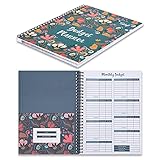
- Customize & Get Budgeted - With blank free of pre-filled categories and months budgeting pages, Soligt undated budget planner gives you complete control of your finances on a daily monthly and annual basis and enable you to manage your personal finance, cash money payment, and budgeting effective without any restrictions.
- Keep you on Track & Organized - The budget book journal provides 12 cute pockets for effortless bill, receipt, envelopes storage, along with a spacious layout perfect for recording and tracking incomes, expenses, savings, debt payoff, bills calendar and paying with ease.
- Achieve Financial Goals - This bill organizer provides a simple yet comprehensive budgeting system that is perfect for home household or small business beginners and encourages celebrating successes while identifying opportunities for improvement, both visually appealing and user-friendly.
- Your perfect companion - The Spiral bound budgeting notebook is the perfect small size, measuring at 9.25 x 6.81" and featuring a durable hardcover and 100 gsm paper. Lightweight and portable, It is easy to take with you wherever you go and built to last throughout the year.
- Bonus Month Tabs - The paycheck Budget Planner Financial Organizer boasts colored sticker labels to aid in simple navigation through your budget pages, ensuring added convenience and ease of use to help locate important information quickly and efficiently.
“A provider operates nearby, so the home is covered.”
Ask the provider to check the complete address and unit, then record installation, eligibility, capacity, and fee conditions.
“An old boundary file is better than no information.”
It can provide geographic context, but label its vintage and never use it as proof of current eligibility. NCES SABS historical data is an example of a resource that must be treated this way.
A practical final checklist
- Full address entered into the current district lookup.
- Assigned school confirmed for every relevant grade and enrollment year.
- Choice, transfer, capacity, application, and transportation rules checked.
- School programs verified as available and accessible to the student.
- Every recurring destination measured at realistic departure and return times.
- Mode, transfers, walking access, parking or drop-off, reliability, and backup recorded.
- Required utility, broadband, waste, transit, childcare, healthcare, and civic services checked with their providers.
- Source, date, caveat, and confirming contact saved for each consequential fact.
- All address-sensitive checks repeated before signing or enrolling.
Frequently Asked Questions
Can a school’s proximity guarantee that my child can attend it?
No. District boundaries, attendance zones, grade-level assignments, capacity, transfers, and application rules determine eligibility. Confirm the exact address with the current district enrollment office.
Free tools Windows power users keep installed
One-click scans. No signup required.
Are NCES attendance-boundary maps current enrollment records?
No. NCES SABS is useful for visualizing geography, but the page contains historical data vintages. Use the responsible district’s current lookup and policy for an enrollment decision.
What commute time should I consider acceptable?
There is no universal threshold supported by the cited evidence. Compare the exact trip at the household’s real times and mode, including reliability, transfers, access, and backup options.
How do I verify broadband or utility service at a home?
Contact the provider responsible for the exact address and ask about serviceability, connection or activation timing, eligibility, equipment, fees, and any capacity or waiting-list limits.
Quick Recap
Product prices and availability are accurate as of the date/time indicated and are subject to change. Any price and availability information displayed on Amazon at the time of purchase will apply.
Quick wins for a faster PC:
Scan for outdated or missing drivers - takes under a minuteDriver Scan →Repair Windows errors before they cause bigger problemsFix Now →Fix the driver behind crashes, sound loss and screen glitchesFind Drivers →
