Recommended Free Tools
Make the task sequence visible, teach one concrete action at a time, demonstrate every safety-critical step, and check understanding before equipment is used. Then adjust the approach with the learner as work, hazards, and settings change. Fetal alcohol spectrum disorder (FASD) affects people differently, so there is no single accommodation package or teaching format that fits everyone. Accessibility means preserving the same safety requirements and learning outcomes while changing how instructions, practice, feedback, and support are delivered.
The construction-specific teaching sequence in this article is a practical synthesis of FASD education and employment guidance, vocational-accessibility resources, and general accessibility standards. The sources reviewed do not include a controlled study of this sequence in construction training, so treat it as an adaptable practice framework rather than a validated construction-specific protocol.
As an Amazon Associate I earn from qualifying purchases.
What FASD can mean in a construction classroom or site
FASD is a spectrum. Two learners may have very different strengths, support needs, communication styles, and responses to noise, time pressure, or changing instructions. A diagnosis alone does not tell an instructor which accommodation will work. Start with the individual: ask what helps them understand, remember, organise, communicate uncertainty, and recover when a task is interrupted.
What’s actually slowing this PC down?
Pick the symptom - the matching free tool is one click away.
Some learners may have difficulty processing or retaining long spoken explanations, interpreting abstract language, shifting attention, or completing a sequence of several actions. These possibilities are not assumptions about every person with FASD. They are reasons to design instruction that is clear and observable for everyone, then tailor the amount and form of support.
#1 Best Overall
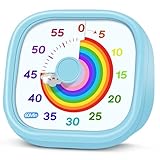
- 【Lively Rainbow Visual Timer】Our visual timer boasts a rainbow pattern to capture kids' attention. Ease their reluctance and make homework or bedtime prep feel like games
- 【Easy Use】Twist the knob clockwise to set the time; flip back to "0" to stop the kitchen timer; or press the rear switch to silence the alarm instantly. Easy enough for kids and seniors to use our visual timer confidently. Only rings when the countdown finishes in ring mode; no sound is emitted in silent mode
- 【Silent & Visual Countdown】No ticking sounds, stay calm and focused. Our visual timer for kids display time through a color shift. No need to read numbers, the kids timer fits all people, especially those with autism or ADHD, to manage time wisely
- 【Ready for All Scenes】Light and compact, slip easily into a schoolbag or a handbag. A reliable time manager for daily routines: ideal as a cooking timer or a visual timer for classroom, office and workouts. The rear button turns the desk timer alarm on or off, also suited for quiet libraries. Not suitable for children under 3 years old
- 【More Details】Powered by one AA battery (not included), the classroom timers for teachers are ready to go anytime. For long-lasting performance, please do not rotate the knob counterclockwise past "0". HIPPIH visual timer, a gentle tool that brings calm and order into everyday routines
Accessibility is not a relaxation of construction safety. Required personal protective equipment, exclusion zones, equipment procedures, permits, supervision, and site rules remain in force. The adjustment is the route to competent performance: for example, a short illustrated sequence and repeated practice instead of a single long verbal briefing.
Begin with an individual learning and safety profile
Have a practical conversation before assigning a task
Meet privately with the learner and, where appropriate and authorised, the support person, employer, assessor, or occupational professional. Ask questions tied to actual training demands:
- How do you prefer instructions: spoken, written, pictures, demonstration, or a combination?
- How much information can you use at one time before it becomes confusing?
- What helps you remember a routine on the next day or after an interruption?
- How should an instructor signal that a task is changing?
- What is a discreet way to ask for repetition or indicate that you are unsure?
- Which environments make concentration harder, such as machinery noise, crowds, glare, or time pressure?
- What support has worked in school, previous employment, or another course?
Record agreed supports in plain language and identify who will provide each one. Do not require the learner to disclose more medical information than is needed to make training safe and accessible.
Separate learning barriers from hazards
A learner may understand a procedure but lose the sequence when distracted, or may remember the steps but not recognise an unfamiliar hazard. Observe both dimensions. List the safety-critical actions that must be performed reliably, then identify where the learner needs a visual cue, extra rehearsal, a pause, a prompt, or direct supervision.
Set a baseline without turning it into a judgement
Use a low-pressure demonstration of a familiar or simulated task. Note what the learner does independently, what prompt works, and whether the prompt can be faded. Explain that the purpose is to design effective teaching, not to test motivation or intelligence.
A construction-friendly instruction sequence
Use the following sequence for a new practical task. Adapt the wording, visuals, repetitions, and supervision to the learner and the site procedure.
- State one concrete goal. Say what will be completed and what a safe finished result looks like. For example: “By the end of this practice, you will position the guard, check the isolation indicator, and tell me before starting.” Avoid a long explanation of every later stage.
- Show the finished result or a model. Point to the features that matter: correct alignment, secure fastening, clear access, or the required PPE. A physical example, photograph, diagram, or marked-up component can make an abstract description observable.
- Demonstrate one action at a time. Perform the first action while saying the same short phrase each time. Pause. Let the learner see the action before adding the next one. Keep the written or illustrated sequence in the same order as the demonstration.
- Ask for an understanding check. Invite the learner to show the next step, point to the correct control, or explain the sequence in their preferred way. If the response is incomplete, reteach with a different demonstration or shorter instruction; do not treat a wrong answer as evidence of unwillingness.
- Rehearse the safety routine in context. Practise identifying the hazard, selecting the required control, and stopping when unsure. Repeat across sessions and after realistic interruptions. Explicitly show both the unsafe condition and the safe action without creating an uncontrolled hazard.
- Give a consistent transition cue. Before changing tools, locations, or task stages, use the agreed signal and point to the visible sequence. Allow processing time rather than issuing several new commands while the learner is still acting.
- Confirm readiness before equipment use. The learner should demonstrate the required sequence under the level of supervision set by the employer, trainer, and site rules. A checklist or verbal confirmation supports the decision; it does not replace a qualified person’s judgement.
- Review after the task. Ask what was clear, where the sequence broke down, and which prompt was useful. Change the support plan when the task, environment, or learner’s needs change.
Teach safety as observable behaviour
The CDC curriculum guide warns that safety programs designed around assumptions about learners without learning disabilities may not serve students with FASD. Adapting the teaching method is therefore part of making safety instruction effective. It does not mean lowering the safety standard or allowing unsupervised trial and error.
Rank #2

- [Clear, Visible Design] The kids timer is perfect for children in the classroom or as a kitchen timer for cooking, with a clear, visible design will make children more willing to complete their assigned tasks
- [Practical Way to Improve Efficiency] Seeing the passage of time visually, like an hourglass, is easy for people of any age to understand. Unlike a digital timer, there is no need to look at the numbers, just a glance is enough to know how much time is left, which is a very useful way to allocate time and increase efficiency
- [Extremely Easy to Use] Just turn the knob in the center of the timer to adjust the time, clockwise to increase the time and counterclockwise to decrease the time. At the end of the time, if you want to turn the buzzer off, you have to turn it clockwise a little bit and then back to zero
- [No Ticking & Adjustable Alarm] Thanks to the sophisticated internal structure, there is almost no sound from inside the timer while it is running, so you can concentrate on the job at hand without any distraction, the alarm will ring to remind you when the timer is over. The volume can be set to High/Low/Mute
- [Suitable for Various Occasions] The visual timer is not only suitable for classroom and kitchen use, but also for beauty, yoga, work, exercise, group games, entertainment time management, etc. LIORQUE visual timer for kids requires 2 AAA batteries to operate it, which are included in the package
Make hazards and controls concrete
Use the actual training area, a controlled simulation, photographs, colour-coded labels, or a simple diagram. Show the hazard and the control together: where a hand must not go, which barrier must be in place, what “isolated” looks like on the equipment used, and where the learner stands. Use the site’s approved terminology, but explain unfamiliar words in plain language.
Use a short safety script
A repeatable script can reduce the memory load:
- Stop: pause before touching the tool or entering the area.
- Look: identify the hazard and confirm the work area is clear.
- Protect: put on the required PPE or establish the required control.
- Check: verify the condition using the site procedure.
- Tell: notify the supervisor before starting or if anything is different.
Use only the steps that match the employer’s approved procedure. Do not substitute this generic memory aid for a statutory or manufacturer instruction.
Check understanding before exposure to risk
Ask the learner to point out the hazard, select the control, and demonstrate the stop signal in a controlled setting. If the learner cannot do this consistently, stop the progression, simplify the teaching, and involve the responsible supervisor or assessor. A completed worksheet is not proof of safe performance.
Accommodations that may help
Potential supports are tools to test with the learner, not automatic entitlements or a universal prescription. Employment guidance discusses reminders, lists, breaks, employer collaboration, and reassessment of job fit. FASD education guidance adds visual prompts, visual schedules, repetition, and advance warnings before transitions.
| Support | How it can be used in training | Safety and usability check |
|---|---|---|
| Short written or illustrated sequence | Show three to six actions in task order, using the same words and symbols as the demonstration. | Keep it visible without blocking sight lines, controls, or emergency information; update it when the approved procedure changes. |
| Consistent reminders | Use an agreed phrase, gesture, or prompt at the same point in the routine. | Define who prompts and when. Fade prompts only after safe independent performance is demonstrated. |
| Visual schedule | Display the day’s sequence, location, breaks, and planned changes. | Give advance notice of changes and confirm that the learner has noticed the update. |
| Repetition and rehearsal | Practise the same safety-critical routine over multiple sessions and after a break. | Vary non-critical details gradually so the learner can transfer the skill without removing supervision. |
| Scheduled break | Plan a pause before overload or fatigue is likely, rather than waiting for a crisis. | Set a safe stopping point and a clear return cue; never leave a hazard unsecured. |
| Visual timer | Use as an optional aid to show the duration of a practice block or time until a transition. | It is an inference from guidance on visual prompts, not a tool specifically endorsed or tested for FASD. It must not distract from a live hazard or replace supervision. |
| Discreet help signal | Agree on a word, hand signal, or card meaning “repeat,” “pause,” or “I am unsure.” | Ensure every relevant instructor and supervisor recognises it and responds immediately. |
Offer choices where possible. Some learners find pictures helpful; others prefer a written checklist, a video of the exact routine, or a demonstration they can repeat. The learner’s actual performance and comfort should determine whether a support stays, changes, or is removed.
Compare instructional formats by function, not fashion
No source establishes one universally best format or product. When a provider is choosing between approaches, compare the features that matter for the task.
| Format or support | Visible sequence | Concrete, manageable steps | Repetition and processing time | Observable understanding | Questions to ask the learner |
|---|---|---|---|---|---|
| Live demonstration with a checklist | High if the checklist mirrors the demonstration | High when the instructor pauses between actions | High; easy to repeat | High; learner can show each step | Can you follow the page while working? Are the words and pictures clear? |
| Illustrated task card | High for a stable routine | High if each image shows one action | Moderate to high | High when paired with a demonstration | Can you identify the hazard and control from the card? |
| Video of the exact task | High if filmed in the same setting | Variable; pause and segment it | High when replay is available | Requires a follow-up demonstration | Does replay help, or is the moving image distracting? |
| Long verbal briefing | Low unless paired with a visual | Low when many actions are described together | Limited | Low without a practical check | Which parts do you want repeated or shown? |
Make changes and transitions predictable
Unexpected changes can overload attention even when the underlying skill is secure. At the start of a session, show the planned sequence and identify what might change. Give the earliest practical warning before moving to a new location, tool, instructor, or task. Point to the revised step rather than announcing several changes at once.
Rank #3

- NO BATTERIES REQUIRED - Premium mechanical countdown timer for cooking, meetings, teaching, playing games, doing homework, and more! Completely mechanical—no batteries needed
- A COUNTDOWN TIMER HAS MANY PRACTICAL USES – Improve time management and more! Examples: bedtime routines, setting timeouts. Excellent tool to help children understand the passage of time visually. Recommended for special education and K-12 teachers
- MOOD RELAXER: Sky blue disc reset your headspace. A clear sky blue that melts away study fatigue, keeping you calm and balanced for the next challenge
- SMALLER FOOTPRINT WITH MULTIPLE PLACEMENT OPTIONS – 1) Features powerful magnetic backing panels to place on refrigerators, whiteboards, and more! 2) It can open up for placement on flat surfaces like desks and countertops. 3) Easily wall mounted
- EASY TO USE – Simply turn the control knob clockwise to expand the bright blue disk—making it easy to see the time count down visually
Use the same transition cue across instructors where possible. If weather, delivery schedules, or site conditions force an immediate change, prioritise the site’s emergency and safety procedures, then explain the new plan in short steps when the area is safe. Afterward, review whether the learner needs a revised visual schedule or additional rehearsal.
Assess competence without confusing memory with capability
Assessment should measure the required construction skill and safety behaviour, not the learner’s ability to absorb a long oral question. Within the rules of the qualification and employer, consider:
- Allowing extra processing time before repeating or rephrasing a question.
- Using the approved practical demonstration, diagram, or checklist to make the task requirements clear.
- Breaking a complex assessment into clearly signposted stages when the assessment rules permit it.
- Separating feedback on one safety-critical behaviour from feedback on a non-critical technique.
- Recording which prompts were necessary, so the assessor can judge whether the learner meets the required level independently or with an allowed adjustment.
Do not coach an answer that the assessment is meant to test, and do not remove a required safety control to make the assessment easier. Ask the awarding organisation or responsible assessor what adjustments are permitted before the assessment takes place.
Clarify responsibilities and local legal duties
Disability law, apprenticeship funding, and workplace duties depend on jurisdiction. The following examples are not interchangeable.
| Jurisdiction or resource | What it says | How to apply it carefully |
|---|---|---|
| England: GOV.UK apprenticeship-provider guidance, updated 31 July 2026 | Providers must make reasonable adjustments so disabled learners are not placed at substantial disadvantage. Support is assessed case by case and may include additional staff support, more frequent assessor visits, specialist equipment, or extra assessment time. | The guidance distinguishes apprenticeship learning support from workplace adjustments. Employers are expected to make workplace adjustments; learning support should not fund those employer duties. Access to Work may support a person in the workplace. Check current eligibility and funding conditions. |
| Australia: government VET resources | Resources cover inclusive enrolment, reasonable adjustment, participation, accessibility, progress, completion, and educator training in universal design and adjustments. | These materials are for Australian registered training organisations. They are not English or Canadian rules. |
| Canada: CAN-ASC-5.2.1:2026 | The standard says training content, materials, equipment, and resources should be accessible according to participants’ needs; delivery should be accessible; content should be adapted as necessary; plain language used where appropriate; and inclusive teaching and assessment used. | It is a Canadian accessibility standard, not a construction-specific FASD standard. Confirm how it applies to the organisation and province. |
In any country, document the adjustment decision, the person responsible, the review date, and the safety conditions that cannot change. Involve the employer where the adjustment concerns the workplace rather than the training provider.
Do these 3 things before closing this tab:
1Repair Windows errors before they cause bigger problems2Scan for outdated or missing drivers - takes under a minute3Clear out junk files and repair common Windows errorsA worked example: teaching a guarded power-tool routine
Suppose a learner is being introduced to a guarded tool under a site-approved procedure. The instructor first shows the correctly set-up station and points out the guard, isolation control, PPE, exclusion area, and stop signal. A task card contains one photograph or short phrase for each approved step.
- The instructor states: “Today you will identify the hazard, put on the required PPE, check the guard and isolation status, and tell me before starting.”
- The instructor demonstrates the first step, pauses, and asks the learner to point to the hazard on the station.
- The learner repeats the action. If the sequence is missed, the instructor uses the same cue and demonstrates again rather than adding a long explanation.
- The instructor rehearses the stop signal and an “I am unsure” signal before any operation.
- The learner completes the full pre-start sequence while the qualified supervisor observes. The tool is not operated until the supervisor is satisfied that the required checks have been completed according to site rules.
- After the exercise, the learner and instructor mark which prompt helped and whether the task card needs clearer wording or a different image.
This example illustrates the teaching method, not a substitute for the tool manufacturer’s instructions, employer procedures, competency requirements, or supervision rules.
Rank #4

- TIME MANAGEMENT — The 60-minute learning clock assists with organization and concentration among tasks. The desk timer is ideal for kids and adults to improve time management and productivity while completing activities
- SPECIAL NEEDS — The countdown analog timer can be understood intuitively by all ages and abilities, incluiding those with autism, ADHD or other learning disabilities. The visual timer provides a calm transition for every activity and ease workload during stressful situations
- EASY TO USE — The homework timer features 4 different removable silicone covers (not included) that encourage a creative and energetic environment for all ages and abilities. Each available color can be assigned to a different learning timer for a designated activity, such as gym timer, homework timer, kitchen timer, study timer or work timer
- OPTIONAL AUDIBLE ALERT — The timer for kids provides an optional alert feature for sound-sensitive environments to avoid distractions and interrumptions while doing your activity. This option is ideal for activities such as doing projects, reading, studying or taking tests
- PRODUCT DETAILS — The school desk timer requires 1 AA battery (not included). You can choose from more available colors — cotton ball white, lake day blue, dreamsicle orange, pale shale, Fern Green, and Peony Pink (not included)
Common mistakes and better responses
Giving every instruction at once
Why it fails: A long explanation can overload processing and working memory, especially in a noisy site.
Better response: Break the task into observable actions, pair speech with a visual sequence, and pause for the learner to show the next step.
Crashes, No Sound, or Screen Glitches?
Random freezes, missing sound and display glitches usually trace back to one bad driver. Find and replace yours safely.Free scan · under a minutePC Slower Than It Used to Be?
A free scan shows the junk files, broken settings and background clutter dragging Windows down - then fixes them in one click.Free scan · Windows 10 & 11Assuming a diagnosis predicts performance
Why it fails: FASD is heterogeneous; a support that helps one learner may frustrate another.
Better response: Ask, observe, trial, and review. Record what actually improves safe performance.
Using a checklist as a substitute for teaching
Why it fails: A learner may tick boxes without recognising a hazard or knowing when to stop.
Better response: Demonstrate the routine, practise it in context, and verify understanding through performance.
The Tool Desk
Outbyte Driver Updater FREEScan for outdated or missing drivers - takes under a minuteDriver Scan →Outbyte PC Repair FREEClear out junk files and repair common Windows errorsFree Scan →Lowering the standard instead of changing the route
Why it fails: It can expose the learner and others to unacceptable risk and may invalidate competence decisions.
Best Value

- TIME MANAGEMENT — The 60-minute learning clock helps to stay on task, and assist with organization and concentration during study time. The dry-erase activity card helps to keep track of a task list and daily reminders
- SPECIAL NEEDS — The visual design of the desk timer helps to ease transitions between activities and encourages independence and productivity for all abilities, including those with autism, ADHD, or other special needs
- EASY TO USE — The timer for kids provides no loud ticking for concentration and a dry-erase activity card to write down tasks and placed on top of the slot as a reminder
- OPTIONAL AUDIBLE ALERT — The homework timer provides an optional alarm feature for sound-sensitive environments; ideal for activities such as doing homework, reading, studying, cooking and working out
- PRODUCT DETAILS — The 12. inches x 1.65 inches x 12 inches visual timer requires 2 AA batteries (not included). The size of the countdown timer is ideal for medium and large groups. The magnetic clock timer can be used as a wall mount or stand with foldable feet on a kids' desk
Better response: Keep the required outcome and controls; change the explanation, pacing, prompts, practice environment, or assessment arrangement where permitted.
Changing support without telling the learner
Why it fails: An unexpected change can disrupt a routine that was working.
Better response: Give advance notice, use the agreed transition cue, and show the revised sequence.
Free tools Windows power users keep installed
One-click scans. No signup required.
Treating a request for repetition as defiance
Why it fails: The learner may be using the agreed safety behaviour of stopping when uncertain.
Better response: Respond promptly, repeat or demonstrate the step, and reinforce that asking is safer than guessing.
Review whether the arrangement is working
Schedule a brief review after the first practice, after a task or location changes, and at the normal progress or assessment review. Look for evidence rather than impressions:
- Can the learner identify the relevant hazard and required control?
- Which prompts are still needed, and at what point in the sequence?
- Does performance remain safe after a break, interruption, or change of setting?
- Is the visual material readable and available without creating a new hazard?
- Does the learner find the support respectful and usable?
- Are the employer, trainer, assessor, and support person acting on the same agreed plan?
Keep supports that improve safe, competent participation. Change or remove supports only after checking that the learner can perform reliably under the conditions that matter. Reassess job or task fit if the essential demands cannot be met safely even after appropriate adjustments; employment guidance identifies this as a legitimate topic for collaborative review, not a reason to blame the learner.
What the evidence does—and does not—establish
The most directly relevant guidance concerns FASD education and employment. Vocational-training and standards documents address disability inclusion generally. No directly relevant source located for this topic evaluates a construction-training intervention for learners with FASD, and no original statistic about FASD in construction training is established here. The recommendations should therefore be implemented as person-centred practice, monitored in the actual training environment, and checked against the learner’s qualification, employer procedures, and local law.
For current legal, funding, standards, and service information, verify the applicable guidance in the learner’s jurisdiction. The England apprenticeship guidance was updated on 31 July 2026, and CAN-ASC-5.2.1 carries a 2026 date; both should be checked for later revisions before a provider relies on them.
Quick Recap
Product prices and availability are accurate as of the date/time indicated and are subject to change. Any price and availability information displayed on Amazon at the time of purchase will apply.

