Windows Errors? Fix Them Before They Spread
Repair common Windows errors and clear accumulated junk for a smoother, more stable PC - no reinstall needed.Free scan · no reinstallOutdated Drivers Are Slowing You Down
One free scan finds every outdated or missing driver and matches the right update for your exact hardware.Free scan · exact hardware matchYou can build a popsicle stick robot arm as a simple, manually articulated craft or as an electronic project controlled by servos and an Arduino. The first route needs craft materials and paper fasteners; the second adds motors, a controller and wiring. These are different example designs, not one standard plan, so use the materials and stick count for the version you choose.
Choose the build that fits your project
| Build path | What moves it | Typical materials in the cited example | Best fit |
|---|---|---|---|
| Mechanical arm | Manually linked joints | 10 craft sticks, cardboard, glue, caps or erasers, and split-pin fasteners | A classroom or craft project without electronics |
| Servo-driven arm | Servo motors controlled by potentiometers or code | 14 craft sticks in the cited Instructables build, four micro servos, an Arduino Uno, and other electronics | A programmable project when you have electronics and want motorized movement |
The stick counts belong to those specific examples: the European Space Agency (ESA) activity lists 10, while the Instructables servo build lists 14. The sources do not report a controlled comparison of strength, reach, precision or cost.
Build a simple mechanical arm
The ESA classroom activity is the electronics-free route. Its stated goal is to “Design and build your own robotic arm.” Follow the activity’s illustrated directions for the joint layout and assembly; the materials list alone does not establish a universal design.
Materials listed by ESA
- 10 popsicle sticks, approximately 10 cm × 2 cm
- Two strong cardboard rectangles or similar material
- Hot glue or strong glue
- Two bottle caps or erasers
- 12 split-pin paper fasteners
- Scissors
Use the ESA activity for the full construction sequence and classroom framing: Robotic Arm – Become a space engineer for a day. The activity is an example design; it does not make these quantities a requirement for every craft-stick arm.
Recommended Free Tools
#1 Best Overall
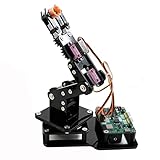
- Fun Robot Building Kit with High Extensibility: The SIYEENOVE 4DOF ESP32 smart robotic arm kit provides all the necessary hardware for you to enjoy the process of building it yourself. It integrates 4 MG90S servos to deliver 4 degrees of freedom (4DOF), allowing the claw to flexibly pick up lightweight objects. The pre-programmed ESP32-C3 control board means you can start using it right away — no code upload required.
- Dual-Mode Control: Joystick & Web App — Enjoy flexible control with two included joysticks or via a web-based interface. Simply press the right joystick button to switch between joystick mode and Web App mode — no app installation needed. (Note: batteries are not included.)
- Motion Record & Loop Playback with joystick: Record your motion sequence step by step — capture one action at a time, building a custom routine with each press. Then, play back the entire sequence in a seamless loop. With simple code modifications, you can easily chage the recording motion capacity. Perfect for learning, demonstration, and automation.
- Ideal STEM Learning Tool for Coding & Robotics: This educational robot arm kit supports both Arduino and MicroPython programming, making it perfect for beginners and experienced makers alike. It helps develop hands-on skills in electronics, robotics, and coding — great for teens, students, and DIY enthusiasts.
- Expandable & Open-Source Platform: With open-source code, detailed tutorials, and expandable hardware support, this ESP32-C3 robot arm grows with your skills. Perfect for classroom projects, robotics competitions, or creative home labs.
Build a servo-driven arm
An electronic version adds motors and control hardware, so it is a more involved project than the mechanical craft. The cited Instructables and Arduino Project Hub designs both use an Arduino board and four micro servos, but their input methods differ: the Instructables parts list includes potentiometers, while the Arduino project says potentiometers are optional when servos are controlled through code.
Parts in the Instructables example
- 14 popsicle sticks
- Four micro servos and four rotary potentiometers
- Half-size breadboard
- Arduino Uno
- 6-volt battery pack
- 26 jumper cables
- Hot glue gun and glue sticks, screwdriver, Arduino IDE and USB cable
Use the project page for its assembly details and code: Popsicle Stick Robotic Arm. Its listed parts apply to that design, not to every Arduino arm.
Rank #2

- ♥Robot Arm Building Kit: this mini robot kit will provide the required hardware and tools to show you how to build a robot kit step by step. NOTE: You need to prepare two batteries.
- ♥Flexible 4DF Arm Robot: The 4-axis design robotic arm is flexible and can grab objects in any direction. The clip can be opened 260°, the wrist can be rotated 180°, the elbow can be rotated 180°, and the base can be rotated 180°.
- ♥Easy To Build And Learn: we provide easy-to-follow assembly and programming tutorials, as well as quick-response after-sales and technical support.
- ♥Remember and Repeat Actions: not only the desk robot hand can be controlled by the joystick we provide, it can also record up to 170 actions and repeat these actions once.
- ♥Great Gift: this mini robot arm is a DIY electronic kit for Adults/Beginners/Teens to improve building, coding and programming skills.
Alternative component list from Arduino Project Hub
The Arduino Project Hub design lists an Arduino Uno Rev3, four SG90 micro-servos, four single-turn 10k-ohm potentiometers and jumper wires. It describes cardboard or 3D-printed parts as substitutes for household-material construction, and says the potentiometers can be omitted when servo motion is controlled through code. See its Simple robotic arm page for the design and component details.
How to decide between the two approaches
- Choose the mechanical arm if you want a hands-on craft with no controller, motors or wiring.
- Choose a servo-driven design if you want motorized movement and are prepared to assemble and control electronics.
- Check what you already have before selecting a servo plan: the two examples differ in their listed components and construction materials.
- Keep expectations tied to the plans. The cited project pages do not establish comparative payload, precision, reach or cost figures.
Related classroom extension: a robotic finger
For a smaller adjacent project, TeachEngineering describes a popsicle-stick robotic finger made with string, elastic bands, glue and tape, with a flex sensor and servo in its electronics activity. It is a finger project rather than a complete arm, but it can introduce related craft and control ideas. See Create and Control a Popsicle Stick Finger Robot.
Quick wins for a faster PC:
Fix the driver behind crashes, sound loss and screen glitchesFind Drivers →Clear out junk files and repair common Windows errorsFree Scan →Quick Recap
Best Value
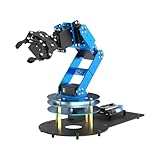
- ESP32 Controller & Arduino Programming. LeArm Open Source AI robotic arm powered by ESP32 and fully compatible with Arduino programming. It features built-in Bluetooth and multiple expansion ports, making it ideal for function upgrades and secondary development.
- Smart Digital Servos & Inverse Kinematics. Equipped with 6 smart PWM servos and an advanced inverse kinematics algorithm, LeArm Open Source delivers precise path planning and smooth, efficient movements—perfect for tackling complex tasks.
- Multiple Control Options. LeArm Open Source can be controlled by App, PC software, and wireless controller. It's beginner-friendly and easy to get started, even with no prior experience.
- Versatile Sensor Expansion. LeArm Open Source supports a wide range of sensors, including AI vision, voice module, ultrasonic, and acceleration sensors. It enables creative applications like color recognition, target tracking, face detection, voice control, and distance measurement.
- Enjoy Robotic Arm Making with Comprehensive Learning Resources. Enjoy the robot assembly process. LeArm is great for learning and building robot structures! Designed for students, engineers, university courses, and robot lovers. Comes with 200+ tutorials, sample experiments, open-source code, circuit schematics, and extensive programs—helping users dive into AI and programming while sparking endless creativity.
Rank #4

- Spark Your Creativity with LeArm Robotic Arm: LeArm is an elementary 6DOF desktop robot arm outfitted with 6 high-quality digital servos.It is capable of remote-control grasping, object transportation, custom actions, graphical programming, and more. It serves as the ideal platform for building and showcasing creative projects and for learning about bionic robotics.
- Anti-stall Protection: The robot arm end is equipped with 3 anti-blocking servos, complete with gear clutches that significantly extend the servos' lifespan.
- Premium Structure Design: The robot arm is constructed from exquisite metal bracket. The base is fortified with high-torque servos and industrial-grade bearings, guaranteeing exceptional stability.
- Various Control Methods: It supports PC, app, mouse and wireless handle control. Users can control the robot at your fingertips.
- Enjoy Robotic Arm Making: Enjoy the robot assembly process, LeArm is great for learning and building robot structures! Designed for students, engineers, university courses, and robot lovers. Comes with easy tutorials and simple programming software.
Rank #3

- Arduino Programming, Open Source: miniArm is built on the Atmega328 platform and is compatible with Arduino programming. The programs for miniArm are open-source, and learning tutorials and secondary development examples are available, making it easier for you to develop your robotic hand.
- High-Performance Hardware, Support Sensor Expansion: miniArm is equipped with a 6-channel knob controller, Bluetooth module, high-precision digital servos, and other high-performance hardware. Moreover, it provides multiple expansion ports for sensor integration, including ESP32 Cam, accelerometer, touch sensor, glowy ultrasonic sensor, etc., empowering users to engage in secondary development for sonic ranging and pose control capabilities.
- Versatile Control Options: miniArm supports app control, and users can utilize knob potentiometers for real-time knob control and offline action editing.
- Spark Your Creativity with miniArm: Expand the capabilities of miniArm with various sensors and unlock endless possibilities for your project.
- Starter Kit NO Glowing ultrasonic sensor, Touch sensor, Acceleration sensor, ESP32Cam Module.
Product prices and availability are accurate as of the date/time indicated and are subject to change. Any price and availability information displayed on Amazon at the time of purchase will apply.




