Yes—Philips Hue can now use compatible lights to detect movement, but the feature is not built into each bulb. Philips Hue MotionAwareTM uses changes in Zigbee radio signals between Hue devices. The Hue Bridge Pro analyzes those changes and can trigger lighting automations in a defined area.
This is a shipping feature, not merely a prototype or rumor. It requires a Hue Bridge Pro, compatible powered Hue products, and three or four participating lights per MotionAware area.
As an Amazon Associate I earn from qualifying purchases.
What Philips Hue MotionAware actually does
Hue MotionAware is a Bridge Pro feature that uses the wireless communication already taking place between compatible Hue devices. When a person moves through the signal paths, the Zigbee signal changes. The Bridge Pro interprets those changes as movement within a configured area.
That is different from a conventional motion sensor. A Hue motion sensor uses dedicated hardware, including a passive infrared detector and daylight sensor. MotionAware does not put a PIR detector inside every bulb, and it does not use a camera for the basic sensing mechanism described by Philips.
#1 Best Overall
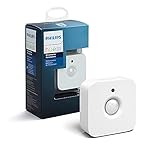
- WHAT'S IN THE BOX - Includes one Hue Motion Sensor and two AAA batteries; Automates your smart lights to respond to movement
- REQUIRES A HUE BRIDGE - Unlock the power of Hue and enjoy automations control from anywhere in the world, and a secure, stable connection that won't drain your Wi-Fi. Use Matter to connect your smart home devices to your Hue smart lighting system.
- TRIGGER LIGHTS WITH MOVEMENT - The wireless battery-powered Hue Motion Sensor automatically turns on your smart lights when movement is detected.
- SET UP - Place anywhere wirelessly using a magnetic mount or a single screw.
- PERSONALIZE YOUR LIGHT - Use the Hue app to customize your motion sensor and personalize your settings based on the time of day. Set your lights to turn on bright and cool in the morning. In the evenings trigger low golden tones - it's up to you!
Philips announced the feature in September 2025, and its current US product pages list it as an available Bridge Pro capability.
What you need
- Hue Bridge Pro: Philips lists the US price at $139.99 as of August 18, 2026. The standard Hue Bridge does not support MotionAware.
- Three or four compatible Hue lights or devices: Philips requires this number for each MotionAware area.
- The Hue app: This is where areas and automations are configured.
- Continuous power and connectivity: Devices switched off at the wall cannot participate in the Zigbee network.
Philips says up to 95% of existing Hue products are compatible, but compatibility depends on the exact model. Check Philips’ MotionAware compatibility list before buying additional lights. A third-party Zigbee bulb that merely works with Hue should not automatically be assumed to qualify.
How to set up a MotionAware area
- Install or migrate to a Hue Bridge Pro. Philips supports Wi-Fi or Ethernet, although it recommends Ethernet for maximum reliability. See the Bridge Pro setup guide.
- Update the Hue app, Bridge Pro, and participating lights.
- Open the Hue app’s settings or automation area and select the MotionAware or motion-area setup option. Menu labels can change with app updates.
- Choose the room or physical zone you want to monitor.
- Assign three or four compatible lights to the area.
- Select which Hue lights should respond when movement is detected, then configure the lighting behavior.
- Walk through the area and test the automation. If detection is inconsistent, review device placement, power, and the boundaries of the area.
Philips currently says Bridge Pro supports up to four MotionAware areas. An area does not necessarily equal one room: an open-plan space, hallway, or stairway may require a different arrangement than a conventional room.
The Tool Desk
Outbyte PC Repair FREEClear out junk files and repair common Windows errorsFree Scan →Outbyte Driver Updater FREEFix the driver behind crashes, sound loss and screen glitchesFind Drivers →Rank #2

- WHAT’S IN THE BOX: One outdoor smart motion sensor with a large 160-degree detection area; perfect for your garage, porch, patio, front doors, backyard, front yard, driveway, sidewalk and more
- REQUIRES A HUE BRIDGE: Unlock the power of Hue and enjoy automations, control from anywhere, and a secure, stable connection that won’t drain your Wi-Fi, use Matter to connect your smart home devices
- AUTOMATIC LIGHT CONTROL: Outdoor motion sensor turns on the lights when somebody passes by; controls indoor and outdoor Hue lights
- BATTERY-POWERED DESIGN: The outdoor motion sensor light allows for simple power replenishment
- SET UP: Mount the motion sensor for lights on a flat wall, or on the inner or outer corner of a wall or post
Where the lights should be placed
Meeting the three-light minimum is not the same as creating good sensing coverage. As a practical rule, participating lights should meaningfully span the area rather than being clustered in one fixture. Avoid hiding all of them behind metal cabinets or inside heavily enclosed fittings.
These are engineering recommendations, not Philips-published accuracy guarantees. Philips does not publish detailed radio geometry, detection thresholds, range data, or false-positive rates. Test entrances, corners, stairs, and adjacent rooms separately rather than assuming that one area will precisely identify every movement.
Also distinguish between a bulb that is turned off in the Hue app and one whose wall switch has cut electrical power. A Hue device that has lost mains power cannot communicate with the Bridge Pro. Smart controls or permanently powered circuits may therefore be important in a MotionAware installation.
Rank #3

- Note: SNZB-03P needs to be used with Zigbee Hub
- 【5-Sec Faster Detection】Automatically turn the lights on immediately when you pass by, and turn off the light after you leave, the shortest time can reach 5 seconds, helping you save energy
- 【3-Year Battery Life】Powered by CR2477 battery extends the battery life to over 3 years, eliminating concerns about frequent battery replacements
- 【Zigbee 3.0 Compatible】Supports Zigbee hubs using the Zigbee 3.0 protocol, such as SONOFF NSPanel Pro, SONOFF iHost, SONOFF ZB Bridge Pro, SONOFF ZBDongle-E, and Echo Plus 2nd…
- 【Local Smart Scene】Even if your WiFi network crashes, you can still activate Zigbee local scenes as long as your Zigbee devices are powered on
What MotionAware can—and cannot—detect
MotionAware is best understood as movement detection. Philips also uses the word “presence,” but its public information does not establish that the system reliably detects someone sitting completely still in the way a dedicated mmWave occupancy sensor may.
Do not assume that it will:
- detect a person anywhere in a home;
- distinguish every room in an open-plan layout;
- reliably detect stationary occupancy;
- ignore pets, curtains, fans, or movement in adjacent spaces;
- provide a published security-grade false-alarm rate; or
- appear as a general-purpose motion sensor in every smart-home platform.
Philips clearly supports native Hue lighting automation. Its Bridge Pro page also discusses integrations, but it does not establish that MotionAware areas are exposed identically through Apple Home, Alexa, Google Home, Matter, SmartThings, Home Assistant, or other systems.
MotionAware versus a dedicated Hue motion sensor
| Approach | Best suited to | Main limitation |
|---|---|---|
| Hue MotionAware | Existing Hue homes wanting hidden, camera-free movement-triggered lighting | Requires Bridge Pro and three or four compatible lights per area |
| Indoor Hue motion sensor | Doorways, halls, bedrooms, and rooms with few Hue lights | Visible, battery-powered device |
| Outdoor Hue motion sensor | Outdoor lighting triggers | Separate hardware and outdoor-placement constraints |
| mmWave sensor | Detecting people who remain still | Additional hardware and potentially more complex setup |
| Camera-based system | Recorded security events and visual identification | Privacy, network, and possible subscription concerns |
Philips lists the dedicated indoor Hue Motion Sensor at $48.99. It also includes a daylight sensor, which can help prevent lights from turning on when a room is already bright. Do not assume MotionAware provides the same ambient-light behavior.
Rank #4

- CONTROL LIGHTS WITH A CLICK: A simple touch of the smart button is enough to turn your lights on and off, cycle through scenes, and more. Press and hold to dim or brighten the space
- GET THE BEST LIGHT THROUGHOUT THE DAY: The wireless light switch button uses the Time-based light function by default, giving you the best light for each moment of the day
- CUSTOMIZE IN THE APP: Set the Rooms or Zone your button controls, adjust settings to remote control lights or start an automation, choose scenes you want for each time slot, and more in the Hue app
- START/STOP AUTOMATIONS: Start or stop an automation created in the Automations tab with a simple press on your PHILIPS Hue Switch
- FLEXIBLE, WIRELESS MOUNTING: Use the included adhesive to mount the Hue button around your home — or place it on any magnetic surface.
For a single room with one or two bulbs, the dedicated sensor is usually the more economical and predictable choice. Bridge Pro becomes more compelling for an existing Hue-heavy home that already has enough compatible lights in several areas and wants to avoid mounting additional sensors.
Independent reader supportYour contribution helps us test, update, and keep practical guides available for everyone.Privacy and security considerations
MotionAware’s described sensing method is camera-free: it infers movement from Zigbee signal changes rather than images or video. That is a meaningful privacy advantage over camera-based occupancy detection.
Quick wins for a faster PC:
Scan for outdated or missing drivers - takes under a minuteDriver Scan →Repair Windows errors before they cause bigger problemsFix Now →It does not prove that every Hue service or security-related automation operates entirely locally. Bridge Pro supports remote control, integrations, and cloud-connected Hue services. Philips also advertises improved Zigbee security and encryption, but those claims concern communications security—not a guarantee of perfect privacy or immunity from compromise.
Best Value
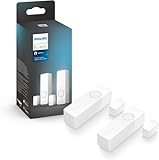
- SECURITY THAT WORKS WITH YOUR PHILIPS HUE LIGHTS: Hue Secure sensors integrate seamlessly with your existing Philips Hue lights; When motion is detected, your lights can turn on automatically.
- STAY IN THE KNOW, WHEREVER YOU ARE: Get real-time motion notifications sent directly to your phone. Trigger alarms right from the Hue app.
- ONE APP, COMPLETE CONTROL: Control your Hue lights, cameras, sensors, and security notifications from a single app. The Hue app puts your entire smart home security system in the palm of your hand.
- SUPREME PEACE OF MIND - When armed, the contact sensors send a real-time alert to your mobile device- and can even turn on lights as soon as they are triggered.
- AUTOMATE YOUR LIGHTS - The contact sensors are perfect for frequently used areas. Have the hallway light turn on when the front door opens, for example.
Motion-triggered lights can help deter activity, but MotionAware should not be treated as an alarm-grade replacement for dedicated security equipment. Turning on lights, sending a notification, recording video, and contacting emergency services are separate capabilities.
Is the Bridge Pro worth buying?
Bridge Pro is most defensible when you already own several compatible Hue lights and want invisible, camera-free lighting automation. It is less attractive when you are starting from scratch for one small room. Philips lists a four-bulb color starter kit with Bridge Pro at $289.99, while a dedicated Hue motion sensor costs substantially less.
Use this decision guide:
- Already have three or four compatible Hue lights in an area? MotionAware may be a useful Bridge Pro upgrade.
- Need one doorway, bathroom, bedroom, or hallway covered? A dedicated Hue motion sensor is likely the simpler purchase.
- Need daylight-aware behavior or a precise field of view? Prefer a dedicated sensor.
- Need reliable detection while someone sits still? Consider a purpose-built mmWave presence sensor.
- Need recorded security or person identification? MotionAware is not a substitute for a security camera or alarm system.
The bottom line
Philips Hue can turn a network of compatible lights into a movement-detection system, but the phrase “your bulbs become motion sensors” is shorthand. The actual sensing is performed by the Hue Bridge Pro using Zigbee signal fluctuations among multiple powered devices.
Free tools Windows power users keep installed
One-click scans. No signup required.
MotionAware is a clever option for Hue owners who already have suitable lights and want fewer visible sensors. It is not a universal replacement for PIR sensors, daylight sensors, radar-based occupancy detection, or security systems. Check model compatibility, plan the light placement, and compare the $139.99 Bridge Pro with the lower cost of a dedicated sensor before upgrading.
Quick Recap
Product prices and availability are accurate as of the date/time indicated and are subject to change. Any price and availability information displayed on Amazon at the time of purchase will apply.

