Some links on this page are affiliate links: if you buy through them we may earn a commission, at no extra cost to you.
IoT can help synchronize people and machines on a jobsite by connecting worker wearables, equipment tags, site sensors, wireless networks, and dashboards so supervisors can see relevant conditions and respond sooner. It is a coordination layer—not a guarantee of safer work: alerts depend on reliable coverage, useful data, clear escalation routines, and human judgment.
Here is how IoT can help coordinate workers and equipment on a construction site, what it can—and cannot—tell you, and what to consider before deploying it.
As an Amazon Associate I earn from qualifying purchases.
What does IoT coordination mean on a jobsite?
Internet of Things (IoT) coordination means collecting signals from connected devices and making them available to people responsible for work planning, equipment operation, or safety. A worker may wear a device, a machine may carry a tag or sensor, and site infrastructure may relay data to software where it can be interpreted in context.
NIOSH describes wearables connected to wireless mesh infrastructure through an IoT network. Such networks can support monitoring, messaging, warnings, and alarms. That shared visibility can help a supervisor notice a worker near operating equipment, a person entering a restricted zone, or a changing environmental condition. It does not mean every system tracks every person and machine with equal precision, or that connectivity itself prevents incidents.
Popular on Amazon

- Versatile Tracker - Streamline your daily routine with our ST02 tags, making it easy to track, locate, and find your everyday items like keys, bags, wallets and remote by attaching the ST02 to them.
- Compatible with iOS & Android - Download the free SwiftFinder app from the App Store or Google Play for iOS and Android phones.
- Find Near and Far - Use the SwiftFinder app to make your ST02 ring or ask Alexa or Siri to find items when it's within Bluetooth range. Use the map on the SwiftFinder app to view the item's recent location when it's out of Bluetooth range.
- Find Your Phone - Ring your phone with a simple double-press of the ST02 button, even if it's in silent mode.
- Disconnect Alert - If ST02 is disconnected from your phone's Bluetooth, your phone will immediately receive a notification and ring to alert you that you may have left something behind.
The stakes are significant: NIOSH reports that nearly 20% of work-related fatalities in a given year occur on construction sites, even though construction employs about 6% of the U.S. workforce. The bulletin attributes those figures to CPWR’s 2018 Construction Chartbook. They help explain the interest in earlier warnings, but they are not evidence that a specific IoT system reduces fatalities.
How does an IoT jobsite system work?
A typical system moves information through four stages: sensing or identification, communication, interpretation, and action. The components vary by project; not every deployment uses wearables, mesh networks, BIM, or cloud dashboards.
The Tool Desk
Outbyte Driver Updater FREEFix the driver behind crashes, sound loss and screen glitchesFind Drivers →Outbyte PC Repair FREERepair Windows errors before they cause bigger problemsFix Now →- Capture a signal. A wearable may identify a worker or measure a physiological signal; an equipment tag may identify an asset; a sensor may detect an environmental condition.
- Carry the data. A local network, gateway, or other wireless connection sends the signal onward. Coverage matters: a device that cannot connect in a work area may provide stale or missing information.
- Add context. Software can associate the signal with a person, machine, work zone, or site map. Some project designs connect IoT data to building information modeling (BIM), so alerts can be understood against a site layout.
- Prompt a decision. A dashboard or alert reaches a supervisor, operator, or safety manager, who assesses the situation and follows the site’s response procedure.
This is an architectural summary, not a universal product recipe. The practical value lies in turning a signal into timely, understandable information for someone who can act.
How can IoT help workers and equipment avoid conflicts?
Proximity awareness is one concrete use case: a system can identify when a worker is near operating equipment and issue a warning or provide that information to an operator or supervisor. The exact detection method, coverage, and alert behavior depend on the implementation.
Also popular on Amazon

- MILITARY STANDARD TOUGHNESS (MIL-STD-810H TESTED): Stainless steel bezel and Corning Gorilla Glass shrug off drops, dust and mud, while 5ATM and IP69K sealing keep it swim-ready and safe under high-pressure water jets - from the pool to the jobsite.
- ANSWER AND MAKE CALLS FROM YOUR WRIST: Built-in speaker and microphone for Bluetooth calling, plus call, text and app notifications - a rugged smart watch compatible with Android phones and iPhone.
- DUAL-FREQUENCY GPS (L1+L5): Track routes phone-free with 6 satellite systems for pinpoint precision in remote terrain; compass, altimeter and barometer keep you oriented off-grid when hiking, hunting or working in the field.
- SUNLIGHT-READABLE 1.96 inch AMOLED, 25-DAY BATTERY: 1000-nit display stays crisp in direct sun; stop charging every night - up to 25 days per charge (basic watch mode), full recharge in about 2 hours on the magnetic charger.
- HEALTH AND FITNESS TRACKER, 160 SPORTS MODES: 24/7 heart rate monitor, SpO2, sleep and stress insights, plus modes for running, cycling, swimming, strength and more; 22mm quick-release silicone strap and screen cover included.
NIOSH describes wearable proximity alerts and smart vehicles that can monitor nearby workers. The European ASSIST-IoT project describes dynamic geofencing around operating construction plant. These sources document capabilities and project scenarios; they do not establish that all commercial systems offer them or that a particular deployment eliminates collision risk.
Geofencing can also help manage access to a restricted area. In the ASSIST-IoT pilot, permissions and dynamic zones are part of a broader safety concept that includes incident alerts and evacuation navigation linked with BIM. Such features can make site rules more visible, but the site still needs clear zone definitions, reliable device coverage, training, and a response plan for alerts.
Free tools Windows power users keep installed
One-click scans. No signup required.
What else can connected sensors monitor?
IoT systems can carry more than location data. Depending on the devices and project, they may combine worker-related, equipment, and environmental signals to help decision-makers understand changing conditions.
- Worker condition: wearables may monitor physiological signals. The ASSIST-IoT pilot description includes heart rate and skin temperature.
- Environmental exposure: that pilot also includes ambient temperature and ultraviolet (UV) conditions.
- Work zones and incidents: access permissions, incident alerts, fall-arrest monitoring, and safe evacuation routing appear in the project’s described use cases.
- Asset location: tags can help crews identify tools or equipment and find their last-used context, a narrower asset-management function than collision warning.
These examples should not be read as a standard feature list. A system may monitor one category and not another, and the meaning of a reading depends on sensor quality, placement, thresholds, and how the site responds.
Also popular on Amazon

- CERAMIC TOUGHNESS FOR DEMANDING WORK: Built as a rugged smart watch for men, GS Explorer S combines a scratch-resistant nano-microcrystalline ceramic bezel, Corning 3rd Gen glass and a reinforced case tested against 17 MIL-STD-810H-2019 methods. The 1.32-inch 1500-nit AMOLED stays clear on bright jobsites, in workshops and during outdoor field work
- 20-DAY POWER & BLUETOOTH CALLS: Spend less time charging through long shifts and road trips with up to 20 days in daily mode, 50 days in basic mode and 100 days in power saver mode. Make or answer Bluetooth calls for up to 9 hours, view notifications, control music and access your phone’s voice assistant when tools, steering wheels or equipment keep your hands busy
- 10ATM WATER RESISTANCE: More than a basic waterproof smart watch, GS Explorer S handles rain, sweat, mud, swimming and water-based work with 10ATM water resistance, while freediving mode supports depths up to 30m. Do not wear the watch in hot showers, saunas, steam rooms or hot springs, as heat and steam may affect its water resistance
- DUAL-BAND GPS FOR WORKSITES & THE WILD: This GPS watch uses L1+L5 dual-frequency GNSS with GPS, BeiDou, GLONASS, Galileo and QZSS to improve positioning stability around buildings, trees and remote terrain. Mark waypoints, use track-back navigation and check the compass, altimeter and barometer during hiking, fishing, camping, field service or jobsite travel
- TRACK THE SHIFT, WORKOUT & RECOVERY: Designed for demanding workdays and active lifestyles, this smart watch for men tracks heart rate, SpO2, sleep, stress, breathing and daily activity trends to help you understand effort and recovery. Choose from 150+ sports modes for running, swimming, strength training and more, with compatible data syncing to Strava, Google Fit on Android and Apple Health on iPhone
Where does human supervision fit?
IoT should support—not replace—experienced supervision. A sensor can flag a possible risk or surface a pattern, but a person still needs to interpret the signal, verify the context when appropriate, and direct a response.
The TRUSS research project combined wearable and distributed sensing with video to support supervisors’ awareness. Its authors wrote that “expert, human-in-the-loop engagement is not replaced by pure automation, but supported by smart sensing and visualization.” The proof of concept involved three steelworkers monitored for two weeks at one active construction site. Researchers observed no accident during the study, but that small, short study does not demonstrate a general injury reduction or prove the system’s effectiveness as a deployed prevention program. The paper framed real-time operation as a future goal.
Can jobsite IoT improve productivity?
Connected data may support coordination as well as safety, for example by making time-and-attendance information or asset status easier to see. But the available evidence does not support a general, quantified productivity improvement for IoT coordination across construction sites.
One CPWR Construction Solutions case describes a connected jobsite platform and reports 214 total labor hours saved per month on a Lettire Construction project through automated time and attendance. That is a project-specific reported result, not an independently established industry average or a guaranteed outcome for other sites.
Also popular on Amazon
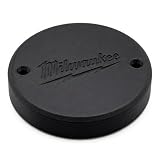
- SECURE SCREW-IN DESIGN — Mounts directly into the recessed circular bay on your modular tool storage system using screws for a locked-in hold. Stays firmly attached through daily transport, stacking, and jobsite vibrations without loosening.
- FLUSH-FIT TRACKER PROTECTION — Sits level inside the round pocket on your storage container, shielding your wireless tracker from impacts, dust, and debris. Full signal passes through for reliable location tracking without adding bulk.
- BUILT TO LAST — Constructed from tough, impact-resistant material engineered to handle workshop conditions and repeated stacking. Resists cracking and warping through temperature swings in hot trucks, cold garages, and outdoor jobsites.
- SIMPLE TWO-MINUTE INSTALLATION — Drops into the existing circular recess and secures with screws in under two minutes. No modifications to your storage system, no adhesives, and no special tools required. Align, fasten, and go.
- NEVER LOSE YOUR GEAR — Purpose-built to hold popular Bluetooth tracking tags inside your modular storage so you always know where your expensive equipment is. Ideal for contractors, tradespeople, and fleet managers on busy jobsites.
What should a construction team evaluate before adopting IoT?
Start with a specific operational problem, then assess whether the devices and workflow can address it. A broad promise of “real-time visibility” is not enough to determine whether a system will be useful on a particular site.
- Coverage and reliability: Check how the network performs across indoor and outdoor areas, changing site geometry, and weak-signal zones. Ask what users see when a device goes offline and how network uptime is monitored.
- What is actually measured: Confirm whether the system tracks worker or equipment location, proximity, equipment status, physiological conditions, environmental hazards, or only asset identity. Do not assume one capability implies another.
- Alert workflow: Identify who receives alerts, how quickly they arrive, how they are acknowledged, and what happens if no one responds. An alert without ownership or escalation can become background noise.
- Site-map and system integration: Determine whether data can be placed in relevant maps or BIM context and whether connections to existing project-management or safety systems are supported.
- Deployment and upkeep: Account for network hardware, gateways, device setup as the site changes, charging or batteries, maintenance, and worker training. NIOSH notes that mesh infrastructure can add cost and that construction sites’ temporary nature creates maintenance challenges.
- Privacy and governance: Tell workers what is collected and why. Minimize data to what the safety or operational purpose requires; define access permissions, retention, and how individual location or activity data will be used.
- Evidence quality: Separate a described product feature from a project pilot and from independently measured outcome evidence. A capability description is not proof of injury reduction.
NIOSH identifies cost, maintenance, and privacy concerns as adoption barriers. Worker confidence matters: a system intended to support safety can lose trust if people do not know what is tracked, who can see it, or how long records are kept.
How is a tool tracker different from a worker-equipment warning system?
A Bluetooth tool tracker can help with asset visibility, but it should not be treated as a worker-equipment collision warning system. Milwaukee Tool describes its ONE-KEY Tracking Tag for tools and equipment, with Bluetooth and NFC setup and last-used context. That example addresses finding and managing assets; the manufacturer description does not establish compatibility with worker-safety wearables or heavy-equipment proximity platforms.
For a safety use case, ask specifically whether the system detects the relevant worker-machine relationship, what warning it produces, where it works, and who is expected to respond. An inventory tag can be useful for a different purpose without providing those functions.
Also popular on Amazon

- MILWAUKEE ONE-Key Bluetooth Tracking TAG (48-21-2301)
What does the evidence say about IoT safety outcomes?
The cited material supports the idea that connected devices can make certain signals more visible and can enable warnings, geofencing, monitoring, and decision support. It does not provide a robust, generalizable estimate of injury reduction from IoT coordination.
NIOSH offers an overview of relevant construction applications and adoption barriers. ASSIST-IoT documents a detailed pilot scenario, not independently validated commercial performance. TRUSS is an early proof of concept with three workers over two weeks, not a large outcome study. The CPWR productivity figure is one project’s reported result. Keeping these evidence categories distinct is essential when setting expectations or evaluating a vendor’s claims.
Frequently Asked Questions
Does jobsite IoT work when cellular service is unavailable?
It depends on the network design: NIOSH describes wireless mesh infrastructure, but the cited material does not establish that every system works without cellular service. Ask the provider how devices communicate locally, where gateways are required, and what users see during an outage.
Can construction wearables detect heat stress?
Some wearables and sensor configurations can collect physiological or environmental signals relevant to heat exposure; the ASSIST-IoT pilot description includes heart rate, skin temperature, and ambient temperature. Those readings should not be treated as a medical diagnosis, and the cited sources do not specify a universal alert threshold.
Who owns worker location data collected by a jobsite system?
Ownership and access depend on contracts, system configuration, and applicable law; the cited research does not establish one universal rule. Before deployment, define who can view identifiable records, how long they are retained, and whether data can be used for purposes beyond the stated safety need.
Can an IoT alert replace a spotter or equipment operator’s judgment?
No. The cited TRUSS research explicitly frames sensing as support for human, expert engagement rather than a replacement for it. A site should preserve its established operating procedures and assign responsibility for responding to alerts.
Recommended Free Tools

