Free tools Windows power users keep installed
One-click scans. No signup required.
The 858D controller hack is a real open-source hardware project for certain Youyue-858D hot-air rework stations and compatible clones—not a universal firmware upgrade. It replaces the factory controller with new electronics and firmware intended to provide improved temperature regulation, fan-fault detection, docking-related safety behavior, cold-air mode, sleep mode, and other control features.
The important first step is compatibility. Stations sold with “858D” in the name can have different circuit boards, handpiece wiring, sensors, and mains arrangements. Confirm the internal hardware before buying a PCB or loading firmware.
As an Amazon Associate I earn from qualifying purchases.
What an 858D station actually is
An 858D is a low-cost hot-air rework-station family, not one precisely standardized product. Similar-looking units are sold under different brands and may use different controller boards. The original Hackaday project focused on the Youyue-858D and some compatible clones. The article, published in 2017, described stations costing around $50 at the time; that is historical pricing, not a current quotation.
In a typical 858D-style tool, a handpiece contains a heater, temperature sensor, and blower—or connects to a base containing some of those functions. The controller reads the temperature signal, operates the heater and fan, responds to front-panel controls, and may detect whether the handpiece is resting in its cradle.
#1 Best Overall
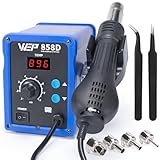
- FAST HEATING: This hot air rework station can heat to operating temperature quickly, and maintain the set temperature via PID temperature stabilization program that compensates in milliseconds. Thanks to its patented cylindrical ceramic heating element, the hot air gun provide significantly more consistent and reliable heating performance when compared with conventional coiled heating elements
- AUTO STANDBY: When the hot air gun is put into the holder, the hot air desoldering gun automatically begins to cool to 212°F. Once the temperature is cooled to 212°F, the blower and heating element stop operating to reduce unnecessary wear when unused and provide better safety
- ADJUSTABLE PARAMETERS: The hot air station temperature can be adjusted from 212-896°F, with adjustable air volume. This hot air soldering station can cover job scopes from SMD component rework, conformal coating removal, heating heat shrink tubes, paint removal, and more
- A MUST HAVE: This hot air station is a great addition to your tool kit if you already own a soldering station, giving you the capability for SMD soldering. The WEP 858D SMD solder kit includes 4 hot air nozzles in different diameters, you can select the diameters based on the size of component you're working with
- This Hot Air Rework Station Kit is covered by our exclusive 1-year USA technical support, with 24-hour assistance from our dedicated team. Note: This product is rated for 110-127V USA specifications. Do not connect this iron to a 220V power socket
That arrangement should not be confused with every product marketed as an 858D. Some professional-style stations use a blower in the base, while others put the fan in the handpiece. An Atten-branded 858D variant, including reported 858D+ versions, may use different electronics from the Youyue design.
What the project replaces
This modification is a controller replacement, not simply a software flash. The factory control board is removed and replaced with open-source controller hardware and firmware. Depending on the exact design and station revision, the work may involve a new PCB, microcontroller, supporting components, wiring, sensor connections, and firmware-programming hardware.
The replacement controller is intended to monitor the temperature sensor and fan-related signals, control the heater and blower, and manage the station’s operating states. Project PCBs were made available through services including OSH Park, although availability and pricing can change.
Crashes, No Sound, or Screen Glitches?
Random freezes, missing sound and display glitches usually trace back to one bad driver. Find and replace yours safely.Free scan · under a minutePC Slower Than It Used to Be?
A free scan shows the junk files, broken settings and background clutter dragging Windows down - then fixes them in one click.Free scan · Windows 10 & 11Reported features
- Improved temperature regulation compared with the original controller.
- Fan-fault detection.
- A docking-related condition intended to prevent heating when the handpiece is not properly positioned.
- Cold-air operation without energizing the heater.
- Sleep or standby behavior.
- Cooling and shutdown control.
- Optional improvements to cradle sensing, handpiece construction, power connection, and bench mounting.
These are features reported by the project coverage. They are not independent measurements of accuracy, warm-up time, airflow, energy consumption, or long-term reliability. A displayed temperature is also not automatically the temperature reached by a component on a circuit board.
Compatibility comes before construction
Do not infer compatibility from the outside label. The same 858D designation can conceal different boards and wiring. Installing firmware or a replacement controller intended for another revision can produce incorrect sensor readings, failed fan detection, heater-control errors, or damage.
The community compatibility discussion and later 858D project coverage both illustrate why the station must be identified internally.
Rank #2

- Direct temperature controls: Use dedicated front-panel buttons to adjust the set temperature without entering a secondary menu during rework
- Adjustable airflow: Use the front-panel airflow knob to make quick air-volume changes while working on different component sizes and board areas
- Real-time temperature display: The 3-digit LED display shows the selected temperature and the changing air temperature during heat-up, operation, and cool-down
- Holder-triggered standby: Return the hot air gun to its holder and the heating element stops while the blower cools the handle to 100°C; once cooled, the station enters standby until pickup
- PID temperature control: Up to 700W of maximum heating output supports fast heat-up and recovery, while PID control regulates power according to temperature demand
Practical identification workflow
- Record the exterior. Photograph the brand, model number, mains-voltage marking, fuse marking, connectors, and rating labels.
- Document the original wiring. With the station unplugged, photograph every connector and wire before disconnecting anything. Do not rely on wire colors.
- Inspect the controller PCB. Record its revision markings, connector locations, component layout, and any microcontroller identification.
- Map the handpiece. Count the conductors, identify the connector, and trace the heater, fan, sensor, and any switching or cradle wires with a multimeter and the relevant schematic.
- Check the power architecture. Determine whether the blower is in the handpiece or base, and verify heater and fan ratings and the station’s mains version.
- Compare the evidence. Match the board layout, connector mapping, sensors, and wiring against the selected project’s schematic and build documentation.
- Stop if uncertain. A visually similar enclosure is not sufficient evidence for a safe installation.
If the PCB revision or handpiece pinout cannot be confidently matched, the safest decision is to leave the station unmodified or choose a controller project specifically documented for that hardware.
Parts, tools, and skills
The exact bill of materials depends on the controller revision. Do not order components from a generic 858D list until the selected repository’s schematic and board files have been checked.
Likely requirements
- A compatible replacement controller PCB.
- The specified microcontroller and supporting components.
- Connectors, wiring, sensors, or interface components required by the selected design.
- A soldering station and suitable rework equipment.
- A reliable multimeter for continuity, resistance, and wiring checks.
- Equipment for programming the controller, if the design requires it.
- A method of independently checking temperature behavior.
- Insulation, strain relief, fasteners, and enclosure materials appropriate to mains-powered and hot equipment.
You should be comfortable reading a schematic, tracing conductors, soldering fine-pitch or through-hole parts as required, diagnosing control signals, and inspecting mains-side wiring. The station contains hazardous voltage and high-temperature components; this is not an appropriate first electronics project.
Build overview
The underlying project documentation—not the short Hackaday introduction—must control the actual pin assignments, firmware files, programming procedure, and mains-side wiring. The following is a safe planning sequence rather than a substitute for the verified schematic.
- Confirm that the station matches the supported hardware revision.
- Obtain the correct PCB files, schematic, source code, and firmware for that revision.
- Fabricate or obtain the replacement PCB and gather the specified components.
- Unplug the station and allow hot parts to cool before opening it.
- Photograph and label the original wiring. Preserve the original board until the modified unit has been fully tested.
- Remove the factory controller and install the replacement hardware as specified.
- Connect the heater, fan, temperature sensor, cradle sensor, display, controls, and mains-side circuitry only after verifying each connection against the documentation.
- Load the firmware intended for that exact controller design.
- Perform electrical and functional checks without allowing the heater to operate unexpectedly.
- Calibrate or verify temperature behavior using the project’s documented method and an independent measuring instrument.
- Reassemble the enclosure, restore strain relief and protective-earth paths, and complete the commissioning checklist.
First startup and commissioning checklist
Do not begin by placing the nozzle over a valuable circuit board. Test the station in stages.
Recommended Free Tools
- Power-up produces no abnormal smell, smoke, arcing, or mechanical noise.
- The handpiece does not heat unexpectedly at startup.
- The fan starts and continues operating when commanded.
- The temperature display responds plausibly and changes when the handpiece warms or cools.
- The heater cycles rather than remaining continuously energized.
- The cradle or reed sensor detects the handpiece correctly.
- Removing the handpiece produces the intended operating response.
- Returning it to the cradle initiates the intended cooling or sleep behavior.
- A simulated or real fan fault is detected if the firmware supports that function.
- Cold-air mode operates without energizing the heater.
- The heater, sensor, and fan wiring remain secure while the handpiece is moved.
- No mains conductors are exposed, pinched, or loose.
- The fuse, protective-earth path, enclosure, cable entry, and strain relief remain intact.
If the heater comes on unexpectedly, the temperature reading is implausible, or the fan fails to operate, unplug the station immediately. A firmware fault feature is an additional safeguard, not permission to continue operating a physically failed heater, fan, thermistor, or control circuit.
Rank #3

- 1.LCD digital displays to show precision temperature;
- 2.microcomputer control, quick warming-up;Temperature stabilization and is impervious to air,Use the brushless fan,and long life and low noise.
- 3.Automatic cooling function for effectively prolonging the heater's life and protecting the hot air gun.
- 4.Safely remove BGA-IC,keep pins intact,Much more safe and reliable,Blowing PCB will not make it blister
- 5.Essential product for cell phone repair, laptop repair, circuit boards, etc,Suitable for unsoldering multiple components,such as SOIC CHIP QFP PLCC and BGA etc (especially for flat cables and cable connectors).
Temperature verification is more complicated than the display
Hot-air performance depends on nozzle size, airflow, nozzle-to-board distance, board mass, copper area, shielding, nearby components, and the location and calibration of the sensor. A controller may regulate the handpiece sensor effectively while the component being heated experiences a different temperature.
For that reason, describe the project as reporting improved temperature regulation rather than promising a particular accuracy. Verify behavior under the conditions in which you will actually work, and treat any independent temperature measurement as a check of the complete tool setup—not just the number on the front panel.
Optional physical improvements
The controller replacement is separate from several mechanical options described in the project coverage.
- Handpiece changes: reinforcement or a more robust arrangement may improve durability, but does not change the electrical compatibility requirements.
- Cradle sensing: a better-positioned or more reliable reed-switch arrangement can improve sleep and docking behavior.
- Power connection: replacing a weak or unsuitable power plug may improve mechanical reliability, provided the replacement is correctly rated and safely fitted.
- Bench mounting: a fixed or articulated mount can make the handpiece easier to position and reduce strain on the cable.
These modifications do not automatically correct poor heater construction, weak airflow, noisy blower operation, inadequate insulation, poor nozzle fit, weak strain relief, or unsafe factory mains layout.
Common failure modes
Wrong board revision
The firmware starts, but readings or outputs are wrong. Fan detection may fail, the heater may be controlled incorrectly, or the display and controls may not match. Recheck the PCB revision, schematic, connector mapping, and firmware target before applying power again.
Incorrect handpiece pinout
858D handpieces are often described as having a familiar multi-wire arrangement, but vendors can alter the pinout. Trace every conductor with a meter and compare it with the project documentation. Never assume matching connector shape means matching wiring.
Rank #4

- Compact Design: The WEP 8858-V hot air rework kit features a palm-sized main unit with an integrated hot air gun holder and nozzle holder, making it easy to handle and store in your precious workspaces.
- Efficient Heating: The solder gun has a powerful heating element that heats up quickly, allowing you to get started on your work right away. WEP 8858-V soldering gun kit also features a PID program that continuously monitors the temperature and adjusts the power output to maintain a consistent temperature, reducing the risk of damage to delicate components.
- Intuitive Control: The WEP 8858-V hot air soldering station features an intuitive control panel that enables users to adjust the temperature and air volume settings with ease. The controls are designed to be simple and clear, making it easy for users to fine-tune the settings to meet their specific requirements. No need to enter the secondary menu, adjust the air volume with just a simple knob on the panel.
- Comprehensive Soldering Kit: The WEP 8858-V hot air rework station combines adaptability, precision, and safety in a versatile soldering kit. Included are a pair of bent and straight tweezers and three additional nozzles in various sizes, supporting a wide range of tasks. It boasts intelligent features such as a PID program for consistent temperature control, ℉/℃ conversion, digital temperature calibration for precise control, and safety features like a hot air fail-safe.
- This Hot Air Rework Station Kit is covered by our exclusive 1-year USA technical support, with 24-hour assistance from our dedicated team. Note: This product is rated for 110-127V USA specifications. Do not connect this iron to a 220V power socket.
The fan runs but the heater does not
Check the heater output path, sensor plausibility, enable conditions, fuse, and firmware configuration. Do not bypass an interlock simply to force heat; an incorrect sensor or missing fan can create an overheating condition.
Do these 3 things before closing this tab:
1Repair Windows errors before they cause bigger problems2Fix the driver behind crashes, sound loss and screen glitches3Clear out junk files and repair common Windows errorsThe heater runs unexpectedly
Unplug the station. Inspect the heater-control device, wiring, startup state, docking input, and firmware target. Do not continue testing with the heater connected until the cause is understood.
The temperature reading is implausible
Check the thermistor or sensor type, connector mapping, wiring continuity, calibration settings, and board revision. A wrong sensor configuration can make the controller appear functional while defeating temperature control.
The docking sensor fails
Confirm the reed switch, magnet or mechanical actuator, cable routing, input wiring, and firmware configuration. Test both docked and undocked states before relying on sleep or heater-inhibit behavior.
The firmware will not start
Verify the microcontroller, programming connection, firmware build, power rails, display connection, and board version. A firmware release from another project is not automatically compatible with the original controller.
Safety requirements
Opening and modifying a mains-powered station introduces risks beyond ordinary low-voltage electronics work.
Best Value

- 2-IN-1: This 2-IN-1 rework station combines a soldering station with a hot air rework station in a super compact body. Comes with individual LED displays, power switches, temperature control buttons, and air volume adjustment.
- Precision Temperature Control: This rework station comes with built-in PID program, providing temperature control for both the soldering iron and hot air gun. The soldering station temperature is 392-896°F adjustable, and hot air rework station temperature is 212-896°F adjustable with variable air volume.
- Useful Functions: This unit comes with sleep mode for soldering iron, standby mode for hot air gun, °C-°F Conversion, automatic shutdown, and calibration function. You can use these functions to reduce wear, extend soldering tips and heating element's lifespan, and achieve greater temperature precision.
- Complete Soldering Kit: This soldering kit for electronics rework includes 2 spools of solder wire, 5 soldering tips (I/B/K/3.2D/3C), brass wool tip cleaner, desoldering pump, 1 pairs of tweezers, 3 hot air nozzles. You can get started with soldering with everything in this kit.
- This soldering iron kit is covered by our exclusive 1-year USA technical support, with 24-hour assistance from our dedicated team. Note: This product is rated for 110-127V USA specifications. Do not connect this iron to a 220V power socket.
- Disconnect the mains plug before opening the enclosure.
- Allow capacitors, heaters, and other hot parts to cool.
- Preserve the fuse and protective-earth connection.
- Use suitable insulation, clearances, connectors, and strain relief.
- Avoid energized probing unless you are qualified, have appropriate equipment, and understand the hazards.
- Inspect for loose strands, pinched wires, damaged insulation, and enclosure damage before closing the case.
- Do not operate the station with the enclosure removed unless the test procedure specifically requires it and you can control the electrical and thermal risks.
Added fan detection, docking logic, and shutdown behavior may reduce some operating risks, but they do not make the station inherently safe or eliminate failure modes that the firmware cannot detect.
Should you modify it or buy another station?
| Modify the existing station when… | Choose another approach when… |
|---|---|
| Your unit is a clearly identified compatible Youyue-858D revision. | The internal board or wiring cannot be identified. |
| You enjoy electronics construction, reverse engineering, and troubleshooting. | The station is damaged, unreliable, poorly insulated, or unsafe before modification. |
| Failure is financially acceptable and the goal includes learning or repairability. | The chosen firmware does not cover your Atten or other variant. |
| You can work safely around mains voltage and hot components. | The modification cost and time approach a better-engineered replacement. |
| The project documentation and required parts are obtainable. | You need predictable calibration, support, and uptime for production work. |
A controller upgrade can improve control electronics without transforming a bargain station into a professional rework system. Compare blower design, airflow stability, heater response, handpiece balance, nozzle availability, cooldown behavior, replacement parts, documentation, electrical safety, warranty, and service—not just the controller.
Lower-risk alternatives
You can improve the workflow without opening the station by using suitable nozzles, a stable holder or articulated mount, good lighting and magnification, appropriate flux and solder, preheating for large boards, external temperature verification, and regular cleaning of the nozzle and air path.
What’s actually slowing this PC down?
Pick the symptom - the matching free tool is one click away.
There are also newer open-source designs. The F1-T12-858D STM32 project combines 858D hot air with Hakko T12 and JBC C245 tool support and documents features such as standby behavior, cooling procedures, reed or tilt sensing, safety-relay support, and firmware revisions through 4.08, with that repository recording version 4.08 on November 7, 2023. It is a separate, more ambitious design—not proof that the original Hackaday controller or its firmware supports every 858D.
Likewise, an archived or shared PCB listing should not be treated as a guaranteed current purchase option. The OSH Park page previously showed a historical total of $9.65 for an 858D adapter board; that figure is not a current price or promise of availability.
Final decision checklist
- Exact brand, model, and internal PCB revision recorded.
- Handpiece pinout traced rather than assumed.
- Heater, fan, sensor, and mains arrangements match the selected schematic.
- Firmware is intended for the installed controller hardware.
- Replacement PCB and components are available at an acceptable total cost.
- Original wiring has been documented and preserved.
- Fan, heater, temperature, docking, cold-air, sleep, and shutdown functions have been tested.
- Fuse, protective earth, insulation, enclosure, and strain relief have been inspected.
- Independent temperature verification has been performed under realistic working conditions.
- The station’s limitations remain acceptable for the intended work.
The worthwhile version of this hack is a documented, hardware-matched controller conversion. The dangerous version is treating “858D” as a universal specification. Identify the board first; only then decide whether the learning value and control improvements justify the construction, safety work, and possibility of replacing the station instead.
Quick Recap
Product prices and availability are accurate as of the date/time indicated and are subject to change. Any price and availability information displayed on Amazon at the time of purchase will apply.




