Free tools Windows power users keep installed
One-click scans. No signup required.
The right CNC workflow starts with the feature you need to make—not with a favorite CAM command. In Fusion, choose a toolpath for the geometry, choose a cutter that can physically reach it, select cutting parameters from the tool manufacturer’s data, and then simulate the complete setup before posting code.
A beginner-friendly plate might use facing to prepare the stock, 2D Adaptive Clearing or 2D Pocket to remove bulk from a cavity, 2D Contour to finish walls and the outside profile, and a dedicated Drilling operation for the holes. No single operation or feeds-and-speeds table is automatically correct for every machine, cutter, material, and workholding setup.
As an Amazon Associate I earn from qualifying purchases.
The basic decision: feature → toolpath → cutter → parameters → verification
A CAM toolpath is the planned motion of a cutting tool relative to the stock and the part. It defines how the tool approaches material, moves through the XY plane and in Z, enters and exits the cut, and links between separate cutting areas.
That matters because the same part normally needs several operations. Roughing removes material efficiently; finishing establishes the final wall, floor, radius, or surface; drilling creates holes with a strategy intended for a drill; and simulation checks whether the planned motion is safe and complete.
#1 Best Overall

- 【High Quality Tungsten Carbide End Mills】 LUNYEE End Mills are made of Ultra-Fine 0.2μm Tungsten Carbide Steel Alloy and can process continuously for 800 minutes. Designed for CNC engraving, PCB milling, woodworking, aluminum cutting, and precision parts processing with high precision, durability, and long service life.
- 【Complete CNC End Mill Set】 Packing List includes 1-ER11 and 1-ER16 collet, 2-Flute Spiral Flat Nose & Ball Nose End Mills, and Two End Mill Sets with Nano Blue and Titanium Coating. Ideal for CNC carving, engraving, slotting, contouring, and detailed machining projects.
- 【2-Flute Spiral Flat Nose & Ball Nose End Mills】 Shank Diameter: 3.175mm, Cutting Diameter: 3.175mm, Cutting Length: 17mm, Overall Length: 38mm. Suitable for detail carving, 3D engraving, sign making, acrylic cutting, wood carving, and smooth finishing applications on CNC engraving machines.
- 【Two End Mill Sets with Nano Blue & Titanium Coating】 Shank Diameter: 3.175mm, Cutting Diameter: 0.8 - 3.0mm (0.8/1.0/1.2/1.4/1.6/1.8/2.0/2.2/2.4/3.0mm), Cutting Length: 17mm, Overall Length: 38mm. Multiple bit sizes help users handle precision engraving, fine detail milling, lettering, PCB routing, and small-part CNC machining tasks.
- 【Wide Material Compatibility & CNC Machine Support】 Widely used in plastics, aluminum, circuit board, wood, and other precision parts processing applications. Compatible with LUNYEE 3018 Series benchtop CNC machines, engraving machines, desktop CNC routers, and other industrial CNC machines for hobby, workshop, and professional machining projects.
In Autodesk Fusion, these operations are created in the Manufacture workspace. The names and exact panel arrangement can change slightly between Fusion releases, but the underlying decisions remain the same. Autodesk’s Fusion Help documentation is the appropriate reference when a field or label differs in your installation.
A beginner toolpath decision guide
| Part feature or goal | Typical Fusion strategy | Primary purpose | Important checks |
|---|---|---|---|
| Uneven or oversized stock top | Facing; some introductory workflows use 2D Adaptive with a stock contour | Create a flat reference surface | Stock boundary, facing depth, workholding clearance |
| Large cavity, open pocket, boss, or 2D region with substantial material to remove | 2D Adaptive Clearing | Efficient roughing with more consistent cutter engagement | Optimal Load, entry method, stock to leave, tool manufacturer’s data |
| Internal cavity or area around a boss within a defined boundary | 2D Pocket | Boundary-controlled roughing, optionally followed by a finishing pass | Stepover, stepdown, multiple depths, entry, pre-drilling |
| Straight inside or outside wall | 2D Contour | Follow and finish an outline | Inside/outside direction, compensation, tabs, corner radius, wall height |
| Round hole, countersink, or tapped hole | Drilling, Countersinking, or Tapping | Use a dedicated hole-making operation | Tool type, depth, retract height, hole recognition, chip evacuation |
| Organic, sculpted, or continuously curved 3D surface | An appropriate 3D strategy | Machine changing surface geometry | Surface tolerance, stepover, ball-nose geometry, simulation and finishing allowance |
1. Facing: prepare a reliable reference surface
Facing removes material from the top of stock so later depths are based on a known surface. It is especially useful when the raw material is not flat, when stock thickness is inconsistent, or when the top face must become a reference for the rest of the job.
For a simple milling job, select the stock boundary and set a shallow cutting depth that removes only the necessary material. Make sure clamps, screws, and other workholding remain below the planned tool motion. On a rotational part, a turning-face strategy serves the analogous purpose by removing stock from the end of the part.
Facing is stock preparation, not a replacement for every roughing operation. A face pass may flatten the top without efficiently clearing a deep pocket or an irregular outside profile.
2. 2D Adaptive Clearing: efficient roughing for open regions and cavities
2D Adaptive Clearing is primarily a roughing strategy. It is useful for cavities, open pockets, bosses, and similar regions where the goal is to remove bulk material while avoiding abrupt changes in cutter engagement. Fusion’s Optimal Load setting controls the intended engagement between the tool and the material.
The appeal of adaptive motion is not that it is universally faster or safer. Its value is that the toolpath is designed to maintain a more consistent load and avoid sudden direction changes. Whether it performs well depends on the machine, cutter, material, workholding, spindle, chip evacuation, and chosen parameters.
Use a flat or bull-nose end mill when the geometry calls for one. Leave stock for a later finishing pass when the pocket walls or floor need accurate dimensions or a better surface finish. Adaptive clearing is not automatically a finishing operation.
Set Optimal Load from the cutter manufacturer’s recommendations, not from a value copied from a different machine. A rigid metal mill, a lightweight router-style CNC, and a hand-built machine may require very different engagement even when they use the same nominal tool diameter.
3. 2D Pocket: stay within a defined boundary
Use 2D Pocket for an internal cavity, an open pocket, or an area around a boss. Fusion describes it as a roughing operation that can also include a finishing pass. Its controls commonly include maximum stepover, multiple depths, roughing stepdown, entry options, and optional pre-drilling.
Rank #2
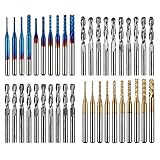
- High Quality: The Genmitsu end mills are made of ultra-fine 0.2μm tungsten carbide steel alloy that can keep continuous machining 800 minutes. Moreover, its Nano Blue Coating /Titanium Coating with high hardness and heat resistance enables the tool's cutting edge to retain crucial sharpness and lubricity. This provides longevity and produces cutting results of the highest quality.
- 2-Flute Spiral Flat Nose & Ball Nose End Mills -- Shank Diameter: 3.175mm, Cutting Diameter: 3.175mm, Cutting Length: 17mm, Overall Length: 38mm.
- Two End Mill Sets -- Shank Diameter: 3.175mm, Cutting Diameter: 0.8 - 3.0mm (0.8/1.0/1.2/1.4/1.6/1.8/2.0/2.2/2.5/3.0mm), Cutting Length: 17mm, Overall Length: 38mm, with Nano blue and Titanium coating.
- Applicable Materials: Widely used in various materials including plastics, aluminum, circuit board, wood, as well as other precision parts processing.
- Wide Compatibility: The MC40A end mills are compatible with most desktop CNC machines, such as the Genmitsu 3018 Series, as well as other industrial CNC machines. Just make sure you select the correct-sized collet for your device
The key distinction from 2D Adaptive Clearing is boundary behavior. Pocket generally stays inside the selected boundary. Adaptive can approach from outside the stock and move into the cut, which can be useful when there is room for that approach. Pocket can also produce a smaller program file than Adaptive, an advantage on older CNC controls with limited memory.
For pocketing, inspect at least these settings:
- Geometry: confirm the selected pocket boundary and whether islands or bosses are being avoided.
- Maximum stepover: Fusion documentation gives a typical range of approximately 10% to 40% of tool diameter, but that is a software-documentation range—not a universal cutting prescription.
- Roughing stepdown: choose it from the cutter and machine data for the material and setup.
- Multiple depths: verify that the final depth does not pass through the workpiece, spoilboard, or hidden workholding.
- Entry: use a ramp, helical entry, or pre-drilled entry when a straight plunge would overload the tool or the tool is not designed for plunging.
- Stock to leave: leave material for a controlled finishing pass when size or finish matters.
4. 2D Contour: finish the outline and walls
2D Contour follows an open or closed outline. It is commonly used to finish the outside profile of a part or the wall of an internal pocket. Fusion supports inside and outside machining, multiple finishing passes, cutter compensation, tabs for sheet work, and a minimum cutting-radius control.
The Tool Desk
Outbyte PC Repair FREERepair Windows errors before they cause bigger problemsFix Now →Outbyte Driver Updater FREEScan for outdated or missing drivers - takes under a minuteDriver Scan →Contour is best suited to straight or essentially prismatic walls. Tapered walls, blended transitions, and organic surfaces require a more suitable 3D strategy rather than forcing a 2D contour to approximate them.
For outside profiles cut through sheet stock, add tabs or another retention method so the part does not become loose while the tool is still cutting. Simulate the final pass with the tabs, clamps, and spoilboard represented accurately enough to reveal collisions.
When a toolpath enters a tight internal corner, the minimum cutting-radius setting can prevent the cutter from being forced into a motion it cannot make smoothly. A larger radius may reduce chatter and finish distortion, but it can leave material in the corner for a smaller follow-up tool.
5. Drilling and related operations
Use a dedicated Drilling operation for holes instead of treating every hole as an opportunity to plunge an end mill. Fusion separates drilling, countersinking, tapping, simulation, and post-processing into distinct stages because each has different tooling and motion requirements.
Outdated Drivers Are Slowing You Down
One free scan finds every outdated or missing driver and matches the right update for your exact hardware.Free scan · exact hardware matchPC Slower Than It Used to Be?
A free scan shows the junk files, broken settings and background clutter dragging Windows down - then fixes them in one click.Free scan · Windows 10 & 11Drilling can also support pocketing. The Pocket operation may offer a pre-drilling entry position so a suitable drill creates an opening before an end mill enters the pocket. That can make entry more controlled, but only when the drill diameter, hole location, depth, material, and subsequent toolpath are compatible.
Verify hole depth, retract height, and the bottom of the hole separately from the pocket or contour depths. A drill that retracts too low can waste time or collide with stock; a drilling operation that is too deep can break through into workholding or the machine table.
Choosing the cutting tool
flat end mills: the practical starting point for 2D work
A flat end mill is a sensible general-purpose starting cutter for 2D contouring, pocketing, and adaptive roughing. Its flat end produces a flat-bottomed cut, while its side can machine vertical walls. Autodesk identifies flat-bottom end mills as suitable for these Fusion operations.
Rank #3
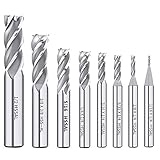
- End mill Straight Shank for Easy Clamping -- Each milling cutter features a straight shank design for secure clamping in compatible CNC routers, milling machines, drill presses and other suitable cutting equipment.
- 8PCS HSS End Mill Cutter Set -- Includes 8 common sizes: 1/16", 1/8", 5/32", 3/16", 1/4", 5/16", 3/8", 1/2". A practical end mill set for milling, slotting, profiling and general cutting work in metalworking or woodworking.
- Durable Material -- Made of Enhanced M2 high speed steel for good toughness, wear resistance and stable cutting performance. Suitable for machining metal materials with hardness of HRC 30 or higher,exclusive to HIGH HARDNESS, HIGH SPEED CUTTING applications.
- Versatile Applications--End mill bits perfect for side milling, end milling, finish machining, etc. Apply to carbon steel, soft alloy steel, die steel, tool steel, cast iron, titanium, aluminum, etc.
- The bottom of end mill bits is u-shaped groove design, large front angle effectively reduces cutting resistance, sharp and durable, The 4-flutes configuration allows for faster feed rates and improved chip removal, resulting in cleaner cuts and a smoother surface finish.
Do not select one solely because its diameter is convenient. Check whether the cutter can reach the required depth, whether its radius can enter the internal corners, whether the shank fits the machine’s holder, and whether its flute geometry and coating suit the workpiece.
Bull-nose or corner-radius end mills
A bull-nose, also called a corner-radius, end mill has a small radius where the end meets the side. It can provide a stronger cutting edge and smoother motion through corners than a sharp-corner tool. It is suitable for adaptive, pocket, and contour operations when the model allows that radius.
Choose it when a small radius is acceptable or desirable. If the design requires a genuinely sharp internal corner, a corner-radius cutter may leave more material than a flat tool, and the feature may need a smaller finishing tool or a design change.
ball-nose end mills
A ball-nose end mill is primarily a 3D-surface tool. Its rounded end is useful for sculpted geometry, radiused transitions, and finishing contoured surfaces. It is not the default first cutter for an ordinary flat-bottomed pocket or basic 2D profile unless the geometry specifically requires a rounded toolpath.
Flute count and chip evacuation
Flute count affects the space available for chips, chip evacuation, and the feed potential of the cutter. A low-flute or single-flute cutter can be advantageous when large chips must be cleared, including some aluminum and router-style applications. Higher flute counts may be appropriate for finishing or harder materials under suitable conditions.
What’s actually slowing this PC down?
Pick the symptom - the matching free tool is one click away.
There is no universal rule such as single flute for every soft material or four flute for every hard material. Use the cutter manufacturer’s geometry and material-specific cutting data. A specialized single-flute CNC cutter or aluminum end mill should be chosen because its design matches the material, spindle speed, chip-load range, and chip-clearance requirements—not merely because it has fewer flutes.
Diameter, stickout, shank, coating, and substrate
- Diameter: A larger cutter is generally more rigid and can remove more material, but it may not fit narrow features or small internal radii.
- Stickout: Use only the reach required. Excessive extension increases deflection and makes chatter more likely.
- Shank: Match the shank to the collet or holder. A 1/4-inch shank is not interchangeable with metric or other sizes simply because the cutter looks similar.
- Runout and toolholding: Poor collet condition, contamination, incorrect tightening, or an unsuitable holder can ruin an otherwise reasonable toolpath.
- Coating and substrate: Select them for the workpiece and cutting conditions. They are functional specifications, not decorative upgrades.
Feeds and speeds: why copying a table can fail
Feeds and speeds depend on cutter diameter, flute count, tool material and coating, workpiece material, spindle power and speed range, depth of cut, stepover, coolant or air blast, workholding, stickout, and machine rigidity. A number that works on one CNC can cause rubbing, chatter, tool breakage, overheating, or an overloaded spindle on another.
Use this sequence instead:
- Begin with the cutter manufacturer’s material-specific data. Record the recommended spindle-speed range, feed information, chip-load guidance, and limits for radial and axial engagement.
- Check the machine’s limits. Confirm that the spindle can reach the required RPM and that the controller and machine can command the required feed rate. Also check whether the machine can physically handle the proposed depth and engagement.
- Make the first cut conservative. Observe the chips, sound, surface finish, tool load, and workholding. A safe first cut is a controlled test, not a production claim.
- Change one variable at a time. If you change feed, RPM, stepdown, and stepover simultaneously, you will not know which change caused the result.
- Stop when the cut shows warning signs. Rubbing, squealing, chatter, excessive deflection, heat, packed flutes, poor finish, or an unexpected load are reasons to stop and investigate.
- Check the setup before simply slowing the feed. Confirm stickout, runout, toolholding, workholding, entry motion, and chip evacuation. Reducing feed without correcting a poor setup can make a tool rub rather than cut.
Do not publish or rely on a generic RPM-and-feed table without naming the machine, spindle, cutter, flute count, material, coating, depth of cut, stepover, and manufacturer data behind it.
Internal corners, cutter radius, and rest machining
An internal corner cannot be sharper than the radius of the cutter that forms it. For example, a tool with a large diameter necessarily leaves a correspondingly large minimum internal radius. If the design calls for a tighter corner, the choices are to use a smaller tool, add a design fillet, use rest machining with a smaller cutter, or select a different manufacturing process.
Recommended Free Tools
Fusion’s pocket-recognition documentation indicates that the minimum corner-radius setting should match or exceed the radius of the tool being used. Treat that setting as a geometric constraint, not as a way to make a large cutter create a sharp corner.
Rank #4

- Top Quality:Made from high speed steel(HSS), high abrasion resistance, obtain accuracy, high-speed cutting for the high hardness
- 2-12mm End Mill Set: This end mill set includes 10 diameter sizes of 2mm, 3mm, 4mm, 5mm, 6mm, 7mm, 8mm, 9mm, 10mm, 12mm, can satisfy all your different needs.
- Widely Application CNC End Mill: Can Used on metal processing, CNC machining and engineering using, Suitable for aluminium, cast iron, copper, magnesium alioy, plastics, wood, etc
- Easy To Use: This End Mill Bits usually used to be assembled on milling machine and used for profiling, shoulder milling, finishing operations, general purpose machining of both ferrous and nonferrous materials
- Satisfaction: ASNOMY aims to provide high-grade products and customer service to all customers. Any problems, just contact us and our after-sale team will solve your problems ASAP.
A common strategy is to rough with a larger, more rigid cutter and then use a smaller tool for the remaining material in tight corners. The tradeoff is extra setup time, extra tool changes, and another operation to simulate and verify. It is often preferable to forcing the first tool into a corner where it may chatter, deflect, or distort the finish.
Climb versus conventional milling
In climb milling, the cutter generally begins a tooth’s engagement with a thicker chip and reduces chip thickness as it exits. Fusion documentation notes that climb milling can produce a better finish in metals when the machine is sufficiently rigid.
Conventional milling is more commonly used on manual-style or less-rigid machines and can have advantages in some woods. On a CNC, the decision depends on backlash, rigidity, workholding, material, cutter geometry, and the machine builder’s guidance.
Quick wins for a faster PC:
Scan for outdated or missing drivers - takes under a minuteDriver Scan →Repair Windows errors before they cause bigger problemsFix Now →Fix the driver behind crashes, sound loss and screen glitchesFind Drivers →Do not treat climb milling as automatically superior. A rigid machine with sound workholding may benefit from it, while backlash or a flexible setup can create problems. If the machine or material behaves unpredictably, stop and resolve the mechanical cause rather than relying on a direction change as a cure-all.
Fusion setup checklist before posting code
- Open the Manufacture workspace and create the setup: use Setup → New Setup, select the correct machine orientation, and place the work coordinate origin where the machine will actually be zeroed.
- Define the stock: enter or select the actual stock dimensions and confirm how the model sits inside it. Check that the stock is not accidentally offset, mirrored, or thinner than the real material.
- Confirm the machine and post processor: select the correct machine definition, post processor, units, and controller conventions. A sound toolpath with the wrong post can still produce unusable or unsafe code.
- Verify every tool: check tool number, diameter, flute count, overall length, flute length, shank, holder, and measured tool length. Make sure the tool in the machine matches the tool selected in Fusion.
- Review heights: inspect clearance, retract, feed, top, and bottom heights. Do not assume that a model top or stock top is the correct reference for every operation.
- Review entry and linking: confirm ramps, helical entries, plunges, retracts, and rapid moves. Look for a rapid move that crosses a clamp or an entry that exceeds the tool’s plunging capability.
- Review cutting engagement: check maximum stepdown, stepover, Optimal Load, and stock-to-leave values against the cutter manufacturer’s data and the machine’s rigidity.
- Check contour direction: confirm inside versus outside machining and cutter-compensation settings. A compensation error can change the finished size or cause the control to reject the program.
- Add retention features: use tabs or another retention method when cutting through sheet stock. Confirm that tabs do not interfere with clamps or the final toolpath.
- Simulate: inspect for collisions, gouges, uncut stock, excessive depth, unexpected retracts, unsafe linking moves, holder interference, and contact with modeled workholding.
- Inspect the physical setup: secure the workpiece, verify tool length, clear loose objects, confirm chip control, check guarding, and make sure the emergency stop is accessible.
Simulation can reveal problems represented in the model; it cannot guarantee that an unmodeled clamp, incorrectly measured tool, loose workpiece, wrong zero, damaged holder, or incorrect post will be safe.
Independent reader supportYour contribution helps us test, update, and keep practical guides available for everyone.A safe beginner project: an aluminum or plastic plate
A useful first exercise is a simple plate containing an outside profile, one rectangular pocket, and four drilled holes. Choose one specific material and use the cutter manufacturer’s data for that material. Plastic is not one universal cutting condition, and aluminum alloys can behave differently, so the material must be identified before numerical settings are selected.
- Face the stock if needed. Create a flat reference surface and verify that the facing pass clears the stock without contacting workholding.
- Rough the pocket. Use 2D Adaptive Clearing or 2D Pocket according to the available approach room and desired boundary behavior. Leave stock if the pocket wall or floor needs finishing.
- Finish the pocket. Use a 2D Contour for the straight walls, or a suitable finishing operation for any curved geometry.
- Finish the outside profile. Use 2D Contour, select the correct outside direction, and add tabs if the plate will be cut free from sheet stock.
- Drill the holes. Use a dedicated Drilling operation with the correct drill, depth, retract, and entry conditions.
- Simulate and inspect. Check the tool holder, workholding, heights, final depths, remaining stock, and all rapid moves.
- Post-process and make a cautious first cut. Verify the posted file, zero the machine carefully, remain in a safe operator position, and be prepared to stop the machine.
This example deliberately does not include a universal RPM, feed, stepdown, or stepover table. Those values require the material, machine, spindle, cutter, flute count, coating, stickout, workholding, and manufacturer’s recommendations.
Starter tooling and shop checklist
Before buying tooling, identify whether you have a router-style CNC or a metal milling machine. Check spindle RPM range, collet or holder type, maximum tool diameter, available tool length, machine clearance, and the materials you intend to cut.
- A 1/4-inch carbide end mill set can be a useful starting category for common 2D work, but only if the shank fits the collet, the diameters fit the features, and the tools are appropriate for the machine’s RPM and the chosen material.
- Add a separate material-specific cutter, such as a single-flute CNC cutter for an application where chip evacuation and the manufacturer’s data support that choice.
- Use a compatible CNC toolholder or collet that matches the spindle, shank size, tightening system, and machine requirements. Never treat a visually similar collet as automatically compatible.
- Provide reliable workholding: clamps, a vise, a spoilboard, screws, or another method suitable for the machine and material. Workholding must resist cutting forces without putting hardware in the toolpath.
- Keep a deburring tool or suitable finishing method available for removing sharp edges after machining.
- Use CNC safety glasses or other appropriate eye and face protection for the hazard. PPE does not replace guarding, enclosure design, operator training, or safe procedures.
- Plan chip control appropriate to the material and machine, such as an enclosure, extraction, or air blast where permitted by the machine and material requirements.
Product availability, specifications, and compatibility change. Verify the current manufacturer’s dimensions and cutting data before purchasing or cutting.
Best Value

- High quality material: Made of high quality carbide with good toughness, high hardness, wear resistance and durability.
- High Precision: These carbide lathe tools with different angles can cut any model you want with high precision.
- Included models: AR4-C6 X 2 pieces,AL4-C6 X 2 pieces,BR4-C6 X 2 pieces,BL4-C6 X 1 piece,C4-C6 X 1 piece,E4-C6 X 2 pieces
- Application: These tools are a good choice for carbide lathe tool bits, suitable for general lathes and CNC lathes.
Safety boundaries: software is not a guard
CNC milling combines rotating tooling, sharp edges, flying chips, entanglement hazards, stored mechanical and electrical energy, and potentially hazardous dust or coolant. OSHA’s machine-guarding guidance identifies point-of-operation guarding as a central protection against contact with dangerous moving parts and hazards such as flying chips and sparks.
- Follow the machine manufacturer’s manual and site safety procedures.
- Use appropriate eye and face protection, and control dust or coolant for the material being cut.
- Secure the stock and confirm that the toolpath clears clamps, screws, vises, fixtures, and the table.
- Keep hands, clothing, hair, and loose objects away from rotating tooling.
- Verify that the emergency stop is accessible and that you understand how the machine stops.
- Never reach into a moving machine, even if the cut appears to be going badly.
- Do not bypass interlocks or remove guarding to gain access during operation.
For servicing, clearing a jam, changing a guarded component, or entering a hazardous area, follow the machine’s energy-control procedure. OSHA’s lockout/tagout standard describes shutdown, energy isolation, locking or tagging, release of stored energy, and verification. Simulation is valuable, but it does not replace physical guarding, lockout procedures, or operator training.
Do these 3 things before closing this tab:
1Scan for outdated or missing drivers - takes under a minute2Repair Windows errors before they cause bigger problems3Fix the driver behind crashes, sound loss and screen glitchesWhen the first cut goes wrong
| Observed problem | Checks before changing cutting parameters |
|---|---|
| Chatter or a rough, wavy wall | Reduce unsupported stickout; check toolholder runout, workholding, machine rigidity, toolpath entry, engagement, and whether the cutter is too small for the reach. |
| Burning, rubbing, or poor chip formation | Check whether the tool is actually cutting, confirm RPM and feed against manufacturer data, inspect flute loading, and verify that the cutter is sharp and suited to the material. |
| Packed flutes or recutting chips | Check chip evacuation, air blast or extraction, flute geometry, stepover, depth, and whether the material requires a different cutter. |
| Tool breaks during entry | Inspect the plunge, ramp, or helix; confirm the tool is intended for that entry; consider pre-drilling where appropriate; and check for excessive engagement or an incorrect bottom height. |
| Material remains in internal corners | Compare the corner radius with the tool radius. Use a smaller rest-machining tool, redesign the corner, or select a different process. |
| Part is the wrong size | Check inside/outside contour selection, cutter compensation, tool diameter and wear, stock alignment, work offset, and whether stock was left for a finishing pass. |
| Simulation looks correct but the machine behaves differently | Check the posted file, post processor, units, machine zero, measured tool length, controller conventions, and any unmodeled workholding. |
When a problem appears, stop the machine first. Do not continue cutting merely to see whether the result improves.
Frequently Asked Questions
Is 2D Adaptive Clearing always better than 2D Pocket?
No. Adaptive Clearing is useful for roughing with more consistent engagement and can approach from outside a boundary when there is room. 2D Pocket stays within a defined boundary and may generate a smaller program, which can be useful on older controls. The better choice depends on geometry, approach space, machine capability, tooling, and the required finish.
What is the best first CNC cutter for a beginner?
For common 2D profiles and pockets, a flat end mill is usually the most broadly useful starting geometry. Choose its diameter, flute count, shank, coating, stickout, and material compatibility together. A ball-nose cutter is not the default choice for flat-bottomed 2D work.
Can I use the same end mill for roughing and finishing?
Sometimes, but not always. A single flat end mill can perform both operations when the geometry, rigidity, finish, and dimensional requirements allow it. Leaving stock and using a separate finishing pass—or a smaller rest-machining tool for tight corners—often gives more controlled results.
The Tool Desk
Outbyte Driver Updater FREEFix the driver behind crashes, sound loss and screen glitchesFind Drivers →Outbyte PC Repair FREEClear out junk files and repair common Windows errorsFree Scan →Does Fusion simulation make a CNC job safe?
No. Simulation can identify modeled collisions, gouges, uncut stock, unsafe linking moves, and excessive depths, but it cannot detect every real-world problem. Incorrect tool length, a wrong work offset, unmodeled clamps, poor workholding, a bad post, or a damaged tool can still cause an accident. Physical guarding, verification, training, and cautious operation remain necessary.
The Bottom Line
Choose the toolpath from the feature: face the stock, rough cavities with Adaptive or Pocket, finish walls with Contour, and drill holes with a dedicated operation. Choose the cutter for the geometry and material, obtain feeds and speeds from the manufacturer, verify machine and workholding limits, and simulate before cutting. The safest beginner workflow is a conservative, staged one—not a universal command, cutter, or parameter table.
Quick Recap
Product prices and availability are accurate as of the date/time indicated and are subject to change. Any price and availability information displayed on Amazon at the time of purchase will apply.

