If your Dolphin Nautilus CC Plus powers on but will not move, first reset its power supply and try another outlet. If it still will not move, disconnect power before checking the impeller, tracks, brushes and other moving parts for debris or visible damage. Stop at these owner-level checks if the problem persists; contact Maytronics or your dealer rather than attempting a substantial repair.
If the robot powers on but does not move
- Reset the power supply. Unplug it, disconnect the blue cable, try a different outlet, reconnect the cable and attempt to start the cleaner. Use only the original supplied power supply unit, as instructed in the Maytronics user instructions, document 8180090.
- Check for an obstruction. Unplug the power supply before servicing. Turn the robot over and inspect the tracks, brushes and other moving parts for trapped debris or visible damage.
- Inspect the impeller. If the robot remains stationary, check the impeller for debris. Maytronics recommends a Phillips screwdriver for the debris check and cautions against using a power drill. Follow the instructions for your precise model and power-supply revision.
If the power source is working and the impeller or drive system is clear but the fault continues, contact your dealer or Maytronics support. The manual identifies a blocked impeller or drive system and a power-source problem as checks for a nonworking motor; it directs owners to the distributor when the source is in order.
How to clean the impeller and filters safely
- Disconnect power first. Unplug the power supply before opening or cleaning any part of the robot.
- Clear the impeller housing. Use the manual’s procedure to remove the impeller cover, clean around the housing and reassemble it. Use a Phillips screwdriver, not a power drill, for the debris check.
- Clean and reseat the filters. Remove and rinse the filter elements, then reinstall them in the indicated orientation. Do not force them into place.
- Rinse the brushes. The manual recommends rinsing them with clean water after each cleaning cycle.
A blocked impeller can prevent movement; dirty or incorrectly seated filters can contribute to poor cleaning coverage. Filter cleaning alone does not establish the cause of every movement problem.
If the robot moves in circles or misses pool areas
- Check moving parts for obstructions. Remove foreign objects from the tracks, brushes and other moving parts while the power is disconnected. Note any visible damage.
- Check the filters and filter doors. Clean the filter elements and confirm they are correctly seated and the doors are closed.
- Lay out enough cable. Arrange enough cable for the cleaner to reach the pool areas it needs to cover, without excess cable twisting or tangling.
- Prepare the pool at season start. Brush algae from the floor and walls.
- Soak Wonder or combined brushes if the cleaner will not sink. The manual gives this advice for a cleaner fitted with those brush types.
These checks address common coverage and movement conditions described in the Maytronics user instructions. They do not prove that a particular symptom has one specific cause.
#1 Best Overall

- WALL-SCRUBBING POWER: Dolphin Nautilus CC Plus climbs walls efficiently, ensuring thorough cleaning on any pool surface, no matter the shape or surface type.
- ACTIVE SCRUBBING: Elevate your pool maintenance with the Dolphin Nautilus CC Plus - active scrubbing brush eliminates manual effort, guaranteeing a pristine pool. Gentle on surfaces, tough on debris.
- EASY FILTER CARE: Effortlessly maintain a clear pool with our user-friendly top-load filter basket. Easily remove debris for crystal-clear water, enhancing your swimming experience.
- PLUG-AND-PLAY EFFICIENCY: Make pool cleaning a breeze with our simple plug-and-play system. Just plug in, drop into the pool, and power on for a spotless pool in 2 hours.
- THE DOLPHIN LEGACY: Over 40 years of effortless cleaning with unmatched performance, durability, and cost savings. Enjoy your pool, hassle-free!
What the power-supply lights mean
Indicator meanings depend on the power-supply version, so check the manual for the exact unit you own. The Maytronics user instructions for document 8180090 list these states:
| Indicator | Meaning in the manual |
|---|---|
| Flashing blue | Waiting for Bluetooth |
| Steady blue | Bluetooth connected |
| Flashing green | Connecting to the Wi-Fi network or cloud |
| Steady green | Wi-Fi or cloud connection established |
| Alternating blue and green | The connection or pairing states specified in the manual |
| Steady red operating light | Error |
| Orange | Clogged filter |
Do not assume that a light pattern has the same meaning across every CC Plus revision. Compare it with the instructions for your power supply before deciding whether it signals a fault.
Rank #2

- ALWAYS CONNECTED: With the Dolphin Nautilus CC Plus robotic pool vacuum cleaner, schedule your pool cleanings from anywhere with always connected Wi-Fi.
- WALL-SCRUBBING POWER: Dolphin Nautilus CC Plus Wi-Fi climbs walls efficiently, ensuring thorough cleaning on any pool surface, no matter the shape or surface type.
- EASY FILTER CARE: Effortlessly maintain a clear pool with our user-friendly top-load filter basket. Easily remove debris for crystal-clear water, enhancing your swimming experience.
- PLUG-AND-PLAY EFFICIENCY: Make pool cleaning a breeze with our simple plug-and-play system. Just plug in, drop into the pool, and power on for a spotless pool in 2 hours.
- THE DOLPHIN LEGACY: Over 40 years of effortless cleaning with unmatched performance, durability, and cost savings. Enjoy your pool, hassle-free!
If the app reports a communication issue
Maytronics’ My Dolphin Plus communication-error guidance applies to connected models; not every CC Plus version has app connectivity. For a connected model, follow the steps in Maytronics’ communication-issue instructions:
- Confirm that the blue cable is firmly connected and undamaged.
- Test the robot in the pool using Manual Drive or another available cleaning mode.
- If the app reports the communication error again, Maytronics says the robot must be repaired. Contact warranty support or your local dealer, as applicable.
When to stop troubleshooting and seek service
Owner-level checks are limited to power resets, outlet checks, cleaning and inspection with power disconnected. Refer persistent movement, motor or communication faults to Maytronics or your dealer. Maytronics publishes a motor-unit procedure for the M250 Nautilus CC Plus that calls for disconnecting power and using Phillips and flathead screwdrivers plus a wrench; this is a substantial repair, not a quick maintenance step. Do not assume that procedure applies to your robot without confirming the exact model.
Do these 3 things before closing this tab:
1Clear out junk files and repair common Windows errors2Fix the driver behind crashes, sound loss and screen glitches3Repair Windows errors before they cause bigger problemsRank #3
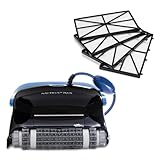
- ULTRA-FINE FILTRATION: Let the Dolphin Nautilus CC Plus Wi-Fi get your pool pristine with added ultra-fine filter panels, providing an additional option of filtration.
- ALWAYS CONNECTED: With the Dolphin Nautilus CC Plus robotic pool vacuum cleaner, schedule your pool cleanings from anywhere with always connected Wi-Fi.
- WALL-SCRUBBING POWER: Our Dolphin robot pool cleaner climbs walls efficiently, ensuring thorough cleaning on any pool surface, no matter the shape or surface type.
- PLUG-AND-PLAY EFFICIENCY: Make pool cleaning a breeze with our simple plug-and-play system. Just plug in, drop into the pool, and power on for a spotless pool in 2 hours.
- THE DOLPHIN LEGACY: Over 40 years of effortless cleaning with unmatched performance, durability, and cost savings. Enjoy your pool, hassle-free!
Before ordering a motor, filter, brush or other replacement, confirm the model, serial number and part number with official support or your dealer. The Maytronics model hub provides access to the manual, FAQs and spare-parts resources; compatibility can vary by CC Plus revision. Maytronics also provides an impeller-cleaning video.
Quick Recap
Best Value

- ACTIVE SCRUBBING: Elevate your pool maintenance with the Dolphin Nautilus AG – active scrubbing brush eliminates manual effort, guaranteeing a pristine pool. Gentle on surfaces, tough on debris. Does not clean walls or waterline.
- EASY FILTER CARE: Effortlessly maintain a clear pool with our user-friendly top-load filter basket. Easily remove debris for crystal-clear water, enhancing your swimming experience.
- PLUG-AND-PLAY EFFICIENCY: Make pool cleaning a breeze with our simple plug-and-play system. Just plug in, drop into the pool, and power on for a spotless pool in 1.5 hours.
- INTUITIVE NAVIGATION: With Smart Navigation Technology, your robot cleans by scanning your pool to determine the most efficient path. Get an ultimate clean no matter your pool shape or surface type.
- THE DOLPHIN LEGACY: Over 40 years of effortless cleaning with unmatched performance, durability, and cost savings. Enjoy your pool, hassle-free!
Rank #4
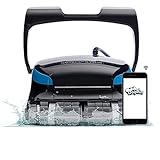
- ALWAYS CONNECTED: With the Dolphin Nautilus CC Supreme robotic pool vacuum cleaner, schedule your pool cleanings from anywhere with always connected Wi-Fi.
- WATERLINE SCRUBBING: Dolphin's powerful technology ensures a spotless waterline. As your robot constantly grips the pool walls, it guarantees a thorough cleaning.
- ACTIVE SCRUBBING: Elevate your pool maintenance with the Dolphin's active scrubbing brush eliminates manual effort, guaranteeing a pristine pool. Gentle on surfaces, tough on debris.
- PRECISE MOVEMENT: The Dolphin features agile steering with Dual Drive. Strategic movements help navigate around obstacles easily no matter how tight the corners of your pool.
- THE DOLPHIN LEGACY: Over 40 years of effortless cleaning with unmatched performance, durability, and cost savings. Enjoy your pool, hassle-free!
Product prices and availability are accurate as of the date/time indicated and are subject to change. Any price and availability information displayed on Amazon at the time of purchase will apply.




