No—not every Eufy camera needs a HomeBase. Battery-powered eufyCam systems generally require one, while many SoloCam, Indoor Cam, Outdoor Cam, floodlight, wired-doorbell, and 4G models can operate independently. HomeBase 3 can still be useful as an optional storage and management hub, so the right answer depends on the exact model, storage method, and features you want.
Start with the camera family
“Eufy camera” covers several different product architectures. Identify the family or product number before buying a hub; the brand name alone is not enough.
As an Amazon Associate I earn from qualifying purchases.
| Camera family | Is HomeBase required? | Typical recording or connection method |
|---|---|---|
| Original eufyCam, eufyCam E, 2, 2C, 2 Pro, and 2C Pro | Yes | HomeBase connection and storage |
| eufyCam S330/eufyCam 3 and S300/eufyCam 3C | Yes for the normal system design | HomeBase 3 |
| SoloCam, including S340 | Usually no; HomeBase 3 may be optional | Built-in camera storage |
| Indoor Cam and many Outdoor Cam models | Usually no | Camera storage, microSD, NAS, or cloud, depending on model |
| Floodlight Cam | Usually no | Camera or microSD storage, depending on model |
| Wired doorbell | Usually no | Doorbell or microSD storage, depending on model |
| Battery doorbell | Model-dependent | HomeBase or local doorbell storage |
| 4G LTE camera | No traditional HomeBase requirement | Cellular connection and camera storage |
| PoE camera | No | PoE NVR |
Use Eufy’s HomeBase 3 compatibility table to check the exact product number and feature support. Eufy identifies the product number on the device or in the app under Device Settings → General → About Device. The first five characters of the serial number identify the product number.
Free tools Windows power users keep installed
One-click scans. No signup required.
Which Eufy cameras require HomeBase?
Eufy’s older battery-camera families—the original eufyCam, eufyCam E, eufyCam 2, 2C, 2 Pro, and 2C Pro—are designed to communicate with HomeBase through Eufy’s proprietary low-power wireless connection. They do not simply join your ordinary household Wi-Fi network. Eufy’s support documentation confirms that these families require a HomeBase: Eufy camera HomeBase requirements.
#1 Best Overall

- 𝐍𝐨 𝐌𝐨𝐧𝐭𝐡𝐥𝐲 𝐅𝐞𝐞𝐬, 𝐌𝐚𝐬𝐬𝐢𝐯𝐞 𝐄𝐱𝐩𝐚𝐧𝐝𝐚𝐛𝐥𝐞 𝐒𝐭𝐨𝐫𝐚𝐠𝐞: Save with 16 GB of built-in storage. Expand up to 16 TB via a portable hard drive (not included) for continuous recordings from all your cameras—with zero hidden costs or monthly fees.
- 𝐌𝐚𝐬𝐬𝐢𝐯𝐞 𝐄𝐜𝐨𝐬𝐲𝐬𝐭𝐞𝐦 𝐟𝐨𝐫 𝐮𝐩 𝐭𝐨 𝟓𝟎 𝐃𝐞𝐯𝐢𝐜𝐞𝐬: Unite your home security. HomeBase S380 supports 16 eufy cameras / doorbells plus 34 sensors. Seamlessly manage a 50-device ecosystem from one intuitive app to cover every corner of your property.
- 𝐁𝐢𝐨𝐧𝐢𝐜𝐌𝐢𝐧𝐝 𝐀𝐈 𝐚𝐧𝐝 𝐃𝐚𝐢𝐥𝐲 𝐒𝐞𝐜𝐮𝐫𝐢𝐭𝐲 𝐁𝐫𝐢𝐞𝐟𝐢𝐧𝐠𝐬: Cut through notification spam with highly accurate facial recognition. HomeBase S380 helps reduce false alarms by distinguishing family from visitors, and delivers Daily Security Briefings to you at a glance.
- 𝐔𝐧𝐜𝐨𝐦𝐩𝐫𝐨𝐦𝐢𝐬𝐞𝐝 𝐏𝐫𝐢𝐯𝐚𝐜𝐲 𝐏𝐫𝐨𝐭𝐞𝐜𝐭𝐢𝐨𝐧: Your data is protected with industry-standard cryptography, including AES-256-GCM and ECC-256 where applicable. It is accessible only to the user, bolstered by BionicMind for ultimate privacy.
- 𝐏𝐫𝐨𝐚𝐜𝐭𝐢𝐯𝐞 𝐈𝐧𝐭𝐫𝐮𝐝𝐞𝐫 𝐃𝐞𝐭𝐞𝐫𝐫𝐞𝐧𝐜𝐞: Stop crimes before they happen. HomeBase S380 features a piercing 100 dB siren, automatically triggered by AI human detection or motion from connected eufy Security devices to instantly scare off unwanted visitors.
The eufyCam S330/eufyCam 3 and S300/eufyCam 3C are also built around HomeBase 3. If you are buying one of these systems, choose a kit that includes the correct hub or budget for it separately.
Some battery doorbells also use HomeBase for local storage. Examples include the Battery Video Doorbell 2K, S210 Video Doorbell, Video Doorbell Dual, and Video Doorbell E340. Doorbell compatibility can vary by model and hardware revision, so verify the exact product number rather than relying only on the product name.
Which Eufy cameras work without HomeBase?
SoloCam
SoloCam is Eufy’s standalone-camera family. A SoloCam S340 can operate without HomeBase using its own local storage. Some SoloCam models can optionally connect to HomeBase 3 for broader ecosystem features, but SoloCams do not generally connect to the older HomeBase 2. See Eufy’s SoloCam and HomeBase compatibility guidance before purchasing an add-on hub.
Recommended Free Tools
Indoor, outdoor, and floodlight cameras
Many wired Indoor Cam, Outdoor Cam, and Floodlight Cam models use storage in the camera or on a microSD card. Some support NAS or cloud backup. HomeBase 3 may be compatible with particular models, but compatibility does not necessarily mean that HomeBase replaces the camera’s normal storage or unlocks every advanced feature.
Rank #2

- MaxColor Night Vision with 2K QHD: Delivers vivid, full-color surveillance footage even in near-total darkness with F/1.0 Aperture for Superior Low-Light Performance. See faces clearly at night, no harsh spotlights or grainy infrared. See exactly what's happening at your doorstep, driveway, or backyard with day-like clarity, whether it's a late-night visitor or a pet wandering the yard.
- Solar-Powered, Worry-Free Security: Built-in solar panel paired with a 13,000 mAh battery keeps each camera running for months without recharging, even through cloudy weeks. The flat, non-peeling solar panel design ensures long-lasting durability. Flexible USB backup charging gives you a safety net when you need it most.
- Local Storage, Zero Monthly Fees: Your bundle comes with HomeBase 2 featuring built-in 16 GB secure local storage with no extra fees and no monthly subscriptions. Keep all footage from both cameras on your own device with complete privacy and control, saving you over $300/year vs. subscription-based alternatives.
- Wireless Freedom, 10-Minute Setup: No wiring, no drilling into walls, no complicated installation. Just mount with two screws, connect to the intuitive eufy Security app, and you're done. Place cameras anywhere across your property: front door, backyard, garage, side yard, wherever you need coverage most.
- Advanced PIR + AI Detection: Upgraded Passive Infrared sensor with intelligent person, pet, and vehicle detection minimizes false alerts while capturing the events that matter across your entire property. Get instant notifications on your phone when activity is detected, so you always know what's happening at home.
Wired doorbells and 4G cameras
Many wired doorbells use their own local storage arrangement. A 4G LTE camera uses cellular connectivity and is not equivalent to a battery eufyCam that needs a HomeBase connection. The exact storage method remains model-specific.
Eufy’s storage compatibility table is the best reference for distinguishing camera storage, HomeBase storage, NAS support, and cloud options.
What HomeBase actually does
It provides the connection for required battery cameras
For required eufyCam models, HomeBase is the bridge between the cameras and the Eufy app. The dedicated low-power connection helps battery cameras avoid maintaining a conventional Wi-Fi connection continuously.
Outdated Drivers Are Slowing You Down
One free scan finds every outdated or missing driver and matches the right update for your exact hardware.Free scan · exact hardware matchPC Slower Than It Used to Be?
A free scan shows the junk files, broken settings and background clutter dragging Windows down - then fixes them in one click.Free scan · Windows 10 & 11It centralizes compatible recordings
HomeBase 3, officially the S380 HomeBase, provides expandable local storage for compatible devices. Eufy advertises capacity of up to 16 TB, but that is an expansion limit—not 16 TB included in the box. The additional storage drive must be purchased and installed separately.
Rank #3

- 4G Backup Connectivity: Stay connected during Internet outages with 4G backup, helping keep your security system online for continuous access and video protection.
- 24-Hour Backup Battery: Built-in battery backup keeps your system running during power outages for up to 24 hours.
- Device Compatibility: Compatible with select eufy devices, including eufy POE cameras, eufyCams, eufy battery doorbells, and eufy sensors.
- Dual Connectivity Options: Compared to HomeBase 3 (Wi-Fi only), HomeBase Pro supports both Wi-Fi and PoE connections for compatible devices, making it ideal for more advanced and reliable security setups. Note: For stable operation, HomeBase Pro itself must be connected to your router using the included Ethernet cable.
- Massive Local* Storage: Secure footage with 32 GB built-in storage, expandable up to 16 TB. Enjoy faster response times and complete data privacy with local processing.
Centralized storage is convenient for a multi-camera property: you can manage recordings in one place instead of maintaining separate memory cards or relying on each camera’s internal capacity.
It manages a wider Eufy system
HomeBase 3 can act as a central management point for compatible cameras, doorbells, sensors, locks, and other Eufy devices. It may also enable BionicMind AI, modes, automation, and cross-device functions. However, Eufy marks support feature by feature. A device may support HomeBase storage while having advanced features listed as under evaluation or not compatible.
It is not automatically a Wi-Fi extender
HomeBase’s main job is connecting and managing compatible Eufy devices. Do not assume that adding one will improve the Wi-Fi range of every standalone camera. A SoloCam may continue connecting directly to your router even when HomeBase 3 is present.
Do these 3 things before closing this tab:
1Repair Windows errors before they cause bigger problems2Scan for outdated or missing drivers - takes under a minute3Clear out junk files and repair common Windows errorsHomeBase 2 versus HomeBase 3
These hubs are not interchangeable universal bridges.
Rank #4

- 𝐑𝐞𝐥𝐞𝐯𝐚𝐧𝐭 𝐑𝐞𝐜𝐨𝐫𝐝𝐢𝐧𝐠𝐬 | The on-device AI determines whether a human or pet is present and only records when an event of interest occurs.
- 𝐓𝐡𝐞 𝐊𝐞𝐲 𝐢𝐬 𝐢𝐧 𝐭𝐡𝐞 𝐃𝐞𝐭𝐚𝐢𝐥 | View every event in up to 2K clarity (1080P while using HomeKit) so you see exactly what is happening inside your home.
- 𝐒𝐦𝐚𝐫𝐭 𝐈𝐧𝐭𝐞𝐠𝐫𝐚𝐭𝐢𝐨𝐧 | Connect your IndoorCam to Apple HomeKit (download our HomeKit User guide in the product information section below), the Google Assistant, or Amazon Alexa for complete control over your surveillance.
- 𝐅𝐨𝐥𝐥𝐨𝐰𝐬 𝐭𝐡𝐞 𝐀𝐜𝐭𝐢𝐨𝐧 | Once motion is detected, the camera automatically locks onto and tracks the moving object. Its pan-and-tilt system delivers 360° coverage, letting you see the whole room clearly from corner to corner.
- 𝐂𝐨𝐦𝐦𝐮𝐧𝐢𝐜𝐚𝐭𝐞 𝐅𝐫𝐨𝐦 𝐘𝐨𝐮𝐫 𝐂𝐚𝐦𝐞𝐫𝐚 | Speak in real-time to anyone who passes via the camera’s built-in two-way audio.
- HomeBase 2 supports several older eufyCam and battery-doorbell families, but SoloCams generally cannot connect to it.
- HomeBase 3/S380 has broader compatibility with newer and some legacy devices, including selected SoloCam models.
- “Compatible” has multiple meanings: check separately for storage, BionicMind AI, modes and automation, and cross-camera tracking.
If you already own HomeBase 2, do not assume it will work with a new SoloCam or newer camera. Check Eufy’s device compatibility information first. For a new required-HomeBase purchase, HomeBase 3 is generally the more useful starting point unless you have a specific reason to choose older hardware.
Where will your recordings be stored?
| Storage method | Best suited to | Main trade-off |
|---|---|---|
| HomeBase storage | Required eufyCam systems and multi-camera households | Requires compatible hub; extra drive may be needed for expansion |
| Built-in camera storage | One or two standalone SoloCams | A stolen or damaged camera may also take its recordings |
| microSD | Supported indoor, outdoor, floodlight, and doorbell models | Cards and maintenance are distributed across cameras |
| NAS | Supported models and users who already operate network storage | Support is model-specific and setup is more involved |
| Cloud backup | Off-site redundancy | May add recurring costs and transmit selected footage or thumbnails to the cloud |
Local recording can avoid a required monthly subscription for many supported systems, but Eufy cameras are not universally cloud-free. Optional cloud backup exists, and some selected features may involve cloud processing or transmission. Check the individual model’s storage and privacy documentation.
Local storage also has a physical-security limitation: a camera, microSD card, or HomeBase can be stolen, damaged, or disconnected at the property. Cloud backup or another off-site copy is worth considering if recorded footage is important.
HomeBase 3 setup and network requirements
HomeBase 3 is not completely wireless during initial installation. Eufy’s current setup path is:
Best Value
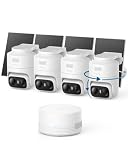
- 𝟑𝟔𝟎° 𝐀𝐈 𝐓𝐫𝐚𝐜𝐤𝐢𝐧𝐠 𝐰𝐢𝐭𝐡 𝐏𝐚𝐧 𝐚𝐧𝐝 𝐓𝐢𝐥𝐭: Deliver 360° property coverage and eliminate blind spots with a single camera. Auto-tracking keeps subjects perfectly centered, providing ultimate home protection. NOTE: For smooth operation of your eufyCam C37, please update your eufy App to version 6.0.10 or newer.
- 𝐙𝐞𝐫𝐨 𝐌𝐨𝐧𝐭𝐡𝐥𝐲 𝐅𝐞𝐞𝐬: Protect your home without cloud subscriptions or hidden costs. Save up to $300 over three years and experience complete security without falling into the subscription trap.
- 𝐔𝐧𝐥𝐨𝐜𝐤 𝐒𝐦𝐚𝐫𝐭𝐞𝐫 𝐅𝐞𝐚𝐭𝐮𝐫𝐞𝐬 𝐰𝐢𝐭𝐡 𝐇𝐨𝐦𝐞𝐁𝐚𝐬𝐞 𝐌𝐢𝐧𝐢: Connect up to 10 cameras in one app to enable human/vehicle/pet/facial recognition, cross-camera tracking, and expandable local storage — a smarter security system, made simple.
- 𝟐𝐊 𝐂𝐨𝐥𝐨𝐫 𝐍𝐢𝐠𝐡𝐭 𝐕𝐢𝐬𝐢𝐨𝐧: Capture crystal-clear details with 2K resolution, delivering 77% more pixels than standard 1080p. The built-in spotlight illuminates faces, license plates, and clothing details in vivid color, even in total darkness.
- 𝐃𝐞𝐭𝐚𝐜𝐡𝐚𝐛𝐥𝐞 𝐒𝐨𝐥𝐚𝐫 𝐏𝐚𝐧𝐞𝐥𝐬 𝐟𝐨𝐫 𝐕𝐞𝐫𝐬𝐚𝐭𝐢𝐥𝐞 𝐈𝐧𝐬𝐭𝐚𝐥𝐥𝐚𝐭𝐢𝐨𝐧: Position each 3W solar panel for optimal sunlight while pointing the cameras exactly where you need them. Never compromise between viewing angle and power. Enjoy continuous charging with zero maintenance, rain or shine.
- Install or update the Eufy Security app and sign in or create an account.
- Open Device Page → + → Add Device → HomeBase 3.
- Select an existing Home profile or create one.
- Connect HomeBase 3 to your router’s LAN port with Ethernet.
- Connect the included 12V/2A power adapter.
- Connect your phone to the same router.
- Wait for the HomeBase LED to change from red to blue.
- Scan the QR code on the underside or enter the serial number manually.
- When prompted, press and hold SYNC/ALARM OFF for two seconds.
- Name the HomeBase and add compatible cameras through the app.
After setup, Eufy says HomeBase 3 can use Wi-Fi when running firmware version v3.1.5.1 or later. The app path is HomeBase Settings → General → About Device → Connection → Wi-Fi Setup. For S330/S300 setup, Eufy specifies 2.4 GHz support rather than 5 GHz. See the HomeBase 3 Wi-Fi instructions.
Eufy gives an approximate HomeBase-to-camera range of about 30 feet, but walls, construction materials, and other obstacles can reduce it substantially. Treat the figure as a support estimate, not a guaranteed installation distance.
When is HomeBase worth buying?
Buy it when:
- Your chosen eufyCam family requires it.
- You are buying an eufyCam 3/S330 or eufyCam 3C/S300 system.
- You want one central storage location for several compatible devices.
- You want expandable local storage.
- You plan to combine cameras with Eufy doorbells, sensors, or locks.
- You need HomeBase-level AI, modes, or automation that your exact model supports.
- You prefer a dedicated low-power connection for battery cameras.
Skip it when:
- You are buying one standalone SoloCam and its built-in storage is sufficient.
- You are using a wired camera with suitable camera or microSD storage.
- You do not need centralized management or cross-device features.
- You prefer a simpler, lower-cost installation and accept that recordings remain on the camera.
When PoE or an NVR makes more sense
HomeBase is designed primarily around Eufy’s wireless camera ecosystem. If you can run Ethernet and need continuous recording, permanent power, or a larger conventional surveillance installation, a PoE camera and NVR system may be a better architecture. Eufy positions its PoE NVR systems separately from HomeBase-based wireless cameras.
The trade-off is installation complexity: PoE requires cabling and network hardware, while a standalone SoloCam or battery system is quicker to deploy.
Troubleshooting common HomeBase problems
The camera will not pair
- Check the exact product number against Eufy’s compatibility table.
- Confirm whether the camera needs HomeBase 2 or HomeBase 3.
- Update the Eufy app and HomeBase firmware.
- Move the camera temporarily closer to HomeBase.
- Finish HomeBase setup before adding the camera.
- Check the 2.4 GHz requirement where applicable.
- Reset the camera only after confirming that account removal or re-pairing is necessary.
HomeBase cannot be added
Check the Ethernet cable, included power adapter, router connection, phone network, LED status, QR code or serial-number entry, and whether the router blocks local device discovery. Eufy’s setup instructions describe the expected sequence.
Recordings are missing
First determine where the model is designed to save recordings: HomeBase, built-in camera storage, microSD, a doorbell, a floodlight, NAS, or cloud backup. A standalone SoloCam will not have HomeBase recordings simply because a HomeBase exists elsewhere in the household.
Bottom line
Buy HomeBase when the camera requires it or when you need centralized storage and Eufy ecosystem features. For a single SoloCam or many wired cameras, it is usually optional and may be unnecessary. Before checkout, verify the exact model number, hub generation, supported storage method, and the specific HomeBase features—not merely whether the product page says “compatible.”
What’s actually slowing this PC down?
Pick the symptom - the matching free tool is one click away.
Quick Recap
Product prices and availability are accurate as of the date/time indicated and are subject to change. Any price and availability information displayed on Amazon at the time of purchase will apply.




