Free tools Windows power users keep installed
One-click scans. No signup required.
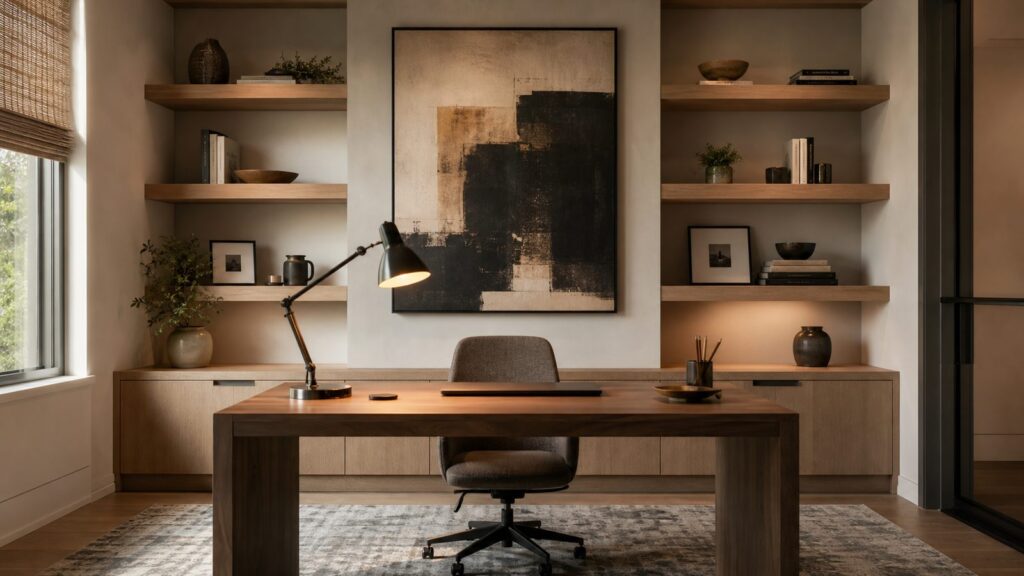
A good Zoom background does two jobs at once: it makes you look composed on camera, and it keeps the room functional when the call ends. The most reliable setups are not the busiest or most expensive. They are usually a matte wall, 4 to 8 feet of depth behind the chair, a few larger objects instead of many small ones, controlled daylight from the side, and a warm front light that keeps your face brighter than the wall behind you.
On our job sites, we treat the first 6 feet behind the desk like a small set. That is where the camera sees finish quality, glare, cords, shelves, wall color, and lighting mistakes. You can create many of these looks with a $100 to $750 staging refresh. A more permanent home-office remodel commonly lands around $2,000 to $22,000 in 2026, depending on electrical, built-ins, flooring, sound control, and finish level.
As an Amazon Associate I earn from qualifying purchases.
If you need a virtual background, Zoom recommends 24-bit PNG or JPG/JPEG files, up to 15 MB, cropped to match your camera ratio. For a 16:9 camera, 1280 by 720 pixels is the minimum safe resolution, and 1920 by 1080 is a cleaner choice. But if you are on video every week, a real background almost always looks more believable than a digital one.
Recommended Free Tools
What Makes a Zoom Background Look Designed
The camera is less forgiving than the eye. A wall that looks pleasant in person can flatten, glare, or turn noisy once compressed through a webcam. The best professional Zoom backgrounds share a few construction and design traits.
#1 Best Overall

- Wider and Higher Green Screen Stand Kit: The tripod has 5 support side rods for creating five different heights from 3.1ft to 8ft, and 3 different width options, up to 7.5ft - perfect for wide-angle lenses, suitable for zoom meetings or video production
- Seamless one-piece design: 8.2x6.5ft polyester green screen with non-reflective front and reflective back for versatile shooting needs. Easy care: machine washable, ironable, and foldable. Laser-cut edges resist fraying, ensuring smoothness and durability
- Portable and Quick Setup: The wider green screen stand is easy to assemble and disassemble. With the included carry bag, both the background stand and the green screen can be conveniently stored, making it easy to stow away or transport
- Wide Applications: This green screen stand kit enables quick and clean chroma key compositing for videos and images. Ideal for home offices, vlogging, TV broadcasting, gaming, VR, Zoom meetings, live streaming, YouTube video recording and more
- Strong and Secure Clipping: The removable pads help clip the green screen securely in any direction. With sturdy springs and a grippy surface, the clips hold anything firmly in place. Note: The orange pads on the clips are detachable and can be rotated
- Depth: Keep 4 to 8 feet between the back of the chair and the main background when the room allows it. Less than 3 feet often makes shelves and art feel crowded.
- Matte surfaces: Use matte or eggshell paint, limewash, Roman clay, matte wallpaper, or low-sheen wood. Save glossy finishes for small accents.
- Face-first lighting: The face should be brighter than the background, ideally by one to two stops. Use a warm front light and avoid strong backlighting.
- Quiet storage: Mail, printers, supplies, cords, and routers should sit below camera height or inside closed storage.
- Scaled decor: One large piece of art reads better than six tiny frames. Shelves should stay 30% to 50% empty so the frame feels calm.
- Glare control: OSHA workstation guidance recommends minimizing glare from windows, desk lamps, overhead lights, and reflective surfaces. Window shades, lamp placement, and matte finishes solve most of it.
15 Designer-Approved Zoom Backgrounds
1. Warm Built-In Bookcase
The look: A painted or stained bookcase behind the chair, with books, storage boxes, pottery, and a few framed pieces. Keep the shelves 30% to 50% open.
Best materials: Painted MDF, stain-grade plywood, white oak veneer, or maple. For a camera-friendly finish, use satin on cabinetry and matte on the wall panels behind open shelves.
Lighting: Add a soft desk light in front of you and low-output shelf lighting only if it does not flare into the camera.
Budget: Styling existing shelves may cost $150 to $750. Semi-custom built-ins commonly push the room into the $3,000 to $12,000 range, with higher costs for hardwood, integrated lighting, and finished electrical.
Virtual vs real: Use a virtual bookcase for occasional formal calls. Build it if you use the room daily and need real storage.
2. Limewash or Roman-Clay Wall
The look: Soft movement, mineral texture, and a wall that feels finished without needing much decor.
Best materials: Limewash, Roman clay, or matte plaster-style coatings in warm gray, clay, taupe, olive-gray, or soft beige-green. Test samples on the actual wall because webcams exaggerate undertones.
Lighting: Side daylight works well because it reveals texture. Avoid direct sun across the wall.
Budget: A DIY paint-style refresh can be a few hundred dollars in materials. Professional prep and specialty coatings cost more, especially if the wall needs skim coating first.
Virtual vs real: This is worth doing in real life. Digital plaster often looks flat unless the image is very high quality.
3. Modern Wood Slat Wall
The look: Vertical wood strips behind the desk, usually 1 to 2 inches wide with narrow reveals. It gives structure without a heavy built-in.
Best materials: White oak, walnut veneer panels, ash, or prefinished acoustic slat panels. Use darker wood carefully; it can make the camera over-brighten your face.
Lighting: Wash the wall lightly from the side, then light your face from the front. Do not put a bright LED strip directly behind your head.
Budget: A small feature wall can be a handyman finish upgrade. Expect material and labor to vary widely by wood species, wall size, and whether outlets need extension rings or relocation.
Virtual vs real: Real slats look better because the shadows move naturally. Anchor panels properly and plan around switches and receptacles.
4. Paneled Wall With Sconces
The look: Box molding, board-and-batten, or flat panel trim with two sconces flanking art or a centerline behind the chair.
Best materials: Poplar, MDF trim, or pre-primed molding with matte wall paint. Keep panel proportions large enough to read on camera.
Lighting: Hardwired sconces are polished, but plug-in sconces can work if cords are concealed safely. Use warm bulbs around 2700K to 3000K.
Rank #2

- Reverse Folding Stand: Highly portable, comes with a carry bag for easy transport. Larger unfolding area, better stability and compact storage than conventional stands. Quick intuitive setup saves time, rock-solid stability for worry-free use
- Height Adjustable: The full stand extends from 121cm to 200cm (4 ft–6.5 ft). After removing the telescopic pole, it adjusts from 82cm to 155cm (2.7 ft–5.1 ft), ideal for tabletop and floor shoot. This flexible design easily adapts to various shooting scenarios
- Upgraded Crossbar: The crossbar measures 1.5m /5ft in length, with its four sections connected by internal ropes. This ingenious design not only makes installation effortless but also enables compact and orderly storage
- High Quality Cloth: Classic green, ideal for chroma key editing. It offers great visual performance. Wrinkle-resistant fabric, machine/hand washable for easy maintenance; low-temperature ironing keeps it smooth—practical for frequent use
- Multi-functional: Ideal for a multitude of applications of content creator, like video shooting, gaming, virtual, streaming media, zoom meeting, podcast, filming
Budget: Trim and paint may be $300 to $1,500 depending on labor and wall prep. Licensed electrical upgrades can add permit and electrician costs.
What’s actually slowing this PC down?
Pick the symptom - the matching free tool is one click away.
Virtual vs real: Use virtual for a one-time board meeting. Build it if the wall is a permanent office backdrop.
5. Calm Japandi Office
The look: Minimal, warm, and restrained: pale wood, off-white walls, one ceramic lamp, woven shade, and hidden storage.
Best materials: White oak, maple, linen textures, matte paint, woven Roman shades, and low-profile cabinets.
Lighting: Soft daylight from the side, diffused by shades. Add a warm front light for afternoon calls.
Crashes, No Sound, or Screen Glitches?
Random freezes, missing sound and display glitches usually trace back to one bad driver. Find and replace yours safely.Free scan · under a minuteWindows Errors? Fix Them Before They Spread
Repair common Windows errors and clear accumulated junk for a smoother, more stable PC - no reinstall needed.Free scan · no reinstallBudget: A staging refresh may run $250 to $1,000 if you already own the desk. Custom storage or millwork can move it into remodel territory.
Virtual vs real: Real is strongly preferred because this style depends on tactile materials and clean proportions.
6. Moody Library
The look: Deep green, charcoal, oxblood, navy-black, or walnut shelving with brass accents and a formal tone.
Best materials: Matte dark paint, walnut veneer, leather pulls, picture lights, and large-scale books or objects. Avoid glossy dark paint behind the camera.
Quick wins for a faster PC:
Fix the driver behind crashes, sound loss and screen glitchesFind Drivers →Repair Windows errors before they cause bigger problemsFix Now →Lighting: This background must stay darker than your face. Add a key light in front of you or the camera will expose for the dark wall and wash you out.
Budget: Paint and styling may be under $750. A real library wall with cabinetry can run several thousand dollars.
Virtual vs real: A virtual moody library is useful for rare formal calls. For daily use, real lighting control matters more than the wall color.
7. Soft Coastal Neutral
The look: Light, relaxed, and professional without looking like a vacation rental. Think warm white, pale blue-gray, grasscloth texture, oak, and linen.
The Tool Desk
Outbyte Driver Updater FREEFix the driver behind crashes, sound loss and screen glitchesFind Drivers →Outbyte PC Repair FREEClear out junk files and repair common Windows errorsFree Scan →Best materials: Matte paint, woven shades, light wood shelves, and one oversized coastal artwork. Avoid tiny shells and themed clutter.
Lighting: Use sheer or woven shades to soften window glare. Do not sit with an uncovered bright window directly behind you.
Budget: $200 to $1,200 for paint, shades, art, and lamps, depending on quality.
Virtual vs real: Real is easy to stage and usually more convincing than a downloaded beach-house image.
8. Biophilic Plant Wall
The look: A few healthy plants, natural material, and organic color. The goal is wellness, not a jungle.
Best materials: Matte green-gray paint, wood shelf, ceramic planters, and two or three large plants. Use faux plants only if they are high quality and not too close to the camera.
Rank #3

- ✅【Larger Size】 Our professional chroma key green screen is easy to contain two people with its large size of 78.7”(W) x 82.7”(H).
- ✅【Premium Fabric】 Wrinkle resistant screen made from composite polyester fabric has the features of good resilience, which is free from wrinkles and defects. And is manufactured using sustainable practices, can recycled materials and reduced carbon emissions.
- ✅【Easy Set-Up】 You can easily set it up in seconds with a few steps. Position the legs flatly, lift the handle to the appropriate height.
- ✅【Convenient Storage】 Simply retract the background into the hard case, and it can be folded to small size to put underneath everywhere you want. Transport subjects everywhere in a moment.
- ✅【Wide Application】 This green background can be well used for video conferencing, YouTube videos, music videos, live-screaming, photography, Tik Tok, or interviews. An indispensable partner for your media career.
Lighting: Plants need real light, but direct sun can create harsh contrast. Use side light with shades.
Budget: $150 to $900 for plants, planters, shelves, and lighting.
Do these 3 things before closing this tab:
1Repair Windows errors before they cause bigger problems2Scan for outdated or missing drivers - takes under a minute3Clear out junk files and repair common Windows errorsVirtual vs real: Real plants help the room feel grounded. Virtual plant walls often clip around hair and glasses.
9. Curated Art Ledge
The look: One or two picture ledges with layered large art, a lamp, and a few objects. It is flexible and renter-friendly if installed correctly.
Best materials: Solid wood ledges, large matte prints, framed textile art, or canvas. Avoid glass directly facing the camera because it reflects monitors and windows.
Lighting: Use soft front light and keep framed glass out of the glare path.
Windows Errors? Fix Them Before They Spread
Repair common Windows errors and clear accumulated junk for a smoother, more stable PC - no reinstall needed.Free scan · no reinstallCrashes, No Sound, or Screen Glitches?
Random freezes, missing sound and display glitches usually trace back to one bad driver. Find and replace yours safely.Free scan · under a minuteBudget: $100 to $750 for ledges, anchors, frames, and art.
Virtual vs real: Real is better because you can change art seasonally without a remodel.
10. Textured Wallpaper
The look: Grasscloth, linen texture, small-scale geometric paper, or a quiet mural that adds depth.
Best materials: Peel-and-stick for lower-cost updates; grasscloth, silk, and designer wallcoverings for higher-end rooms. Textured papers look rich on camera but can be harder to align and repair.
Quick wins for a faster PC:
Repair Windows errors before they cause bigger problemsFix Now →Fix the driver behind crashes, sound loss and screen glitchesFind Drivers →Lighting: Use angled light to show texture, but avoid shiny or metallic papers unless tested on camera.
Budget: Costs vary heavily by material and installation. Professional installation is worth pricing when seams will sit inside the video frame.
Virtual vs real: Use real wallpaper for daily calls. Virtual wallpaper can look too flat unless the pattern scale is perfect.
11. Minimalist Plaster Niche
The look: A recessed niche, arched opening, or shallow display bay with one vase, one sculpture, or a stack of books.
Best materials: Drywall, plaster finish, Roman clay, or smooth matte paint. Keep the niche simple and symmetrical.
Lighting: A small recessed or concealed light can work, but plan heat, access, and electrical code requirements.
Budget: This is usually beyond weekend styling. A niche can involve framing, drywall, finish work, and possibly electrical.
Virtual vs real: Virtual works for concept testing. Build it only when it fits the architecture of the room.
Free tools Windows power users keep installed
One-click scans. No signup required.
12. Traditional Millwork
The look: Wainscoting, crown, chair rail, inset panels, and a classic paint color. It is formal without needing many objects.
Rank #4

- Greenscreen Backdrop: this green screen cloth is great for covering out the real background and completing background replacement through post-processing. Idea for chroma keying, live streaming, photo and video shooting.
- Easy to Use: the green backdrop with hook & loop straps can be easily attached to your chair with back-rest and easily removed when not in use. No additional brackets are required and is recommended for use with chairs. (Chair NOT Included)
- Size Information: this round photography backdrop is approximately 43 in / 110 cm diameter when unfolded, suitable for covering smaller backgrounds or photographing smaller projects. Ideal for personal and small studio use.
- Portable & Foldable: the green screen backdrop features a collapsible design, can be easily folded and stored into the included carry bag to save space. The portable design makes it perfect for travel and outdoor photography.
- Durable and Reusable: made of quality polyester fabric and steel ring, the green screen background is lightweight, durable and won't wrinkle easily after repeated use. With a even and bright color help to easily identify in post-processing.
Best materials: Poplar or MDF trim, quality primer, and durable matte or eggshell wall paint. Crisp caulk lines matter on camera.
Lighting: Use balanced front lighting and avoid overhead-only light, which creates shadows under the eyes.
Budget: $500 to $2,500 for a focused wall is common depending on trim complexity, wall size, and labor rates.
Virtual vs real: Real millwork is worth it if the room supports traditional detailing. A virtual version can feel believable only if the perspective matches your camera height.
13. Compact Apartment Corner
The look: A small desk angled off a corner, with one vertical shelf, a fabric pinboard, a curtain panel, or a painted half-wall behind it.
Best materials: removable wallpaper, freestanding shelves, clamp lights, floor lamps, cord raceways, and lightweight art.
Lighting: Use a front-facing desk lamp or monitor light bar. In apartments, window glare is often the main issue.
Do these 3 things before closing this tab:
1Repair Windows errors before they cause bigger problems2Scan for outdated or missing drivers - takes under a minute3Clear out junk files and repair common Windows errorsBudget: $100 to $600 can make a major difference if you focus on the camera frame only.
Virtual vs real: Real is usually easier than fighting poor virtual-background edge detection in tight spaces.
14. Executive Walnut Office
The look: Walnut desk, walnut shelving, tailored rug, closed storage, and one strong piece of art. This is the most formal option.
Best materials: Walnut veneer, leather, wool rug, matte wall paint, and integrated cable management. Keep monitors and printers out of the background.
Lighting: Use layered lighting: front key light, shaded lamp, and dimmable room light. Avoid recessed cans directly above the chair.
Budget: Furniture-only upgrades may start in the low thousands. A full executive office with built-ins, electrical, lighting, and flooring can reach the upper end of the $2,000 to $22,000 home-office remodel range or beyond.
Virtual vs real: Use virtual for rare investor or legal calls. Build it if the office is client-facing and part of your professional identity.
15. Construction-Finished Real Home-Office Backdrop
The look: A purpose-built backdrop with proper outlets, dimmable lighting, acoustic treatment, hidden storage, finished trim, and a durable desk wall.
Best materials: Matte paint, acoustic panels wrapped in fabric, built-in lower cabinets, durable flooring, and code-compliant electrical.
Lighting: Plan outlets for lamps, monitor lights, camera power, and charging. Add dimmers where allowed and appropriate.
Budget: This is a true remodel. Many 2026 home-office projects fall around $2,000 to $22,000, with about $7,500 often cited as an average-type figure for midrange work.
Virtual vs real: If you work from home full time, this is the best long-term option. It improves calls, storage, comfort, and resale presentation.
Cost Comparison: Virtual, Styled, or Built
The right budget depends on how often you are on camera. A downloadable background is fine for occasional calls. A styled wall is the best value for most homeowners. A remodel makes sense when the office also needs storage, lighting, power, sound control, or a more permanent professional setting.
| Approach | Typical 2026 Cost | Best For | Watchouts |
|---|---|---|---|
| Virtual Zoom background | Free to paid template or stock subscription | One-off calls, temporary branding, travel | Image rights, fake-looking scale, edge clipping around hair or glasses |
| Simple staging refresh | $100-$750 | Paint, art, plants, lamps, shelves, cord control | Busy shelves, glare, poor camera depth |
| Finish upgrade | $500-$2,500+ | Trim, wallpaper, slat wall, better shades, acoustic panels | Wall prep, seams, anchoring, outlet adjustments |
| Home-office remodel | $2,000-$22,000 commonly | Built-ins, lighting, electrical, flooring, sound control | Permits, inspections, lead times, custom cabinetry cost |
| Interior designer support | $150-$500 consultation; $2,000-$15,000 traditional project fees excluding furniture | Finish selections, layout, furniture, camera styling | Scope clarity, purchasing fees, local market variation |
How to Build a Camera-Friendly Background
Start With the Camera Frame
Before buying furniture or trim, open your webcam and mark the visible wall area with painter’s tape. Most homeowners only need to improve a zone 6 to 8 feet wide and 4 to 6 feet deep behind the chair. That is far cheaper than remodeling the whole room.
Set the camera at or slightly above eye level. If the camera points upward, shelves feel towering and ceilings dominate the frame. If it points down, the desk surface, keyboard, and clutter become the background.
Best Value

- 2-Sided Use Backdrop: Hemmotop 5x7 ft green screen backdrop made of polyester material, pure green color, the front side non-reflective, the back side reflective design, can meet different shooting needs and make sure of chromakey effect
- Good Edge Treatment & Single One-Piece: High temperature laser cutting design, the greenscreen with uniform and beautiful edges without detachment. Seamless one-piece design, offer a good vertical feeling, is ideal for photoshoot, video or image editing
- Application: The green screen backdrop is your ideal choice for photo studio photography, home photoshoot, broadcasting, interview, zoom meeting, live streaming, Gaming, YouTube video recording, video conferencing, music videos, Tik Tok, etc.
- Easy to Use and Care: Features a convenient rod pocket (on the 5ft side) for quick mounting on any backdrop stand. (Note: Stand not included). The green backdrop is also machine washable, ironable, foldable, durable, light weight, easy to store and carry
- Package Includes: Greenscreen background x 1. Note: The green screen background was folded shipped, if there are wrinkles, please iron the green backdrop with steam iron before use. After washing, please smooth the green backdrop and lay it flat
Keep the Background Darker Than Your Face
Webcams expose for the whole scene. If the wall behind you is bright white and your face is dim, the camera often underexposes you. A warmer medium wall color, a shaded window, and a front light solve the problem. Good Zoom colors include mushroom, warm gray, clay, muted green, soft blue-gray, plaster white, and deeper library tones when front lighting is strong.
Recommended Free Tools
Use Fewer, Larger Objects
Small decor looks busy after video compression. Use one large art piece, two substantial shelf objects, a plant with a clear silhouette, or a single ceramic lamp. A shelf that is half empty usually looks more expensive than a shelf filled edge to edge.
Control Glare and Echo
Glare comes from windows, framed glass, glossy paint, polished desks, and overhead lights. Echo comes from hard floors, bare walls, and empty rooms. Add fabric shades, a rug, curtains, upholstered seating, acoustic panels, or books. OSHA workstation guidance also recommends maintaining air circulation and avoiding seating directly under air-conditioning vents, which matters when you spend hours in the office.
When to DIY vs When to Hire a Pro
A weekend DIY refresh is appropriate when the work is cosmetic: painting one wall, hanging art, styling shelves, adding a floor lamp, using removable wallpaper, installing cord raceways, or adding freestanding storage. Plan one to three days, including paint drying and room reset.
Hire a handyman or finish carpenter for trim walls, slat panels, heavy shelves, wall-mounted cabinets, and precise wallpaper prep. The risk is not just appearance. Shelves, cabinets, and slat systems need proper anchoring into studs or rated blocking, especially if they will hold books, printers, or equipment.
The Tool Desk
Outbyte Driver Updater FREEFix the driver behind crashes, sound loss and screen glitchesFind Drivers →Outbyte PC Repair FREERepair Windows errors before they cause bigger problemsFix Now →Bring in a licensed electrician for hardwired sconces, new outlets, recessed lighting, dedicated circuits, or changes inside electrical boxes. Permit requirements vary by city, county, and scope. Small electrical permits may be under $300 in some areas, while larger remodeling permits can run roughly $500 to $2,000 or more once valuation, plan review, and inspections are included.
Use a design professional when you need help with room layout, finish coordination, custom cabinetry, or a camera-ready office that still fits the rest of the house. A paid consultation can be enough for paint, furniture, and lighting direction. Full-service design costs more, but it can prevent expensive mismatches in millwork, scale, and furnishings.
Safety, Permits, and Indoor Air Quality
Permits vary by jurisdiction, so check the local building department before work begins. Common triggers include new electrical wiring, relocated outlets, hardwired lighting, structural changes, framing changes, plumbing work, HVAC modifications, and some built-in installations. A plug-in lamp rarely creates a permit issue. A new hardwired sconce often does.
Electrical planning matters in modern home offices. Computers, monitors, chargers, printers, routers, task lights, cameras, and standing desks can overload a poorly planned corner. Depending on local code and the room type, AFCI or GFCI protection may apply when circuits or receptacles are added or modified. A qualified electrician can confirm what is required in your area.
What’s actually slowing this PC down?
Pick the symptom - the matching free tool is one click away.
Indoor air quality also deserves attention. EPA guidance identifies paints, solvents, wood preservatives, aerosol sprays, cleansers, and similar products as sources of volatile organic compounds. Use low-odor or low-VOC finishes where practical, ventilate during and after work, and give finishes time to cure before heavy daily use. This is especially important in a closed office where you may sit for eight hours at a time.
Common Mistakes That Make Zoom Backgrounds Look Cheap
- The chair is too close to the wall. Add depth whenever possible. Even 4 feet helps.
- The wall is too bright. A bright background can make your face look dark.
- Everything is glossy. Gloss paint, glass frames, polished desks, and shiny wallpaper create glare.
- The shelves are overloaded. Keep open space. Use larger objects and fewer of them.
- The lighting is behind you. Windows and lamps behind the chair pull attention away from your face.
- Cords are visible. Cable trays, raceways, grommets, and lower cabinets make the room feel finished.
- Electrical work is treated as decor. Hardwired fixtures and new outlets are construction work, not styling.
- The virtual background does not match the camera. Wrong perspective, wrong resolution, or unrealistic scale makes a digital image obvious.
The Best Choice for Most Homes
For most homeowners, the best Zoom background is not a full remodel. It is a real, staged wall with matte paint, side-controlled daylight, a warm front light, one large visual anchor, hidden storage below camera height, and enough depth behind the chair. That usually costs far less than built-ins and looks better than a fake background.
If you are on video daily, upgrade the room in layers: first lighting and glare control, then paint or texture, then storage, then electrical and built-ins if the office still feels underpowered. That order gives you the biggest visible improvement before you commit to the most expensive work.
Frequently Asked Questions
What makes a Zoom background look professional?
A professional Zoom background has 4 to 8 feet of depth behind the chair, matte finishes, controlled glare, simple storage, and lighting that keeps your face brighter than the wall. Large art, quiet shelves, and hidden cords usually matter more than expensive decor.
What’s actually slowing this PC down?
Pick the symptom - the matching free tool is one click away.
Are virtual Zoom backgrounds better than real home-office backgrounds?
Virtual backgrounds are useful for occasional calls, travel, or temporary branding. A real background is better for daily use because it has believable depth, natural lighting, and fewer edge-detection problems around hair, glasses, and hands.
What size should a Zoom background image be?
Zoom recommends 24-bit PNG or JPG/JPEG images up to 15 MB, cropped to match the camera aspect ratio. For a 16:9 camera, 1280 by 720 pixels is a safe minimum, while 1920 by 1080 usually looks cleaner.
How much does it cost to create a designer-looking home-office background?
A simple staging refresh often costs about $100 to $750. Trim, wallpaper, lighting, or finish upgrades may run $500 to $2,500 or more. A fuller home-office remodel commonly falls around $2,000 to $22,000 in 2026, depending on scope.
Do I need a permit to add lighting, outlets, or built-ins?
Permit requirements vary by jurisdiction and scope. New wiring, relocated outlets, hardwired sconces, recessed lights, structural changes, and some built-ins may require permits and inspections. Check the local building department before work begins.
How do I reduce glare and echo in a home office?
Use matte finishes, fabric shades, side-controlled daylight, non-glass art, rugs, curtains, upholstered furniture, and acoustic panels. Avoid sitting with a bright window or glossy framed artwork directly behind you.
Quick Recap
Product prices and availability are accurate as of the date/time indicated and are subject to change. Any price and availability information displayed on Amazon at the time of purchase will apply.

