Construction robots are not automatically cheaper than conventional equipment. They create the strongest business case when a task is repetitive, hazardous, high-volume or tightly coordinated with digital models. For small, irregular or frequently changing work, a crew using flexible conventional tools often remains less expensive and easier to deploy. The right comparison is total installed cost, useful output, schedule effect, quality, safety exposure and utilization—not a robot’s purchase price or a vendor’s fastest speed claim.
The short answer: choose the process, not the machine
Robotic construction equipment is a task-specific production system. It can remove labor from overhead drilling, repetitive layout, heavy handling or other predictable cycles, but it still needs accurate data, site preparation, supervision and recovery when conditions differ from the model. Traditional equipment has a lower entry cost in many cases and can move between unrelated tasks, especially when the contractor already owns it.
As an Amazon Associate I earn from qualifying purchases.
Evidence shows both outcomes. A 2022 Scientific Reports study covering 12 projects and 10 robots found an average 13% cost reduction, but only six cases reduced cost while four increased total cost. An American Society of Civil Engineers (ASCE) cost framework published in 2024 found no general current cost advantage for robotic construction; in the cases where robots were cheaper, they needed to be more than 2.9 times as efficient as human workers. A 2025 multi-trade layout case did achieve major savings because one robot served a large volume of coordinated work.
That variation makes a hybrid decision—robot for the repeatable bottleneck, conventional tools for variable work—the usual starting point.
#1 Best Overall
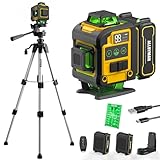
- WARM TIPS: Please press the battery firmly to ensure it is securely installed and to keep the product stable. Adjusting to manual mode will stop the beeping sound.
- 【4x360° Full Room Laser Coverage】Designed for precise leveling and alignment, this self leveling laser level projects 16 bright green laser lines with 4x360° coverage for accurate tile installation, picture hanging, cabinet mounting, flooring, ceiling alignment, and wall framing. Ideal for home renovation, construction, and DIY projects.
- 【High Visibility Green Laser & Outdoor Pulse Mode】Equipped with high-brightness Class II green laser beams for clear visibility in both indoor and bright working environments. Pulse mode extends the working range up to 150ft with a laser receiver (not included), making it perfect for outdoor construction, large rooms, and long-distance alignment applications.
- 【Self-leveling Mode & Manual Mode】Switch effortlessly between auto-leveling and manual modes with a simple long press of the mode switch. When the pendulum is unlocked, the laser level will automatically level within 3°. If the surface is tilted more than 3°, it will continue to flash and beep to remind you that it is not level. While the manual mode allows projection on tilted surfaces, enhancing versatility.
- 【2-in-1 Accessories】Enhance your setup with our included 37.5-inch tripod and magnetic mount, allowing for easy adjustment and positioning of the laser level. This combination boosts usability and efficiency for a wide range of applications.
What counts as a construction robot?
Construction robots combine a drive system, sensors, software and a defined work tool. They may be autonomous, semi-autonomous or remotely supervised. Their operating envelope is narrower than a general-purpose machine’s: the robot is optimized for a particular action, geometry, material and workflow.
Layout and drilling robots
A layout robot reads BIM or CAD information and marks locations on a slab. A drilling robot follows coordinated points to drill repetitive holes, often overhead. These systems depend on a controlled coordinate system, known reference points and current model revisions.
How traditional equipment fits the comparison
Traditional equipment is crew-operated gear such as laser layout tools, total stations, GPS rovers, drills, lifts and material-handling machines. A robotic total station still requires a person to set up, aim and verify points; it belongs in the conventional-tool comparison when it is used as a flexible surveying instrument rather than as part of an autonomous workflow.
Quick wins for a faster PC:
Fix the driver behind crashes, sound loss and screen glitchesFind Drivers →Clear out junk files and repair common Windows errorsFree Scan →Scan for outdated or missing drivers - takes under a minuteDriver Scan →Cost comparison: use total installed cost
The sticker price of a robot is only one line in the estimate. Include every cost required to turn a design file into accepted work, then compare that total with the labor, equipment and delay costs of the conventional method.
| Cost component | Robotic method | Traditional method | Questions to quantify |
|---|---|---|---|
| Equipment | Purchase or rental, attachments, batteries and charging equipment | Owned or rented tools, vehicles, lifts and consumables | What is paid per project, shift or month? |
| Mobilization and setup | Delivery, site access, calibration, control points and protected work area | Tool transport, setup and crew staging | How long before productive work starts? |
| Data preparation | BIM/CAD cleaning, coordinate alignment, export and revision control | Field interpretation and manual measurements | Who prepares and checks the file, and at what labor rate? |
| Labor | Operator, supervisor, model technician and exception-recovery labor | Layout, drilling or handling crew hours | Which hours disappear, and which new roles appear? |
| Software and support | Subscriptions, updates, training, service contracts and manufacturer support | Usually limited to tool calibration, maintenance and training | Are fees recurring, and can data be exported? |
| Downtime and maintenance | Charging, sensor faults, blocked paths, repairs and waiting for support | Breakdowns, operator availability and ordinary maintenance | What is the recovery time for a failure? |
| Quality and rework | Potentially fewer layout or drilling errors, but model or calibration errors can propagate | More direct field judgment, with human measurement and transcription risk | What defect, inspection and rework rates are realistic? |
| Residual value and utilization | Value depends on hours used across a project pipeline | General-purpose tools can often be redeployed across tasks | How many productive shifts will the asset receive? |
Calculate break-even utilization by dividing the robot’s incremental fixed and setup costs by the labor, delay, rework and safety costs it removes per productive shift. A robot that sits idle between projects can lose its apparent labor advantage even when its cycle time is excellent.
What the cost evidence actually shows
Multi-project evidence: averages conceal risk
The 2022 study of 12 projects and 10 robots reported a 13% average cost reduction. Six cases lowered cost and four increased total cost. The result is useful as a warning against a universal payback claim: project conditions, utilization, task selection and integration quality changed the outcome.
Rank #2

- 【Ultra-Bright Green Beam & High-Precision Accuracy】Powered by an advanced green laser diode, this tool delivers 4X the brightness of standard red lasers (laser level 360 self leveling). The vivid green cross-line remains clearly visible indoors up to 100ft, even in well-lit conditions. Enjoy professional-grade precision with ±1/9 inch accuracy at 33ft (±3mm @10m) and a wide 110° projection angle. Whether tiling a wall or installing shelving, achieve perfect alignment with zero guesswork. (Class II <5mW, IP54 dust/water resistant),
- 【2-in-1 Smart Modes: Perfect for Pros & DIYers】Experience ultimate versatility with our simple pendulum lock. Unlock for Self-Leveling Mode (self leveling laser level) – the laser automatically levels within ±4°. If the surface is tilted beyond 4°, the laser line flashes continuously to alert you – this is a safety feature, not a malfunction. Press the power button for Manual Mode to project lines at any angle, ideal for sloped staircases, creative wall patterns, or custom layouts. Note: In manual mode, the laser flashes once every 5 seconds as a normal reminder that the pendulum is locked and lines are not level references.
- 【Compact, Rugged & Job Site Ready】Built tough for the job site, this portable laser level features a palm-sized design with soft-grip body. It boasts IP54 dust/water resistance and can withstand drops from up to 30 inches, ensuring long-lasting durability. Compact and lightweight, it's easy to carry and store. Note: The protective acrylic window may cause tiny gaps in laser lines—this is normal and does not affect accuracy.
- 【Complete Kit for Instant Use & 24-Month Peace of Mind】Your purchase includes everything you need, right out of the box: 1x 100ft Green Laser Level, 1x Adjustable Tripod, 2x AA Batteries, 1x User Manual, and 1x Carry Bag. Perfect for picture hanging (laser level for picture hanging), tile installation, decoration, and DIY construction. We stand behind our quality with a 24-month warranty and 24/7 online technical support – your satisfaction is our priority.
ASCE life-cycle framework
The 2024 ASCE analysis identified high purchase cost and uncertain life-cycle cost as the main barriers to adoption. It found no broad current cost advantage for robotic construction. In the studied cases where robotic work did cost less than traditional work, the robots required more than 2.9 times the efficiency of human workers. That threshold reflects the full framework, not a guaranteed productivity multiplier for every product.
Free tools Windows power users keep installed
One-click scans. No signup required.
A high-volume layout example
In a 2025 Construction Robotics case study, multi-trade robotic layout saved 1,749 labor hours and approximately $131,000 under the case assumptions. The robotic process took 79.4 working days compared with an estimated 97 days for the traditional process. The study calculated that a rental price above $1,900 per day would exceed traditional cost under those same assumptions. The threshold changes with wage rates, scope, model preparation, mobilization, utilization and the negotiated rental rate; it is not a general market price.
Productivity and schedule: measure the whole workflow
A robot can accelerate a project by removing handoffs and waiting, not merely by moving its tool faster. Compare the complete cycle: model preparation, setup, calibration, productive passes, inspections, corrections, demobilization and downstream release of the work area.
| Evidence or metric | Reported result | How to interpret it |
|---|---|---|
| Scientific Reports multi-project study (2022) | 25–90% reduction in repetitive site work; 2.3× average schedule acceleration and 1.4× median | The median is lower than the average because a few very strong cases lift the mean. |
| Dusty multi-trade layout case (2025) | 68% lower total labor hours and 18% shorter total duration | These are case-specific results from coordinated, high-volume layout. |
| Dusty FieldPrinter vendor claims | 10,000–15,000 square feet per day with one person; up to 1/16-inch accuracy at 600 DPI; up to 10 times faster than manual layout | These are vendor claims. Validate them on the target slab, crew, model and site conditions. |
The same 2022 study reported a 55% average accuracy improvement and more than 50% average rework reduction. Treat those as study averages, not guaranteed project results. A robot can repeat a correct instruction extremely well—and repeat an incorrect coordinate just as consistently.
Safety and quality benefits—and their boundaries
Automation is most compelling where it reduces exposure to overhead drilling, dust, repetitive motion, heavy handling, confined spaces or prolonged awkward postures. NIOSH has linked automation’s potential to productivity, musculoskeletal-disorder reduction and fewer human-error opportunities. The multi-project evidence reported a 72% average reduction in hazardous-task time.
Do these 3 things before closing this tab:
1Repair Windows errors before they cause bigger problems2Fix the driver behind crashes, sound loss and screen glitches3Clear out junk files and repair common Windows errorsSafety risk does not disappear. Crews still work around moving equipment, charging systems, tools and temporary obstacles. Establish exclusion zones, traffic rules, emergency stops, inspection points and a named person responsible for the robot during each shift.
Rank #3

- MULTI-PURPOSE LASER: Grading, excavating and general construction projects are perfect applications for the RL-H5A. With the IP66 rating, the RL-H5A is "job site tough" and can withstand dust, a sudden shower and even torrential rainfall.
- EASY TO USE: With electronic self-leveling, you press the power button and go right to work in seconds. If the RL-H5A gets disturbed on the job it relevels itself automatically. The self-leveling motors are accurate to ±10 arc seconds.
- LONG RANGE WITH HIGH ACCURACY: Need to shoot elevations up to 800 m from your laser? No problem - this instrument has the power and range to cover a 800 m diameter job site.
- KIT COMPONENTS: includes the RL-H5A laser and LS-80 Receiver, Sensor holder and Carry case.
Quality depends on a controlled information chain. In the Dusty case, incorrect uploaded information could create incorrect layout. The case recommends automated coordinate-system and quality-control checks. Keep a human sign-off before a model revision reaches the machine, after calibration, when an obstacle changes the route and before work is accepted by the next trade.
Where construction robots struggle
Changing site conditions
Construction sites are not factories. Clutter, weather, incomplete slabs, wet surfaces, moving lifts, stacked materials and trade interference can invalidate assumptions made during programming. A route that was clear during morning setup may be blocked at lunch.
Data and coordinate errors
Layout and drilling robots require current BIM or CAD files, a known coordinate system, reliable control points and disciplined revision management. A mismatch between the model and field coordinates can create systematic error across an entire area. Lock the approved revision, record the file identifier and verify a sample of points before releasing a full run.
Recommended Free Tools
Reach, payload and setup limits
Reviews of construction robotics identify reach, payload and setup dimensions as hard constraints. Large structures may require multiple setups, extensions or gantries. Each setup adds calibration, access and verification time; the robot’s nominal speed does not include those transitions unless the supplier states that it does.
Integration and vendor dependence
Confirm supported file formats, export rights, application-programming interfaces, software update policy, training, service coverage and maintenance terms. A platform that cannot accept your coordination workflow can shift labor from the field to the office or create a lock-in problem when the project changes.
Human factors
Robots change work roles rather than eliminating supervision. Operators prepare files, establish control, monitor the work, manage exceptions and coordinate with other trades. Budget that labor explicitly; otherwise the business case will overstate savings.
Rank #4

- HIGHLY VISIBLE: Vibrant green laser lines and plumb spot are easy to see and have a working range of up to 75-Feet
- CLASS 2 CROSS LINE LASER LEVEL WITH POWER OUTPUT <1mW: Projects horizontal and vertical lines for leveling and alignment jobs around the house and on the job
- BASE CUT-OUT: Allows for direct alignment on 2 x 4's and metal tracks without a tripod, providing flexible positioning of the laser level
- COMPACT AND LIGHTWEIGHT: Easy to use in tight spaces, and easy to store with the included soft carrying case
- AUTO OUT-OF-LEVEL DETECTION: Laser level tool flashes when no longer level, ensuring accuracy on the job
Representative systems and conventional alternatives
Dusty Robotics FieldPrinter
FieldPrinter is a BIM-to-field layout robot designed to print walls, MEP penetrations, embeds, callouts and QR codes on slabs. The manufacturer describes it as “The construction robot built for layout.” Its published claims include up to 10 times the speed of manual layout and up to 1/16-inch accuracy at 600 DPI. It is used in data centers, healthcare, industrial, multifamily and other commercial work. Treat the speed and accuracy figures as vendor claims and run a measured pilot on your own floorplate, surface and model standards.
Hilti Jaibot
Jaibot is a semi-autonomous, cordless mobile ceiling-drilling robot for MEP and interior-finishing work. Hilti says it uses BIM data, provides dust removal and marking, does not require expert skills and can operate for up to eight hours between charges. Its strongest fit is repetitive overhead drilling where reducing physical strain and exposure has value. Confirm ceiling access, anchor or drill specifications, dust-management requirements and the handoff process for exceptions.
Conventional layout equipment
Laser layout tools, robotic total stations and GPS rovers remain practical when BIM is incomplete, layout volume is small or one crew needs a tool that can be redeployed across varied tasks. Their flexibility can outweigh the throughput advantage of a dedicated robot on short, changing or geographically dispersed jobs.
Independent reader supportYour contribution helps us test, update, and keep practical guides available for everyone.Buy, rent or keep using traditional equipment?
Buy when utilization is predictable
- You have a pipeline with enough repeatable work to keep the robot productive between projects.
- Your teams can maintain model standards, calibration procedures and operator coverage.
- The business case remains positive after software, training, maintenance, downtime and residual value are included.
Rent or use a service when demand is intermittent
- You need to test a workflow before committing capital.
- A single large project provides concentrated volume but the broader pipeline is uncertain.
- The rental or service rate includes training, setup and support, and the rate stays below the project-specific break-even threshold.
Keep conventional equipment when flexibility wins
- The task is low-volume, nonstandard or likely to change daily.
- The project lacks coordinated BIM, dependable control points or suitable access and power.
- A crew already owns versatile tools and can complete the work without creating schedule or safety bottlenecks.
Use a hybrid workflow
Many projects can reserve the robot for repetitive, high-volume zones while crews use lasers, total stations or manual tools for edge conditions, late changes and small corrections. Define the handoff: who verifies robot output, who records deviations and which tool is authorized for final acceptance.
A decision framework for a real project
| Axis | Questions to answer before approval |
|---|---|
| Economics | What is total installed cost, and what utilization produces break-even? |
| Productivity | How many labor hours, crew members and calendar days are actually removed after setup and supervision? |
| Quality | What accuracy, defect, rework and inspection evidence exists on projects with similar geometry and trade density? |
| Safety | Which hazardous exposures are removed, and what new interaction risks are introduced? |
| Readiness | Are approved BIM/CAD files, control points, access, power, charging and trained operators available? |
| Flexibility | Can the system handle design changes, obstacles, weather and nonstandard geometry without excessive manual completion? |
| Support | What training, service response, maintenance, software and data-export terms apply? |
How to run a pilot without fooling yourself
- Define one comparable scope. Select a floor, ceiling zone or repetitive task that the conventional crew can complete and that the robot can execute without special treatment.
- Record a baseline. Measure crew size, paid labor hours, setup, output per shift, waiting, defects, rework, schedule effect, safety observations and direct costs using the existing method.
- Freeze the information. Identify the approved model revision, coordinate system, control points and acceptance tolerances. Document who may authorize a revision.
- Price the full robotic process. Include mobilization, model preparation, calibration, operator and supervisor time, charging, consumables, maintenance, support, downtime and manual completion.
- Run the same scope. Do not compare a robot on an easy area with a conventional crew on a congested one. Keep the production target and quality standard equivalent.
- Log exceptions as production data. Record blocked paths, sensor failures, coordinate corrections, waiting for other trades and every manually completed item.
- Verify quality independently. Check representative points with an accepted instrument and track downstream fit-up, inspection findings and rework.
- Calculate the result. Compare total installed cost, labor hours, calendar days, defects, rework, safety exposure and utilization. Separate one-time setup from recurring performance.
- Set a go/no-go rule. Adopt, rent again or stop only against thresholds agreed before the pilot, not against a favorable demonstration.
Failure modes and recovery plans
The model and field do not align
Stop the run, preserve the affected area, verify control points and compare the machine file with the approved revision. Re-survey a known reference before releasing more work. Do not correct a systematic error by moving individual marks without documenting the coordinate change.
An obstacle blocks the programmed route
Pause the robot, establish a safe path, update the work-area map and re-run calibration checks after relocation. If the obstruction cannot be removed, assign the exception to a conventional crew and record the labor for the pilot’s economics.
Best Value

- 【Post-sale reminder】: All users purchasing "weiddw" products enjoy a 12-month free warranty.
- 【Usage scenarios】: Ideal for interior decoration, picture hanging, tiling, ceiling installation, and engineering measurement.
- 【Battery Life】: Includes 2×2400mAh batteries. Each lasts 3-4 hours continuously, totaling 6-8 hours of use.
- 【Modes】: Auto-leveling (range: <4° tilt) and manual mode.
- 【Accessories】: Comes with a tripod and remote control for easy operation.
Sensing, battery or software failure
Use the manufacturer’s safe shutdown and restart procedure, isolate the equipment and call the agreed service contact. Maintain a charged backup battery or a conventional tool for schedule-critical points. Log downtime separately from productive cycle time.
A design revision arrives mid-run
Stop work in the affected zone, identify marks or holes made from the prior revision and obtain design-team disposition. Release a new file only after revision approval, coordinate verification and a documented quality check.
What a realistic business case looks like
A positive case normally combines high repeat volume, shared use by multiple trades, expensive or difficult-to-staff labor, measurable safety exposure and a project schedule that benefits from removing sequential handoffs. A weak case has scattered work, frequent redesign, poor model quality, difficult access and low utilization.
Outdated Drivers Are Slowing You Down
One free scan finds every outdated or missing driver and matches the right update for your exact hardware.Free scan · exact hardware matchWindows Errors? Fix Them Before They Spread
Repair common Windows errors and clear accumulated junk for a smoother, more stable PC - no reinstall needed.Free scan · no reinstallFor each candidate task, build two schedules and two cost sheets: one for the robot and one for the best available conventional process. Include the same acceptance criteria and all supervision. Then test sensitivity to wage rates, rental price, utilization, setup duration, rework and one lost day of support. If a small change reverses the decision, rent or pilot rather than buy.
Making the choice
Construction robots are productivity tools, not universal replacements for equipment or people. Select one when a measured workflow shows that its repeatability, safety benefit or schedule compression outweighs acquisition and integration costs at realistic utilization. Keep conventional tools for variable work and as a recovery path. The most defensible decision is usually a hybrid plan backed by a site-specific pilot, explicit model controls and a total-installed-cost calculation.
Quick Recap
Product prices and availability are accurate as of the date/time indicated and are subject to change. Any price and availability information displayed on Amazon at the time of purchase will apply.

