CNC cutting with a drag knife works best when the job resembles cutting sheet stock with a utility knife: the material is flat, the blade is sharp, and the sheet can be held securely. The blade trails behind a pivot, so the machine needs a dedicated drag-knife toolpath and a correctly calibrated blade offset. With those conditions met, a router can cut films, card, leather, veneer, gasket sheet, and other suitable materials cleanly. Without them, corners distort, sheets move, and the blade can damage the backing or machine.
What CNC cutting with a drag knife actually means
CNC cutting with a drag knife is suitable for flat sheet materials that can normally be cut with a sharp utility knife. The CNC machine moves the knife holder through the XY plane, while a freely swiveling blade trails behind a pivot. The tool can cut paper, card, vinyl, films, thin leather, gasket sheet, veneer, and selected foam, rubber, composite, and flexible-plastic products—but it is not a universal substitute for a router, tangential knife, or oscillating knife.
As an Amazon Associate I earn from qualifying purchases.
The important difference from a milling cutter is that the blade tip is deliberately offset from the holder’s pivot axis. That offset lets the blade caster around curves, but it also means a normal router toolpath will not produce accurate corners. The CAM system must compensate for the offset and provide suitable swivel, overcut, lift, or repositioning moves.
The Tool Desk
Outbyte PC Repair FREEClear out junk files and repair common Windows errorsFree Scan →Outbyte Driver Updater FREEFix the driver behind crashes, sound loss and screen glitchesFind Drivers →A drag knife is a good choice when the machine owner wants a mechanically simple, relatively inexpensive tool for ordinary sheet materials. A tangential or oscillating knife is usually the better choice for thick, tough, abrasive, rigid, or production-critical stock and for work requiring especially clean internal corners.
#1 Best Overall

- All-Aluminum Structure & Enhanced Stability: Engineered with an all-metal framework and linear rail Z-axis, the FoxAlien Masuter Pro offers superior precision, durability, and stability for detailed engraving and cutting on wood, acrylic, MDF, nylon, and more.
- Upgraded Dust-Proof Controller & User-Friendly Design: Features a compact, dust-resistant controller box with easily accessible emergency stop and home buttons for safer, more convenient operation.
- Versatile Spindle Compatibility & Customization: Includes two spindle clamps (52mm & 65mm) compatible with 60W and 300W spindles, as well as custom upgrade options like 65mm router or 1.5KW spindle for advanced carving needs. It also supports the 69mm spindle clamp, please buy separately.
- Quick Assembly & Pre-Wired Components: Main parts are pre-assembled with pre-wired wiring to the controller, plus a detailed step-by-step manual—set up in just 10-15 minutes, ideal for hobbyists and DIY enthusiasts.
- Large Working Area & Expandability: Features a generous 15.75” x 15.75” x 2.36” (400 x 400 x 60mm) engraving surface, with optional Y-axis extension kit, perfect for larger projects and versatile woodworking applications.
Drag knife versus tangential knife
| Feature | Drag knife | Tangential or oscillating knife |
|---|---|---|
| Blade movement | The blade trails and swivels passively as the CNC changes direction. | An additional drive actively rotates the blade; an oscillating system may also move the blade rapidly up and down. |
| Machine requirements | Often works in a conventional CNC router collet or tool holder, provided the holder and toolpath are suitable. | Requires a compatible powered or controlled knife axis and its matching holder or tool system. |
| Setup | Relatively simple and inexpensive, but requires blade-offset compensation and careful depth calibration. | More complex and generally more expensive, but gives more direct control at corners. |
| Best use | Thin, flexible, utility-knife-cuttable sheets and short-run work. | Thicker or tougher materials, demanding production work, and applications where corner quality matters most. |
| Corner behavior | The blade remains in contact and can drag through a turn unless the toolpath inserts a swivel or other compensation move. | The blade can lift and rotate before entering the next segment, improving orientation at sharp corners. |
Summa describes the distinction in similar terms: a drag knife swivels around corners while remaining in the material, whereas a tangential knife lifts and rotates for more precise blade orientation. KinetiC-NC also describes tangential cutting as using an additional positioning drive to rotate the knife, with oscillating knives available for thicker materials.
Which materials can a drag knife cut?
Use this practical test: if the material can be cut cleanly with a utility knife and is supplied as a reasonably flat sheet, it may be a candidate for drag-knife cutting. That does not guarantee success. Blade geometry, material compliance, backing, adhesive, hold-down, and the required detail all affect the result.
Common applications
- Paper, cardstock, cardboard, packaging board, and templates.
- Vinyl, sign film, laminates, foils, and other thin flexible sheet materials.
- Leather, gasket sheet, and selected rubber products.
- Thin veneer and some flexible plastics.
- Foam, composite sheet, carbon-fiber prepreg laminates, and ski or snowboard base materials where the specific blade and tool are suitable.
Thickness alone is a poor way to select a tool. As blade engagement increases, friction against the cut sidewalls also increases. Tough or abrasive stock can push itself out of position, deflect the blade, tear rather than slice, or wear the edge quickly. A material may be nominally thin yet difficult because it is dense, fibrous, laminated, adhesive-backed, or prone to stretching.
Published Donek specifications illustrate why model limits must be treated as model-specific rather than universal. Its D1 and D3 tools are listed for cuts up to approximately 1/16 inch, D2 and D4 for approximately 1/4 inch, and a larger model for approximately 1/2 inch. The models also have different offsets and minimum radii. Those figures describe those tools under their intended conditions; they are not a thickness chart for every drag knife.
Check compatibility before buying
Compatibility has two separate parts: mechanical fit and motion/control support. A tool that fits the collet can still be unusable if the holder, blade, or CAM workflow is wrong.
Mechanical compatibility
- Collet or carriage: Confirm whether the holder fits a 1/4-inch, 1/2-inch, or another collet size, or whether it requires a dedicated tool carriage.
- Holder style: Some tools are fixed-depth holders; others use a spring-loaded or pressure-regulated mechanism to follow variations in stock height.
- Blade system: Check the exact blade profile, shoulder geometry, thickness, included angle, and holder requirement.
- Clearance: Make sure the holder, spring travel, and blade exposure will not collide with clamps, vacuum fixtures, or the machine’s spindle nose.
Donek offers router-collet models for particular collet sizes. StepCraft, by contrast, sells a drag-knife holder with automatic pressure regulation for its CNC machines. Summa drag knives, holders, and blades are tied to specific cutter families. These systems should not be assumed interchangeable.
For a general router owner, a CNC drag knife or a drag knife attachment for the machine’s exact collet can be a sensible starting point. Before ordering, compare the manufacturer’s dimensions and blade requirements with the machine manual. Marketplace listings may group together tools that look similar but use different blade geometries or mounting dimensions.
Rank #2

- Universal Compatibility: The innovative gasket design allows seamless adaptation to 65mm or 69mm CNC spindle motors or compact router. It's a perfect fit for the Genmitsu PROVerXL Series, 4040-PRO, 3020-PRO MAX V2 and 3030-PROVer MAX CNC machines that support adding the 65mm/69mm trimmer router.
- Durable & Effective: The dust shoe is constructed from high-quality and durable ABS material. Its transparent design allows you to keep an eye on your operations.
- Tidy Planting Brush: The planting brush used in this dust shoe is neater and firmer compared to glued alternatives. This contributes to effective dust collection and sweeping.
- 2-step Assembly: Simply insert the top cover into the router, align the magnets on the bottom cover to the top, and you're done. This simple assembly process ensures that you can start using it without hassle.
- Split Design: The dust shoe's integrated split design makes it easy to replace cutting bits and worn brushes. Thanks to two magnets and three supports, it has a stable structure that prevents displacement during use, offering a more secure experience than other dust shoes.
Control and CAM compatibility
The machine must be able to:
- Move the knife in XY using a drag-knife toolpath rather than an ordinary milling profile.
- Lift or retract the blade between separate contours.
- Use the correct blade offset and swivel behavior.
- Execute safe rapid moves without dragging the blade across uncut material.
- Keep the router spindle off during the knife operation unless the tool manufacturer explicitly requires another arrangement.
Vectric’s documented drag-knife workflow includes parameters for blade offset, tolerance angle, cut depth, swivel depth, number of passes, vector start-point handling, feed rate, and plunge rate. Its documentation also explicitly warns that the spindle should be switched off. A normal router toolpath does not automatically provide these functions.
Blade offset: the setting that controls corner accuracy
Blade offset is the horizontal distance from the pivot center to the cutting tip. It is not the blade’s exposed length and it is not the diameter of a router bit. Because the tip follows behind the pivot, the controller must move the pivot along a compensated path so that the actual blade tip follows the intended contour.
If the offset is incorrect, the most obvious errors usually appear at corners and small features:
- Outside corners may extend past the intended intersection.
- Inside corners may be rounded, pulled short, or left with a small uncut section.
- Small holes and narrow slots may change shape.
- Start and end points may fail to meet cleanly.
- Repeated contours may show a consistent dimensional error.
Donek publishes approximate offsets of about 0.065 inch for its D1/D3 tools, 0.16 inch for D2/D4, and 0.25 inch for its 1/2-inch model. Use such figures only as starting values. Actual results can change with blade seating, holder construction, blade wear, material, depth, and machine motion.
Free tools Windows power users keep installed
One-click scans. No signup required.
How to calibrate offset
- Install the blade correctly. Remove any packing material, seat the blade fully, and confirm that it turns freely in the holder.
- Enter the manufacturer’s starting offset. Do not substitute blade length, exposed blade height, or a guessed tool diameter.
- Prepare a test sheet. Use the actual production material and backing. Include a square, triangle, circle, small hole, acute angle, and a long straight cut.
- Set a conservative depth. Cut through the target layer without burying the blade unnecessarily in the spoilboard.
- Inspect the top and underside. A clean-looking top surface can conceal an incomplete cut through the bottom layer.
- Adjust one variable at a time. Check offset first, then depth, feed, passes, and hold-down. Record the settings that produce the best test result.
Also confirm the assumed starting orientation. Vectric’s documented handling of existing vector start points assumes that the blade begins parallel to the positive X axis. If the blade starts at another orientation, the first corner or segment can be wrong even when the offset value is correct.
Depth, pressure, and hold-down
Set the blade to extend only far enough to sever the intended layer. Excessive exposure increases side force, blade deflection, corner error, drag, and the risk of cutting into the spoilboard. A fixed-depth holder depends heavily on accurate Z calibration and flat stock. A spring-loaded or pressure-regulated holder can accommodate some variation, but it still needs appropriate pressure and travel.
Choose the cutting objective before setting depth:
- Through-cut: The blade must pass through the entire sheet, with only enough additional depth to ensure separation into a suitable sacrificial backing.
- Kiss-cut: The blade cuts the face layer but leaves the liner or backing substantially intact. This is useful for many adhesive films and labels, but requires a controlled, application-specific depth.
- Multi-layer work: Test whether the blade is cutting, compressing, or tearing each layer. Nominal thickness is not a substitute for a test cut.
Use a sacrificial cutting mat, spoilboard, adhesive-backed cutting surface, vacuum bed, clamps outside the toolpath, or another hold-down method appropriate to the sheet. The material must remain flat because a drag knife applies sideways force while turning. A loose sheet can shift, buckle, catch the blade, or produce a pattern that is dimensionally wrong even when the machine followed its programmed path.
Rank #3

- START YOUR CNC JOURNEY – The Genmitsu 3018-PRO is a compact desktop CNC router machine designed for beginners, makers, and DIY projects. Its upgraded assembly reduces setup complexity while the raised base improves stability, giving you an approachable way to learn CNC carving, engraving, and milling
- CREATE WITH MULTIPLE MATERIALS – Take on CNC projects in wood, acrylic, PVC, plastic, PCB, and soft aluminum with the right bits and cutting settings. From signs and custom parts to circuit board prototypes, this 3-axis CNC milling machine gives makers room to explore different applications
- PROVEN GRBL CONTROL – Built around open-source GRBL control for a flexible CNC workflow with extensive community resources. Use Candle to control movement and run G-code files, making it easier to learn the fundamentals of CNC machining and move from your first test cut to custom projects
- COMPACT SIZE, PRACTICAL WORKSPACE – The 300 x 180 x 45 mm XYZ working area provides useful capacity for small woodworking, engraving, PCB milling, and prototype projects without taking over your workbench. A practical mini CNC machine for home workshops, classrooms, and maker spaces
- WORK WITH OR WITHOUT A COMPUTER – The included offline controller lets you operate basic CNC functions and run compatible G-code files without keeping a computer connected. Use computer-based GRBL control when you want a more complete workflow, giving you flexibility for different projects and setups
A CNC cutting mat, CNC spoilboard, or sheet-material hold-down system can be useful, but the correct choice depends on the material and whether the job is a kiss-cut or through-cut. A backing that grips too aggressively can deform soft stock or leave adhesive residue; one that grips too little may allow movement.
Quick wins for a faster PC:
Scan for outdated or missing drivers - takes under a minuteDriver Scan →Repair Windows errors before they cause bigger problemsFix Now →Toolpath, feeds, and passes
There is no universal drag-knife feed rate. The correct value depends on blade sharpness, included angle, material, thickness, holder pressure, blade exposure, machine rigidity, and the detail being cut. Start conservatively on scrap, then increase speed only after the blade is tracking reliably.
Useful adjustments include:
- Reduce blade exposure to limit deflection and sidewall drag.
- Reduce feed rate when the material lifts, corners tear, or the blade fails to keep up with direction changes.
- Use multiple passes for stock that moves or resists a single deep cut.
- Use a sharp, suitable blade rather than compensating for a damaged edge with excessive pressure or depth.
- Set plunge and retract moves deliberately. The blade should be lifted before traversing between contours.
- Follow the CAM software’s swivel-depth guidance. Some workflows use a swivel depth slightly below full cut depth so the blade remains engaged while turning without unnecessarily forcing the tip into the backing.
Very slow cutting is not automatically safer. In some films, adhesives, foams, and plastics, slow movement can increase heat, adhesive pickup, stretching, or tearing. Make controlled test cuts rather than choosing the lowest possible feed.
Why corners fail
Corners are the critical failure point because the pivot changes direction before the offset blade tip has reached the intended intersection. A drag-knife toolpath may pause and swivel, add an overcut, or make a short controlled lift-and-reposition move. The exact method depends on the CAM software, holder, material, and desired finish.
Test more than a simple square. Include inside and outside corners, acute angles, circles, small holes, long straight cuts, and transitions between thin and thick regions. Small internal radii are limited by the blade offset, blade shape, material compliance, and the particular tool’s minimum-radius specification. If a small corner is essential and the drag knife leaves an unacceptable radius, a tangential or oscillating knife—or a secondary finishing operation—may be the more appropriate solution.
PC Slower Than It Used to Be?
A free scan shows the junk files, broken settings and background clutter dragging Windows down - then fixes them in one click.Free scan · Windows 10 & 11Crashes, No Sound, or Screen Glitches?
Random freezes, missing sound and display glitches usually trace back to one bad driver. Find and replace yours safely.Free scan · under a minuteTroubleshooting a poor cut
| Symptom | Likely causes | Checks and corrective actions |
|---|---|---|
| Corner overshoots or does not meet | Incorrect blade offset, unsuitable swivel behavior, excessive blade exposure, or worn blade. | Verify the offset measurement and starting orientation; run a corner test; reduce exposure; inspect or replace the blade. |
| Material shifts during cutting | Insufficient hold-down, excessive depth, high feed, or tough material creating high side force. | Improve the backing or hold-down, reduce exposure and depth, slow the cut, and consider multiple passes. |
| Top cuts cleanly but the bottom remains attached | Insufficient depth, stock not flat, inadequate holder pressure, or a dull blade. | Perform a shallow test cut, check Z calibration and flatness, inspect spring travel, and replace the blade if necessary. |
| Backing or spoilboard is heavily scored | Blade exposure or cut depth is excessive, or the sheet varies in thickness. | Reduce depth, use a suitable sacrificial surface, and adjust pressure or spring travel where available. |
| Curves look faceted or torn | Feed is too high, the blade angle is unsuitable, the material is stretching, or the toolpath tolerance is poor. | Use a suitable blade, reduce speed, improve hold-down, and review curve resolution and toolpath tolerance. |
| First segment is misplaced | The CAM software assumes a different initial blade orientation or vector start point. | Confirm the starting blade direction and either align it as required or regenerate the toolpath with correct start-point handling. |
| Blade drags between shapes | Missing or insufficient retract moves, incorrect Z heights, or an incorrect postprocessor. | Verify lift height, safe Z, rapid clearance, and the drag-knife postprocessor before running again. |
Blades and replacement parts
Blades are consumables. Select them by holder compatibility, included angle, material, and required detail—not by angle alone. Summa lists standard 36-degree drag blades, specialty 60-degree drag blades, and a 55-degree sandblast drag blade, with different holder requirements. Its guidance also notes that blade depth and pressure vary by machine and material, and that blade life depends on both material and settings.
Some Donek tools use a specified utility-knife blade type, which can make replacement economical and straightforward. Do not assume that any generic utility blade is safe to substitute. Physical fit is not enough: thickness, shoulder geometry, included angle, edge position, and the resulting pivot-to-tip offset must all be correct.
Rank #4

- MORE CONSISTENT CUTS, LESS BED FLEX - The upgraded 4040-PRO CNC router machine features a reinforced hybrid spoilboard with a center aluminum support bar to reduce sagging and maintain a flatter work surface, helping deliver more consistent cutting and carving depth across larger projects.
- RIGID MOTION FOR STABLE MACHINING - Dual 16mm HSS steel tubes on each axis and lead-screw drives create a rigid motion system for smooth, accurate movement. A 32-bit controller with silent Toshiba drivers provides stable, quieter operation for detailed carving, engraving, and CNC milling projects.
- MORE ROOM FOR CREATIVE PROJECTS - A 435 x 400 x 80mm (17.13 x 15.75 x 3.15 in) working area gives this desktop CNC machine room for signs, reliefs, prototypes, and woodworking projects. Machine wood, acrylic, MDF, nylon, and carbon fiber composites with the appropriate bits and cutting settings.
- FROM ASSEMBLY TO CNC FASTER - Pre-assembled modules let you build the 4040-PRO in about 15 minutes, while the relocated Z-probe port provides easier access during setup. GRBL control gives makers a flexible, widely supported workflow for learning CNC, preparing jobs, and running G-code projects.
- UPGRADE AS YOUR SKILLS GROW - Expand your CNC machine instead of outgrowing it. The redesigned Z-axis carriage supports 65mm or 69mm spindle mounts with an additional mount, while dedicated 3-pin ports support compatible accessories such as air assistance and MPG controllers for more advanced projects.
When replacing a blade, recalibrate or at least verify the offset and depth. A replacement with a different profile can move the cutting tip even if it appears to fit the holder. Keep spare blades protected from damage, and replace an edge that begins to tear, drag, require excessive pressure, or leave inconsistent corners.
For Summa equipment, look specifically for the holder and blade model approved for the exact cutter family. A Summa blade should not be presented as compatible with a Donek or generic CNC-router holder without confirmed specifications. Conversely, a low-cost utility blade may not be a suitable replacement for a proprietary Summa system.
Recommended Free Tools
Software and machine setup checklist
- Confirm that the holder physically fits the machine’s collet or carriage.
- Install the correct blade and record its approximate pivot-to-tip offset.
- Set the machine origin and verify the sheet is flat and secure.
- Generate a dedicated drag-knife toolpath with offset compensation and swivel or corner handling.
- Set cut depth, swivel depth, passes, feed, plunge, retract, and safe-Z values for the actual material.
- Disable the router spindle. Vectric specifically warns that it should be switched off for its drag-knife workflow.
- Perform a dry run above the material to check axis direction, origin, starting blade orientation, retracts, clamp clearance, and spindle state.
- Run a small test pattern before committing the full sheet.
- Inspect both the finished part and the sacrificial backing, then record the successful settings.
Never repurpose a standard router milling program without checking it. A milling toolpath may omit the offset compensation, swivel moves, retracts, and spindle-off behavior that the knife requires.
Safety when CNC cutting with a drag knife
A drag knife is a sharp cutting tool mounted on a moving machine. Keep hands, loose clothing, cables, and unsecured material outside the cutting envelope. Use appropriate eye protection and machine guarding, particularly when cutting brittle sheet, laminates, or material that can catch on the blade.
- Disable the spindle before starting unless the manufacturer explicitly specifies otherwise.
- Use a dry run above the workpiece to verify the program.
- Check that rapid moves clear clamps, fixtures, and the sheet.
- Confirm the blade retracts before traveling between contours.
- Do not reach into the machine while axes are enabled.
- Stop the job if the sheet folds, catches, shifts, or begins pulling the holder sideways.
- Change blades with the machine stopped and follow the holder manufacturer’s handling instructions.
Buying guidance: what to purchase first
For a basic CNC-router setup, the first purchase is normally a collet-compatible drag-knife holder or complete knife matched to the machine. Then budget for compatible replacement blades and a suitable sacrificial backing or hold-down method. A height gauge or setter can make repeated Z calibration easier, while CAM software or a postprocessor with drag-knife support is essential for accurate corners.
Donek is a relevant named option for router owners because its published information distinguishes models by collet size, approximate cut depth, minimum radius, offset, and blade type. Stupid Simple Tools also lists an SST012 Drag Knife, but its detailed specifications and program availability should be verified before publication or purchase. For Summa owners, use Summa’s own holder and blade compatibility information rather than comparing generic router tools solely by appearance.
Do these 3 things before closing this tab:
1Fix the driver behind crashes, sound loss and screen glitches2Repair Windows errors before they cause bigger problems3Scan for outdated or missing drivers - takes under a minuteMarketplace searches for replacement drag knife blades, utility blades for CNC drag knives, a CNC cutting mat, or sheet-material hold-down supplies can be useful, but verify the exact dimensions and intended system before ordering. Generic marketplace products should not be treated as automatically compatible with a named manufacturer’s holder.
Best Value
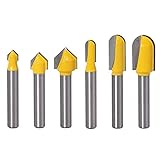
- 3Pcs 90 Degree V-Groove Router Bits - 1/4" Shank, Cutting Diameter: 1/4", 3/8", 1/2", Cutting Height: 1/4", 3/8", 1/2"
- 3Pcs Round Nose Groove Router Bits - 1/4" Shank, Cutting Diameter: 1/4", 3/8", 1/2", Cutting Height: 1/2", 25/32", 25/32"
- V-groove & Round-groove router bits are great for grooving in many workpieces in woodworking projects for sign making or adding decorative accents to furniture and plaques
- Premium C3 micro-grain tungsten carbide blades with Anti-Kickback design increased strength and utmost resistance for long life use
- Specifically design for CNC and other automatic table-mounted portable routers. Cuts all composition materials, plywoods, softwoods, Acrylic, MDF, PVC, 3D engraving and chamfer, etc
When a drag knife is the wrong tool
Choose another cutting method when the material is too thick, rigid, abrasive, tough, or unstable for a passive trailing blade; when the required internal corners are smaller than the tool’s practical minimum radius; or when production output demands repeatable corner quality that cannot be achieved through offset and swivel tuning.
A router bit may be preferable when the material needs chip removal or a mechanically defined tool diameter. A tangential knife is preferable when active blade orientation is important. An oscillating knife is often better for thicker flexible stock. The right choice is governed by the material and required finish, not by whether a drag knife can make an initial mark in the sheet.
Frequently Asked Questions
What materials can a CNC drag knife cut?
A drag knife is suitable for paper, cardstock, cardboard, vinyl, films, thin leather, gasket sheet, veneer, and selected foam, rubber, composite, and flexible-plastic sheets. The material must be reasonably flat and secure. Toughness, abrasiveness, adhesive layers, and flexibility can matter as much as thickness.
Can a drag knife be used in a CNC router?
Yes, but only when the holder fits the collet or carriage and the CAM workflow supports drag-knife offset compensation, swivel moves, and blade retraction. The router spindle should normally be disabled during the operation.
What is drag-knife blade offset?
Blade offset is the horizontal distance from the holder’s pivot axis to the cutting tip. It is different from exposed blade length and tool diameter. The CAM system uses it to compensate for the blade trailing behind the pivot.
What is the difference between a drag knife and a tangential knife?
A tangential knife actively rotates the blade with an additional drive, while a drag knife swivels passively as it moves. Tangential or oscillating systems are generally better for thick, tough, abrasive, or production-critical materials and demanding internal corners.
How deep should a CNC drag knife cut?
Use a shallow test cut on the actual material and backing. Adjust the blade so it severs the intended layer without excessive exposure or spoilboard damage. For kiss-cutting, leave the backing substantially intact; for through-cutting, use a suitable sacrificial surface.
What’s actually slowing this PC down?
Pick the symptom - the matching free tool is one click away.
The Bottom Line
A CNC drag knife is a practical, low-complexity tool for cutting flat, utility-knife-cuttable sheet materials, but accurate results depend on more than mounting a blade in a collet. Match the holder and blade to the machine, use a dedicated offset-aware toolpath, calibrate depth and blade offset on the actual material, secure the sheet, and keep the spindle off. If the stock is thick or tough, the corners are highly demanding, or production consistency is critical, a tangential or oscillating knife is usually the better investment.
Quick Recap
Product prices and availability are accurate as of the date/time indicated and are subject to change. Any price and availability information displayed on Amazon at the time of purchase will apply.

