Do these 3 things before closing this tab:
1Clear out junk files and repair common Windows errors2Scan for outdated or missing drivers - takes under a minute3Repair Windows errors before they cause bigger problemsYes. A Blink Outdoor camera can still provide live view, motion notifications, and two-way audio without a paid subscription. However, without a plan, new motion clips are not saved to Blink cloud storage. To record motion video without paying monthly, you generally need compatible local-storage hardware—either a Sync Module 2 with a compatible USB flash drive or, where supported, a Sync Module XR with a compatible microSD card.
The exact answer depends on your camera generation. Current models such as Blink Outdoor 4 and Blink Outdoor (3rd Gen) support the newer local-storage options, while older XT and XT2 cameras do not.
What works without a Blink subscription?
For current Blink camera systems, you can use these features without an active Blink Subscription Plan:
- Live View: Open the Blink app and watch the camera’s live stream.
- Motion notifications: Receive an alert when the camera detects motion, provided the system is armed and motion detection is enabled.
- Two-way audio: Listen to the camera and speak through it using the app.
- Local motion recording: Save eligible motion clips to local storage when the camera is connected to the appropriate Sync Module and storage device.
That does not mean every recording feature is free. Blink’s subscription-free experience is primarily live viewing, alerts, two-way communication, and—on compatible systems—local motion-clip storage.
What’s actually slowing this PC down?
Pick the symptom - the matching free tool is one click away.
As an Amazon Associate I earn from qualifying purchases.
What does require a subscription?
A Blink Subscription Plan is required for the standard cloud-recording experience. With a plan, Blink can store motion clips and recorded Live View sessions in the cloud so they can be reviewed through the app as cloud recordings. Blink’s U.S. plans list a maximum cloud-retention period of 60 days, subject to the applicable auto-delete settings.
Subscription-linked features can also include:
- Cloud video history.
- Cloud recording of Live View.
- Person detection.
- Custom snooze controls.
- Moments and other plan-based features.
On Blink Outdoor 4, Photo Capture is also tied to an active subscription or trial. Blink describes Photo Capture as periodically capturing images and creating a daily summary video. It is not part of the basic subscription-free setup.
#1 Best Overall
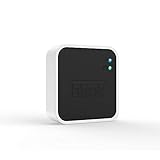
- Conveniently control all of your Blink devices right from the Blink Home Monitor app with the Blink Sync Module 2. The Sync Module 2 connects up to 10 of any Blink Indoor, Blink Outdoor, XT2, XT, Video Doorbell and Blink Mini devices (not required for Mini).
- Supports local video storage for up to 10 Outdoor, Indoor, Video Doorbell and Mini devices. Record and store motion clips when you insert a USB flash drive (up to 256 GB – sold separately) into the Blink Sync Module 2. Does not support live view recording.
- View, share, and download locally stored motion alerts from Outdoor, Indoor, Video Doorbell and Mini devices through the Blink app anytime or watch the footage on your computer by plugging in the USB flash drive (sold separately).
- No monthly fees are required to use local video storage functionality. Local video storage functionality is not compatible with Blink XT2, XT, and 1st generation Indoor cameras.
The important distinction: live view is not the same as recording
Without a subscription, you can open Live View and watch what the camera sees. That does not automatically mean the Live View session is being recorded.
The Tool Desk
Outbyte Driver Updater FREEScan for outdated or missing drivers - takes under a minuteDriver Scan →Outbyte PC Repair FREERepair Windows errors before they cause bigger problemsFix Now →Cloud-based Live View recording is a subscription feature. Local storage is primarily intended for eligible motion clips—not as a blanket replacement for every cloud-recording function. If you need to preserve a Live View session, check the features supported by your specific camera, Sync Module, and current Blink software before assuming it will be saved locally.
How to record Blink motion clips without monthly payments
There are two current local-storage routes, depending on your equipment and location.
Option 1: Sync Module 2 plus a USB flash drive
A Blink Sync Module 2 can provide local storage for eligible Blink cameras when you insert a compatible USB flash drive. Blink states that the Sync Module 2 can support up to 10 Blink devices in a system and accepts USB storage up to 256 GB, subject to its compatibility requirements. The USB drive is purchased separately unless your particular camera bundle already includes the needed hardware.
If you want subscription-free motion recording for a compatible Outdoor 4 or Outdoor (3rd Gen) system, the Blink Sync Module 2 is the most established local-storage route. The module itself is not a subscription service; the separate costs are the hardware and compatible USB storage.
You will also need a compatible USB flash drive for Blink. Do not assume that any drive, any format, or any capacity will work simply because it fits the USB port. Follow Blink’s current compatibility requirements, and stay within the documented capacity limit.
Option 2: Sync Module XR plus a microSD card
Blink’s current support materials also identify the Sync Module XR as a local-storage option using a compatible microSD card. Blink’s U.S. support documentation says the Sync Module XR is available in the United States and Canada.
This can be an alternative for eligible current cameras if you prefer removable microSD storage rather than a USB flash drive. Compatibility and availability should be checked before purchase, particularly if your camera is not a current Outdoor model.
A compatible microSD card for Sync Module XR is required for this setup. Avoid choosing a card solely by brand or capacity; use the current Blink requirements for the Sync Module XR and your region.
Recommended Free Tools
How local storage behaves without a subscription
When there is no active subscription or trial and a recognized storage device is installed, eligible motion clips are saved directly to local storage. You can access the local clips through the Blink app’s local-storage clip list, subject to the camera and Sync Module’s supported workflow.
Local clips remain until you delete them or the storage device becomes full. Once the device is full, new recordings stop until space is made available. Local storage is therefore not the same as an unlimited archive: important footage should be downloaded or copied elsewhere.
Rank #2

- [Compatible Blink Sync Module 2] : The 256GB USB flash drive allows you to download, view, and save videos on the Blink outdoor camera, plug and play, easy to use (NOTE: Blink Sync Module 2 is not Included)
- [ 256GB USB Flash Drive ] : The use of blink flash drive and Blink sync module 2 together increases the space of video storage, which can make your Blink indoor outdoor ecosystem more complete and secure
- [ No Clutter and Save Space ] : With this custom outlet wall mount, installing your Blink sync module takes 2 seconds; the USB cable (micro) design can make your space more tidy and moved anywhere. NOTE: ONLY compatible with Blink Sync Module 2 ,not compatible with Blink Outdoor 4
- [ Stable and secure ] : Made of high quality materials, the metal housing and buckle design protect your sync module 2 for more stability.Note :prevent children and pets from pulling it
- [ What You Get? ] : 1*256GB usb flash drive, 1*Outlet wall mount for Sync Module 2, 1*Short cable. If you have any questions about the product, please contact us and we will solve your problem
Local storage is different from a cloud backup
With an active subscription or trial, Blink normally stores clips in the cloud. If a compatible USB drive or microSD card is attached, the Sync Module may create a once-daily local backup of cloud clips. Those backup files are not handled in the Blink app in exactly the same way as clips recorded directly to local storage, and you may need to access the storage device directly from a computer.
Without an active plan, eligible motion clips are saved directly to local storage rather than being uploaded as new cloud recordings. This distinction matters when deciding whether you need a subscription.
What happens when a free trial ends?
If your camera or account has an active trial, recordings may initially be stored in the cloud. When the trial ends, existing cloud recordings are subject to deletion according to the account’s settings and the applicable retention rules. Do not assume that trial recordings will remain indefinitely just because you later install local storage.
If a clip matters—for example, footage of a property incident—download or otherwise preserve it before the relevant cloud-retention period expires.
Camera-model differences
Blink Outdoor 4
Blink Outdoor 4 requires a Sync Module to connect to the home Wi-Fi network. It supports local storage through a Sync Module 2 with a compatible USB drive or a Sync Module XR with a compatible microSD card.
Outdoor 4 can work without a subscription for live view, motion notifications, two-way audio, and supported local motion recording. Features such as person detection and Photo Capture are subscription- or trial-dependent.
Blink Outdoor (3rd Gen)
Blink Outdoor (3rd Gen) uses a Sync Module system and supports local storage through a Sync Module 2 and compatible USB flash drive. Blink describes this as an alternative to subscription-based cloud storage and says local storage can support videos from up to 10 cameras in the system.
Older Blink XT and XT2 cameras
Older Blink XT, XT2, and first-generation Indoor cameras should not be treated like current Outdoor models. Blink states that these legacy devices do not support local storage.
Rank #3

- Up to 10x beyond Wi-Fi range — Place Outdoor 4 cameras (sold separately) up to 800 ft away from your Sync Module XR+ with some trees or structures in the way, or up to 2,700 ft with a clear line of sight. Range will vary based on obstructions and interference; resolution reduced at longer ranges.
- Maximize range — Place Sync Module XR+ outdoors, 9ft or higher, and line of sight to cameras with the Blink Weather-Resistant Power Adapter (sold separately).
- Faster live view where wifi is spotty — XR technology runs on the 900MHz band, avoiding typical wifi congestion, and unlocking up to 20% quicker access to live view in areas where your wifi signal is poor.
- Experience a more reliable connection — Cameras using XR technology have up to 70% fewer disconnects in areas with poor wifi signal strength.
- Get two-year battery life, even at long range — Blink's patented chip technology unlocks up to two years of battery life for Outdoor 4 (sold separately) when used with a Sync Module XR+ and Energizer Lithium AA batteries.
Depending on the account and device history, legacy systems may instead have access to up to 7,200 seconds of basic cloud storage per Sync Module. That is not equivalent to the current Sync Module 2 local-storage workflow. Buying a USB flash drive will not turn an XT or XT2 system into a subscription-free local recorder.
Subscription-free setup checklist
- Identify the exact model and generation. Check whether it is Outdoor 4, Outdoor (3rd Gen), Outdoor 2K+, XT2, or another model. The product name alone may not be enough to identify the generation.
- Confirm the required Sync Module. Outdoor 4 requires a Sync Module, and local storage requires the compatible module and storage route supported by your system.
- Choose the storage path. Use a Sync Module 2 with a compatible USB flash drive, or use a Sync Module XR with a compatible microSD card where supported.
- Insert the storage device. Allow the Blink system to recognize it before relying on it for recording.
- Arm the system. Motion recording will not work as expected if the system is disarmed or motion detection is disabled.
- Test with a deliberate motion event. Walk through the camera’s detection area and check whether a new clip appears under local storage rather than cloud storage.
- Preserve important footage. Copy important clips elsewhere. Local storage can fill, and cloud recordings have retention limits.
Common mistakes and what to check
“I get motion alerts, but there is no video.”
This is expected if the system has no active subscription, no trial, and no compatible local-storage device. Alerts can continue even though new motion clips are not being saved.
Free tools Windows power users keep installed
One-click scans. No signup required.
For recording, check that the camera is an eligible model, the correct Sync Module is connected, the storage device is compatible and recognized, and the system is armed.
“I installed a USB drive, but nothing is recording.”
First verify that the camera supports the current local-storage workflow. XT and XT2 cameras do not support local storage. Then check the Sync Module 2 connection, the USB drive’s recognition status, the drive’s compatibility and capacity, and the camera’s motion-detection settings.
“I expected Live View to be saved automatically.”
Live View streaming and Live View recording are separate functions. Subscription-free access to Live View does not by itself provide a saved recording. Current Blink documentation distinguishes streaming from cloud-based Live View recording.
“The storage device is full.”
Local clips remain until manually deleted or until the storage device fills. When it is full, new recordings stop. Download clips you need, then free space according to the storage-management options available in your Blink system.
“My cloud clips disappeared after the trial.”
Trial recordings are not necessarily permanent. Cloud clips are governed by the account’s retention and auto-delete settings. Preserve important footage before the trial or retention window ends.
Independent reader supportYour contribution helps us test, update, and keep practical guides available for everyone.Is a Blink subscription worth it?
Choose the subscription-free setup if you mainly want live viewing, motion alerts, two-way audio, and local motion clips—and you are comfortable managing removable storage yourself.
Rank #4

- 【2-in-1 Design Wall Mount & Charging Solution】This innovative charging mount combines wall-mounting with charging function for the Blink Sync Module 2. Integrated design eliminates messy cables, offering a clean, organized, and stylish solution for your Blink Sync Module 2 setup
- 【Specifically Designed for Blink Sync Module 2】TAIlored exclusively for the Blink Sync Module 2, this mount ensures a perfect fit and seamless to your Blink Sync Module 2, enhancing its functionality and ease of use.
- 【Easy Setup Without Drilling or Screws】Installation is incredibly simple—just attach the Blink Sync Module 2 to the mount and plug it into wall AC outlet. This allows for instant charging and continuous charge, without the need for drilling or damaging your wall.
- 【Portable & Flexible Placement】The mount is designed for easy plug-and-play use, allowing you to move it effortlessly from one location to another.flexibility connect your Blink Indoor and Outdoor cameras in any part of your home.
- 【High-Quality Materials for Safety & Reliability】Built with premium materials, this charging stand ensures safe and efficient charging. The package includes one charging mount and one adapter, providing everything you need for a hassle-free setup.
A subscription may be more useful if you want cloud access to recordings, recorded Live View sessions, person detection, Photo Capture on Outdoor 4, or less hands-on storage management. Cloud storage also provides a form of separation from the camera’s local hardware: if someone takes or damages the camera and local storage is not otherwise protected, locally stored footage may not be available afterward.
For a construction site, workshop, rental property, or other location where footage may matter after equipment damage or theft, consider the security trade-off carefully. Local storage avoids a monthly fee, but it is not an off-site backup. Protecting the Sync Module and storage device—or periodically copying important clips to another secure location—may be more important than simply avoiding the subscription price.
Crashes, No Sound, or Screen Glitches?
Random freezes, missing sound and display glitches usually trace back to one bad driver. Find and replace yours safely.Free scan · under a minuteWindows Errors? Fix Them Before They Spread
Repair common Windows errors and clear accumulated junk for a smoother, more stable PC - no reinstall needed.Free scan · no reinstallFrequently Asked Questions
Can a Blink Outdoor camera work on Wi-Fi without a subscription?
Yes, supported Blink Outdoor systems can provide live view, motion notifications, and two-way audio without a paid plan. Some models, including Outdoor 4, require a Sync Module to connect to the home Wi-Fi network.
Can Blink record motion without a subscription?
Yes, if the camera is eligible and connected to the required local-storage hardware. The usual options are a Sync Module 2 with a compatible USB flash drive or a Sync Module XR with a compatible microSD card where supported.
Do Blink XT and XT2 cameras support local storage?
No. Blink states that XT and XT2 are legacy devices that do not support the current local-storage workflow. A USB drive does not add that capability to those models.
Does Blink save Live View without a subscription?
Not automatically. Live-view streaming is available without a plan, while cloud-based Live View recording is a subscription feature. Do not confuse watching Live View with saving it as a recording.
How long do Blink local recordings last?
Local clips remain until you delete them or the storage device fills. When storage is full, new recordings stop until space is freed.
The Bottom Line
Bottom line: You can use a Blink Outdoor camera without a subscription, but the free experience is limited to features such as live view, motion alerts, and two-way audio unless you add compatible local storage. For subscription-free motion recording, current compatible systems generally need a Sync Module 2 and USB drive or a Sync Module XR and microSD card. Check the exact camera generation before buying accessories—XT and XT2 do not support local storage.
Quick Recap
Product prices and availability are accurate as of the date/time indicated and are subject to change. Any price and availability information displayed on Amazon at the time of purchase will apply.

