Some links on this page are affiliate links: if you buy through them we may earn a commission, at no extra cost to you.
Usually, no. For nearly all modern flat-screen televisions, the safest transport position is upright, secured against tipping and sliding. Do not drive with the TV flat on its back, face-down, or on its side unless the exact manufacturer instructions for that model expressly allow it.
This matters during a move, renovation, delivery, or room remodel: a TV can survive brief, controlled screen-down handling while its stand is removed, yet still be damaged by hours of road vibration while lying flat. Treat temporary placement and vehicle transport as two different situations.
As an Amazon Associate I earn from qualifying purchases.
The short answer: transport a flat-screen TV upright
Manufacturers, moving companies, and commercial shipping guidance generally agree on the safest rule: keep a modern flat-screen TV upright during carrying, vehicle transport, unloading, and unpacking. LG specifically advises keeping the television upright, avoiding side-to-side tilting, and protecting it from jolts, excessive vibration, pressure, and flexing. U-Haul likewise advises against transporting a flat-screen television horizontally, even when it is inside a TV box. Best Buy’s inbound shipping requirements also specify upright orientation for TVs rather than shipping them flat on their side.
The concern is not simply that the screen might be scratched. A thin LCD, LED, QLED, or OLED panel and its supporting frame can flex under uneven pressure. When the television is lying flat, bumps and vibration can place stress across the center of the panel or allow the set to shift inside its packaging. A crack may be immediately visible, but pressure damage, lines, dark areas, or a display that fails after powering on can also result.
Popular on Amazon
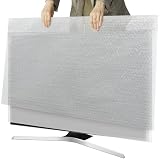
- Dual-Layer Protection - Comes with two separate covers. The inner layer features premium pearl cotton, delicately safeguarding your TV screen from scratches and abrasions. Encased in outer bubble film, this cover absorbs shocks and resists impacts during transit. Ideal for moving, shipping, or long-term storage
- Suitable for TVs up to 65 inches - The flat size of the 2 set TV moving cover is 65*37.8 inches, which is highly compatible with TVs 43 to 65 inches, and accurately covers TVs 65 inches and smaller. Our protective solution guarantees defense against scratches, dents, and accidental collisions
- Convenient to Use - Just choose the items need protect, wrap the soft pearl cotton directly around the items, wrap the outer layer with a bubble bag, and then put it firmly into the shipping box, which ensures the best safety during transportation
- Eco-Safe & Reusable - Crafted with non-toxic, odor-free materials to protect both your family and the environment. Weighing just 0.66 lbs, this lightweight cover folds compactly for storage and endless reuse. A sustainable investment for frequent movers and savvy homeowners
- Widely Used - Great for protecting TVs from scratches, impacts and providing cushioning protection, the waterproof bubble film can isolate rain, snow and humid warehouse environments. It can also be used to protect photo frames, mirrors, ceramics, valuable collections, etc., to prevent scratches and collisions
Does that mean a TV can never be laid down?
No. A television may sometimes be placed screen-down briefly for a controlled installation or packing task. For example, manufacturer instructions may permit laying the display face-down on a clean, flat, cushioned surface to attach or remove its stand. Sony’s instructions for some 43-inch and 50-inch models provide model-specific examples of this kind of temporary handling.
That permission is not the same as permission to transport the TV horizontally. The distinction is important:
The Tool Desk
Outbyte Driver Updater FREEFix the driver behind crashes, sound loss and screen glitchesFind Drivers →Outbyte PC Repair FREERepair Windows errors before they cause bigger problemsFix Now →- Temporary handling: A short, stationary step such as removing the stand may be allowed when the model’s instructions say so. Use a soft, clean, flat surface and keep all pressure away from the panel.
- Transport: The television is exposed to bumps, braking, turns, vibration, shifting cargo, and repeated flexing. Keep it upright unless the exact owner’s manual expressly gives different instructions.
Before moving the set, find its model number and check the owner’s manual or the manufacturer’s support page. Construction and panel designs vary, and a general instruction for one model or screen size should not be applied automatically to another.
Safest way to move a TV: step-by-step
1. Check the model instructions before packing
Look for the model number on the rear label, original paperwork, or purchase record. Confirm the manufacturer’s instructions for stand removal, lifting, packaging, and transport. Pay particular attention if the TV is curved, unusually large, very thin, an OLED, or a professional/commercial display.
If the manual is unavailable, use the conservative approach: keep the television upright for every part of the move and do not place weight on the screen.
2. Disconnect and prepare the television
Unplug the power cord and remove HDMI, antenna, Ethernet, optical audio, USB, and other cables. Do not pull a television by its cables or leave connectors hanging where they can catch on packaging.
Remove the tabletop stand or legs if they interfere with the carton. Put the stand, screws, remote, power cable, and loose accessories in a labeled bag. Keep that bag with the TV rather than in a separate box where it may be lost during a renovation or move.
Also popular on Amazon

- Precision Fit: This TV moving cover is specially designed for 50"–55" LED/LCD/OLED TVs, measuring 55"(L) × 32"(H) × 3.9"(W). Please measure your TV dimensions before purchase.
- All-Round Protection: Our TV moving cover effectively defends your TV against moisture, dust, dirt, scratches, and scuffs during moving, renovation, or long-term storage, safeguarding both the TV body and screen.
- Convenient & Reusable: Our TV cover is a practical alternative to cardboard moving boxes and plastic or foam TV covers. It is recyclable, reusable and safe. Easy to put on and take off, greatly reducing packing and unpacking effort; folds compact for easy storage.
- Thick & Durable: Made of thickened high-density felt, this flat screen TV dust cover is soft yet sturdy. Equipped with 4 Velcro straps for a secure hold to prevent slipping, shifting during transport, collisions during renovation, pet scratching, and accidental touching by children.
- Multi-Purpose Use: Our TV moving cover is also ideal for protecting mirrors, framed artwork, paintings, picture frames, tiles, and ceramics, keeping large fragile items clean and secure.
When lifting, hold the frame or designated handholds at the top and bottom. Do not lift by the screen, bezel, speaker grille, or stand. A large set should be carried by two or more people; moving it alone increases the chance of twisting the panel, dropping it, or striking a doorway.
3. Use the original carton if you have it
The original box and molded inserts are usually the best option because they were designed around that particular television. Reinstall the supports in their original positions and confirm that the screen is not pressed by cardboard, foam, straps, or accessories.
If the original inserts are missing, do not assume that loose blankets or crumpled paper provide equivalent protection. Replace the missing support with suitable corner protection and fill empty space so the television cannot move inside the carton.
Free tools Windows power users keep installed
One-click scans. No signup required.
If you need a replacement, an adjustable TV moving box can be useful for many 32- to 70-inch flat-screen TVs. Check the box’s interior dimensions, maximum screen size, thickness, and design limitations before buying. Some kits are not intended for curved televisions or computer monitors, and a box that is too large can allow dangerous movement.
4. Protect the corners and panel without compressing it
Use foam corner protectors or the television’s original molded supports to protect the frame and edges. If the original inserts are gone, TV foam corner protectors can help create clearance between the carton and the vulnerable corners. They must fit securely without transferring force into the display.
Use a cover or protective wrap to guard against dust, dirt, and abrasion, but do not tape anything directly to the display. Avoid hard objects, screw bags, tools, straps, and loose packing material touching the panel.
A flat-screen TV cover is a reasonable extra layer during a dusty construction project or household move. It does not make flat transport safe and it is not a substitute for a rigid carton, corner protection, or upright positioning.
What’s actually slowing this PC down?
Pick the symptom - the matching free tool is one click away.
When securing protective materials, use mover’s stretch wrap around the protective package or carton as appropriate. Wrap should hold the protection in place, not squeeze the television. Never tighten it across the display so firmly that the panel or frame is compressed.
5. Keep the TV upright while carrying it
Carry the set vertically, with two people for larger screens. Hold the frame rather than the panel and coordinate turns, stairs, and doorways before moving. Keep the screen clear of walls, tools, ladders, and unfinished construction materials.
Do not carry the television upside down by the stand body. If the stand is still attached, use the manufacturer’s designated lifting method; otherwise remove it before the move.
6. Load the vehicle so the TV cannot tip or slide
Place the boxed television vertically in a van, truck, or SUV. The ideal position is between two stable, padded surfaces that prevent it from falling sideways. It should not be left leaning loosely against a wall or resting where a turn can send it into other cargo.
Recommended Free Tools
Also popular on Amazon

- Protecting Your TV: Shield Your Television During Moves or Renovations. Protect your valuable television during moves, home renovations, or storage with this reliable flat-screen TV protector. Helps protect your TV screen from scratches, dust and dirt. This ensures optimal safety during transit!
- Perfect Fit for Most Flat Screen TVs: TV cover measures 65"W x 36"H, making it suitable for most 65inch LED, LCD, and OLED flat-screen TVs. To ensure a perfect fit, please measure your TV before ordering. Please ensure to measure your TV's dimensions before purchasing to confirm the perfect fit. This proactive step is crucial to avoid any issues with a cover that is too tight or too loose.
- High Tear Resistance for Superior Protection: Our TV moving box made of high-quality felt, this TV cover is more durable and offers better impact resistance than ordinary PE foam materials on the market. This soft, durable fabric effectively protects your TV from scratches, dents, moisture, and dirt during transport, reducing handling stress to ensure your TV arrives safely at its destination.
- Reusable & Easy install: Designed for moving day protection, this tv moving box 65 inch with quick-release straps for instant setup. Built to withstand bumps and scratches, ensures your TV remains fully protected and secure throughout the entire moving process.
- Multi-Use Protective Cover: When you're not moving your TV, this cover can also be used to protect picture frames, mirrors, tiles, ceramics, and other delicate items. It acts as a protective layer against dust and provides versatile protection for your belongings, ensuring maximum safety for your valuables.
Use the vehicle’s tie-down points when available. Moving tie-down straps or suitable moving rope can stabilize an upright box, but straps must not run across the screen or be tightened enough to crush the carton. Secure the load against movement, not by applying maximum tension.
Separate the television from tools, lumber, appliances, boxes, and other hard or pointed items. Do not put furniture, storage bins, or any heavy box on top of it. Leave clearance above and around the carton so another load cannot fall against the panel during braking.
If the carton needs additional protection from neighboring cargo, furniture moving pads can be used around the outside of the box or between the TV carton and other items. Do not tightly compress blankets against the screen or use them to justify laying the television flat.
7. Drive smoothly and check the load
Sudden braking, potholes, sharp turns, and shifting cargo are the main hazards once the TV is packed. Drive conservatively, avoid unnecessary rough roads, and inspect the load after the first few minutes. If the box has tipped, shifted, or taken an impact, stop and correct the problem before continuing.
Keep the television upright during unloading and until it is ready to be unpacked. Have the same number of people available at the destination as at pickup; a large screen is often harder to maneuver indoors than it is to load into the vehicle.
8. Inspect the television before powering it on
Examine the carton first for crushed corners, punctures, tears, water exposure, or signs that it fell over. Then inspect the frame and screen for cracks, pressure marks, lines, dark areas, or separation.
If the set has visible damage, do not connect power merely to test it. Photograph the packaging and television, retain the carton, and contact the seller, carrier, mover, or manufacturer according to the applicable warranty or shipping process.
There is no single universal waiting period that applies to every television after a move. If the set was exposed to unusual cold, condensation, moisture, or a major temperature change, follow the manufacturer’s instructions before powering it. Do not automatically apply refrigerator transport rules to a TV.
What if the TV cannot fit upright?
Change the transport plan rather than treating horizontal transport as harmless. Options include using a taller or larger vehicle, removing seats when safe and practical, hiring a professional mover, or using a service equipped for oversized TV transport.
Also popular on Amazon

- 50-55" TV Dust Cover: Universal cover fits up to 55-inch flat screen TVs (Size:51"L x 30"H x 4.5"D). Compatible with LED, LCD, OLED, and other TV types
- High Quality Felt: The TV moving cover is made of high-density tear-resistant felt fabric.The 0.8 inch thickened designe ffectively protecting your TV from scratches, dust, collisions and accidental damage, fully protecting the large-screen TV for safe transportation
- Bottom Secure Straps: TV protector moving cover features a convenient slip-on design, four straps at the bottom for quick attachment to your TV. It will fit snugly against the TV body, providing stable and reliable protection
- Reusable Design: TV screen protector is lightweight yet durable, resistant to deformation, wrinkles, and abrasion, can reused multiple time, easy to install and remove
- Widely Used: The TV moving cover can be used to protect the screen during moving, dustproof packaging during renovations, and anti-scratch from pet
A professional TV transport service may be worth considering for a very large OLED, curved display, fragile commercial screen, narrow staircase, or vehicle that cannot hold the carton upright. Availability, pricing, insurance, and handling standards vary by location, so verify those details before booking.
If the owner’s manual expressly permits a particular alternative orientation, follow that model-specific instruction. Without such permission, the manufacturer and logistics guidance reviewed here does not support presenting flat transport as equally safe.
Common mistakes that damage televisions during a move
- Driving with the TV flat: This exposes the panel to stress from vibration and uneven support.
- Assuming the box solves the problem: A carton helps prevent impact, but it does not make horizontal transport equivalent to upright transport.
- Lifting by the screen or stand: The frame and designated handholds are safer points to grip.
- Moving it alone: Large displays are awkward and can twist or fall before help arrives.
- Leaving empty space in the box: Internal movement allows impact and edge loading.
- Using an incompatible moving box: Check dimensions and whether the box supports flat, curved, or monitor-style displays.
- Compressing the panel with straps or wrap: Protection should prevent movement without pressing into the screen.
- Confusing setup instructions with transport instructions: A short screen-down step for stand installation is not approval to drive with the TV flat.
- Putting cargo on top: Weight and shifting objects can crack or permanently mark the display.
Quick moving checklist
- Check the exact model’s manual.
- Unplug and remove all cables.
- Remove the stand if required for packing.
- Bag and label the stand, screws, remote, and cables.
- Use the original carton and inserts whenever possible.
- Add properly fitted foam corner protection if inserts are missing.
- Cover the TV against dust and abrasion without pressing on the screen.
- Use two or more people for a large display.
- Keep the boxed TV upright in the vehicle.
- Secure it against tipping and sliding without over-tightening straps.
- Keep tools, furniture, and heavy cargo away from and off the carton.
- Inspect the packaging and screen before connecting power.
Frequently Asked Questions
Can I transport a TV flat in its original box?
The original box offers important impact and movement protection, but it does not automatically make flat transport safe. General moving and shipping guidance recommends keeping a modern flat-screen TV upright even inside its original or replacement carton. Follow the exact model manual if it gives different instructions.
Outdated Drivers Are Slowing You Down
One free scan finds every outdated or missing driver and matches the right update for your exact hardware.Free scan · exact hardware matchWindows Errors? Fix Them Before They Spread
Repair common Windows errors and clear accumulated junk for a smoother, more stable PC - no reinstall needed.Free scan · no reinstallCan I lay a TV face-down to remove the stand?
Some manufacturer instructions permit temporary screen-down placement for stand removal or installation. Use a clean, flat, cushioned surface, keep objects away from the panel, and return the TV to an upright position before vehicle transport.
How should I secure an upright TV in a moving truck?
Place the boxed TV vertically between stable, padded surfaces so it cannot tip or slide. Use tie-down points and appropriate straps or rope if available, but do not route straps across the screen or tighten them enough to compress the carton.
What should I do if the TV does not fit upright in my vehicle?
Use a larger vehicle, a professional mover, or a TV transport service. If the model’s instructions do not expressly permit another orientation, do not assume that laying it flat is a safe substitute.
Should I wait before turning on a TV after moving it?
There is no universal waiting period for every television. Inspect for damage and follow the manufacturer’s instructions, especially if the TV was exposed to cold, moisture, condensation, or unusual temperature changes.
Quick wins for a faster PC:
Repair Windows errors before they cause bigger problemsFix Now →Fix the driver behind crashes, sound loss and screen glitchesFind Drivers →Clear out junk files and repair common Windows errorsFree Scan →The Bottom Line
Keep a modern flat-screen TV upright and secured for the entire trip. Laying it down briefly may be allowed for a controlled stand-installation or packing step, but that is different from driving with it flat. Use the original carton or a properly fitted TV moving box, protect the corners, prevent shifting, avoid panel pressure, and get professional help when an upright vehicle position is not practical.
Quick Recap
Product prices and availability are accurate as of the date/time indicated and are subject to change. Any price and availability information displayed on Amazon at the time of purchase will apply.

