An Arduino RFID servo lock is a useful tabletop project: an MFRC522/RC522 reader checks a card or tag, the sketch compares its identifier with an allowed value, and a servo moves a small model latch when access is accepted. It is a demonstration—not a validated lock for an exterior door. The cited projects do not establish the strength, tamper resistance, or security needed for full-size access control.
What the project does
The controller initializes the RFID reader over SPI and monitors for a credential. When a card is presented, the sketch reads its identifier and checks it against the value programmed as allowed. On a match, it commands the servo to move the model latch; after a chosen interval, it can return the servo to the locked position. A cited Arduino Project Hub example uses SPI, MFRC522, and Servo libraries, though its exact pin mapping and angles are project-specific: Arduino Project Hub.
This is an instructional access check. Comparing a card UID with a stored value does not establish strong credential security, and the cited examples report no measured security level.
Parts and compatibility
- Arduino-compatible board: A cited project uses an Arduino Uno Rev3. Arduino documents the Uno R3 as an ATmega328P-based board with 14 digital I/O pins, six PWM-capable pins, six analog inputs, a 16 MHz resonator, and EEPROM. Other models can have different pins and capabilities. Arduino UNO Rev3 documentation.
- RFID reader: The examples use an MFRC522/RC522 module. Check the documentation for the exact breakout you own for its supply and logic-level requirements; the module name alone does not establish that every clone is wired or rated identically.
- Credential: Use a card or key fob that is compatible with the specific reader. Verify protocol and frequency before buying extras.
- Servo: One cited build lists an SG90 micro servo, suitable to consider for a small model latch when its mechanics and load are appropriate. The examples do not provide torque or load measurements.
- Prototyping supplies: Breadboard and jumper wires appear in one project’s parts list. An I2C 16×2 LCD is optional if you want status messages; it is not needed for the basic reader-to-servo action.
For source examples and their listed components, see Arduino Project Hub’s 2025 servo-and-LCD project and RFID Card Door Lock project.
Free tools Windows power users keep installed
One-click scans. No signup required.
#1 Best Overall
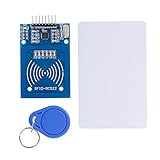
- The RF IC Card module design the circuit of card read by using the original Philips MFRC522 chip
- Easy to use, with pin header. The module can be directly loaded into the various reader molds.
- Applicable for the user who need to design or manufacture the RF card terminal.
- Module Interface: SPI, Data transfer rate: Maximum 10Mbit/s.
- Power Voltage : 3.3V,Operating frequency: 13.56MHz.
Plan the wiring and power before assembly
Do not copy a pin map from another project without checking your board and reader. The Arduino board, RFID module, and example sketch determine which SPI and control pins are used. Confirm the RFID module’s own voltage and logic requirements, then follow the documentation for the exact board.
Servo power is a separate design concern. Arduino’s UNO R4 WiFi User Manual says, “External devices with a high current draw (e.g. servo motors) should never be powered via the 5 V pin.” UNO R4 WiFi guidance. Supply needs depend on the board, servo model, and mechanical load; choose a suitable supply and connect grounds as required by the circuit design. This warning is specific to the UNO R4 WiFi guidance. For the Uno R3, Arduino documents a 50 mA maximum current draw for its 3.3 V pin, not a general-purpose supply for peripherals. Uno R3 specifications.
Rank #2

- Installation is more convenient: direct serial read, all pins lead to electronic building blocks interface
- Higher Sensitivity: Advanced RF Receiving Line, Embedded Microcontroller Design, Efficient Decoding Algorithm
- More compact size: the full version of the design optimization, rational wiring, practical superior performance
- Support external antenna.Maximum effective distance up to 50mm.
- Support EM4100 compatible read only or read/write tags.
Sketch logic and latch behavior
- Initialize the hardware: Start SPI and the RFID library, attach the servo, and define the locked position for the model mechanism.
- Enroll an allowed credential: Read the identifier of the card or tag you want to accept and put that value into the sketch’s access rule. Handle unknown or disallowed identifiers as denied; do not move the latch for them.
- Poll for a card: Check for a new credential, then read its identifier. The cited example uses the MFRC522 library pattern; follow the library and board setup appropriate to your hardware.
- Check and actuate: Compare the read identifier with the allowed value. On a match, move the servo to the model’s release position; otherwise leave it locked.
- Relock: After a chosen interval, command the servo back to the locked position. Adjust the endpoints to the physical latch so the servo does not bind or strain against the mechanism.
The cited projects demonstrate this general sequence, not a universal sketch or prescribed pin assignment. No range, reliability, torque, cost, or build-success figures are established by those examples.
Independent reader supportYour contribution helps us test, update, and keep practical guides available for everyone.Keep the scope to a demonstration
An SG90 and UID-checking sketch are appropriate subjects for learning how RFID input can control a small mechanism, but the available examples do not validate them for a full-size door. They provide no evidence about the mechanical strength, tamper resistance, or fail-safe behavior required of an exterior lock. For real access control, use equipment and installation designed and rated for that purpose rather than treating this hobby circuit as a security system.
Recommended Free Tools
Quick Recap
Rank #4

- Support NFC RFID reading and writing, P2P communication with peers
- Support I2C, SPI and HSU (High Speed UART), easy to change among these modes
- On-board level shifter, standard 5V TTL for I2C and UART, 3.3V TTL SPI
- Arduino Raspberry Pi compatible, Small Size and easy to embed into your project
- RFID reader/writer supports: Mifare 1k, 4k, Ultralight, and DesFire cards, ISO/IEC 14443-4 cards such as CD97BX, CD light, Desfire, P5CN072 (SMX), Innovision Jewel cards such as IRT5001 card, FeliCa cards such as RCS_860 and RCS_854
Rank #3
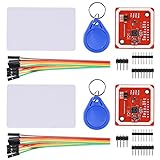
- RFID reader/writer supports: Mifare 1k, 4k, Ultralight, and DesFire cards, ISO/IEC 14443-4 cards such as CD97BX, CD light, Desfire, P5CN072 (SMX), Innovision Jewel cards such as IRT5001 card, FeliCa cards such as RCS_860 and RCS_854
- On-board level shifter, standard 5V TTL for I2C and UART, 3.3V TTL SPI
- Support NFC RFID reading and writing, P2P communication with peers
- Support I2C, SPI and HSU (High Speed UART), easy to change among these modes
- Small Size and easy to embed into your project
Product prices and availability are accurate as of the date/time indicated and are subject to change. Any price and availability information displayed on Amazon at the time of purchase will apply.




