Choose a surge protector only after checking your residence hall’s rules. For a desk with several devices, the Anker 351 is a feature-rich option if your dorm accepts its TUV certification; for a smaller setup, consider the Anker 341. If your housing policy requires UL Listed equipment, select an exact model whose certification the school accepts—do not assume either Anker qualifies. No power strip makes a heater, microwave, or other high-draw appliance safe to use against dorm rules.
Quick picks: compare the exact model with your dorm policy
Prices below were observed on the manufacturers’ U.S. pages on August 18, 2026; check current price, stock, and specifications before buying. Manufacturer-listed certification is not a guarantee that a residence hall accepts the product.
| Product | Best for | AC outlets and USB | Surge rating | Certification shown | Price observed | Key limitation |
|---|---|---|---|---|---|---|
| Anker 351 Power Strip | Many desk devices | 12 AC; one USB-C and two USB-A | 2,100 joules, per Anker support | TUV, per manufacturer product information | $28.99 | Not appropriate if your dorm requires UL; USB-C is 20 W and its full capability depends on USB-A use. |
| Anker 341 USB Power Strip | Compact desk or nightstand | Eight AC; one USB-C and two USB-A | 2,000 joules | TUV, per manufacturer product information | $27.99 | Not appropriate if your dorm requires UL; 20 W USB-C is not laptop-class charging. |
| Anker 525 Charging Station | Laptop-and-phone charging desk | Three AC; two USB-C and two USB-A | 300 joules, per Anker support | TUV, per manufacturer product information | $39.99 | Few AC outlets and comparatively low joule rating; USB output is shared depending on ports in use. |
| Belkin surge-protector range | Buyers considering a UL-oriented alternative | Varies by exact model | Varies; current range includes models from 1,080 to 4,320 joules | Verify the exact model and mark | Varies; check current catalog | Do not choose by brand family alone; verify policy fit, model specifications, and availability. |
If your dorm requires UL specifically, treat the Anker options above as unsuitable unless the school confirms otherwise. Belkin’s catalog, or exact models from APC, CyberPower, or Tripp Lite, can be a starting point—not a substitute for checking the certification on the exact product. Official pages: APC, CyberPower, and Tripp Lite.
Best overall for a crowded dorm desk: Anker 351
The Anker 351 combines 12 AC outlets with USB-A and USB-C charging in a flat-strip layout designed to accommodate larger plugs. Anker lists a 15-amp, 1,875-watt electrical rating, and its support documentation gives the model a 2,100-joule surge rating. The product page showed $28.99 and in-stock status on August 18, 2026; availability can change.
Do these 3 things before closing this tab:
1Clear out junk files and repair common Windows errors2Scan for outdated or missing drivers - takes under a minute3Repair Windows errors before they cause bigger problems#1 Best Overall

- 12 IN 1 Surge Protector Power Strip: Features 8 AC outlets, 2 USB-C port, and 2 USB-A ports to give everything you need to power up all of your electrical appliances. The 4-side layout prevents power outlet obstruction, allowing simultaneous use of multi USB outlets and AC ports. Designed with extra space (1.65 inch) between outlets to accommodate even the largest plugs.
- Flat Extension Cord 10 ft: With an ultra thin flat head (only 0.3 inches), our flat plug power strip can easily fit in tight spots and hide behind furniture (sofa / bed / nightstand) with wall-flush alignment; The 45° right angle plug creates extra space for other receptacles below without blocking.
- 8-Point Safety Protection System: Combines 1050 Joules surge protection, 1382℉ fire retarding, 1250W overload protection, 10A over-current protection, and more to protect your appliance and electronics, providing you a safe and reliable indoor charging environment.
- Power Strip with USB C: 2 USB-A (5V/2.4A) and 2 USB-C (5V/3A), with a total USB output up to 15W. This USB charging station can auto-detect charged devices’ power draw and deliver optimal charging speed, compatible with all USB-powered devices like cell phones, earphones, tablets, smart watches, etc.
- Mountable Power Strip Outlet Extender: 2 mounting holes on the back enable this white extension cord for secure wall / desk / counter installation. The space-saving compact design, optimized for apartment / dorm room / home office use with UL-recognized cable and V-0 fire-retardant casing.
Its trade-off is the certification: Anker lists TUV, not UL. Do not buy it for a UL-only residence hall without explicit approval. The USB-C output is 20 watts, useful for many phones and accessories but not a replacement for a laptop’s higher-wattage charger. Anker also says USB-C charging is available at full capability only when the USB-A ports are not in use. See the Anker 351 product page and Anker’s surge-protection information.
Best compact option: Anker 341
For a smaller desk or nightstand, the Anker 341 has eight AC outlets, one 20-watt USB-C port, two USB-A ports, a flat plug, and a five-foot cord. The manufacturer lists 2,000 joules and a 15-amp, 1,875-watt rating. Its U.S. page showed $27.99 and in-stock status on August 18, 2026.
Its TUV listing may not meet a UL-only housing rule. Eight outlets can also feel cramped when several plugs are bulky, and its USB-C port is for lower-power charging rather than replacing a laptop charger. Confirm the policy and current details on the Anker 341 product page.
Rank #2

- 【4+4 Outlets Power Strip with 4 USB Ports】- The 3-side power strip with 8AC widely outlets and 4 USB charging ports, each USB A port features 5V/2.4A Max output. USB C charging port features 5V/3A MAX. can power up to 12 devices simultaneously.
- 【Surge Protector Power Strip with 3 Side Design & Wide Space】- 3-side design that makes it easier to make the plugs not covering any outlet, and the 8 AC outlets with 1.8 inches long space in between, larger than standard 1.5-inch socket. Larger spacing makes it easier to use for all kinds of equipment. The compact design saves more space, suitable for the home, office, and college dorm room.
- 【Multi Safety Protection】- ETL Certificates. This power strip has overload protection, short-circuit protection, over current protection, over-voltage protection and overheating protection. The surge protector with overload protection protects your electrical appliances from lighting, surges or spikes. The minimum energy-absorbing capacity of 900 Joules. It will automatically cut power to protect connected devices when voltage surge is overwhelming.
- 【6 Ft extension cord with Flat Plug】- The 45° flat plug design prevents the bottom plug from clogging and allows for easy installation in tight spaces; the 6-foot power cord allows for flexibility, and two mounting holes on the back allow for secure installation of this power outlet in a variety of applications.
- 【 Our After Sale Service 】- ETL Certificates. Our friendly and reliable customer service will respond to you within 24 hours. You can purchase with confidence, with our 30-day return and 12-month warranty.
Best for laptop-class USB-C charging: Anker 525
The Anker 525 Charging Station has three AC outlets, two USB-C ports, and two USB-A ports. Anker advertises up to 67 watts of USB-C output, with allocation depending on how many ports are used. The page showed $39.99 on August 18, 2026.
This is a charging-station choice, not a high-capacity surge-strip choice: Anker’s support page lists 300 joules, and three AC outlets are a poor fit for a gaming or entertainment setup with several plugs. TUV certification may not satisfy a UL-only policy. Check the Anker 525 product page for shared-output behavior.
How to choose a dorm-room surge protector
1. Check the residence hall’s actual rules first
Policies vary by university and building. Ask whether a surge protector is required, which certification marks are accepted, whether the cord has a maximum length or gauge requirement, and whether USB-equipped strips, extension cords, cubes, or wall taps are prohibited. Also check whether a mini-fridge or other appliance must plug directly into a wall outlet.
Rank #3
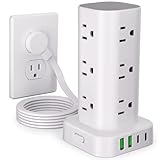
- 16 in 1 Power Strip Tower with USB: This surge protector power strip tower extends one socket to multiple outlets – 12 AC outlets and 4 smart USB ports (2 USB-A and 2 USB-C). Charge up to 16 devices simultaneously, keeping your desktop organized. Turns a single socket into a versatile multiport charging station, perfect for your home, office, or dorm room
- Ultra-thin Plug & 6FT Extension Cord Power Strip Tower: This 0.3-inch sleek flat-head plug design provides a flush wall fit, perfect for tight spaces behind sofas, nightstands, bookshelves, and headboards. Its 45° angled outlets prevent blockage. The 6FT extension cord offers versatility for use in homes, offices, dorms, or as college supplies
- Smart USB Fast Charging: This power strip has 4 USB ports (2 USB-A and 2 USB-C), with a total output of 3.4A. Each USB A has a max output of 3.1A, and the USB C has a max output of 3.4A. The USB-C charges up to 30% faster than the standard 5W charger, saving you time. The flat plug tower is compatible with most USB devices such as smartphones, tablets, earphones etc. It's an ideal option for efficiently charging your diverse gadgets
- Surge Protection & Overload Protection: This power strip tower features an 1800J surge protector with overload, short-circuit, and over-current protection. The reset/off switch helps you save energy on the go. In case of overload, it shuts off automatically to keep your precious devices safe. Safeguard your gadgets and enjoy a reliable charging environment
- Space-Saving & Organized Power Tower: The mini vertical power tower, with a compact (3.15*3.15*5.79 inch) design, takes up less space than a traditional power strip when charging multiple devices. It has four rubber feet at the bottom, remaining rock-solid in place to ensure no sliding or falling. This surge protector tower with an extension cord helps keep your desktop neat and organized
For example, West Chester University’s buying guide specifies UL listing, a built-in breaker, 15 amps, 14-gauge wire, and no more than 1,875 watts. That is one campus’s rule, not a nationwide standard.
2. Verify the safety mark on the exact product
Look for the mark on the device or packaging and confirm the precise model number. UL Listed, ETL Listed, CSA, and TUV are certification marks associated with testing, but acceptance depends on the institution’s policy. A marketplace title or a generic “surge protection” claim does not establish certification.
Recommended Free Tools
3. Treat joules as one specification, not a safety score
Joules are a simplified measure of how much surge energy a protector can dissipate without damaging itself. NIST explains the rating and other surge-protector considerations in its technical guide. For ordinary dorm electronics, roughly 1,000–2,000 or more joules is a sensible target when the product also meets campus and electrical requirements. Under 600 joules is a limited choice; 600–1,000 may suit a modest setup if permitted. A higher number does not make an unapproved or overloaded strip safe.
Rank #4

- 【12 in 1 Power Strip】The power strip with 8AC widely outlets and 4 USB charging ports (Total 5V/3.1A) can power up to 12 devices simultaneously. 2.2 inchces widely spced in between outlets, fit big adapters without blocking each other.
- 【Ultra Slim Flat Plug Power Strip】With only 0.35 inch ultra thin plug and 45° right angle design, which can close to the wall easily, and hide in the back of furniture, bed or refrigerator.
- 【2 x USB C Charging Station】Added extra 2 USB C ports for your devices, the power strip with USB C port can charge up to 5V/3A. USB-A ports can charge up to 5V/2.4A Max.
- 【1080J Surge Protection】The extension cord with multiple outlets with the surge protectiron & overload protection protects your electrical appliances from lighting, surges or spikes.
- 【Multi Safety Protection】RoHS, ETL Certificates. This flat wall plug has overload protection, short-circuit protection etc. Fire-resistance PC shell with flame retardant at 1382℉ makes it more durable.
Do not rank products by clamping voltage or response-time claims alone. NIST notes that conventional protectors respond adequately to power-line surges, and that a failed protector may either cut power or continue supplying it without protection. A lit power indicator does not by itself prove that every part of a device is functioning.
4. Check the electrical rating and breaker
A typical U.S. 15-amp, 125-volt strip is rated for a theoretical maximum of 1,875 watts. That is the combined load limit, not a target for continuous use, and a strip cannot add capacity to the wall circuit. Prefer a built-in circuit breaker; some campus rules also specify cord gauge, such as 14 gauge. Follow the lower limit if the strip, outlet, or dorm policy sets one.
5. Choose a layout that fits the room
- A flat or right-angle plug can fit behind furniture, but must remain accessible and must not be crushed.
- A five- to eight-foot cord is often practical; campus limits take precedence.
- Spaced outlets help prevent large laptop bricks or console adapters from blocking neighboring sockets.
- Mounting holes or adhesive may help with cable organization, but confirm that attaching equipment to furniture or walls is allowed.
- Keep the strip visible and ventilated—not under a bed, rug, clothing, or papers.
6. Match outlet count to the devices, not the maximum on the box
- Minimal setup: laptop, phone, watch or earbuds, lamp, plus a spare; a compact six-outlet unit is often enough.
- Typical desk: computer, monitor, phone, lamp, speakers, router, and console or streaming device; eight outlets are more practical.
- Gaming or entertainment: PC or console, display, speakers, router, chargers, lamp, and perhaps a printer; 10 or 12 outlets may help, but do not increase the circuit’s available power.
7. Read USB output claims carefully
USB-A and low-wattage USB-C ports are convenient for accessories and many phones. A 20-watt USB-C port is not equivalent to a 65- or 100-watt USB-C Power Delivery laptop charger. Even a port advertised up to 67 watts may share output when other ports are active. Check the manufacturer’s port-by-port output information and keep a laptop’s own charger if needed.
The Tool Desk
Outbyte Driver Updater FREEFix the driver behind crashes, sound loss and screen glitchesFind Drivers →Outbyte PC Repair FREERepair Windows errors before they cause bigger problemsFix Now →Best Value

- 【12 IN 1 Power Strip & 2.2 IN Wide Space】- 3-side design power strip surge protector with 8AC widely outlets and 4 USB (2 USB C) charging ports can power up to 12 devices simultaneously. That makes it easier to make the plugs not covering any outlet, and the 2.2 inchces widely spced in between outlets, larger than standard socket, fit big adapters without blocking each other. The compact design saves more space, suitable for the home, office, and college dorm room essentials
- 【2 x USB C Power Strip】- Added extra 2 USB C ports for your devices, the USB C port can charge up to 5V/3A. USB-A ports can charge up to 5V/2.4A Max, all USB Ports Output is 5V/3.1A. With smart charging technology, it can auto-detects your devices and can reach faster charging efficiency, perfectly fit for your phone, tablet etc.(Note: When plugging in or unplugging a device, other ports may experience a brief power interruption before automatically recovering; this is a normal power negotiation protection mechanism.)
- 【Overload Surge Protection】- The surge protector power strip with overload protection protects your electrical appliances from lighting, surges or spikes. The minimum energy-absorbing capacity of 1080 Joules. Lighted on/off switch with integrated circuit breaker for overload protection of all outlets.(The "Surge Protected” indicator light on to show your devices are protected)
- 【Wall Mountable Extension Cord with Flat Plug】- The low-profile flat plug fits easily in tight spaces; and the right angle flat plug design prevents bottom plug blocking; the 5ft(included the plug) upgraded braided extension cord is very thick and has better current carrying capacity; the two mounting holes on back allows this power strip to be securely installed in various applications
- 【Multi Safety Protection】- RoHS, ETL Certificates. It will automatically cut power to protect connected devices when voltage surge is overwhelming. Environmental protection and fire-resistance PC shell with flame retardant at 1382℉ makes it more durable and longer lifetime. For your safety, ensure that the current power DO NOT exceed the rated power of 1875W/15A, or it may cause short circuit and fire explode hazards.
8. Understand indicator lights and warranties
A “protected” light can help show whether suppression circuitry is still active, but learn what the manufacturer says it means. A connected-equipment warranty is not guaranteed reimbursement: eligibility can depend on installation, registration, exclusions, and proof. Belkin’s guidance describes its warranty and replacement advice; read the exact model terms rather than treating a warranty as a substitute for safe use.
Independent reader supportYour contribution helps us test, update, and keep practical guides available for everyone.What should not go on a dorm surge protector?
Low-power electronics such as laptop chargers, monitors, phones, consoles, routers, small speakers, desk lamps, and many printers are typical candidates, subject to the strip’s rating and campus rules. High-draw heating or cooling equipment is a different category.
- Do not use a power strip for space heaters, hot plates, microwaves, toasters, kettles, coffee makers, hair dryers, or air conditioners unless the residence explicitly allows the arrangement; many prohibit it.
- Mini-fridges may be required to plug directly into a wall outlet. West Chester University’s guide specifically directs residents to plug mini-fridges and air conditioners directly into wall outlets.
- A refrigerator compressor can draw extra current at startup, so an average-wattage figure alone does not settle whether a strip is suitable.
The issue is sustained current, heat, startup load, and fire risk—not simply whether a device has surge protection.
How to install and use it safely
- Read the residence hall’s electrical-equipment policy and confirm that the exact model is allowed.
- Inspect the casing, cord, plug, and outlets. Do not use a unit that is cracked, frayed, discolored, loose, or otherwise damaged.
- Plug the protector directly into a grounded wall receptacle. Do not connect it through an extension cord unless your campus and the product instructions expressly allow that configuration.
- Never plug one power strip or surge protector into another.
- Place it where air can circulate and where it can be seen; keep it away from liquids and from bedding, carpet, rugs, clothes, and paper.
- Do not tightly coil excess cord, pinch it behind furniture, or run it where it can be tripped over.
- Keep the combined load within the lowest applicable wattage or current limit. If a breaker trips, unplug devices and identify the load rather than repeatedly resetting it.
- Check the grounded and protection indicators if the model has them, following the manufacturer’s explanation of each light.
- Turn off or unplug equipment that need not remain on when you leave for an extended period.
These precautions align with the specific requirements in West Chester University’s guide; your own residence hall’s rules govern your room.
Surge protector vs. power strip vs. UPS
| Device | What it does | What it does not do | Typical dorm use |
|---|---|---|---|
| Basic power strip | Adds outlets | May offer no surge suppression | Only where policy allows and when extra outlets—not surge protection—are the need. |
| Surge protector | Adds outlets and uses suppression components to help reduce damage from transient voltage surges | Does not prevent overloads, correct bad wiring, or guarantee safety from every electrical event | Common choice for electronics, if campus-approved and used within its rating. |
| UPS | Adds battery backup as well as power protection features | Does not make prohibited appliances safe or provide unlimited runtime | Useful for a desktop computer or network equipment when brief outages could interrupt work. |
Whole-home surge protection is installed at an electrical panel and is not a typical student purchase or dorm-room fix. A plug-in protector also may not cover surges entering through coax, Ethernet, telephone, or other connected lines unless it is designed to protect those paths.
When to replace a surge protector
Replace it after a known major surge, visible damage, melting, burning smell, repeated breaker trips, or a protection indicator that has gone out. Some protectors can continue powering devices after their suppression components have been compromised, so power at the outlets is not proof of ongoing protection. If there is no indicator, follow the manufacturer’s instructions and replace a unit whose condition is uncertain after a significant event. Belkin recommends replacement after a major surge and gives a general three-to-five-year interval; that is Belkin guidance, not a universal engineering deadline. See Belkin’s explanation.
Quick Recap
Product prices and availability are accurate as of the date/time indicated and are subject to change. Any price and availability information displayed on Amazon at the time of purchase will apply.