The best smart security devices depend on the job: Ring Alarm Pro is the best fit for whole-home sensors and alarm coordination, Arlo Pro 5S 2K for wire-free outdoor coverage, Google Nest Cam (Battery) for Google Home households, Ring Wired Doorbell (2nd Gen) for wired entrances, and Yale Assure Lock 2 for compatible keyless entry.
This comparison is oriented to U.S. homeowners, builders, and renovation clients. The recommendations are based on the supplied manufacturers’ current specifications and documented capabilities rather than independent hands-on testing. The practical choice depends on coverage, power, installation, storage, subscriptions, ecosystem compatibility, privacy, and what should happen when the network or electricity fails.
As an Amazon Associate I earn from qualifying purchases.
Key takeaways
- Ring Alarm Pro is the best fit for whole-home intrusion detection because its base station coordinates compatible contact sensors, motion detection, a keypad, a 104-decibel siren, and compatible Ring cameras.
- Arlo Pro 5S 2K is the strongest outdoor-camera fit when broad coverage, color night vision, a spotlight, and wire-free placement matter; Arlo lists up to eight months of battery life under stated conditions.
- Google Nest Cam (Battery) offers 1080p HDR video, a 130-degree view, person/animal/vehicle detection, and three hours of included event-based history, but continuous recording requires wired power and Google Home Premium Plus.
- Ring Wired Doorbell (2nd Gen) requires compatible 8–24 VAC wiring, recommends 10 Mbps upload speed for its 2K video, and does not activate an existing indoor doorbell chime by itself.
- Yale Assure Lock 2 is an entry-control device, not an alarm or camera; buyers must verify door compatibility and select the appropriate keypad, fingerprint, Apple Home Key, retrofit, and connectivity configuration.
- NIST recommends checking a manufacturer’s security record, reviewing privacy controls, using secure onboarding, and enabling multi-factor authentication before connecting smart security devices.
What are the best smart security devices for each security job?
The best smart security device depends on whether the priority is visual evidence, whole-home intrusion detection, visitor awareness, entry control, or a dependable connected-home foundation. The products below are category-specific recommendations based on documented features and installation fit, not a single universal ranking.
Free tools Windows power users keep installed
One-click scans. No signup required.
| Security job | Best-fit device | Why it fits | Important limitation |
|---|---|---|---|
| Whole-home alarm | Ring Alarm Pro | Central hub with Ring Alarm connectivity, compatible contact sensors, motion detection, keypad, siren, battery backup, and Ring camera/Alexa integration. | Professional monitoring, backup connectivity, cloud storage, and other capabilities can depend on the selected Ring plan. |
| Outdoor video coverage | Arlo Pro 5S 2K Spotlight Camera | Wireless indoor/outdoor use, 2K HDR, 160-degree diagonal view, color night vision, spotlight, siren, and direct Wi-Fi connection. | The advertised battery life is a manufacturer estimate that varies with activity, settings, signal, and conditions. |
| Flexible battery camera | Google Nest Cam (Battery) | Rechargeable operation, indoor/outdoor placement, 1080p HDR, person/animal/vehicle detection, and Google Home integration. | Only three hours of event-based history is included; continuous recording requires wired power and a higher-tier subscription. |
| Front-door video | Ring Wired Doorbell (2nd Gen) | Hardwired power, Retinal 2K video, head-to-toe view, motion detection, night vision, and two-way talk. | It needs compatible existing wiring and does not trigger the home’s internal chime without a Ring Chime or Ring Chime Pro. |
| Keyless entry | Yale Assure Lock 2 | Family of touchscreen, fingerprint, Apple Home Key, retrofit, and other connectivity configurations. | Compatibility and available features depend on the door and the exact Assure Lock 2 variant. |
A camera can be an excellent deterrent and evidence source, but a camera is not a complete alarm system. A layered installation usually assigns different jobs to cameras, contact sensors, motion sensors, a keypad, a siren, and a smart lock rather than expecting one device to do everything.
#1 Best Overall
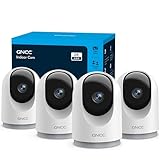
- 【2K & Night Vision】: GNCC Security Camera Indoor comes with 2K FHD quality video and images. You can access a live view of anything you care about or recorded video anytime and anywhere, keeping an eye on your baby, pet, home, and more. Even at night, the baby/pet camera provides super clear night vision and a wide video of any area you wish to monitor. The home cameras indoor always connects with a type-C power cord that gives you peace of mind with continuous 24/7 protection.
- 【Smart Pan/Tilt Rotation & Smart Motion Detection】: Pet camera indoor with phone app features smart 355°horizontal and 90°vertical rotation for complete 355°coverage, allowing it to track people and pets and capture everything anywhere at any time. Receive instant notifications whenever movement is detected by the WiFi camera, helping you stay connected to your home at all times. This indoor security camera ensures you can monitor pets, kids, or your space seamlessly through the OSAIO app.
- 【Two-Way Audio & Multi-device Viewing】: GNCC house cameras with audio and video comes with a built-in microphone and speaker, supporting real-time, two-way audio calls. You can communicate in real-time with your family, baby, pet, and even warn off and drive away thieves via your phone app wherever you are. Sharing memorable moments with your family up to 3 devices simultaneously and enjoy the convenience that indoor camera brings to you.
- 【Optional Cloud & 24/7 SD Card Storage】: GNCC security camera indoor to save the alert video on SD card(not included) or 30-day trial cloud storage to ensure your data safe, and enable 24/7 continuous recording on SD card storage to avoid the risk of losing anything important.
- 【Work with Alexa & Easy to Set Up】: The indoor camera is compatible with Alexa and Google Assistant. Pair the wifi camera with Alexa or Google Assistant, then use a simple voice command to ask Alexa or Google Assistant to view your live camera feed. The security camera is also easy to set up, just follow the detailed instructions on the app. Make sure the pet camera is connected to Wifi within a 3 feet range.
Why is a whole-home alarm different from a security camera?
A whole-home alarm detects events across multiple entry points and can produce a local siren or coordinated alarm notification, while a security camera primarily verifies and records what is visible in its field of view. A camera pointed at a porch may miss a basement window, side door, or interior movement outside the frame.
| Capability | Camera-first setup | Alarm-hub setup |
|---|---|---|
| Primary job | Visual verification, visitor awareness, and recorded evidence. | Opening, motion, and alarm detection across multiple sensors. |
| Typical hardware | Camera, microphone, speaker, motion detection, and app. | Base station, contact sensors, motion detector, keypad, range extender, and siren, with cameras added as needed. |
| Local deterrence | May include a camera spotlight or integrated siren, depending on model. | Ring Alarm Pro includes a 104-decibel siren, according to Ring’s current product specifications. |
| Connectivity resilience | Depends on the camera’s power, Wi-Fi, cloud service, and any local-storage option. | Ring Alarm Pro lists up to 24 hours of battery backup in low-power mode; backup connectivity and other resilience features may depend on a plan. |
| Best use | Confirming who arrived, what happened, or whether an alert is genuine. | Coordinating whole-home detection and alarm response. |
Ring describes Alarm Pro as a base station with a built-in eero Wi-Fi 6 router, Ring Alarm connectivity, a 24-hour battery backup, compatible sensors, a keypad, range extender, and integration with Ring cameras and Alexa-enabled devices. The base station is designed to replace the existing primary router, so households with a preferred router or mesh system should check the network topology before choosing it.
Ring Alarm Pro can be a good fit for a homeowner, landlord, or construction client who wants one central alarm platform. Ring’s product information also identifies plan-dependent features, so the hardware should not be presented as automatically including cellular backup, cloud recording, or professional monitoring. Verify current U.S. plan terms before purchase.
Recommended Free Tools
Which outdoor smart security camera is best for wide coverage?
Arlo Pro 5S 2K is the best fit in this comparison for outdoor coverage when a wide view, color night vision, spotlight deterrence, and wire-free installation are more important than guaranteed continuous recording.
According to Arlo’s current Pro 5S 2K specifications, the camera provides 2K HDR video, a 160-degree diagonal field of view, 12x digital zoom, color night vision, a spotlight, full-duplex two-way audio, an integrated siren, dual-band Wi-Fi, and weather-resistant construction. Arlo lists estimated battery life of up to eight months under the manufacturer’s stated conditions. The eight-month figure is a manufacturer specification, not an independent test result or a guarantee for every installation.
The camera can connect directly to Wi-Fi without a hub. Adding an Arlo SmartHub or base station can provide local-storage capability and other system benefits, which may matter when a homeowner wants a second storage path or is installing several Arlo devices. A wide field of view is useful for driveways and broad exterior walls, but placement still matters: a camera mounted too high, aimed toward glare, or obstructed by a roof edge may produce less useful evidence than a lower-resolution camera placed correctly.
Arlo says basic live view and motion notifications remain available without a subscription after the trial. Premium cloud video storage, interactive notifications, and video-object detection require a paid plan. That makes Arlo a reasonable choice for a reader who wants basic alerts without an ongoing storage plan, provided the reader accepts the reduced feature set.
What’s actually slowing this PC down?
Pick the symptom - the matching free tool is one click away.
Rank #2

- Stay Connected Anywhere: This wired Wi-Fi Camera access 24/7 live streams via LaView app on mobile or web browser; supports up to 9 simultaneous live feeds; stay in touch with your home at all times
- 1080P HD & Night Vision: Capture clear 2.1MP live views; equipped with advanced IR night vision for up to 33 ft coverage; compatible with 2.4GHz WiFI network(5GHz not supported); ensures quality monitoring even in darkness
- Motion Detection & Clear Two-way audio: Instant motion detection with smart alerts; this indoor home security camera supports clear two-way audio with noise cancellation; stay informed and communicate with family anytime
- Fit for most scenes & Sharing: The camera can be installed anywhere such as the living room & kitchen & office; space-efficient design; share access with up to 20 people; monitor multiple cameras from a single account
- 30 days free-trial US Cloud Storage & Micro-SD Storage: 30-day US cloud storage trial; The cloud storage bases on the AWS server in the US to encrypt your data and avoid the risk of losing video clips; microSD slot up to 128GB; store recordings securely
How do Arlo Pro 5S 2K and Google Nest Cam (Battery) compare?
Arlo Pro 5S 2K favors outdoor coverage and visual deterrence, while Google Nest Cam (Battery) favors Google Home integration, rechargeable placement, and built-in person, animal, and vehicle detection. Neither camera should be selected by resolution alone.
| Decision point | Arlo Pro 5S 2K | Google Nest Cam (Battery) |
|---|---|---|
| Video specification | 2K HDR video; 12x digital zoom. | Up to 1080p at 30 frames per second with HDR; 6x digital zoom. |
| Field of view | 160-degree diagonal. | 130-degree diagonal. |
| Power and placement | Wireless, with manufacturer-listed battery life of up to eight months under stated conditions; indoor or outdoor use. | Rechargeable built-in battery; weather-resistant IP54 rating; indoor or outdoor use. |
| Night and deterrence features | Color night vision, spotlight, integrated siren, and two-way audio. | Night vision with HDR and two-way audio; a spotlight and siren are not listed in the cited technical specifications. |
| Detection | Motion notifications and premium video-object detection with a subscription. | Person, animal, and vehicle detection listed in the technical specifications. |
| Included history | Basic live view and motion notifications without a subscription; premium cloud storage requires a plan. | Up to three hours of event-based video history included. |
| Extended recording | Premium cloud storage or local storage through a SmartHub/base station. | Google Home Premium can extend history; continuous recording requires continuous wired power and Google Home Premium Plus. |
| Platform requirement | Arlo app and Wi-Fi; a SmartHub or base station is optional for direct Wi-Fi use. | Google Home app and a Google Account are required. |
Google’s Nest Cam (Battery) specifications list on-device machine learning, secure boot, automatic security updates, 128-bit AES encryption with TLS/SSL, and support for WPA, WPA2, and WPA3 encryption. Those are useful security properties, but they do not eliminate the need for a protected account, updated home network, and careful privacy settings.
Choose Arlo when the installation needs a broad exterior view, color night vision, a spotlight, or a camera that can operate directly on Wi-Fi. Choose Google Nest Cam (Battery) when a household already uses Google Home and wants person, animal, and vehicle detection with battery placement. Choose neither on battery life alone: recording frequency, signal strength, temperature, motion volume, and charging access affect the practical result.
What should you check before installing a wired video doorbell?
Before installing a wired video doorbell, check the existing doorbell transformer, wiring, chime behavior, mounting position, and network upload speed. Ring Wired Doorbell (2nd Gen) is a good fit for a home with usable wiring and a front entrance that benefits from continuous power.
Quick wins for a faster PC:
Clear out junk files and repair common Windows errorsFree Scan →Scan for outdated or missing drivers - takes under a minuteDriver Scan →Repair Windows errors before they cause bigger problemsFix Now →Ring lists the Wired Doorbell (2nd Gen) with Retinal 2K video, up to 6x enhanced zoom, motion detection, night vision, two-way talk, and a 140-degree horizontal and vertical head-to-toe field of view. The doorbell requires compatible 8–24 VAC power, and Ring recommends at least 10 Mbps upload speed for its 2K devices.
The doorbell does not activate the home’s internal doorbell chime. A Ring Chime or Ring Chime Pro is needed for in-home alerts, so the installation plan should include an alert method inside the house rather than assuming the existing chime will work.
For new construction or a major renovation, decide the doorbell position and wiring route before exterior finishes are closed. For an existing property, confirm transformer compatibility and test Wi-Fi at the mounting location. A doorbell camera can show visitors and packages, but a field of view does not guarantee that every delivery, face, or approach path will be captured.
Rank #3

- AI Motion Detection 2.0 – Driving AI to the next level, human&vehicle detection and flexible detection area are more accurate than before. For quicker locating in crucial moments, human&vehicle smart searching in recordings offers you great help.
- Tried-and-True Safe Guard – This one-stop security solution can work with TVI, AHD, CVI, CVBS & IP cameras, the kit includes 1080P cams. The 8CH 3K lite DVR can hook up with 1080P@30fps or 3K/5MP@20fps cams. Therefore, you can also DIY it with other cameras in your home.
- Reliable 24/7 Continuous Recording – With a pre-installed 1TB HDD(Support up to 10TB HDD), providing 24/7 surveillance recording for you. Upgraded H.265+ saves more storage space and uses less bandwidth, recording videos longer and smoother viewing.
- Smart Dual-Light Effectively Guard Your Home – This newly upgraded security system offers you a crisp full color night vision, IR mode and color night vision switch flexibly. Once detect intruders, immediate pushes pop up on your phone, securing your peace of mind day&night.
- Color Night Vision & IP67 Weatherproof – Built-in IR lights and white lights, these cameras can see up to 100ft in B&W night vision, full-color night vision up to 66ft. Rated IP67, these wired cameras can brave all weather, and stand from cold to hot.
Which smart lock is best for keyless entry?
Yale Assure Lock 2 is the best fit in this comparison for keyless entry when the selected model matches the door and the household’s preferred access method. Yale’s Assure Lock 2 family is not one identical product: configurations include touchscreen, fingerprint, Apple Home Key, retrofit, and different connectivity options.
The Tool Desk
Outbyte Driver Updater FREEScan for outdated or missing drivers - takes under a minuteDriver Scan →Outbyte PC Repair FREEClear out junk files and repair common Windows errorsFree Scan →Yale directs buyers to verify door compatibility before ordering. Check the door type, backset, bore dimensions, handing, existing hardware, and the exact connectivity module. A lock that fits the door mechanically may still lack the remote-control or smart-home integration a household expects if the wrong variant is selected.
| Access priority | Assure Lock 2 direction to investigate | Question to answer before purchase |
|---|---|---|
| Codes for family, guests, or tradespeople | Touchscreen configuration. | Does the selected model support the required remote management and household platform? |
| Fingerprint entry | Fingerprint configuration. | Is biometric entry appropriate for every user, and what backup access method is available? |
| Apple Home Key | Apple Home Key configuration. | Is the household using compatible Apple devices and the correct lock module? |
| Keeping existing exterior hardware | Retrofit configuration. | Does the existing lock and door geometry meet Yale’s compatibility requirements? |
A smart lock controls entry; it does not replace a camera, contact sensor, or alarm siren. Use the lock for access codes and entry control, then pair it with a door sensor or camera if the goal is to know when the door opens and who is present.
How much do subscriptions change the real cost?
Subscriptions change the real cost by adding storage, object detection, cellular backup, or professional monitoring to the initial hardware purchase. A no-subscription setup may still provide useful live video or alerts, but the included features differ by manufacturer and device.
| Device or system | What the dossier documents without or with a plan | Cost question to verify |
|---|---|---|
| Arlo Pro 5S 2K | Live view and motion notifications continue without a subscription after the trial; premium cloud storage, interactive notifications, and video-object detection require a paid plan. | Whether the household needs cloud history, object detection, or a SmartHub for local storage. |
| Google Nest Cam (Battery) | Up to three hours of event-based history is included; Google Home Premium can extend history; continuous recording requires wired power and Google Home Premium Plus. | Whether event clips are sufficient or continuous recording justifies both wired power and the higher-tier plan. |
| Ring Alarm Pro | Ring documents optional 24/7 professional monitoring and identifies backup connectivity, cloud recording, and other capabilities as plan-dependent. | Current U.S. plan availability, monitoring terms, backup-connectivity terms, and camera-storage requirements. |
Calculate total cost as hardware plus the required or optional plan, replacement batteries, mounts, cables, solar accessories, indoor stands, and any extra chime or sensor. Retail prices, bundles, sellers, and inventory are volatile, so verify current listings and plan terms on the publication date rather than relying on an old price.
PC Slower Than It Used to Be?
A free scan shows the junk files, broken settings and background clutter dragging Windows down - then fixes them in one click.Free scan · Windows 10 & 11Outdated Drivers Are Slowing You Down
One free scan finds every outdated or missing driver and matches the right update for your exact hardware.Free scan · exact hardware matchWhat happens when power or Wi-Fi fails?
Power and Wi-Fi resilience depends on the device, hub, network, storage method, and subscription; no camera or alarm should be assumed to provide full protection during every outage.
- Ring Alarm Pro: Ring lists up to 24 hours of battery backup in low-power mode. Cellular or backup connectivity is not automatically included in every configuration, so check the current plan and hardware requirements.
- Battery cameras: A rechargeable camera can continue to have battery power during a household power failure, but cloud alerts and remote viewing still depend on the camera’s network path unless the system provides a documented local or backup connection.
- Arlo local storage: An Arlo SmartHub or base station can add local-storage capability, but local storage does not automatically mean remote alerts will work without network connectivity.
- Wired doorbells: A wired doorbell depends on compatible doorbell power and the home network. A Ring Chime can provide an in-home alert, but the chime does not replace power or network resilience.
- Smart locks: Operation during an outage varies by the selected lock, batteries, connectivity module, and access method. Keep a documented backup entry method and confirm the exact Yale configuration before relying on remote access.
A camera may preserve evidence without delivering an alert, and an alarm may sound locally without reaching a phone. If outage behavior matters, test the complete system—including the router, hub, camera, lock, app notifications, and local siren—before treating the installation as dependable.
Rank #4

- CAPTURE CRIME FROM DETAILS: Discover potential crime has never been so easier with superior 5MP HD. With advanced IR lights, you can see up to 100ft in the dark, helping to protect your property and loved ones even at night.
- SMART PERSON/ANIMAL/VEHICLE DETECTION – Smart PoE IP cameras can identify people, animals, and vehicles, minimizing unwanted alerts triggered by bugs or leaves (please upgrade to the latest firmware version). Filter out true threats and get to know what happened simply by glancing at the lock screen. General motion detection is also available.
- PLUG & PLAY: With everything needed, the poe security camera system can be easily installed even by yourself. Just hook all the poe cameras up with the NVR and you can enjoy your whole new security system day and night.
- HEAR THE EVIDENCE: Watch and also hear every detail of surroundings and make sure everything is under control. With the built-in microphone, you won’t miss any suspicious noise or conversation when the crisis arises with just one click to turn the function on.
- HDD Storage and Remote Playback – Including a pre-installed 2TB HDD, videos can be recorded and stored for ten days without overwriting occurring. Users can add one additional external 8TB HDD via the camera’s e-SATA port. With the free Reolink app, all videos can be played back through your smart device anywhere, anytime.
How should you compare smart-home ecosystem compatibility?
Choose the ecosystem that reduces app switching and supports the alerts and automations the household will actually use. Hardware compatibility is only part of the decision; account requirements, voice assistants, camera access, lock controls, and alarm notifications also matter.
| Ecosystem or platform priority | Documented fit in this comparison | Important qualification |
|---|---|---|
| Ring and Alexa | Ring Alarm Pro integrates with Ring cameras and Alexa-enabled devices. | Confirm which alarm, camera, storage, and monitoring features require a Ring plan. |
| Google Home | Google Nest Cam (Battery) requires the Google Home app and a Google Account. | Google Home Premium and Premium Plus affect history and continuous-recording capabilities. |
| Arlo | Arlo Pro 5S 2K can connect directly to Wi-Fi through the Arlo system; a SmartHub or base station is optional for additional capabilities. | Confirm the exact feature and platform support for the chosen Arlo configuration. |
| Apple Home | Yale Assure Lock 2 includes an Apple Home Key configuration. | Not every Assure Lock 2 variant supports every platform or access method. |
| Mixed smart home | Google Home, Ring/Alexa, Arlo, Apple Home, SmartThings, and vendor-specific apps may coexist in a household. | Cross-platform automations and shared controls must be checked by exact model and connectivity module. |
For a construction or renovation project, decide early whether the owner wants a Ring/Alexa, Google Home, Apple Home, SmartThings, Arlo, or mixed setup. That decision affects account ownership, Wi-Fi placement, doorbell wiring, camera power, lock selection, and who can receive alerts after handover.
What privacy and cybersecurity checks matter before purchase?
Privacy and account security should be buying criteria, not afterthoughts, because cameras, microphones, sensors, and locks create records about people, movement, visitors, and access.
According to NIST’s 2025 U.S. survey of 401 smart-home users, security and privacy perceptions and actions differed across device categories including voice assistants, thermostats, security devices, sensors, and lighting. NIST’s consumer IoT work also says there is “no one-size fits all” approach to consumer IoT security. The correct choice depends on the product, account, network, household, and use case.
NIST researcher Julie Haney’s 2025 consumer guidance gives a particularly practical account-security recommendation: “A much better option is to use multi-factor authentication.” Enable multi-factor authentication or passkeys when the manufacturer supports them, and do not reuse the smart-home account password elsewhere.
- Account protection: Check for multi-factor authentication or passkeys, recovery controls, separate household users, and access-log visibility.
- Updates: Confirm whether automatic security updates are supported and whether the manufacturer documents a support period or lifecycle policy.
- Storage: Determine whether clips are stored locally, in the cloud, or in both locations, and identify retention and deletion controls.
- Recording controls: Look for privacy zones, audio controls, recording schedules, camera indicators, and the ability to disable recording when appropriate.
- Network onboarding: NIST’s secure-onboarding guidance emphasizes trusted network-layer onboarding, unique local network credentials, and lifecycle management for IoT devices.
- Network separation: Consider a secure Wi-Fi router for a smart home that supports current encryption and a separate guest or IoT network where appropriate. Network infrastructure improves connected-device hygiene but does not replace locks, sensors, alarms, or cameras.
- Manufacturer history: Research recent security breaches, privacy complaints, update practices, and account controls before buying a device.
- Household consent: Make sure residents, workers, guests, and visitors understand where cameras and microphones are located and how access logs or recordings are handled.
Google documents on-device machine learning, secure boot, automatic security updates, 128-bit AES encryption with TLS/SSL, and WPA, WPA2, and WPA3 support for Nest Cam (Battery). Those documented controls are positive selection factors for that model, but they should not be generalized to every smart security device.
What response can you expect after a security alert?
A smart security device can notify a user, sound a siren, or provide evidence, but a camera or app does not guarantee crime prevention, police dispatch, emergency response, or successful delivery of an alert.
Best Value

- A great fit for 2-4 bedroom homes, this Alarm Kit includes one Base Station, two Keypads, eight Contact Sensors, two Motion Detectors, and one Range Extender.
- Includes an intuitive Keypad that can arm and disarm your Alarm and Contact Sensors that detect when doors or windows open.
- Choose the Ring Alarm Kit that fits your needs and detect even more with additional Alarm Sensors and accessories (sold separately) at any time.
- Receive mobile notifications when your system is triggered and monitor all your Ring devices all through the Ring app.
- More peace of mind. Subscribe to a compatible Ring Protect Plan (sold separately) to Arm your Alarm from anywhere, keep your system online if the Wi-Fi goes down, and more. Plus, get 24/7 Professional Monitoring for emergency police, fire and medical response, and more.
Google’s technical specifications state that Nest Cam does not provide third-party monitored emergency notification or response. Professional monitoring is a separate service model with plan, provider, geography, and response-policy requirements that must be verified before purchase. Self-monitoring may be sufficient for a homeowner who can respond to alerts; Ring Alarm Pro’s optional 24/7 professional monitoring is more relevant to households that want a service provider involved, subject to current plan terms and availability.
Before choosing professional home-security monitoring, ask who receives the signal, what events are monitored, whether cellular backup is included, which U.S. locations are supported, what verification steps apply, and what response the provider actually promises. Do not describe a camera subscription as emergency response unless the provider’s current terms explicitly support that service.
Which installation checklist should a homeowner or builder use?
Use the following checklist before ordering equipment or closing walls around a smart-security installation:
Do these 3 things before closing this tab:
1Scan for outdated or missing drivers - takes under a minute2Clear out junk files and repair common Windows errors3Fix the driver behind crashes, sound loss and screen glitches- Map the security jobs: Mark front and secondary doors, accessible windows, driveways, walkways, packages, interior circulation areas, and the locations where a siren or keypad would be useful.
- Separate detection from verification: Use contact or motion sensors for whole-home detection and cameras for visual confirmation. Do not rely on a single camera to cover every opening.
- Plan power: Identify doorbell transformer compatibility, camera charging access, wired versus battery placement, and any weather-rated cable or solar accessory requirements.
- Plan the network: Check Wi-Fi coverage at exterior mounting points, upload speed for 2K video, router placement, account ownership, and whether a separate IoT network is appropriate.
- Check physical fit: Verify the camera mounting surface and weather exposure. For Yale Assure Lock 2, verify door type, backset, bore dimensions, handing, existing hardware, and selected connectivity module.
- Choose storage deliberately: Decide whether included event history, paid cloud storage, local storage, or continuous recording is actually required.
- Plan outage behavior: Identify what should happen during a power or Wi-Fi failure and test the backup battery, local siren, router, hub, and notification path.
- Secure the accounts: Enable multi-factor authentication, install firmware updates, use unique passwords, and remove installer or former-occupant access after handover.
- Test the finished installation: Walk every approach path, open each protected door or window, check night images, test indoor alerts, confirm recording controls, and verify that every intended household user can access the system.
Which smart security setup is the best overall choice?
For whole-home protection, start with an alarm hub and sensors, then add cameras where visual verification matters, a wired video doorbell at the primary entrance, and a compatible smart lock if keyless entry solves a real access problem. Ring Alarm Pro is the clearest central-system choice in this research; Arlo Pro 5S 2K is the better outdoor-camera fit, Google Nest Cam (Battery) is the better Google Home battery-camera fit, Ring Wired Doorbell (2nd Gen) is the better wired-entry fit, and Yale Assure Lock 2 is the entry-control option after compatibility verification.
The best smart security devices are therefore the devices that fit the property’s openings, wiring, network, ecosystem, privacy expectations, outage plan, and response model. Verify current U.S. availability, firmware, subscriptions, bundles, and professional-monitoring terms before publication or purchase.
Frequently Asked Questions
Can smart security cameras work without a subscription?
Arlo says live view and motion notifications continue without a subscription after the trial, but premium cloud storage, interactive notifications, and video-object detection require a paid plan. Google Nest Cam (Battery) includes up to three hours of event-based history, while extended history and continuous recording require Google Home subscriptions; continuous recording also requires wired power. Arlo’s specifications and Google’s Nest Cam specifications document these differences.
What smart security device works during a power outage?
Ring Alarm Pro lists up to 24 hours of battery backup in low-power mode, but a household should not assume that every camera, router, notification, or cloud feature will continue during a power or Wi-Fi outage. Backup connectivity and other resilience features may depend on the selected Ring plan and system configuration.
Is Yale Assure Lock 2 compatible with every door and smart-home platform?
Yale Assure Lock 2 compatibility depends on the door and the exact lock configuration. Verify the door type, backset, bore dimensions, handing, existing hardware, connectivity module, and desired access method before ordering; Yale provides a compatibility check through its Assure Lock 2 product-family information.
Do smart security cameras automatically call the police?
A camera records evidence or sends an alert but does not automatically guarantee police or emergency response. Google states that Nest Cam does not provide third-party monitored emergency notification or response; professional monitoring is a separate, plan- and geography-dependent service that requires current provider verification.
The Bottom Line
Buy by security job, not by camera resolution. Use sensors and an alarm hub for whole-home detection, cameras for visual confirmation, a doorbell for the entrance, and a compatible smart lock for access control; then verify power, Wi-Fi, storage, subscriptions, privacy, and outage behavior.
Quick Recap
Product prices and availability are accurate as of the date/time indicated and are subject to change. Any price and availability information displayed on Amazon at the time of purchase will apply.