What’s actually slowing this PC down?
Pick the symptom - the matching free tool is one click away.
The best programmable remote for a home theater in 2026 is not one product for every house. For a simple TV, soundbar, streaming box, and game console, a $70 to $200 DIY remote can be enough. For a media room with a receiver, projector, motorized screen, hidden cabinet, lighting scenes, and multiple HDMI sources, you should be looking at hub-based control, RF, Bluetooth, Wi-Fi/IP control, and reliable activity macros. For a dedicated theater or whole-home system, a dealer-programmed platform is often the correct answer, even though it costs more.
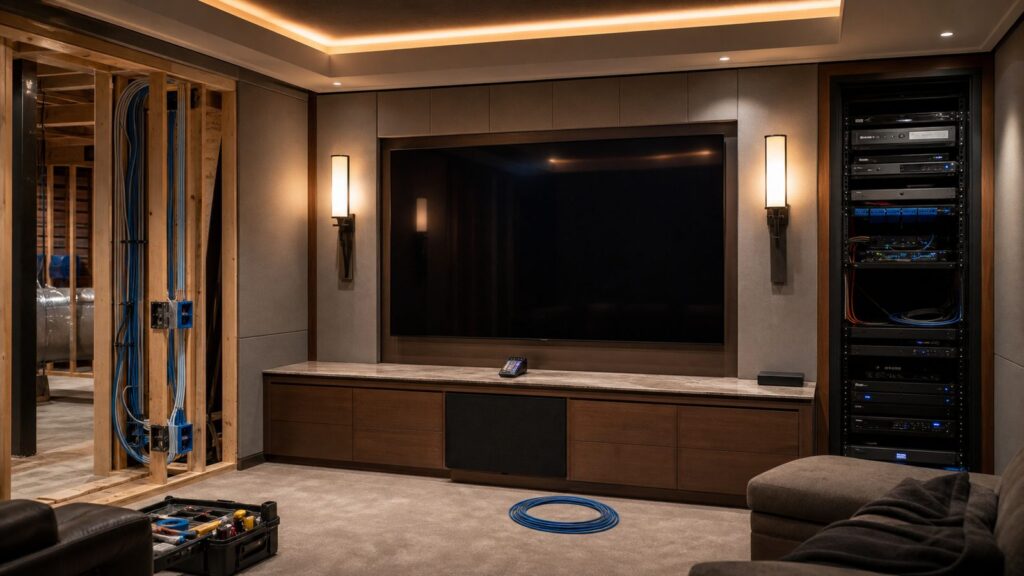
On our job sites, the remote conversation usually starts too late. Homeowners ask about the remote after the display is mounted, the cabinet is built, the receiver is buried behind doors, and the drywall is painted. That is backwards. The control system should be part of the design and pre-wire plan, because it affects conduit, Ethernet, low-voltage paths, equipment ventilation, rack access, lighting controls, and future service.
As an Amazon Associate I earn from qualifying purchases.
Logitech Harmony is now legacy for practical purposes. Many families still use old Harmony remotes, but we would not design a new 2026 theater around a discontinued ecosystem. The current replacement market falls into five useful categories: basic IR remotes, DIY hub-based remotes such as SofaBaton, app-based control such as Roomie Remote, enthusiast local-control remotes such as Unfolded Circle Remote 3, and professional systems from URC, Control4, Savant, RTI, or Crestron.
Start With the Room, Not the Remote
A remote is only as reliable as the system behind it. Before choosing hardware, make a simple device and activity matrix. We use this same logic when coordinating media rooms with low-voltage installers and AV integrators.
#1 Best Overall

- 【THE PERFECT UPGRADE】This X2 universal remote is designed to replace all your old remotes including IR, Bluetooth, Wi-Fi, and RF compatible devices. With support for 6,000+ brands and 500,000+ devices, it’s the ultimate all-in-one solution for your home entertainment system. Our regularly updated database ensures compatibility with the latest gadgets.
- 【COMPLETE HOME ASSISTANT INTEGRATION】Offers seamless smart home management by allowing you to add the dedicated Sofabaton Hub integration into your Home Assistant system, enabling HA automations to directly execute your pre-set Activities. For complete control, you can also add commands in our Sofabaton app to control Home Assistant-connected devices, establishing a robust, bi-directional link that ensures harmonious, cross-platform control between your entertainment devices and your entire smart home ecosystem.
- 【INSTANT CHANNEL ACCESS】Tired of Endless Menu Scrolling? The X2 Universal Remote with touchscreen and convenient charging dock makes everything simple! As the first smart remote with a quick-access touch screen, it features a dedicated button for instant access to the numeric keypad (0-9), favorite keys, and macros. It's smarter and faster than any standard smart remote.
- 【ONE-TOUCH ACTIVITIES】Turn on custom activities like "Movie Night" or "Game Time" with a single tap! Launch multiple commands at once to turn on your TV, switch inputs, adjust sound, and dim lights—all without manually adjusting each device. Simply touch the screen to activate your ideal setup instantly.
- 【HANDS-FREE VOICE CONTROL】The X2 universal remote control offers full compatibility with Alexa and Google Assistant. Simply link your SofaBaton account to integrate all your activities. Use voice commands like, "Alexa, turn on Movie Night" to instantly activate your customized scenes—no remote needed. Experience voice-activated entertainment throughout your home.
List every device first: TV or projector, AV receiver, soundbar, streaming box, cable or satellite box, Blu-ray player, game consoles, Apple TV or Roku, lighting dimmers, motorized shades, screen lift, subwoofer, and any control processor or hub. Then list the activities the family will actually use: Watch TV, Stream Movie, Play Game, Listen to Music, Projector Night, Intermission, and All Off.
If each activity requires three or four commands, almost any programmable remote can help. If each activity requires powering up seven devices, selecting inputs, lowering shades, dimming sconces, changing receiver sound modes, and waking a projector, you need a stronger control layer.
Visible Gear Is Easier Than Hidden Gear
If the TV, soundbar, and streaming box are visible, infrared control may be fine. Infrared is inexpensive and common, but it is line-of-sight. Close a cabinet door, hide a receiver in a built-in, or move equipment to a closet, and basic IR becomes unreliable unless you add repeaters, emitters, a hub, or a base station.
For hidden gear, we prefer systems that can use RF, IP, Bluetooth, or a hardwired control path where appropriate. A remote that works only when pointed at the perfect angle will frustrate the homeowner, no matter how nice the room looks.
Build the Wiring Path Before Drywall
For remodels and new construction, run conduit from the display or projector location to the equipment location. HDMI standards change faster than walls do. A 1.5-inch to 2-inch conduit with sweep bends is cheap insurance compared with opening a finished wall later. For projectors, plan the throw distance, outlet, data path, and mount blocking before ceiling drywall.
Home theater wiring is not a throwaway line item. A 2026 national average for home theater wiring starts around $715 to $1,056 per system before premium paths, racks, drywall repair, patch panels, in-wall speakers, or electrical work. In finished homes, fishing cable through insulated walls, attic spaces, or masonry can push that number up quickly.
Best Programmable Remote Choices by Project Type
The right remote depends on the room type. Here is the practical breakdown we would give a homeowner before a remodel, basement finish, or media-room upgrade.
| Project Type | Best Remote Category | Typical 2026 Cost | Good Fit | Watchouts |
|---|---|---|---|---|
| Basic living room | Simple IR or budget programmable remote | $10-$80 | TV, cable box, soundbar, one streamer | Weak macros, line-of-sight control, little smart-home integration |
| Living room with receiver | DIY programmable remote or hub remote | $70-$200 | TV, AVR, game console, streamer, Blu-ray | Setup app quality matters; hidden gear may need hub placement work |
| Media room with hidden equipment | Hub-based DIY or pro-style single-room remote | $160-$500+ DIY; several hundred to several thousand pro-installed | Receiver in cabinet, projector, screen, multiple sources | Needs IR emitters, RF/base station, IP control, Ethernet, and service access |
| Dedicated theater | Dealer-programmed control system | Often several thousand dollars with programming | Projector, screen, rack, lighting scenes, shades, HVAC, acoustic treatments | Ask who owns programming and how future changes are handled |
| Whole-home AV | URC, Control4, Savant, RTI, Crestron, or similar | $10,000-$50,000 mid-range; $50,000-$100,000 high-end integrated systems | Multi-room audio, video distribution, lighting, shades, security, climate | Dealer support, network design, rack cooling, and documentation are critical |
Best Budget Pick: SofaBaton U2-Class Remote
For a homeowner replacing a pile of remotes in a modest living room, a SofaBaton U2-class remote is the practical budget-plus category. Expect about $80 for this type of device. It supports up to 15 devices, programmable buttons, and macros, which is enough for many TV, soundbar, streaming, and disc-player setups.
This is not the remote we would choose for a fully hidden rack or a high-end theater. It is the remote we would consider for a family room where the TV is visible, the soundbar is simple, and the homeowner wants fewer remotes on the coffee table without hiring an installer.
Where It Works Well
A U2-class remote makes sense when you have 3 to 6 devices, most components can receive IR directly, and the activities are simple. Watch TV might mean turning on the TV, selecting HDMI 1, powering the cable box, and controlling soundbar volume. Stream Movie might mean switching the TV input and controlling an Apple TV, Roku, or similar streamer.
The value is cost control. At roughly $70 to $100, it can solve a real annoyance without turning a small living-room setup into a full smart-home project.
Quick wins for a faster PC:
Repair Windows errors before they cause bigger problemsFix Now →Fix the driver behind crashes, sound loss and screen glitchesFind Drivers →Clear out junk files and repair common Windows errorsFree Scan →Where It Falls Short
Setup depends on a companion app, and that matters. If the device database is incomplete or a command sequence is finicky, the homeowner has to troubleshoot. It also does not magically solve bad cabinet design. If the receiver is behind a thick wood door, an IR-only command may still fail unless the system has the right hub, emitter, or repeater path.
Rank #2
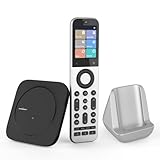
- Powerful Unified Code Library & Advanced Multi Control: The SofaBaton X2 universal remote features sophisticated multi-protocol support, mastering IR, Bluetooth, RF and Wi-Fi connectivity to command an unprecedented range of over 500,000 devices across 6,000+ brands. This intelligent hub delivers seamless operation of your television, streaming devices, audio systems, gaming consoles and set-top boxes, creating a truly unified control
- 【Exclusive Touchscreen Innovation】The SofaBaton X2 revolutionizes universal remote control with its groundbreaking 2.4-inch HD touchscreen, putting advanced control literally at your fingertips. The smart interface enables direct touch navigation while dedicated shortcut buttons beneath the display provide immediate access to Number Pads & Macros. Paired with the innovative Type-C charging dock that ensures your remote is always charged and ready, create a seamless, modern control that redefines what a universal remote can achieve
- 【Seamless Home Assistant Integration】Achieve seamless smart home automation through native Home Assistant integration. By adding the SofaBaton integration to your HA system, you can utilize Home Assistant automations to trigger activities on your remote, enabling true cross-platform device synchronization and creating a unified smart home entertainment
- 【Dedicated Home Assistant Controller】Utilize your SofaBaton X2 as a dedicated physical controller for Home Assistant. Through MQTT integration, your HA system can subscribe to remote commands and trigger supported automation functions, enabling direct control of audio-video equipment, lighting, curtains and other smart devices directly from your remote
- 【Smart One-Touch Activity Programming】The SofaBaton X2 smart remote revolutionizes multi-device control with its intelligent Activity programming. Create Customized Activity sequences that operate your entire entertainment system simultaneously - configure "TV Time" to activate cable box, set optimal soundbar levels and turn on lights. This all-in-one universal remote replaces complex multi-step operations with intuitive single-button control, making home automation accessible to everyone
Best DIY Harmony-Style Replacement: SofaBaton X1S or X2
For larger DIY systems, SofaBaton X1S and X2 are the stronger Harmony-style replacement category. The X1S commonly tracks around $160 to $200 in U.S. retail data and is advertised for 60-plus devices. The newer X2 has been observed around $329.99 to $359.99 and adds a stronger feature set for homeowners who want more than basic IR.
This category is a good fit for a component-heavy living room or media room where the homeowner wants hard buttons, activities, hub control, and the ability to handle more devices over time. It is also a reasonable option when the budget does not justify a dealer-programmed system.
Why the Hub Matters
A hub lets you place control hardware near the equipment instead of relying on the remote itself to blast IR across the room. That matters when the receiver is in a cabinet, a console table, or a nearby closet. A better hub-based system can combine IR, Bluetooth, RF, Wi-Fi/IP style control, and activity macros depending on model and device compatibility.
In real use, this is what separates an acceptable theater remote from one that the whole family will use. The remote should turn on the right devices, select the right inputs, control volume through the AVR or soundbar, and shut the room down cleanly with one All Off command.
Best Fit
Use this category for 5 to 12 active devices, especially if you have a TV, AV receiver, streaming boxes, game consoles, a Blu-ray player, and maybe a projector or screen. It is also useful when the homeowner is comfortable with app-based setup but still wants a physical remote with buttons for daily use.
We would still plan the room as if service matters. Label every cable at both ends. Leave slack behind the rack or cabinet. Photograph walls before drywall. Do not bury HDMI extenders, splitters, or power supplies inside sealed cavities. A good remote cannot fix a system that cannot be reached for service.
Best App-First Option: Roomie Remote
Roomie Remote is the app-first route. Pricing observed for 2026 starts around $49.99 per year for one room and around $89.99 per year for one home. IR adapters start around $39.95 to $49.95 when older IR-only equipment must be controlled.
Recommended Free Tools
This is best for Apple-centric households and systems with mature IP-controllable AV devices. If the homeowner already lives on iPhone or iPad, likes dashboards, and wants a flexible app interface, Roomie can be a strong fit. It can be less ideal for guests, children, or anyone who just wants tactile volume, mute, pause, and power buttons without unlocking a phone.
Where App Control Makes Sense
App control is useful when the home already has a strong network, modern devices, and homeowners who are comfortable managing subscriptions. It can also be excellent for secondary rooms where a physical remote is less important.
For construction planning, the network is the hidden backbone. Hardwire what matters: rack, TV, projector, streaming boxes, game consoles, and control processors. Ethernet is more reliable than crowded Wi-Fi, especially in homes with mesh nodes, concrete, masonry, foil-backed insulation, or equipment rooms tucked under stairs.
Keep a Manual Fallback
We do not like designs where the phone is the only way to use the room. Batteries die. Apps update. Wi-Fi goes down. Guests visit. At minimum, the family should have a way to control power, input, volume, and lights without depending on one person’s phone.
Best Enthusiast Local-Control Remote: Unfolded Circle Remote 3
Unfolded Circle Remote 3 is aimed at homeowners and enthusiasts who care about local control, modern hardware, and avoiding subscription dependence. It emphasizes local operation, no subscription, 2.4 GHz and 5 GHz Wi-Fi, Bluetooth 5.2, IR, touchscreen control, backlit buttons, and wireless charging. Pricing sits roughly in the $329-plus range depending on bundle and availability.
Rank #3

- Extensive Device Compatibility: The Sofabaton X2 universal TV remote features a comprehensive cloud-based code library supporting over 500,000 devices from more than 6,000 brands, making it the ultimate universal remote control for TVs, soundbars, streaming devices like Roku and Apple TV, and beyond, with seamless IR, Bluetooth, RF, and Wi-Fi connectivity.
- Innovative Touchscreen Interface: Elevate your control experience with the Sofabaton X2's 2.4-inch HD touchscreen, offering intuitive navigation and a quick-access panel for digital keypads and macros, positioning this smart remote control as a modern, user-friendly Sofabaton universal remote complete with a Type-C charging dock.
- Advanced Smart Home Integration: Seamlessly connect the Sofabaton X2 smart universal remote to Home Assistant for automated activities, enabling cross-platform synchronization and turning it into a central hub for your entertainment and smart home ecosystem.
- Dedicated MQTT Control for Home Assistant: Transform the Sofabaton X2 into a programmable remote control for Home Assistant via MQTT, allowing direct command subscriptions to automate audio-video gear, lighting, curtains, and more, enhancing its role as the best universal remote for integrated smart living.
- Effortless One-Touch Activities: Customize activities on the Sofabaton X2 universal remote control to execute multi-device commands with a single press, such as "Movie Night" for powering on your TV and adjusting settings, simplifying complex setups with this versatile smart remote control.
This is not the simplest option for every family. It is more attractive for technically capable homeowners, Home Assistant users, and people who want control to keep working locally instead of depending heavily on cloud services.
Why Local Control Matters
Local control reduces dependence on internet outages and vendor cloud changes. That does not make it maintenance-free. Firmware, integrations, device compatibility, and network design still matter. But for a homeowner who wants a serious DIY control layer without a dealer ecosystem, this category deserves attention.
We would pair this type of remote with a clean network layout, hardwired key devices, a labeled rack, and accessible power management. It belongs in a well-planned media room, not tossed into a cabinet as an afterthought.
Free tools Windows power users keep installed
One-click scans. No signup required.
Best Pro-Style Single-Room Remote: URC MX-990
The URC MX-990 remains a strong example of a pro-style single-room remote. It is dealer-customizable and includes a color LCD, backlit hard buttons, rechargeable cradle, conditional logic, timers, and through-cabinet or through-wall control when paired with a compatible base station.
This is the kind of remote that makes sense when a room has enough complexity to punish weak control but does not necessarily require a whole-house automation platform. Think dedicated family media room, projector room, or living room with hidden AV components and lighting scenes.
Why Dealer Programming Can Be Worth It
A professionally programmed system costs more because the work is not just the remote. You are paying for device discovery, command sequencing, macro testing, IR emitter placement, base-station setup, input mapping, lighting integration, handoff, and follow-up revisions after the family uses the room for a few weeks.
For many homes, a dealer-programmed remote and processor package lands somewhere from several hundred to several thousand dollars, depending on hardware, programming time, service visit, and system complexity. That can sound expensive beside a $300 remote, but it may be cheap compared with a $25,000 to $60,000 theater that nobody can operate comfortably.
Crashes, No Sound, or Screen Glitches?
Random freezes, missing sound and display glitches usually trace back to one bad driver. Find and replace yours safely.Free scan · under a minuteWindows Errors? Fix Them Before They Spread
Repair common Windows errors and clear accumulated junk for a smoother, more stable PC - no reinstall needed.Free scan · no reinstallBest Whole-Home Control: Control4, Savant, RTI, Crestron, or URC Total Control
Once the remote is expected to control more than the theater, you are no longer shopping for a remote. You are designing a home control system. This is where platforms such as Control4, Savant, RTI, Crestron, and URC Total Control enter the conversation.
These systems are appropriate when the project includes multi-room audio, video distribution, lighting scenes, motorized shades, security, climate, gate control, pool control, or multiple touchscreens and remotes. CEDIA’s 2026-updated homeowner cost guidance places budget multi-room AV at $1,000 to $10,000, mid-range systems at $10,000 to $50,000, and high-end integrated systems at $50,000 to $100,000.
Ask Ownership Questions Before Signing
Before choosing a dealer ecosystem, ask direct questions. Who can edit the programming? What happens if the dealer relationship ends? Is remote access enabled? What are the hourly rates for revisions? Is there a service plan? Are passwords, device lists, IP addresses, cable labels, and rack drawings documented for the homeowner?
A beautiful control system with poor documentation is a future service problem. We want the equipment rack, low-voltage panel, lighting controls, and network gear labeled well enough that another qualified technician can understand the installation years later.
Do these 3 things before closing this tab:
1Scan for outdated or missing drivers - takes under a minute2Clear out junk files and repair common Windows errors3Fix the driver behind crashes, sound loss and screen glitchesCost Planning: The Remote Is Usually Not the Expensive Part
Homeowners often focus on the price of the handheld remote, but the bigger cost is the supporting infrastructure. A $20 remote can be perfect for a guest room. A $300 remote can be inadequate in a theater with hidden gear, no conduit, weak Wi-Fi, poor ventilation, and no lighting integration.
Rank #4

- 【HOME ASSISTANT + MQTT SUPPORT】Fully integrate with your smart home ecosystem. The X2 universal remote control connects directly to Home Assistant via our official integration—plus native MQTT support for advanced automations. Trigger activities from HA, or send commands from the remote to control lights, curtains, and more.
- 【FASTER TOUCHSCREEN CONTROL】Stop scrolling endless menus. The X2 universal remote is the first smart remote with a quick-access touchscreen—tap once to reach the numeric keypad, favorite channels, or custom macros. Comes with a charging dock for effortless power.
- 【ONE REMOTE FOR EVERYTHING】Replace all your old remotes—IR, Bluetooth, Wi-Fi, and RF devices—with a single X2. It supports 6,000+ brands and 500,000+ devices, including the latest streaming players, TVs, and soundbars. Our cloud-based database is regularly updated, so new gadgets work right out of the box.
- 【ACTIVITIES WITH ONE TAP】Create custom activities like “Movie Night” or “Game Time”—and trigger them with a single tap. One command powers on your TV, switches inputs, adjusts the sound, and even dims the lights. No more juggling remotes or navigating menus. Just tap, and your entire setup responds instantly.
- 【HANDS-FREE VOICE CONTROL】Works with Alexa and Google Assistant—so you never need to pick up the remote. Link your Sofabaton account once, then use simple voice commands like “Alexa, turn on Movie Night” to trigger your custom activities. Your entertainment responds instantly, hands-free.
| Item | Typical 2026 Cost | What Drives the Price |
|---|---|---|
| Basic replacement remote | $10-$25 | Simple IR control for 3 to 4 devices |
| Better DIY programmable remote | $70-$200 | Device count, macros, display, app setup, hub support |
| Premium DIY or enthusiast remote | $300-$500+ | Touchscreen, dock, hub, local control, IR extenders, availability |
| App-based control | $49.99-$89.99 per year plus $39.95-$49.95 IR adapters | Room count, subscription tier, IR-only device support |
| Dealer-programmed control package | Several hundred to several thousand dollars | Remote, processor, base station, programming, testing, service visit |
| Home theater wiring | $715-$1,056 starting national average | Finished walls, conduit, rack location, speaker wire, HDMI/fiber, patch panels |
| Mid-range multi-room AV | $10,000-$50,000 | Multiple rooms, audio zones, lighting, shades, network, programming |
| High-end integrated system | $50,000-$100,000 | Whole-home automation, custom theater, distributed AV, service contract |
Construction Details That Make or Break Remote Reliability
This is where a construction company sees the project differently from a gadget roundup. The remote works only if the room is built to support it.
Conduit and Cable Paths
Run conduit wherever future cable replacement would be painful: display to cabinet, projector to rack, rack to low-voltage panel, and sometimes rack to attic or basement access. Use sweep bends instead of tight 90-degree elbows. Leave pull strings. Avoid filling conduit so tightly that future HDMI or fiber replacement becomes impossible.
Ethernet and Network Design
Hardwire the TV or projector location, the equipment rack, streaming boxes, game consoles, and control processor. Wi-Fi is convenient, but AV control needs consistency. A $150 network switch and properly terminated Cat6 can prevent hours of intermittent troubleshooting.
The Tool Desk
Outbyte Driver Updater FREEFix the driver behind crashes, sound loss and screen glitchesFind Drivers →Outbyte PC Repair FREEClear out junk files and repair common Windows errorsFree Scan →IR, RF, Bluetooth, and IP Control
Use IP control where it is mature, IR where necessary, and RF or base stations where equipment is hidden. Many systems end up using a mix. The mistake is assuming one method will handle everything without testing each device.
Ventilation and Access
Receivers, amplifiers, game consoles, and cable boxes create heat. Built-ins should have ventilation paths and service access. Do not seal an AV receiver in a decorative cabinet with no airflow and then blame the remote when the system locks up after a two-hour movie.
Lighting and Shades
A great theater remote should not only turn on the receiver. It should trigger dimming, sconces, step lights, or blackout shades. Plan dimmers, switch locations, neutral wires, load types, and shade power early. Lighting scenes are easiest when the electrician, builder, and AV integrator coordinate before drywall.
Safety, Code, and Permit Notes
Low-voltage work is still construction work. Speaker wire, data cable, in-wall HDMI, conduit, and electrical separation should be handled correctly. Use cable rated for the wall or ceiling assembly. Keep low-voltage cable separated from line-voltage wiring according to local code and manufacturer guidance. Do not run extension cords inside walls.
Do these 3 things before closing this tab:
1Repair Windows errors before they cause bigger problems2Scan for outdated or missing drivers - takes under a minute3Clear out junk files and repair common Windows errorsPermit rules vary by city and state. Some jurisdictions allow limited low-voltage work without a full electrical permit, while others require permits or licensed contractors for certain wiring, outlets, circuits, or concealed work. Electrical outlets behind TVs, projector outlets, new circuits, recessed lighting, and motorized shade power are common points where code requirements matter.
For in-wall speaker wiring, use proper CL2, CL3, or other code-appropriate cable as required by the application and local authority. In many home theater builds, 14 AWG or 16 AWG speaker wire is common depending on run length and speaker load, but the rating and installation method matter as much as gauge. For long subwoofer, projector, or HDMI paths, plan the cable type before framing closes.
When to DIY vs. When to Hire a Pro
DIY is reasonable when the system is visible, limited, and recoverable. If you have a TV, soundbar, one streaming box, a game console, and no hidden equipment, a $70 to $200 remote is a good first move. Expect a few hours for setup, testing, and button customization.
DIY becomes risky when the room has hidden components, a projector, an AV receiver, in-wall speakers, lighting scenes, or multiple family members who need the system to work without troubleshooting. At that point, the cost of a pro is not just convenience. It is reliability, documentation, clean cable paths, proper ventilation, and support.
Hire a pro when the work touches electrical circuits, finished-wall cable fishing, in-wall speakers, rack design, projector mounting, lighting control, motorized shades, distributed audio, or whole-home automation. Also hire a pro if the homeowner expects one button to control AV, lights, shades, and climate across multiple rooms.
Best Value

- 【Massive Code Library – One Remote for All】Replace every remote you own with a single X2 universal remote. It supports over 500,000 devices from 6,000+ brands – IR, Bluetooth, Wi-Fi, or RF. Compatible with TVs, soundbars, streaming players, cable boxes, Blu-ray players and more
- 【Activity – One Tap, Whole Scene】Create a one-tap activity like "Movie Night." A single press powers on your TV, switches to the right input, adjusts the volume, and dims the smart lights. No more juggling remotes or digging through menus. Just tap, your complicated setup just became a one-button wonder
- 【Home Assistant Integration – Bring Your Smart Home to Life】Add the SofaBaton integration to your Home Assistant system and unlock advanced automation. Trigger remote activities through HA automations, enabling true cross-platform synchronization. Your remote becomes a part of your smart home entertainment setup
- 【MQTT Trigger – Your HA Remote】The X2 works as a physical button for Home Assistant using built-in MQTT. Your HA system subscribes to X2 remote commands and triggers supported automation functions – like dimming the lights. Control AV gear, lighting, curtains, and other smart devices, all from your remote.
- 【Voice Control – Alexa & Google Assistant】Connect the X2 universal remote control to Alexa or Google Assistant, and your voice becomes the remote. Link your account once, then simply say "Alexa, start Movie Night" – lights dim, TV powers on, soundbar wakes up
Our Practical Buying Recommendations
For a basic TV room, use a simple IR remote or a SofaBaton U2-class remote. Keep the budget under $100 unless there is a clear reason to spend more.
For a living room with an AV receiver and several sources, use a SofaBaton X1S-class hub remote or similar DIY hub-based option. Plan on $160 to $200 and several hours of setup.
For a serious DIY media room, consider SofaBaton X2 or Unfolded Circle Remote 3. Budget $300 to $500-plus, and make sure the network, cabinet access, and device compatibility are ready for it.
The Tool Desk
Outbyte Driver Updater FREEFix the driver behind crashes, sound loss and screen glitchesFind Drivers →Outbyte PC Repair FREEClear out junk files and repair common Windows errorsFree Scan →For an Apple-heavy home where app control is acceptable, Roomie Remote can be a strong fit. Budget $49.99 to $89.99 per year plus IR adapters where needed.
For a dedicated theater, hidden rack, or whole-home AV project, price the control system as part of the construction scope. A dealer-programmed URC, Control4, Savant, RTI, or Crestron system may cost more upfront, but it is often the right tool when the theater is expected to work every night for years.
Final Takeaway
The best programmable remote is the one that matches the room’s wiring, equipment location, network, lighting, and maintenance plan. If the gear is visible and the setup is small, do not overbuy. If the equipment is hidden, the system uses a projector, or the remote needs to control lighting and shades, do not underbuild the control layer.
For new construction and remodels, choose the control strategy before drywall. Run conduit. Hardwire key devices. Label both ends. Leave access. Photograph the walls before they close. A thoughtful pre-wire and serviceable equipment layout will do more for daily reliability than any single remote spec sheet.
Quick wins for a faster PC:
Repair Windows errors before they cause bigger problemsFix Now →Fix the driver behind crashes, sound loss and screen glitchesFind Drivers →Frequently Asked Questions
What is the best programmable remote for a home theater in 2026?
For most component-heavy home theaters, a hub-based programmable remote such as a SofaBaton X1S or X2-class system is the best DIY fit. For hidden racks, projectors, lighting scenes, or whole-home control, a professionally programmed URC, Control4, Savant, RTI, or Crestron system is usually more reliable.
What replaced Logitech Harmony remotes?
Harmony has effectively been replaced by several categories: low-cost IR remotes, DIY hub-based remotes such as SofaBaton, app-based systems such as Roomie Remote, enthusiast local-control options such as Unfolded Circle Remote 3, and dealer-installed platforms such as URC, Control4, Savant, RTI, and Crestron.
Is SofaBaton good enough for a full home theater?
SofaBaton can be good enough for many full home theaters if the system is mostly single-room, the hub can reach hidden components, and the homeowner is comfortable with app setup and troubleshooting. For complex lighting, shades, racks, multiple rooms, or high service expectations, a dealer-programmed system is usually the better choice.
Do I need a professional installer for a universal remote?
You do not need a pro for a simple TV, soundbar, streamer, and game console. You should consider a pro when components are hidden, wiring is inside finished walls, a projector is involved, lighting or shade scenes are needed, or the system controls multiple rooms.
How much should I budget for home theater control?
A basic remote may cost $10 to $25, a better DIY programmable remote usually runs $70 to $200, and premium DIY hardware often lands around $300 to $500-plus. Dealer-programmed control packages commonly cost several hundred to several thousand dollars once hardware, programming, and service are included.
Should I choose a physical remote or app control?
For daily family use, a physical remote with hard buttons is usually better for volume, mute, pause, and power. App control is useful for Apple-centric homes, secondary rooms, and dashboards, but it should not be the only fallback for basic theater operation.
Quick Recap
Product prices and availability are accurate as of the date/time indicated and are subject to change. Any price and availability information displayed on Amazon at the time of purchase will apply.

