Quick wins for a faster PC:
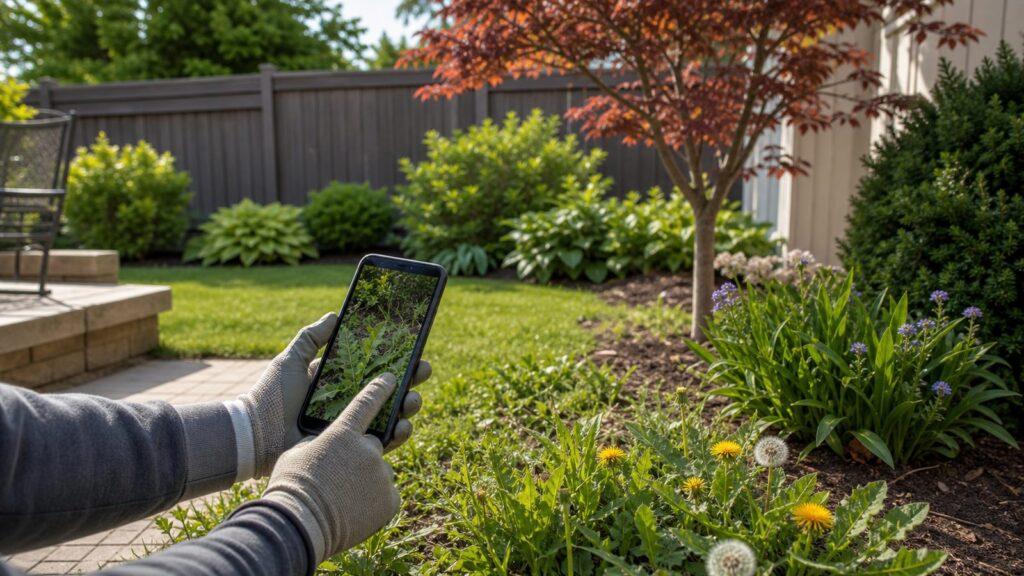
Fix the driver behind crashes, sound loss and screen glitchesFind Drivers →Repair Windows errors before they cause bigger problemsFix Now →A good plant identifier app can save a homeowner time, money, and a few bad landscaping decisions. The right app helps you put a likely name to a weed in the lawn, a vine climbing a fence, a volunteer tree near the foundation, or a houseplant that came without a tag. The best plant identifier apps in 2026 include PictureThis, PlantNet, iNaturalist, Seek by iNaturalist, PlantSnap, LeafSnap, Blossom, Flora Incognita, Gardenia, Google Lens, Apple Visual Look Up, Agrio, and Planta.
Our practical recommendation is simple: use plant ID apps as a first-pass screen, not as the final authority for poisonous plants, edible plants, pesticide use, tree hazards, or major landscape changes. On our job sites, plant identification is most useful before clearing, grading, fencing, patio work, drainage repairs, retaining walls, irrigation changes, and foundation-adjacent landscaping. Knowing what is growing there can flag poison ivy, aggressive roots, invasive species, protected trees, and plants that are thriving because the site is wet, compacted, shaded, or poorly drained.



As an Amazon Associate I earn from qualifying purchases.
For most homeowners, start with a free app such as PlantNet, iNaturalist, Seek, Google Lens, Apple Visual Look Up, or Flora Incognita. If you also want watering reminders, houseplant care, disease screening, or a cleaner consumer interface, consider a paid app such as PictureThis, Blossom, Planta, Gardenia, or PlantSnap. Many paid plant apps fall roughly in the $3 to $10 per month range, or about $20 to $60 per year, with some lifetime offers advertised around $30 to $100 or more depending on promotions and features.
The Tool Desk
Outbyte Driver Updater FREEScan for outdated or missing drivers - takes under a minuteDriver Scan →Outbyte PC Repair FREERepair Windows errors before they cause bigger problemsFix Now →Quick Comparison: Best Plant Identifier Apps by Use Case
The best app is not always the one with the longest plant list. A gardener identifying native wildflowers has different needs than a homeowner trying to decide whether a vine should be removed before a fence replacement. Use the table below as a practical starting point.
#1 Best Overall
| App | Best For | Typical Cost in 2026 | Practical Notes for Homeowners |
|---|---|---|---|
| PictureThis | Overall homeowner plant ID and care prompts | Often subscription-based, commonly around $20-$60/year | Strong consumer interface; useful for ornamental plants, weeds, and quick care guidance. Verify high-risk results. |
| PlantNet | Best free app for plant ID and botanical learning | Free | Good for identifying plants from multiple images; useful when you can photograph leaves, flowers, fruit, and growth habit. |
| iNaturalist | Community validation and native/invasive context | Free | Best when you want a second look from a naturalist community. Helpful for regional confidence. |
| Seek by iNaturalist | Free, kid-friendly outdoor identification | Free | No account required for basic use; good for casual yard walks and quick IDs. |
| Google Lens | Fast free plant checks on Android or Google Photos | Free | Convenient, but results can be broad. Use it as one opinion, not a diagnosis. |
| Apple Visual Look Up | Fast free plant checks on iPhone | Free on supported Apple devices | Useful for quick IDs from photos already on your phone. Best with clear, well-lit images. |
| PlantSnap | Large image database and casual plant ID | Free and paid options vary | Good for common ornamentals and travel IDs; check subscription terms before committing. |
| LeafSnap | Leaf-focused tree and plant identification | Free and paid options vary | Helpful for trees and shrubs when leaves are clear, mature, and photographed flat. |
| Blossom | Houseplant care and reminders | Often subscription-based, commonly $3-$10/month | Useful for watering, fertilizing, and indoor plant care schedules. |
| Flora Incognita | Free wild plant identification | Free | Good for wildflowers and field identification. Regional performance varies. |
| Gardenia | Garden planning and care organization | Free and paid options vary | Good for tracking plant care tasks and garden records. |
| Agrio | Plant disease and pest screening | Free and paid options vary | Useful for suspected pest or disease issues, but treatment decisions still need label and local guidance. |
| Planta | Houseplant care, watering, and light guidance | Often subscription-based, commonly $20-$60/year | Strong for indoor plants and routine care reminders. |
How We Judge Plant Identifier Apps on Real Properties
On a construction or landscape-adjacent project, the plant name is only part of the answer. We care about what that plant means for the site. Is it a poisonous vine growing where a crew will be clearing brush? Is it an invasive shrub spreading into a drainage swale? Is it a water-loving plant hinting at a soggy corner? Is a tree close enough to threaten a roof, driveway, sewer lateral, retaining wall, or foundation as it matures?
A useful plant identifier app should help with four things. First, it should give a reasonable species or genus match from clear photos. Second, it should work well in your region, because a lookalike plant from another climate is not always the likely answer in your yard. Third, it should make it easy to compare multiple photos instead of relying on one blurry leaf. Fourth, it should avoid giving homeowners false confidence about herbicides, edible plants, poisonous plants, and structural tree risks.
For important decisions, we recommend using two independent apps. For example, run the same plant through PlantNet and PictureThis, or Google Lens and iNaturalist. If both point to the same plant and the photos are clear, you have a better starting point. If they disagree, slow down and verify through a university extension office, local nursery professional, state invasive plant council, USDA PLANTS database, or an ISA Certified Arborist for tree concerns.
What’s actually slowing this PC down?
Pick the symptom - the matching free tool is one click away.
1. PictureThis: Best Overall Paid App for Homeowners
PictureThis is one of the strongest all-around choices for homeowners who want fast plant identification with a polished interface. It is especially useful for common garden plants, weeds, ornamentals, shrubs, trees, and houseplants. Many homeowners like it because it does more than name the plant; it also offers care notes, health clues, and maintenance prompts.
Expect paid features to land in the common consumer app range of roughly $20 to $60 per year, though pricing, free trials, and promotions change. The value is best when you use it often: identifying weeds in spring, checking shrubs before pruning, organizing houseplants, and screening unknown plants before outdoor projects.
Use PictureThis for quick homeowner decisions, but do not treat its diagnosis as permission to spray, remove a tree, eat a plant, or ignore a poisonous lookalike. If an app suggests a disease or pest, confirm the plant species first, inspect the whole site, and read any pesticide label before applying a product.
2. PlantNet: Best Free Plant Identifier for Serious Gardeners
PlantNet is one of the best free plant identifier apps because it is built around plant observation and image comparison rather than only consumer plant care. It works well when you provide multiple photos: the whole plant, leaves, flowers, fruit, bark, stems, and the plant base. That makes it useful for gardeners who want a more careful ID before deciding what to keep, move, prune, or remove.
PlantNet is a strong first stop for native plants, wild plants, ornamental volunteers, and weeds. It is also useful when planning a bed renovation because you can document what is already thriving. A plant growing well in a dry, hot strip along a driveway tells you something about that microclimate. A moisture-loving weed in a low corner may point to a drainage issue worth fixing before adding new plants or hardscape.
Cost is a major advantage: PlantNet is generally free. The tradeoff is that it may not feel as hand-holding as paid care apps. For gardeners who prefer accuracy and learning over reminders and lifestyle features, that is a good trade.
3. iNaturalist: Best for Community Confirmation
iNaturalist is free and especially useful when you want a plant ID checked by people, not just software. It is a strong option for native plants, invasive species questions, regional wildflowers, and plants found along property edges, wooded lots, drainage corridors, and undeveloped areas.
The community layer matters because plant identification is often regional. A plant that looks like one species in a national image search may be less likely in your county, climate, or habitat. Community input can help narrow that down. For homeowners, iNaturalist is particularly useful when you are deciding whether a plant might be native, invasive, unusual, or worth preserving during landscape work.
Rank #2

- Pocket Guide to Trees and Shrubs of North America
- Pocket Guide to Trees and Shrubs of North America
- National Geographic Maps
The downside is speed. Community confirmation can take longer than a simple app result. If you are making a same-day decision about clearing brush or applying herbicide, do not rush based on a partial ID. Mark the plant location, take better photos, and verify through local extension or state invasive plant resources when the result has consequences.
4. Seek by iNaturalist: Best Free App for Casual Yard Walks
Seek by iNaturalist is a free, approachable app for identifying plants and other organisms around the yard. It is a good choice for families, casual gardeners, and homeowners who want a quick read without building a detailed observation record.
Seek is useful for everyday curiosity: What is that flowering weed by the mailbox? What tree is dropping seed pods near the patio? What vine is growing along the back fence? It can encourage better observation, which is half the battle in yard care.
For construction planning, Seek is best as an early warning tool. If it points toward poison ivy, poison oak, poison sumac, an invasive vine, or a large tree species with major mature size, treat that as a prompt to investigate further. The CDC/NIOSH warns that poison ivy, poison oak, and poison sumac can cause allergic skin reactions, so unknown vegetation should be handled with gloves, long sleeves, eye protection, and washable clothing until identified.
5. Google Lens: Best Free Built-In Option for Fast Checks
Google Lens is free, convenient, and already available to many homeowners through Android devices, Google Photos, or the Google app. It is excellent for quick comparisons when you already have a photo on your phone.
The main strength is speed. If you are walking the property with a contractor, landscaper, or family member, Google Lens can give a fast starting point. The main weakness is that it can return visually similar plants without enough botanical discipline. That is fine for a casual houseplant or common flower. It is not enough for poison plants, edible plants, mushrooms, pesticide decisions, or tree safety.
Use Google Lens as one vote. If it identifies a weed that you plan to spray, pull, compost, or bag, confirm with a second app and a local source. Before applying herbicide, the EPA’s guidance is clear: the product label controls how the pesticide can be used. The label tells you the approved sites, target pests, rate, protective gear, disposal requirements, and restrictions.
6. Apple Visual Look Up: Best Free iPhone Option
Apple Visual Look Up is useful for iPhone users because it can identify plants from photos without installing a separate plant app, as long as the device and operating system support the feature. It is convenient for homeowners who take yard photos and want a quick possible ID afterward.
Recommended Free Tools
Like Google Lens, Apple Visual Look Up is best for low-risk identification. It can help you sort common flowers, shrubs, houseplants, and weeds, but it should not be the final word on treatment or removal. For high-risk cases, the workflow is the same: take better photos, run a second app, and verify locally.
One practical use is documentation. Before a patio build, fence replacement, or drainage project, photograph existing plants around the work area. Even if the app ID is imperfect, the photo record helps you remember what was growing where, how dense it was, and whether plants were concentrated near water, shade, utilities, or structures.
7. PlantSnap: Best for Broad Casual Identification
PlantSnap is a popular plant ID app with free and paid options that vary by platform and promotion. It is a good fit for homeowners who want broad identification of flowers, shrubs, trees, succulents, and common landscape plants.
Rank #3

- EDIBLE WILD PLANTS: EAST & CEN
It is most helpful when you are building a general plant list for your property. Walk the yard, identify what you can, and create a simple map: front bed, side yard, fence line, drainage swale, patio edge, foundation planting, tree canopy, and utility corridor. That list becomes useful before pruning, mulching, irrigation changes, or landscape redesign.
Free tools Windows power users keep installed
One-click scans. No signup required.
Check the subscription terms before signing up. Many plant apps use free trials, monthly plans, annual plans, or occasional lifetime offers. A reasonable paid range for many consumer plant apps is about $3 to $10 per month or $20 to $60 per year, but the details matter.
8. LeafSnap: Best for Leaf-Focused Tree and Shrub ID
LeafSnap is useful when leaves are the clearest feature available. That makes it helpful for identifying many trees and shrubs, especially during the growing season when leaves are mature and intact.
For best results, photograph leaves in natural light, include both the top and underside if possible, and take a second photo showing how leaves attach to the stem. Leaf arrangement matters. Opposite, alternate, compound, simple, lobed, serrated, and smooth leaf edges can all change the answer.
For trees near a house, driveway, retaining wall, utility line, roof, or sewer route, a leaf ID is only the beginning. Apps cannot assess trunk decay, root plate movement, included bark, storm damage, soil heaving, or structural risk. For those concerns, hire an ISA Certified Arborist. A plant app can help name the tree; it cannot clear it as safe.
Outdated Drivers Are Slowing You Down
One free scan finds every outdated or missing driver and matches the right update for your exact hardware.Free scan · exact hardware matchWindows Errors? Fix Them Before They Spread
Repair common Windows errors and clear accumulated junk for a smoother, more stable PC - no reinstall needed.Free scan · no reinstall9. Blossom: Best for Houseplants and Care Reminders
Blossom is a good paid choice for homeowners who care more about plant maintenance than outdoor ecology. It is especially useful for houseplants, watering schedules, fertilizing reminders, light preferences, and basic care guidance.
For indoor plants, that structure can matter. Many houseplant failures come from inconsistent watering, poor drainage, low light, wrong pot size, or seasonal changes in heating and cooling. A reminder app can help, especially if you have 10, 20, or 50 plants spread through a home.
Do not confuse care reminders with diagnosis. Yellow leaves might mean overwatering, underwatering, root rot, nitrogen deficiency, low light, cold drafts, compacted soil, or normal leaf aging. If a valuable plant is declining, inspect the pot, drainage holes, root ball, soil moisture, and light exposure before acting on a single app suggestion.
10. Flora Incognita: Best Free Wild Plant App
Flora Incognita is generally free and useful for identifying wild plants, especially when you can provide multiple clear photos. It is a good option for homeowners with meadow areas, wooded edges, naturalized beds, rural lots, or unmanaged corners where ornamental plant apps may be less helpful.
Do these 3 things before closing this tab:
1Repair Windows errors before they cause bigger problems2Scan for outdated or missing drivers - takes under a minute3Clear out junk files and repair common Windows errorsFor property planning, wild plant identification can reveal site conditions. Rushes, sedges, and certain moisture-loving plants may indicate wet soil. Drought-tolerant volunteers may point to a hot, dry exposure. Dense invasive growth may show where maintenance has lagged or where seed sources are nearby.
If an app flags a possible invasive plant, verify with your state or county resources. USDA and state extension sources are better authorities than generic app results because noxious weed lists vary by state and county. Some plants are regulated in one state but simply considered aggressive in another.
Rank #4
11. Planta, Gardenia, and Agrio: Best Specialty Picks
Planta is a strong houseplant care app, especially for watering, light, and maintenance schedules. Gardenia is useful for garden organization and plant care tracking. Agrio is worth considering when the main concern is disease or pest screening rather than simple plant naming.
These specialty apps make sense when your use case is specific. If you have a large indoor plant collection, Planta may be more useful than a general identifier. If you want to track garden beds, Gardenia may fit better. If you are trying to understand leaf spots, pest damage, or crop symptoms, Agrio may offer a more relevant workflow.
For any disease or pest result, remember the difference between identification and diagnosis. A correct species name does not prove the cause of decline. Lawn weeds, shrub dieback, tree stress, and vegetable disease can come from irrigation problems, soil compaction, nutrient imbalance, herbicide drift, insects, fungus, heat, freeze damage, root injury, or poor planting depth.
How to Take Better Photos for Accurate Plant Identification
Most bad app results start with bad photos. A single blurry closeup of one leaf is rarely enough. For best accuracy, take 5 to 8 photos per plant. Start with the whole plant from 3 to 10 feet away, depending on size. Then photograph leaves, leaf arrangement, stems, bark, flowers, fruit, seed heads, and the base of the plant where it meets the soil.
Use natural light. Avoid harsh shadows, motion blur, and extreme zoom. Put your hand, a tape measure, or a common object near the plant for scale when useful. For trees, photograph the full canopy, trunk, bark, leaves, any fruit or seed pods, and the ground around the root flare. For vines, show how the vine attaches: tendrils, aerial roots, twining stems, or sprawling growth.
Also photograph the site. Is the plant in full sun, shade, wet soil, a slope, a compacted path, a foundation bed, a fence line, or a drainage swale? On outdoor improvement projects, location can matter as much as the plant name. A plant growing right over a sewer line, under a deck, against siding, or within 5 feet of a foundation may require a different decision than the same plant in an open back corner.
Costs: Free Apps, Paid Apps, and the Price of Getting It Wrong
Plant ID apps are inexpensive compared with most yard mistakes. Free options include Google Lens, Apple Visual Look Up, iNaturalist, Seek, PlantNet, and Flora Incognita. Paid homeowner choices often include PictureThis, Blossom, Planta, PlantSnap, and Gardenia. Many paid apps advertise monthly pricing around $3 to $10 per month or annual pricing around $20 to $60 per year. Lifetime plans, when offered, commonly appear around $30 to $100 or more.
The hidden cost is misidentification. Pulling the wrong plant may remove a desirable native. Leaving the wrong plant may allow an invasive to spread. Spraying the wrong herbicide wastes money and can damage turf, ornamentals, trees, pets’ areas, or nearby water. Planting an attractive shrub without checking mature size can create future conflicts with sidewalks, fences, patios, siding, windows, irrigation, sewer lines, or foundations.
Professional verification has its place. Extension office plant or lawn diagnosis may be free or low-cost, depending on your location and whether lab testing is needed. Private arborist, landscape, or lawn-care consultations vary widely by market, travel distance, scope, and testing. That extra cost is reasonable when the decision involves a mature tree, a large planting plan, retaining wall work, drainage repair, pesticide use, or possible poisonous vegetation.
When to DIY vs. When to Hire a Pro
Good DIY Uses for Plant Identifier Apps
DIY identification is reasonable for common garden flowers, houseplants, basic lawn weeds, volunteer seedlings, plant shopping, garden journaling, and early landscape planning. If the decision is low risk and reversible, an app result plus a second check is usually enough to move forward.
What’s actually slowing this PC down?
Pick the symptom - the matching free tool is one click away.
For example, a homeowner can use PlantNet and Google Lens to identify a common weed in a mulched bed, then hand-pull it with gloves. A houseplant owner can use Blossom or Planta to build a watering schedule. A gardener can use iNaturalist to learn whether a wildflower at the back of the lot is likely native.
Best Value
Call a Professional or Local Expert When Risk Increases
Bring in help when the plant may be poisonous, edible, medicinal, invasive, protected, diseased, structurally hazardous, or close to construction work. Do not rely on an app before removing a mature tree, applying herbicide, clearing heavy brush, grading near roots, trenching for utilities, or changing drainage around established plants.
For trees near homes, driveways, roofs, utility lines, retaining walls, or public sidewalks, use an ISA Certified Arborist. For pesticide questions, read the EPA-approved label and check state or local restrictions. For digging, trenching, fencing, irrigation, or landscape lighting, contact 811 before excavation so underground utilities can be marked. For invasive species, use USDA, state extension, or state invasive plant council resources.
Safety, Pesticide, and Permit Notes for Homeowners
Unknown plants should be treated with caution. Wear gloves, long sleeves, eye protection, and washable work clothes when inspecting brush, thorny shrubs, vines, or diseased vegetation. Do not burn unknown plants. Burning poison ivy, poison oak, or poison sumac can create exposure risks through smoke, and skin contact can trigger allergic reactions in sensitive people.
Do these 3 things before closing this tab:
1Fix the driver behind crashes, sound loss and screen glitches2Repair Windows errors before they cause bigger problems3Scan for outdated or missing drivers - takes under a minuteBefore applying herbicide, fungicide, or insecticide, identify the plant or pest, choose a product labeled for that site, and follow the label exactly. The label covers application rate, personal protective equipment, reentry intervals, disposal, target plants or pests, and where the product can legally be used. An app’s treatment suggestion does not override the label.
Before removing trees or large shrubs, check city tree ordinances, HOA rules, easements, utility conflicts, and nesting-season limits. Before digging more than a few inches for posts, edging, drainage pipe, irrigation, or lighting, call 811. Plant apps can help you understand what is growing, but they do not replace site due diligence.
Our Practical Recommendation
If you want one paid app, start with PictureThis for broad homeowner use. If you want one free app, start with PlantNet. If you want community confirmation, use iNaturalist. If you want a quick built-in tool, use Google Lens or Apple Visual Look Up. If your focus is houseplants, use Blossom or Planta. If you are screening possible disease or pest issues, consider Agrio but verify before treatment.
The best workflow is not complicated. Take clear photos, use two apps, compare the results, and verify high-risk decisions locally. Pair the plant name with site facts: sun, shade, soil moisture, drainage, slope, hardiness zone, irrigation, mature size, root spread, and proximity to structures. That is how a simple phone app becomes useful for real lawn, garden, and landscape decisions.
Recommended Free Tools
Frequently Asked Questions
What is the best plant identifier app in 2026?
For most homeowners, PictureThis is the best paid all-around option, while PlantNet is one of the best free choices. iNaturalist is best when you want community confirmation, and Google Lens or Apple Visual Look Up are convenient for quick checks.
Which plant identifier app is best and free?
PlantNet, iNaturalist, Seek by iNaturalist, Google Lens, Apple Visual Look Up, and Flora Incognita are strong free options. PlantNet is a good first choice for careful plant ID, while iNaturalist is better when regional community validation matters.
Are plant identifier apps accurate?
They can be useful, but accuracy varies by photo quality, plant maturity, region, visible flowers or fruit, and whether the plant is diseased or a lookalike. Use two apps for important IDs and verify poisonous plants, edible plants, invasive species, pesticide decisions, and tree hazards with a local expert.
Can I use Google Lens to identify plants?
Yes. Google Lens is useful for fast, free plant checks, especially for common plants and photos already on your phone. Treat it as a starting point, not a final diagnosis for herbicide use, poisonous plants, edible plants, or tree safety.
What is the best app for identifying weeds in my lawn?
PictureThis, PlantNet, Google Lens, and iNaturalist can all help identify lawn weeds. Before applying herbicide, confirm the weed, read the product label, make sure it is approved for your lawn type and site, and follow all label directions.
What photos should I take for the most accurate plant identification?
Take 5 to 8 clear photos: the whole plant, leaves, leaf arrangement, stems, bark if present, flowers, fruit or seed heads, and the plant base. Also photograph the surrounding site so you can consider sun, shade, moisture, slope, drainage, and nearby structures.
Quick Recap
Product prices and availability are accurate as of the date/time indicated and are subject to change. Any price and availability information displayed on Amazon at the time of purchase will apply.

