Recommended Free Tools
The best door jamb switch depends on what you need it to do. For a commercial door monitored by an access-control panel, choose a magnetic door-position switch matched to the door and frame. For phone alerts or smart-home routines, choose a consumer door/window contact sensor and confirm its hub or network requirements. These devices report whether a door is open or closed; detection can support a security system, but does not itself prevent entry.
What does “door jamb switch” mean?
The term can describe two different products. A commercial door-position switch is typically installed in or on a frame and wired to a control panel. A consumer contact sensor has separate sensor and magnet pieces mounted on the door and frame, then communicates with a compatible smart-home or alarm system.
Schlage describes its door-position switches (DPS) as magnetic sensors that detect a door’s open or closed status relative to its frame and relay that status to a control panel. Consumer products such as SwitchBot, Aqara and Philips Hue call their products door/window contact sensors. Choose between these categories before comparing models: they serve different systems and installation contexts.
Which type should you choose?
| Need | Better fit | What to verify |
|---|---|---|
| Report the state of a commercial door to an access-control panel | Commercial magnetic door-position switch, such as a Schlage DPS configuration | Door and frame material, mounting style, and compatibility with the control panel. Schlage lists options for wood, hollow-metal and aluminum doors. Schlage door-position switches |
| Receive phone alerts or trigger home automations | Wireless consumer contact sensor, such as SwitchBot, Aqara P2, or Philips Hue Secure | Required hub, bridge, or Thread border router; supported platform; sensor-to-magnet fit. SwitchBot Contact Sensor Aqara Door and Window Sensor P2 Philips Hue Secure contact sensor |
| Use a sensor as part of a professionally installed ADT alarm setup | ADT Premium Door/Window Sensor | ADT describes professional installation as required for this product; check its current system and service compatibility. ADT Premium Door/Window Sensor |
Commercial door-position switches: choose the mounting configuration
Schlage lists its 674, 679, 7764 and 7766 door-position switches in six configurations intended for different installation needs. The available styles include concealed, concealed flush-mount, surface-mount, and overhead or floor-mount options. The correct choice depends on the door assembly and how the switch can be installed—not on a universal ranking of one model as best.
#1 Best Overall
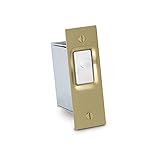
- Use to control lighting with the opening and closing of a door
- TOGGLE POSITION: Normally-ON / Momentary-OFF, (SPST) circuitry turns lights on when the door opens
- CSA listed
- ½ HP or 10 Amp s at 125/277 Volt AC
- Install in a doorjamb with a 1¼ inch wide x 2¾ inch. high x 2 inch deep mounting hole
- Concealed or concealed flush-mount: Consider these where a less visible installation is needed and the door and frame can accommodate the specified hardware.
- Surface-mount: Consider this when the installation calls for mounting on the surface rather than concealing the switch.
- Overhead or floor-mount: Check the exact product configuration and installation guidance for the opening; these are distinct options in the Schlage series.
Before specifying a switch, confirm the door material, frame construction, geometry, and control-panel connection with the manufacturer’s installation documentation or a qualified access-control installer. The product information identifies applications for wood, hollow-metal and aluminum doors, but does not establish that every configuration fits every door in those materials. Schlage configuration and application details
Consumer sensors: alignment and connectivity are part of the fit
SwitchBot Contact Sensor
SwitchBot describes open/closed detection, phone notifications, voice alarms, and automation. Its installation guidance says to align the magnet with the bottom of the sensor body and keep the pieces less than 1.2 inches (30 mm) apart. That spacing is specific to this product; follow the instructions for whichever sensor you select. SwitchBot says a hub is needed for some remote notifications and integrations, so check which functions work without one before buying. SwitchBot Contact Sensor details
Rank #2

- SW DOOR JAM SW 3A125V
- Metal Push-button
- Metal Jamb Box
- Only doorjamb switch that meets UL requirements
- Operating temperature: -40 C to 120 C
Aqara Door and Window Sensor P2
Aqara says the P2 supports Matter and can connect with Apple Home, Google Home, Amazon Alexa, Samsung SmartThings, and Aqara Home through a Matter-compatible Thread border router. It uses adhesive mounting and includes a thin magnet plate. Aqara also describes tamper alerts. The border router and the chosen platform determine whether the integration is available in a particular setup. Aqara P2 compatibility and installation
Philips Hue Secure contact sensor
Philips Hue describes its wireless contact sensor for doors, windows, cabinets, and safes, with notifications or lighting control when opened. Its US product page says a Hue Bridge is required. This is a sensible candidate when the intended outcome is a Hue-connected alert or light routine, but it is not a direct substitute for a wired commercial control-panel switch. Philips Hue Secure contact sensor
Quick wins for a faster PC:
Repair Windows errors before they cause bigger problemsFix Now →Scan for outdated or missing drivers - takes under a minuteDriver Scan →Clear out junk files and repair common Windows errorsFree Scan →Rank #3
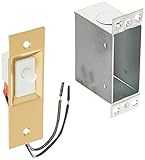
- Make your closet light turn on or off when you open or close the door
- Save money by reducing your electric bill and lengthening bulb life
- Works with sliding or hinged doors
- 600-Watt, spring-loaded
- Mounting hardware included
Legacy Aqara Door and Window Sensor
Aqara’s legacy product page describes magnet-distance status detection, alarm-mode alerts through its hub, and door-opening automation. It claims battery life can exceed two years under normal usage; that is a manufacturer usage-dependent claim, not an independently tested result. Check that the legacy sensor, hub, and app remain suitable for the system you plan to use. Aqara Door and Window Sensor
Alarm-system-specific option: ADT
ADT’s Premium Door/Window Sensor is designed for an ADT alarm-system context rather than as a universal standalone jamb switch. ADT lists opening alerts, smart-home integrations, shock sensing, tamper notifications, and one-touch bypass, and says professional installation is required for this product. Confirm eligibility and compatibility with the specific ADT system before treating those features as available in your home. ADT product details
Rank #4

- Use to control lighting with the opening and closing of a door
- TOGGLE POSITION: Normally-ON / Momentary-OFF, (SPST) circuitry turns lights on when the door opens
- 6 or 10 Amp sat 125/250 Volt AC
- Install in a doorjamb with a 1¼ inch wide x 2¾ inch. high x 2 inch deep mounting hole
- Color: White Plate and White Switch Button
Installation and selection checklist
- Identify the system: Decide whether the switch must report to a commercial control panel, an alarm system, or a smart-home app.
- Match the mounting to the opening: For commercial switches, check concealed, flush, surface, overhead, or floor configurations against the door and frame. For adhesive consumer sensors, ensure both pieces can sit securely and align when the door closes.
- Check fit instructions: Use the selected product’s specified alignment and separation limits; do not assume one model’s spacing applies to another.
- Confirm connectivity before purchase: Check whether the desired alerts and automations require a hub, bridge, Thread border router, or a particular alarm service.
- Test the intended response: After installation, open and close the door and confirm the panel, app, notification, or automation reports the expected state. Check the manufacturer’s instructions for any setup or test procedure.
What a door sensor can—and cannot—do for security
A contact sensor can report an opening, send an alert, or trigger a connected alarm or automation. Some products also describe tamper alerts or shock sensing. Those capabilities are useful components of a layered security setup, but the cited product information does not show that a sensor alone prevents intrusion or establish comparative security performance among these models. Treat detection and notification as functions to integrate with an appropriate alarm, access-control, or response plan—not as a guarantee of protection.
How to make the final choice
- Choose Schlage DPS when the requirement is a magnetic door-position switch reporting to a commercial control panel; select the configuration for the opening and installation method.
- Choose a consumer contact sensor when the goal is app notification or smart-home automation, then match the model to the hub, bridge, or Thread network already available.
- Choose ADT’s sensor only when it fits the ADT system and its professional-installation requirement is acceptable.
Manufacturer pages describe different use cases and features, but do not establish a universal best model or a head-to-head reliability ranking. Selection should follow the door, installation, and connected system requirements.
PC Slower Than It Used to Be?
A free scan shows the junk files, broken settings and background clutter dragging Windows down - then fixes them in one click.Free scan · Windows 10 & 11Crashes, No Sound, or Screen Glitches?
Random freezes, missing sound and display glitches usually trace back to one bad driver. Find and replace yours safely.Free scan · under a minuteQuick Recap
Best Value

- Professional, premium aftermarket replacement
- Provides the performance and dependability you expect from ACDelco
- Manufactured to meet expectations for fit, form, and function
Product prices and availability are accurate as of the date/time indicated and are subject to change. Any price and availability information displayed on Amazon at the time of purchase will apply.




